ECO mode LINCOLN MKT 2019 Owner's Guide
[x] Cancel search | Manufacturer: LINCOLN, Model Year: 2019, Model line: MKT, Model: LINCOLN MKT 2019Pages: 575, PDF Size: 4.66 MB
Page 156 of 575
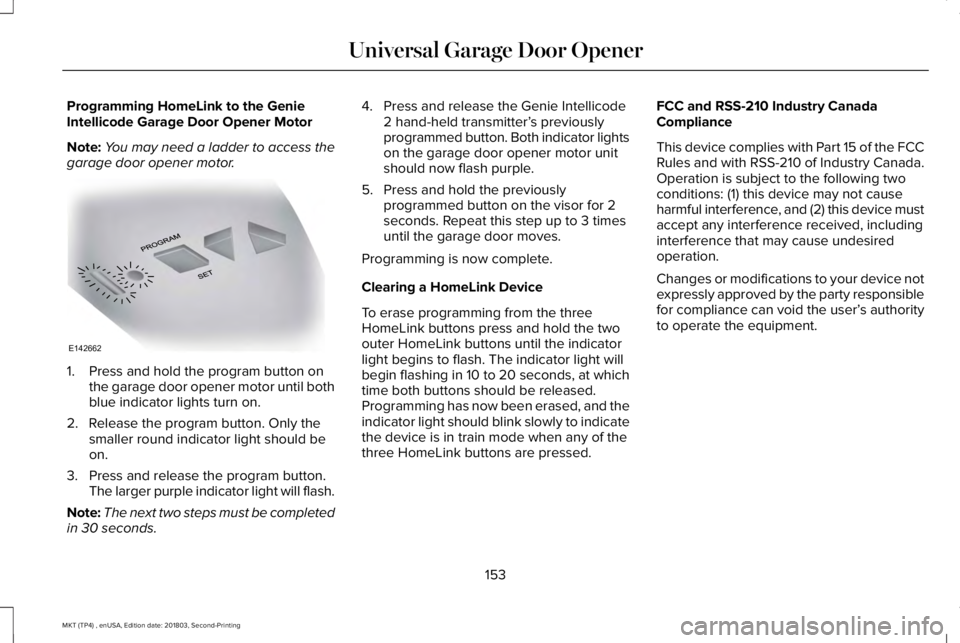
Programming HomeLink to the GenieIntellicode Garage Door Opener Motor
Note:You may need a ladder to access thegarage door opener motor.
1. Press and hold the program button onthe garage door opener motor until bothblue indicator lights turn on.
2. Release the program button. Only thesmaller round indicator light should beon.
3. Press and release the program button.The larger purple indicator light will flash.
Note:The next two steps must be completedin 30 seconds.
4. Press and release the Genie Intellicode2 hand-held transmitter’s previouslyprogrammed button. Both indicator lightson the garage door opener motor unitshould now flash purple.
5. Press and hold the previouslyprogrammed button on the visor for 2seconds. Repeat this step up to 3 timesuntil the garage door moves.
Programming is now complete.
Clearing a HomeLink Device
To erase programming from the threeHomeLink buttons press and hold the twoouter HomeLink buttons until the indicatorlight begins to flash. The indicator light willbegin flashing in 10 to 20 seconds, at whichtime both buttons should be released.Programming has now been erased, and theindicator light should blink slowly to indicatethe device is in train mode when any of thethree HomeLink buttons are pressed.
FCC and RSS-210 Industry CanadaCompliance
This device complies with Part 15 of the FCCRules and with RSS-210 of Industry Canada.Operation is subject to the following twoconditions: (1) this device may not causeharmful interference, and (2) this device mustaccept any interference received, includinginterference that may cause undesiredoperation.
Changes or modifications to your device notexpressly approved by the party responsiblefor compliance can void the user’s authorityto operate the equipment.
153
MKT (TP4) , enUSA, Edition date: 201803, Second-Printing
Universal Garage Door OpenerE142662
Page 158 of 575
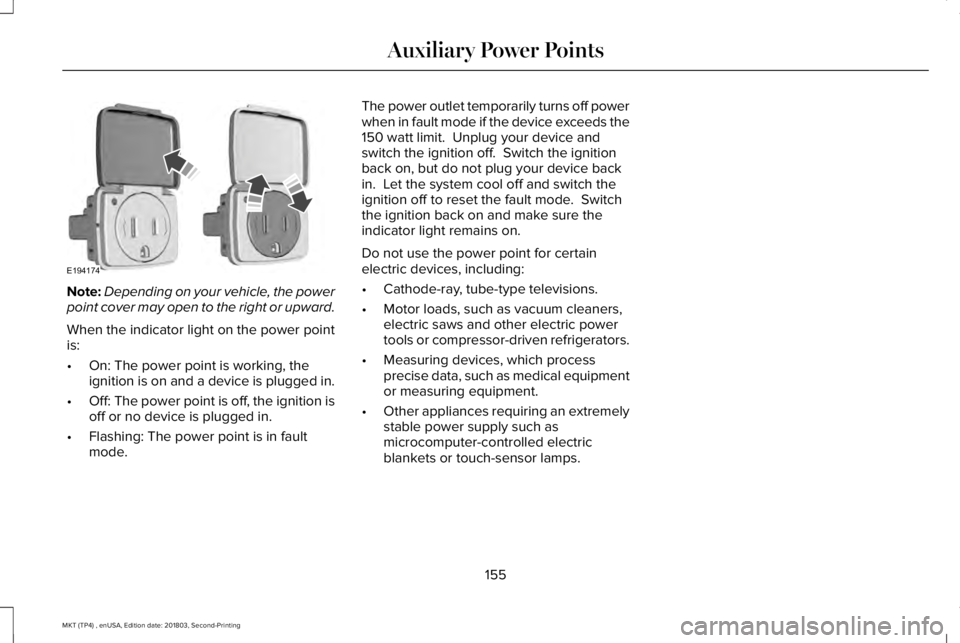
Note:Depending on your vehicle, the powerpoint cover may open to the right or upward.
When the indicator light on the power pointis:
•On: The power point is working, theignition is on and a device is plugged in.
•Off: The power point is off, the ignition isoff or no device is plugged in.
•Flashing: The power point is in faultmode.
The power outlet temporarily turns off powerwhen in fault mode if the device exceeds the150 watt limit. Unplug your device andswitch the ignition off. Switch the ignitionback on, but do not plug your device backin. Let the system cool off and switch theignition off to reset the fault mode. Switchthe ignition back on and make sure theindicator light remains on.
Do not use the power point for certainelectric devices, including:
•Cathode-ray, tube-type televisions.
•Motor loads, such as vacuum cleaners,electric saws and other electric powertools or compressor-driven refrigerators.
•Measuring devices, which processprecise data, such as medical equipmentor measuring equipment.
•Other appliances requiring an extremelystable power supply such asmicrocomputer-controlled electricblankets or touch-sensor lamps.
155
MKT (TP4) , enUSA, Edition date: 201803, Second-Printing
Auxiliary Power PointsE194174
Page 159 of 575
CENTER CONSOLE
Stow items in the cup holder carefully asitems may become loose during hardbraking, acceleration or crashes, includinghot drinks which may spill.
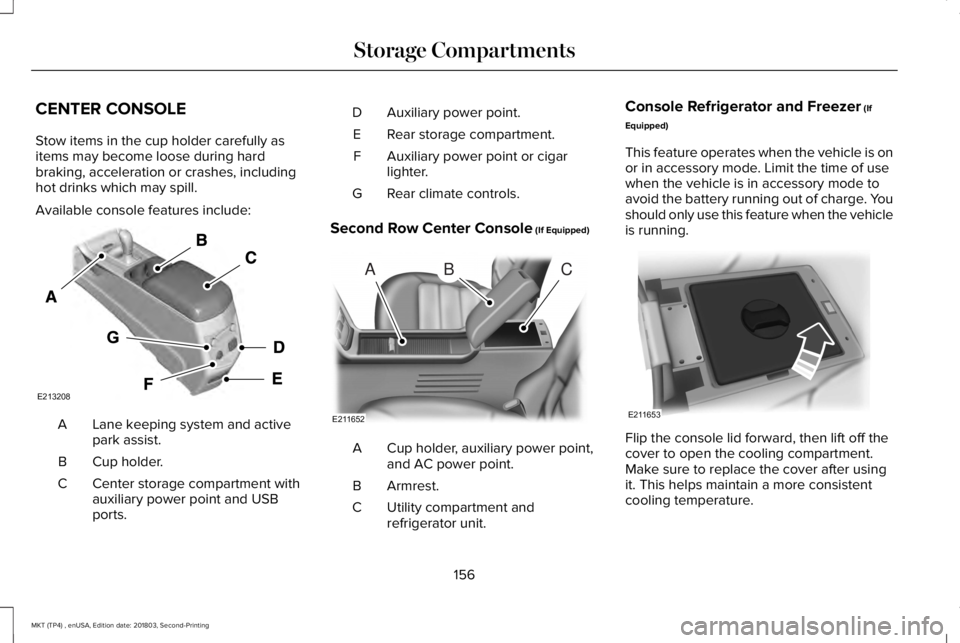
Available console features include:
Lane keeping system and activepark assist.A
Cup holder.B
Center storage compartment withauxiliary power point and USBports.
C
Auxiliary power point.D
Rear storage compartment.E
Auxiliary power point or cigarlighter.F
Rear climate controls.G
Second Row Center Console (If Equipped)
Cup holder, auxiliary power point,and AC power point.A
Armrest.B
Utility compartment andrefrigerator unit.C
Console Refrigerator and Freezer (If
Equipped)
This feature operates when the vehicle is onor in accessory mode. Limit the time of usewhen the vehicle is in accessory mode toavoid the battery running out of charge. Youshould only use this feature when the vehicleis running.
Flip the console lid forward, then lift off thecover to open the cooling compartment.Make sure to replace the cover after usingit. This helps maintain a more consistentcooling temperature.
156
MKT (TP4) , enUSA, Edition date: 201803, Second-Printing
Storage CompartmentsE213208 ABC
E211652 E211653
Page 160 of 575
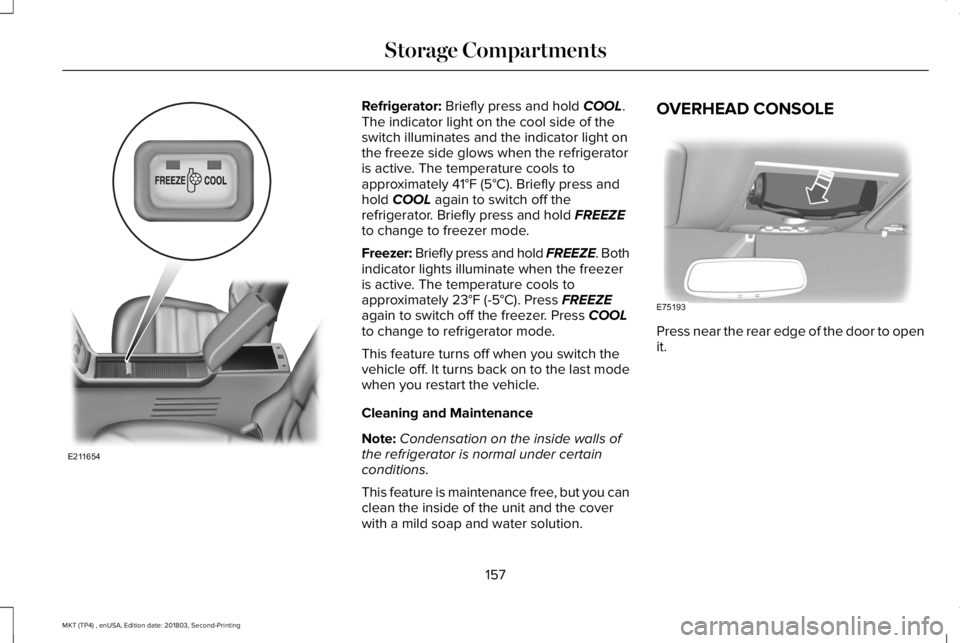
Refrigerator: Briefly press and hold COOL.The indicator light on the cool side of theswitch illuminates and the indicator light onthe freeze side glows when the refrigeratoris active. The temperature cools toapproximately 41°F (5°C). Briefly press andhold COOL again to switch off therefrigerator. Briefly press and hold FREEZEto change to freezer mode.
Freezer: Briefly press and hold FREEZE. Bothindicator lights illuminate when the freezeris active. The temperature cools toapproximately 23°F (-5°C). Press FREEZEagain to switch off the freezer. Press COOLto change to refrigerator mode.
This feature turns off when you switch thevehicle off. It turns back on to the last modewhen you restart the vehicle.
Cleaning and Maintenance
Note:Condensation on the inside walls ofthe refrigerator is normal under certainconditions.
This feature is maintenance free, but you canclean the inside of the unit and the coverwith a mild soap and water solution.
OVERHEAD CONSOLE
Press near the rear edge of the door to openit.
157
MKT (TP4) , enUSA, Edition date: 201803, Second-Printing
Storage CompartmentsE211654 E75193
Page 161 of 575
GENERAL INFORMATION
WARNING: Extended idling at highengine speeds can produce very hightemperatures in the engine and exhaustsystem, creating the risk of fire or otherdamage.
WARNING: Do not park, idle or driveyour vehicle on dry grass or other dryground cover. The emission system heatsup the engine compartment and exhaustsystem, creating the risk of fire.
WARNING: Do not start the enginein a closed garage or in other enclosedareas. Exhaust fumes can be toxic. Alwaysopen the garage door before you start theengine.
WARNING: Exhaust leaks may resultin entry of harmful and potentially lethalfumes into the passenger compartment. Ifyou smell exhaust fumes inside yourvehicle, have your vehicle inspectedimmediately. Do not drive if you smellexhaust fumes.
If you disconnect the battery, your vehiclemay exhibit some unusual drivingcharacteristics for approximately 5 mi (8 km)after you reconnect it. This is because theengine management system must realignitself with the engine. You can disregard anyunusual driving characteristics during thisperiod.
The powertrain control system meets allCanadian interference-causing equipmentstandard requirements regulating theimpulse electrical field or radio noise.
When you start the engine, avoid pressingthe accelerator pedal before and duringoperation. Only use the accelerator pedalwhen you have difficulty starting the engine.
KEYLESS STARTING
Note:The keyless starting system may notfunction if the key is close to metal objectsor electronic devices such as cellularphones.
Note:A valid key must be located insideyour vehicle to switch the ignition on andstart the engine.
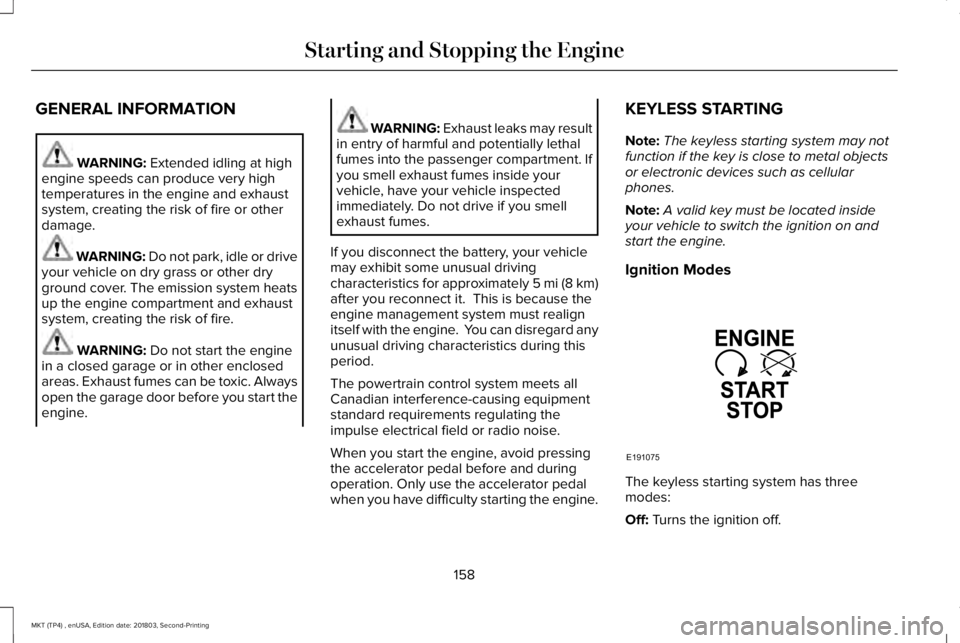
Ignition Modes
The keyless starting system has threemodes:
Off: Turns the ignition off.
158
MKT (TP4) , enUSA, Edition date: 201803, Second-Printing
Starting and Stopping the EngineE191075
Page 162 of 575
•Without applying the brake pedal, pressand release the button once when theignition is in the on mode, or when theengine is running but the vehicle is notmoving.
On: All electrical circuits are operational andthe warning lamps and indicators illuminate.
•Without applying the brake pedal, pressand release the button once.
Note:You may have to press the pushbutton ignition switch twice to switch theignition on.
Start: Starts the engine.
•Press the brake pedal, and then pressthe button for any length of time. Anindicator light on the button illuminateswhen then ignition is on and when theengine starts.
STARTING A GASOLINE ENGINE
When you start the engine, the idle speedincreases. This helps to warm up the engine.If the engine idle speed does not slow downautomatically, have your vehicle checked byan authorized dealer.
Note: You can crank the engine for a totalof 60 seconds without the engine startingbefore the starting system temporarilydisables. The 60 seconds does not have tobe all at once. For example, if you crank theengine three times for 20 seconds each time,without the engine starting, you reached the60-second time limit. A message appearsin the information display alerting you thatyou exceeded the cranking time. Youcannot attempt to start the engine for atleast 15 minutes. After 15 minutes, you arelimited to a 15-second engine cranking time. You need to wait 60 minutes before you cancrank the engine for 60 seconds again.
Before starting your vehicle, check thefollowing:
•Make sure all occupants have fastenedtheir safety belts.
•Make sure the headlamps and electricalaccessories are off.
•Make sure the parking brake is on.
•Make sure the transmission is in park (P).
Note:Do not touch the accelerator pedal.
Note:You must have your intelligent accesskey in your vehicle to shift the transmissionout of park (P).
1. Fully depress the brake pedal.
2. Press the push button ignition switch.
The system does not function if:
•The passive key frequencies are jammed.
•The key battery has no charge.
If you are unable to start your vehicle, do thefollowing:
159
MKT (TP4) , enUSA, Edition date: 201803, Second-Printing
Starting and Stopping the Engine
Page 179 of 575
SelectShift Automatic™ Transmission (If
Equipped)
Your vehicle is equipped with a SelectShiftAutomatic transmission. The SelectShiftAutomatic transmission gives you the abilityto change gears up or down (without aclutch) as desired.
In order to prevent the engine from runningat too low an RPM, which may cause it tostall, SelectShift still automatically makessome downshifts if it has determined thatyou have not downshifted in time. AlthoughSelectShift makes some downshifts for you,it still allows you to downshift at any time aslong as the SelectShift determines thatdamage will not be caused to the enginefrom over-revving.
Note:Engine damage may occur if youmaintain excessive engine revving withoutshifting.
SelectShift does not automatically upshift,even if the engine is approaching the RPMlimit. It must be shifted manually by pressingthe + button. Notice should be taken of theshift indicator lamp, which alerts you whento shift to make sure you achieve the highestlevel or efficiency and fuel economy.
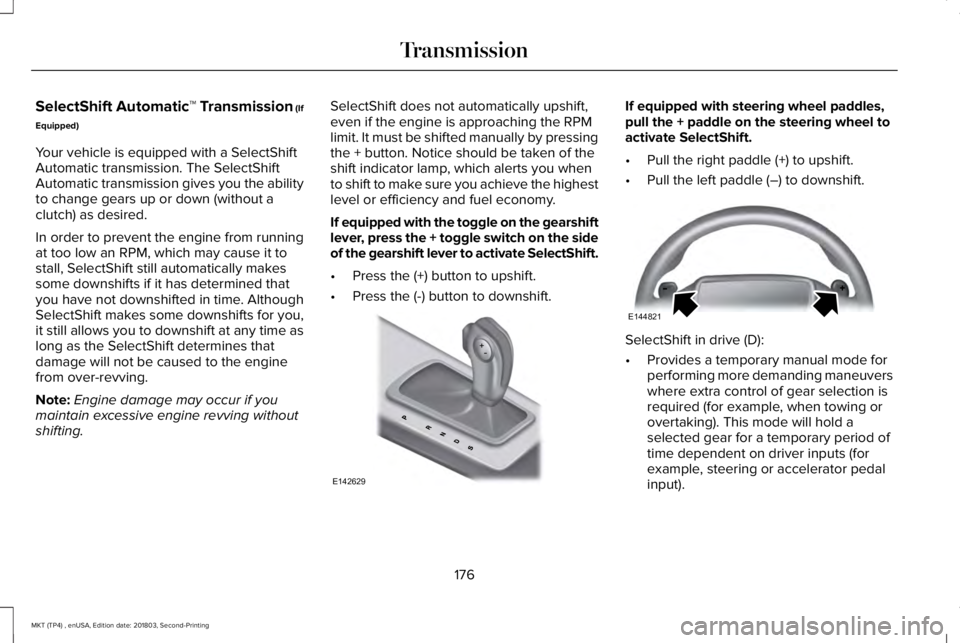
If equipped with the toggle on the gearshiftlever, press the + toggle switch on the sideof the gearshift lever to activate SelectShift.
•Press the (+) button to upshift.
•Press the (-) button to downshift.
If equipped with steering wheel paddles,pull the + paddle on the steering wheel toactivate SelectShift.
•Pull the right paddle (+) to upshift.
•Pull the left paddle (–) to downshift.
SelectShift in drive (D):
•Provides a temporary manual mode forperforming more demanding maneuverswhere extra control of gear selection isrequired (for example, when towing orovertaking). This mode will hold aselected gear for a temporary period oftime dependent on driver inputs (forexample, steering or accelerator pedalinput).
176
MKT (TP4) , enUSA, Edition date: 201803, Second-Printing
TransmissionE142629 E144821
Page 180 of 575
SelectShift in sport (S):
•Provides a permanent manual gearselection where full control of gearselection is required.
To exit SelectShift mode shift thetransmission into another gear (for example,drive [D]).
Upshift to the recommended shift speedsaccording to the following chart:
Upshifts when accelerating (recommended forbest fuel economy)
Shift from:
15 mph (24 km/h)1 - 2
25 mph (40 km/h)2 - 3
40 mph (64 km/h)3 - 4
45 mph (72 km/h)4 - 5
50 mph (80 km/h)5 - 6
The instrument cluster displays your currentlyselected gear. If a gear is requested but notavailable due to vehicle conditions (lowspeed, too high engine speed for requestedgear selection), the current gear will flashthree times.
Note:At full accelerator pedal travel, thetransmission automatically downshifts formaximum performance.
Note:In low traction conditions, you can pullaway in second gear using SelectShift. Toperform this operation, select drive (D) orsport (S) mode and press the + toggle (ifequipped) or pull the + paddle (if equipped)until 2 is displayed on the cluster. Yourvehicle is now ready to move in 2nd gear.
Brake-Shift Interlock
WARNING: Do not drive your vehicleuntil you verify that the brake lamps areworking.
WARNING: When doing thisprocedure, you need to take thetransmission out of park (P) which meansyour vehicle can roll freely. To avoidunwanted vehicle movement, always fullyapply the parking brake prior to doing thisprocedure. Use wheels chocks ifappropriate.
WARNING: If the parking brake isfully released, but the brake warning lampremains illuminated, the brakes may notbe working properly. Have your vehiclechecked as soon as possible.
Note:For some markets this feature will bedisabled.
Your vehicle is equipped with a brake-shiftinterlock feature that prevents moving thegearshift lever from park (P) when the ignitionis in the on position and the brake pedal isnot pressed.
177
MKT (TP4) , enUSA, Edition date: 201803, Second-Printing
Transmission
Page 183 of 575
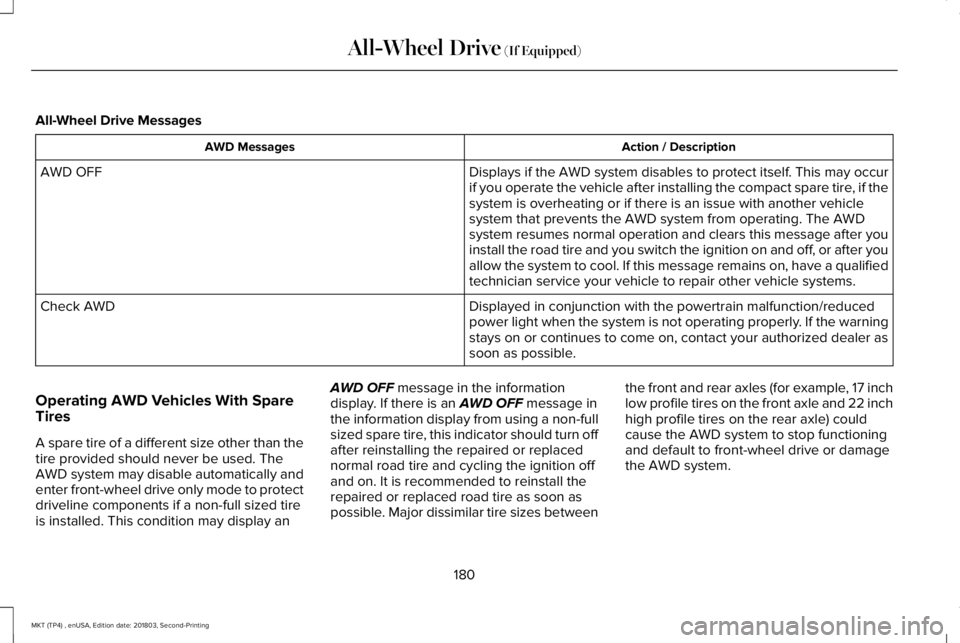
All-Wheel Drive Messages
Action / DescriptionAWD Messages
Displays if the AWD system disables to protect itself. This may occurif you operate the vehicle after installing the compact spare tire, if thesystem is overheating or if there is an issue with another vehiclesystem that prevents the AWD system from operating. The AWDsystem resumes normal operation and clears this message after youinstall the road tire and you switch the ignition on and off, or after youallow the system to cool. If this message remains on, have a qualifiedtechnician service your vehicle to repair other vehicle systems.
AWD OFF
Displayed in conjunction with the powertrain malfunction/reducedpower light when the system is not operating properly. If the warningstays on or continues to come on, contact your authorized dealer assoon as possible.
Check AWD
Operating AWD Vehicles With SpareTires
A spare tire of a different size other than thetire provided should never be used. TheAWD system may disable automatically andenter front-wheel drive only mode to protectdriveline components if a non-full sized tireis installed. This condition may display an
AWD OFF message in the informationdisplay. If there is an AWD OFF message inthe information display from using a non-fullsized spare tire, this indicator should turn offafter reinstalling the repaired or replacednormal road tire and cycling the ignition offand on. It is recommended to reinstall therepaired or replaced road tire as soon aspossible. Major dissimilar tire sizes between
the front and rear axles (for example, 17 inchlow profile tires on the front axle and 22 inchhigh profile tires on the rear axle) couldcause the AWD system to stop functioningand default to front-wheel drive or damagethe AWD system.
180
MKT (TP4) , enUSA, Edition date: 201803, Second-Printing
All-Wheel Drive (If Equipped)
Page 207 of 575
Canceling the Set Speed
Press and release the button, ortap the brake pedal to cancel theset speed.
Note:The system remembers the set speed.
Resuming the Set Speed
Press and release to resume theset speed.
Switching Cruise Control Off
Press and hold the toggle buttondownward when the system is instandby mode, or switch theignition off.
Note:You erase the set speed when youswitch the system off.
USING ADAPTIVE CRUISE
CONTROL (If Equipped)
WARNING: Always pay closeattention to changing road conditions whenusing adaptive cruise control. The systemdoes not replace attentive driving. Failingto pay attention to the road may result ina crash, serious injury or death.
WARNING: Do not use the adaptivecruise control when entering or leaving ahighway, on roads with intersections orroundabouts or non-vehicular traffic orroads that are winding, slippery, unpaved,or steep slopes.
WARNING: Do not use the systemin poor visibility, for example fog, heavyrain, spray or snow.
WARNING: Do not use the systemwhen towing a trailer that has aftermarketelectronic trailer brake controls. Failure tofollow this instruction could result in theloss of control of your vehicle, personalinjury or death.
WARNING: Do not use tire sizesother than those recommended becausethis can affect the normal operation of thesystem. Failure to do so may result in a lossof vehicle control, which could result inserious injury.
WARNING: Adaptive cruise controlmay not detect stationary or slow movingvehicles below 6 mph (10 km/h).
WARNING: Adaptive cruise controldoes not detect pedestrians or objects inthe road.
WARNING: Adaptive cruise controldoes not detect oncoming vehicles in thesame lane.
204
MKT (TP4) , enUSA, Edition date: 201803, Second-Printing
Cruise ControlE265298 E265297