ECO mode LINCOLN MKT 2019 Service Manual
[x] Cancel search | Manufacturer: LINCOLN, Model Year: 2019, Model line: MKT, Model: LINCOLN MKT 2019Pages: 575, PDF Size: 4.66 MB
Page 211 of 575
Automatic cancellation can also occur when:
•The tires lose traction.
•The engine speed is too low.
•You apply the parking brake.
Hilly Condition Usage
Select a lower gear when the system isactive in situations such as prolongeddownhill driving on steep grades, forexample in mountainous areas. The systemneeds additional engine braking in thesesituations to reduce the load on the vehicle’sregular brake system to prevent it fromoverheating.
Note:An audible alarm sounds and thesystem shuts down if it applies brakes for anextended period of time. This allows thebrakes to cool. The system functionsnormally again after the brakes cool.
Switching Adaptive Cruise Control Off
Press and release the button whenthe system is in standby mode, orswitch the ignition off.
Note:You erase the set speed and gapsetting when you switch the system off.
Detection Issues
WARNING: On rare occasions,detection issues can occur due to the roadinfrastructures, for example bridges,tunnels and safety barriers. In these cases,the system may brake late orunexpectedly. At all times, you areresponsible for controlling your vehicle,supervising the system and intervening, ifrequired.
WARNING: If the systemmalfunctions, have your vehicle checkedas soon as possible.
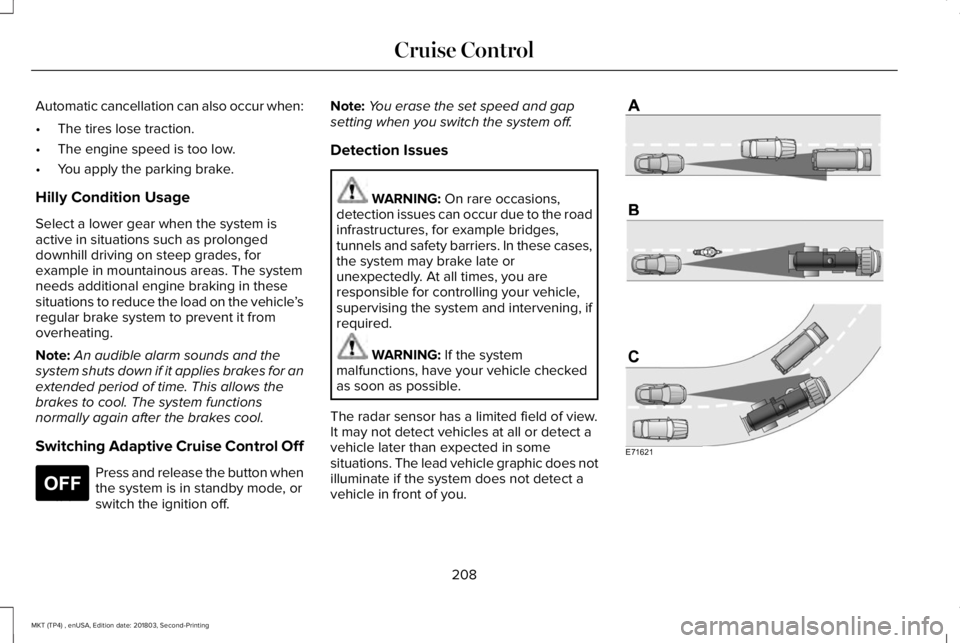
The radar sensor has a limited field of view.It may not detect vehicles at all or detect avehicle later than expected in somesituations. The lead vehicle graphic does notilluminate if the system does not detect avehicle in front of you.
208
MKT (TP4) , enUSA, Edition date: 201803, Second-Printing
Cruise ControlE265297 E71621
Page 214 of 575
Switching to Normal Cruise Control
WARNING: Normal cruise control willnot brake when your vehicle isapproaching slower vehicles. Always beaware of which mode you have selectedand apply the brakes when necessary.
The cruise control indicator lightreplaces the adaptive cruisecontrol indicator light if you selectnormal cruise control. The gap setting doesnot display, and the system does not respondto lead vehicles. Automatic braking remainsactive to maintain set speed.
You can change from adaptive cruise controlto normal cruise control through theinformation display.
211
MKT (TP4) , enUSA, Edition date: 201803, Second-Printing
Cruise ControlE71340
Page 217 of 575
Note:If the camera sensor cannot track theroad lane markings or if your vehicle speeddrops below approximately 40 mph(64 km/h), the alertness level will change togrey for a short time and the informationdisplay will inform you that the system isunavailable.
Resetting the System
You can reset the system by either:
•Switching the ignition off and on.
•Stopping the vehicle and then openingand closing the driver’s door.
LANE KEEPING SYSTEM (If Equipped)
WARNING: You are responsible forcontrolling your vehicle at all times. Thesystem is designed to be an aid and doesnot relieve you of your responsibility todrive with due care and attention. Failureto follow this instruction could result in theloss of control of your vehicle, personalinjury or death.
WARNING: Always drive with duecare and attention when using andoperating the controls and features on yourvehicle.
WARNING: In cold and severeweather conditions the system may notfunction. Rain, snow and spray can all limitsensor performance.
WARNING: The system will notoperate if the sensor cannot track the roadlane markings.
WARNING: The sensor mayincorrectly track lane markings as otherstructures or objects. This can result in afalse or missed warning.
WARNING: Large contrasts in outsidelighting can limit sensor performance.
WARNING: The system may notoperate properly if the sensor is blocked.Keep the windshield free from obstruction.
WARNING: If damage occurs in theimmediate area surrounding the sensor,have your vehicle checked as soon aspossible.
WARNING: The system may notcorrectly operate if your vehicle is fittedwith a suspension kit not approved by us.
Note:The system works above 40 mph(64 km/h).
Note:The system works as long as thecamera can detect one lane marking.
Note:When aid or alert and aid modes areselected and the system detects no steeringactivity for a short period, the system alertsyou to put your hands on the steering wheel.The system may detect a light grip or touchon the steering wheel as hands off driving.
Note:The system may not function with ablocked camera, or a damaged or dirtywindshield.
214
MKT (TP4) , enUSA, Edition date: 201803, Second-Printing
Driving Aids
Page 218 of 575
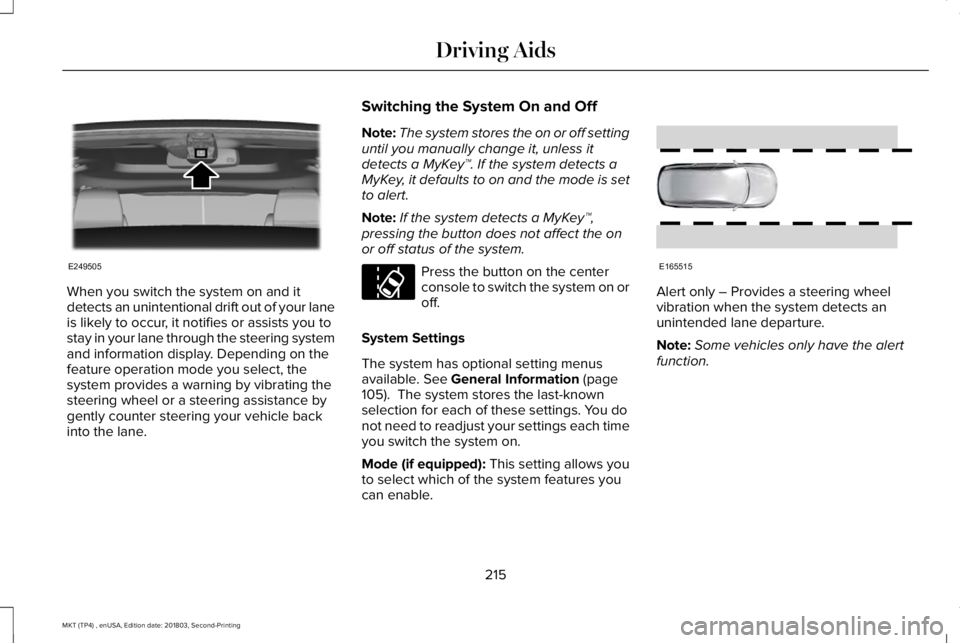
When you switch the system on and itdetects an unintentional drift out of your laneis likely to occur, it notifies or assists you tostay in your lane through the steering systemand information display. Depending on thefeature operation mode you select, thesystem provides a warning by vibrating thesteering wheel or a steering assistance bygently counter steering your vehicle backinto the lane.
Switching the System On and Off
Note:The system stores the on or off settinguntil you manually change it, unless itdetects a MyKey™. If the system detects aMyKey, it defaults to on and the mode is setto alert.
Note:If the system detects a MyKey™,pressing the button does not affect the onor off status of the system.
Press the button on the centerconsole to switch the system on oroff.
System Settings
The system has optional setting menusavailable. See General Information (page105). The system stores the last-knownselection for each of these settings. You donot need to readjust your settings each timeyou switch the system on.
Mode (if equipped): This setting allows youto select which of the system features youcan enable.
Alert only – Provides a steering wheelvibration when the system detects anunintended lane departure.
Note:Some vehicles only have the alertfunction.
215
MKT (TP4) , enUSA, Edition date: 201803, Second-Printing
Driving AidsE249505 E173233 E165515
Page 219 of 575
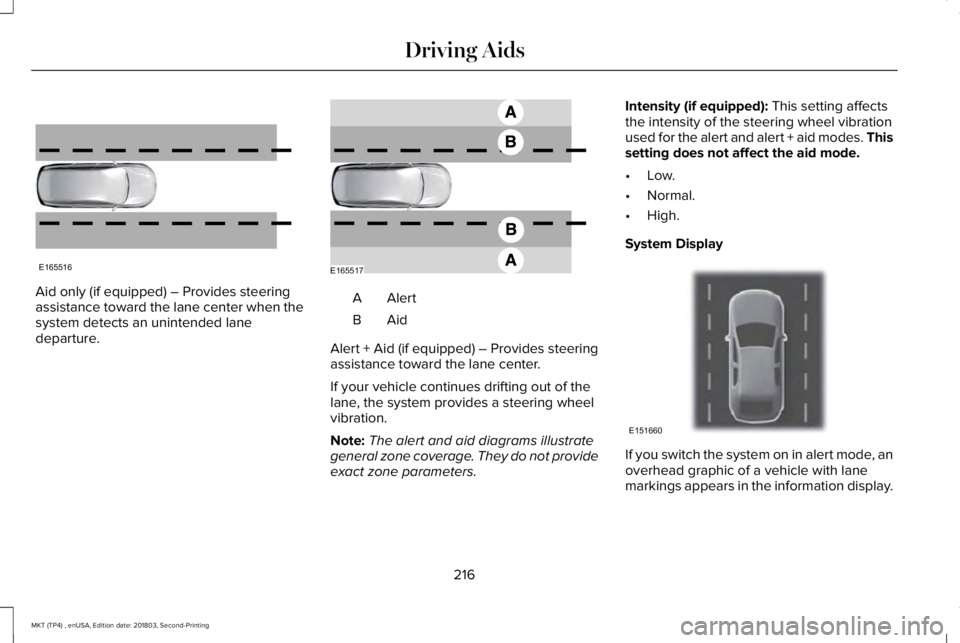
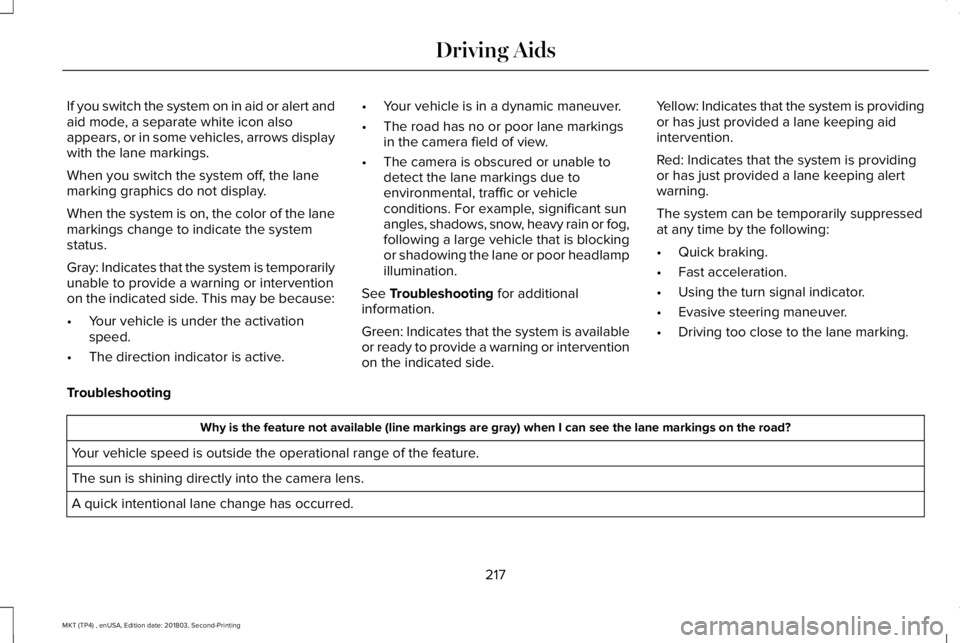
Aid only (if equipped) – Provides steeringassistance toward the lane center when thesystem detects an unintended lanedeparture.
AlertA
AidB
Alert + Aid (if equipped) – Provides steeringassistance toward the lane center.
If your vehicle continues drifting out of thelane, the system provides a steering wheelvibration.
Note:The alert and aid diagrams illustrategeneral zone coverage. They do not provideexact zone parameters.
Intensity (if equipped): This setting affectsthe intensity of the steering wheel vibrationused for the alert and alert + aid modes. Thissetting does not affect the aid mode.
•Low.
•Normal.
•High.
System Display
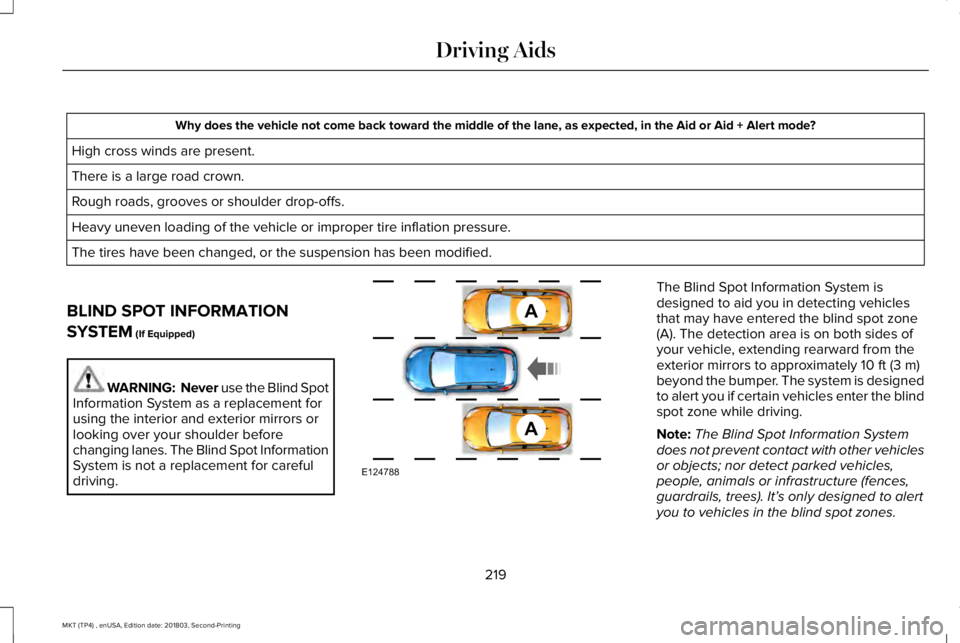
If you switch the system on in alert mode, anoverhead graphic of a vehicle with lanemarkings appears in the information display.
216
MKT (TP4) , enUSA, Edition date: 201803, Second-Printing
Driving AidsE165516 E165517 E151660
Page 220 of 575
If you switch the system on in aid or alert andaid mode, a separate white icon alsoappears, or in some vehicles, arrows displaywith the lane markings.
When you switch the system off, the lanemarking graphics do not display.
When the system is on, the color of the lanemarkings change to indicate the systemstatus.
Gray: Indicates that the system is temporarilyunable to provide a warning or interventionon the indicated side. This may be because:
•Your vehicle is under the activationspeed.
•The direction indicator is active.
•Your vehicle is in a dynamic maneuver.
•The road has no or poor lane markingsin the camera field of view.
•The camera is obscured or unable todetect the lane markings due toenvironmental, traffic or vehicleconditions. For example, significant sunangles, shadows, snow, heavy rain or fog,following a large vehicle that is blockingor shadowing the lane or poor headlampillumination.
See Troubleshooting for additionalinformation.
Green: Indicates that the system is availableor ready to provide a warning or interventionon the indicated side.
Yellow: Indicates that the system is providingor has just provided a lane keeping aidintervention.
Red: Indicates that the system is providingor has just provided a lane keeping alertwarning.
The system can be temporarily suppressedat any time by the following:
•Quick braking.
•Fast acceleration.
•Using the turn signal indicator.
•Evasive steering maneuver.
•Driving too close to the lane marking.
Troubleshooting
Why is the feature not available (line markings are gray) when I can see the lane markings on the road?
Your vehicle speed is outside the operational range of the feature.
The sun is shining directly into the camera lens.
A quick intentional lane change has occurred.
217
MKT (TP4) , enUSA, Edition date: 201803, Second-Printing
Driving Aids
Page 222 of 575
Why does the vehicle not come back toward the middle of the lane, as expected, in the Aid or Aid + Alert mode?
High cross winds are present.
There is a large road crown.
Rough roads, grooves or shoulder drop-offs.
Heavy uneven loading of the vehicle or improper tire inflation pressure.
The tires have been changed, or the suspension has been modified.
BLIND SPOT INFORMATION
SYSTEM (If Equipped)
WARNING: Never use the Blind SpotInformation System as a replacement forusing the interior and exterior mirrors orlooking over your shoulder beforechanging lanes. The Blind Spot InformationSystem is not a replacement for carefuldriving.
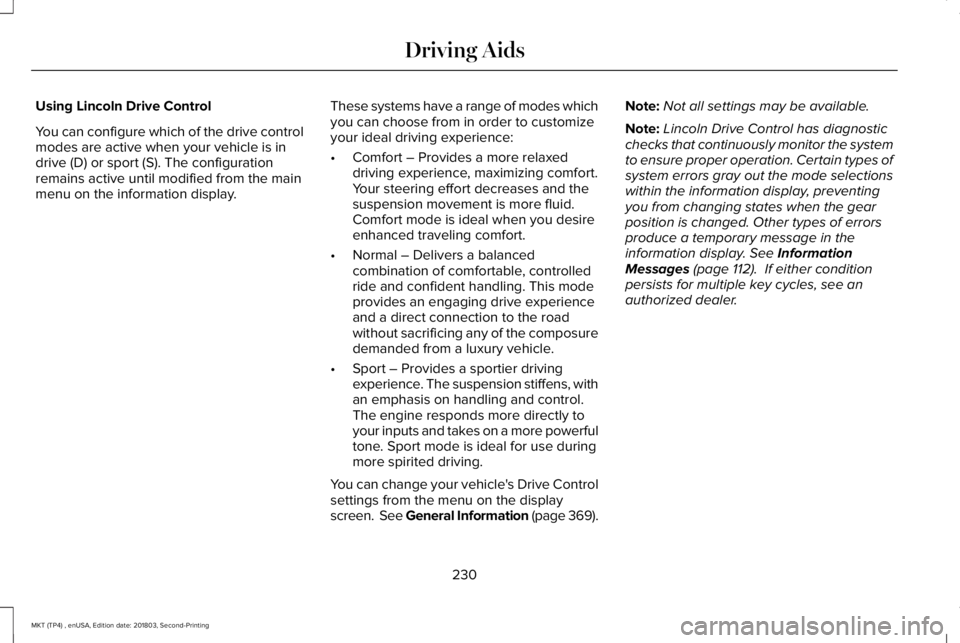
The Blind Spot Information System isdesigned to aid you in detecting vehiclesthat may have entered the blind spot zone(A). The detection area is on both sides ofyour vehicle, extending rearward from theexterior mirrors to approximately 10 ft (3 m)beyond the bumper. The system is designedto alert you if certain vehicles enter the blindspot zone while driving.
Note:The Blind Spot Information Systemdoes not prevent contact with other vehiclesor objects; nor detect parked vehicles,people, animals or infrastructure (fences,guardrails, trees). It’s only designed to alertyou to vehicles in the blind spot zones.
219
MKT (TP4) , enUSA, Edition date: 201803, Second-Printing
Driving AidsA
A
E124788
Page 233 of 575
Using Lincoln Drive Control
You can configure which of the drive controlmodes are active when your vehicle is indrive (D) or sport (S). The configurationremains active until modified from the mainmenu on the information display.
These systems have a range of modes whichyou can choose from in order to customizeyour ideal driving experience:
•Comfort – Provides a more relaxeddriving experience, maximizing comfort.Your steering effort decreases and thesuspension movement is more fluid.Comfort mode is ideal when you desireenhanced traveling comfort.
•Normal – Delivers a balancedcombination of comfortable, controlledride and confident handling. This modeprovides an engaging drive experienceand a direct connection to the roadwithout sacrificing any of the composuredemanded from a luxury vehicle.
•Sport – Provides a sportier drivingexperience. The suspension stiffens, withan emphasis on handling and control.The engine responds more directly toyour inputs and takes on a more powerfultone. Sport mode is ideal for use duringmore spirited driving.
You can change your vehicle's Drive Controlsettings from the menu on the displayscreen. See General Information (page 369).
Note:Not all settings may be available.
Note:Lincoln Drive Control has diagnosticchecks that continuously monitor the systemto ensure proper operation. Certain types ofsystem errors gray out the mode selectionswithin the information display, preventingyou from changing states when the gearposition is changed. Other types of errorsproduce a temporary message in theinformation display. See InformationMessages (page 112). If either conditionpersists for multiple key cycles, see anauthorized dealer.
230
MKT (TP4) , enUSA, Edition date: 201803, Second-Printing
Driving Aids
Page 247 of 575

Recreational Towing
Note: Put your climate control system inrecirculated air mode to prevent exhaustfumes from entering the vehicle. SeeClimate Control (page 125).
Follow these guidelines if you have a needfor recreational (RV) towing. An example ofrecreational towing would be towing yourvehicle behind a motorhome. We designedthese guidelines to prevent damage to yourtransmission.
You can tow your 3.5L or 3.7L equippedvehicle with all four wheels on the ground.
If you tow your vehicle with all four wheelson the ground:
•Tow only in the forward direction.
•Release the parking brake.
•Do not exceed 65 mph (105 km/h).
•Start the engine and allow it to run forfive minutes at the beginning of each dayand every six hours thereafter. With theengine running and your foot on thebrake, shift into drive (D) and then intoreverse (R) before shifting back intoneutral (N).
1. Start the vehicle by pressing the brakepedal, and then pressing the keyless startbutton until the vehicle starts.
2. Press the brake pedal and shift thetransmission into neutral (N).
3. Switch your vehicle off by pressing thekeyless start button once.
4. Disconnect the negative (black) cablefrom the battery. You need the door keyto lock and unlock doors when thebattery cable is disconnected. SeeChanging the 12V Battery (page 295).
Note:The anti-theft system does not workuntil you reconnect the battery cable.
Start the engine within 15 minutes ofreconnecting the battery cable.
Front-wheel Drive Vehicles
Alternatively, you can tow your front-wheeldrive vehicle with the front wheels off theground by using a tow dolly, or with all fourwheels off the ground using a vehicletransport trailer. If you are using a tow dolly,follow the instructions specified by theequipment provider.
All-wheel Drive Vehicles
Alternatively, you can tow your all-wheeldrive vehicle with all four wheels off theground using a vehicle transport trailer. Donot tow your all-wheel drive vehicle with thefront wheels off the ground (by using a towdolly) and the rear wheels on the ground.This causes damage to your all-wheel drivesystem. If you are using a vehicle transporttrailer, follow the instruction specified by theequipment provider.
244
MKT (TP4) , enUSA, Edition date: 201803, Second-Printing
Towing
Page 248 of 575
BREAKING-IN
You need to break in new tires forapproximately 300 mi (480 km). During thistime, your vehicle may exhibit some unusualdriving characteristics.
Avoid driving too fast during the first 1,000 mi(1,600 km). Vary your speed frequently andchange up through the gears early. Do notlabor the engine.
Do not tow during the first 1,000 mi(1,600 km).
ECONOMICAL DRIVING
Fuel economy is affected by several thingssuch as how you drive, the conditions youdrive under and how you maintain yourvehicle.
There are some things to keep in mind thatmay improve your fuel economy:
•Accelerate and slow down in a smooth,moderate fashion.
•Drive at steady speeds.
•Anticipate stops; slowing down mayeliminate the need to stop.
•Combine errands and minimizestop-and-go driving (When runningerrands, go to the furthest destinationfirst and then work your way back home).
•Close the windows for high-speeddriving.
•Drive at reasonable speeds.
•Keep the tires properly inflated and useonly the recommended size.
•Use the recommended engine oil.
•Perform all regularly scheduledmaintenance.
There are also some things you may want toavoid doing because they reduce your fueleconomy:
•Avoid sudden or hard accelerations.
•Avoid revving the engine before turningoff the car.
•Avoid long idle periods.
•Do not warm up your vehicle on coldmornings.
•Reduce the use of air conditioning andheat.
•Avoid using speed control in hilly terrain.
•Do not rest your foot on the brake pedalwhile driving.
•Avoid carrying unnecessary weight.
•Avoid adding particular accessories toyour vehicle (e.g. bug deflectors,rollbars/light bars, running boards, skiracks).
•Avoid driving with the wheels out ofalignment.
DRIVING THROUGH WATER
WARNING: Do not drive throughflowing or deep water as you may losecontrol of your vehicle.
Note:Driving through standing water cancause vehicle damage.
Note:Engine damage can occur if waterenters the air filter.
245
MKT (TP4) , enUSA, Edition date: 201803, Second-Printing
Driving Hints