ECO mode LINCOLN MKT 2019 Workshop Manual
[x] Cancel search | Manufacturer: LINCOLN, Model Year: 2019, Model line: MKT, Model: LINCOLN MKT 2019Pages: 575, PDF Size: 4.66 MB
Page 252 of 575
If you need to arrange roadside assistancefor yourself, Lincoln Motor Companyreimburses a reasonable amount for towingto the nearest Lincoln dealership within100 mi (160 km). To obtain reimbursementinformation, United States clients, call1-800-521-4140. Clients need to submit theiroriginal receipts.
Vehicles Sold in Canada: GettingRoadside Assistance
To fully assist you should you have a vehicleconcern, Lincoln Motor Company of Canada,Limited offers a complimentary roadsideassistance program. This program is eligiblewithin Canada or the continental UnitedStates.
The service is available 24 hours a day,seven days a week.
This program is separate from the NewVehicle Limited Warranty, but the coverageis concurrent with the powertrain coverageperiod of your vehicle. Canadian roadsidecoverage and benefits may differ from theU.S. coverage.
If you require more information, please callus in Canada at 1-800-387-9333, or visit ourwebsite at www.lincolncanada.com.
HAZARD FLASHERS
Note:The hazard flashers operate when theignition is in any position, or if the key is notin the ignition. If used when the vehicle is notrunning, the battery loses charge. As a result,there may be insufficient power to restartyour vehicle.
The flasher control is on theinstrument panel. Use your hazardflashers when your vehicle iscreating a safety hazard for other motorists.
•Press the flasher control and all front andrear direction indicators flash.
•Press the button again to switch them off.
FUEL SHUTOFF
WARNING: If your vehicle has beeninvolved in a crash, have the fuel systemchecked. Failure to follow this instructioncould result in fire, personal injury or death.
Note: When you try to restart your vehicleafter a fuel shutoff, the vehicle makes surethat various systems are safe to restart. Once the vehicle determines the systemsare safe, then the vehicle allows you torestart.
Note: In the event that your vehicle doesnot restart after your third attempt, contacta qualified technician.
The fuel pump shutoff stops the flow of fuelto the engine in the event of a moderate tosevere crash. Not every impact causes ashutoff.
Should your vehicle shut off after a crash,you may restart your vehicle.
249
MKT (TP4) , enUSA, Edition date: 201803, Second-Printing
Roadside Emergencies
Page 254 of 575
WARNING: Do not connect the endof the second cable to the negative (-)terminal of the battery to be jumped. Aspark may cause an explosion of the gasesthat surround the battery.
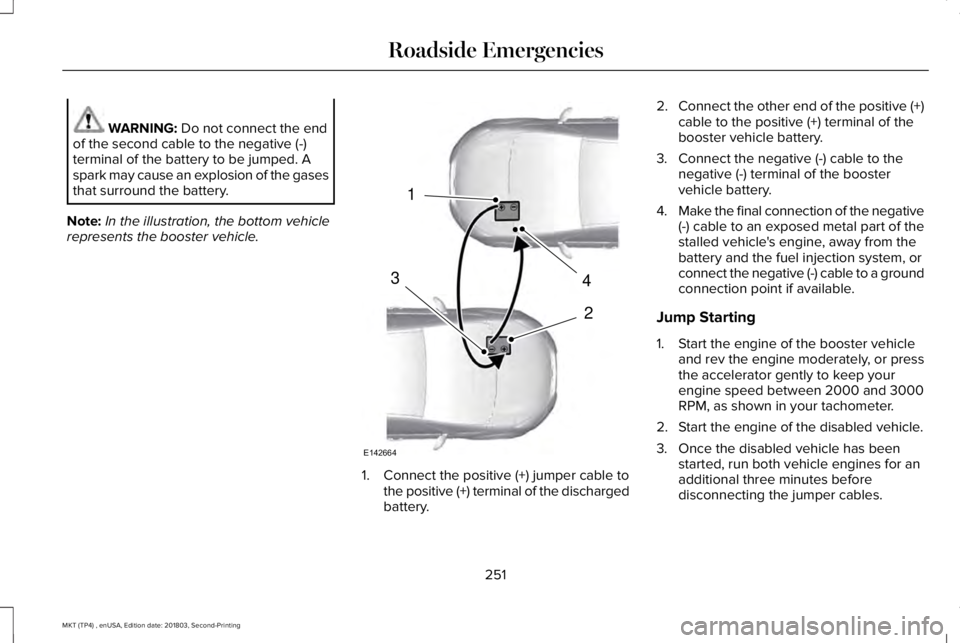
Note:In the illustration, the bottom vehiclerepresents the booster vehicle.
1. Connect the positive (+) jumper cable tothe positive (+) terminal of the dischargedbattery.
2.Connect the other end of the positive (+)cable to the positive (+) terminal of thebooster vehicle battery.
3. Connect the negative (-) cable to thenegative (-) terminal of the boostervehicle battery.
4.Make the final connection of the negative(-) cable to an exposed metal part of thestalled vehicle's engine, away from thebattery and the fuel injection system, orconnect the negative (-) cable to a groundconnection point if available.
Jump Starting
1. Start the engine of the booster vehicleand rev the engine moderately, or pressthe accelerator gently to keep yourengine speed between 2000 and 3000RPM, as shown in your tachometer.
2. Start the engine of the disabled vehicle.
3. Once the disabled vehicle has beenstarted, run both vehicle engines for anadditional three minutes beforedisconnecting the jumper cables.
251
MKT (TP4) , enUSA, Edition date: 201803, Second-Printing
Roadside Emergencies4
2
1
3
E142664
Page 292 of 575
WARNING: Do not put coolant in thewindshield washer reservoir. If sprayed onthe windshield, coolant could make itdifficult to see through the windshield.
Note: Do not use stop leak pellets, coolingsystem sealants, or non-specified additivesas they can cause damage to the enginecooling or heating systems. Resultingcomponent damage may not be covered bythe vehicle Warranty.
Note: Automotive fluids are notinterchangeable.
It is very important to use prediluted coolantapproved to the correct specification in orderto avoid plugging the small passageways inthe engine cooling system. See Capacitiesand Specifications (page 343). Do not mixdifferent colors or types of coolant in yourvehicle. Mixing of engine coolants or usingan incorrect coolant may harm the engine orcooling system components and may not becovered by the vehicle Warranty.
Note:If prediluted coolant is not available,use the approved concentrated coolantdiluting it to 50/50 with distilled water. SeeCapacities and Specifications (page 343).Using water that has not been deionisedmay contribute to deposit formation,corrosion and plugging of the small coolingsystem passageways.
Note: Coolants marketed for all makes andmodels may not be approved to ourspecifications and may cause damage tothe cooling system. Resulting componentdamage may not be covered by the vehicleWarranty.
If the coolant level is at or below theminimum mark, add prediluted coolantimmediately.
To top up the coolant level do the following:
1. Unscrew the cap slowly. Any pressureescapes as you unscrew the cap.
2. Add prediluted coolant approved to thecorrect specification. See Capacities andSpecifications (page 343).
3.Add enough prediluted coolant to reachthe correct level.
4. Replace the coolant reservoir cap, turnit clockwise until you feel a strongresistance.
5. Check the coolant level in the coolantreservoir the next few times you driveyour vehicle. If necessary, add enoughprediluted engine coolant to bring thecoolant level to the correct level.
If you have to add more than 1.1 qt (1 L) ofengine coolant per month, have your vehiclechecked as soon as possible. Operating anengine with a low level of coolant can resultin engine overheating and possible enginedamage.
Note:During normal vehicle operation, thecoolant may change color from orange topink or light red. As long as the coolant isclear and uncontaminated, this color changedoes not indicate the coolant has degradednor does it require the coolant to be drained,the system to be flushed, or the coolant tobe replaced.
In case of emergency, you can add a largeamount of water without engine coolant inorder to reach a vehicle service location. Inthis instance, qualified personnel:
289
MKT (TP4) , enUSA, Edition date: 201803, Second-Printing
Maintenance
Page 294 of 575
How Fail-Safe Cooling Works
If the engine begins to overheat,the coolant temperature gaugemoves toward the red zone:
A warning lamp illuminates and amessage may appear in theinformation display.
If the engine reaches a presetover-temperature condition, the engineautomatically switches to alternating cylinderoperation. Each disabled cylinder acts as anair pump and cools the engine.
When this occurs, your vehicle still operates,however:
•Engine power is limited.
•The air conditioning system turns off.
Continued operation increases the enginetemperature, causing the engine tocompletely shut down. Your steering andbraking effort increases in this situation.
When the engine temperature cools, you canre-start the engine. Have your vehiclechecked as soon as possible to minimizeengine damage.
When Fail-Safe Mode Is Activated
WARNING: Fail-safe mode is for useduring emergencies only. Operate yourvehicle in fail-safe mode only as long asnecessary to bring your vehicle to rest ina safe location and seek immediate repairs.When in fail-safe mode, your vehicle willhave limited power, will not be able tomaintain high-speed operation, and maycompletely shut down without warning,potentially losing engine power, powersteering assist, and power brake assist,which may increase the possibility of acrash resulting in serious injury.
WARNING: Do not remove thecoolant reservoir cap when the engine ison or the cooling system is hot. Wait 10minutes for the cooling system to cooldown. Cover the coolant reservoir cap witha thick cloth to prevent the possibility ofscalding and slowly remove the cap.Failure to follow this instruction could resultin personal injury.
Your vehicle has limited engine power whenin the fail-safe mode, drive your vehicle withcaution. Your vehicle does not maintainhigh-speed operation and the engine mayoperate poorly.
Remember that the engine is capable ofautomatically shutting down to preventengine damage. In this situation:
1. Pull off the road as soon as safelypossible and switch the engine off.
2. If you are a member of a roadsideassistance program, we recommend thatyou contact your roadside assistanceservice provider.
3. If this is not possible, wait for a shortperiod of time for the engine to cool.
4. Check the coolant level. If the coolantlevel is at or below the minimum mark,add prediluted coolant immediately.
5.When the engine temperature cools, youcan re-start the engine. Have your vehiclechecked as soon as possible to minimizeengine damage.
Note:Driving your vehicle without repairincreases the chance of engine damage.
291
MKT (TP4) , enUSA, Edition date: 201803, Second-Printing
Maintenance
Page 295 of 575
Engine Coolant TemperatureManagement (If Equipped)
WARNING: To reduce the risk ofcrash and injury, be prepared that thevehicle speed may reduce and the vehiclemay not be able to accelerate with fullpower until the coolant temperaturereduces.
If you tow a trailer with your vehicle, theengine may temporarily reach a highertemperature during severe operatingconditions, for example ascending a long orsteep grade in high ambient temperatures.
At this time, you may notice the coolanttemperature gauge moves toward the redzone and a message may appear in theinformation display.
You may notice a reduction in vehicle speedcaused by reduced engine power in orderto manage the engine coolant temperature. Your vehicle may enter this mode if certainhigh-temperature and high-load conditionstake place. The amount of speed reductiondepends on vehicle loading, grade andambient temperature. If this occurs, there isno need to stop your vehicle. You cancontinue to drive.
The air conditioning may automatically turnon and off during severe operatingconditions to protect the engine fromoverheating. When the coolant temperaturedecreases to the normal operatingtemperature, the air conditioning turns on.
If the coolant temperature gauge moves fullyinto the red zone, or if the coolanttemperature warning or service engine soonmessages appear in your information display,do the following:
1.Stop your vehicle as soon as it is safe todo so. Fully apply the parking brake, shiftinto park (P) or neutral (N).
2. Leave the engine running until thecoolant temperature gauge needlereturns to the normal position. If thetemperature does not drop after severalminutes, follow the remaining steps.
3. Switch the engine off and wait for it tocool. Check the coolant level.
4. If the coolant level is at or below theminimum mark, add prediluted coolantimmediately.
5. If the coolant level is normal, restart theengine and continue.
AUTOMATIC TRANSMISSION
FLUID CHECK
Do not use supplemental transmission fluidadditives because they are unnecessary andcould lead to transmission damage that maynot be covered by the vehicle Warranty.
The transmission does not consume fluid.However, if the transmission slips or shiftsslowly you should check the fluid level. If younotice a sign of leaking fluid, contact anauthorized dealer.
292
MKT (TP4) , enUSA, Edition date: 201803, Second-Printing
Maintenance
Page 315 of 575
Cooling system
•Protect against freezing temperatures.
•When removing your vehicle fromstorage, check coolant fluid level.Confirm that there are no cooling systemleaks and that fluid is at therecommended level.
Battery
•Check and recharge as necessary. Keepconnections clean.
•If storing your vehicle for more than 30days without recharging the battery, werecommend that you disconnect thebattery cables to maintain battery chargefor quick starting.
Note:It is necessary to reset memoryfeatures if battery cables are disconnected.
Brakes
•Make sure the brakes and parking brakerelease fully.
Tires
•Maintain recommended air pressure.
Miscellaneous
•Make sure all linkages, cables, levers andpins under your vehicle are covered withgrease to prevent rust.
•Move vehicles at least 25 ft (7.5 m) every15 days to lubricate working parts andprevent corrosion.
Removing Vehicle From Storage
When your vehicle is ready to come out ofstorage, do the following:
•Wash your vehicle to remove any dirt orgrease film build-up on window surfaces.
•Check windshield wipers for anydeterioration.
•Check under the hood for any foreignmaterial that may have collected duringstorage such as mice or squirrel nests.
•Check the exhaust for any foreignmaterial that may have collected duringstorage.
•Check tire pressures and set tire inflationper the Tire Label.
•Check brake pedal operation. Drive yourvehicle 15 ft (4.5 m) back and forth toremove rust build-up.
•Check fluid levels (including coolant, oiland gas) to make sure there are no leaks,and fluids are at recommended levels.
•If you remove the battery, clean thebattery cable ends and check fordamage.
Contact an authorized dealer if you have anyconcerns or issues.
BODY STYLING KITS
The distance between the underside of yourvehicle and the ground is less than that ofother models. Drive with extreme care toavoid damage to your vehicle.
312
MKT (TP4) , enUSA, Edition date: 201803, Second-Printing
Vehicle Care
Page 350 of 575
VEHICLE IDENTIFICATION
NUMBER
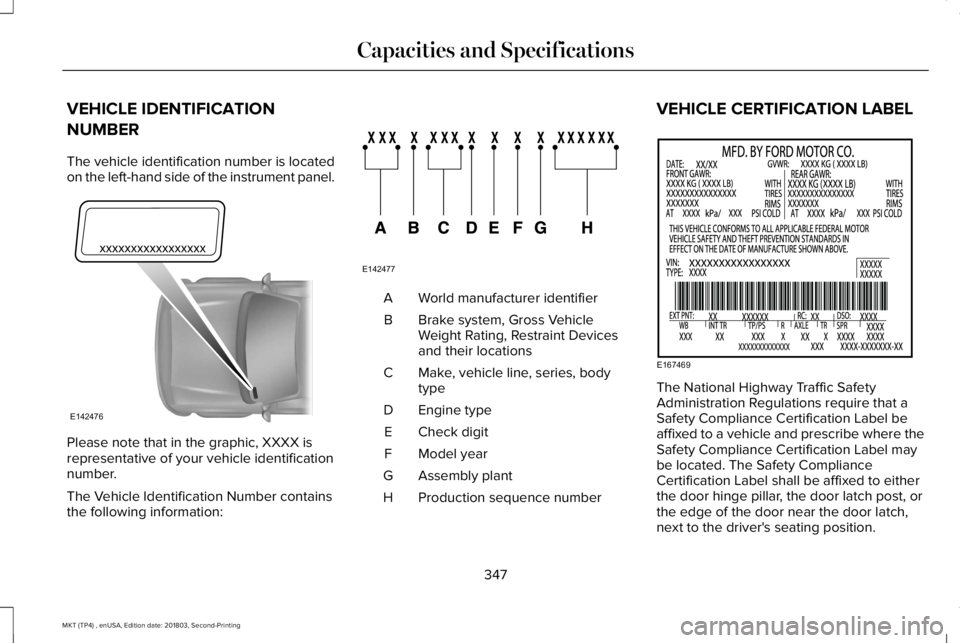
The vehicle identification number is locatedon the left-hand side of the instrument panel.
Please note that in the graphic, XXXX isrepresentative of your vehicle identificationnumber.
The Vehicle Identification Number containsthe following information:
World manufacturer identifierA
Brake system, Gross VehicleWeight Rating, Restraint Devicesand their locations
B
Make, vehicle line, series, bodytypeC
Engine typeD
Check digitE
Model yearF
Assembly plantG
Production sequence numberH
VEHICLE CERTIFICATION LABEL
The National Highway Traffic SafetyAdministration Regulations require that aSafety Compliance Certification Label beaffixed to a vehicle and prescribe where theSafety Compliance Certification Label maybe located. The Safety ComplianceCertification Label shall be affixed to eitherthe door hinge pillar, the door latch post, orthe edge of the door near the door latch,next to the driver's seating position.
347
MKT (TP4) , enUSA, Edition date: 201803, Second-Printing
Capacities and SpecificationsE142476 E142477 E167469
Page 368 of 575
CD and CD Player Information
Note:CD units play commercially pressed4.7 in (12 cm) audio compact discs only. Dueto technical incompatibility, certainrecordable and re-recordable compact discsmay not function correctly when used in thevehicle’s CD player.
Note: Do not insert CDs with homemadepaper (adhesive) labels into the CD playeras the label may peel and cause the CD tobecome jammed. You should use apermanent felt tip marker rather thanadhesive labels on your homemade CDs. Ballpoint pens may damage CDs. Ask anauthorized dealer for more information.
Note:Do not use any irregularly shapeddiscs or discs with a scratch protection filmattached.
Always handle discs by their edges only. Clean the disc with an approved CD cleaneronly. Wipe it from the center of the disctoward the edge. Do not clean in a circularmotion.
Do not expose discs to direct sunlight or heatsources for extended periods.
MP3 and WMA Track and FolderStructure
Audio systems capable of recognizing andplaying MP3 and WMA individual tracks andfolder structures work as follows:
•There are two different modes for MP3and WMA disc playback: MP3 and WMAtrack mode (system default) and MP3 andWMA folder mode.
•MP3 and WMA track mode ignores anyfolder structure on the MP3 and WMAdisc. The player numbers each MP3 andWMA track on the disc (noted by the MP3or WMA file extension) from T001 to amaximum of T255. The maximum numberof playable MP3 and WMA files may beless depending on the structure of theCD and exact model of radio present.
•MP3 and WMA folder mode representsa folder structure consisting of one levelof folders. The CD player numbers allMP3 and WMA tracks on the disc (notedby the MP3 or WMA file extension) andall folders containing MP3 and WMA files,from F001 (folder) T001 (track) to F253T255.
•Creating discs with only one level offolders helps with navigation through thedisc files.
If you are burning your own MP3 and WMAdiscs, it is important to understand how thesystem reads the structures you create. Whilevarious files may be present (files withextensions other than MP3 and WMA), onlyfiles with the MP3 and WMA extension areplayed; other files are ignored by the system.This enables you to use the same MP3 andWMA disc for a variety of tasks on your workcomputer, home computer and yourin-vehicle system.
365
MKT (TP4) , enUSA, Edition date: 201803, Second-Printing
Audio System
Page 369 of 575
In track mode, the system displays and playsthe structure as if it were only one level deep(all MP3 and WMA files play, regardless ofbeing in a specific folder). In folder mode,the system only plays the MP3 and WMA filesin the current folder.
AUDIO UNIT
WARNING: Driving while distractedcan result in loss of vehicle control, crashand injury. We strongly recommend thatyou use extreme caution when using anydevice that may take your focus off theroad. Your primary responsibility is the safeoperation of your vehicle. We recommendagainst the use of any hand-held devicewhile driving and encourage the use ofvoice-operated systems when possible.Make sure you are aware of all applicablelocal laws that may affect the use ofelectronic devices while driving.
Note: The touchscreen system controls mostof the audio features.
Adjusting the Volume
Press to adjust the volume.
Changing Radio Stations
In radio mode, press and release + or - tosearch through the radio frequency band.
In satellite radio mode, press and release +or - to find the previous or next availablesatellite radio station.
Ejecting the CD
Press and release to eject a CD.
Inserting a CD
Insert a CD into the CD slot.
Switching the Audio Unit On and Off
Press and release the button.
Using Seek, Fast Forward and Reverse
In radio mode, select a frequency band andpress and release either button. The systemstops at the first station it finds in thatdirection.
In CD mode, press and release to select thenext or previous track. Press and hold tomove quickly forward or backward throughthe current track.
In satellite radio mode, press and release toselect the next or previous satellite radiostation. If you select a specific category, suchas jazz, rock or news, press to find the nextor previous station in the category you select.
Rear Seat Audio Controls (If Equipped)
Adjusting the Rear Volume
Press and release the togglebutton upward or downward toadjust the rear volume.
366
MKT (TP4) , enUSA, Edition date: 201803, Second-Printing
Audio SystemE265304 E265272 E265032 E265273 E265304
Page 370 of 575
Displaying the Clock
Press and release the button todisplay the clock.
Selecting the Audio Modes
Press and release the button toscroll through available audiosystem modes.
Using Seek
Press and release the togglebutton upward or downward toselect the next or previous storedradio frequency station, satellite radiochannel or CD track.
USB PORT
WARNING: Driving while distractedcan result in loss of vehicle control, crashand injury. We strongly recommend thatyou use extreme caution when using anydevice that may take your focus off theroad. Your primary responsibility is the safeoperation of your vehicle. We recommendagainst the use of any hand-held devicewhile driving and encourage the use ofvoice-operated systems when possible.Make sure you are aware of all applicablelocal laws that may affect the use ofelectronic devices while driving.
The USB port allows you to plug in mediaplaying devices, memory sticks and chargedevices, if supported.
MEDIA HUB
WARNING: Driving while distractedcan result in loss of vehicle control, crashand injury. We strongly recommend thatyou use extreme caution when using anydevice that may take your focus off theroad. Your primary responsibility is the safeoperation of your vehicle. We recommend
367
MKT (TP4) , enUSA, Edition date: 201803, Second-Printing
Audio SystemE265278 E265035 E265273 E201595