ac mode LINCOLN MKX 2016 Manual Online
[x] Cancel search | Manufacturer: LINCOLN, Model Year: 2016, Model line: MKX, Model: LINCOLN MKX 2016Pages: 563, PDF Size: 4.96 MB
Page 435 of 563

To turn the feature on press the lower left corner of the touchscreen, an\
d then select:
Action and Description
Menu Item
SIRIUS
You can then select any of the following: Save a channel by pressing and holding one of the memory preset areas. T\
here is a brief mute while the
radio saves the channel. Sound returns when finished.
Presets
Save the current song, artist, or team as a favorite.
Alerts
If you are listening to music, you can save the song or artist, so the s\
ystem can alert you when they are
playing on a satellite radio channel. If you are listening to a sporting\
event, you can save your favorite
teams so the system can alert you when they are playing on a satellite r\
adio channel. You can also edit
alerts or turn alerts on or off.
When an alert appears on the screen, you can choose to tune to the chann\
el, cancel the alert or turn off
alerts.
Replay audio on the current channel. You can replay approximately 45 minutes of audio as long as you
have remained tuned to the current station. Changing stations erases the\
previous audio.
Replay
While in replay mode:
Press and release the seek buttons to hear the previous or next song.
Press and hold the seek buttons to reverse or fast forward in the curren\
t track.
Press play or pause to play or pause the audio.
Press the button again to return to live audio.
432
MKX (CD9) Canada/United States of America, enUSA, ASO/OGC Review MyLincoln Touch™
Page 437 of 563
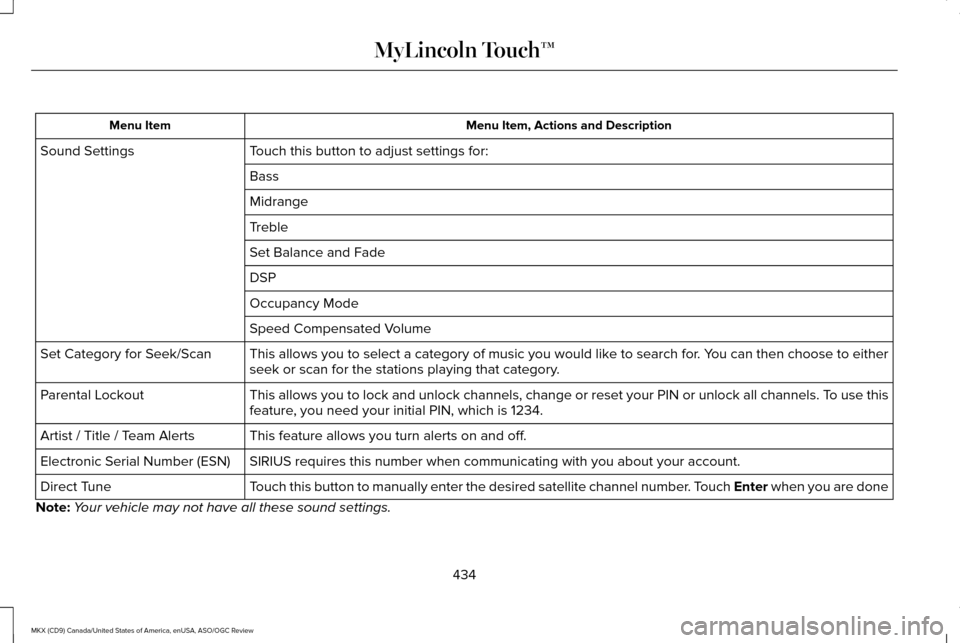
Menu Item, Actions and Description
Menu Item
Touch this button to adjust settings for:
Sound Settings
Bass
Midrange
Treble
Set Balance and Fade
DSP
Occupancy Mode
Speed Compensated Volume
This allows you to select a category of music you would like to search for. You can then choose to either
seek or scan for the stations playing that category.
Set Category for Seek/Scan
This allows you to lock and unlock channels, change or reset your PIN or\
unlock all channels. To use this
feature, you need your initial PIN, which is 1234.
Parental Lockout
This feature allows you turn alerts on and off.
Artist / Title / Team Alerts
SIRIUS requires this number when communicating with you about your accou\
nt.
Electronic Serial Number (ESN)
Touch this button to manually enter the desired satellite channel number. Touch Enter when you are done
Direct Tune
Note: Your vehicle may not have all these sound settings.
434
MKX (CD9) Canada/United States of America, enUSA, ASO/OGC Review MyLincoln Touch™
Page 442 of 563

Insert your CD then select:
Action and Description
Menu Item
Touch this button to repeat the currently playing track, all tracks on th\
e disc or switch the feature off if
already on.
Repeat
Touch this button to play the tracks or entire albums in random order, or switch the feature off if already
on.
Shuffle
Touch this button to hear a brief sampling of all available tracks.
Scan
Touch this button to see disc information.
More Info
Touch this button to look through all available CD tracks.
Browse
To adjust the Sound Settings, select: Menu Item
Options
Sound Settings
Then any of the following:
Bass
Midrange Menu Item
Treble
Set Balance and Fade
Occupancy Mode
EQ Mode
Speed Compensated Volume
Note: Your vehicle may not have all these
sound settings. CD Voice Commands If you are listening to a CD, press
the voice button on the steering
wheel controls. When prompted,
say any of the following commands.
439
MKX (CD9) Canada/United States of America, enUSA, ASO/OGC Review MyLincoln Touch™E142599
Page 445 of 563
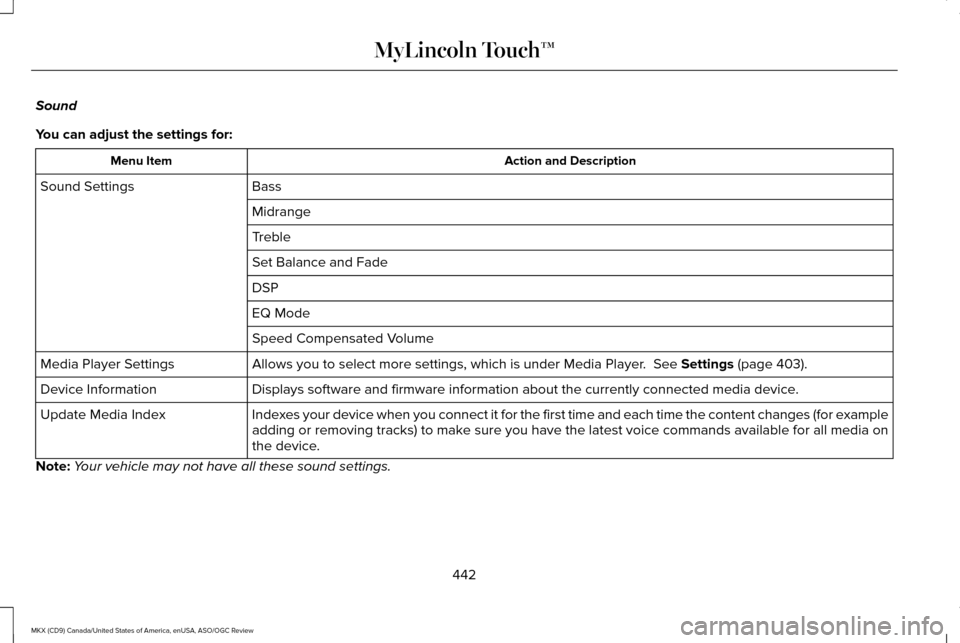
Sound
You can adjust the settings for:
Action and Description
Menu Item
Bass
Sound Settings
Midrange
Treble
Set Balance and Fade
DSP
EQ Mode
Speed Compensated Volume
Allows you to select more settings, which is under Media Player. See Settings (page 403).
Media Player Settings
Displays software and firmware information about the currently connected\
media device.
Device Information
Indexes your device when you connect it for the first time and each time the \
content changes (for example
adding or removing tracks) to make sure you have the latest voice commands available for all media on
the device.
Update Media Index
Note: Your vehicle may not have all these sound settings.
442
MKX (CD9) Canada/United States of America, enUSA, ASO/OGC Review MyLincoln Touch™
Page 449 of 563
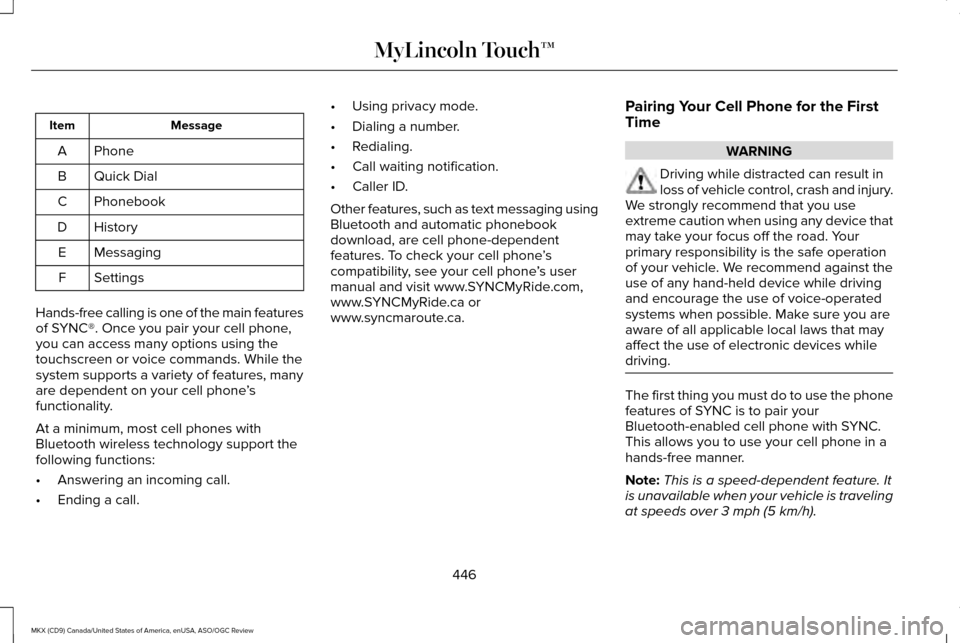
Message
Item
Phone
A
Quick Dial
B
Phonebook
C
History
D
Messaging
E
Settings
F
Hands-free calling is one of the main features
of SYNC®. Once you pair your cell phone,
you can access many options using the
touchscreen or voice commands. While the
system supports a variety of features, many
are dependent on your cell phone ’s
functionality.
At a minimum, most cell phones with
Bluetooth wireless technology support the
following functions:
• Answering an incoming call.
• Ending a call. •
Using privacy mode.
• Dialing a number.
• Redialing.
• Call waiting notification.
• Caller ID.
Other features, such as text messaging using
Bluetooth and automatic phonebook
download, are cell phone-dependent
features. To check your cell phone ’s
compatibility, see your cell phone ’s user
manual and visit www.SYNCMyRide.com,
www.SYNCMyRide.ca or
www.syncmaroute.ca. Pairing Your Cell Phone for the First
Time WARNING
Driving while distracted can result in
loss of vehicle control, crash and injury.
We strongly recommend that you use
extreme caution when using any device that
may take your focus off the road. Your
primary responsibility is the safe operation
of your vehicle. We recommend against the
use of any hand-held device while driving
and encourage the use of voice-operated
systems when possible. Make sure you are
aware of all applicable local laws that may
affect the use of electronic devices while
driving. The first thing you must do to use the phone
features of SYNC is to pair your
Bluetooth-enabled cell phone with SYNC.
This allows you to use your cell phone in a
hands-free manner.
Note:
This is a speed-dependent feature. It
is unavailable when your vehicle is traveling
at speeds over 3 mph (5 km/h).
446
MKX (CD9) Canada/United States of America, enUSA, ASO/OGC Review MyLincoln Touch™
Page 450 of 563
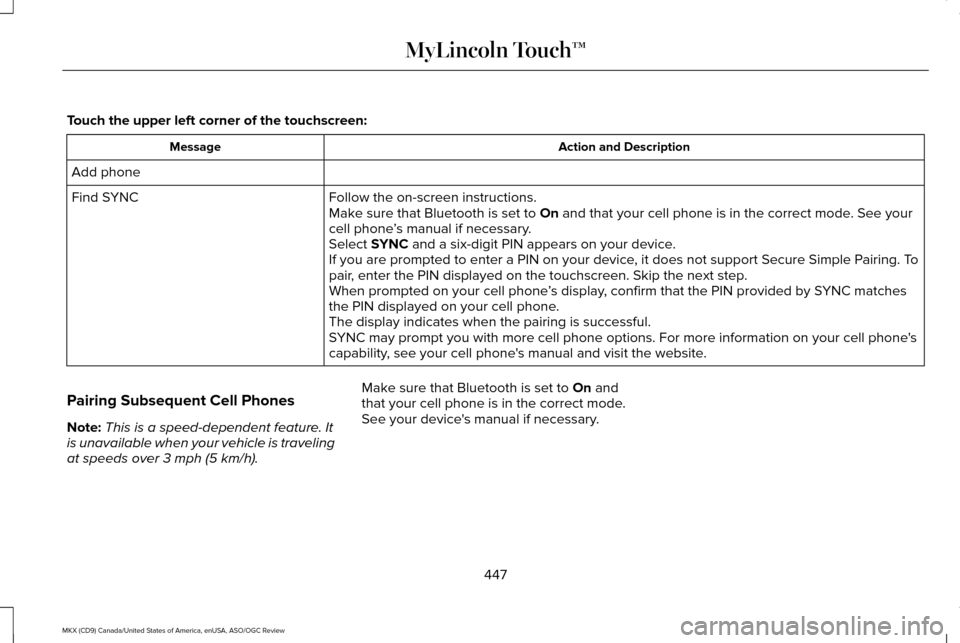
Touch the upper left corner of the touchscreen:
Action and Description
Message
Add phone Follow the on-screen instructions.
Find SYNC
Make sure that Bluetooth is set to On and that your cell phone is in the correct mode. See your
cell phone ’s manual if necessary.
Select
SYNC and a six-digit PIN appears on your device.
If you are prompted to enter a PIN on your device, it does not support Secure Simple Pairing. To
pair, enter the PIN displayed on the touchscreen. Skip the next step.
When prompted on your cell phone ’s display, confirm that the PIN provided by SYNC matches
the PIN displayed on your cell phone.
The display indicates when the pairing is successful.
SYNC may prompt you with more cell phone options. For more information on\
your cell phone's
capability, see your cell phone's manual and visit the website.
Pairing Subsequent Cell Phones
Note: This is a speed-dependent feature. It
is unavailable when your vehicle is traveling
at speeds over
3 mph (5 km/h). Make sure that Bluetooth is set to
On and
that your cell phone is in the correct mode.
See your device's manual if necessary.
447
MKX (CD9) Canada/United States of America, enUSA, ASO/OGC Review MyLincoln Touch™
Page 451 of 563
To pair a subsequent cell phone, select:
Action and Description
Menu Item
Phone
Settings
Bluetooth Devices
Add Device Follow the on-screen instructions.
Find SYNC
Make sure that Bluetooth is set to On and that your cell phone is in the correct mode. See your
cell phone ’s manual if necessary.
Select
SYNC and a six-digit PIN appears on your device.
If you are prompted to enter a PIN on your device, it does not support Secure Simple Pairing. To
pair, enter the PIN displayed on the touchscreen. Skip the next step.
When prompted on your cell phone ’s display, confirm that the PIN provided by SYNC matches
the PIN displayed on your cell phone.
The display indicates when the pairing is successful.
SYNC may prompt you with more cell phone options. For more information on\
your cell phone's
capability, see your cell phone's manual and visit the website.
Making Calls 448
MKX (CD9) Canada/United States of America, enUSA, ASO/OGC Review MyLincoln Touch™E142599
Page 452 of 563
Press the voice button and say a command
similar to the following:
Voice command
Call
Dial
You can say the name of a person from your
phone book to call or a say a number to dial.
For example "Call Jenny" or "Dial 867-5309". To end the call or exit phone
mode, press and hold the phone
button.
Receiving Calls
During an incoming call, an audible tone
sounds. Call information appears in the
display if it is available. To accept the call, select:
Message
Accept
Note: You can also accept the call by
pressing the phone button on the steering
wheel. To reject the call, select:
Message
Reject
Note: You can also reject the call by
pressing the phone button on the steering
wheel.
Ignore the call by doing nothing. SYNC logs
it as a missed call.
Phone Menu Options
Press the top left corner on the touchscreen
to select from the following options: Action and Description
Menu Item
Touch this button to access the on-screen numerical pad to enter a number\
and place a call. During
an active call, you can also choose any of these options:
Phone
Mute Call
Hold Call
449
MKX (CD9) Canada/United States of America, enUSA, ASO/OGC Review MyLincoln Touch™E142632 E142632
Page 457 of 563

Action and Description
Message
Select the ring tone you want to hear when you receive a call. Choose fr\
om possible system ring
tones, your currently paired cell phone ’s ring tone, a beep, text-to-speech or a silent notification.
Phone Ringer
Select a text message notification, if supported by your cell phone. Choose from possible system
alert tones, text-to-speech or silent.
Text Message Notification
If your cell phone is compatible, use this screen to adjust your internet data connection. Select to
make your connection profile with the personal area network or to turn off \
your connection. You
can also choose to adjust your settings or have the system always connec\
t, never connect when
roaming or query on connect. Press ? for more information.
Internet Data Connection
To access features such as automatic phonebook download, re-download your\
phonebook, add
contacts from your cell phone as well as delete or upload your phonebook\
.
Manage Phonebook
To have the system alert you when your cell phone is in roaming mode.
Roaming Warning
Phone Voice Commands 454
MKX (CD9) Canada/United States of America, enUSA, ASO/OGC Review MyLincoln Touch™E142599
Page 459 of 563
Menu Item
Item
SYNC Services
A
Travel Link
B
Alerts
C
Calendar
D
AppsE
Where Am I?
F If your vehicle is equipped with
Navigation, press the Information
button to access these features. If
your vehicle is not equipped with Navigation,
press the corner of the touchscreen with the
green tab. SYNC Services (If Equipped, United
States Only)
Note:
SYNC Services varies by trim level and
model year and may require a subscription.
Traffic alerts and turn-by-turn directions
available in select markets. Message and
data rates may apply. Ford Motor Company
reserves the right to change or discontinue
this product service at any time without prior
notification or incurring any future obligation.
Note: SYNC Services requires activation
before use. Visit www.SYNCMyRide.com to
register and check your eligibility for
complimentary services. Standard phone
and message rates may apply. Subscription
may be required. You must also have the
active SYNC Services Bluetooth-enabled
cellular phone paired and connected to the
system in order to connect to, and use, SYNC
Services. See Phone (page 445).
Note: This feature does not function properly
if you have enabled caller ID blocking on
your cellular phone. Make sure your cellular
phone is not blocking caller ID before using
SYNC Services. Note:
The driver is ultimately responsible for
the safe operation of the vehicle, and
therefore, must evaluate whether it is safe
to follow the suggested directions. Any
navigation features provided are only an aid.
Make your driving decisions based on your
observations of local conditions and existing
traffic regulations. Do not follow the route
suggestions if doing so would result in an
unsafe or illegal maneuver, if you would be
placed in an unsafe situation, or if you would
be directed into an area that you consider
unsafe. Maps used by this system may be
inaccurate because of errors, changes in
roads, traffic conditions or driving conditions.
456
MKX (CD9) Canada/United States of America, enUSA, ASO/OGC Review MyLincoln Touch™E142608