warning LINCOLN MKZ 2013 Workshop Manual
[x] Cancel search | Manufacturer: LINCOLN, Model Year: 2013, Model line: MKZ, Model: LINCOLN MKZ 2013Pages: 474, PDF Size: 3.79 MB
Page 103 of 474
GENERAL INFORMATION
WARNING
Driving while distracted can
result in loss of vehicle control,
accident and injury. Ford strongly
recommends that drivers use extreme
caution when using any device or
feature that may take their focus off
the road. Your primary responsibility
is the safe operation of the vehicle.
We recommend against the use of any
handheld device while driving and that
you comply with all applicable laws. Various systems on your vehicle can
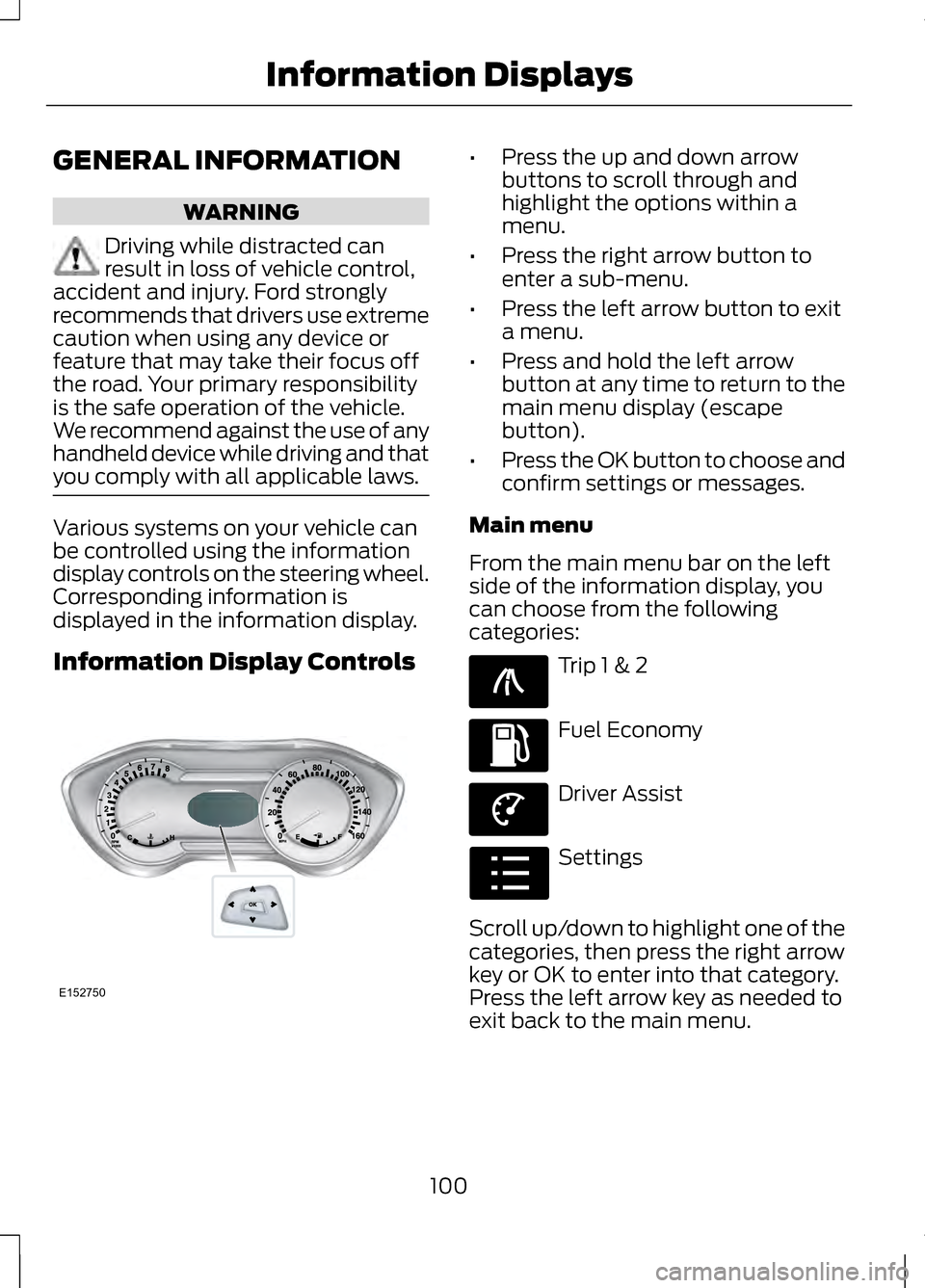
be controlled using the information
display controls on the steering wheel.
Corresponding information is
displayed in the information display.
Information Display Controls •
Press the up and down arrow
buttons to scroll through and
highlight the options within a
menu.
• Press the right arrow button to
enter a sub-menu.
• Press the left arrow button to exit
a menu.
• Press and hold the left arrow
button at any time to return to the
main menu display (escape
button).
• Press the OK button to choose and
confirm settings or messages.
Main menu
From the main menu bar on the left
side of the information display, you
can choose from the following
categories: Trip 1 & 2
Fuel Economy
Driver Assist
Settings
Scroll up/down to highlight one of the
categories, then press the right arrow
key or OK to enter into that category.
Press the left arrow key as needed to
exit back to the main menu.
100
Information DisplaysE152750 E138660 E144640 E144639 E100023
Page 111 of 474
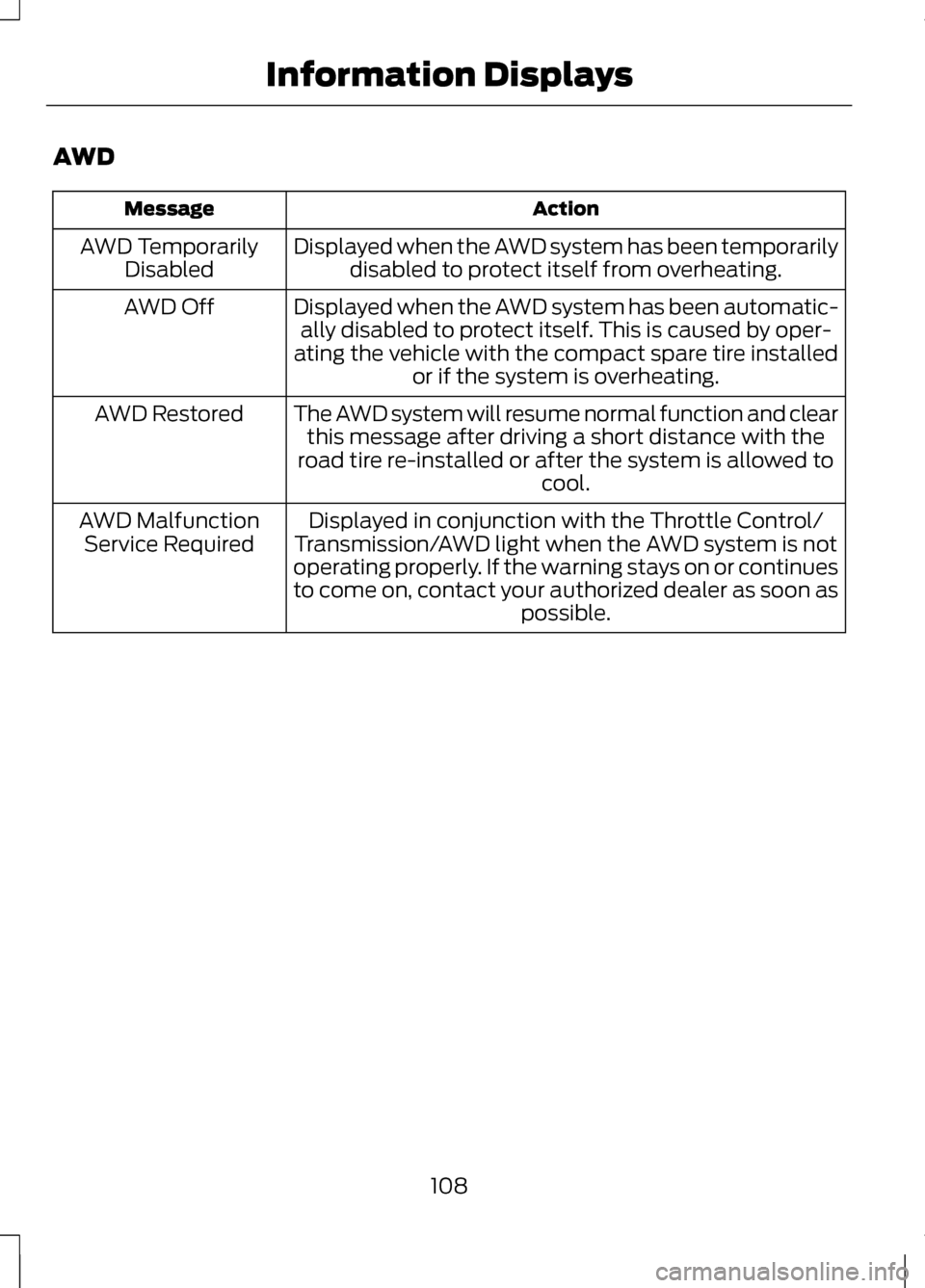
AWD
Action
Message
Displayed when the AWD system has been temporarilydisabled to protect itself from overheating.
AWD Temporarily
Disabled
Displayed when the AWD system has been automatic-ally disabled to protect itself. This is caused by oper-
ating the vehicle with the compact spare tire installed or if the system is overheating.
AWD Off
The AWD system will resume normal function and clearthis message after driving a short distance with the
road tire re-installed or after the system is allowed to cool.
AWD Restored
Displayed in conjunction with the Throttle Control/
Transmission/AWD light when the AWD system is not
operating properly. If the warning stays on or continues
to come on, contact your authorized dealer as soon as possible.
AWD Malfunction
Service Required
108
Information Displays
Page 112 of 474
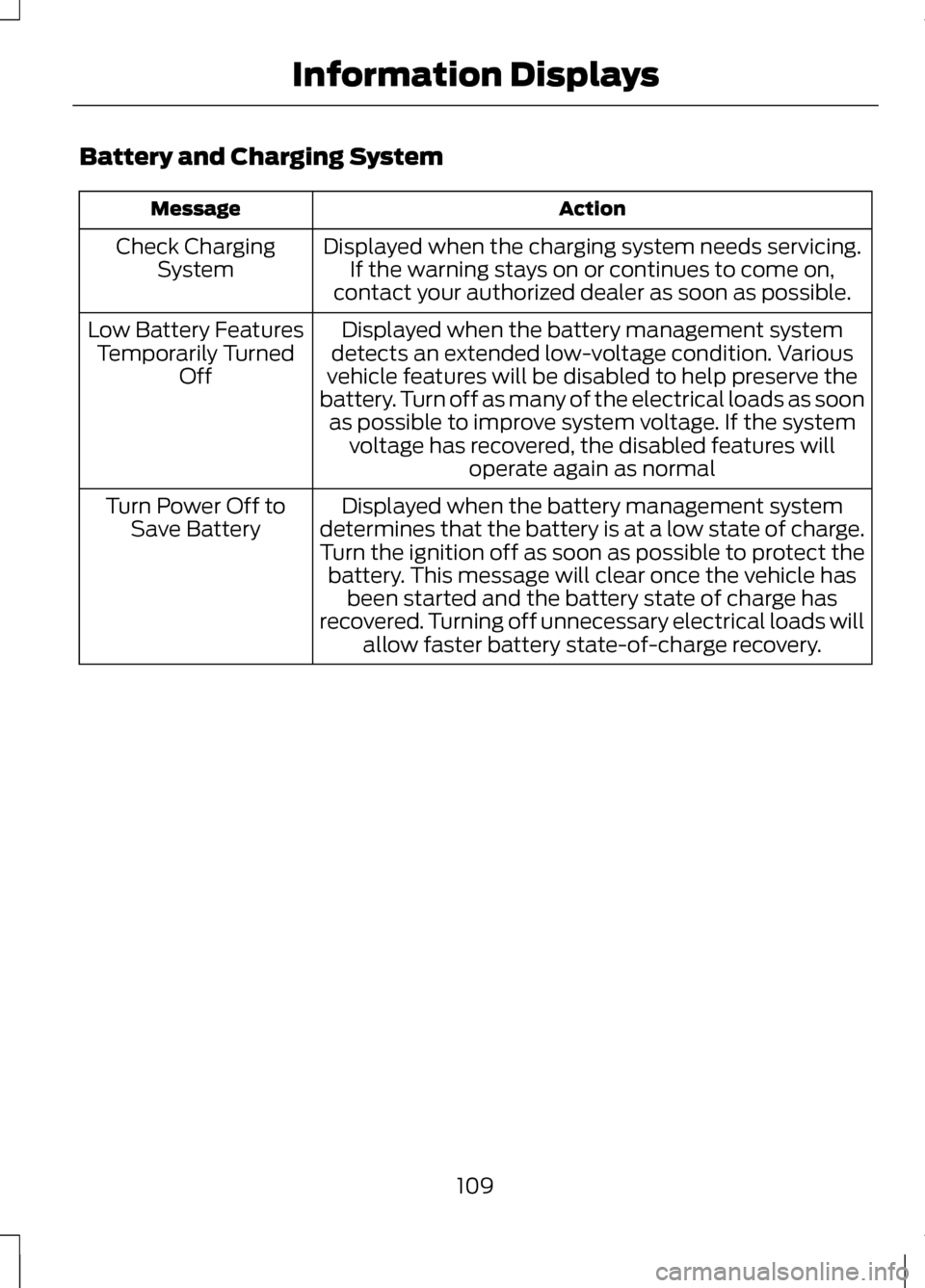
Battery and Charging System
Action
Message
Displayed when the charging system needs servicing.If the warning stays on or continues to come on,
contact your authorized dealer as soon as possible.
Check Charging
System
Displayed when the battery management system
detects an extended low-voltage condition. Various
vehicle features will be disabled to help preserve the
battery. Turn off as many of the electrical loads as soon as possible to improve system voltage. If the system voltage has recovered, the disabled features will operate again as normal
Low Battery Features
Temporarily Turned Off
Displayed when the battery management system
determines that the battery is at a low state of charge.
Turn the ignition off as soon as possible to protect the battery. This message will clear once the vehicle has been started and the battery state of charge has
recovered. Turning off unnecessary electrical loads will allow faster battery state-of-charge recovery.
Turn Power Off to
Save Battery
109
Information Displays
Page 113 of 474
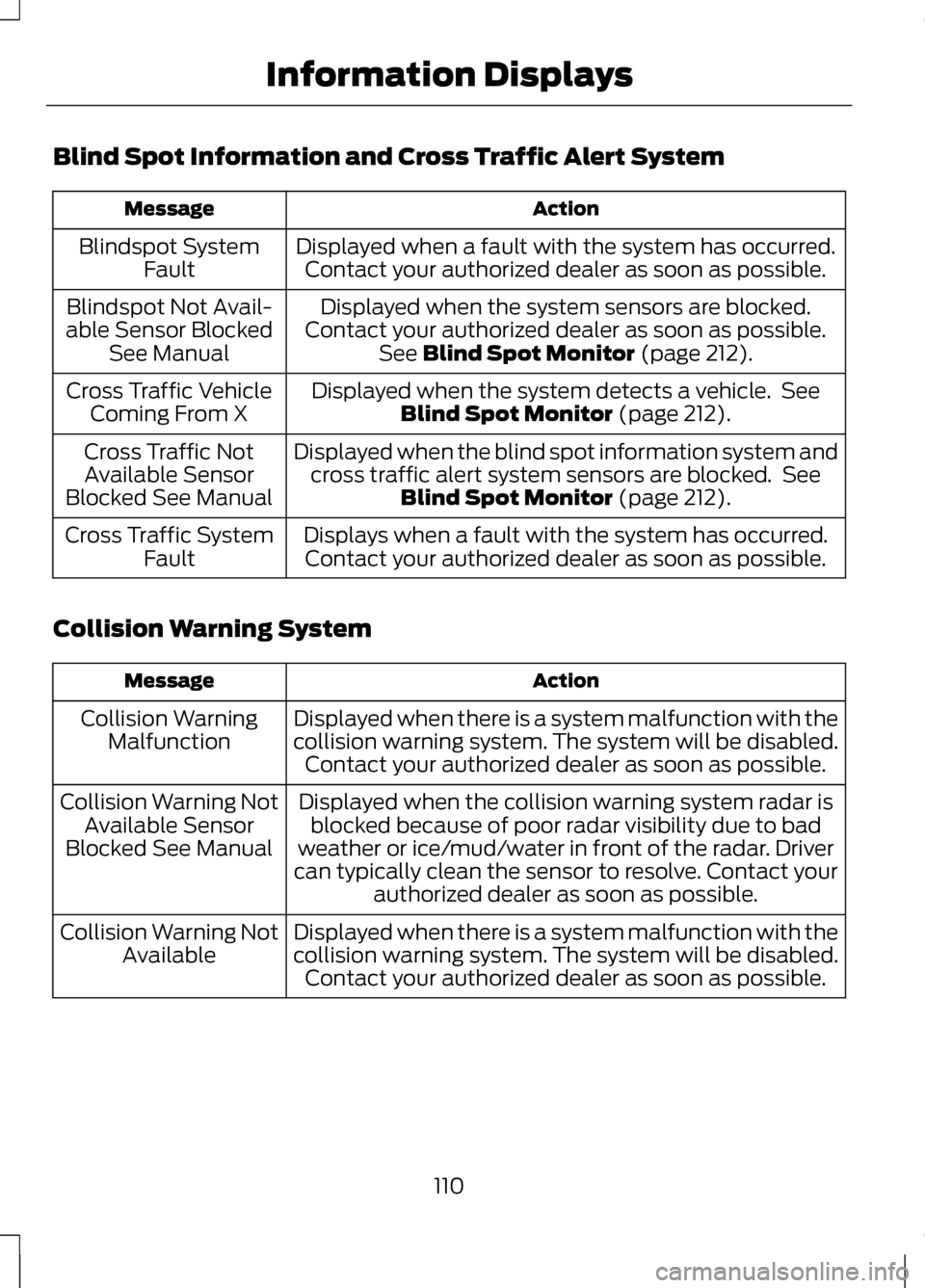
Blind Spot Information and Cross Traffic Alert System
Action
Message
Displayed when a fault with the system has occurred.Contact your authorized dealer as soon as possible.
Blindspot System
Fault
Displayed when the system sensors are blocked.
Contact your authorized dealer as soon as possible. See Blind Spot Monitor (page 212).
Blindspot Not Avail-
able Sensor Blocked See Manual
Displayed when the system detects a vehicle. SeeBlind Spot Monitor
(page 212).
Cross Traffic Vehicle
Coming From X
Displayed when the blind spot information system andcross traffic alert system sensors are blocked. See Blind Spot Monitor
(page 212).
Cross Traffic Not
Available Sensor
Blocked See Manual
Displays when a fault with the system has occurred.Contact your authorized dealer as soon as possible.
Cross Traffic System
Fault
Collision Warning System Action
Message
Displayed when there is a system malfunction with the
collision warning system. The system will be disabled.Contact your authorized dealer as soon as possible.
Collision Warning
Malfunction
Displayed when the collision warning system radar isblocked because of poor radar visibility due to bad
weather or ice/mud/water in front of the radar. Driver
can typically clean the sensor to resolve. Contact your authorized dealer as soon as possible.
Collision Warning Not
Available Sensor
Blocked See Manual
Displayed when there is a system malfunction with the
collision warning system. The system will be disabled.Contact your authorized dealer as soon as possible.
Collision Warning Not
Available
110
Information Displays
Page 114 of 474
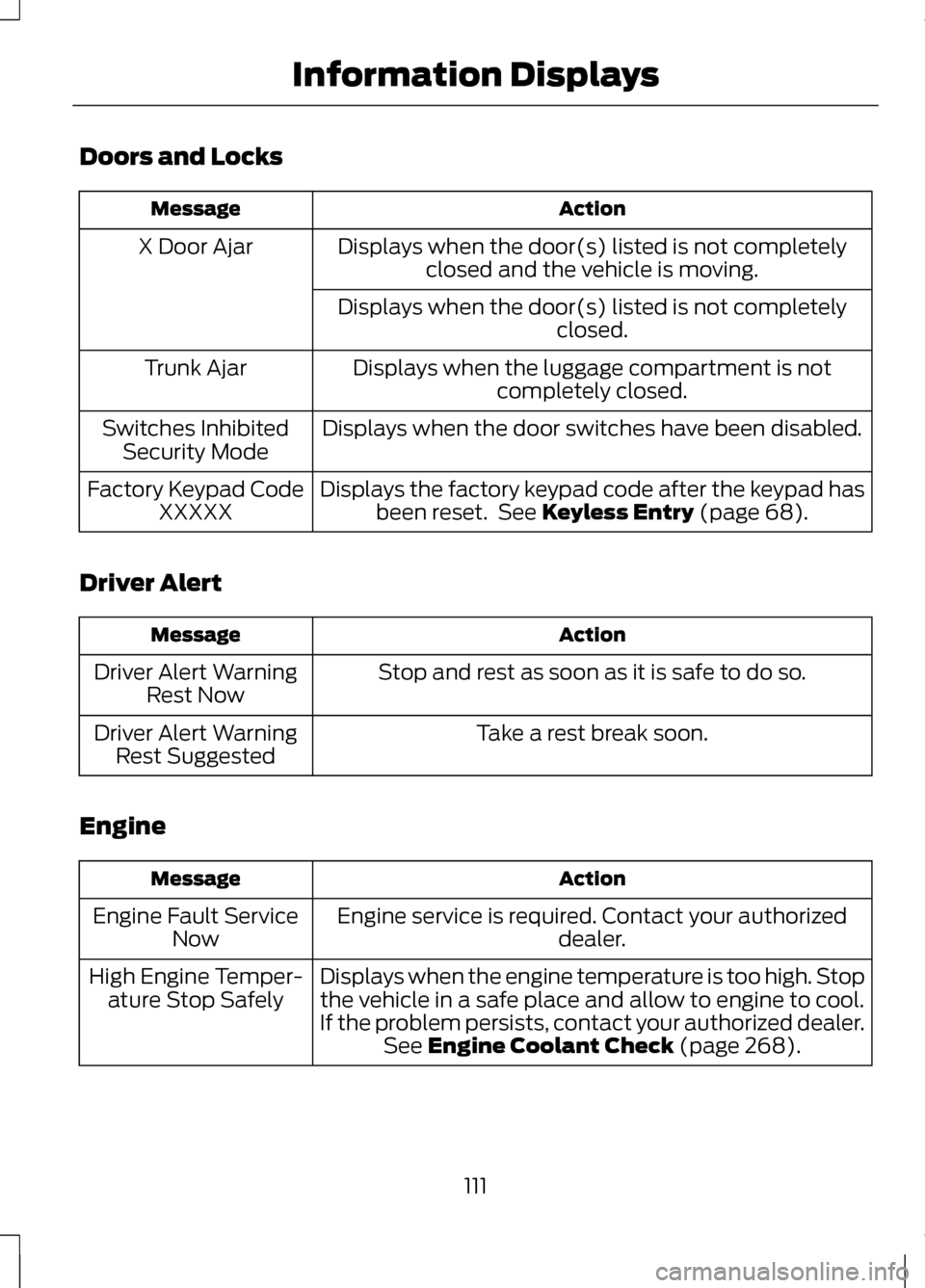
Doors and Locks
Action
Message
Displays when the door(s) listed is not completelyclosed and the vehicle is moving.
X Door Ajar
Displays when the door(s) listed is not completely closed.
Displays when the luggage compartment is not completely closed.
Trunk Ajar
Displays when the door switches have been disabled.
Switches Inhibited
Security Mode
Displays the factory keypad code after the keypad hasbeen reset. See Keyless Entry (page 68).
Factory Keypad Code
XXXXX
Driver Alert Action
Message
Stop and rest as soon as it is safe to do so.
Driver Alert Warning
Rest Now
Take a rest break soon.
Driver Alert Warning
Rest Suggested
Engine Action
Message
Engine service is required. Contact your authorized dealer.
Engine Fault Service
Now
Displays when the engine temperature is too high. Stopthe vehicle in a safe place and allow to engine to cool.
If the problem persists, contact your authorized dealer. See
Engine Coolant Check (page 268).
High Engine Temper-
ature Stop Safely
111
Information Displays
Page 117 of 474
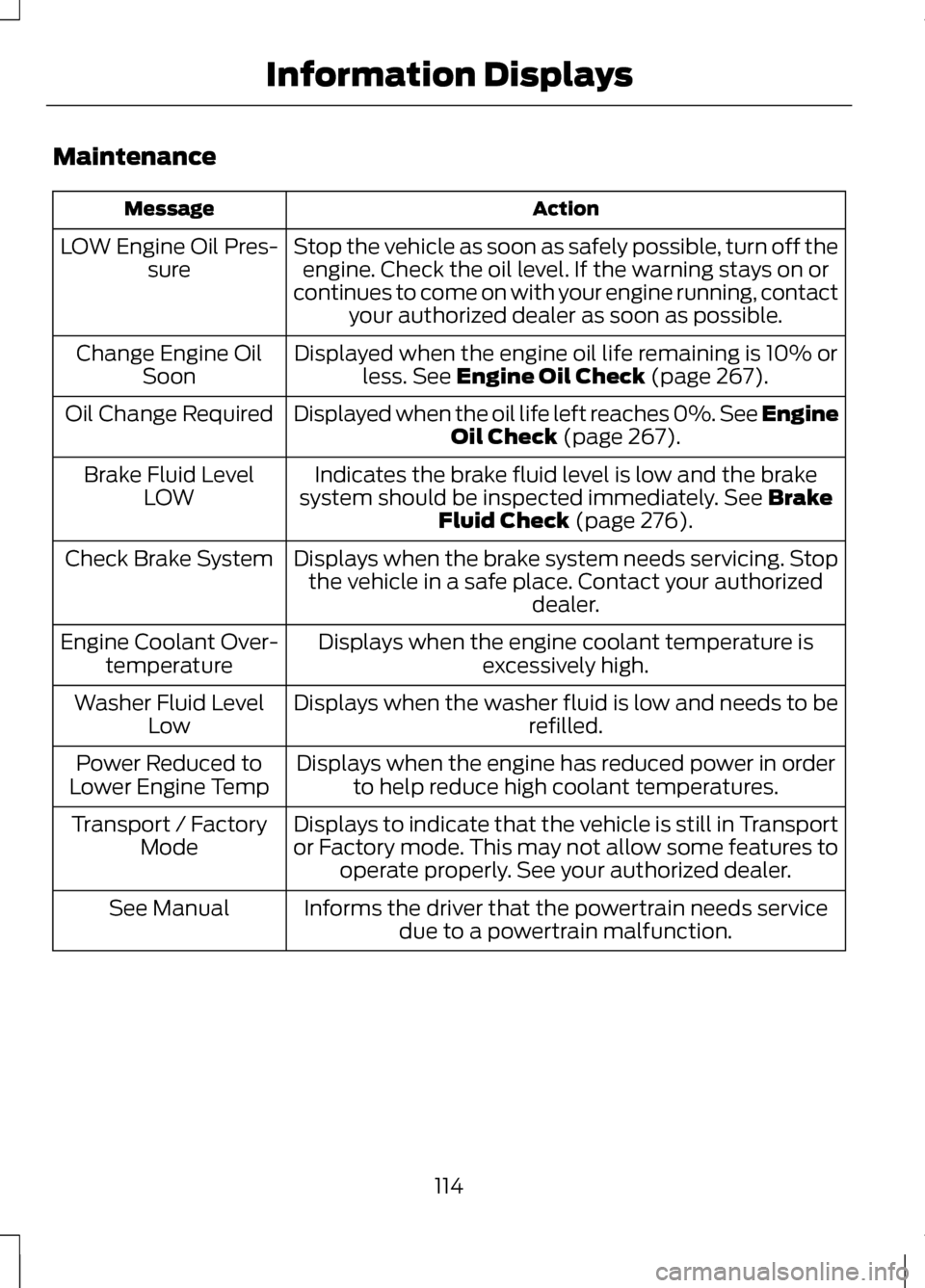
Maintenance
Action
Message
Stop the vehicle as soon as safely possible, turn off theengine. Check the oil level. If the warning stays on or
continues to come on with your engine running, contact your authorized dealer as soon as possible.
LOW Engine Oil Pres-
sure
Displayed when the engine oil life remaining is 10% orless. See Engine Oil Check (page 267).
Change Engine Oil
Soon
Displayed when the oil life left reaches 0%. See Engine Oil Check
(page 267).
Oil Change Required
Indicates the brake fluid level is low and the brake
system should be inspected immediately.
See Brake
Fluid Check (page 276).
Brake Fluid Level
LOW
Displays when the brake system needs servicing. Stopthe vehicle in a safe place. Contact your authorized dealer.
Check Brake System
Displays when the engine coolant temperature isexcessively high.
Engine Coolant Over-
temperature
Displays when the washer fluid is low and needs to be refilled.
Washer Fluid Level
Low
Displays when the engine has reduced power in orderto help reduce high coolant temperatures.
Power Reduced to
Lower Engine Temp
Displays to indicate that the vehicle is still in Transport
or Factory mode. This may not allow some features tooperate properly. See your authorized dealer.
Transport / Factory
Mode
Informs the driver that the powertrain needs servicedue to a powertrain malfunction.
See Manual
114
Information Displays
Page 119 of 474
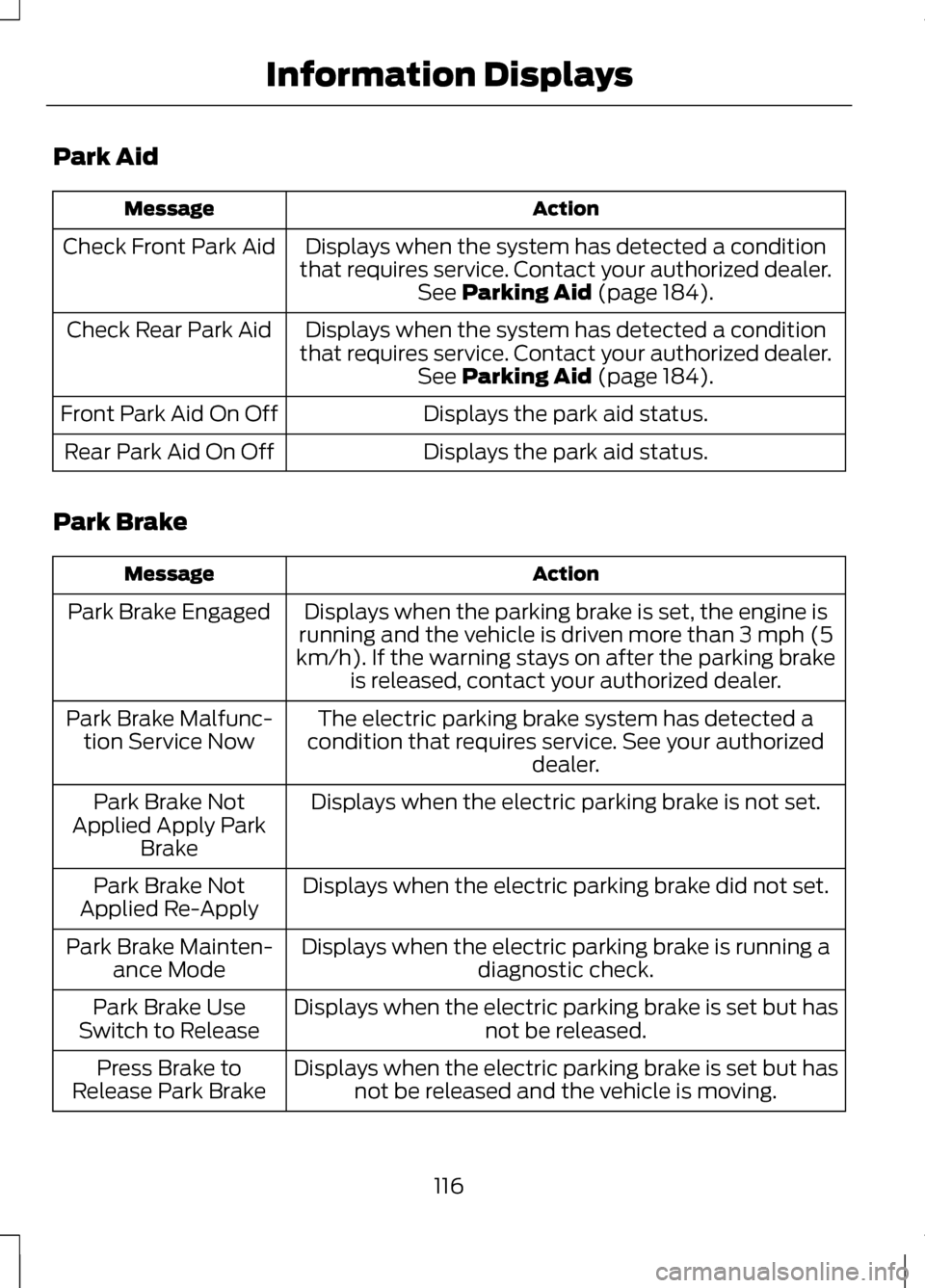
Park Aid
Action
Message
Displays when the system has detected a condition
that requires service. Contact your authorized dealer. See Parking Aid (page 184).
Check Front Park Aid
Displays when the system has detected a condition
that requires service. Contact your authorized dealer. See
Parking Aid (page 184).
Check Rear Park Aid
Displays the park aid status.
Front Park Aid On Off
Displays the park aid status.
Rear Park Aid On Off
Park Brake Action
Message
Displays when the parking brake is set, the engine is
running and the vehicle is driven more than 3 mph (5
km/h). If the warning stays on after the parking brake is released, contact your authorized dealer.
Park Brake Engaged
The electric parking brake system has detected a
condition that requires service. See your authorized dealer.
Park Brake Malfunc-
tion Service Now
Displays when the electric parking brake is not set.
Park Brake Not
Applied Apply Park Brake
Displays when the electric parking brake did not set.
Park Brake Not
Applied Re-Apply
Displays when the electric parking brake is running adiagnostic check.
Park Brake Mainten-
ance Mode
Displays when the electric parking brake is set but has not be released.
Park Brake Use
Switch to Release
Displays when the electric parking brake is set but hasnot be released and the vehicle is moving.
Press Brake to
Release Park Brake
116
Information Displays
Page 121 of 474
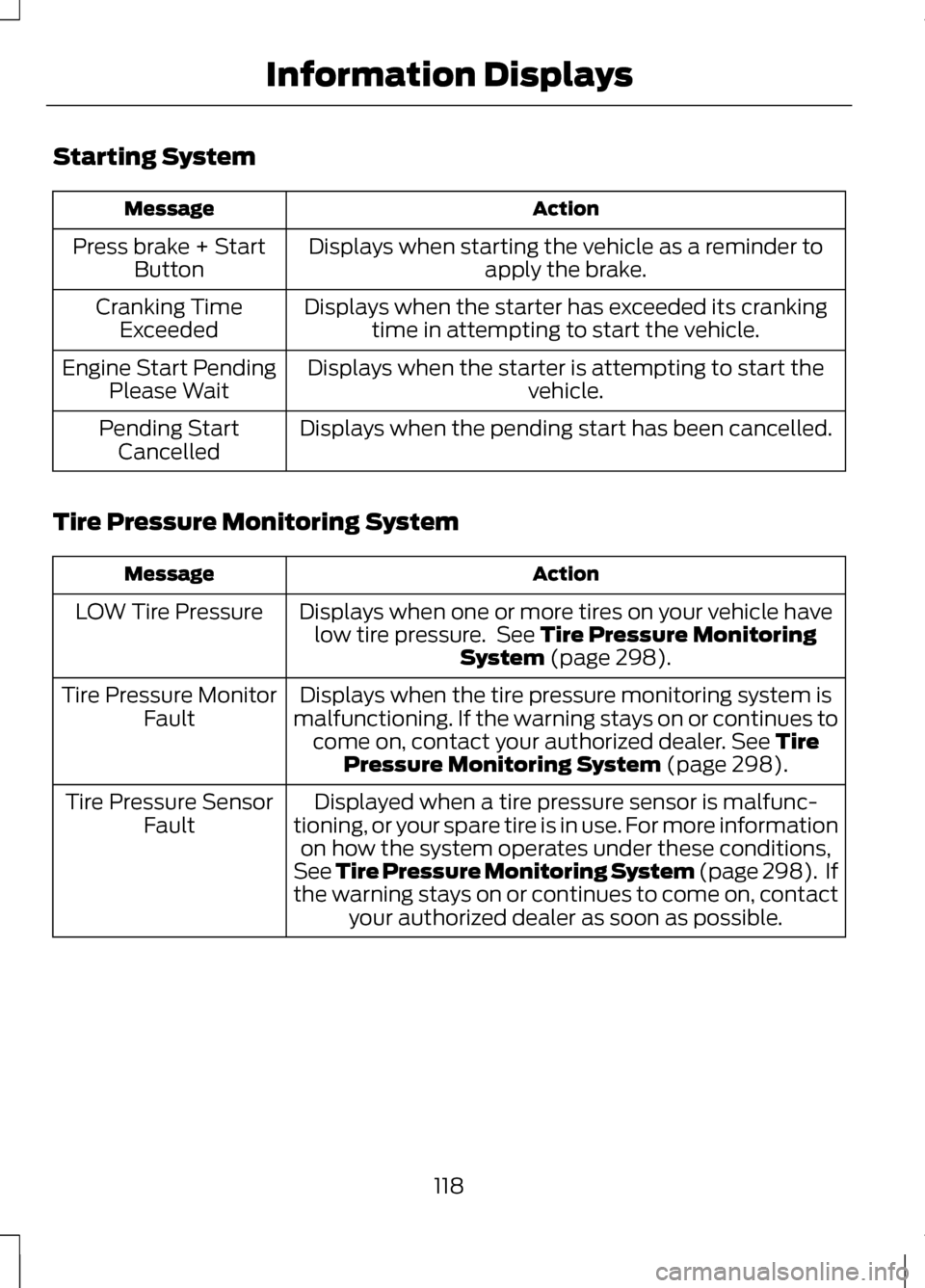
Starting System
Action
Message
Displays when starting the vehicle as a reminder toapply the brake.
Press brake + Start
Button
Displays when the starter has exceeded its crankingtime in attempting to start the vehicle.
Cranking Time
Exceeded
Displays when the starter is attempting to start the vehicle.
Engine Start Pending
Please Wait
Displays when the pending start has been cancelled.
Pending Start
Cancelled
Tire Pressure Monitoring System Action
Message
Displays when one or more tires on your vehicle havelow tire pressure. See Tire Pressure Monitoring
System (page 298).
LOW Tire Pressure
Displays when the tire pressure monitoring system is
malfunctioning. If the warning stays on or continues to come on, contact your authorized dealer.
See Tire
Pressure Monitoring System (page 298).
Tire Pressure Monitor
Fault
Displayed when a tire pressure sensor is malfunc-
tioning, or your spare tire is in use. For more information on how the system operates under these conditions,
See Tire Pressure Monitoring System (page 298). If
the warning stays on or continues to come on, contact your authorized dealer as soon as possible.
Tire Pressure Sensor
Fault
118
Information Displays
Page 126 of 474
Do not expose discs to direct sunlight
or heat sources for extended periods.
MP3 Track and Folder
Structure
Audio systems capable of recognizing
and playing MP3 individual tracks and
folder structures work as follows:
•
There are two different modes for
MP3 disc playback: MP3 track
mode (system default) and MP3
folder mode.
• MP3 track mode ignores any folder
structure on the MP3 disc. The
player numbers each MP3 track on
the disc (noted by the .mp3 file
extension) from T001 to a
maximum of T255. The maximum
number of playable MP3 files may
be less depending on the structure
of the CD and exact model of radio
present.
• MP3 folder mode represents a
folder structure consisting of one
level of folders. The CD player
numbers all MP3 tracks on the disc
(noted by the .mp3 file extension)
and all folders containing MP3
files, from F001 (folder) T001
(track) to F253 T255.
• Creating discs with only one level
of folders helps with navigation
through the disc files. If you are burning your own MP3 discs,
it is important to understand how the
system reads the structures you
create. While various files may be
present, (files with extensions other
than mp3), only files with the .mp3
extension are played; other files are
ignored by the system. This enables
you to use the same MP3 disc for a
variety of tasks on your work
computer, home computer and your
in-vehicle system.
In track mode, the system displays
and plays the structure as if it were
only one level deep (all .mp3 files
play, regardless of being in a specific
folder). In folder mode, the system
only plays the .mp3 files in the current
folder.
AUDIO UNIT - VEHICLES
WITH: PREMIUM
AM/FM/CD
WARNING
Driving while distracted can
result in loss of vehicle control,
accident and injury. Ford strongly
recommends that you use extreme
caution when using any device or
feature that may take your focus off
the road. Your primary responsibility
is the safe operation of the vehicle.
We recommend against the use of any
handheld device while driving,
encourage the use of voice-operated
systems when possible and that you
become aware of applicable state
and local laws that may affect use of
electronic devices while driving. 123
Audio System
Page 134 of 474
SITTING IN THE CORRECT
POSITION
WARNINGS
Sitting improperly, out of
position or with the seat back
reclined too far can take weight off
the seat cushion and affect the
decision of the passenger sensing
system, resulting in serious injury or
death in the event of a collision.
Always sit upright against your seat
back, with your feet on the floor. Do not recline the seat back as
this can cause the occupant to
slide under the safety belt, resulting
in serious injury in the event of a
collision. Do not place objects higher than
the seat back to reduce the risk
of serious injury in the event of a
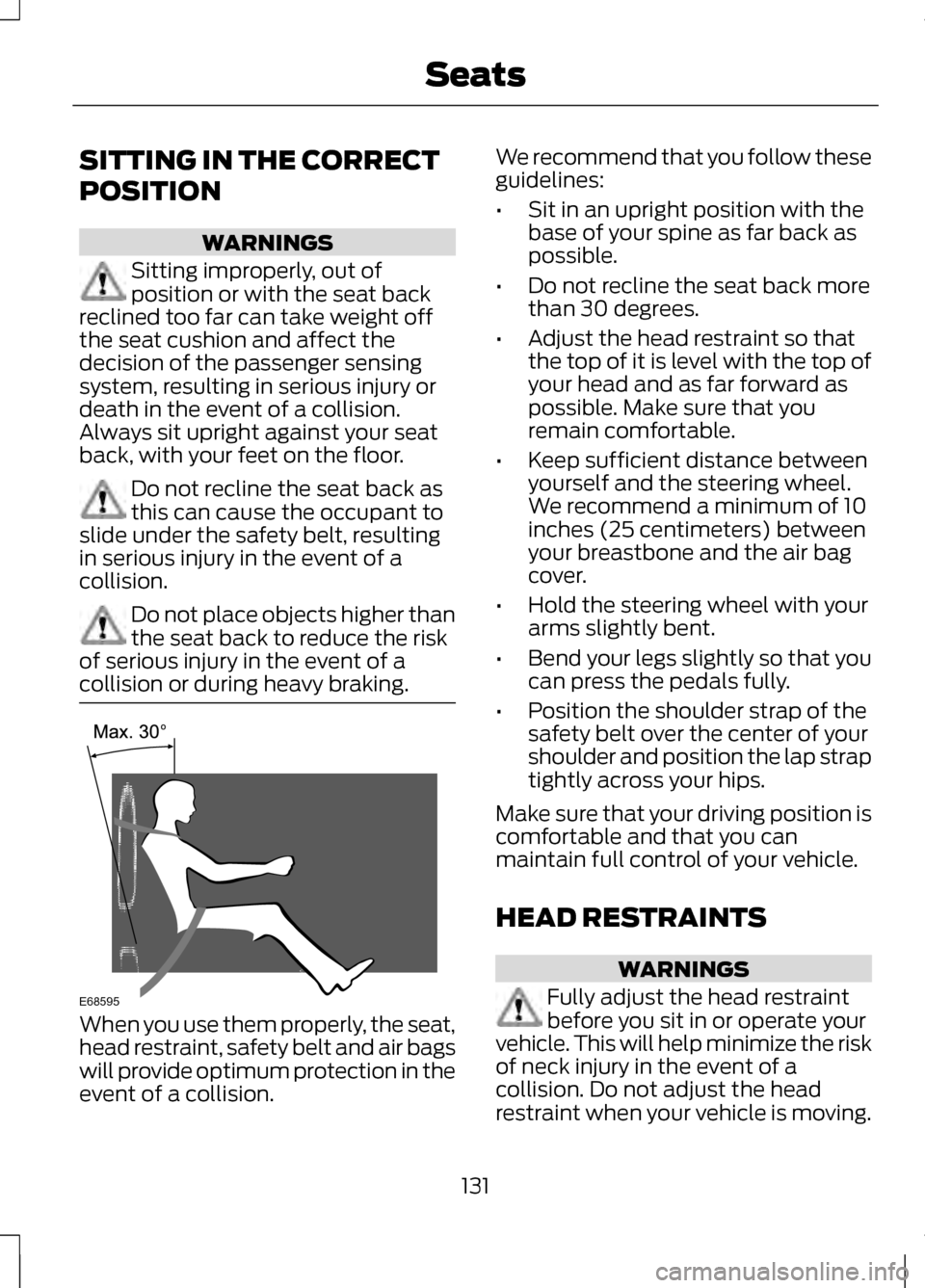
collision or during heavy braking. When you use them properly, the seat,
head restraint, safety belt and air bags
will provide optimum protection in the
event of a collision. We recommend that you follow these
guidelines:
•
Sit in an upright position with the
base of your spine as far back as
possible.
• Do not recline the seat back more
than 30 degrees.
• Adjust the head restraint so that
the top of it is level with the top of
your head and as far forward as
possible. Make sure that you
remain comfortable.
• Keep sufficient distance between
yourself and the steering wheel.
We recommend a minimum of 10
inches (25 centimeters) between
your breastbone and the air bag
cover.
• Hold the steering wheel with your
arms slightly bent.
• Bend your legs slightly so that you
can press the pedals fully.
• Position the shoulder strap of the
safety belt over the center of your
shoulder and position the lap strap
tightly across your hips.
Make sure that your driving position is
comfortable and that you can
maintain full control of your vehicle.
HEAD RESTRAINTS WARNINGS
Fully adjust the head restraint
before you sit in or operate your
vehicle. This will help minimize the risk
of neck injury in the event of a
collision. Do not adjust the head
restraint when your vehicle is moving.
131
SeatsE68595