warning LINCOLN MKZ 2013 Owner's Guide
[x] Cancel search | Manufacturer: LINCOLN, Model Year: 2013, Model line: MKZ, Model: LINCOLN MKZ 2013Pages: 474, PDF Size: 3.79 MB
Page 52 of 474
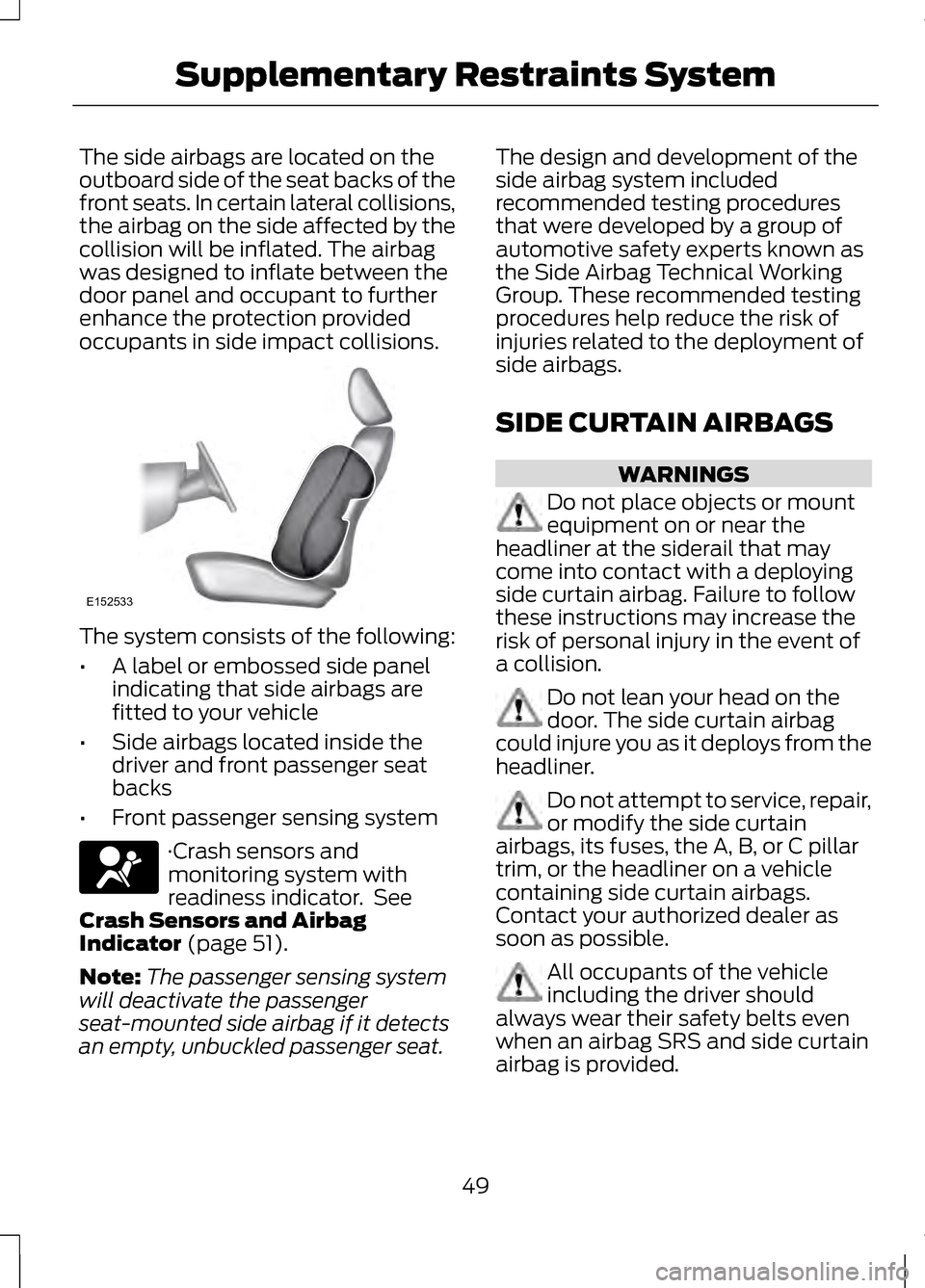
The side airbags are located on the
outboard side of the seat backs of the
front seats. In certain lateral collisions,
the airbag on the side affected by the
collision will be inflated. The airbag
was designed to inflate between the
door panel and occupant to further
enhance the protection provided
occupants in side impact collisions.
The system consists of the following:
•
A label or embossed side panel
indicating that side airbags are
fitted to your vehicle
• Side airbags located inside the
driver and front passenger seat
backs
• Front passenger sensing system ·Crash sensors and
monitoring system with
readiness indicator. See
Crash Sensors and Airbag
Indicator (page 51).
Note: The passenger sensing system
will deactivate the passenger
seat-mounted side airbag if it detects
an empty, unbuckled passenger seat. The design and development of the
side airbag system included
recommended testing procedures
that were developed by a group of
automotive safety experts known as
the Side Airbag Technical Working
Group. These recommended testing
procedures help reduce the risk of
injuries related to the deployment of
side airbags.
SIDE CURTAIN AIRBAGS
WARNINGS
Do not place objects or mount
equipment on or near the
headliner at the siderail that may
come into contact with a deploying
side curtain airbag. Failure to follow
these instructions may increase the
risk of personal injury in the event of
a collision. Do not lean your head on the
door. The side curtain airbag
could injure you as it deploys from the
headliner. Do not attempt to service, repair,
or modify the side curtain
airbags, its fuses, the A, B, or C pillar
trim, or the headliner on a vehicle
containing side curtain airbags.
Contact your authorized dealer as
soon as possible. All occupants of the vehicle
including the driver should
always wear their safety belts even
when an airbag SRS and side curtain
airbag is provided.
49
Supplementary Restraints SystemE152533
Page 53 of 474
WARNINGS
To reduce risk of injury, do not
obstruct or place objects in the
deployment path of the side curtain
airbag. If the side curtain airbags have
deployed, the side curtain
airbags will not function again. The
side curtain airbags (including the A,
B and C pillar trim and headliner)
must be inspected and serviced by an
authorized dealer. If the side curtain
airbag is not replaced, the unrepaired
area will increase the risk of injury in a
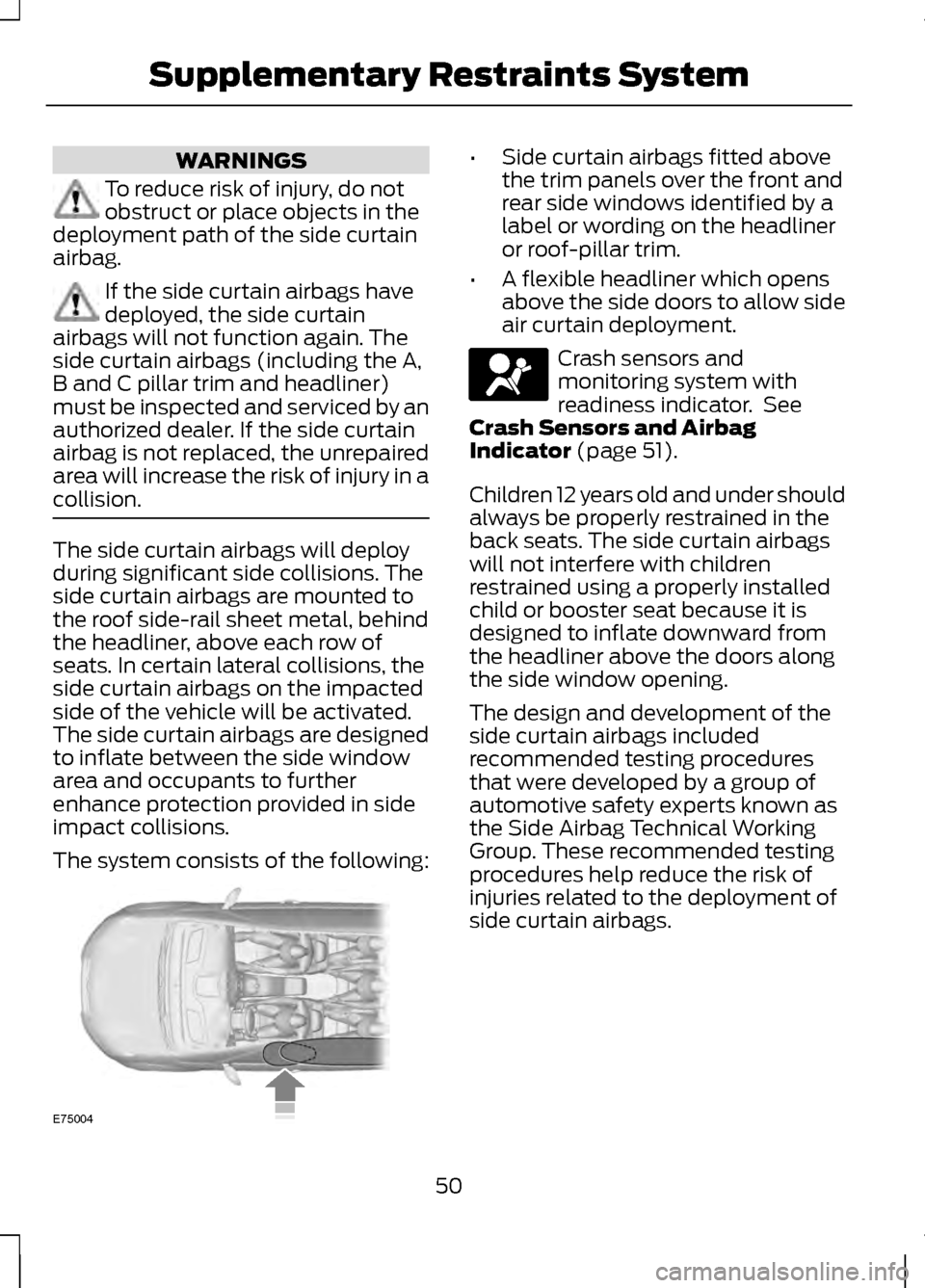
collision. The side curtain airbags will deploy
during significant side collisions. The
side curtain airbags are mounted to
the roof side-rail sheet metal, behind
the headliner, above each row of
seats. In certain lateral collisions, the
side curtain airbags on the impacted
side of the vehicle will be activated.
The side curtain airbags are designed
to inflate between the side window
area and occupants to further
enhance protection provided in side
impact collisions.
The system consists of the following: •
Side curtain airbags fitted above
the trim panels over the front and
rear side windows identified by a
label or wording on the headliner
or roof-pillar trim.
• A flexible headliner which opens
above the side doors to allow side
air curtain deployment. Crash sensors and
monitoring system with
readiness indicator. See
Crash Sensors and Airbag
Indicator (page 51).
Children 12 years old and under should
always be properly restrained in the
back seats. The side curtain airbags
will not interfere with children
restrained using a properly installed
child or booster seat because it is
designed to inflate downward from
the headliner above the doors along
the side window opening.
The design and development of the
side curtain airbags included
recommended testing procedures
that were developed by a group of
automotive safety experts known as
the Side Airbag Technical Working
Group. These recommended testing
procedures help reduce the risk of
injuries related to the deployment of
side curtain airbags.
50
Supplementary Restraints SystemE75004
Page 54 of 474
CRASH SENSORS AND
AIRBAG INDICATOR
WARNING
Modifying or adding equipment
to the front end of the vehicle
(including frame, bumper, front end
body structure and tow hooks) may
affect the performance of the airbag
system, increasing the risk of injury.
Do not modify the front end of the
vehicle. The vehicle has a collection of crash
and occupant sensors which provide
information to the Restraints Control
Module which deploys (activates) the
front safety belt pretensioners, driver
airbag, passenger airbag, knee
airbag(s), seat mounted side airbags,
and the side curtain airbags. Based on
the type of collision (frontal impact
or side impact), the restraints control
module will deploy the appropriate
safety devices.
The restraints control module also
monitors the readiness of the above
safety devices plus the crash and
occupant sensors. The readiness of
the safety system is indicated by a
warning indicator light in the
instrument cluster or by a backup tone
if the warning light is not working.
Routine maintenance of the airbag is
not required.
A difficulty with the system is
indicated by one or more of the
following: · The readiness light will not
illuminate immediately after
the ignition is turned on.
• The readiness light will either flash
or stay lit.
• A series of five beeps will be heard.
The tone pattern will repeat
periodically until the problem, the
light or both are repaired.
If any of these things happen, even
intermittently, have the supplemental
restraint system serviced at an
authorized dealer immediately. Unless
serviced, the system may not function
properly in the event of a collision.
The safety belt pretensioners and the
front airbag supplemental restraint
system are designed to activate when
the vehicle sustains longitudinal
deceleration sufficient to cause the
restraints control module to deploy a
safety device.
The fact that the safety belt
pretensioners or front airbags did not
activate for both front seat occupants
in a collision does not mean that
something is wrong with the system.
Rather, it means the restraints control
module determined the accident
conditions (crash severity, belt usage,
etc.) were not appropriate to activate
these safety devices.
51
Supplementary Restraints System
Page 58 of 474
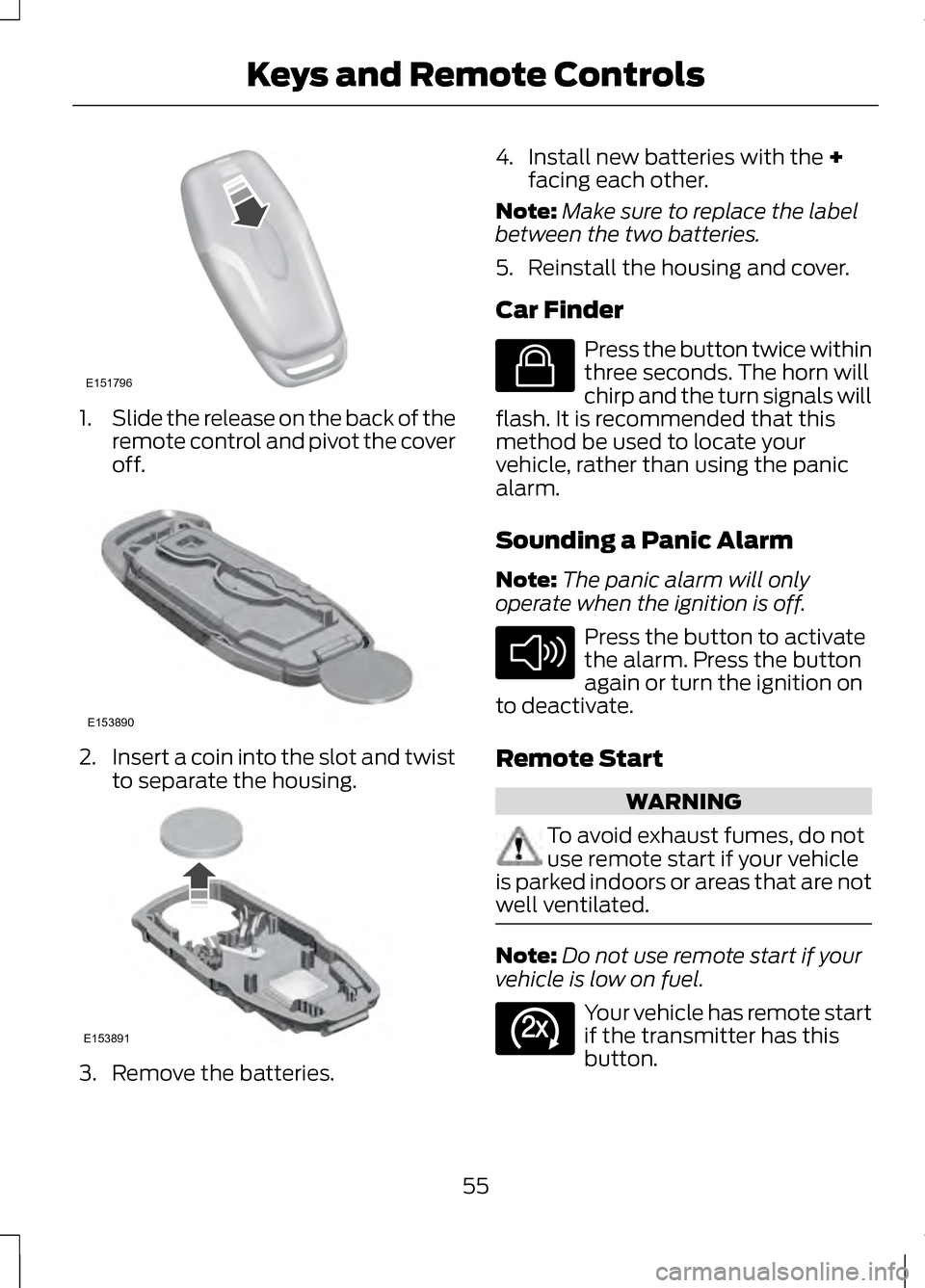
1.
Slide the release on the back of the
remote control and pivot the cover
off. 2.
Insert a coin into the slot and twist
to separate the housing. 3. Remove the batteries. 4. Install new batteries with the +
facing each other.
Note: Make sure to replace the label
between the two batteries.
5. Reinstall the housing and cover.
Car Finder Press the button twice within
three seconds. The horn will
chirp and the turn signals will
flash. It is recommended that this
method be used to locate your
vehicle, rather than using the panic
alarm.
Sounding a Panic Alarm
Note: The panic alarm will only
operate when the ignition is off. Press the button to activate
the alarm. Press the button
again or turn the ignition on
to deactivate.
Remote Start WARNING
To avoid exhaust fumes, do not
use remote start if your vehicle
is parked indoors or areas that are not
well ventilated. Note:
Do not use remote start if your
vehicle is low on fuel. Your vehicle has remote start
if the transmitter has this
button.
55
Keys and Remote ControlsE151796 E153890 E153891 E138623 E138624 E138625
Page 61 of 474
PRINCIPLE OF OPERATION
MyKey allows you to program keys
with restricted driving modes to
promote good driving habits. All but
one of the keys programmed to the
vehicle can be activated with these
restricted modes. Any keys that have
not been programmed are referred to
as an "administrator key" or "admin
key" which can be used to:
•
create a restricted key
• program optional MyKey settings
• clear all MyKey features
altogether.
Once a key has been programmed you
can access the following information
using the information display control:
• How many admin keys and MyKeys
are programmed to the vehicle.
• The total distance the vehicle has
been driven with a MyKey.
For vehicles equipped with intelligent
access key (push button start), when
both a MyKey and an admin intelligent
access key (fob) are present, the
admin fob will be recognized by the
vehicle to start the engine. Standard Settings
These settings cannot be changed.
•
Belt-Minder®. This cannot be
disabled and the five-minute timer
does not expire. The audio system
is muted when MyKey
Belt-Minder® is activated.
• Early low fuel. Warnings are
displayed in the information
display control followed by an
audible tone when the fuel tank is
at one-eighth tank or less.
• Driver assist features, if equipped
on your vehicle, are forced on: Rear
parking aid, Blind spot information
system (BLIS®) with cross traffic
alert, Lane departure warning,
Forward collision warning system
and Satellite radio adult content
restriction.
Optional Settings
These settings can be configured right
after a MyKey is first created or
changed afterward with an admin key.
• Vehicle speed limit of 65, 70, 75
and 80 mph (105, 113, 121 and 130
km/h). Visual warnings are
displayed followed by an audible
tone when vehicle speed has
reached the selected top speed.
• Vehicle speed minder of 45, 55 or
65 mph (75, 90, or 105 km/h).
Visual warnings are displayed
followed by an audible tone when
the preselected vehicle speed is
exceeded.
58
MyKey®
Page 69 of 474
Accessory Mode Battery Saver for
Intelligent Access Keys
If you switch off the engine and leave
the ignition in the on or accessory
mode, the ignition will shut off after
30 minutes.
Luggage Compartment
From Inside Your Vehicle
Press the button on the
instrument panel to unlatch
the trunk.
With the Remote Control Press twice within three
seconds to unlatch the trunk.
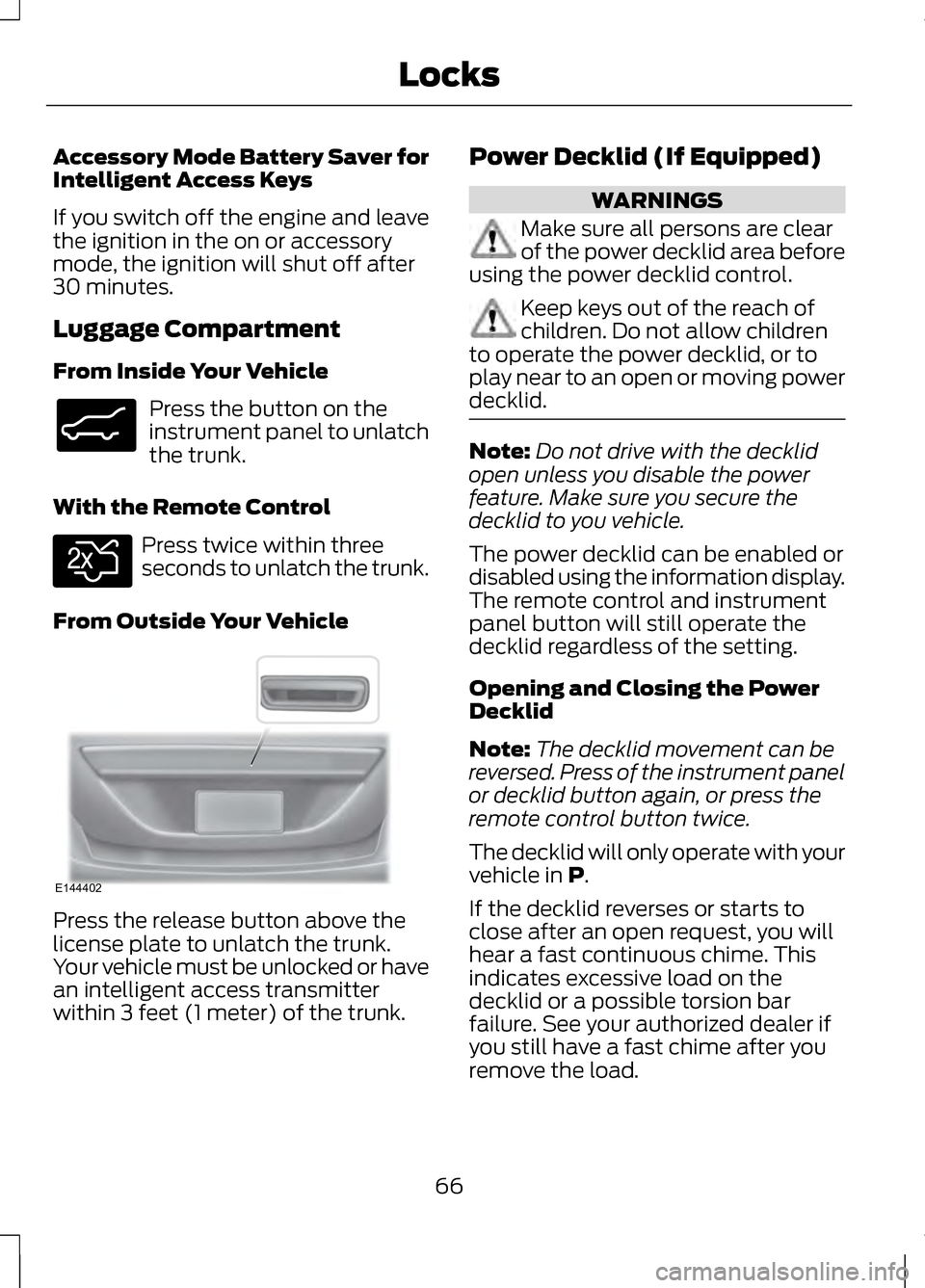
From Outside Your Vehicle Press the release button above the
license plate to unlatch the trunk.
Your vehicle must be unlocked or have
an intelligent access transmitter
within 3 feet (1 meter) of the trunk. Power Decklid (If Equipped) WARNINGS
Make sure all persons are clear
of the power decklid area before
using the power decklid control. Keep keys out of the reach of
children. Do not allow children
to operate the power decklid, or to
play near to an open or moving power
decklid. Note:
Do not drive with the decklid
open unless you disable the power
feature. Make sure you secure the
decklid to you vehicle.
The power decklid can be enabled or
disabled using the information display.
The remote control and instrument
panel button will still operate the
decklid regardless of the setting.
Opening and Closing the Power
Decklid
Note: The decklid movement can be
reversed. Press of the instrument panel
or decklid button again, or press the
remote control button twice.
The decklid will only operate with your
vehicle in P.
If the decklid reverses or starts to
close after an open request, you will
hear a fast continuous chime. This
indicates excessive load on the
decklid or a possible torsion bar
failure. See your authorized dealer if
you still have a fast chime after you
remove the load.
66
LocksE138633 E138630 E144402
Page 70 of 474
From Inside Your Vehicle
Press the button on the
instrument panel.
With the Remote Control Press twice within three
seconds.
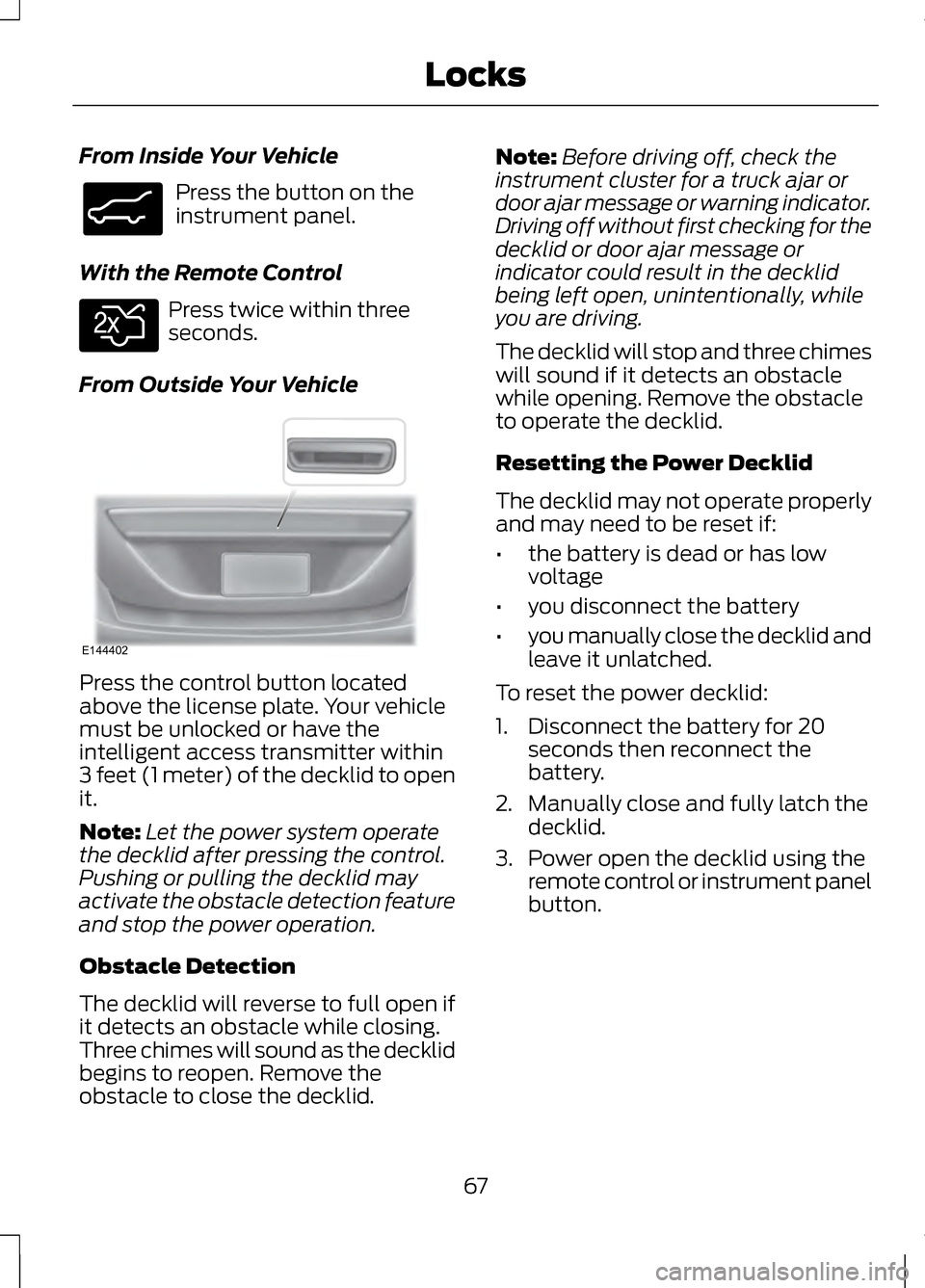
From Outside Your Vehicle Press the control button located
above the license plate. Your vehicle
must be unlocked or have the
intelligent access transmitter within
3 feet (1 meter) of the decklid to open
it.
Note:
Let the power system operate
the decklid after pressing the control.
Pushing or pulling the decklid may
activate the obstacle detection feature
and stop the power operation.
Obstacle Detection
The decklid will reverse to full open if
it detects an obstacle while closing.
Three chimes will sound as the decklid
begins to reopen. Remove the
obstacle to close the decklid. Note:
Before driving off, check the
instrument cluster for a truck ajar or
door ajar message or warning indicator.
Driving off without first checking for the
decklid or door ajar message or
indicator could result in the decklid
being left open, unintentionally, while
you are driving.
The decklid will stop and three chimes
will sound if it detects an obstacle
while opening. Remove the obstacle
to operate the decklid.
Resetting the Power Decklid
The decklid may not operate properly
and may need to be reset if:
• the battery is dead or has low
voltage
• you disconnect the battery
• you manually close the decklid and
leave it unlatched.
To reset the power decklid:
1. Disconnect the battery for 20 seconds then reconnect the
battery.
2. Manually close and fully latch the decklid.
3. Power open the decklid using the remote control or instrument panel
button.
67
LocksE138633 E138630 E144402
Page 73 of 474
To Release the Trunk
Enter the factory set code or your
personal code, then press 5·6 within
five seconds.
Displaying the Factory Set Code
Note: You will need to have two
programmed intelligent access keys
for this procedure.
To display the factory set code in the
information display:
1. Place the first programmed key in the backup slot at the bottom of
the cupholder (after removing the
rubber cover).
2. Press the
START/STOP button
once and wait a few seconds.
3. Press the
START/STOP button
again and remove the key.
4. Insert the second programmed key
into the backup slot, then press the
START/STOP
button.
The factory set code will appear in the
information display for a few seconds.
Note: The code may not display until
after any other warning messages first
display. INTERIOR LUGGAGE
COMPARTMENT RELEASE WARNINGS
Keep vehicle doors and luggage
compartment locked and keep
keys and remote transmitters out of
a child ’s reach. Unsupervised children
could lock themselves in the trunk and
risk injury. Children should be taught
not to play in vehicles. Do not leave children, unreliable
adults, or animals unattended in
the vehicle. On hot days, the
temperature in the trunk or vehicle
interior can rise very quickly. Exposure
of people or animals to these high
temperatures for even a short time
can cause death or serious
heat-related injuries, including brain
damage. Small children are
particularly at risk. Your vehicle is equipped with a
release handle that provides a means
of escape for children and adults if
they become locked inside the
luggage compartment.
Adults should familiarize themselves
with the operation and location of the
release handle.
70
Locks
Page 78 of 474
ADJUSTING THE STEERING
WHEEL
WARNING
Do not adjust the steering wheel
when your vehicle is moving.
Note:
Make sure that you are sitting in
the correct position. See Sitting in the
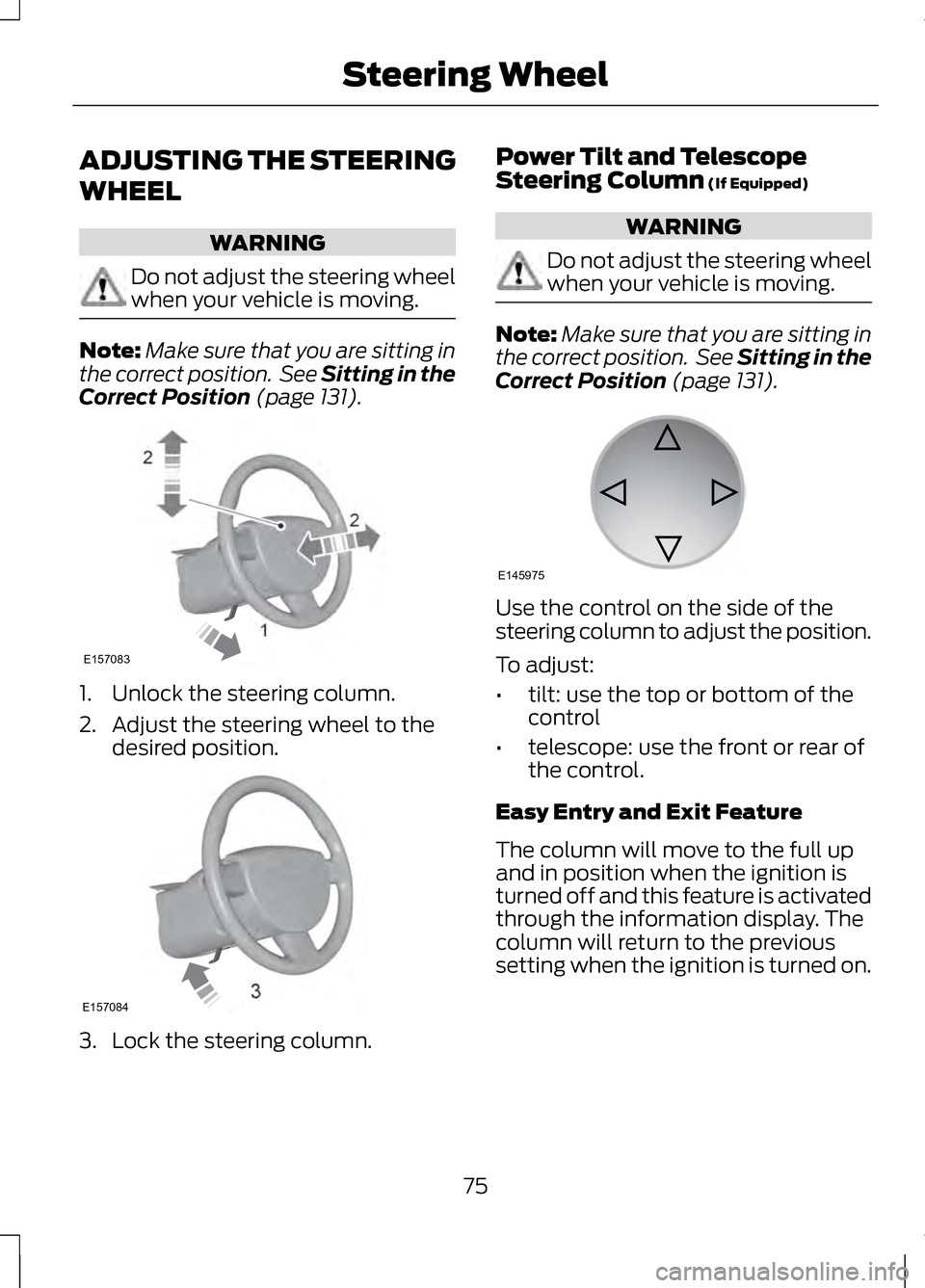
Correct Position (page 131). 1. Unlock the steering column.
2. Adjust the steering wheel to the
desired position. 3. Lock the steering column. Power Tilt and Telescope
Steering Column
(If Equipped) WARNING
Do not adjust the steering wheel
when your vehicle is moving.
Note:
Make sure that you are sitting in
the correct position. See Sitting in the
Correct Position
(page 131). Use the control on the side of the
steering column to adjust the position.
To adjust:
•
tilt: use the top or bottom of the
control
• telescope: use the front or rear of
the control.
Easy Entry and Exit Feature
The column will move to the full up
and in position when the ignition is
turned off and this feature is activated
through the information display. The
column will return to the previous
setting when the ignition is turned on.
75
Steering Wheel2
2
1E157083 E157084 E145975
Page 86 of 474
The headlamps will remain on for a
period of time after you switch the
ignition off. You can adjust the time
delay using the information display
controls. See Information Displays
(page ?).
Note: If you switch autolamps on in
conjunction with autowipers, low beam
headlamps will illuminate
automatically when the rain sensor
activates the windshield wipers
continuously.
INSTRUMENT LIGHTING
DIMMER
Note: If you disconnect and connect
the battery, or fully discharge and
charge the battery, the illuminated
components will switch to the
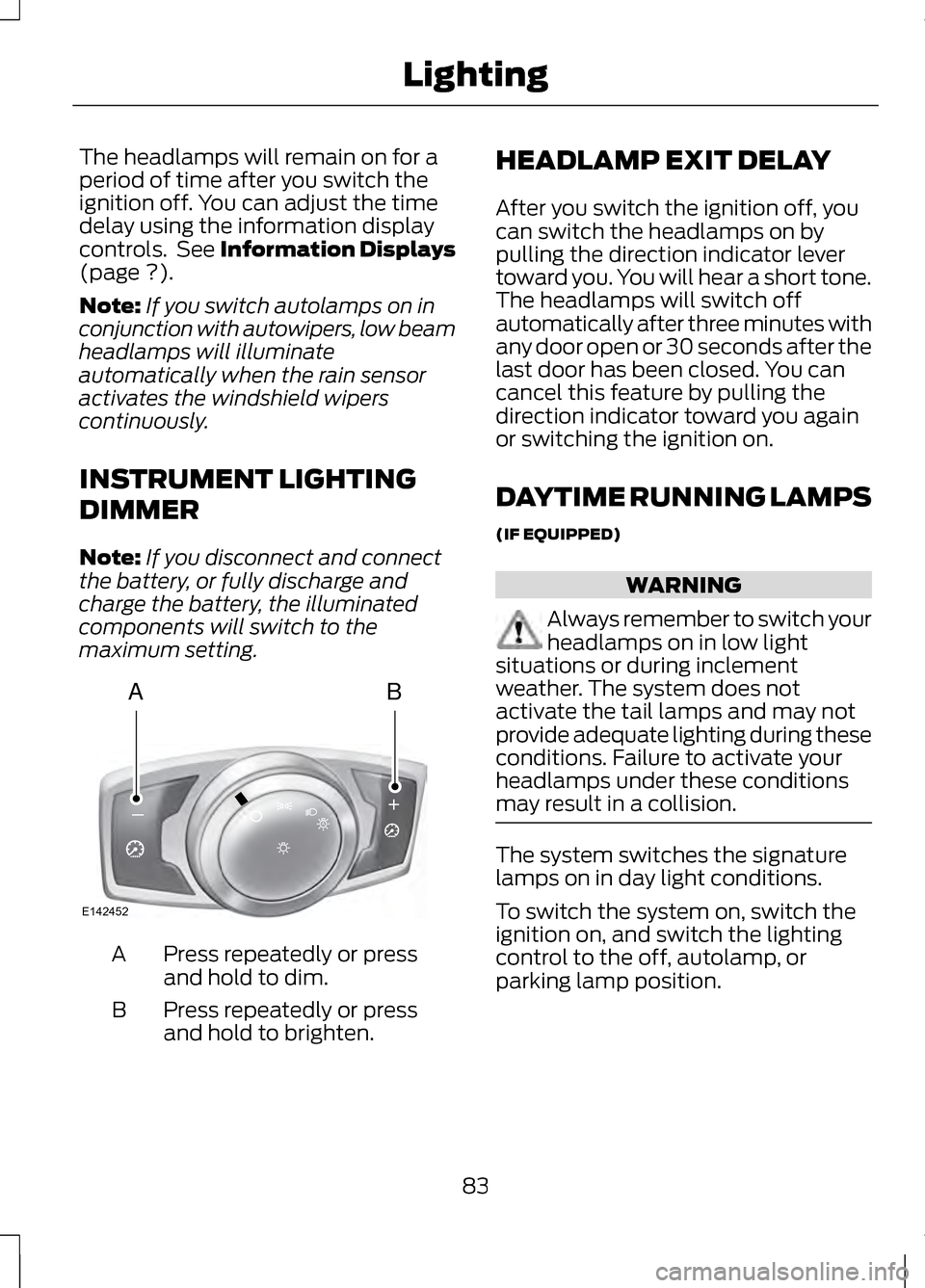
maximum setting. Press repeatedly or press
and hold to dim.
A
Press repeatedly or press
and hold to brighten.
B HEADLAMP EXIT DELAY
After you switch the ignition off, you
can switch the headlamps on by
pulling the direction indicator lever
toward you. You will hear a short tone.
The headlamps will switch off
automatically after three minutes with
any door open or 30 seconds after the
last door has been closed. You can
cancel this feature by pulling the
direction indicator toward you again
or switching the ignition on.
DAYTIME RUNNING LAMPS
(IF EQUIPPED)
WARNING
Always remember to switch your
headlamps on in low light
situations or during inclement
weather. The system does not
activate the tail lamps and may not
provide adequate lighting during these
conditions. Failure to activate your
headlamps under these conditions
may result in a collision. The system switches the signature
lamps on in day light conditions.
To switch the system on, switch the
ignition on, and switch the lighting
control to the off, autolamp, or
parking lamp position.
83
LightingAB
A
E142452