automatic transmission LINCOLN MKZ 2013 Owners Manual
[x] Cancel search | Manufacturer: LINCOLN, Model Year: 2013, Model line: MKZ, Model: LINCOLN MKZ 2013Pages: 474, PDF Size: 3.79 MB
Page 6 of 474
Universal Garage Door
Opener
Universal Garage Door Opener......142
Auxiliary Power Points
Auxiliary Power Points.......................147
Storage Compartments
Center Console....................................149
Overhead Console..............................149
Starting and Stopping the Engine
General Information
..........................150
Keyless Starting...................................150
Starting a Gasoline Engine..............152
Engine Block Heater
...........................153
Fuel and Refueling
Safety Precautions
.............................155
Fuel Quality
...........................................156
Running Out of Fuel...........................156
Refueling................................................158
Fuel Consumption
..............................160
Emission Control System..................161
Transmission
Automatic Transmission
..................165
Hill Start Assist
.....................................170
All-Wheel Drive
Using All-Wheel Drive.........................171
Brakes
General Information............................177 Hints on Driving With Anti-Lock
Brakes..................................................178
Electric Parking Brake
........................178
Traction Control
Principle of Operation
........................181
Using Traction Control.......................181
Stability Control
Principle of Operation.......................182
Using Stability Control......................183
Parking Aids
Parking Aid
............................................184
Active Park Assist...............................186
Rear View Camera...............................191
Cruise Control
Principle of Operation.......................195
Using Cruise Control..........................195
Using Adaptive Cruise Control
.......196
Driving Aids
Driver Alert............................................203
Lane Keeping System......................208
Blind Spot Monitor..............................212
Steering...................................................217
Load Carrying
Load Limit..............................................219
Towing
Towing a Trailer
....................................227
Recommended Towing Weights...............................................227
3
Table of Contents
Page 7 of 474
Essential Towing Checks.................229
Transporting the Vehicle...................231
Towing the Vehicle on Four
Wheels................................................232
Driving Hints
Breaking-In............................................235
Economical Driving
............................235
Driving Through Water.....................236
Floor Mats.............................................236
Roadside Emergencies
Roadside Assistance
........................238
Hazard Warning Flashers................239
Fuel Cut-Off Switch..........................239
Jump-Starting the Vehicle.............240
Customer Assistance
Getting the Services You Need......243
In California (U.S. Only)...................244
The Better Business Bureau (BBB) Auto Line Program (U.S.
Only)...................................................245
Utilizing the Mediation/Arbitration Program (Canada Only)..............247
Getting Assistance Outside the U.S. and Canada
......................................247
Ordering Additional Owner's Literature...........................................248
Reporting Safety Defects (U.S. Only)...................................................249
Reporting Safety Defects (Canada Only)...................................................250
Fuses
Changing a Fuse
..................................251
Fuse Specification Chart
.................252 Maintenance
General Information
..........................263
Opening and Closing the Hood.....264
Under Hood Overview - 2.0L EcoBoost™......................................265
Under Hood Overview - 3.7L..........266
Engine Oil Dipstick - 2.0L EcoBoost™.......................................267
Engine Oil Dipstick - 3.7L.................267
Engine Oil Check - 2.0L EcoBoost™/3.7L
............................267
Engine Coolant Check - 2.0L EcoBoost™/3.7L............................268
Automatic Transmission Fluid Check...................................................272
Brake Fluid Check
...............................276
Power Steering Fluid Check............276
Fuel Filter...............................................276
Washer Fluid Check
............................277
Changing the 12V Battery.................277
Checking the Wiper Blades
............279
Changing the Wiper Blades............279
Changing the Engine Air Filter - 2.0L EcoBoost™/3.7L............................280
Adjusting the Headlamps
................281
Removing a Headlamp
....................282
Changing a Bulb
.................................282
Bulb Specification Chart.................283
Vehicle Care
General Information
..........................284
Cleaning Products.............................284
Cleaning the Exterior........................284
Repairing Minor Paint Damage......285
Waxing...................................................285
Cleaning the Engine
..........................286
4
Table of Contents
Page 42 of 474
Deactivating and Activating the
Belt-Minder Feature
WARNING
While the system allows you to
deactivate it, this system is
designed to improve your chances of
being safely belted and surviving an
accident. We recommend you leave
the system activated for yourself and
others who may use the vehicle. To
reduce the risk of injury, do not
deactivate or activate the system
while driving the vehicle. Note:
The driver and front passenger
warning are deactivated and activated
independently. When deactivating or
activating one seating position, do not
buckle the other position as this will
terminate the process.
Read Steps 1 - 4 thoroughly before
proceeding with the deactivation or
activation programming procedure.
The system can be deactivated or
activated by performing the following
procedure:
Before following the procedure, make
sure that:
• the parking brake is set
• the transmission selector lever is
in position P (automatic
transmission) or N (manual
transmission)
• the ignition is off
• the driver and front passenger
safety belts are unbuckled.
1. Turn the ignition on. DO NOT START THE ENGINE. 2. Wait until the safety belt warning
light turns off (approximately one
minute). After Step 2, wait an
additional five seconds before
proceeding with Step 3. Once Step
3 is started, the procedure must be
completed within 30 seconds.
3. For the seating position being disabled, buckle then unbuckle the
safety belt three times at a
moderate speed, ending in the
unbuckled state. After Step 3, the
safety belt warning light will turn
on.
4. While the safety belt warning light
is on, buckle and then unbuckle the
safety belt. After Step 4, the safety
belt warning light will flash for
confirmation.
• This will disable the feature for
that seating position if it is
currently enabled.
• This will enable the feature for that
seating position if it is currently
disabled.
39
Safety Belts
Page 94 of 474
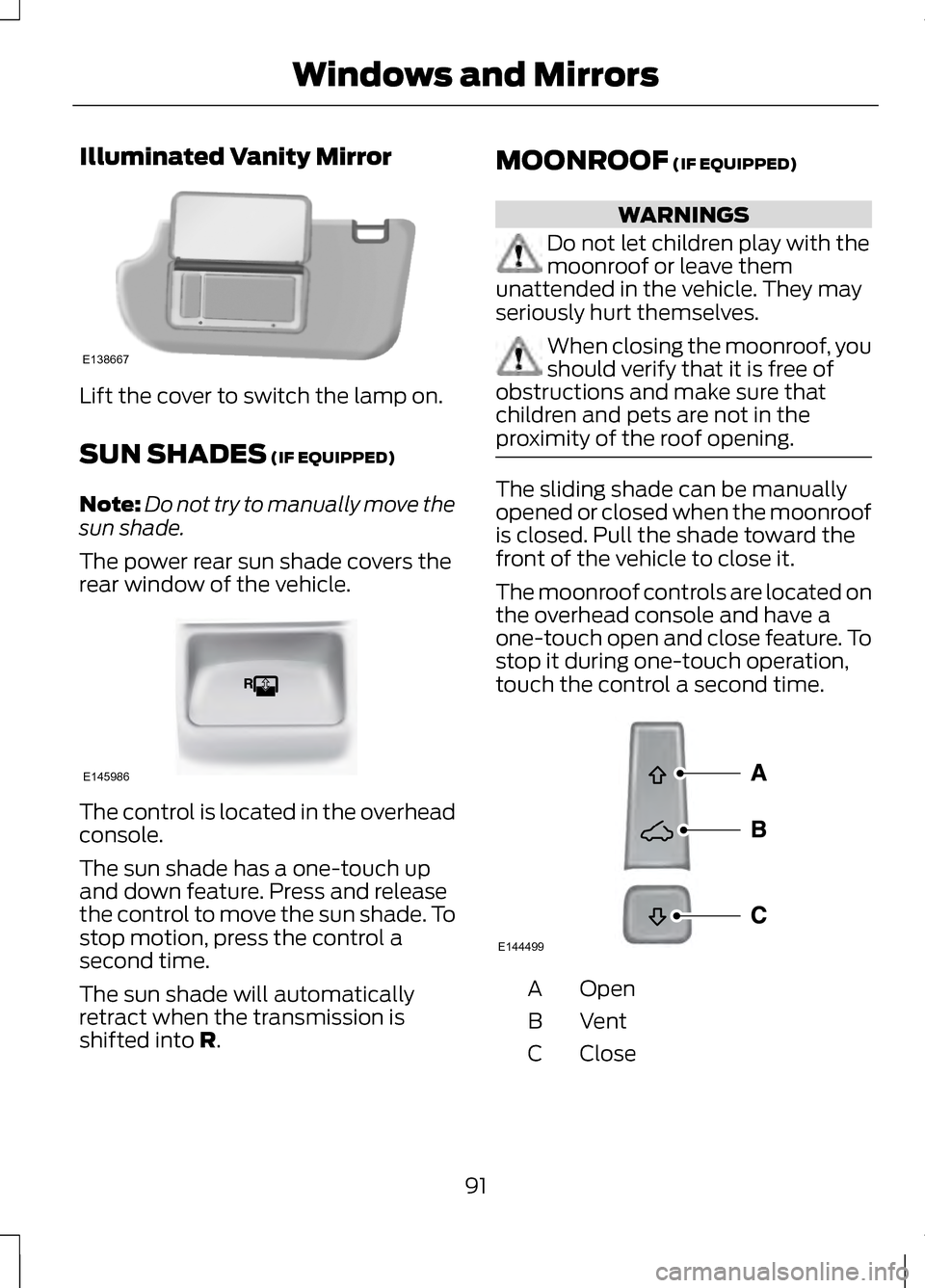
Illuminated Vanity Mirror
Lift the cover to switch the lamp on.
SUN SHADES (IF EQUIPPED)
Note: Do not try to manually move the
sun shade.
The power rear sun shade covers the
rear window of the vehicle. The control is located in the overhead
console.
The sun shade has a one-touch up
and down feature. Press and release
the control to move the sun shade. To
stop motion, press the control a
second time.
The sun shade will automatically
retract when the transmission is
shifted into
R. MOONROOF
(IF EQUIPPED) WARNINGS
Do not let children play with the
moonroof or leave them
unattended in the vehicle. They may
seriously hurt themselves. When closing the moonroof, you
should verify that it is free of
obstructions and make sure that
children and pets are not in the
proximity of the roof opening. The sliding shade can be manually
opened or closed when the moonroof
is closed. Pull the shade toward the
front of the vehicle to close it.
The moonroof controls are located on
the overhead console and have a
one-touch open and close feature. To
stop it during one-touch operation,
touch the control a second time.
Open
A
VentB
Close
C
91
Windows and MirrorsE138667 E145986 E144499
Page 109 of 474
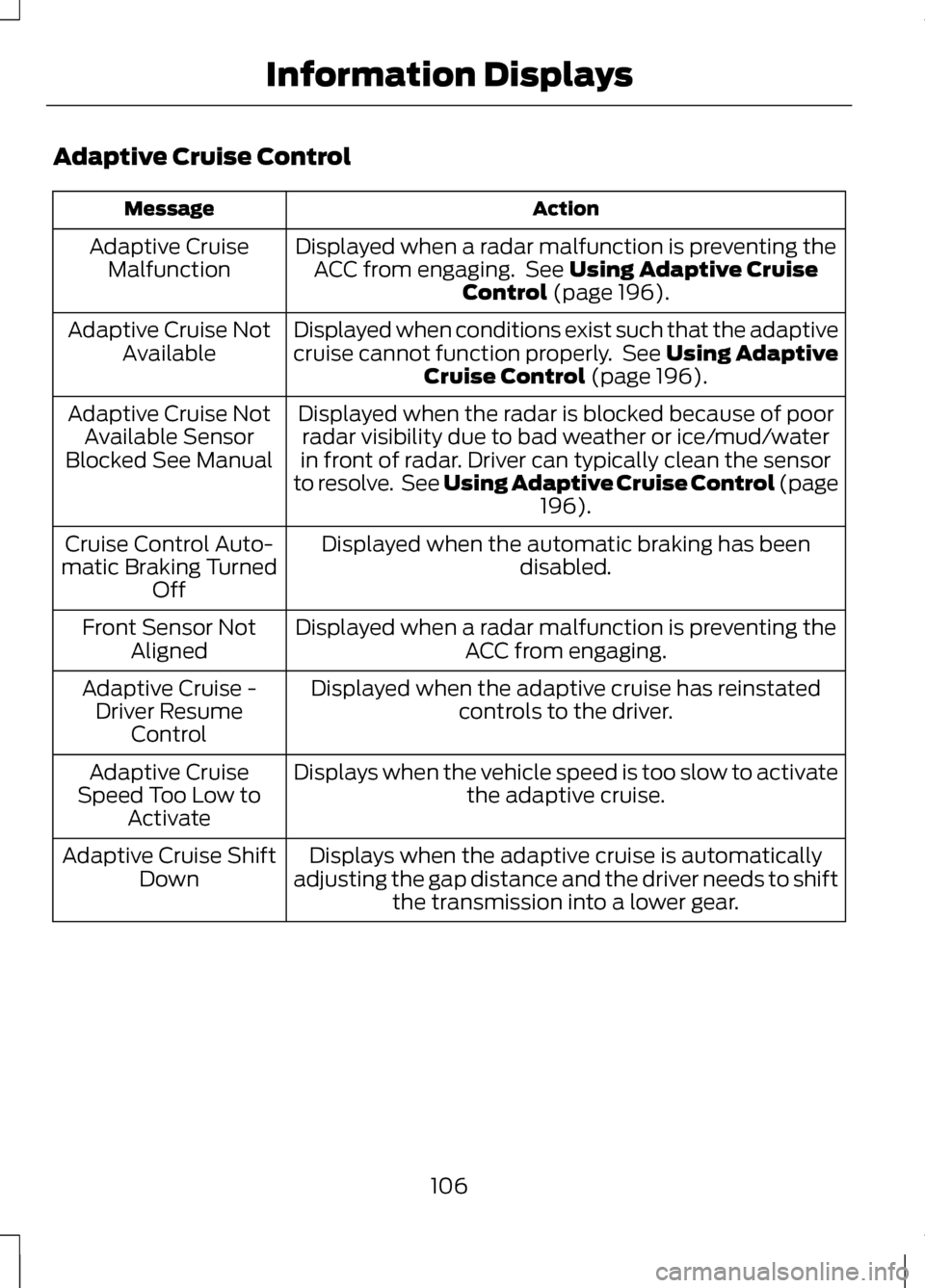
Adaptive Cruise Control
Action
Message
Displayed when a radar malfunction is preventing theACC from engaging. See Using Adaptive Cruise
Control (page 196).
Adaptive Cruise
Malfunction
Displayed when conditions exist such that the adaptive
cruise cannot function properly. See Using AdaptiveCruise Control
(page 196).
Adaptive Cruise Not
Available
Displayed when the radar is blocked because of poorradar visibility due to bad weather or ice/mud/water
in front of radar. Driver can typically clean the sensor
to resolve. See Using Adaptive Cruise Control
(page
196).
Adaptive Cruise Not
Available Sensor
Blocked See Manual
Displayed when the automatic braking has beendisabled.
Cruise Control Auto-
matic Braking Turned Off
Displayed when a radar malfunction is preventing the ACC from engaging.
Front Sensor Not
Aligned
Displayed when the adaptive cruise has reinstatedcontrols to the driver.
Adaptive Cruise -
Driver Resume Control
Displays when the vehicle speed is too slow to activate the adaptive cruise.
Adaptive Cruise
Speed Too Low to Activate
Displays when the adaptive cruise is automatically
adjusting the gap distance and the driver needs to shift the transmission into a lower gear.
Adaptive Cruise Shift
Down
106
Information Displays
Page 111 of 474
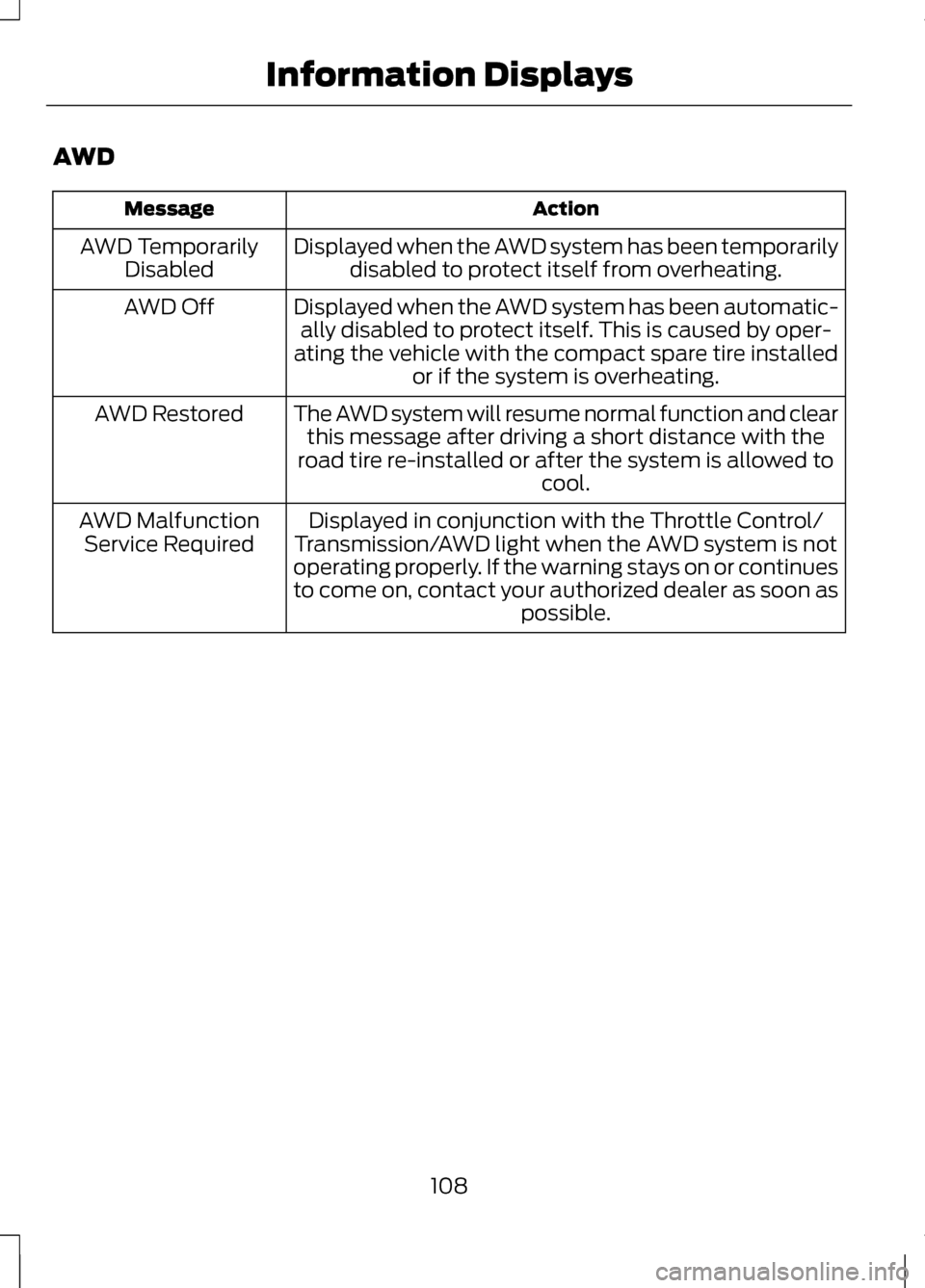
AWD
Action
Message
Displayed when the AWD system has been temporarilydisabled to protect itself from overheating.
AWD Temporarily
Disabled
Displayed when the AWD system has been automatic-ally disabled to protect itself. This is caused by oper-
ating the vehicle with the compact spare tire installed or if the system is overheating.
AWD Off
The AWD system will resume normal function and clearthis message after driving a short distance with the
road tire re-installed or after the system is allowed to cool.
AWD Restored
Displayed in conjunction with the Throttle Control/
Transmission/AWD light when the AWD system is not
operating properly. If the warning stays on or continues
to come on, contact your authorized dealer as soon as possible.
AWD Malfunction
Service Required
108
Information Displays
Page 122 of 474
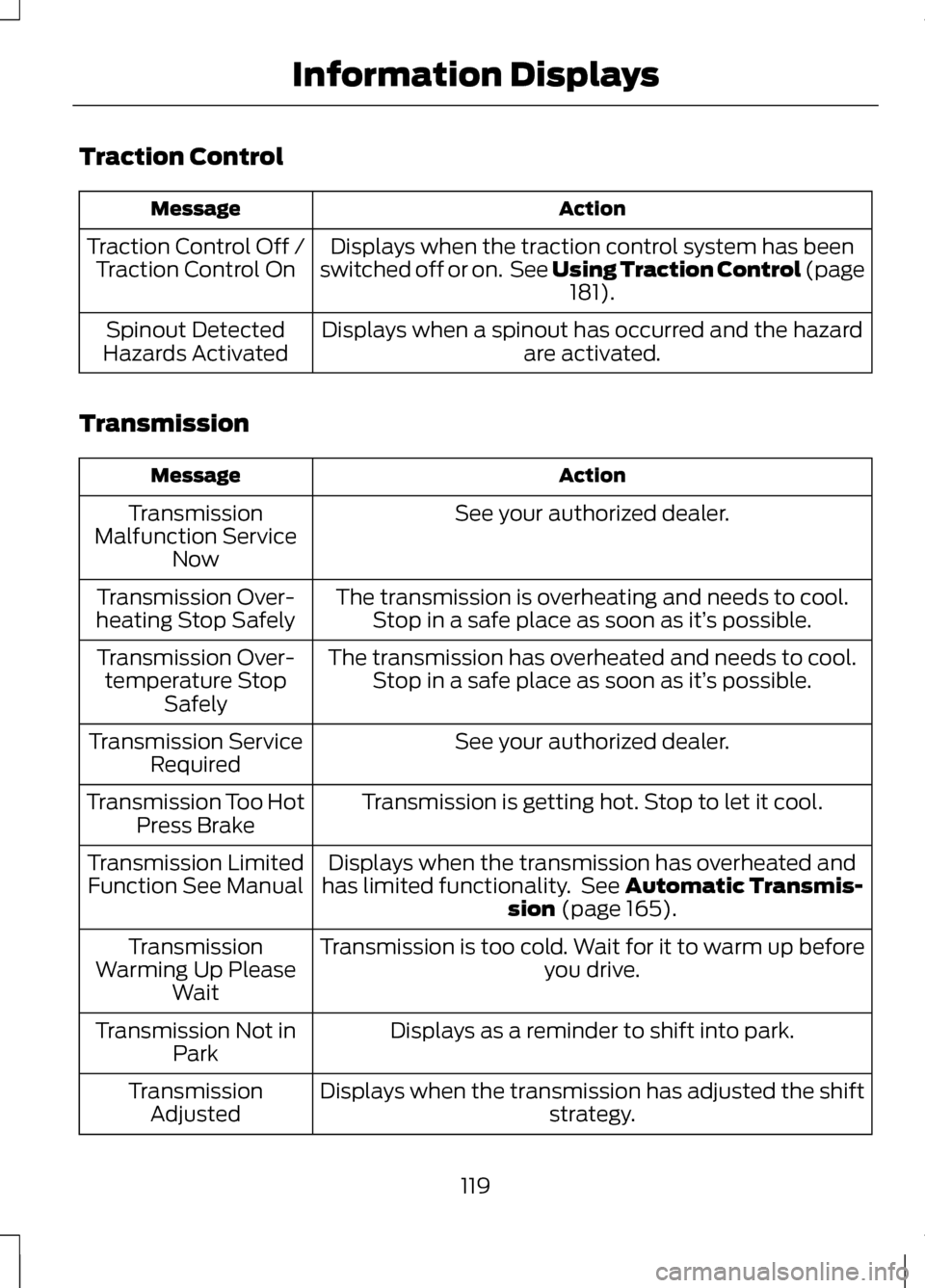
Traction Control
Action
Message
Displays when the traction control system has been
switched off or on. See Using Traction Control (page 181).
Traction Control Off /
Traction Control On
Displays when a spinout has occurred and the hazardare activated.
Spinout Detected
Hazards Activated
Transmission Action
Message
See your authorized dealer.
Transmission
Malfunction Service Now
The transmission is overheating and needs to cool.Stop in a safe place as soon as it’ s possible.
Transmission Over-
heating Stop Safely
The transmission has overheated and needs to cool.Stop in a safe place as soon as it’ s possible.
Transmission Over-
temperature Stop Safely
See your authorized dealer.
Transmission Service
Required
Transmission is getting hot. Stop to let it cool.
Transmission Too Hot
Press Brake
Displays when the transmission has overheated and
has limited functionality. See
Automatic Transmis-
sion (page 165).
Transmission Limited
Function See Manual
Transmission is too cold. Wait for it to warm up beforeyou drive.
Transmission
Warming Up Please Wait
Displays as a reminder to shift into park.
Transmission Not in
Park
Displays when the transmission has adjusted the shift strategy.
Transmission
Adjusted
119
Information Displays
Page 123 of 474
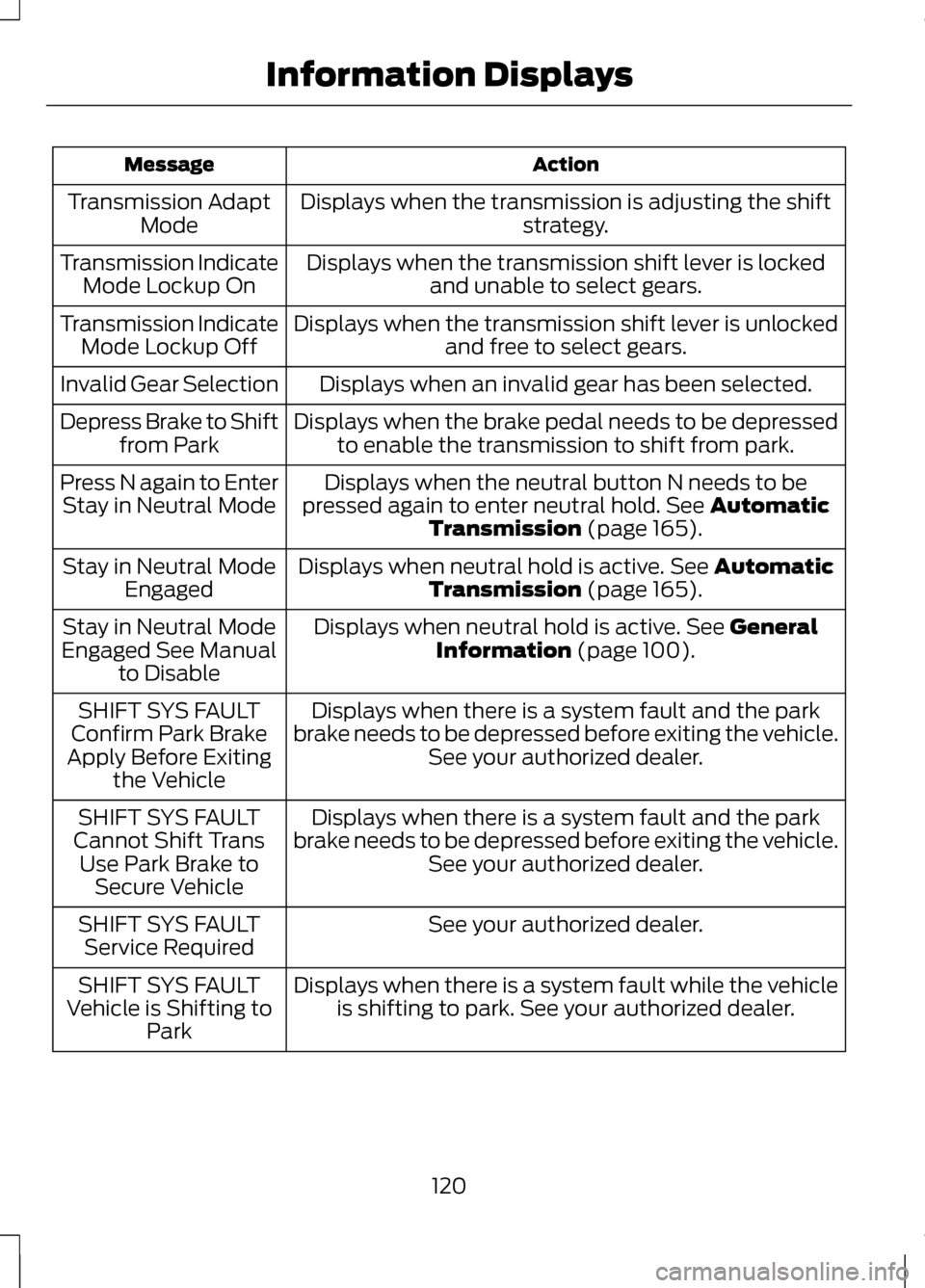
Action
Message
Displays when the transmission is adjusting the shift strategy.
Transmission Adapt
Mode
Displays when the transmission shift lever is lockedand unable to select gears.
Transmission Indicate
Mode Lockup On
Displays when the transmission shift lever is unlockedand free to select gears.
Transmission Indicate
Mode Lockup Off
Displays when an invalid gear has been selected.
Invalid Gear Selection
Displays when the brake pedal needs to be depressedto enable the transmission to shift from park.
Depress Brake to Shift
from Park
Displays when the neutral button N needs to be
pressed again to enter neutral hold. See Automatic
Transmission (page 165).
Press N again to Enter
Stay in Neutral Mode
Displays when neutral hold is active.
See Automatic
Transmission (page 165).
Stay in Neutral Mode
Engaged
Displays when neutral hold is active.
See General
Information (page 100).
Stay in Neutral Mode
Engaged See Manual to Disable
Displays when there is a system fault and the park
brake needs to be depressed before exiting the vehicle. See your authorized dealer.
SHIFT SYS FAULT
Confirm Park Brake
Apply Before Exiting the Vehicle
Displays when there is a system fault and the park
brake needs to be depressed before exiting the vehicle. See your authorized dealer.
SHIFT SYS FAULT
Cannot Shift Trans Use Park Brake to Secure Vehicle
See your authorized dealer.
SHIFT SYS FAULT
Service Required
Displays when there is a system fault while the vehicleis shifting to park. See your authorized dealer.
SHIFT SYS FAULT
Vehicle is Shifting to Park
120
Information Displays
Page 140 of 474
Note:
If more than one linked remote
control or IA key is in range, the memory
function will move to the settings of
the first key stored.
Easy Entry and Exit Function
If the easy entry and exit feature is
enabled, this feature automatically
moves the driver seat position
rearward up to five centimeters when
the transmission selector lever is in
position P and the key is removed or
the keyless start ignition is turned off.
The driver seat will return to the
previous position when the key is put
in the ignition or the keyless start
ignition is activated.
The easy entry and exit feature can
be turned on or off using the driver
information display.
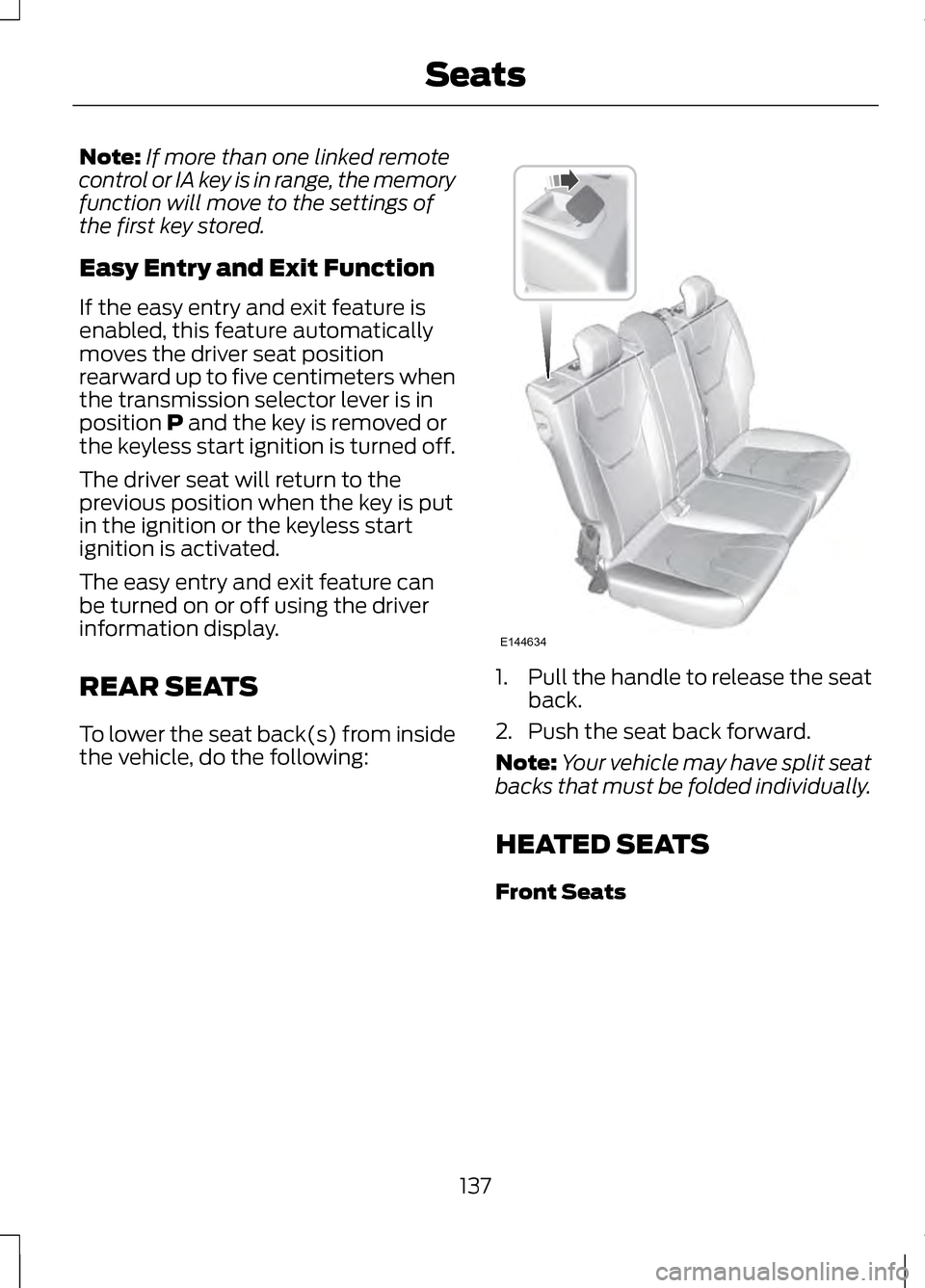
REAR SEATS
To lower the seat back(s) from inside
the vehicle, do the following: 1.
Pull the handle to release the seat
back.
2. Push the seat back forward.
Note: Your vehicle may have split seat
backs that must be folded individually.
HEATED SEATS
Front Seats
137
SeatsE144634
Page 154 of 474
2.
Put the transmission in position P.
3. Press the START button.
The system does not function if:
• The key frequencies are jammed.
• The key battery has no charge.
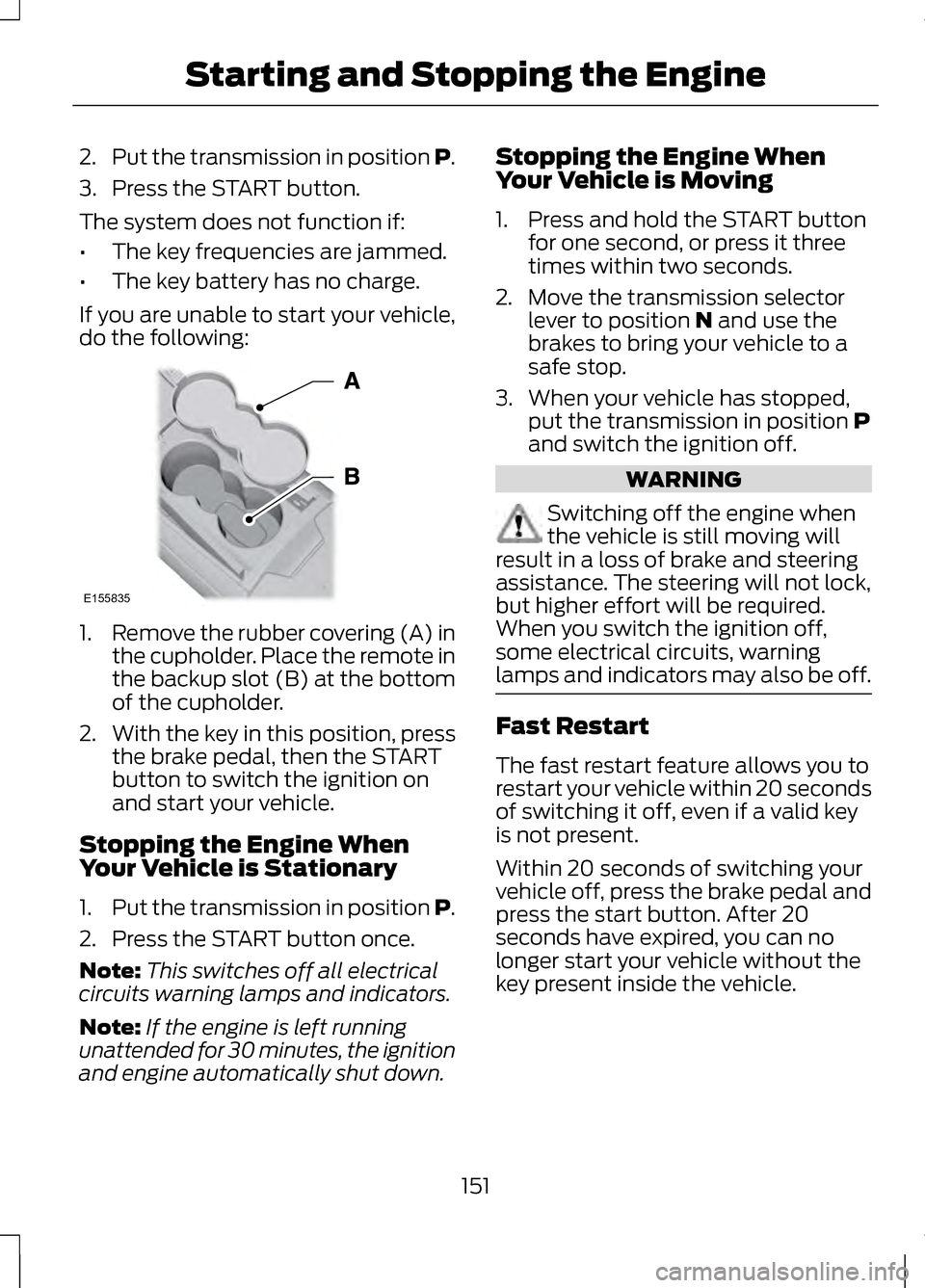
If you are unable to start your vehicle,
do the following: 1.
Remove the rubber covering (A) in
the cupholder. Place the remote in
the backup slot (B) at the bottom
of the cupholder.
2. With the key in this position, press
the brake pedal, then the START
button to switch the ignition on
and start your vehicle.
Stopping the Engine When
Your Vehicle is Stationary
1. Put the transmission in position P.
2. Press the START button once.
Note: This switches off all electrical
circuits warning lamps and indicators.
Note: If the engine is left running
unattended for 30 minutes, the ignition
and engine automatically shut down. Stopping the Engine When
Your Vehicle is Moving
1. Press and hold the START button
for one second, or press it three
times within two seconds.
2. Move the transmission selector lever to position N and use the
brakes to bring your vehicle to a
safe stop.
3. When your vehicle has stopped, put the transmission in position
P
and switch the ignition off. WARNING
Switching off the engine when
the vehicle is still moving will
result in a loss of brake and steering
assistance. The steering will not lock,
but higher effort will be required.
When you switch the ignition off,
some electrical circuits, warning
lamps and indicators may also be off. Fast Restart
The fast restart feature allows you to
restart your vehicle within 20 seconds
of switching it off, even if a valid key
is not present.
Within 20 seconds of switching your
vehicle off, press the brake pedal and
press the start button. After 20
seconds have expired, you can no
longer start your vehicle without the
key present inside the vehicle.
151
Starting and Stopping the EngineE155835