lock LINCOLN MKZ 2014 Owners Manual
[x] Cancel search | Manufacturer: LINCOLN, Model Year: 2014, Model line: MKZ, Model: LINCOLN MKZ 2014Pages: 468, PDF Size: 4.49 MB
Page 376 of 468
Scan
Touch this button to hear a brief
sampling of channels.
Options
Touch this button to view and adjust
various media settings.
Sound Settings
Touch this button to adjust settings
for:
•Bass
• Midrange
• Treble
• Balance and Fade
• THX Deep Note Demo
• DSP (Digital Signal processing)
• Occupancy Mode
• Speed Compensated Volume.
Note:Your vehicle may not have all
these sound settings.
Set Category for Seek/Scan
This allows you to select a category
of music you would like to search for.
You can then choose to either seek or
scan for the stations playing that
category.
Parental Lockout
This allows you to lock and unlock
channels, change or reset your PIN or
unlock all channels. To use this
feature, you need your initial PIN,
which is 1234. Artist/Title/Team Alerts
This feature allows you to select
Artists, Titles and Teams that you
would like the system to alert you to
when they are playing on other
channels. Press Edit Alerts to delete
or turn off alerts. You can also set all
alerts to on or off. When an alert
appears on the screen, you can
choose to Tune to the channel, to
Cancel the alert or to Disable Alerts.
If you are listening to a sporting event,
you can save your favorite teams so
that the system can alert you when
they are playing on a satellite radio
channel.
Note:
Sirius does not support the Alert
feature on all channels. Ford Motor
Company shall not be responsible for
Alert feature variation.
Electronic Serial Number (ESN)
Sirius requires this number when
communicating with you about your
account.
Direct Tune
Touch this button to enter the desired
satellite channel number manually.
Touch Enter when you are done.
Browse
Touch this button to view a list of all
available stations. Scroll to see more
categories. Touch the station you
want to listen to.
Touch Skip if you want to skip this
channel.
373
MyLincoln Touch™
Page 377 of 468
Touch Lock if you do not want anyone
to listen to this channel.
Touch Title or Artist to see song and
artists on other stations.
Sirius Satellite Radio Information
Note: Sirius reserves the unrestricted
right to change, rearrange, add or
delete programming including
canceling, moving or adding particular
channels, and its prices, at any time,
with or without notice to you. Ford
Motor Company shall not be
responsible for any such programming
changes.
E142593
Sirius satellite radio is a
subscription-based satellite radio
service that broadcasts a variety of
music, sports, news, weather, traffic
and entertainment programming.
Your factory-installed Sirius satellite
radio system includes hardware and
a limited subscription term that begins
on the date of sale or lease of your
vehicle. See an authorized dealer for
availability. For more information on extended
subscription terms (a service fee is
required), the online media player and
a list of Sirius satellite radio channels,
and other features, please visit
www.siriusxm.com in the United
States, www.sirius.ca in Canada, or
call Sirius at 1-888-539-7474.
Note:
This receiver includes the eCos
real-time operating system. eCos is
published under the eCos License.
Satellite Radio Electronic Serial
Number (ESN)
You need your ESN to activate, modify
or track your satellite radio account.
The ESN is on the System Information
Screen (SR ESN:XXXXXXXXXXXX).
To access your ESN, touch the bottom
left corner of the touchscreen. Touch
SIRIUS > Options.
374
MyLincoln Touch™
Page 379 of 468
Troubleshooting tipsAction
Cause
Radio display
The signal is blocked.
When you move into an
open area, the signal
should return.
The signal is lost from
the Sirius satellite or
Sirius tower to your
vehicle antenna.
No Signal.
No action required. The
process may take up to
three minutes.
Update of channel
programming in progress.
Updating.
Contact Sirius at 1-888-
539-7474 to resolve
subscription issues.
Your satellite service is
no longer available.
Call Sirius
1-888-539-7474.
Use the channel guide to
turn off the Lock or Skip
function on that station.
All the channels in the
selected category are
either skipped or locked.
None found. Check
Channel Guide.
No action required.
Sirius has updated the
channels available for
your vehicle.
Subscription Updated.
Sirius Satellite Radio Voice
Commands
E142599
If you are listening to Sirius
satellite radio, press the voice
button on the steering wheel
controls. When prompted, say any of
the following commands.
If you are not listening to Sirius
satellite radio, press the voice button
and, after the tone, say "Sirius", then
any of the following commands.
"SIRIUS"
"
"Preset <#>" "SAT"
"SAT preset <#>" "SAT 1"
"SAT 1 Preset <#>" "SAT 2"
"SAT 2 preset <#>" "SAT 3"
"SAT 3 preset <#>"
376
MyLincoln Touch™
Page 396 of 468
SYNC Services (If Equipped,
United States Only)
Note:SYNC Services requires
activation before use. Visit
www.SYNCMyRide.com to register and
check your eligibility for complimentary
services. Standard phone and message
rates may apply. Subscription may be
required. You must also have the active
SYNC Services Bluetooth-enabled
cellular phone paired and connected
to the system in order to connect to,
and use, SYNC Services. See Phone
(page 385).
Note: This feature does not function
properly if you have enabled caller ID
blocking on your cellular phone. Make
sure your cellular phone is not blocking
caller ID before using SYNC Services.
Note: The driver is ultimately
responsible for the safe operation of
the vehicle, and therefore, must
evaluate whether it is safe to follow
the suggested directions. Any
navigation features provided are only
an aid. Make your driving decisions
based on your observations of local
conditions and existing traffic
regulations. Do not follow the route
suggestions if doing so would result in
an unsafe or illegal maneuver, if you
would be placed in an unsafe situation,
or if you would be directed into an area
that you consider unsafe. Maps used
by this system may be inaccurate
because of errors, changes in roads,
traffic conditions or driving conditions. Note:
When you connect, the service
uses GPS technology and advanced
vehicle sensors to collect your vehicle's
current location, travel direction and
speed to help provide you with the
directions, traffic reports, or business
searches you request. Further, to
provide the services you request, for
continuous improvement, the service
may collect and record call details and
voice communications. For more
information, see SYNC Services Terms
and Conditions at
www.SYNCMyRide.com. If you do not
want Ford or its service providers to
collect your vehicle travel information
or other information identified in the
Terms and Conditions, do not subscribe
or use the service.
SYNC Services uses advanced vehicle
sensors, integrated GPS technology
and comprehensive map and traffic
data, to give you personalized traffic
reports, precise turn-by-turn
directions, business search, news,
sports, weather and more. For a
complete list of services, or to learn
more, please visit
www.SYNCMyRide.com.
Connecting to SYNC Services
Using Voice Commands
E142599
1. Press the voice button.
2. When prompted, say "Services". This initiates an outgoing call to
SYNC Services using your paired
and connected Bluetooth-enabled
cellular phone.
393
MyLincoln Touch™
Page 406 of 468
Vehicle Health Report (If Equipped)
WARNING
Always follow scheduled
maintenance instructions,
regularly inspect your vehicle, and
seek repair for any damage or problem
you suspect. Vehicle Health Report
supplements, but cannot replace,
normal maintenance and vehicle
inspection. Vehicle Health Report only
monitors certain systems
electronically monitored by your
vehicle and will not monitor or report
the status of any other system, (such
as brake lining wear). Failure to
perform scheduled maintenance and
regularly inspect your vehicle may
result in vehicle damage and serious
injury.
Note: This feature is only available in
the United States.
Note: Your Vehicle Health Report
feature requires activation prior to use.
Visit www.SYNCMyRide.com to
register. There is no fee or subscription
associated with Vehicle Health Report,
but you must register to use this
feature.
Note: This feature may not function
properly if you have enabled caller ID
blocking on your cellular phone. Before
running a report, review the Vehicle
Health Report Privacy Notice.
Note: In order to allow a break-in
period for your vehicle, you may not be
able to create a Vehicle Health Report
until your vehicle odometer has
reached 200 miles. Note:
Cellular phone and SMS charges
may apply when making a report.
Register for Vehicle Health Report and
set your report preferences at
www.SYNCMyRide.com. After
registering, you can request a Vehicle
Health Report (inside your vehicle).
Return to your account at
www.SYNCMyRide.com to view your
report. You can also choose for SYNC
to remind you automatically to run
reports at specific mileage intervals.
Cellular phone airtime usage may
apply when reporting.
The system allows you to check your
vehicle’s overall health in the form of
a diagnostic report card. The Vehicle
Health Report contains valuable
information, such as:
• Vehicle diagnostic information
• Scheduled maintenance
• Open recalls and Field Service Actions
• Items noted during vehicle inspections by your authorized
dealer that still need servicing.
Making a Report
E142608
If you want to run a report by
using the touchscreen, touch
Apps > Vehicle Health
Report.
E142599
To run a report by voice
command, press the voice
button on the steering wheel
and, when prompted, say "Vehicle
health report".
403
MyLincoln Touch™
Page 409 of 468
Manual airflow distribution controls:Floor/Defrost: Distributes
air through the windshield defroster vents, demister vents, floor vents
and rear seat floor vents, and provides outside air to reduce window
fogging. Panel: Distributes air through the instrument panel vents.
Panel/Floor: Distributes air through the instrument panel vents,
demister vents, floor vents and rear seat floor vents. Floor: Distributes
air through the demister vents, floor vents and rear seat floor vents.
Defrost: Touch to clear the windshield of fog and thin ice. Touch again
to return to the previous airflow selection. When switched on, defrost
distributes outside air through the windshield defroster vents and
demister vents to reduce window fogging.
I
Driver settings: Depending on your vehicle and option package, you
may have the following features: Touch the + and - to adjust the
temperature. Touch the heated seat icon to control the heated seat
(if equipped). Touch the cooled seat icon to control the cooled seat
(if equipped). See Seats (page 133). Touch MyTemp to select your
previously pre-set temperature setpoint. Touch and hold MyTemp to
store a new pre-set for temperature setpoint. Touch the heated steering
wheel icon (if equipped) to warm the steering wheel.
J
Note: If your vehicle is equipped with
a wood-trimmed steering wheel, it
does not heat between the 10 o'clock
and 2 o'clock positions.
Climate Control Voice
Commands
E142599
Press the voice button on the
steering wheel controls.
When prompted, say any of
the following commands:
Climate control commands
"Climate automatic"
"Climate my temperature" "Climate off""Climate on"
Climate control commands
"Climate temperature <15.5-29.5> degrees"
"Climate temperature <60-85> degrees"
"Help"
There are additional climate control
commands but in order to access
them, you have to say "Climate" first.
When the system is ready to listen,
you may say any of the following
commands:
406
MyLincoln Touch™
Page 415 of 468
Traffic Preferences
Avoid Traffic Problems
Choose how you want the system to
handle traffic problems along your
route.
•Automatic: Have the system
reroute you to avoid traffic
incidents that develop and impact
the current route. The system does
not provide a traffic alert
notification.
• Manual: Have the system always
provide a traffic alert notification
for traffic incidents along the
planned route. You have a choice
to accept or ignore the notification
before making the route deviation.
Traffic Alert Notification
Have the system display traffic alert
notifications.
Other traffic alert features allows you
to turn on certain, or all, traffic icons
on the map such as road work,
incident, accidents and closed roads.
Scroll down to view all the different
types of alerts. Turn these features
ON or OFF.
Avoid Areas
Choose areas which you want the
system to avoid when calculating a
route for you. Press
Add to program an entry. Once
you make a selection, the system tries
to avoid the area(s) if possible for all
routes. To delete a selection, choose
the listing on the screen. When the
screen changes to Avoid Areas Edit,
you can press Delete at the bottom
right of the screen.
Map Mode
Press the green bar in the upper right
area of the touchscreen to view map
mode. Map mode shows advanced
viewing comprised of both 2D city
maps as well as 3D landmarks (when
available).
2D city maps show detailed outlines
of buildings, visible land use and land
elements and detailed railway
infrastructure for the most essential
cities around the globe. These maps
also contain features, such as town
blocks, building footprints, and
railways.
3D landmarks appear as clear, visible
objects that are typically recognizable
and have a certain tourist value. The
3D landmarks appear in 3D map mode
only. Coverage v aries, and improves
with updated map releases.
412
MyLincoln Touch™
Page 441 of 468
Oils, Fluids and Flushing
In many cases, fluid discoloration is a
normal operating characteristic and,
by itself, does not necessarily indicate
a concern or that the fluid needs to be
changed. However, a qualified expert,
such as the factory-trained
technicians at your dealership, should
inspect discolored fluids that also
show signs of overheating or foreign
material contamination immediately.Make sure to change your vehicle’s
oils and fluids at the specified
intervals or in conjunction with a
repair. Flushing is a viable way to
change fluid for many vehicle
sub-systems during scheduled
maintenance. It is critical that systems
are flushed only with new fluid that is
the same as that required to fill and
operate the system or using a
Ford-approved flushing chemical.
Owner Checks and Services
Make sure you perform the following
basic maintenance checks and
inspections every month or at
six-month intervals.
Check every month
Engine oil level.
Function of all interior and exterior lights.
Tires (including spare) for wear and proper pressure. Windshield washer fluid level.
Check every six months
Battery connections. Clean if necessary.
Body and door drain holes for obstructions. Clean if necessary. Cooling system fluid level and coolant strength.
Door weatherstrips for wear. Lubricate if necessary.
Hinges, latches and outside locks for proper operation. Lubricate if necessary. Parking brake for proper operation.
438
Scheduled Maintenance
Page 456 of 468
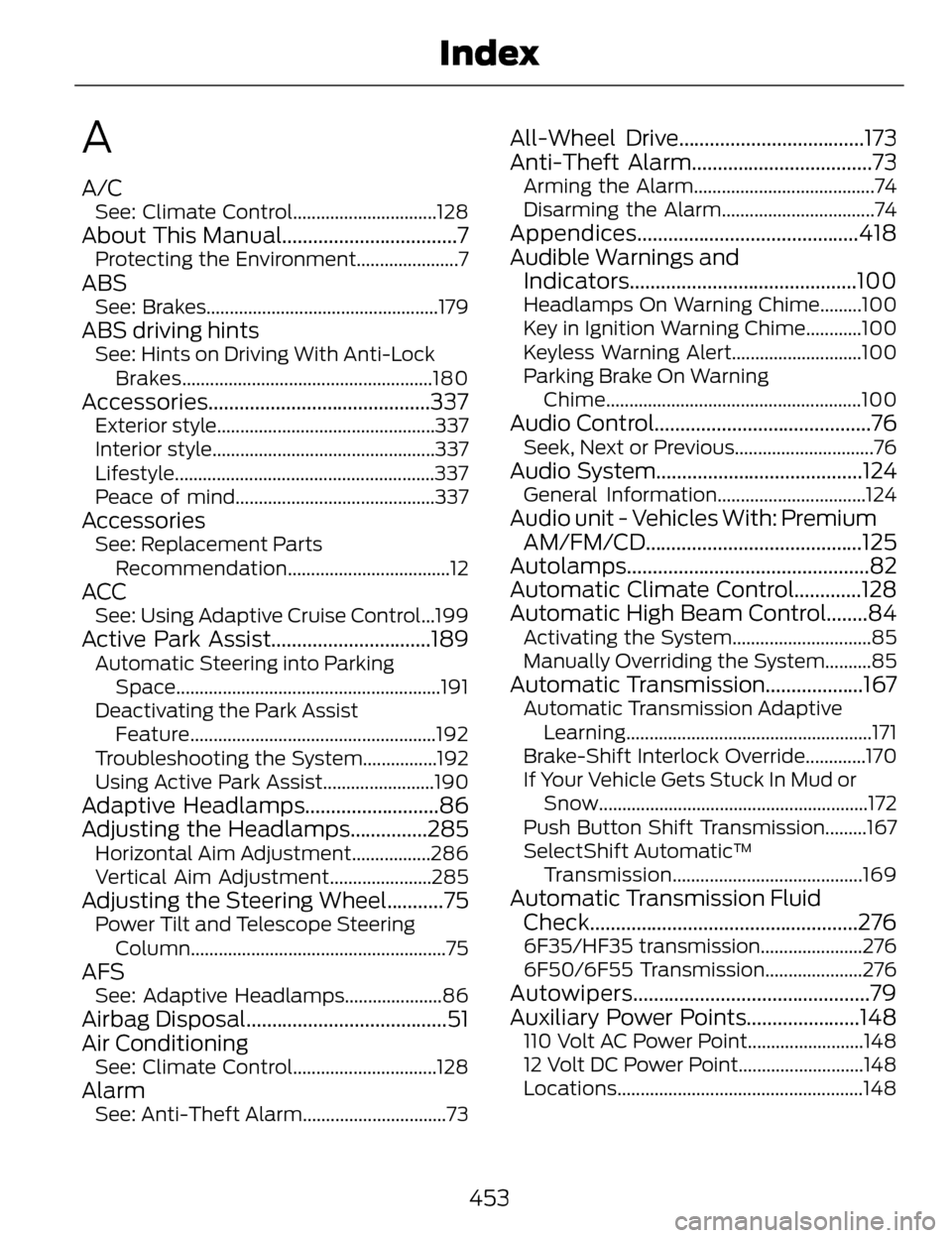
A
A/CSee: Climate Control...............................128
About This Manual..................................7Protecting the Environment......................7
ABSSee: Brakes..................................................179
ABS driving hintsSee: Hints on Driving With Anti-LockBrakes......................................................180
Accessories ...........................................337Exterior style...............................................337
Interior style................................................337
Lifestyle........................................................337
Peace of mind...........................................337
AccessoriesSee: Replacement Parts
Recommendation...................................12
ACCSee: Using Adaptive Cruise Control...199
Active Park Assist...............................189Automatic Steering into ParkingSpace.........................................................191
Deactivating the Park Assist Feature.....................................................192
Troubleshooting the System................192
Using Active Park Assist........................190
Adaptive Headlamps..........................86
Adjusting the Headlamps...............285
Horizontal Aim Adjustment.................286
Vertical Aim Adjustment......................285
Adjusting the Steering Wheel...........75Power Tilt and Telescope Steering Column.......................................................75
AFSSee: Adaptive Headlamps.....................86
Airbag Disposal.......................................51
Air Conditioning
See: Climate Control...............................128
AlarmSee: Anti-Theft Alarm...............................73
All-Wheel Drive....................................173
Anti-Theft Alarm...................................73
Arming the Alarm.......................................74
Disarming the Alarm.................................74
Appendices...........................................418
Audible Warnings andIndicators............................................100
Headlamps On Warning Chime.........100
Key in Ignition Warning Chime............100
Keyless Warning Alert............................100
Parking Brake On Warning
Chime....................................................... 100
Audio Control..........................................76Seek, Next or Previous..............................76
Audio System........................................124General Information................................124
Audio unit - Vehicles With: Premium
AM/FM/CD..........................................125
Autolamps...............................................82
Automatic Climate Control.............128
Automatic High Beam Control........84
Activating the System..............................85
Manually Overriding the System..........85
Automatic Transmission...................167Automatic Transmission Adaptive
Learning.....................................................171
Brake-Shift Interlock Override.............170
If Your Vehicle Gets Stuck In Mud or Snow..........................................................172
Push Button Shift Transmission.........167
SelectShift Automatic™ Transmission.........................................169
Automatic Transmission FluidCheck....................................................276
6F35/HF35 transmission......................276
6F50/6F55 Transmission.....................276
Autowipers..............................................79
Auxiliary Power Points......................148
110 Volt AC Power Point.........................148
12 Volt DC Power Point...........................148
Locations.....................................................148
453
Index
Page 457 of 468
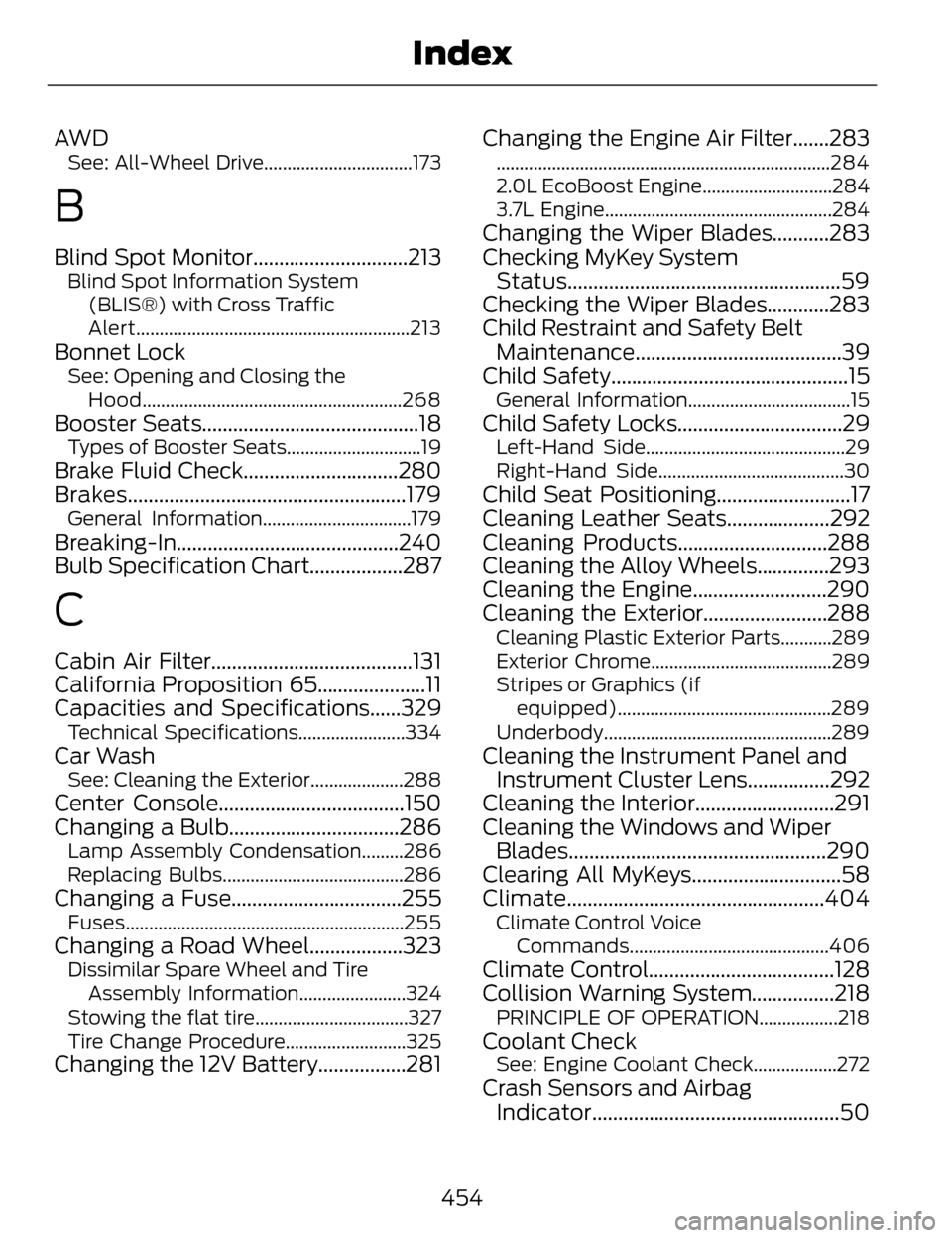
AW DSee: All-Wheel Drive................................173
B
Blind Spot Monitor..............................213Blind Spot Information System(BLIS®) with Cross Traffic
Alert...........................................................213
Bonnet LockSee: Opening and Closing theHood........................................................268
Booster Seats..........................................18Types of Booster Seats.............................19
Brake Fluid Check..............................280
Brakes......................................................179
General Information................................179
Breaking-In...........................................240
Bulb Specification Chart..................287
C
Cabin Air Filter.......................................131
California Proposition 65.....................11
Capacities and Specifications......329
Technical Specifications.......................334
Car WashSee: Cleaning the Exterior....................288
Center Console....................................150
Changing a Bulb.................................286
Lamp Assembly Condensation.........286
Replacing Bulbs.......................................286
Changing a Fuse.................................255Fuses............................................................255
Changing a Road Wheel..................323Dissimilar Spare Wheel and TireAssembly Information.......................324
Stowing the flat tire.................................327
Tire Change Procedure..........................325
Changing the 12V Battery.................281 Changing the Engine Air Filter.......283
........................................................................\
284
2.0L EcoBoost Engine............................284
3.7L Engine.................................................284
Changing the Wiper Blades...........283
Checking MyKey System
Status.....................................................59
Checking the Wiper Blades............283
Child Restraint and Safety Belt Maintenance........................................39
Child Safety..............................................15
General Information...................................15
Child Safety Locks................................29Left-Hand Side...........................................29
Right-Hand Side........................................30
Child Seat Positioning..........................17
Cleaning Leather Seats....................292
Cleaning Products.............................288
Cleaning the Alloy Wheels..............293
Cleaning the Engine..........................290
Cleaning the Exterior........................288
Cleaning Plastic Exterior Parts...........289
Exterior Chrome.......................................289
Stripes or Graphics (if
equipped)..............................................289
Underbody.................................................289
Cleaning the Instrument Panel and Instrument Cluster Lens................292
Cleaning the Interior...........................291
Cleaning the Windows and Wiper Blades..................................................290
Clearing All MyKeys.............................58
Climate..................................................404
Climate Control Voice
Commands...........................................406
Climate Control....................................128
Collision Warning System................218
PRINCIPLE OF OPERATION.................218
Coolant CheckSee: Engine Coolant Check..................272
Crash Sensors and AirbagIndicator................................................50
454
Index