lock LINCOLN MKZ 2014 Manual PDF
[x] Cancel search | Manufacturer: LINCOLN, Model Year: 2014, Model line: MKZ, Model: LINCOLN MKZ 2014Pages: 468, PDF Size: 4.49 MB
Page 222 of 468
The warning system sensitivity can be
adjusted to one of three possible
settings by using the information
display control. See General
Information (page 101).
Note:If the system cannot be turned
off in a vehicle equipped with MyKey®,
Note: If collision warnings are
perceived as being too frequent or
disturbing then the warning sensitivity
can be reduced, though the
manufacturer recommends using the
highest sensitivity setting where
possible. Setting lower sensitivity
would lead to fewer and later system
warnings. See General Information
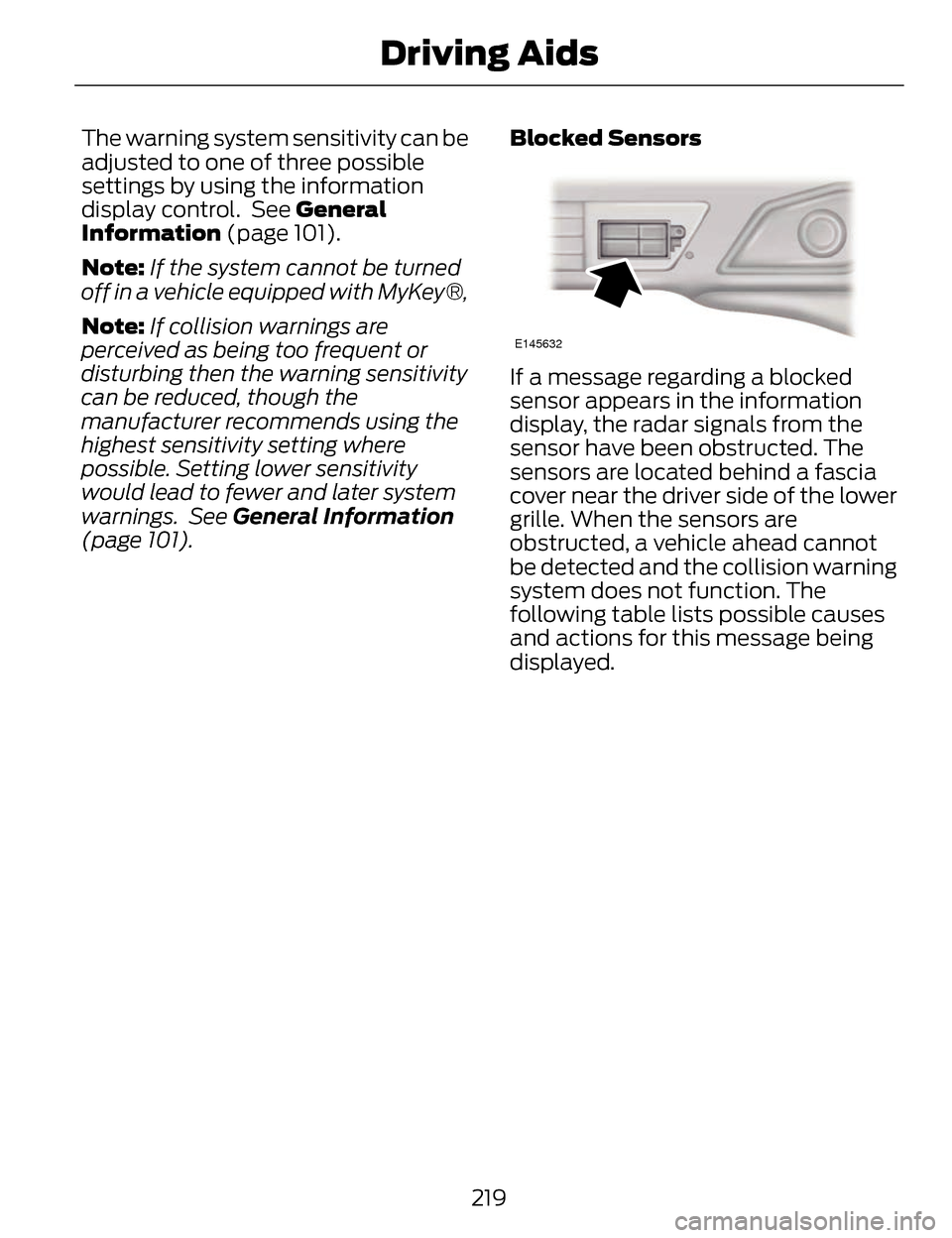
(page 101). Blocked Sensors
E145632
If a message regarding a blocked
sensor appears in the information
display, the radar signals from the
sensor have been obstructed. The
sensors are located behind a fascia
cover near the driver side of the lower
grille. When the sensors are
obstructed, a vehicle ahead cannot
be detected and the collision warning
system does not function. The
following table lists possible causes
and actions for this message being
displayed.
219
Driving Aids
Page 223 of 468
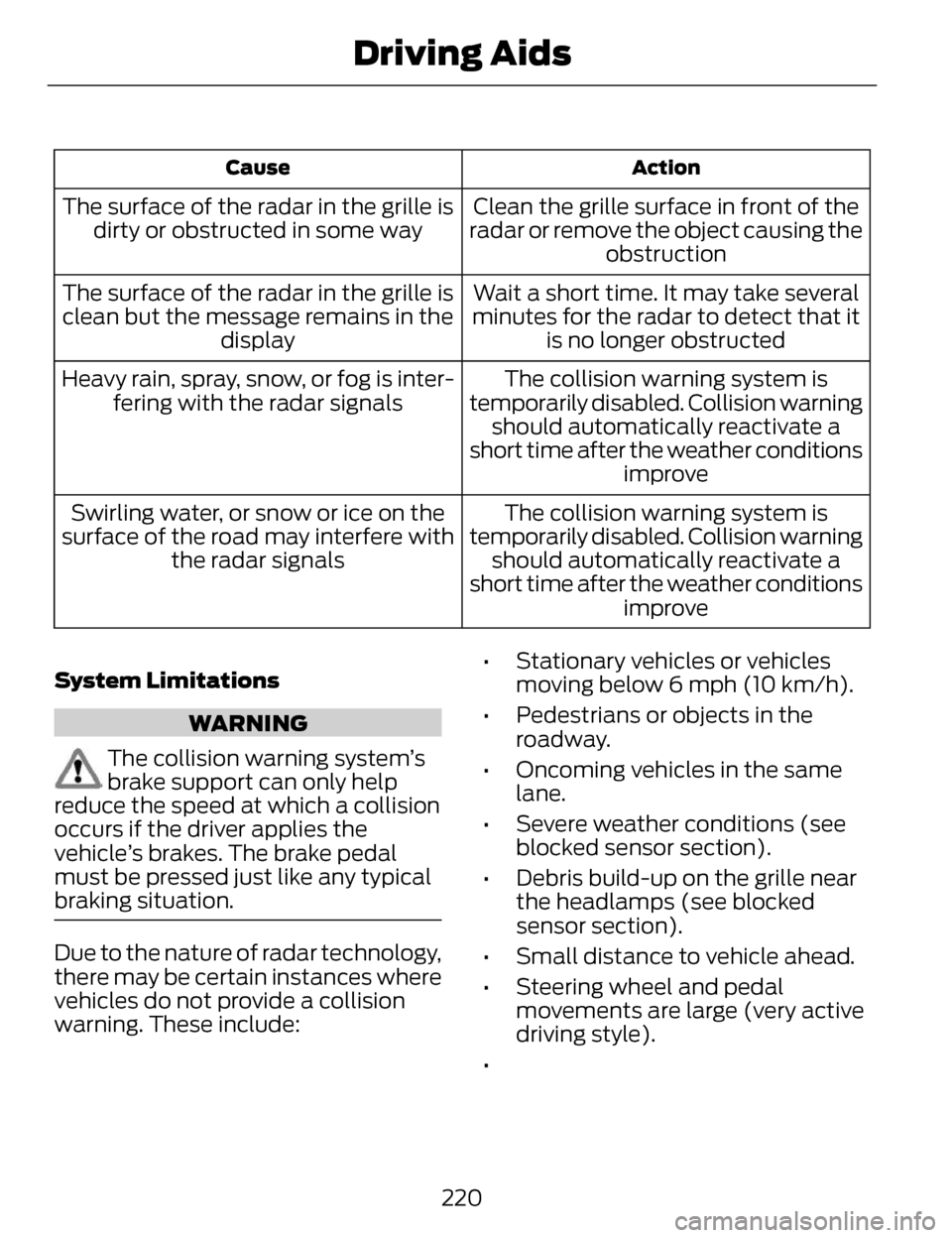
Action
Cause
Clean the grille surface in front of the
radar or remove the object causing the obstruction
The surface of the radar in the grille is
dirty or obstructed in some way
Wait a short time. It may take several
minutes for the radar to detect that it is no longer obstructed
The surface of the radar in the grille is
clean but the message remains in the display
The collision warning system is
temporarily disabled. Collision warning should automatically reactivate a
short time after the weather conditions improve
Heavy rain, spray, snow, or fog is inter-
fering with the radar signals
The collision warning system is
temporarily disabled. Collision warning should automatically reactivate a
short time after the weather conditions improve
Swirling water, or snow or ice on the
surface of the road may interfere with the radar signals
System Limitations
WARNING
The collision warning system’s
brake support can only help
reduce the speed at which a collision
occurs if the driver applies the
vehicle’s brakes. The brake pedal
must be pressed just like any typical
braking situation.
Due to the nature of radar technology,
there may be certain instances where
vehicles do not provide a collision
warning. These include: • Stationary vehicles or vehicles
moving below 6 mph (10 km/h).
• Pedestrians or objects in the roadway.
• Oncoming vehicles in the same lane.
• Severe weather conditions (see blocked sensor section).
• Debris build-up on the grille near the headlamps (see blocked
sensor section).
• Small distance to vehicle ahead.
• Steering wheel and pedal movements are large (very active
driving style).
•
220
Driving Aids
Page 245 of 468
WARNINGS
Never place floor mats or any
other covering in the vehicle foot
well that cannot be properly secured
to prevent them from moving and
interfering with the pedals or the
ability to control the vehicle.
Never place floor mats or any
other covering on top of already
installed floor mats. Floor mats
should always rest on top of vehicle
carpeting surface and not another
floor mat or other covering. Additional
floor mats or any other covering will
reduce the pedal clearance and
potentially interfere with pedal
operation.
Check attachment of floor mats
on a regular basis. Always
properly reinstall and secure floor
mats that have been removed for
cleaning or replacement.
Always make sure that objects
cannot fall into the driver foot
well while the vehicle is moving.
Objects that are loose can become
trapped under the pedals causing a
loss of vehicle control.
Failure to properly follow floor
mat installation or attachment
instructions can potentially cause
interference with pedal operation
causing loss of control of vehicle.
To install floor mats, position the
floor mat so that the eyelet is
over the retention post and press
down to lock in.
To remove the floor mat, reverse
the installation procedure.
242
Driving Hints
Page 246 of 468
ROADSIDE ASSISTANCE
Vehicles Sold In The U.S.:
Getting Roadside Assistance
To fully assist you should you have a
vehicle concern Ford Motor Company
offers a complimentary roadside
assistance program. This program is
separate from the New Vehicle
Limited Warranty. The service is
available:
• 24-hours, seven days a week.
• for the coverage period listed onthe Roadside Assistance Card
included in your Owner's Manual
portfolio.
Roadside assistance will cover:
• a flat tire change with a good spare (except vehicles that have been
supplied with a tire inflation kit).
• battery jump start.
• lock-out assistance (key replacement cost is the customer's
responsibility).
• fuel delivery — Independent Service Contractors, if not
prohibited by state, local or
municipal law shall deliver up to
2.0 gallons (7.5L) of gasoline or
5.0 gallons (18.9L) of diesel fuel
to a disabled vehicle. Fuel delivery
service is limited to two no-charge
occurrences within a 12-month
period. • winch out — available within 100
feet (30.5 meters) of a paved or
county maintained road, no
recoveries.
• towing — Ford and Lincoln eligible vehicles towed to an authorized
dealer within 35 miles (56 km) of
the disablement location or to the
nearest authorized dealer. If a
member requests to be towed to
an authorized dealer more than 35
miles (56 km) from the
disablement location, the member
shall be responsible for any
mileage costs in excess of 35 miles
(56 km).
Trailers shall be covered up to $200
if the disabled eligible vehicle requires
service at the nearest authorized
dealer. If the trailer is disabled, but the
towing vehicle is operational, the
trailer does not qualify for any
roadside services.
Vehicles Sold In The U.S. :
Using Roadside Assistance
Complete the roadside assistance
identification card and place it in your
wallet for quick reference. This card
is found in the owner's information
portfolio in the glove compartment.
U.S. Lincoln vehicle customers who
require Roadside Assistance, call
1-800-521-4140.
243
Roadside Emergencies
Page 250 of 468
4
1
3
2
E142665
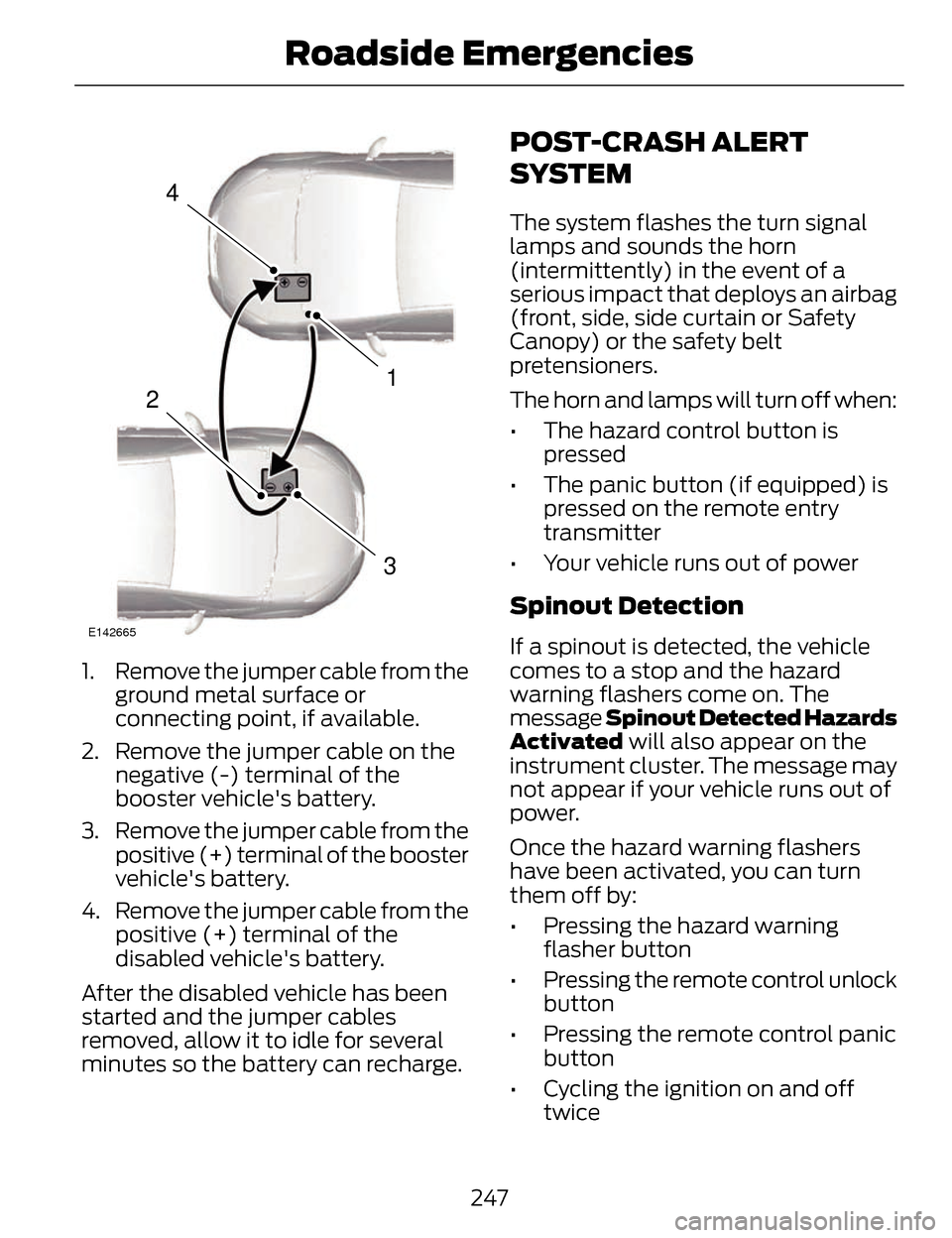
1. Remove the jumper cable from theground metal surface or
connecting point, if available.
2. Remove the jumper cable on the negative (-) terminal of the
booster vehicle's battery.
3. Remove the jumper cable from the positive (+) terminal of the booster
vehicle's battery.
4. Remove the jumper cable from the positive (+) terminal of the
disabled vehicle's battery.
After the disabled vehicle has been
started and the jumper cables
removed, allow it to idle for several
minutes so the battery can recharge.
POST-CRASH ALERT
SYSTEM
The system flashes the turn signal
lamps and sounds the horn
(intermittently) in the event of a
serious impact that deploys an airbag
(front, side, side curtain or Safety
Canopy) or the safety belt
pretensioners.
The horn and lamps will turn off when:
• The hazard control button is pressed
• The panic button (if equipped) is pressed on the remote entry
transmitter
• Your vehicle runs out of power
Spinout Detection
If a spinout is detected, the vehicle
comes to a stop and the hazard
warning flashers come on. The
message Spinout Detected Hazards
Activated will also appear on the
instrument cluster. The message may
not appear if your vehicle runs out of
power.
Once the hazard warning flashers
have been activated, you can turn
them off by:
• Pressing the hazard warning flasher button
• Pressing the remote control unlock button
• Pressing the remote control panic button
• Cycling the ignition on and off twice
247
Roadside Emergencies
Page 261 of 468
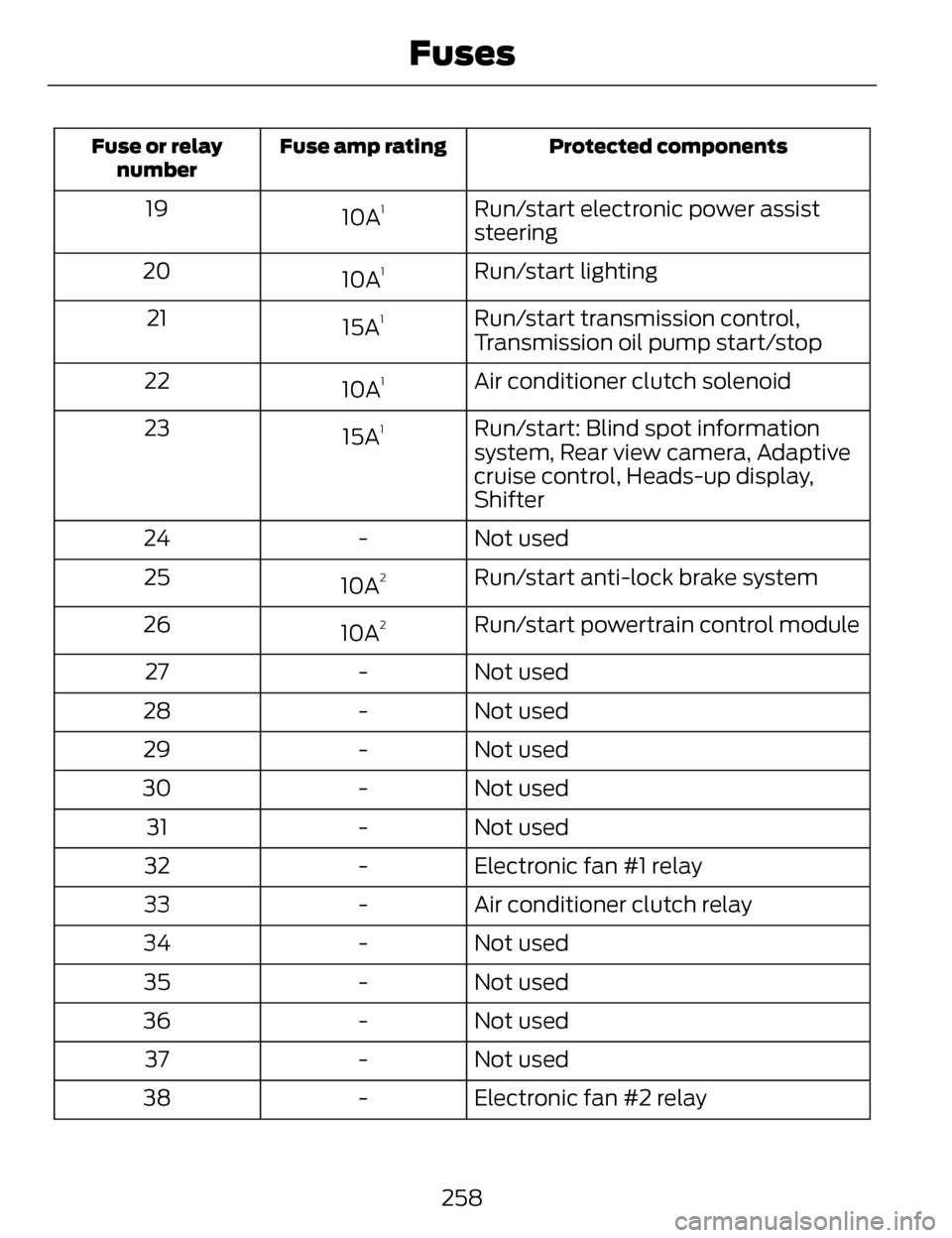
Protected components
Fuse amp rating
Fuse or relay
number
Run/start electronic power assist
steering
10A119
Run/start lighting
10A
120
Run/start transmission control,
Transmission oil pump start/stop
15A
121
Air conditioner clutch solenoid
10A
122
Run/start: Blind spot information
system, Rear view camera, Adaptive
cruise control, Heads-up display,
Shifter
15A
123
Not used
-
24
Run/start anti-lock brake system
10A
225
Run/start powertrain control module
10A
226
Not used
-
27
Not used
-
28
Not used
-
29
Not used
-
30
Not used
-
31
Electronic fan #1 relay
-
32
Air conditioner clutch relay
-
33
Not used
-
34
Not used
-
35
Not used
-
36
Not used
-
37
Electronic fan #2 relay
-
38
258
Fuses
Page 265 of 468
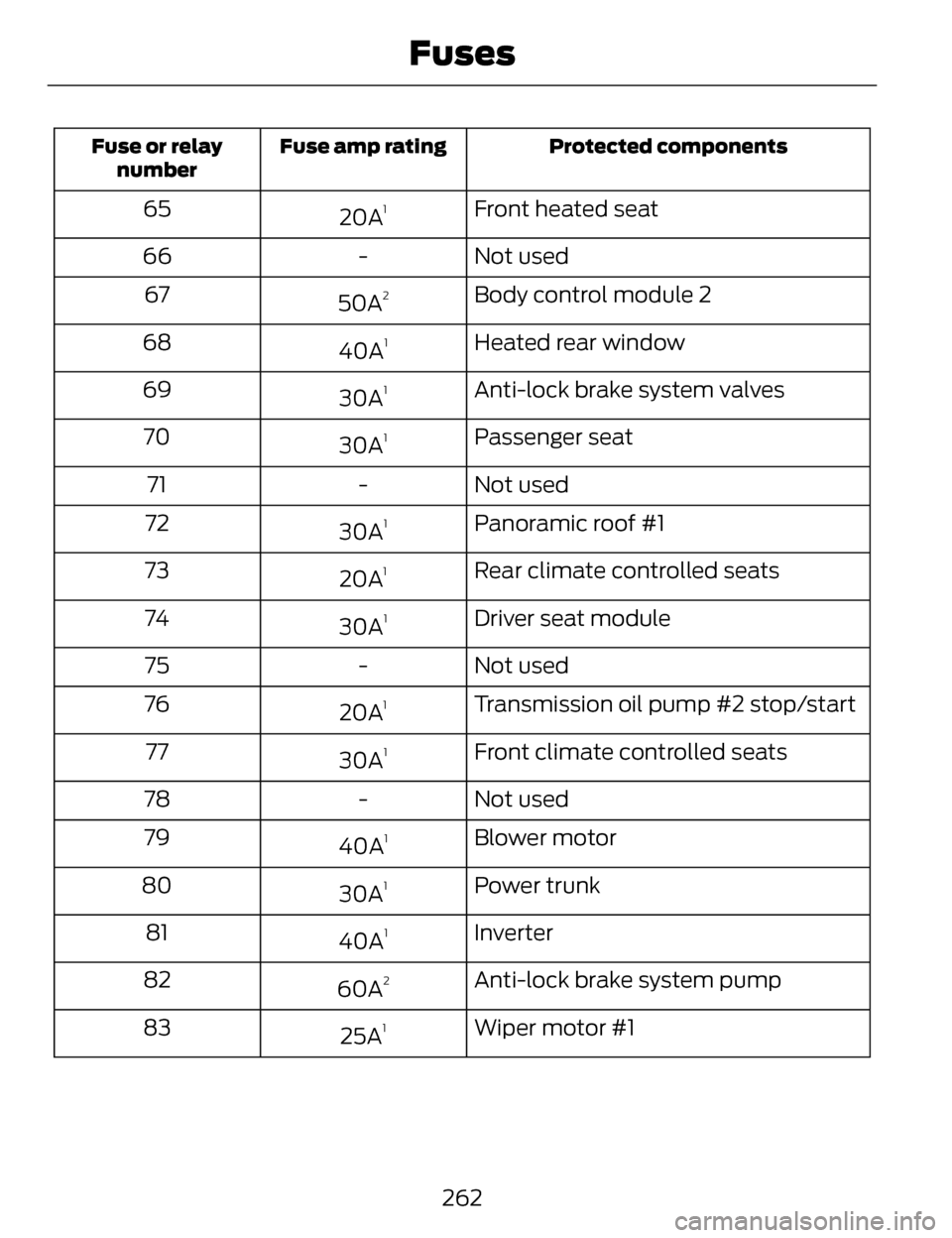
Protected components
Fuse amp rating
Fuse or relay
number
Front heated seat
20A165
Not used
-
66
Body control module 2
50A
267
Heated rear window
40A
168
Anti-lock brake system valves
30A
169
Passenger seat
30A
170
Not used
-
71
Panoramic roof #1
30A
172
Rear climate controlled seats
20A
173
Driver seat module
30A
174
Not used
-
75
Transmission oil pump #2 stop/start
20A
176
Front climate controlled seats
30A
177
Not used
-
78
Blower motor
40A
179
Power trunk
30A
180
Inverter
40A
181
Anti-lock brake system pump
60A
282
Wiper motor #1
25A
183
262
Fuses
Page 267 of 468
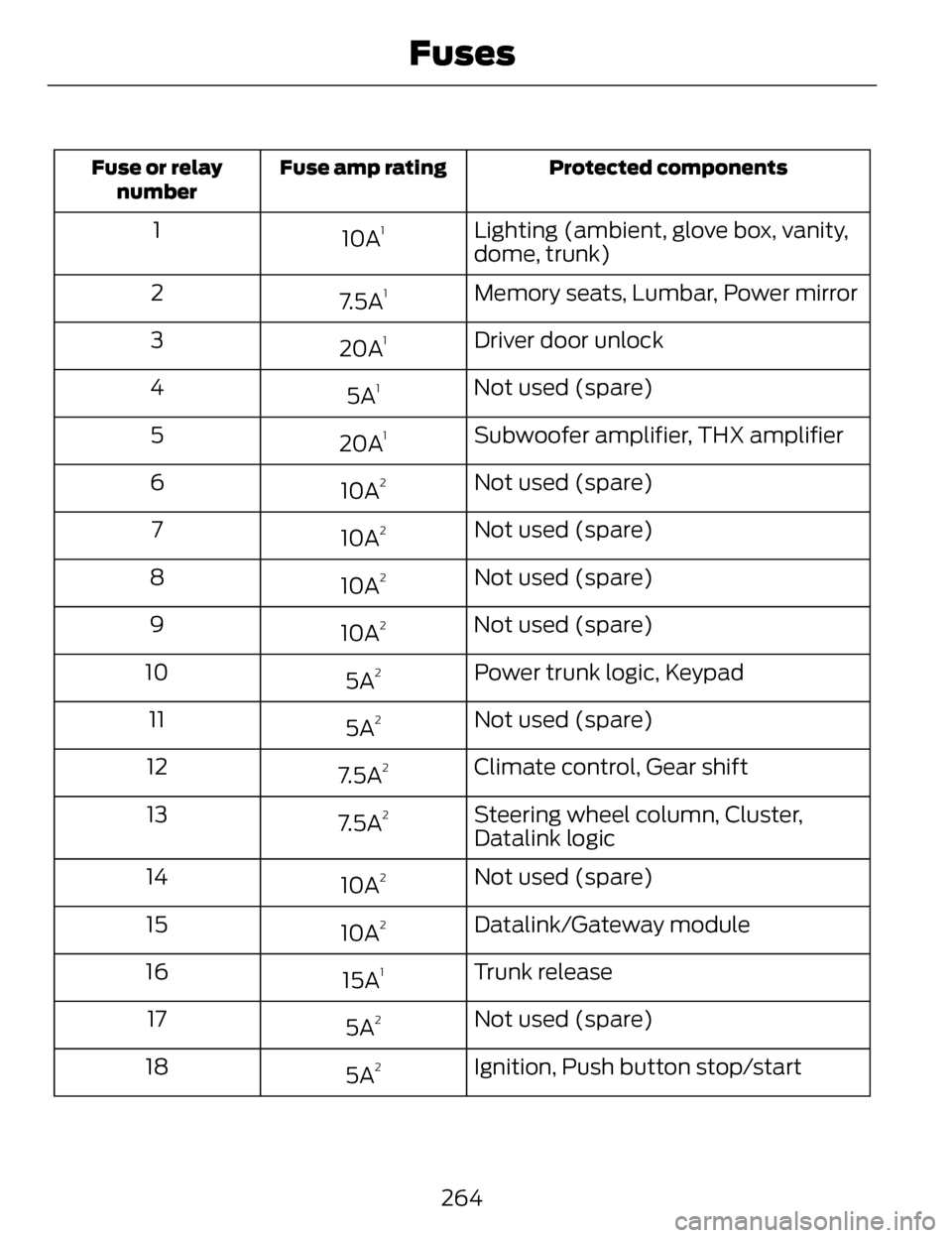
Protected components
Fuse amp rating
Fuse or relay
number
Lighting (ambient, glove box, vanity,
dome, trunk)
10A11
Memory seats, Lumbar, Power mirror
7.5A
12
Driver door unlock
20A
13
Not used (spare)
5A
14
Subwoofer amplifier, THX amplifier
20A
15
Not used (spare)
10A
26
Not used (spare)
10A
27
Not used (spare)
10A
28
Not used (spare)
10A
29
Power trunk logic, Keypad
5A
210
Not used (spare)
5A
211
Climate control, Gear shift
7.5A
212
Steering wheel column, Cluster,
Datalink logic
7.5A
213
Not used (spare)
10A
214
Datalink/Gateway module
10A
215
Trunk release
15A
116
Not used (spare)
5A
217
Ignition, Push button stop/start
5A
218
264
Fuses
Page 268 of 468
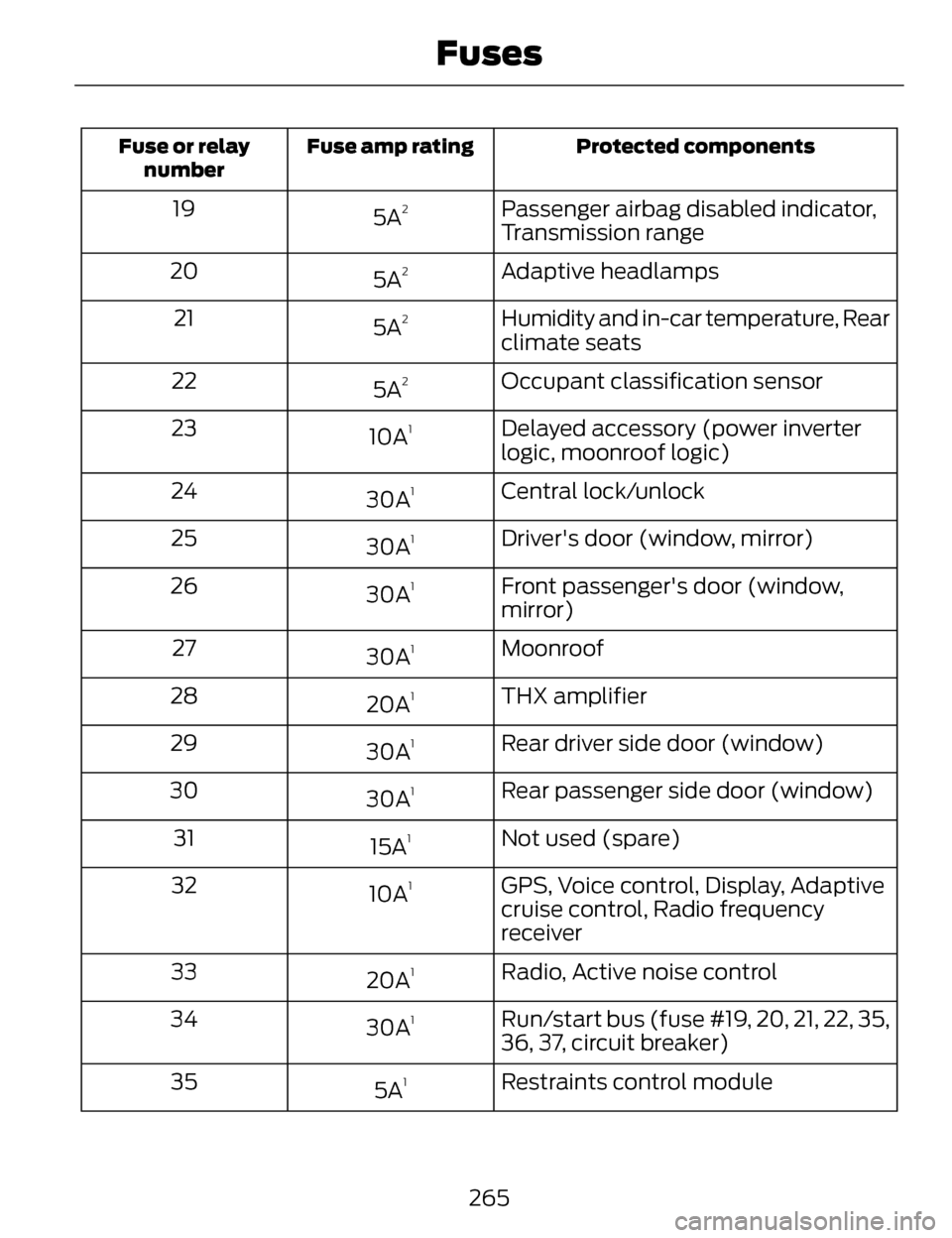
Protected components
Fuse amp rating
Fuse or relay
number
Passenger airbag disabled indicator,
Transmission range
5A219
Adaptive headlamps
5A
220
Humidity and in-car temperature, Rear
climate seats
5A
221
Occupant classification sensor
5A
222
Delayed accessory (power inverter
logic, moonroof logic)
10A
123
Central lock/unlock
30A
124
Driver's door (window, mirror)
30A
125
Front passenger's door (window,
mirror)
30A
126
Moonroof
30A
127
THX amplifier
20A
128
Rear driver side door (window)
30A
129
Rear passenger side door (window)
30A
130
Not used (spare)
15A
131
GPS, Voice control, Display, Adaptive
cruise control, Radio frequency
receiver
10A
132
Radio, Active noise control
20A
133
Run/start bus (fuse #19, 20, 21, 22, 35,
36, 37, circuit breaker)
30A
134
Restraints control module
5A
135
265
Fuses
Page 270 of 468
GENERAL INFORMATION
Have your vehicle serviced regularly
to help maintain its roadworthiness
and resale value. There is a large
network of Ford authorized dealers
that are there to help you with their
professional servicing expertise. We
believe that their specially trained
technicians are best qualified to
service your vehicle properly and
expertly. They are supported by a wide
range of highly specialized tools
developed specifically for servicing
your vehicle.
To help you service your vehicle, we
provide scheduled maintenance
information which makes tracking
routine service easy. See Scheduled
Maintenance (page 436).
If your vehicle requires professional
service, your authorized dealer can
provide the necessary parts and
service. Check your warranty
information to find out which parts
and services are covered.
Use only recommended fuels,
lubricants, fluids and service parts
conforming to specifications.
Motorcraft® parts are designed and
built to provide the best performance
in your vehicle.
Precautions
• Do not work on a hot engine.
• Make sure that nothing gets caught in moving parts. • Do not work on a vehicle with the
engine running in an enclosed
space, unless you are sure you
have enough ventilation.
• Keep all open flames and other burning material (such as
cigarettes) away from the battery
and all fuel related parts.
Working with the Engine Off
1. Set the parking brake and shift toP (Park).
2. Turn off the engine and remove the key (if equipped).
3. Block the wheels.
Working with the Engine On
WARNING
To reduce the risk of vehicle
damage and/or personal burn
injuries, do not start your engine with
the air cleaner removed and do not
remove it while the engine is running.
1. Set the parking brake and shift to P (Park).
2. Block the wheels
267
Maintenance