lock LINCOLN MKZ 2014 Owners Manual
[x] Cancel search | Manufacturer: LINCOLN, Model Year: 2014, Model line: MKZ, Model: LINCOLN MKZ 2014Pages: 468, PDF Size: 4.49 MB
Page 328 of 468
• Use commercial car washingequipment.
• Use snow chains on the end of the vehicle with the dissimilar spare
wheel and tire assembly.
The usage of a full-size dissimilar
spare wheel and tire assembly can
lead to impairment of the following:
• Handling, stability and braking performance.
• Comfort and noise.
• Ground clearance and parking at curbs.
• Winter weather driving capability.
• Wet weather driving capability.
• All-wheel driving capability (if applicable).
• Load leveling adjustment (if applicable).
When driving with the full-size
dissimilar spare wheel and tire
assembly additional caution should
be given to:
• Towing a trailer.
• Driving vehicles equipped with a camper body.
• Driving vehicles with a load on the cargo rack.
Drive cautiously when using a full-size
dissimilar spare wheel and tire
assembly and seek service as soon as
possible.Tire Change Procedure
WARNINGS
When one of the front wheels is
off the ground, the transmission
alone will not prevent the vehicle from
moving or slipping off the jack, even if
the transmission selector lever is in
position P.
To help prevent the vehicle from
moving when you change a tire,
be sure to place the transmission
selector lever in position P, set the
parking brake and block (in both
directions) the wheel that is
diagonally opposite (other side and
end of the vehicle) to the tire being
changed.
Never get underneath a vehicle
that is supported only by a jack.
If the vehicle slips off the jack, you or
someone else could be seriously
injured.
Do not attempt to change a tire
on the side of the vehicle close
to moving traffic. Pull far enough off
the road to avoid the danger of being
hit when operating the jack or
changing the wheel.
Always use the jack provided as
original equipment with your
vehicle. If using a jack other than the
one provided as original equipment
with your vehicle, make sure the jack
capacity is adequate for the vehicle
weight, including any vehicle cargo or
modifications.
325
Wheels and Tires
Page 329 of 468
1. Park on a level surface, set theparking brake and activate the
hazard flashers.
2. Place the transmission selector lever in position P and turn the
engine off.
3. Remove the carpeted wheel cover.
4. Remove the spare tire bolt securing the spare tire by turning
it counterclockwise.
5. Remove the spare tire from the spare tire compartment.
E142550
6. Remove the lug wrench and jackfrom the foam holder.
E142551
7. Block the diagonally oppositewheel. 8. Loosen each wheel lug nut
one-half turn counterclockwise but
do not remove them until the
wheel is raised off the ground.
9. The vehicle jacking points are shown here, and are depicted on
the yellow warning label on the
jack. Note: Jack at the specified
locations to avoid damage to the
vehicle.
E145908
10. Small arrow-shaped marks on the sills show the location of the
jacking points.
E142553
11. Remove the lug nuts with the lugwrench.
326
Wheels and Tires
Page 330 of 468
12. Replace the flat tire with thespare tire, making sure the valve
stem is facing outward. Reinstall
the lug nuts until the wheel is
snug against the hub. Do not fully
tighten the lug nuts until the
wheel has been lowered.
13. Lower the wheel by turning the jack handle counterclockwise.
1
2
3
4
5
E75442
14. Remove the jack and fully tighten the lug nuts in the order shown.
See Technical Specifications
(page 328).
Stowing the flat tire
You can stow the full-size road wheel
in the spare tire compartment.
1. Lift the carpeted wheel cover at an
angle to access the spare tire
compartment.
2. Place the wheel in the spare tire well with the valve stem facing
down. Use the mini-spare bolt to
secure the wheel through one of
the lug holes.
3. Place the jack, tools and foam block back into the spare tire
compartment.
4. Replace the carpeted wheel cover.
E146026
327
Wheels and Tires
Page 337 of 468
TECHNICAL SPECIFICATIONS
Ford part number /Ford specification
Ford part name or
equivalent
Capacity
Item
PM-20 / WSS-
M6C65-A2 and
ISO 4925 Class 6
Motorcraft™ DOT 4
LV High Perform-ance Brake Fluid
Between MIN
and MAX on reservoir
Brake fluid 1
Motorcraft XL-5
(aerosol) and/or
CRCSL3151ESB / ESB-M1C93-B
Multi-Purpose
Grease (lithium grease)
Not applicable
Hinges, latches,
striker plates and
rotors, seat tracks, fuel filler door
hinge and spring
XL-1 / None
Motorcraft Penet-
rating and Lock Lubricant
Not applicable
Lock cylinder
XT-10-QLV
MERCON LV
Motorcraft
MERCON™ LV ATF
9.0 qt (8.5 L)
6F35 automatic
transmission fluid
2, 3
11.6 qt (11 L)
6F50 automatic
transmission fluid
2, 3
XY-80W90-QL / WSP-M2C197-A
Motorcraft SAE
80W-90 Premium
Rear Axle Lubricant
2.4 pt (1.15 L)
Rear differential
(AWD) fluid
XY-75W140-QL /WSL-M2C192-A
Motorcraft SAE
75W-140 Synthetic
Rear Axle Lubricant
12 fl oz (0.35
L)
Power Transfer
Unit (PTU) fluid
(AWD)
4
XO-5W30-QSP
Motorcraft SAE 5W-
30 or equivalent motor oil
5.7 qt (5.4 L)
2.0L EcoBoost
engine oil 5, 6WSS-M2C946-A
XO-5W20-QSP
Motorcraft SAE 5W-
20 or equivalent motor oil
6 qt (5.7 L)
3.7L V6 engine oil
5,
6
WSS-M2C945-A
334
Capacities and Specifications
Page 340 of 468
For a complete listing of the
accessories that are available for your
vehicle, please contact an authorized
dealer or visit our online store at
Accessories.Lincoln.com (United
States only).
Lincoln Custom Accessories are
available for your vehicle through an
authorized Lincoln dealer. Lincoln
Motor Company will repair or replace
any properly authorized
dealer-installed Lincoln Custom
Accessories found to be defective in
factory-supplied materials or
workmanship during the warranty
period, as well as any component
damaged by the defective
accessories.
Lincoln Motor Company will warrant
your vehicle through the warranty that
provides the greatest benefit:
• 12 months or 12000 miles (20000kilometers) (whichever occurs
first).
• The remainder of your new vehicle limited warranty.
Contact an authorized dealer for
details and a copy of the warranty.
Exterior style
• Hood deflectors
• Side-window deflectors
• Wheels
• Bumper protectors
Interior style
• All-weather floor mats
• Rear seat entertainment*
• Premium carpeted floor mats
Lifestyle
• Ash cup (smoker's packages)
• Cargo area protector
• Cargo net
• Cargo organizer
• Roof racks and carriers*
Peace of mind
• Car cover*
• Wheel locks
• Bumper mounted parking sensor*
• Locking fuel plug for capless fuel system
*The accessory manufacturer designs,
develops and therefore warrants
Lincoln Licensed Accessories, and
does not design or test these
accessories to Lincoln Motor
Company engineering requirements.
Contact an authorized Lincoln dealer
for the manufacturer's limited
warranty details and request a copy
of the Lincoln Licensed Accessories
product limited warranty from the
accessory manufacturer.
337
Accessories
Page 341 of 468
For maximum vehicle performance,
keep the following information in mind
when adding accessories or
equipment to your vehicle:
• When adding accessories,equipment, passengers and
luggage to your vehicle, do not
exceed the total weight capacity
of the vehicle or of the front or rear
axle (GVWR or GAWR as indicated
on the Safety Compliance
Certification label). Consult an
authorized dealer for specific
weight information.
• The Federal Communications Commission (FCC) and Canadian
Radio Telecommunications
Commission (CRTC) regulate the
use of mobile communications
systems that are equipped with
radio transmitters, for example,
two-way radios, telephones and
theft alarms. Any such equipment
installed in your vehicle should
comply with the Federal
Communications Commission
(FCC) and Canadian Radio
Telecommunications Commission
(CRTC) regulations and should be
installed only by an authorized
dealer.
• Mobile communications systems may harm the operation of your
vehicle, particularly if their
manufacturer did not design them
specifically for automotive use. • To avoid interference with other
vehicle functions, for example
anti-lock brake systems, do not
locate amateur radio antennas in
the area of the driver side hood.
• If you or an authorized Lincoln dealer add any non-Lincoln
custom electrical or electronic
accessories or components to your
vehicle, you may adversely affect
battery performance and
durability. In addition, you may also
adversely affect the performance
of other electrical systems in the
vehicle.
338
Accessories
Page 342 of 468
PROTECT YOURSELF FROM THE
RISING COST OF VEHICLE REPAIRS
WITH A FORD EXTENDED SERVICE
PLAN.
SERVICE PLANS (U.S. Only)
More than 32 million Ford and Lincoln
owners have discovered the powerful
protection of Ford Extended Service
Plan. It is the only extended service
plan backed by Ford Motor Company,
and provides peace of mind
protection beyond the New Vehicle
Limited Warranty coverage.
Ford ESP Can Quickly Pay for Itself
One service bill – the cost of parts and
labor – can easily exceed the price of
your Ford Extended Service Plan. With
Ford ESP, you minimize your risk for
unexpected repair bills and rising
repair costs.
Up to 500+ Covered Vehicle
Components
There are four Extended Service Plans
with different levels of coverage. Ask
your authorized dealer for details.
1. PremiumCARE - Our most comprehensive coverage. With
over 500 covered components,
this plan is so complete that we
generally only discuss what’s not
covered.
2. ExtraCARE - Covers 113 components, and includes many
high-tech items.
3. BaseCARE - Covers 84 components. 4. PowertrainCARE - Covers 29
critical components.
Ford Extended Service Plan is honored
by all authorized Ford and Lincoln
dealers in the U.S. and Canada. It is
the only extended service plan
authorized and backed by Ford Motor
Company.
That means you get:
• Reliable, quality service anywhere you go
• Repairs performed by factory trained technicians, using Genuine
Ford and Lincoln parts
Rental Car Reimbursement
1st day Rental Benefit
You take advantage of replacement
transportation if your vehicle is at your
authorized dealer for same day
covered repairs.
Extended Rental Benefits
If your vehicle is kept overnight for
covered repairs, you are eligible for
rental car coverage, including Bumper
to Bumper warranty repairs, or Field
Service Actions.
Roadside Assistance
Exclusive 24/7 roadside assistance,
including:
• Towing, flat-tire change and battery jump starts
• Out of fuel and lock-out assistance
339
Ford Extended Service Plan (ESP)
Page 346 of 468
Information
F
Entertainment
G
This system uses a four-corner
strategy to provide quick access to
several vehicle features and settings.
The touchscreen provides easy
interaction with your cellular phone,
multimedia, climate control and
navigation system. The corners
display any active modes within those
menus, such as phone status or the
climate temperature.
Note: Some features are not available
while your vehicle is moving.
Note: Your system is equipped with a
feature that allows you to access and
control audio features for 30 minutes
after you switch the ignition off (and
no doors open).
PHONE
Press to select any of the following:
• Phone
• Quick Dial
• Phonebook
• History
• Messaging
• Settings
NAVIGATION
Press to select any of the following:
• My Home
• Favorites
• Previous Destinations
• Point of Interest
• Emergency • Street Address
• Intersection
• City Center
• Map
• Edit Route Cancel Route
CLIMATE
Press to select any of the following:
• Driver Settings
• Recirculated Air
• Auto
•Dual
• Passenger Settings
•A/C
• Defrost
E142607
SETTINGS
Press to select any of the following:
• Clock
• Display
• Sound
• Vehicle
• Settings
• Help
E142613
HOME
343
MyLincoln Touch™
Page 355 of 468
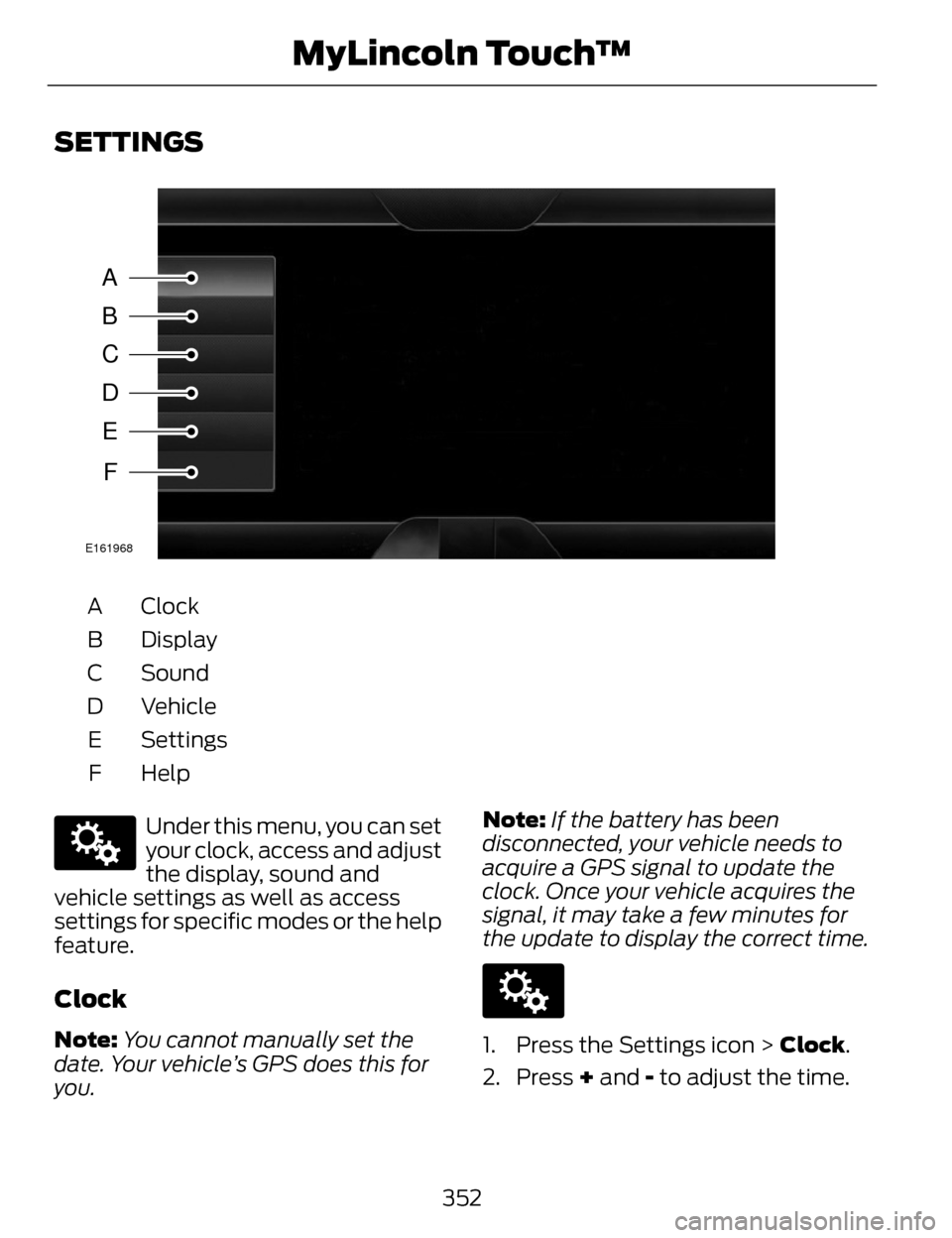
SETTINGS
A
B
C
D
E
F
E161968
Clock
A
Display
B
Sound
C
Vehicle
D
Settings
E
HelpF
E142607
Under this menu, you can set
your clock, access and adjust
the display, sound and
vehicle settings as well as access
settings for specific modes or the help
feature.
Clock
Note: You cannot manually set the
date. Your vehicle’s GPS does this for
you. Note:
If the battery has been
disconnected, your vehicle needs to
acquire a GPS signal to update the
clock. Once your vehicle acquires the
signal, it may take a few minutes for
the update to display the correct time.
E142607
1. Press the Settings icon > Clock.
2. Press + and - to adjust the time.
352
MyLincoln Touch™
Page 358 of 468
• Rear Camera Delay
• Visual Park Aid Alert
• Guidelines.
You can find more information on the
rear view camera in another chapter.
See Rear View Camera (page 194).
Enable Valet Mode
Note: If the system locks, and you
need to reset the PIN, enter 3681 and
the system unlocks.
Valet mode allows you to lock the
system. No information is accessible
until the system is unlocked with the
correct PIN.
E142607
1. Press the Settings icon > Vehicle > Enable Valet Mode.
2. When prompted, enter a four-digit PIN.
After you press Continue, the system
locks until you enter the PIN again.
Settings
Access and adjust system settings,
voice features, as well as phone,
navigation and wireless settings.
System
E142607
Press the Settings icon >
Settings > System , then
select from the following:
System
Select to have the touchscreen display in English,
Spanish or French.
Language
Select to display units in kilometers or miles.
Distance
Select to display units in Celsius or Fahrenheit.
Temperature
Adjust the volume of voice prompts from the
system.
System Prompt Volume
Select to have the system beep to confirm choices
made through the touchscreen.
Touch Screen Button
Beep
Select to have the system beep to confirm button
choices made through the climate or audio system.
Touch Panel Button
Beep
355
MyLincoln Touch™