steering LINCOLN MKZ 2014 Workshop Manual
[x] Cancel search | Manufacturer: LINCOLN, Model Year: 2014, Model line: MKZ, Model: LINCOLN MKZ 2014Pages: 468, PDF Size: 4.49 MB
Page 283 of 468
7. Install the bolt cover (if equipped).
8. Reinstall the harness retaining clip into the front of the air filter
assembly.
BRAKE FLUID CHECK
Fluid levels between the MIN and MAX
lines are within the normal operating
range; there is no need to add fluid. If
the fluid levels are outside of the
normal operating range, the
performance of the system could be
compromised; seek service from your
authorized dealer immediately.
POWER STEERING FLUID
CHECK
Your vehicle is equipped with an
electric power steering (EPS) system.
There is no fluid reservoir to check or
fill.
FUEL FILTER
Your vehicle is equipped with a
lifetime fuel filter that is integrated
with the fuel tank. Regular
maintenance or replacement is not
needed.
WASHER FLUID CHECK
WARNING
If you operate your vehicle in
temperatures below 40°F (5°C),
use washer fluid with antifreeze
protection. Failure to use washer fluid
with antifreeze protection in cold
weather could result in impaired
windshield vision and increase the risk
of injury or accident.
Note: The front and rear washer
systems are supplied from the same
reservoir.
Add fluid to fill the reservoir if the level
is low. Only use a washer fluid that
meets Ford specifications. See
Capacities and Specifications
(page 329).
State or local regulations on volatile
organic compounds may restrict the
use of methanol, a common
windshield washer antifreeze additive.
Washer fluids containing
non-methanol antifreeze agents
should be used only if they provide
cold weather protection without
damaging the vehicle’s paint finish,
wiper blades or washer system.
280
Maintenance
Page 295 of 468
CLEANING THE
INSTRUMENT PANEL AND
INSTRUMENT CLUSTER
LENS
WARNING
Do not use chemical solvents or
strong detergents when cleaning
the steering wheel or instrument panel
to avoid contamination of the airbag
system.
Clean the instrument panel and
cluster lens with a clean, damp, white
cotton cloth, then use a clean and dry
white cotton cloth to dry these areas.
• Avoid cleaners or polishes that increase the gloss of the upper
portion of the instrument panel.
The dull finish in this area helps
protect you from undesirable
windshield reflection.
• Be certain to wash or wipe your hands clean if you have been in
contact with certain products such
as insect repellent and suntan
lotion in order to avoid possible
damage to the interior painted
surfaces.
• Do not use household or glass cleaners as these may damage the
finish of the instrument panel,
interior trim and cluster lens.
• Do not allow air fresheners and hand sanitizers to spill onto interior
surfaces. If a spill occurs, wipe off
immediately. Damage may not be
covered by y our warranty. If a staining liquid like coffee or juice
has been spilled on the instrument
panel or on interior trim surfaces,
clean as follows:
1. Wipe up spilled liquid using a
clean, white, cotton cloth.
2. Wipe the surface with a damp, clean, white cotton cloth. For more
thorough cleaning, use a mild soap
and water solution. If the spot
cannot be completely cleaned by
this method, the area may be
cleaned using a commercially
available cleaning product
designed for automotive interiors.
3. If necessary, apply more soap and water solution or cleaning product
to a clean, white, cotton cloth and
press the cloth onto the soiled
area. Allow this to set at room
temperature for 30 minutes.
4. Remove the soaked cloth and if it is not soiled badly, use this cloth
to clean the area by using a
rubbing motion for 60 seconds.
5. Following this, wipe area dry with a clean, white, cotton cloth.
CLEANING LEATHER SEATS
(IF EQUIPPED)
For routine cleaning, wipe the surface
with a soft, damp cloth. For more
thorough cleaning, wipe the surface
with a mild soap and water solution.
Dry the area with a soft cloth. In
Canada, use Motorcraft® Vinyl
Cleaner.
292
Vehicle Care
Page 301 of 468
General Information
WARNING
Failure to follow these guidelines
could result in an increased risk
of loss of vehicle control, injury or
death.
Note: Do not use the kit if a tire has
become severely damaged by driving
the vehicle with a tire that has
insufficient air pressure. Only punctured
areas located within the tire tread can
be sealed with the kit.
Do not attempt to repair punctures
larger than 1.4 inch (6.4 millimeters)
or damage to the tire's sidewall. The
tire may not completely seal.
Loss of air pressure may adversely
affect tire performance. For this
reason:
Note: Do not drive the vehicle above
50 mph (80 km/h).
Note: Do not drive further than 120
miles (200 kilometers). Drive only to
the closest Ford Motor Company
authorized dealer or tire repair shop to
have your tire inspected.
• Drive carefully and avoid abrupt steering maneuvers.
• Periodically monitor tire inflation pressure in the affected tire; if the
tire is losing pressure, have the
vehicle towed.
• Read the information in the Tips for Use of the Kit section to make
sure safe operation of the kit and
your vehicle.
Tips for Use of the Kit
Read the following list of tips to
ensure safe operation of the kit:
• Before operating the kit, make sureyour vehicle is safely off the road
and away from moving traffic. Turn
on the hazard lights.
• Always set the parking brake to ensure the vehicle doesn't move
unexpectedly.
• Do not remove any foreign objects, such as nails or screws, from the
tire.
• When using the kit, leave the engine running (only if the vehicle
is outdoors or in a well-ventilated
area) so the compressor doesn't
drain the vehicle's battery.
• Do not allow the compressor to operate continuously for more
than 15 minutes; this will help
prevent the compressor from
overheating.
• Never leave the kit unattended when it is operating.
• Sealant compound contains latex. Make sure that you use the
non-latex gloves provided to avoid
an allergic reaction.
• Keep the kit away from children.
• Only use the kit when the ambient temperature is between -22°F
(–30°C) and 158°F (70°C).
298
Wheels and Tires
Page 322 of 468
describes the fundamental
characteristics of the tire and also
provides a U.S. DOT Tire
Identification Number for safety
standard certification and in case
of a recall.
This begins with the letters DOT
and indicates that the tire meets
all federal standards. The next
two numbers or letters are the
plant code designating where it
was manufactured, the next two
are the tire size code and the last
four numbers represent the week
and year the tire was built. For
example, the numbers 317 mean
the 31st week of 1997. After 2000
the numbers go to four digits. For
example, 2501 means the 25th
week of 2001. The numbers in
between are identification codes
used for traceability. This
information is used to contact
customers if a tire defect requires
a recall.
Tire Replacement
Requirements
Your vehicle is equipped with tires
designed to provide a safe ride
and handling capability.
WARNINGS
Only use replacement tires
and wheels that are the same
size, load index, speed rating and
type (such as P-metric versus
LT-metric or all-season versus
all-terrain) as those originally
provided by Ford. The
recommended tire and wheel size
WARNINGS
may be found on either the Safety
Compliance Certification Label
(affixed to either the door hinge
pillar, door-latch post, or the door
edge that meets the door-latch
post, next to the driver's seating
position), or the Tire Label which
is located on the B-Pillar or edge
of the driver’s door. If this
information is not found on these
labels then you should contact
your authorized dealer as soon as
possible. Use of any tire or wheel
not recommended by Ford can
affect the safety and performance
of your vehicle, which could result
in an increased risk of loss of
vehicle control, vehicle rollover,
personal injury and death.
Additionally the use of
non-recommended tires and
wheels could cause steering,
suspension, axle, transfer case or
power transfer unit failure. If you
have questions regarding tire
replacement, contact your
authorized dealer as soon as
possible.
To reduce the risk of serious
injury, when mounting
replacement tires and wheels, you
should not exceed the maximum
pressure indicated on the sidewall
of the tire to set the beads without
additional precautions listed
below. If the beads do not seat at
the maximum pressure indicated,
re-lubricate and try again
319
Wheels and Tires
Page 326 of 468
USING SNOW CHAINS
WARNINGS
If you choose to install snow tires
on your vehicle, they must be the
same size, construction, and load
range as the original tires listed on the
tire placard, and they must be
installed on all four wheels. Mixing
tires of different size or construction
on your vehicle can adversely affect
your vehicle's handling and braking,
and may lead to loss of vehicle
control.
Do not use snow chains or cables
on this vehicle as they may cause
damage to your vehicle which may
lead to loss of vehicle control.
Snow chains have not been approved
for use on your vehicle.
The original equipment tires on your
vehicle may have an all-weather tread
design to provide traction, handling,
and braking performance in
year-round driving. You may install
snow tires for improved traction when
driving in areas with sustained periods
of snow or icy driving conditions.
CHANGING A ROAD WHEEL
WARNINGS
The use of tire sealants may
damage your tire pressure
monitoring system and should not be
used. However, if you must use a
sealant, the tire pressure monitoring
system sensor and valve stem on the
wheel must be replaced by an
authorized dealer.
If the tire pressure monitor
sensor becomes damaged, it will
no longer function. See Tire Pressure
Monitoring System (page 303).
Note: The tire pressure monitoring
system indicator light will illuminate
when the spare tire is in use. To restore
the full function of the monitoring
system, all road wheels equipped with
tire pressure monitoring sensors must
be mounted on the vehicle.
If you get a flat tire while driving, do
not apply the brake heavily. Instead,
gradually decrease your speed. Hold
the steering wheel firmly and slowly
move to a safe place on the side of
the road.
Have a flat serviced by an authorized
dealer in order to prevent damage to
the tire pressure monitoring system
sensors. See Tire Pressure
Monitoring System (page 303).
Replace the spare tire with a road tire
as soon as possible. During repairing
or replacing of the flat tire, have the
authorized dealer inspect the tire
pressure monitoring system sensor
for damage.
323
Wheels and Tires
Page 351 of 468
access the information independently
of Ford Motor Company and Ford of
Canada. For further privacyinformation, see the sections on 911
Assist, Vehicle Health Report, and
Traffic, Directions and Information.
Accessing and Adjusting Modes through Your Vehicle Information
Display
E156609
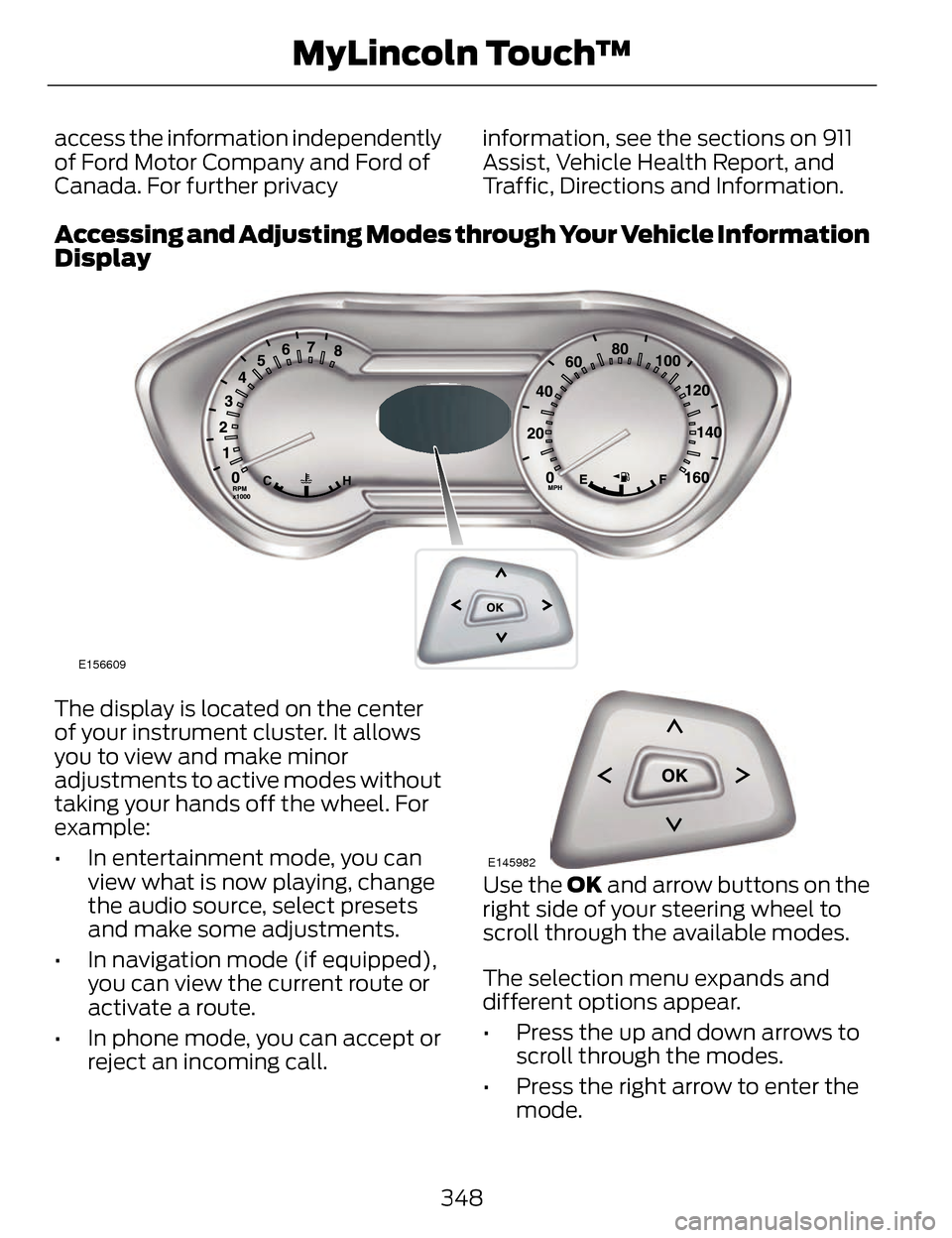
The display is located on the center
of your instrument cluster. It allows
you to view and make minor
adjustments to active modes without
taking your hands off the wheel. For
example:
• In entertainment mode, you can
view what is now playing, change
the audio source, select presets
and make some adjustments.
• In navigation mode (if equipped), you can view the current route or
activate a route.
• In phone mode, you can accept or reject an incoming call.
E145982
Use the OK and arrow buttons on the
right side of your steering wheel to
scroll through the available modes.
The selection menu expands and
different options appear.
• Press the up and down arrows to scroll through the modes.
• Press the right arrow to enter the mode.
348
MyLincoln Touch™
Page 353 of 468
Helpful Hints
• Make sure the interior of yourvehicle is as quiet as possible.
Wind noise from open windows
and road vibrations may prevent
the system from correctly
recognizing spoken commands.
• After pressing the voice icon, wait until after the tone sounds and
Listening appears before saying a
command. Any command spoken
before this does not register with
the system.
• Speak naturally, without long pauses between words.
• At any time, you can interrupt the system while it is speaking by
pressing the voice icon.
Accessing a List of Available
Commands
• If you use the touchscreen, press the Settings icon > Help > Voice
Command List.
• If you use the steering wheel control, press the voice icon. After
the tone, speak your command
clearly.
Available voice commands
"Audio list of commands"
"Bluetooth audio list of commands" "Browse list of commands""CD list of commands"
"Climate control list of commands" "List of commands"
Available voice commands
"Navigation list of commands" *
"Phone list of commands""Radio list of commands"
"SD card list of commands"
"Sirius satellite list of commands"
**
"Travel link list of commands" *
"USB list of commands"
"Voice instructions list of commands"
"Voice settings list of commands" "Help"
* This command is only available when
your vehicle is equipped with the
navigation system, and the navigation
system SD card is in the card slot.
** This command is only available
when you have an active SIRIUS
satellite radio subscription.
Voice Settings
Voice settings allow you to customize
the level of system interaction, help
and feedback. The system defaults
to standard interaction that uses
candidate lists and confirmation
prompts as these provide the highest
level of guidance and feedback.
350
MyLincoln Touch™
Page 356 of 468
From this screen, you can also make
other adjustments such as 12-hour or
24-hour mode, activate GPS time
synchronization and have the system
automatically update new time zones.
You can also turn the outside air
temperature display off and on. It
appears at the top center of the
touchscreen, next to the time and
date.
The system automatically saves any
updates you make to the settings.
Display
You can adjust the touchscreen
display through the touchscreen or by
pressing the voice button on your
steering wheel controls and when
prompted, say, "Display settings".
E142607
Press the Settings icon >
Display, to access and make
adjustments using the
touchscreen.
• Brightness allows you to make
the screen display brighter or
dimmer.
• Auto DIM, when set to On, lets
you use the Auto Dim Manual
Offset feature.
• Mode allows you to set the screen
to a certain brightness or have the
system automatically change
based on the outside light level, or
turn the display off.
• If you select AUTO or NIGHT,
you have the options of turning
the display's Auto Dim feature
on or off and changing the Auto
Dim Manual Offset feature. •
Auto Dim Manual Offset allows
you to adjust screen dimming as
the outside lighting conditions
change from day to night.
• Edit Wallpaper
• You can have your touchscreen
display the default photo or
upload your own.
Uploading Photos for Your Home
Screen Wallpaper
Note: You cannot load photos directly
from your camera. You must access
the photos either from your USB mass
storage device or from an SD card.
Note: Photographs with extremely
large dimensions (such as 2048 x
1536) may not be compatible and
appear as a blank (black) image on the
display.
Your system allows you to upload and
view up to 32 photos.
E142607
To access, press the Settings
icon > Display > Edit
Wallpaper, and then follow
the system prompts to upload your
photographs.
Only the photograph(s), which meets
the following conditions, display:
• Compatible file formats are as follows: .jpg, .gif, .png, .bmp
• Each file must be 1.5 MB or less.
• Recommended dimensions: 800 x 384
353
MyLincoln Touch™
Page 368 of 468
E142599
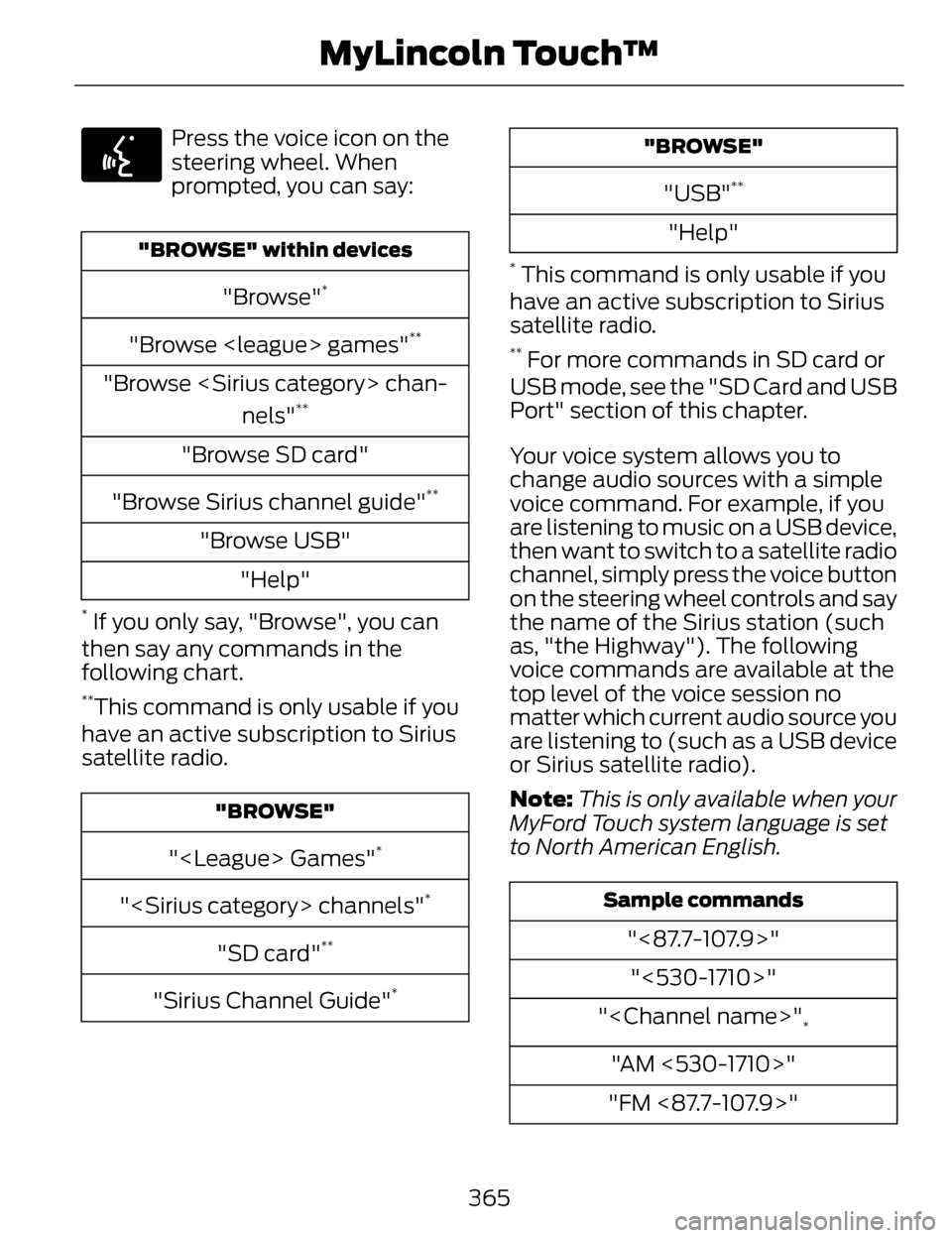
Press the voice icon on the
steering wheel. When
prompted, you can say:
"BROWSE" within devices
"Browse"*
"Browse
"Browse
"Browse SD card"
"Browse Sirius channel guide"
**
"Browse USB" "Help"
* If you only say, "Browse", you can
then say any commands in the
following chart.
**This command is only usable if you
have an active subscription to Sirius
satellite radio.
"BROWSE"
"
"
"SD card"**
"Sirius Channel Guide"*
"BROWSE"
"USB"**
"Help"
* This command is only usable if you
have an active subscription to Sirius
satellite radio.
** For more commands in SD card or
USB mode, see the "SD Card and USB
Port" section of this chapter.
Your voice system allows you to
change audio sources with a simple
voice command. For example, if you
are listening to music on a USB device,
then want to switch to a satellite radio
channel, simply press the voice button
on the steering wheel controls and say
the name of the Sirius station (such
as, "the Highway"). The following
voice commands are available at the
top level of the voice session no
matter which current audio source you
are listening to (such as a USB device
or Sirius satellite radio).
Note: This is only available when your
MyFord Touch system language is set
to North American English.
Sample commands
"<87.7-107.9>"
"<530-1710>"
"
*
"AM <530-1710>"
"FM <87.7-107.9>"
365
MyLincoln Touch™
Page 374 of 468
HD Radio Technology manufactured
under license from iBiquity Digital
Corp. U.S. and foreign patents. HD
Radio and the HD and HD Radio logos
are proprietary trademarks of iBiquity
Digital Corp. Ford Motor Company and
iBiquity Digital Corp. are not
responsible for the content sent using
HD Radio technology. Content may
be changed, added or deleted at any
time at the station owner's discretion.
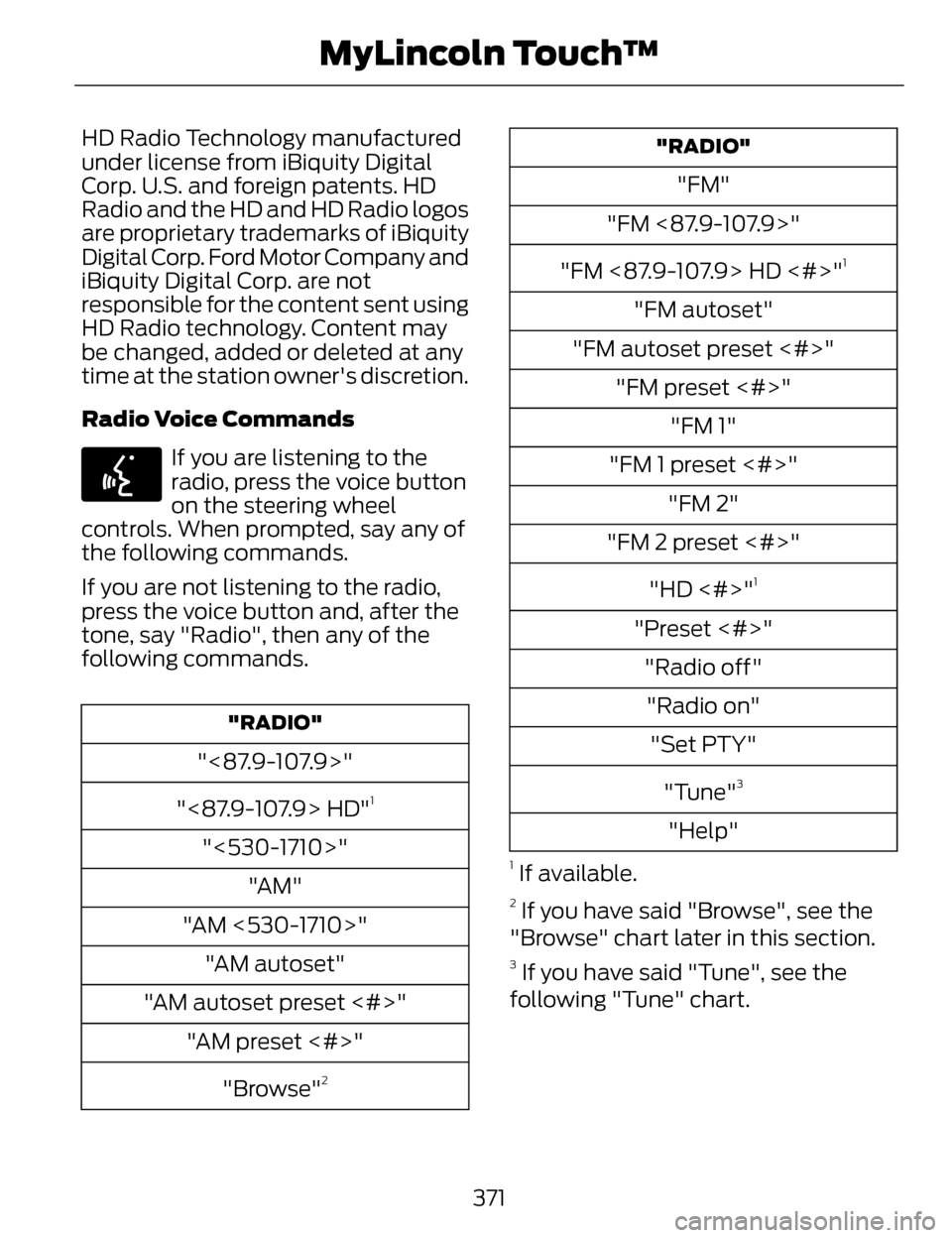
Radio Voice Commands
E142599
If you are listening to the
radio, press the voice button
on the steering wheel
controls. When prompted, say any of
the following commands.
If you are not listening to the radio,
press the voice button and, after the
tone, say "Radio", then any of the
following commands.
"RADIO"
"<87.9-107.9>"
"<87.9-107.9> HD"
1
"<530-1710>" "AM"
"AM <530-1710>" "AM autoset"
"AM autoset preset <#>" "AM preset <#>"
"Browse"
2
"RADIO"
"FM"
"FM <87.9-107.9>"
"FM <87.9-107.9> HD <#>"
1
"FM autoset"
"FM autoset preset <#>" "FM preset <#>" "FM 1"
"FM 1 preset <#>" "FM 2"
"FM 2 preset <#>"
"HD <#>"
1
"Preset <#>""Radio off""Radio on" "Set PTY"
"Tune"
3
"Help"
1 If available.
2 If you have said "Browse", see the
"Browse" chart later in this section.
3 If you have said "Tune", see the
following "Tune" chart.
371
MyLincoln Touch™