reset LINCOLN MKZ HYBRID 2014 Service Manual
[x] Cancel search | Manufacturer: LINCOLN, Model Year: 2014, Model line: MKZ HYBRID, Model: LINCOLN MKZ HYBRID 2014Pages: 445, PDF Size: 3.8 MB
Page 348 of 445
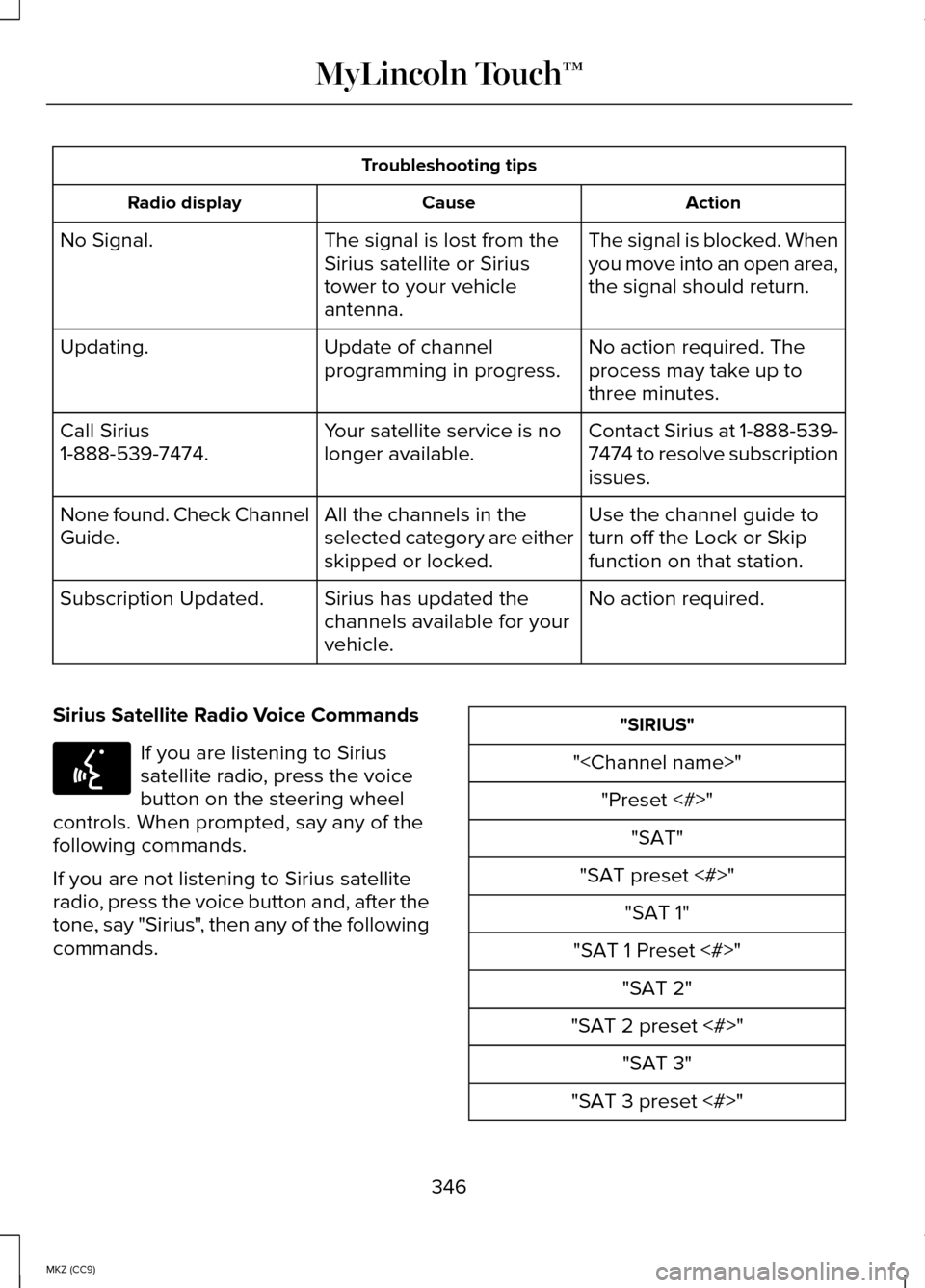
Troubleshooting tips
Action
Cause
Radio display
The signal is blocked. When
you move into an open area,
the signal should return.
The signal is lost from the
Sirius satellite or Sirius
tower to your vehicle
antenna.
No Signal.
No action required. The
process may take up to
three minutes.
Update of channel
programming in progress.
Updating.
Contact Sirius at 1-888-539-
7474 to resolve subscription
issues.
Your satellite service is no
longer available.
Call Sirius
1-888-539-7474.
Use the channel guide to
turn off the Lock or Skip
function on that station.
All the channels in the
selected category are either
skipped or locked.
None found. Check Channel
Guide.
No action required.
Sirius has updated the
channels available for your
vehicle.
Subscription Updated.
Sirius Satellite Radio Voice Commands If you are listening to Sirius
satellite radio, press the voice
button on the steering wheel
controls. When prompted, say any of the
following commands.
If you are not listening to Sirius satellite
radio, press the voice button and, after the
tone, say "Sirius", then any of the following
commands. "SIRIUS"
"
"SAT preset <#>" "SAT 1"
"SAT 1 Preset <#>" "SAT 2"
"SAT 2 preset <#>" "SAT 3"
"SAT 3 preset <#>"
346
MKZ (CC9) MyLincoln Touch™E142599
Page 349 of 445
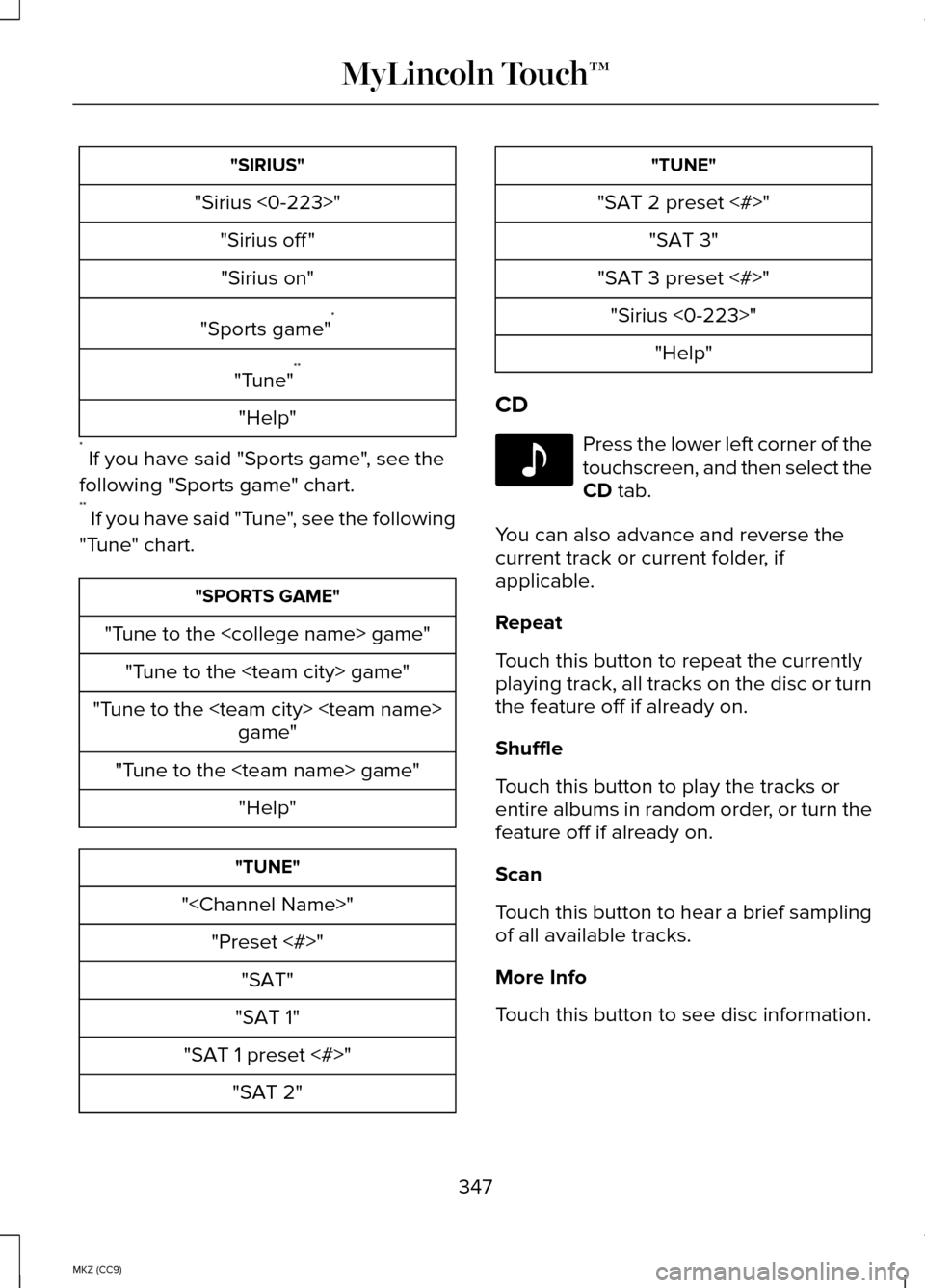
"SIRIUS"
"Sirius <0-223>" "Sirius off ""Sirius on"
"Sports game" *
"Tune" **
"Help"
* If you have said "Sports game", see the
following "Sports game" chart.
** If you have said "Tune", see the following
"Tune" chart. "SPORTS GAME"
"Tune to the
"Tune to the
"Tune to the
"
"SAT 1"
"SAT 1 preset <#>" "SAT 2" "TUNE"
"SAT 2 preset <#>" "SAT 3"
"SAT 3 preset <#>" "Sirius <0-223>" "Help"
CD Press the lower left corner of the
touchscreen, and then select the
CD tab.
You can also advance and reverse the
current track or current folder, if
applicable.
Repeat
Touch this button to repeat the currently
playing track, all tracks on the disc or turn
the feature off if already on.
Shuffle
Touch this button to play the tracks or
entire albums in random order, or turn the
feature off if already on.
Scan
Touch this button to hear a brief sampling
of all available tracks.
More Info
Touch this button to see disc information.
347
MKZ (CC9) MyLincoln Touch™E142611
Page 415 of 445
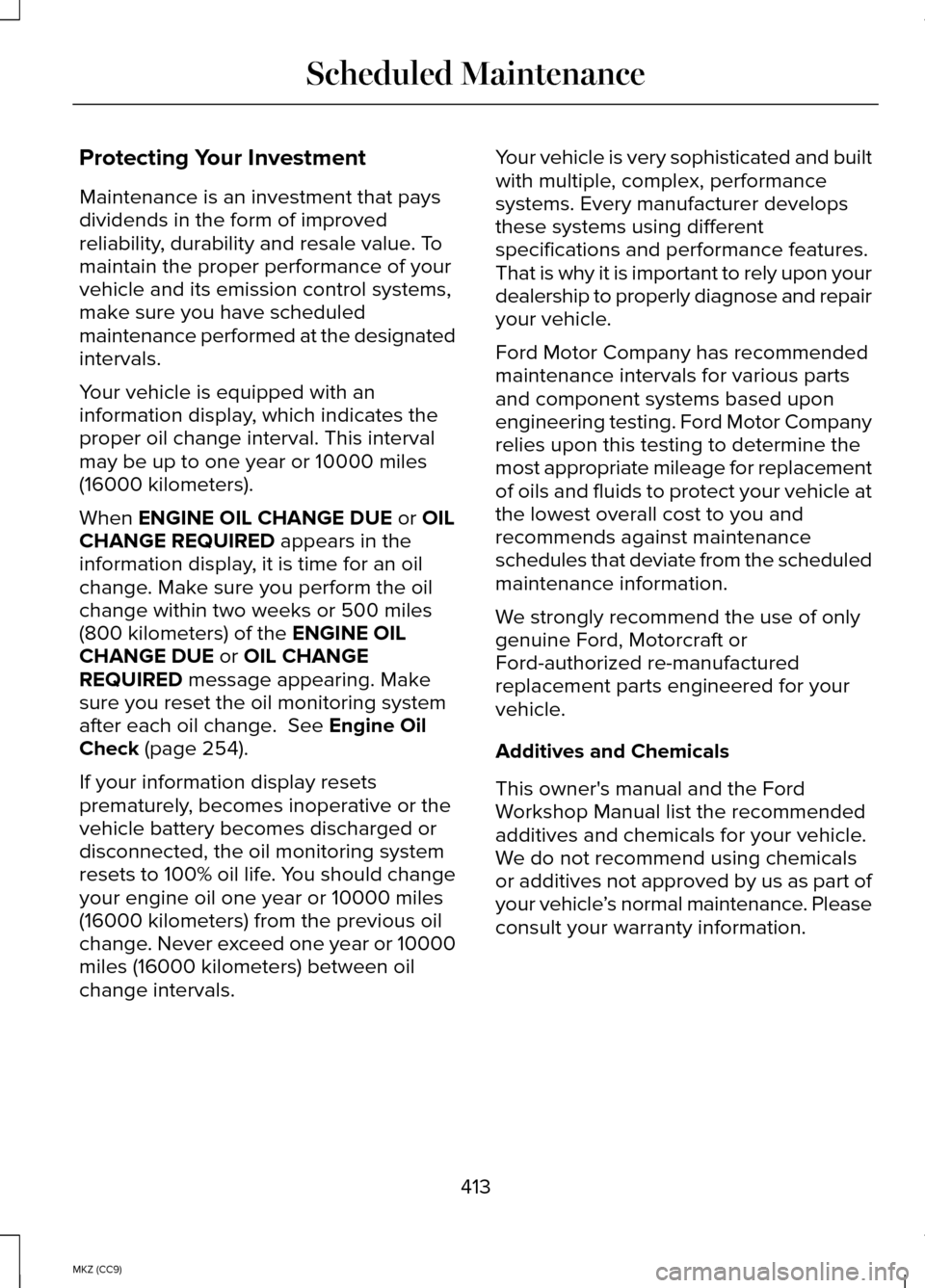
Protecting Your Investment
Maintenance is an investment that pays
dividends in the form of improved
reliability, durability and resale value. To
maintain the proper performance of your
vehicle and its emission control systems,
make sure you have scheduled
maintenance performed at the designated
intervals.
Your vehicle is equipped with an
information display, which indicates the
proper oil change interval. This interval
may be up to one year or 10000 miles
(16000 kilometers).
When ENGINE OIL CHANGE DUE or OIL
CHANGE REQUIRED appears in the
information display, it is time for an oil
change. Make sure you perform the oil
change within two weeks or 500 miles
(800 kilometers) of the
ENGINE OIL
CHANGE DUE or OIL CHANGE
REQUIRED message appearing. Make
sure you reset the oil monitoring system
after each oil change.
See Engine Oil
Check (page 254).
If your information display resets
prematurely, becomes inoperative or the
vehicle battery becomes discharged or
disconnected, the oil monitoring system
resets to 100% oil life. You should change
your engine oil one year or 10000 miles
(16000 kilometers) from the previous oil
change. Never exceed one year or 10000
miles (16000 kilometers) between oil
change intervals. Your vehicle is very sophisticated and built
with multiple, complex, performance
systems. Every manufacturer develops
these systems using different
specifications and performance features.
That is why it is important to rely upon your
dealership to properly diagnose and repair
your vehicle.
Ford Motor Company has recommended
maintenance intervals for various parts
and component systems based upon
engineering testing. Ford Motor Company
relies upon this testing to determine the
most appropriate mileage for replacement
of oils and fluids to protect your vehicle at
the lowest overall cost to you and
recommends against maintenance
schedules that deviate from the scheduled
maintenance information.
We strongly recommend the use of only
genuine Ford, Motorcraft or
Ford-authorized re-manufactured
replacement parts engineered for your
vehicle.
Additives and Chemicals
This owner's manual and the Ford
Workshop Manual list the recommended
additives and chemicals for your vehicle.
We do not recommend using chemicals
or additives not approved by us as part of
your vehicle
’s normal maintenance. Please
consult your warranty information.
413
MKZ (CC9) Scheduled Maintenance
Page 420 of 445
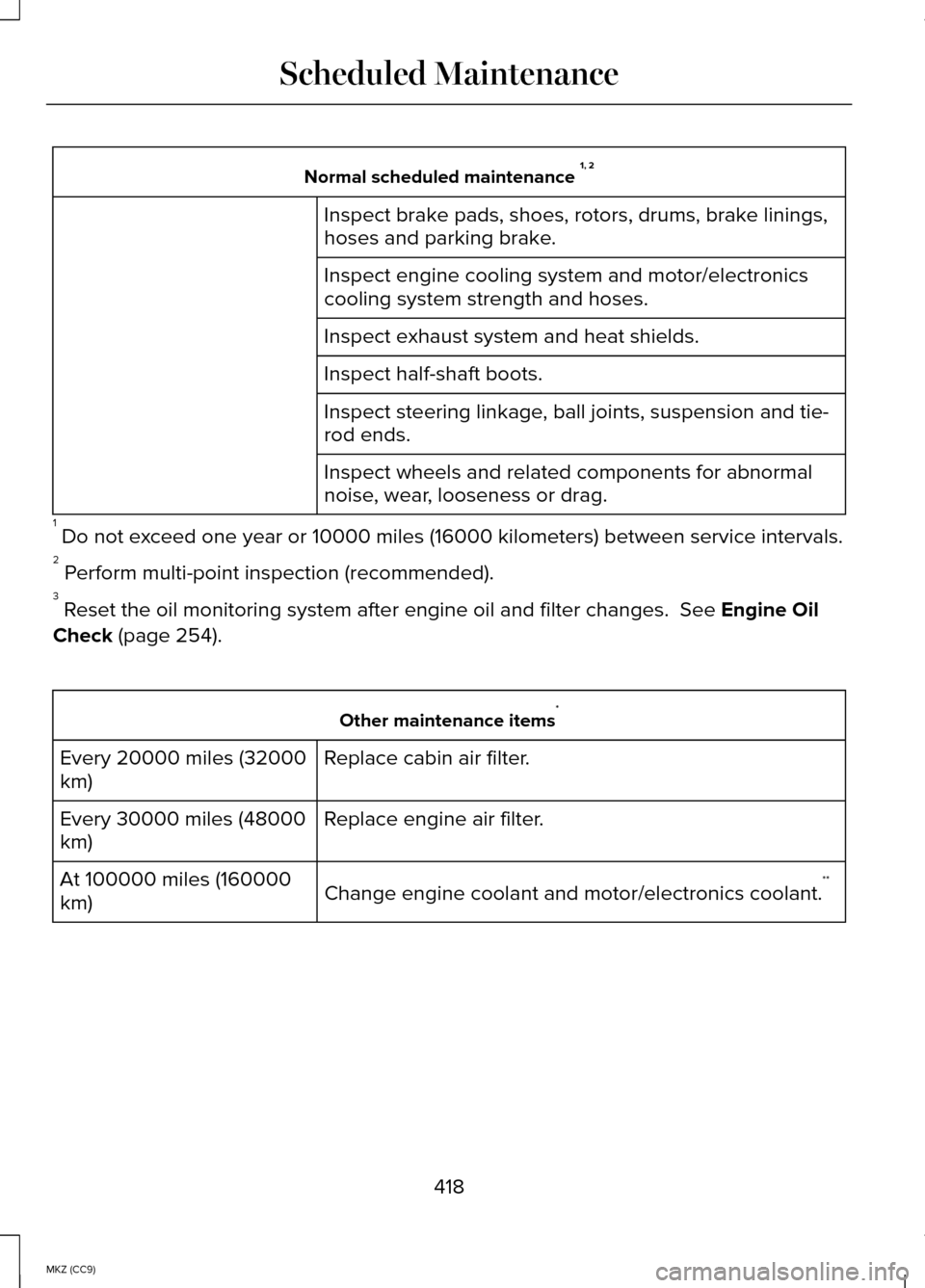
Normal scheduled maintenance
1, 2
Inspect brake pads, shoes, rotors, drums, brake linings,
hoses and parking brake.
Inspect engine cooling system and motor/electronics
cooling system strength and hoses.
Inspect exhaust system and heat shields.
Inspect half-shaft boots.
Inspect steering linkage, ball joints, suspension and tie-
rod ends.
Inspect wheels and related components for abnormal
noise, wear, looseness or drag.
1 Do not exceed one year or 10000 miles (16000 kilometers) between service interv\
als.
2 Perform multi-point inspection (recommended).
3 Reset the oil monitoring system after engine oil and filter changes. See Engine Oil
Check
(page 254). Other maintenance items
*
Replace cabin air filter.
Every 20000 miles (32000
km)
Replace engine air filter.
Every 30000 miles (48000
km)
Change engine coolant and motor/electronics coolant. **
At 100000 miles (160000
km)
418
MKZ (CC9) Scheduled Maintenance
Page 439 of 445
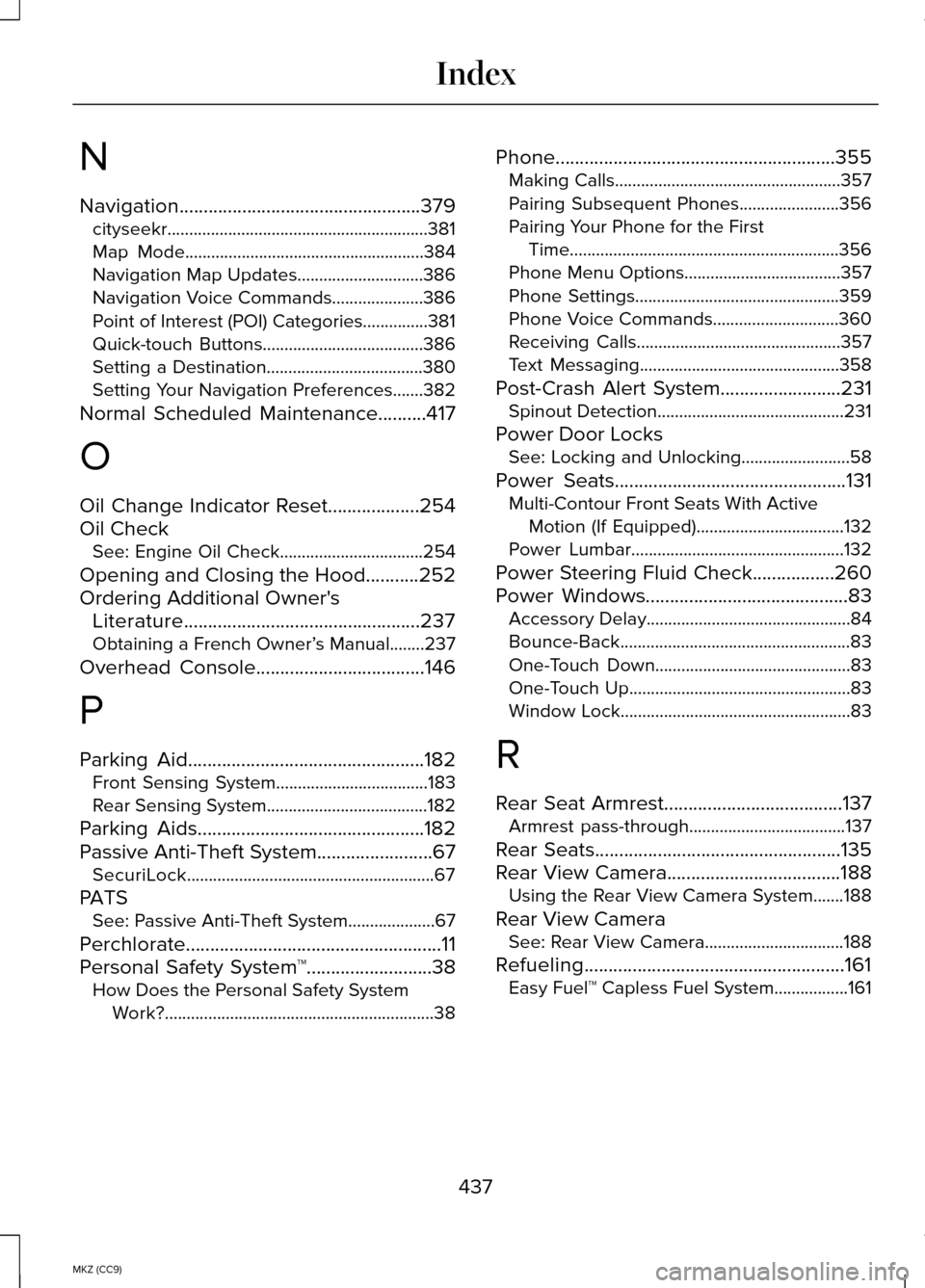
N
Navigation..................................................379
cityseekr............................................................381
Map Mode.......................................................384
Navigation Map Updates.............................386
Navigation Voice Commands.....................386
Point of Interest (POI) Categories...............381
Quick-touch Buttons.....................................386
Setting a Destination....................................380
Setting Your Navigation Preferences.......382
Normal Scheduled Maintenance
..........417
O
Oil Change Indicator Reset
...................254
Oil Check See: Engine Oil Check.................................254
Opening and Closing the Hood...........252
Ordering Additional Owner's Literature.................................................237
Obtaining a French Owner’ s Manual........237
Overhead Console
...................................146
P
Parking Aid
.................................................182
Front Sensing System...................................183
Rear Sensing System.....................................182
Parking Aids
...............................................182
Passive Anti-Theft System........................67
SecuriLock.........................................................67
PATS See: Passive Anti-Theft System....................
67
Perchlorate
.....................................................11
Personal Safety System ™..........................38
How Does the Personal Safety System
Work?..............................................................38 Phone..........................................................355
Making Calls....................................................357
Pairing Subsequent Phones.......................356
Pairing Your Phone for the First
Time..............................................................356
Phone Menu Options....................................357
Phone Settings...............................................359
Phone Voice Commands.............................360
Receiving Calls...............................................357
Text Messaging..............................................358
Post-Crash Alert System.........................231 Spinout Detection...........................................231
Power Door Locks See: Locking and Unlocking.........................58
Power Seats
................................................131
Multi-Contour Front Seats With Active
Motion (If Equipped)..................................132
Power Lumbar.................................................132
Power Steering Fluid Check.................260
Power Windows..........................................83 Accessory Delay...............................................84
Bounce-Back.....................................................83
One-Touch Down.............................................83
One-Touch Up...................................................83
Window Lock.....................................................83
R
Rear Seat Armrest
.....................................137
Armrest pass-through....................................137
Rear Seats
...................................................135
Rear View Camera....................................188 Using the Rear View Camera System.......
188
Rear View Camera See: Rear View Camera................................188
Refueling......................................................161 Easy Fuel™ Capless Fuel System.................161
437
MKZ (CC9) Index