reset LINCOLN MKZ HYBRID 2019 User Guide
[x] Cancel search | Manufacturer: LINCOLN, Model Year: 2019, Model line: MKZ HYBRID, Model: LINCOLN MKZ HYBRID 2019Pages: 575, PDF Size: 4.77 MB
Page 117 of 575
•Tach rpm x 1000 — When the gasolineengine is running, the tachometer gaugedisplays the engine speed in revolutionsper minute (RPM). When your vehicle isoperating on battery power only with theengine off, EV displays and thetachometer is greyed out.
Note:The trip data, and average fueleconomy cannot be reset in MyView.
Trip 1 & 2
Provides trip odometer, trip average fueleconomy and trip timer.
Distance traveled on battery power only withthe engine off is shown in blue next to totaltrip distance.
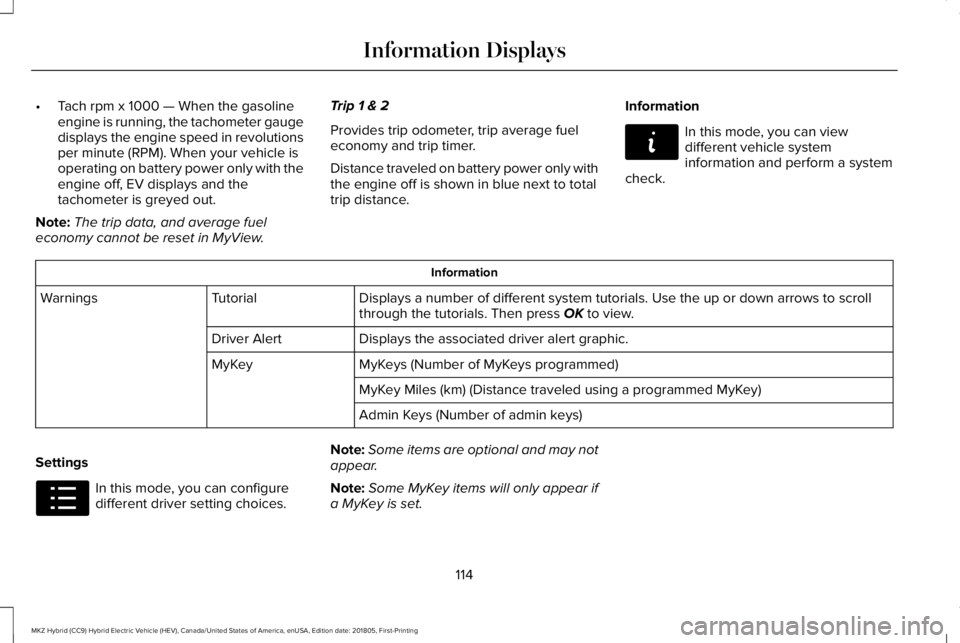
Information
In this mode, you can viewdifferent vehicle systeminformation and perform a systemcheck.
Information
Displays a number of different system tutorials. Use the up or down arrows to scrollthrough the tutorials. Then press OK to view.TutorialWarnings
Displays the associated driver alert graphic.Driver Alert
MyKeys (Number of MyKeys programmed)MyKey
MyKey Miles (km) (Distance traveled using a programmed MyKey)
Admin Keys (Number of admin keys)
Settings
In this mode, you can configuredifferent driver setting choices.
Note:Some items are optional and may notappear.
Note:Some MyKey items will only appear ifa MyKey is set.
114
MKZ Hybrid (CC9) Hybrid Electric Vehicle (HEV), Canada/United States of America, enUSA, Edition date: 201805, First-Printing
Information DisplaysE144642 E100023
Page 118 of 575
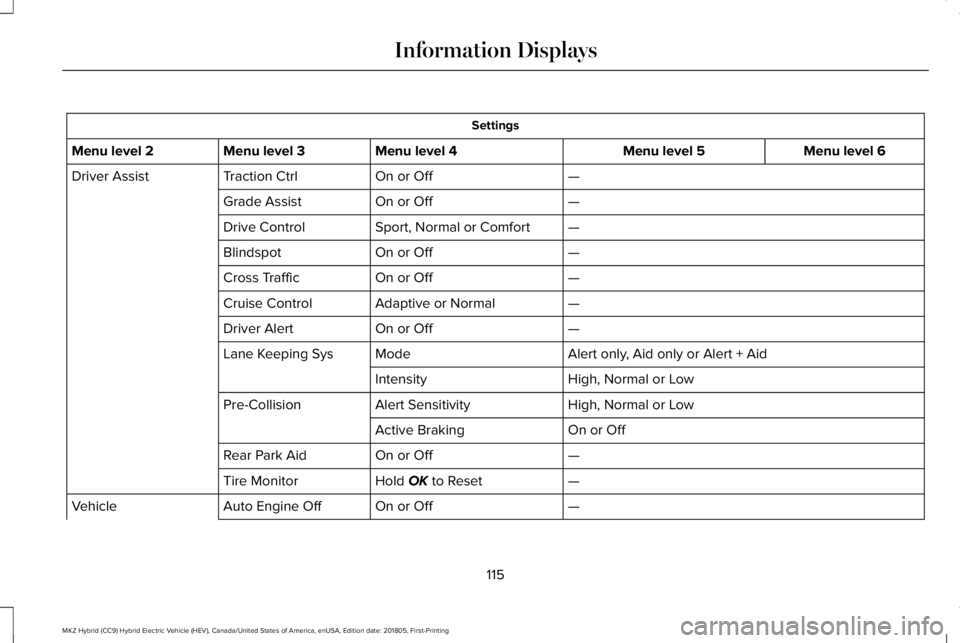
Settings
Menu level 6Menu level 5Menu level 4Menu level 3Menu level 2
—On or OffTraction CtrlDriver Assist
—On or OffGrade Assist
—Sport, Normal or ComfortDrive Control
—On or OffBlindspot
—On or OffCross Traffic
—Adaptive or NormalCruise Control
—On or OffDriver Alert
Alert only, Aid only or Alert + AidModeLane Keeping Sys
High, Normal or LowIntensity
High, Normal or LowAlert SensitivityPre-Collision
On or OffActive Braking
—On or OffRear Park Aid
—Hold OK to ResetTire Monitor
—On or OffAuto Engine OffVehicle
115
MKZ Hybrid (CC9) Hybrid Electric Vehicle (HEV), Canada/United States of America, enUSA, Edition date: 201805, First-Printing
Information Displays
Page 119 of 575
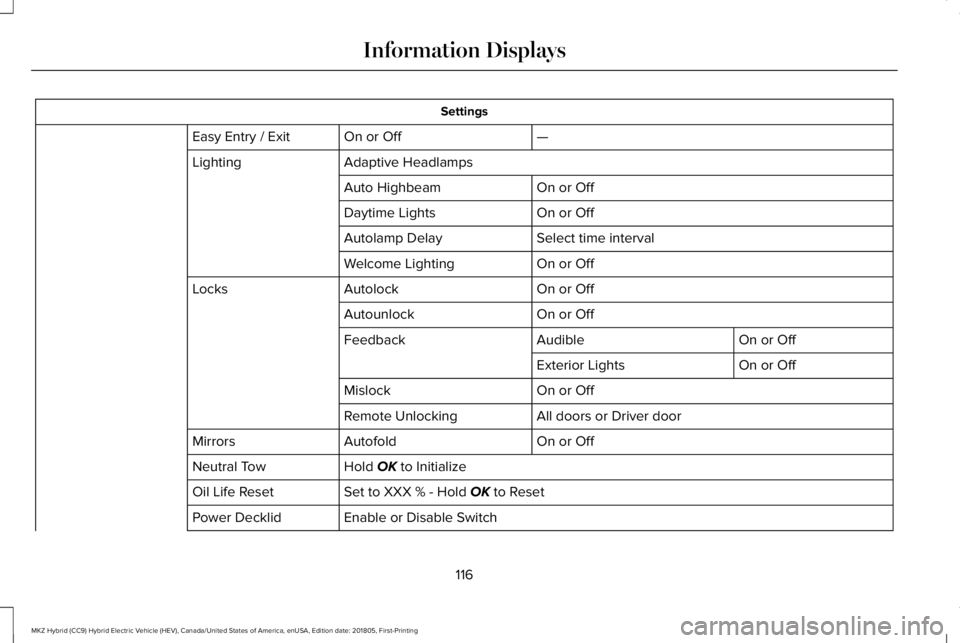
Settings
—On or OffEasy Entry / Exit
Adaptive HeadlampsLighting
On or OffAuto Highbeam
On or OffDaytime Lights
Select time intervalAutolamp Delay
On or OffWelcome Lighting
On or OffAutolockLocks
On or OffAutounlock
On or OffAudibleFeedback
On or OffExterior Lights
On or OffMislock
All doors or Driver doorRemote Unlocking
On or OffAutofoldMirrors
Hold OK to InitializeNeutral Tow
Set to XXX % - Hold OK to ResetOil Life Reset
Enable or Disable SwitchPower Decklid
116
MKZ Hybrid (CC9) Hybrid Electric Vehicle (HEV), Canada/United States of America, enUSA, Edition date: 201805, First-Printing
Information Displays
Page 121 of 575
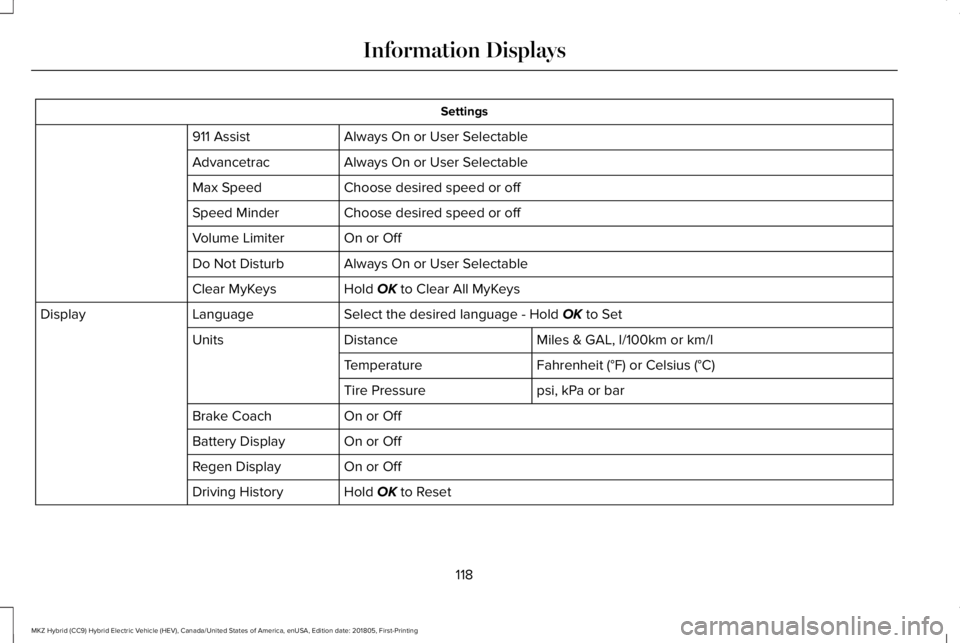
Settings
Always On or User Selectable911 Assist
Always On or User SelectableAdvancetrac
Choose desired speed or offMax Speed
Choose desired speed or offSpeed Minder
On or OffVolume Limiter
Always On or User SelectableDo Not Disturb
Hold OK to Clear All MyKeysClear MyKeys
Select the desired language - Hold OK to SetLanguageDisplay
Miles & GAL, l/100km or km/lDistanceUnits
Fahrenheit (°F) or Celsius (°C)Temperature
psi, kPa or barTire Pressure
On or OffBrake Coach
On or OffBattery Display
On or OffRegen Display
Hold OK to ResetDriving History
118
MKZ Hybrid (CC9) Hybrid Electric Vehicle (HEV), Canada/United States of America, enUSA, Edition date: 201805, First-Printing
Information Displays
Page 123 of 575
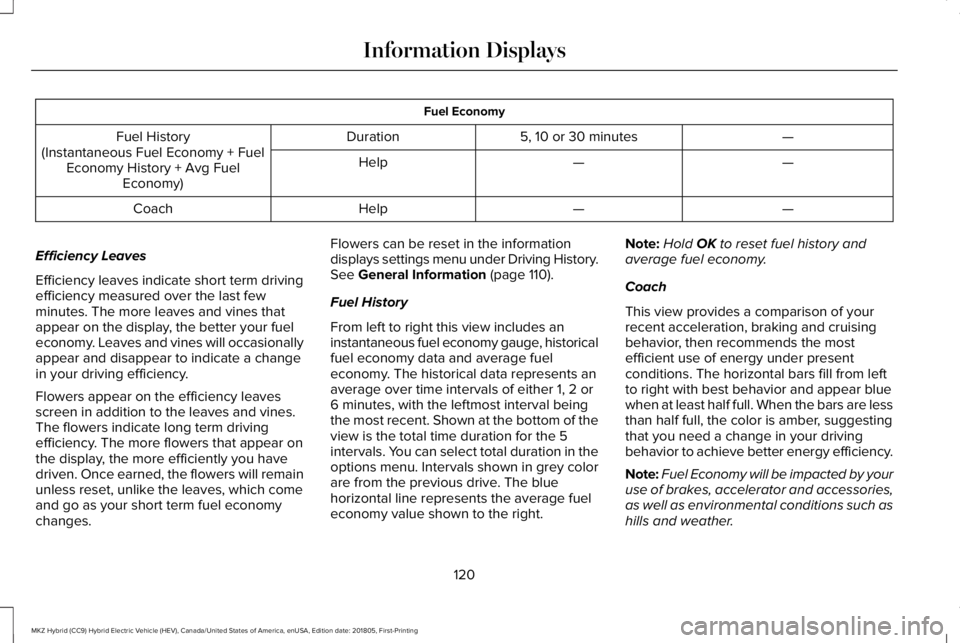
Fuel Economy
—5, 10 or 30 minutesDurationFuel History(Instantaneous Fuel Economy + FuelEconomy History + Avg FuelEconomy)
——Help
——HelpCoach
Efficiency Leaves
Efficiency leaves indicate short term drivingefficiency measured over the last fewminutes. The more leaves and vines thatappear on the display, the better your fueleconomy. Leaves and vines will occasionallyappear and disappear to indicate a changein your driving efficiency.
Flowers appear on the efficiency leavesscreen in addition to the leaves and vines.The flowers indicate long term drivingefficiency. The more flowers that appear onthe display, the more efficiently you havedriven. Once earned, the flowers will remainunless reset, unlike the leaves, which comeand go as your short term fuel economychanges.
Flowers can be reset in the informationdisplays settings menu under Driving History.See General Information (page 110).
Fuel History
From left to right this view includes aninstantaneous fuel economy gauge, historicalfuel economy data and average fueleconomy. The historical data represents anaverage over time intervals of either 1, 2 or6 minutes, with the leftmost interval beingthe most recent. Shown at the bottom of theview is the total time duration for the 5intervals. You can select total duration in theoptions menu. Intervals shown in grey colorare from the previous drive. The bluehorizontal line represents the average fueleconomy value shown to the right.
Note:Hold OK to reset fuel history andaverage fuel economy.
Coach
This view provides a comparison of yourrecent acceleration, braking and cruisingbehavior, then recommends the mostefficient use of energy under presentconditions. The horizontal bars fill from leftto right with best behavior and appear bluewhen at least half full. When the bars are lessthan half full, the color is amber, suggestingthat you need a change in your drivingbehavior to achieve better energy efficiency.
Note:Fuel Economy will be impacted by youruse of brakes, accelerator and accessories,as well as environmental conditions such ashills and weather.
120
MKZ Hybrid (CC9) Hybrid Electric Vehicle (HEV), Canada/United States of America, enUSA, Edition date: 201805, First-Printing
Information Displays
Page 124 of 575
Note:Fuel economy is not always a measureof appropriate driving behavior. For example,when driving uphill and maintaining anappropriate speed, your instant fueleconomy may not be good (losing leaves)but the Coach may show a blue bar forAcceleration and Cruising.
Common Displays
Both Average fuel economy and aninstantaneous fuel economy gauge areincluded in Engage, Empower and MyView(if selected) on the left information display.They are also included in Fuel History on theright information display.
Average Fuel Economy
Average Fuel Economy is continuouslyaveraged since the last reset. You can resetyour average fuel economy by pressing andholding the OK button on the correspondingsteering wheel controls.
Note:Average fuel economy cannot be resetin MyView.
Instantaneous Fuel Economy
If your instantaneous fuel economy is greaterthan the maximum value displayed, a + signwill be shown next to the maximum scalenumber. When your vehicle is operating onbattery power only, EV will display and thegauge fill will show in blue.
INFORMATION MESSAGES
Note: Depending on your vehicle optionsand instrument cluster type, not all of themessages will display or be available. Certain messages may be abbreviated orshortened depending upon which clustertype you have.
Press the OK button to acknowledge andremove some messages from the informationdisplay. Other messages will be removedautomatically after a short time.
Certain messages need to be confirmedbefore you can access the menus.
121
MKZ Hybrid (CC9) Hybrid Electric Vehicle (HEV), Canada/United States of America, enUSA, Edition date: 201805, First-Printing
Information DisplaysE145981
Page 130 of 575
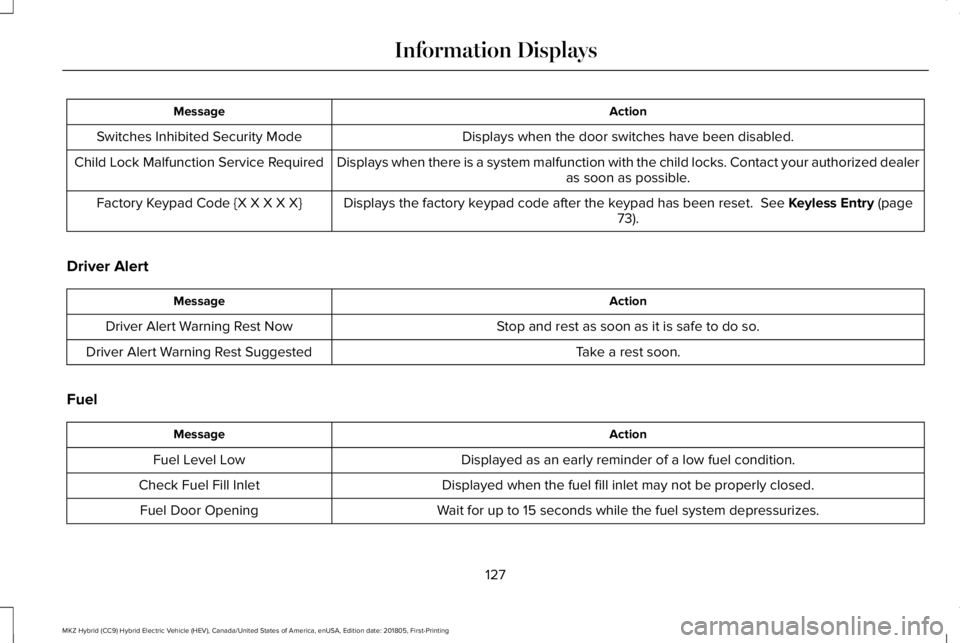
ActionMessage
Displays when the door switches have been disabled.Switches Inhibited Security Mode
Displays when there is a system malfunction with the child locks. Contact your authorized dealeras soon as possible.Child Lock Malfunction Service Required
Displays the factory keypad code after the keypad has been reset. See Keyless Entry (page73).Factory Keypad Code {X X X X X}
Driver Alert
ActionMessage
Stop and rest as soon as it is safe to do so.Driver Alert Warning Rest Now
Take a rest soon.Driver Alert Warning Rest Suggested
Fuel
ActionMessage
Displayed as an early reminder of a low fuel condition.Fuel Level Low
Displayed when the fuel fill inlet may not be properly closed.Check Fuel Fill Inlet
Wait for up to 15 seconds while the fuel system depressurizes.Fuel Door Opening
127
MKZ Hybrid (CC9) Hybrid Electric Vehicle (HEV), Canada/United States of America, enUSA, Edition date: 201805, First-Printing
Information Displays
Page 155 of 575
MEMORY FUNCTION (If Equipped)
WARNING: Before activating thememory seat, make sure that the areaimmediately surrounding the seat is clear ofobstructions and that all occupants are clearof moving parts.
WARNING: Do not use the memoryfunction when your vehicle is moving.
This feature automatically recalls the positionof the following features:
•Driver seat.
•Power mirrors.
•Power steering column.
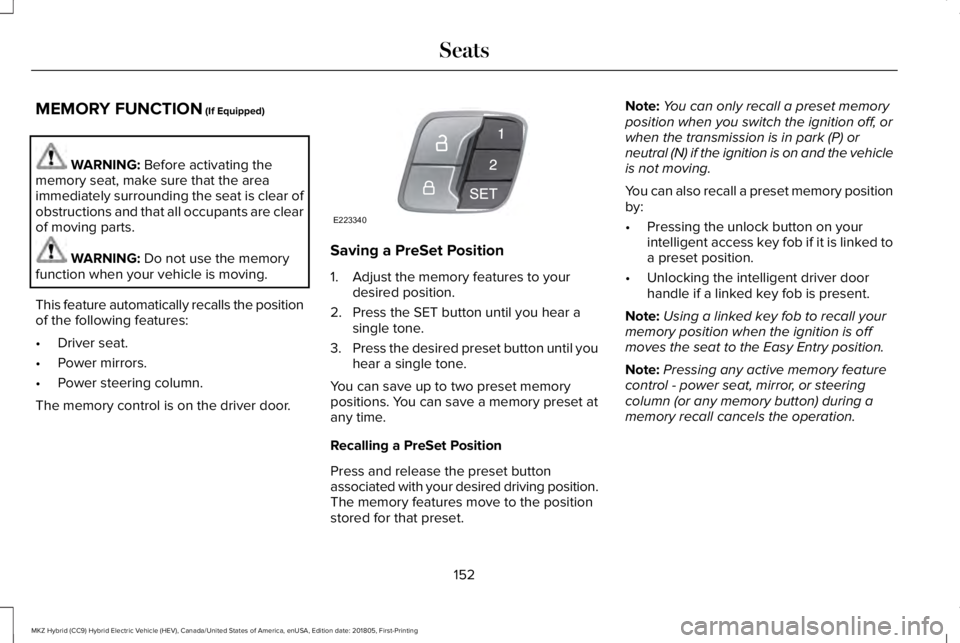
The memory control is on the driver door.
Saving a PreSet Position
1. Adjust the memory features to yourdesired position.
2. Press the SET button until you hear asingle tone.
3.Press the desired preset button until youhear a single tone.
You can save up to two preset memorypositions. You can save a memory preset atany time.
Recalling a PreSet Position
Press and release the preset buttonassociated with your desired driving position.The memory features move to the positionstored for that preset.
Note:You can only recall a preset memoryposition when you switch the ignition off, orwhen the transmission is in park (P) orneutral (N) if the ignition is on and the vehicleis not moving.
You can also recall a preset memory positionby:
•Pressing the unlock button on yourintelligent access key fob if it is linked toa preset position.
•Unlocking the intelligent driver doorhandle if a linked key fob is present.
Note:Using a linked key fob to recall yourmemory position when the ignition is offmoves the seat to the Easy Entry position.
Note:Pressing any active memory featurecontrol - power seat, mirror, or steeringcolumn (or any memory button) during amemory recall cancels the operation.
152
MKZ Hybrid (CC9) Hybrid Electric Vehicle (HEV), Canada/United States of America, enUSA, Edition date: 201805, First-Printing
SeatsE223340
Page 156 of 575
Linking a PreSet Position to yourRemote Control or Intelligent AccessKey Fob
Your vehicle can save the preset memorypositions for up to two remote controls orintelligent access (IA) keys.
After you have saved your desired memorypreset positions:
1.Press and hold the desired preset buttonfor about three seconds until you hear asingle tone.
2. Within three seconds, press the lockbutton on the remote control you arelinking.
To unlink a remote control, follow the sameprocedure – except in step 2, press theunlock button on the remote control.
Note:If more than one linked remote controlor intelligent access key is in range, thememory function moves to the settings ofthe first key to initiate a memory recall.
Easy Entry and Exit Feature
If you enable the easy entry and exit feature,it automatically moves the driver seatposition rearward up to 2 in (5 cm) when youswitch the ignition off.
The driver seat returns to the previousposition when you switch the ignition on.
You can enable or disable this feature in theinformation display. See GeneralInformation (page 110).
REAR SEATS
Note:Your vehicle may have split seatbacksthat you must fold individually.
Note:Make sure the center safety belt isunbuckled before folding the seatback.
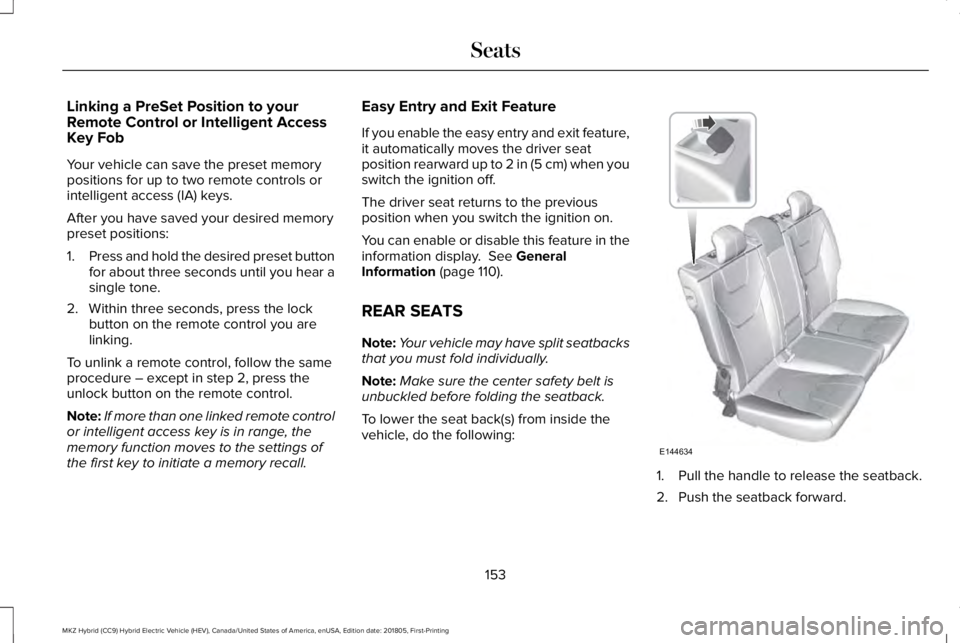
To lower the seat back(s) from inside thevehicle, do the following:
1. Pull the handle to release the seatback.
2. Push the seatback forward.
153
MKZ Hybrid (CC9) Hybrid Electric Vehicle (HEV), Canada/United States of America, enUSA, Edition date: 201805, First-Printing
SeatsE144634
Page 158 of 575
Rear Seats
WARNING: Persons who are unableto feel pain to the skin because of advancedage, chronic illness, diabetes, spinal cordinjury, medication, alcohol use, exhaustion,or other physical conditions, must exercisecare when using the seat heater. The seatheater may cause burns even at lowtemperatures, especially if used for longperiods of time. Do not place anything onthe seat that insulates against heat, such asa blanket or cushion, because this may causethe seat heater to overheat. Do not puncturethe seat with pins, needles, or other pointedobjects because this may damage theheating element which may cause the seatheater to overheat. An overheated seat maycause serious personal injury.
Do not do the following:
•Place heavy objects on the seat.
•Operate the seat heater if water or anyother liquid is spilled on the seat. Allowthe seat to dry thoroughly.
•Operate the heated seats unless theengine is running. Doing so can causethe battery to lose charge.
The rear seat heat controls are located onthe rear of the center console.
Press the heated seat symbol to cyclethrough the various heat settings and off.More indicator lights indicate warmersettings.
The heated seat module resets at everyignition run cycle. While the ignition is on,press the high or low heated seat switch toenable heating mode. When activated, theywill turn off automatically when you turn theengine off.
CLIMATE CONTROLLED SEATS (If
Equipped)
Heated Seats
WARNING: People who are unable tofeel pain to their skin because of advancedage, chronic illness, diabetes, spinal cordinjury, medication, alcohol use, exhaustionor other physical conditions, must exercisecare when using the heated seat. The heatedseat may cause burns even at lowtemperatures, especially if used for longperiods of time. Do not place anything onthe seat that insulates against heat, such asa blanket or cushion. This may cause the
155
MKZ Hybrid (CC9) Hybrid Electric Vehicle (HEV), Canada/United States of America, enUSA, Edition date: 201805, First-Printing
SeatsE146322