power steering LINCOLN NAUTILUS 2022 User Guide
[x] Cancel search | Manufacturer: LINCOLN, Model Year: 2022, Model line: NAUTILUS, Model: LINCOLN NAUTILUS 2022Pages: 586, PDF Size: 13.97 MB
Page 218 of 586
•Door ajar indicator does not illuminatewith the driver door open.
•Door ajar indicator illuminates with thedriver door closed.
•Transmission not in park messageappears with the driver door closed, afteryou shift out of park (P).
MANUAL PARK RELEASE
WHAT IS MANUAL PARK RELEASE
Manual park release allows you to move yourtransmission out of the park (P) position inthe event of an electrical malfunction oremergency.
MANUAL PARK RELEASEPRECAUTIONS
WARNING: When doing thisprocedure, you need to take thetransmission out of park (P) which meansyour vehicle can roll freely. To avoidunwanted vehicle movement, always fullyapply the parking brake prior to doing thisprocedure. Use wheels chocks ifappropriate.
WARNING: If the parking brake isfully released, but the brake warning lampremains illuminated, the brakes may notbe working properly. Have your vehiclechecked as soon as possible.
WARNING: Do not drive your vehicleuntil you verify that the stoplamps areworking.
USING MANUAL PARK RELEASE
Activating the Manual Park ReleaseCable
1.Apply the parking brake. See ElectricParking Brake (page 223).
Note:If vehicle battery has run out of charge,use an external power source to apply theparking brake.
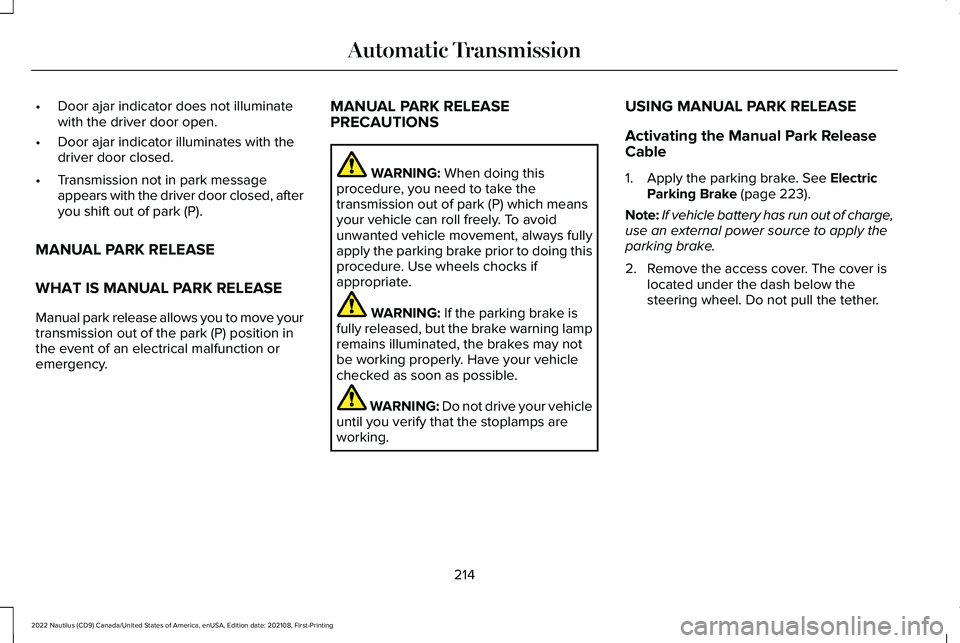
2.Remove the access cover. The cover islocated under the dash below thesteering wheel. Do not pull the tether.
214
2022 Nautilus (CD9) Canada/United States of America, enUSA, Edition date: 202108, First-PrintingAutomatic Transmission
Page 235 of 586
HOW DOES STABILITY CONTROL
WORK
WARNING: Vehicle modificationsinvolving braking system, aftermarket roofracks, suspension, steering system, tireconstruction and wheel and tire size maychange the handling characteristics of yourvehicle and may adversely affect theperformance of the electronic stabilitycontrol system. In addition, installing anystereo loudspeakers may interfere withand adversely affect the electronic stabilitycontrol system. Install any aftermarketstereo loudspeaker as far as possible fromthe front center console, the tunnel, andthe front seats in order to minimize the riskof interfering with the electronic stabilitycontrol sensors. Reducing theeffectiveness of the electronic stabilitycontrol system could lead to an increasedrisk of loss of vehicle control, vehiclerollover, personal injury and death.
WARNING: Remember that evenadvanced technology cannot defy the lawsof physics. It's always possible to losecontrol of a vehicle due to inappropriatedriver input for the conditions. Aggressivedriving on any road condition can causeyou to lose control of your vehicleincreasing the risk of personal injury orproperty damage. Activation of theelectronic stability control system is anindication that at least some of the tireshave exceeded their ability to grip theroad; this could reduce the operator'sability to control the vehicle potentiallyresulting in a loss of vehicle control, vehiclerollover, personal injury and death. If yourelectronic stability control system activates,SLOW DOWN.
If a driving condition activates either thestability control or the traction control systemyou may experience the following conditions:
•The stability and traction control lightflashes.
•Your vehicle slows down.
•Reduced engine power.
The stability control system has severalfeatures built into it to help you maintaincontrol of your vehicle:
Electronic Stability Control
Electronic stability control enhances yourvehicle’s ability to prevent skids or lateralslides by applying brakes to one or more ofthe wheels individually and, if necessary,reducing engine power.
Roll Stability Control
Roll stability control enhances your vehicle’sability to prevent rollovers by detecting yourvehicle’s roll motion and the rate at which itchanges by applying the brakes to one ormore wheels individually.
231
2022 Nautilus (CD9) Canada/United States of America, enUSA, Edition date: 202108, First-PrintingStability Control
Page 238 of 586
ELECTRIC POWER STEERING
ELECTRIC POWER STEERINGPRECAUTIONS
WARNING: The electric powersteering system has diagnostic checks thatcontinuously monitor the system. If a faultis detected, a message displays in theinformation display. Stop your vehicle assoon as it is safe to do so. Switch the
vehicle off. After at least 10 seconds, switchthe vehicle on and watch the informationdisplay for a steering system warningmessage. If a steering system warningmessage returns, have the system checkedas soon as possible.
WARNING: If the system detects anerror, you may not feel a difference in thesteering, however a serious condition mayexist. Have your vehicle checked as soonas possible. Failure to do so may result inloss of steering control.
Adapt your speed and driving behavioraccording to reduced steering assist.
Extreme continuous steering may increasethe effort to steer. This occurs to preventinternal overheating and damage to thesteering system. If this occurs, you will notlose the ability to steer your vehicle manuallynor will it cause damage to the system.Normal steering and driving allows thesystem to cool down and steering assistreturns to normal.
Note:There is no fluid reservoir to check orfill.
234
2022 Nautilus (CD9) Canada/United States of America, enUSA, Edition date: 202108, First-PrintingSteering
Page 239 of 586
STEERING – TROUBLESHOOTING
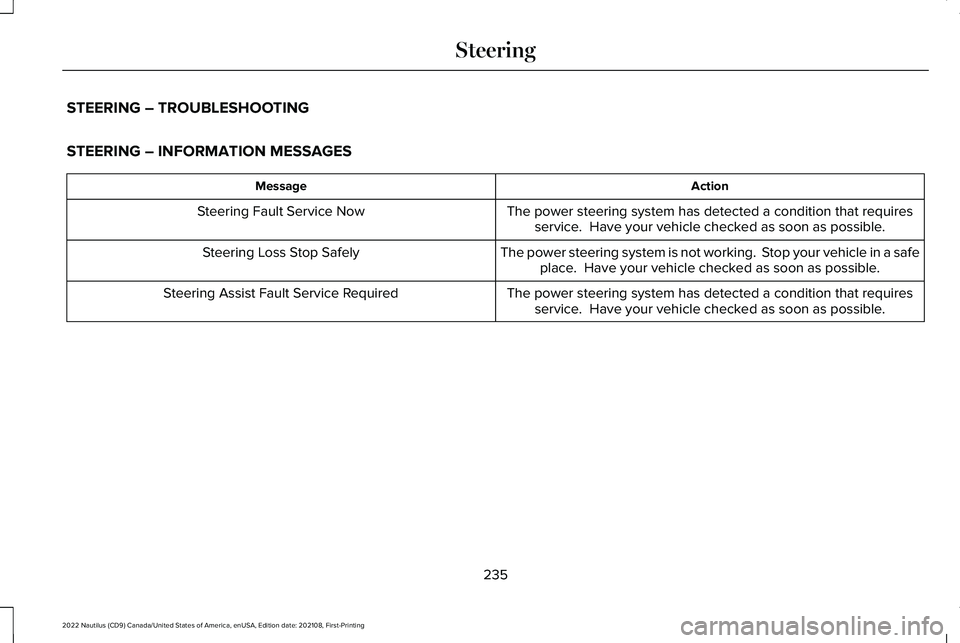
STEERING – INFORMATION MESSAGES
ActionMessage
The power steering system has detected a condition that requiresservice. Have your vehicle checked as soon as possible.Steering Fault Service Now
The power steering system is not working. Stop your vehicle in a safeplace. Have your vehicle checked as soon as possible.Steering Loss Stop Safely
The power steering system has detected a condition that requiresservice. Have your vehicle checked as soon as possible.Steering Assist Fault Service Required
235
2022 Nautilus (CD9) Canada/United States of America, enUSA, Edition date: 202108, First-PrintingSteering
Page 272 of 586
WHAT IS DRIVE MODE CONTROL
Your vehicle has various drive modes thatyou can select for different drivingconditions. Depending on the drive modethat you select, the system adjusts variousvehicle settings.
HOW DOES DRIVE MODE
CONTROL WORK
Drive mode control adjusts your vehicleconfiguration for each mode you select.
Changing the drive mode changes thefunctionality of the steering system to adjustthe steering effort and feel.
Active noise control utilizes your vehicleelectronics to enhance the acousticexperience.
The stability and traction control assist yourvehicle control in adverse conditions orhigh-performance driving.
Throttle control enhances the powertrainresponse, transmission controls becomeoptimized with shift schedules, andfour-wheel drive settings are optimized andtuned to each mode.
Note:The system has diagnostic checks thatcontinuously monitor the system for properoperation. If a mode is unavailable due to asystem fault, the mode defaults to normal.
SELECTING A DRIVE MODE
You can configure which of the drive controlmodes are active when your vehicle is indrive (D) or in sport (S). The configurationremains active until modified from the mainmenu on the instrument cluster display. SeeInstrument Cluster Display Main Menu(page 146).
Note:Not all settings may be available.
Note:Drive mode changes may not beavailable when the ignition is off.
DRIVE MODES
COMFORT
Provides a more relaxed driving experience,maximizing comfort. Your steering effortdecreases and the suspension movement ismore fluid. Comfort mode is ideal when youdesire enhanced traveling comfort.
NORMAL
Delivers a balanced combination of acomfortable, controlled ride and confidenthandling. This mode provides an engagingdriving experience and a direct connectionto the road without sacrificing any of thecomposure demanded from a luxury vehicle.
SPORT
Provides a sportier driving experience. Thesuspension stiffens, with an emphasis onhandling and control. The engine respondsmore directly to your inputs and takes on amore powerful tone. This mode is ideal foruse during more spirited driving.
268
2022 Nautilus (CD9) Canada/United States of America, enUSA, Edition date: 202108, First-PrintingDrive Mode Control
Page 315 of 586
•Do not add unnecessary accessories tothe exterior of your vehicle, for examplerunning boards. If you use a roof rack,remember to fold it down or remove itwhen not in use.
•Do not shift into neutral when you arebraking or when your vehicle is slowingdown.
•Shut all windows when driving at highspeeds.
•Switch off all electric systems when notin use, for example air conditioning. Makesure that you unplug any accessoriesfrom the auxiliary power points when notin use.
DRIVING IN SPECIAL CONDITIONS
EMERGENCY MANEUVERS
In an unavoidable emergency where youmust make a sudden sharp maneuver, turnthe steering wheel only as rapidly and as faras required to avoid the emergency. Applysmooth pressure to the accelerator pedal orbrake pedal as needed. Avoid abrupt
steering, acceleration and braking changes.Abrupt changes could increase the risk ofvehicle roll over, loss of vehicle control andpersonal injury. If possible, use any availableroad surfaces to bring your vehicle undercontrol.
DRIVING THROUGH MUD AND WATER
Mud
Be cautious of sudden changes in vehiclespeed or direction when you are driving inmud. Even all-wheel drive and four-wheeldrive vehicles can lose traction in mud. Ifyour vehicle slides, steer in the direction ofthe slide until you regain control of yourvehicle. After driving through mud, clean offresidue stuck to rotating driveshafts and tires.Excess residue can cause an imbalance thatcould damage drive components.
Note:If your vehicle gets stuck in mud, itcould be rocked out by shifting betweenforward and reverse gears, stoppingbetween shifts in a steady pattern. Presslightly on the accelerator in each gear.
Note:Do not rock your vehicle if the engineis not at normal operating temperature, asdamage to the transmission could occur.
Note:Do not rock your vehicle for more thana minute, as damage to the transmissionand tires could occur or the engine couldoverheat.
Water
If you must drive though deep water, driveslowly. The water could limit traction or brakecapability. See Driving Through ShallowWater (page 313).
When driving though water, determine thedepth and avoid water higher than the centerof the wheel.
Once through water, always try the brakes.Wet brakes do not stop your vehicle asquickly as dry brakes. Apply light pressureto the brake pedal while slowly moving thevehicle to dry the brakes.
311
2022 Nautilus (CD9) Canada/United States of America, enUSA, Edition date: 202108, First-PrintingDriving Hints
Page 316 of 586
Note:Driving through deep water couldcause damage to the transmission. If thefront or rear axle is submerged in water,have the axle lubricant and power transferunit lubricant checked and changed ifnecessary.
DRIVING ON HILLY OR SLOPINGTERRAIN
WARNING: Extreme care should beused when steering the vehicle in reversedown a slope so as not to cause thevehicle to swerve out of control.
Although natural obstacles could make itnecessary to travel diagonally up or down ahill or steep incline, you should try to drivestraight up or straight down.
Note:Avoid turning on steep slopes or hills.A danger lies in losing traction, slippingsideways and possible vehicle roll over.Whenever driving on a hill, determinebeforehand the route you can use. Do notdrive over the crest of a hill without seeingwhat conditions are on the other side. Donot drive in reverse over a hill without theaid of an observer.
Apply just enough power to the wheels toclimb the hill. Too much power causes thetires to slip, spin or lose traction, and youcould lose control of your vehicle. Whendescending a steep hill, do not descend thehill in neutral. Avoid sudden hard braking tokeep the front wheels rolling and to maintainyour vehicle's steering.
Note:Your vehicle has anti-lock brakes,apply the brakes steadily. Do not pump thebrakes.
Note:If your vehicle gets stuck driving onhilly or sloping terrain, it could be rocked outby shifting between forward and reversegears, stopping between shifts in a steadypattern. Press lightly on the accelerator ineach gear.
Note:Do not rock your vehicle if the engineis not at normal operating temperature, asdamage to the transmission could occur.
Note:Do not rock your vehicle for more thana minute, as damage to the transmissionand tires could occur or the engine couldoverheat.
DRIVING IN SAND
When driving over sand, try to keep all fourwheels on the most solid area of the trail. Steadily drive through the terrain. Apply theaccelerator slowly and avoid excessivewheel slip. Do not drive your vehicle in deepsand for an extended period of time. Thiscould overheat the system. A messageappears in the instrument cluster display.
Note:If your vehicle gets stuck driving onhilly or sloping terrain, it could be rocked outby shifting between forward and reversegears, stopping between shifts in a steadypattern. Press lightly on the accelerator ineach gear.
312
2022 Nautilus (CD9) Canada/United States of America, enUSA, Edition date: 202108, First-PrintingDriving Hints
Page 317 of 586
Note:Do not rock your vehicle if the engineis not at normal operating temperature, asdamage to the transmission could occur.
Note:Do not rock your vehicle for more thana minute, as damage to the transmissionand tires could occur or the engine couldoverheat
DRIVING THROUGH SHALLOW
WATER
WARNING: Do not attempt to crossa deep or flowing body of water. Failure tofollow this instruction could result in theloss of control of your vehicle, personalinjury or death.
Note:Driving through standing water cancause vehicle damage.
Note:Engine damage can occur if waterenters the air filter.
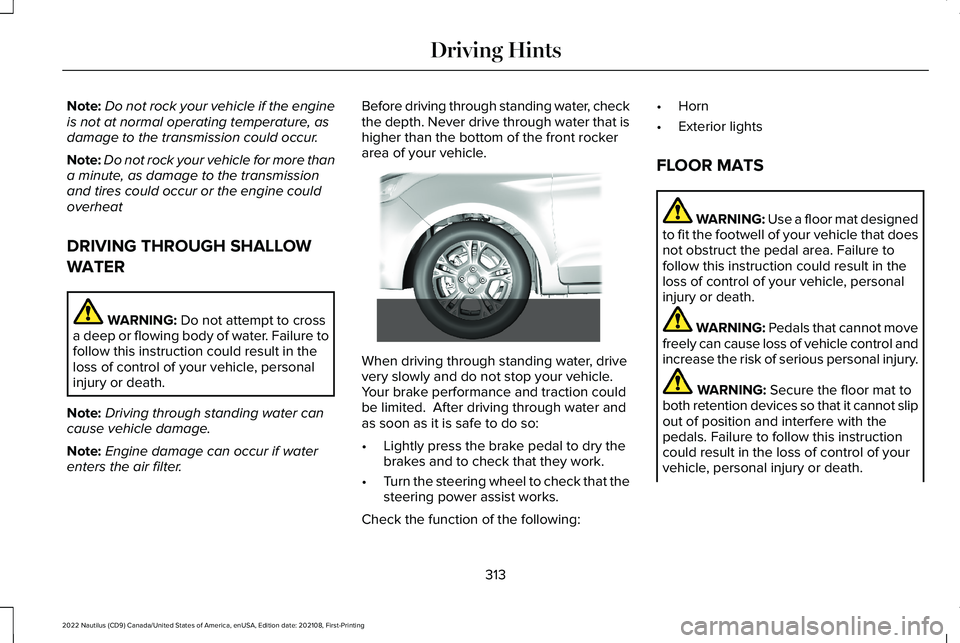
Before driving through standing water, checkthe depth. Never drive through water that ishigher than the bottom of the front rockerarea of your vehicle.
When driving through standing water, drivevery slowly and do not stop your vehicle. Your brake performance and traction couldbe limited. After driving through water andas soon as it is safe to do so:
•Lightly press the brake pedal to dry thebrakes and to check that they work.
•Turn the steering wheel to check that thesteering power assist works.
Check the function of the following:
•Horn
•Exterior lights
FLOOR MATS
WARNING: Use a floor mat designedto fit the footwell of your vehicle that doesnot obstruct the pedal area. Failure tofollow this instruction could result in theloss of control of your vehicle, personalinjury or death.
WARNING: Pedals that cannot movefreely can cause loss of vehicle control andincrease the risk of serious personal injury.
WARNING: Secure the floor mat toboth retention devices so that it cannot slipout of position and interfere with thepedals. Failure to follow this instructioncould result in the loss of control of yourvehicle, personal injury or death.
313
2022 Nautilus (CD9) Canada/United States of America, enUSA, Edition date: 202108, First-PrintingDriving Hints E266447
Page 331 of 586
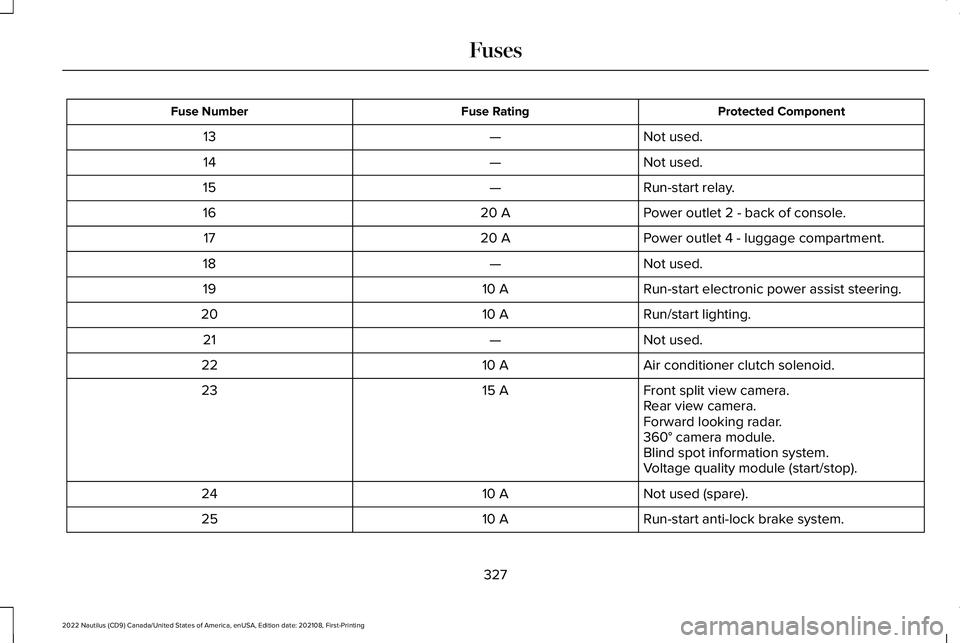
Protected ComponentFuse RatingFuse Number
Not used.—13
Not used.—14
Run-start relay.—15
Power outlet 2 - back of console.20 A16
Power outlet 4 - luggage compartment.20 A17
Not used.—18
Run-start electronic power assist steering.10 A19
Run/start lighting.10 A20
Not used.—21
Air conditioner clutch solenoid.10 A22
Front split view camera.15 A23Rear view camera.Forward looking radar.360° camera module.Blind spot information system.Voltage quality module (start/stop).
Not used (spare).10 A24
Run-start anti-lock brake system.10 A25
327
2022 Nautilus (CD9) Canada/United States of America, enUSA, Edition date: 202108, First-PrintingFuses
Page 339 of 586
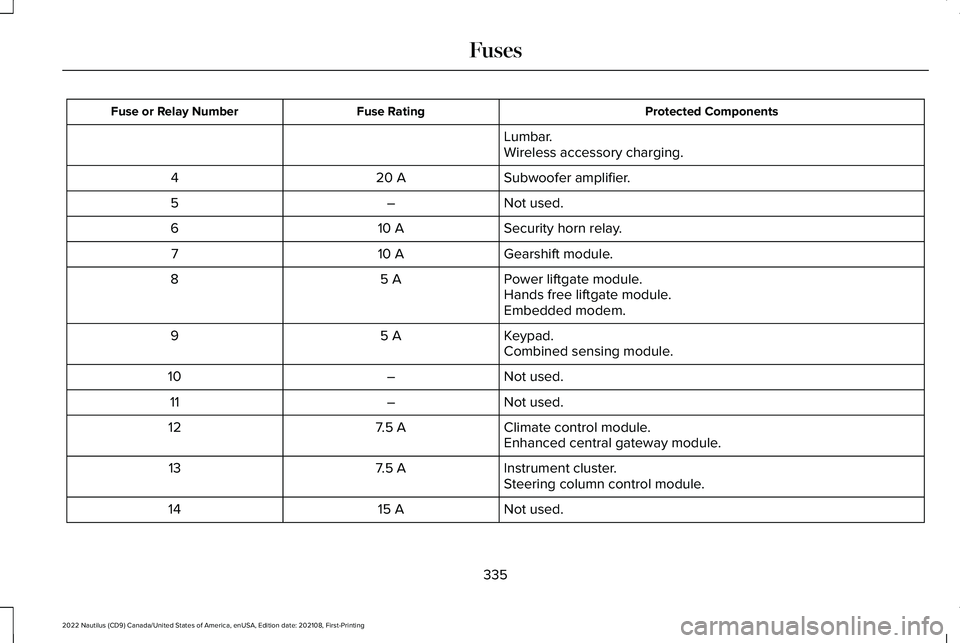
Protected ComponentsFuse RatingFuse or Relay Number
Lumbar.Wireless accessory charging.
Subwoofer amplifier.20 A4
Not used.–5
Security horn relay.10 A6
Gearshift module.10 A7
Power liftgate module.5 A8Hands free liftgate module.Embedded modem.
Keypad.5 A9Combined sensing module.
Not used.–10
Not used.–11
Climate control module.7.5 A12Enhanced central gateway module.
Instrument cluster.7.5 A13Steering column control module.
Not used.15 A14
335
2022 Nautilus (CD9) Canada/United States of America, enUSA, Edition date: 202108, First-PrintingFuses