ignition LINCOLN NAVIGATOR 2015 Owner's Guide
[x] Cancel search | Manufacturer: LINCOLN, Model Year: 2015, Model line: NAVIGATOR, Model: LINCOLN NAVIGATOR 2015Pages: 475, PDF Size: 5.13 MB
Page 115 of 475
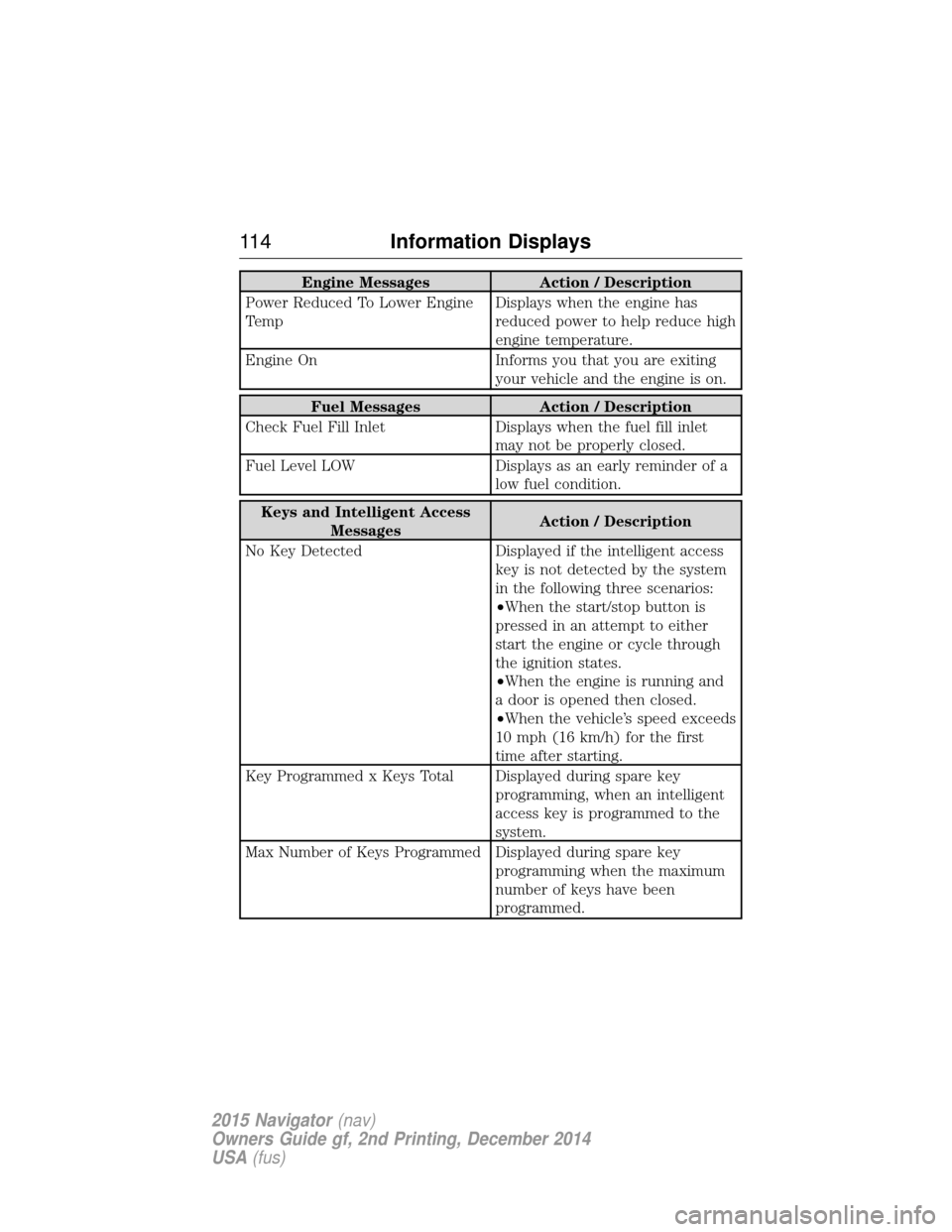
Engine MessagesAction / Description
Power Reduced To Lower Engine
Temp Displays when the engine has
reduced power to help reduce high
engine temperature.
Engine On Informs you that you are exiting
your vehicle and the engine is on.
Fuel Messages Action / Description
Check Fuel Fill Inlet Displays when the fuel fill inlet
may not be properly closed.
Fuel Level LOW Displays as an early reminder of a
low fuel condition.
Keys and Intelligent Access Messages Action / Description
No Key Detected Displayed if the intelligent access key is not detected by the system
in the following three scenarios:
•When the start/stop button is
pressed in an attempt to either
start the engine or cycle through
the ignition states.
•When the engine is running and
a door is opened then closed.
•When the vehicle’s speed exceeds
10 mph (16 km/h) for the first
time after starting.
Key Programmed x Keys Total Displayed during spare key programming, when an intelligent
access key is programmed to the
system.
Max Number of Keys Programmed Displayed during spare key programming when the maximum
number of keys have been
programmed.
11 4Information Displays
2015 Navigator (nav)
Owners Guide gf, 2nd Printing, December 2014
USA (fus)
Page 116 of 475
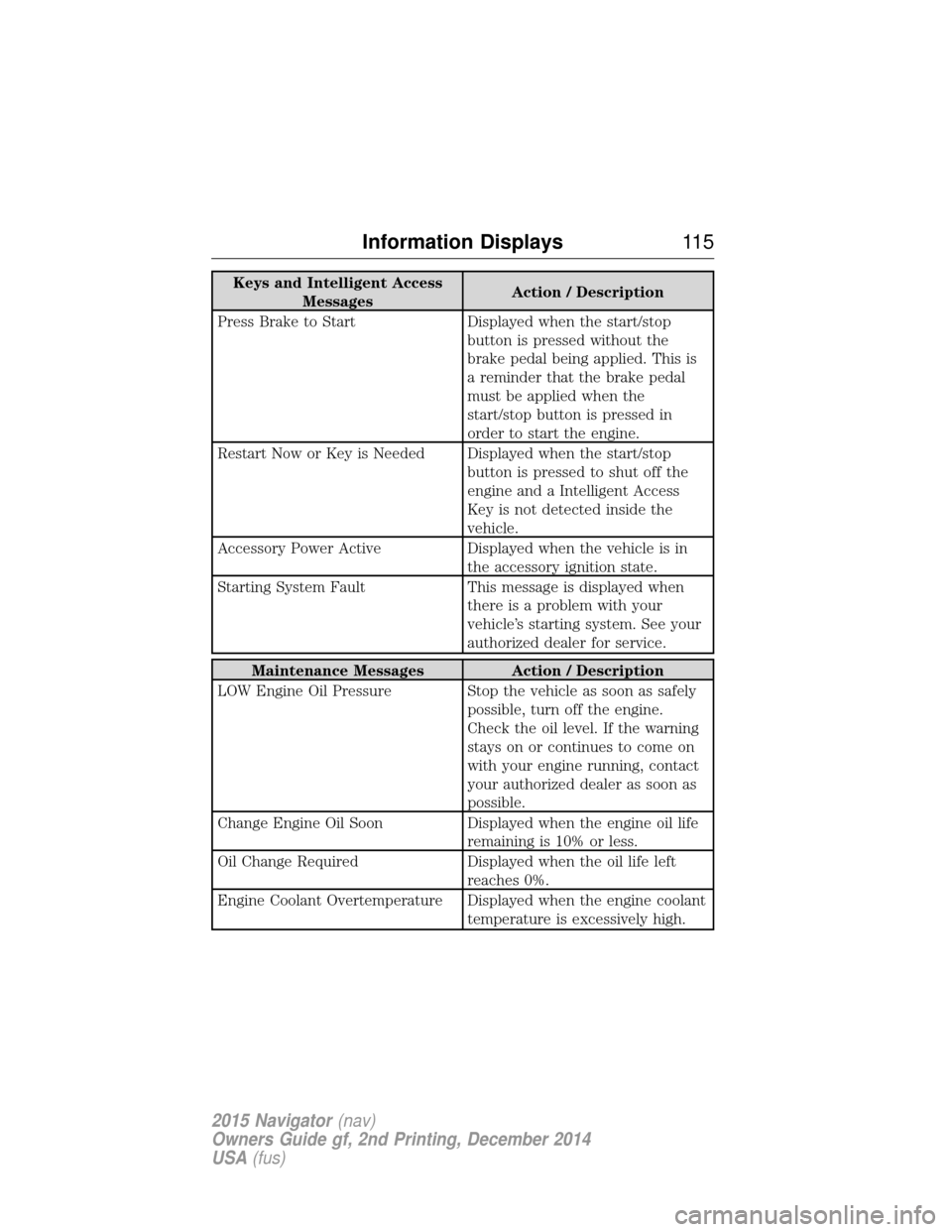
Keys and Intelligent AccessMessages Action / Description
Press Brake to Start Displayed when the start/stop button is pressed without the
brake pedal being applied. This is
a reminder that the brake pedal
must be applied when the
start/stop button is pressed in
order to start the engine.
Restart Now or Key is Needed Displayed when the start/stop button is pressed to shut off the
engine and a Intelligent Access
Key is not detected inside the
vehicle.
Accessory Power Active Displayed when the vehicle is in the accessory ignition state.
Starting System Fault This message is displayed when there is a problem with your
vehicle’s starting system. See your
authorized dealer for service.
Maintenance Messages Action / Description
LOW Engine Oil Pressure Stop the vehicle as soon as safely possible, turn off the engine.
Check the oil level. If the warning
stays on or continues to come on
with your engine running, contact
your authorized dealer as soon as
possible.
Change Engine Oil Soon Displayed when the engine oil life
remaining is 10% or less.
Oil Change Required Displayed when the oil life left
reaches 0%.
Engine Coolant Overtemperature Displayed when the engine coolant temperature is excessively high.
Information Displays11 5
2015 Navigator(nav)
Owners Guide gf, 2nd Printing, December 2014
USA (fus)
Page 121 of 475
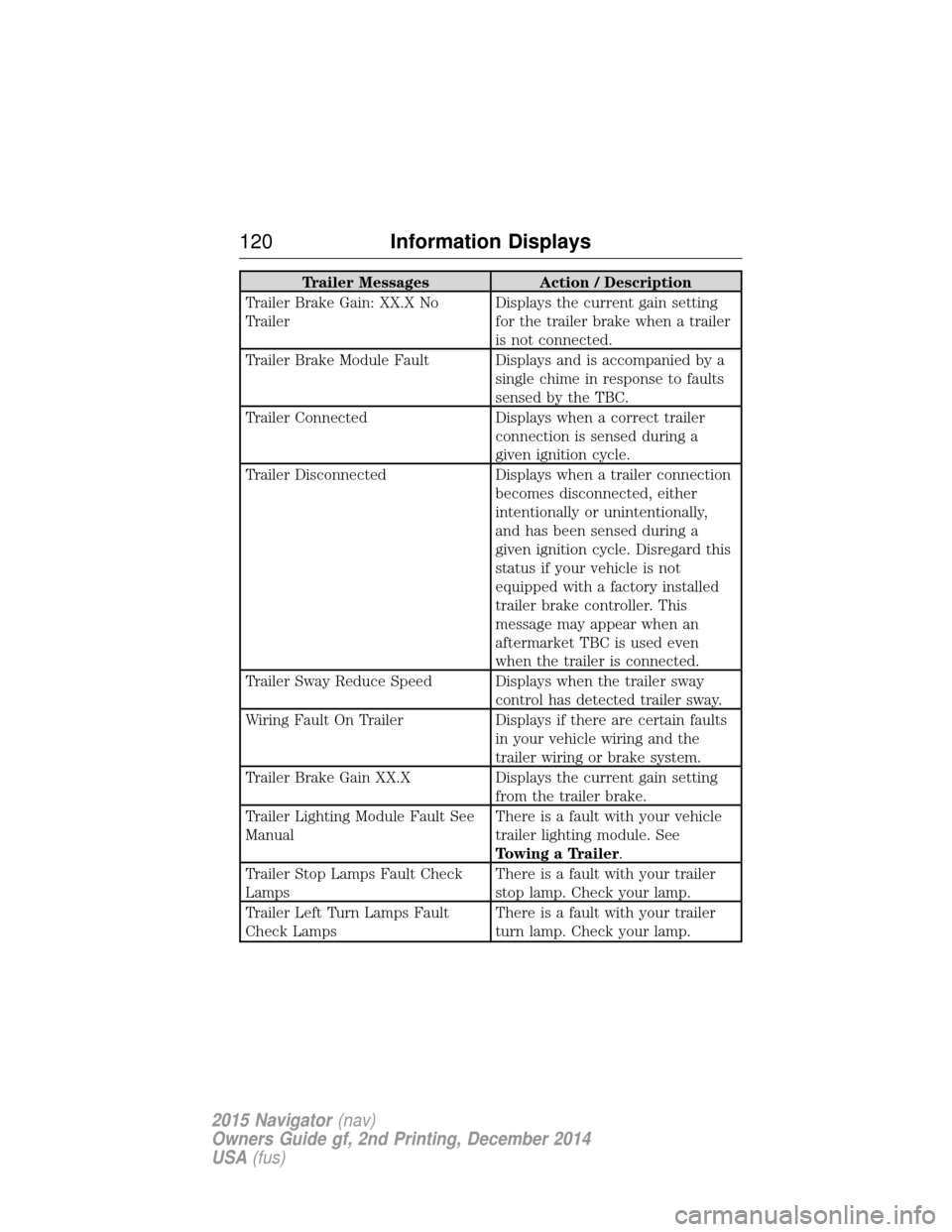
Trailer MessagesAction / Description
Trailer Brake Gain: XX.X No
Trailer Displays the current gain setting
for the trailer brake when a trailer
is not connected.
Trailer Brake Module Fault Displays and is accompanied by a single chime in response to faults
sensed by the TBC.
Trailer Connected Displays when a correct trailer
connection is sensed during a
given ignition cycle.
Trailer Disconnected Displays when a trailer connection
becomes disconnected, either
intentionally or unintentionally,
and has been sensed during a
given ignition cycle. Disregard this
status if your vehicle is not
equipped with a factory installed
trailer brake controller. This
message may appear when an
aftermarket TBC is used even
when the trailer is connected.
Trailer Sway Reduce Speed Displays when the trailer sway control has detected trailer sway.
Wiring Fault On Trailer Displays if there are certain faults
in your vehicle wiring and the
trailer wiring or brake system.
Trailer Brake Gain XX.X Displays the current gain setting
from the trailer brake.
Trailer Lighting Module Fault See
Manual There is a fault with your vehicle
trailer lighting module. See
Towing a Trailer.
Trailer Stop Lamps Fault Check
Lamps There is a fault with your trailer
stop lamp. Check your lamp.
Trailer Left Turn Lamps Fault
Check Lamps There is a fault with your trailer
turn lamp. Check your lamp.
120
Information Displays
2015 Navigator (nav)
Owners Guide gf, 2nd Printing, December 2014
USA (fus)
Page 127 of 475
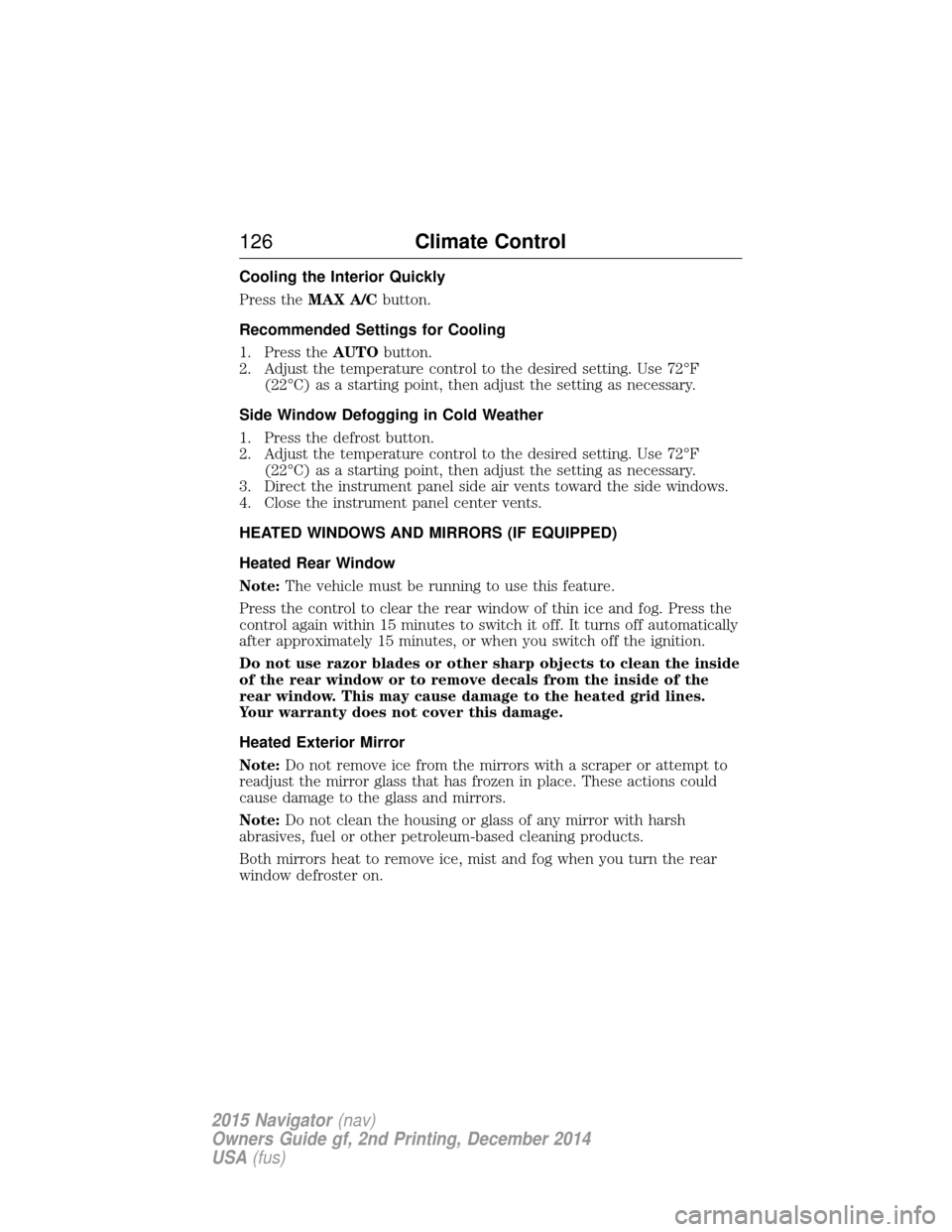
Cooling the Interior Quickly
Press theMAX A/C button.
Recommended Settings for Cooling
1. Press the AUTObutton.
2. Adjust the temperature control to the desired setting. Use 72°F (22°C) as a starting point, then adjust the setting as necessary.
Side Window Defogging in Cold Weather
1. Press the defrost button.
2. Adjust the temperature control to the desired setting. Use 72°F (22°C) as a starting point, then adjust the setting as necessary.
3. Direct the instrument panel side air vents toward the side windows.
4. Close the instrument panel center vents.
HEATED WINDOWS AND MIRRORS (IF EQUIPPED)
Heated Rear Window
Note: The vehicle must be running to use this feature.
Press the control to clear the rear window of thin ice and fog. Press the
control again within 15 minutes to switch it off. It turns off automatically
after approximately 15 minutes, or when you switch off the ignition.
Do not use razor blades or other sharp objects to clean the inside
of the rear window or to remove decals from the inside of the
rear window. This may cause damage to the heated grid lines.
Your warranty does not cover this damage.
Heated Exterior Mirror
Note: Do not remove ice from the mirrors with a scraper or attempt to
readjust the mirror glass that has frozen in place. These actions could
cause damage to the glass and mirrors.
Note: Do not clean the housing or glass of any mirror with harsh
abrasives, fuel or other petroleum-based cleaning products.
Both mirrors heat to remove ice, mist and fog when you turn the rear
window defroster on.
126 Climate Control
2015 Navigator(nav)
Owners Guide gf, 2nd Printing, December 2014
USA (fus)
Page 128 of 475
REMOTE START (IF EQUIPPED)
The remote start feature allows you to pre-condition the interior of your
vehicle. The climate control system works to achieve comfort according
to your previous settings.
Note:You cannot adjust the system during remote start operation.
Turn the ignition on to return the system to its previous settings. You
can now make adjustments normally, but you need to turn certain
vehicle-dependent features back on, such as:
• Heated seats.
• Cooled seats.
• Heated steering wheel.
• Heated mirrors.
• Heated rear window.
You can adjust the default remote start settings using the information
display controls. See the Information Displayschapter.
Automatic Settings
In hot weather, the system is set to 72°F (22°C). The cooled seats are
set to high (if available, and selected to AUTO in the information
display).
In moderate weather, the system either heats or cools (based on
previous settings). The rear defroster, heated mirrors and heated seats
do not automatically turn on.
In cold weather, the system is set to 72°F (22°C). The heated seats are
set to high (if available, and selected to AUTO in the information
display). The rear defroster and heated mirrors automatically turn on.
Climate Control 127
2015 Navigator(nav)
Owners Guide gf, 2nd Printing, December 2014
USA (fus)
Page 134 of 475
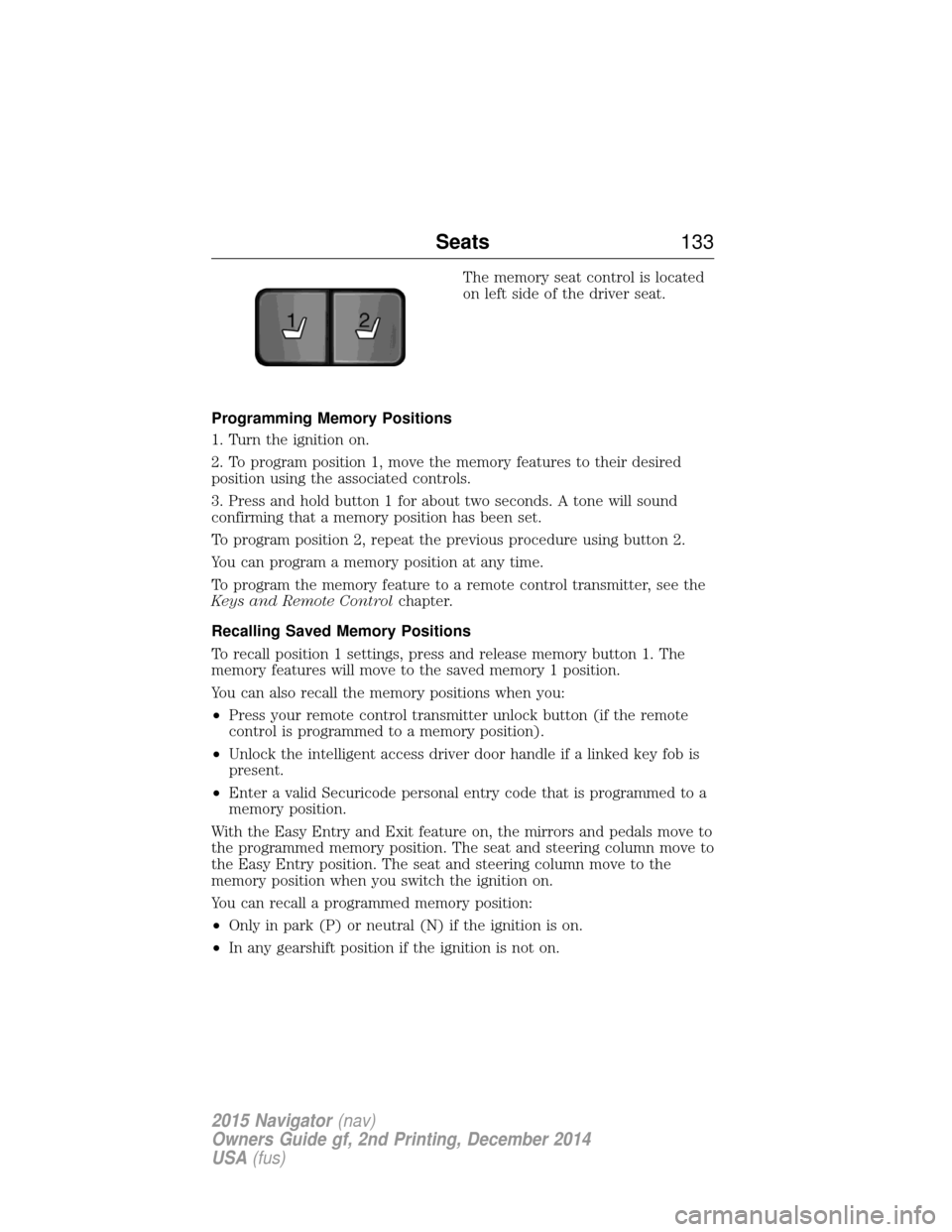
The memory seat control is located
on left side of the driver seat.
Programming Memory Positions
1. Turn the ignition on.
2. To program position 1, move the memory features to their desired
position using the associated controls.
3. Press and hold button 1 for about two seconds. A tone will sound
confirming that a memory position has been set.
To program position 2, repeat the previous procedure using button 2.
You can program a memory position at any time.
To program the memory feature to a remote control transmitter, see the
Keys and Remote Control chapter.
Recalling Saved Memory Positions
To recall position 1 settings, press and release memory button 1. The
memory features will move to the saved memory 1 position.
You can also recall the memory positions when you:
• Press your remote control transmitter unlock button (if the remote
control is programmed to a memory position).
• Unlock the intelligent access driver door handle if a linked key fob is
present.
• Enter a valid Securicode personal entry code that is programmed to a
memory position.
With the Easy Entry and Exit feature on, the mirrors and pedals move to
the programmed memory position. The seat and steering column move to
the Easy Entry position. The seat and steering column move to the
memory position when you switch the ignition on.
You can recall a programmed memory position:
• Only in park (P) or neutral (N) if the ignition is on.
• In any gearshift position if the ignition is not on.
21
Seats 133
2015 Navigator(nav)
Owners Guide gf, 2nd Printing, December 2014
USA (fus)
Page 135 of 475
Easy Entry and Exit Feature
The Easy Entry and Exit feature adjusts the position of the seat and
steering column to allow easier exit and entry to the vehicle.
The driver seat automatically moves 2 inches (5 centimeters) rearward
when the transmission is in park (P) and you switch the ignition off.
The driver seat returns to the previous position when you switch the
ignition on.
Enable or disable this feature through the information display. See the
Information Displayschapter for more information.
Climate Controlled Seats (If Equipped)
Heated Seats
WARNING: Persons who are unable to feel pain to the skin
because of advanced age, chronic illness, diabetes, spinal cord
injury, medication, alcohol use, exhaustion, or other physical conditions,
must exercise care when using the seat heater. The seat heater may
cause burns even at low temperatures, especially if used for long
periods of time. Do not place anything on the seat that insulates against
heat, such as a blanket or cushion, because this may cause the seat
heater to overheat. Do not puncture the seat with pins, needles, or
other pointed objects because this may damage the heating element
which may cause the seat heater to overheat. An overheated seat may
cause serious personal injury.
Note: Do not do the following:
• Place heavy objects on the seat.
• Operate the seat heater if water or any other liquid is spilled on the
seat. Allow the seat to dry thoroughly.
The heated seats will only function when the engine is running.
To operate the heated seats: Press the heated seat symbol to cycle through the various
heat settings and off. Warmer settings are indicated by
more indicator lights.
134 Seats
2015 Navigator(nav)
Owners Guide gf, 2nd Printing, December 2014
USA (fus)
Page 136 of 475
Cooled Seats
The cooled seats will only function when the engine is running.
To operate the cooled seats:Press the cooled seat symbol to cycle through the various
cooling settings and off. Cooler settings are indicated by
more indicator lights.
If the engine falls below 350 RPM while the cooled seats are on, the
feature will turn itself off. You will need to reactivate it.
Climate Controlled Seats Air Filter Replacement (If Equipped)
The climate controlled seat system includes air filters. You must replace
them periodically. See scheduled maintenance information for more
information.
There is a filter located under each front seat. You can access the filter
from the second row seat. Move the front seats all the way forward and
up to ease access.
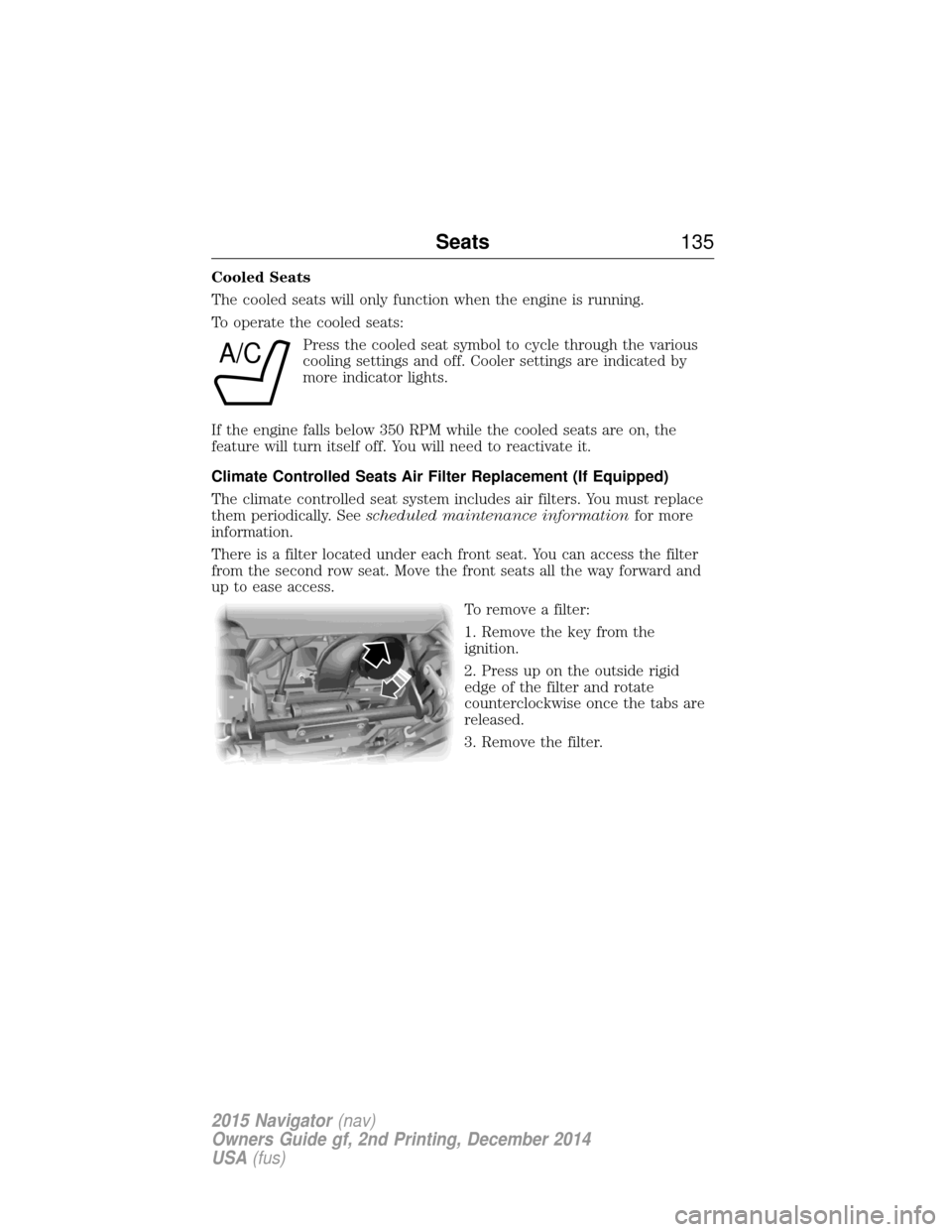
To remove a filter:
1. Remove the key from the
ignition.
2. Press up on the outside rigid
edge of the filter and rotate
counterclockwise once the tabs are
released.
3. Remove the filter.
A/C
Seats135
2015 Navigator(nav)
Owners Guide gf, 2nd Printing, December 2014
USA (fus)
Page 145 of 475
The heated seats only operate when the ignition is on. To operate the
heated seats:Press the heated seat button to cycle through the various
heat settings and off. Warmer settings are indicated by
more indicator lights.
Third Row Seats
Make sure that no objects are on the floor in front of the third row seats
or on the seat cushion before lowering them. Make sure that the head
restraints are lowered and the second row seats are not reclined.
Folding Down the Third Row Seats to the Load Floor
WARNING: To prevent possible damage to the seat or safety
belts, make sure that the safety belts are not buckled when
moving the seat to the load floor position.
WARNING: Before returning the seatback to its original position,
make sure that cargo or any objects are not trapped behind the
seatback. After returning the seat back to its original position, pull on
the seatback to make sure that it has fully latched. An unlatched seat
may become dangerous in the event of a sudden stop or crash.
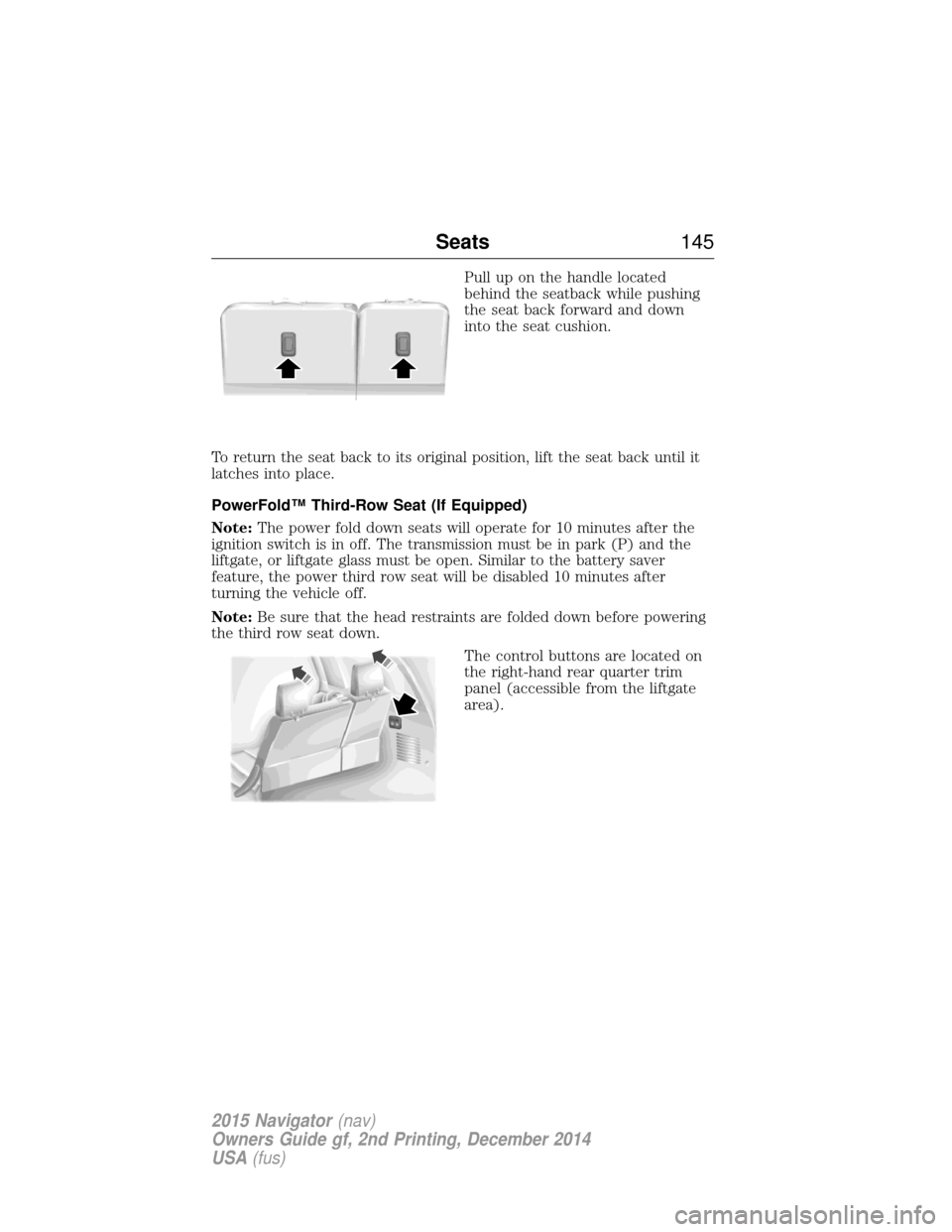
Before folding the third row seats,
fold the head restraints down by
pulling on the strap located at the
bottom of the restraint.
144Seats
2015 Navigator(nav)
Owners Guide gf, 2nd Printing, December 2014
USA (fus)
Page 146 of 475
Pull up on the handle located
behind the seatback while pushing
the seat back forward and down
into the seat cushion.
To return the seat back to its original position, lift the seat back until it
latches into place.
PowerFold™ Third-Row Seat (If Equipped)
Note: The power fold down seats will operate for 10 minutes after the
ignition switch is in off. The transmission must be in park (P) and the
liftgate, or liftgate glass must be open. Similar to the battery saver
feature, the power third row seat will be disabled 10 minutes after
turning the vehicle off.
Note: Be sure that the head restraints are folded down before powering
the third row seat down.
The control buttons are located on
the right-hand rear quarter trim
panel (accessible from the liftgate
area).
Seats145
2015 Navigator(nav)
Owners Guide gf, 2nd Printing, December 2014
USA (fus)