ignition LINCOLN NAVIGATOR 2015 Repair Manual
[x] Cancel search | Manufacturer: LINCOLN, Model Year: 2015, Model line: NAVIGATOR, Model: LINCOLN NAVIGATOR 2015Pages: 475, PDF Size: 5.13 MB
Page 212 of 475
WARNING:Obtain immediate service if a system error is
detected. You may not notice any difference in the feel of your
steering, but a serious condition may exist. Failure to do so may result
in loss of steering control.
Your vehicle is equipped with an electric power-assisted steering system.
There is no fluid reservoir to check or fill.
If your vehicle loses electrical power while you are driving (or if the
ignition is turned off), you can steer the vehicle manually, but it takes
more effort. Extreme continuous steering may increase the effort it takes
for you to steer. This occurs to prevent internal overheating and
permanent damage to your steering system. If this should occur, you will
neither lose the ability to steer the vehicle manually nor will it cause
permanent damage. Typical steering and driving maneuvers will allow the
system to cool and steering assist will return to normal.
When a steering system error is detected, steering messages may appear
in the information display.
Steering Tips
If the steering wanders or pulls, check for:
• an improperly inflated tire
• uneven tire wear
• loose or worn suspension components
• loose or worn steering components
• improper vehicle alignment
A high crown in the road or high crosswinds may also make the steering
seem to wander/pull.
Driving Aids 211
2015 Navigator(nav)
Owners Guide gf, 2nd Printing, December 2014
USA (fus)
Page 237 of 475
TOWING THE VEHICLE ON FOUR WHEELS
Emergency Towing
WARNING:If your vehicle has a steering wheel lock, make sure
the ignition is in the accessory or on position when being towed.
If your vehicle becomes inoperable (without access to wheel dollies,
car-hauling trailer, or flatbed transport vehicle), it can be flat-towed (all
wheels on the ground, regardless of the powertrain and transmission
configuration) under the following conditions:
• Your vehicle is facing forward for towing in a forward direction.
• Place the transmission in position N.See Automatic transmission in
the Transmission chapter if you cannot move the transmission into
N.
• Maximum speed is 35 mph (56 km/h).
• Maximum distance is 50 miles (80 kilometers).
Recreational Towing
Note: Put your climate control system in recirculated air mode to
prevent exhaust fumes from entering your vehicle. See the Climate
Control chapter.
Follow these guidelines if you have a need for recreational towing, such
as towing your vehicle behind a motorhome. We designed these
guidelines to prevent damage to your transmission.
Do not tow your vehicle with any wheels on the ground, as vehicle or
transmission damage may occur. It is recommended to tow your vehicle
with all four (4) wheels off the ground, such as when using a car-hauling
trailer. Otherwise, you cannot tow your vehicle.
236 Towing
2015 Navigator(nav)
Owners Guide gf, 2nd Printing, December 2014
USA (fus)
Page 244 of 475
HAZARD WARNING FLASHERSThe hazard flasher control is located on the instrument panel
by the radio. Use it when your vehicle is disabled and is
creating a safety hazard for other motorists.
•
Press the flasher control and all front and rear direction signals will flash.
• Press the flasher control again to turn them off.
Note:
With extended use, the flashers may run down your 12–volt battery.
FUEL SHUTOFF
WARNING: Failure to inspect and, if necessary, repair fuel leaks
after a collision may increase the risk of fire and serious injury.
Ford Motor Company recommends that the fuel system be inspected by
an authorized dealer after any collision.
In the event of a moderate to severe collision, this vehicle includes a fuel
pump shut-off feature that stops the flow of fuel to the engine. Not every
impact will cause a shut off.
Should your vehicle shut off after a collision, you may restart your
vehicle by doing the following:
1. Switch off the ignition.
2. Switch on the ignition.
3. Repeat Steps 1 and 2 to re-enable the fuel pump.
For vehicles equipped with a push button start system:
1. Press the START/STOP button to switch off the ignition.
2. Press the brake pedal and press the START/STOP button to start the
vehicle.
3. Remove your foot from the brake pedal and press the START/STOP
button to switch off the ignition.
4. You can either attempt to start the engine by pressing the brake pedal
and the START/STOP button, or switch on the ignition only by pressing
the START/STOP button without pressing the brake pedal. Both ways
re-enable the fuel system.
Note: When you try to restart your vehicle after a fuel shutoff, the
vehicle makes sure that various systems are safe to restart. Once your
vehicle determines that the systems are safe, then the vehicle will allow
you to restart.
Note: In the event that your vehicle does not restart after your third
attempt, contact an authorized dealer.
Roadside Emergencies 243
2015 Navigator(nav)
Owners Guide gf, 2nd Printing, December 2014
USA (fus)
Page 260 of 475
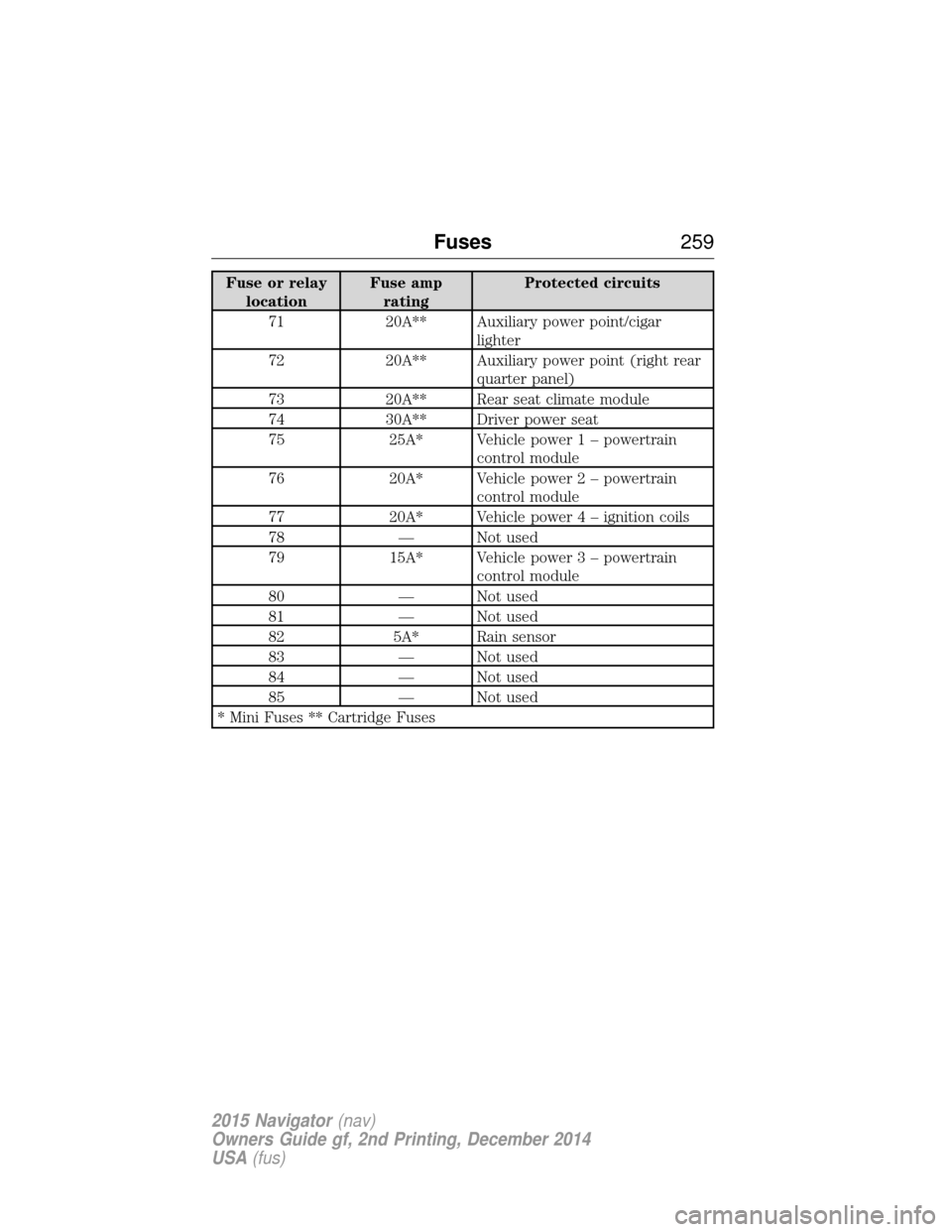
Fuse or relaylocation Fuse amp
rating Protected circuits
71 20A** Auxiliary power point/cigar lighter
72 20A** Auxiliary power point (right rear quarter panel)
73 20A** Rear seat climate module
74 30A** Driver power seat
75 25A* Vehicle power 1 – powertrain control module
76 20A* Vehicle power 2 – powertrain
control module
77 20A* Vehicle powe r4–ignition coils
78 — Not used
79 15A* Vehicle power 3 – powertrain
control module
80 — Not used
81 — Not used
82 5A* Rain sensor
83 — Not used
84 — Not used
85 — Not used
* Mini Fuses ** Cartridge Fuses
Fuses 259
2015 Navigator(nav)
Owners Guide gf, 2nd Printing, December 2014
USA (fus)
Page 263 of 475
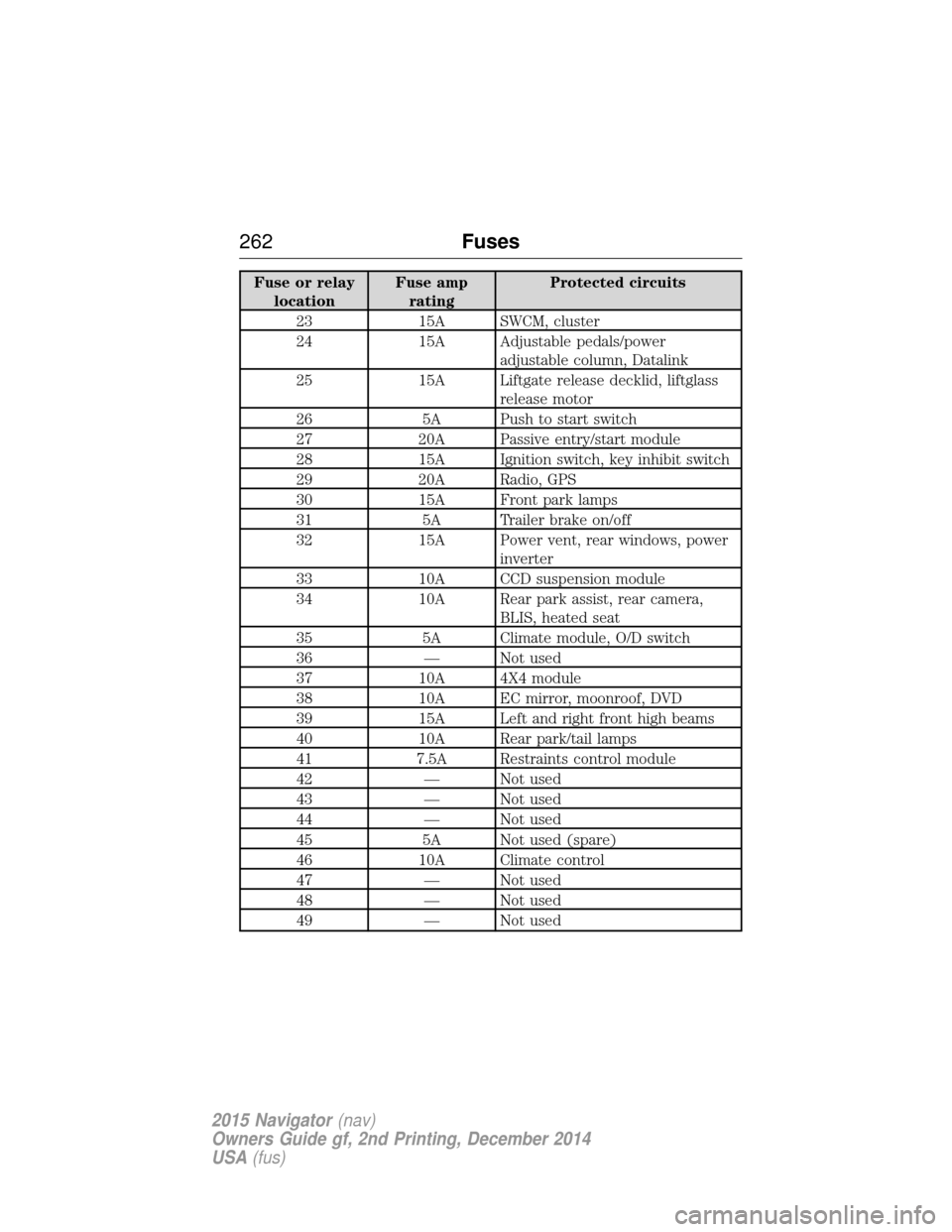
Fuse or relaylocation Fuse amp
rating Protected circuits
23 15A SWCM, cluster
24 15A Adjustable pedals/power adjustable column, Datalink
25 15A Liftgate release decklid, liftglass release motor
26 5A Push to start switch
27 20A Passive entry/start module
28 15A Ignition switch, key inhibit switch
29 20A Radio, GPS
30 15A Front park lamps
31 5A Trailer brake on/off
32 15A Power vent, rear windows, power inverter
33 10A CCD suspension module
34 10A Rear park assist, rear camera, BLIS, heated seat
35 5A Climate module, O/D switch
36 — Not used
37 10A 4X4 module
38 10A EC mirror, moonroof, DVD
39 15A Left and right front high beams
40 10A Rear park/tail lamps
41 7.5A Restraints control module
42 — Not used
43 — Not used
44 — Not used
45 5A Not used (spare)
46 10A Climate control
47 — Not used
48 — Not used
49 — Not used
262 Fuses
2015 Navigator(nav)
Owners Guide gf, 2nd Printing, December 2014
USA (fus)
Page 288 of 475
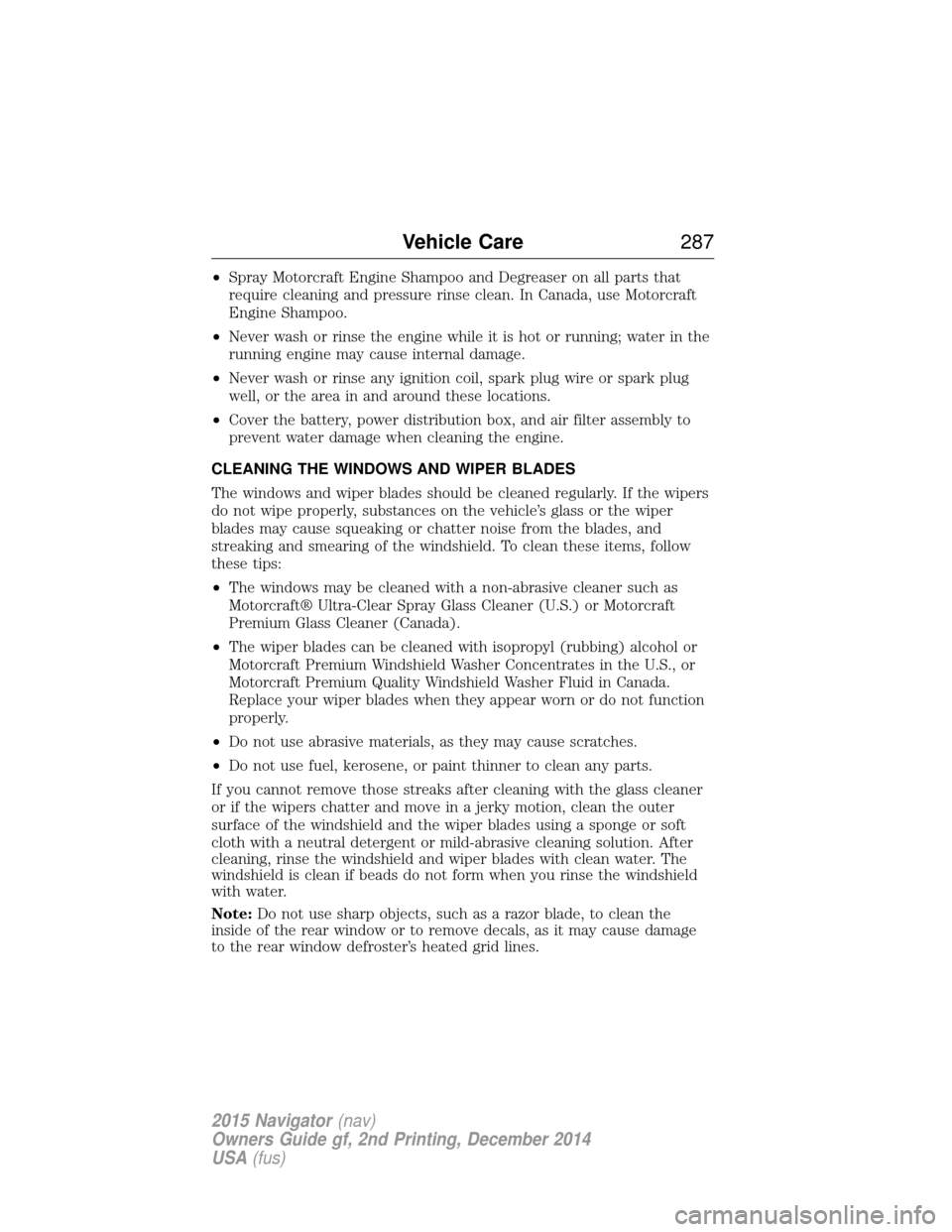
•Spray Motorcraft Engine Shampoo and Degreaser on all parts that
require cleaning and pressure rinse clean. In Canada, use Motorcraft
Engine Shampoo.
• Never wash or rinse the engine while it is hot or running; water in the
running engine may cause internal damage.
• Never wash or rinse any ignition coil, spark plug wire or spark plug
well, or the area in and around these locations.
• Cover the battery, power distribution box, and air filter assembly to
prevent water damage when cleaning the engine.
CLEANING THE WINDOWS AND WIPER BLADES
The windows and wiper blades should be cleaned regularly. If the wipers
do not wipe properly, substances on the vehicle’s glass or the wiper
blades may cause squeaking or chatter noise from the blades, and
streaking and smearing of the windshield. To clean these items, follow
these tips:
• The windows may be cleaned with a non-abrasive cleaner such as
Motorcraft® Ultra-Clear Spray Glass Cleaner (U.S.) or Motorcraft
Premium Glass Cleaner (Canada).
• The wiper blades can be cleaned with isopropyl (rubbing) alcohol or
Motorcraft Premium Windshield Washer Concentrates in the U.S., or
Motorcraft Premium Quality Windshield Washer Fluid in Canada.
Replace your wiper blades when they appear worn or do not function
properly.
• Do not use abrasive materials, as they may cause scratches.
• Do not use fuel, kerosene, or paint thinner to clean any parts.
If you cannot remove those streaks after cleaning with the glass cleaner
or if the wipers chatter and move in a jerky motion, clean the outer
surface of the windshield and the wiper blades using a sponge or soft
cloth with a neutral detergent or mild-abrasive cleaning solution. After
cleaning, rinse the windshield and wiper blades with clean water. The
windshield is clean if beads do not form when you rinse the windshield
with water.
Note: Do not use sharp objects, such as a razor blade, to clean the
inside of the rear window or to remove decals, as it may cause damage
to the rear window defroster’s heated grid lines.
Vehicle Care 287
2015 Navigator(nav)
Owners Guide gf, 2nd Printing, December 2014
USA (fus)
Page 328 of 475
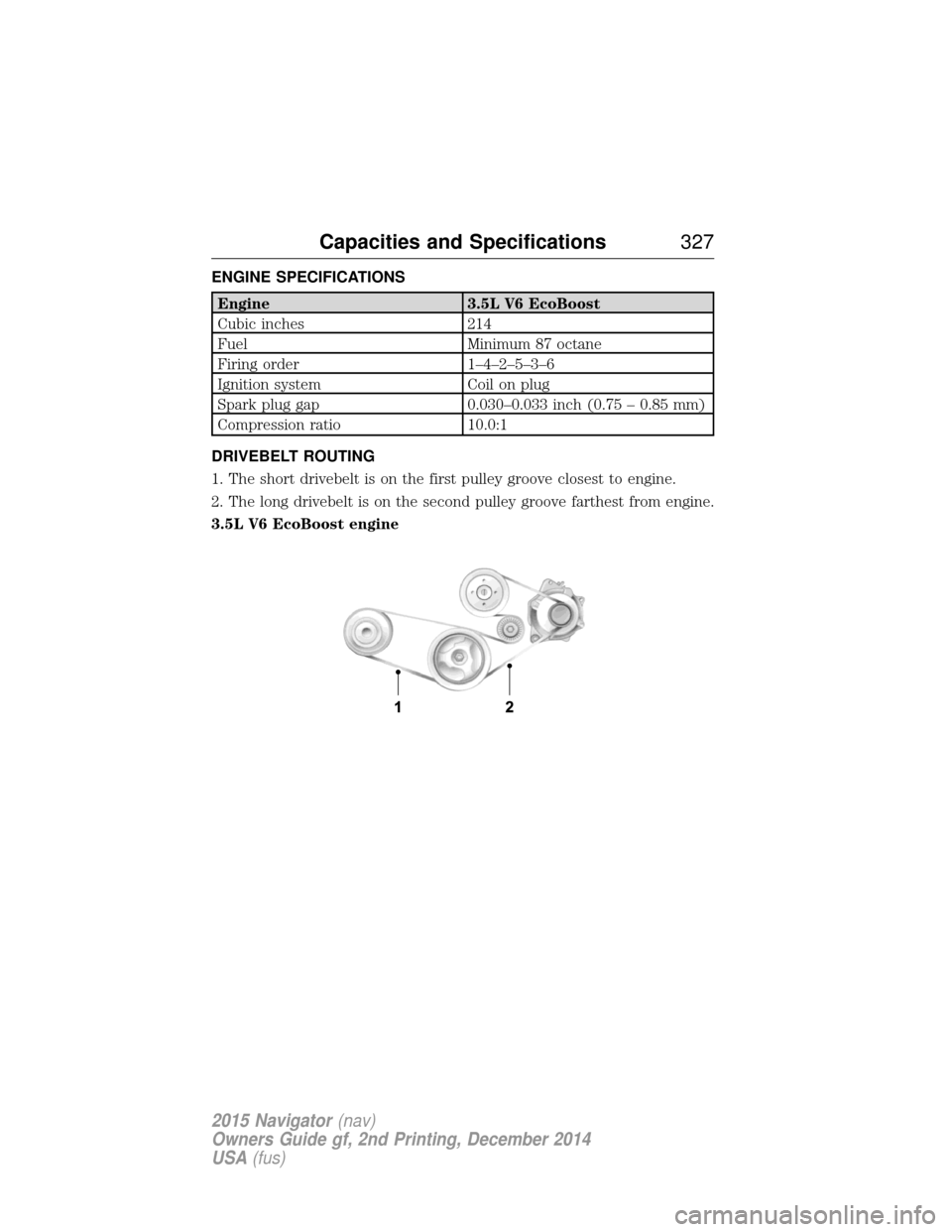
ENGINE SPECIFICATIONS
Engine3.5L V6 EcoBoost
Cubic inches 214
Fuel Minimum 87 octane
Firing order 1–4–2–5–3–6
Ignition system Coil on plug
Spark plug gap 0.030–0.033 inch (0.75 – 0.85 mm)
Compression ratio 10.0:1
DRIVEBELT ROUTING
1. The short drivebelt is on the first pulley groove closest to engine.
2. The long drivebelt is on the second pulley groove farthest from engine.
3.5L V6 EcoBoost engine
Capacities and Specifications 327
2015 Navigator(nav)
Owners Guide gf, 2nd Printing, December 2014
USA (fus)
Page 350 of 475
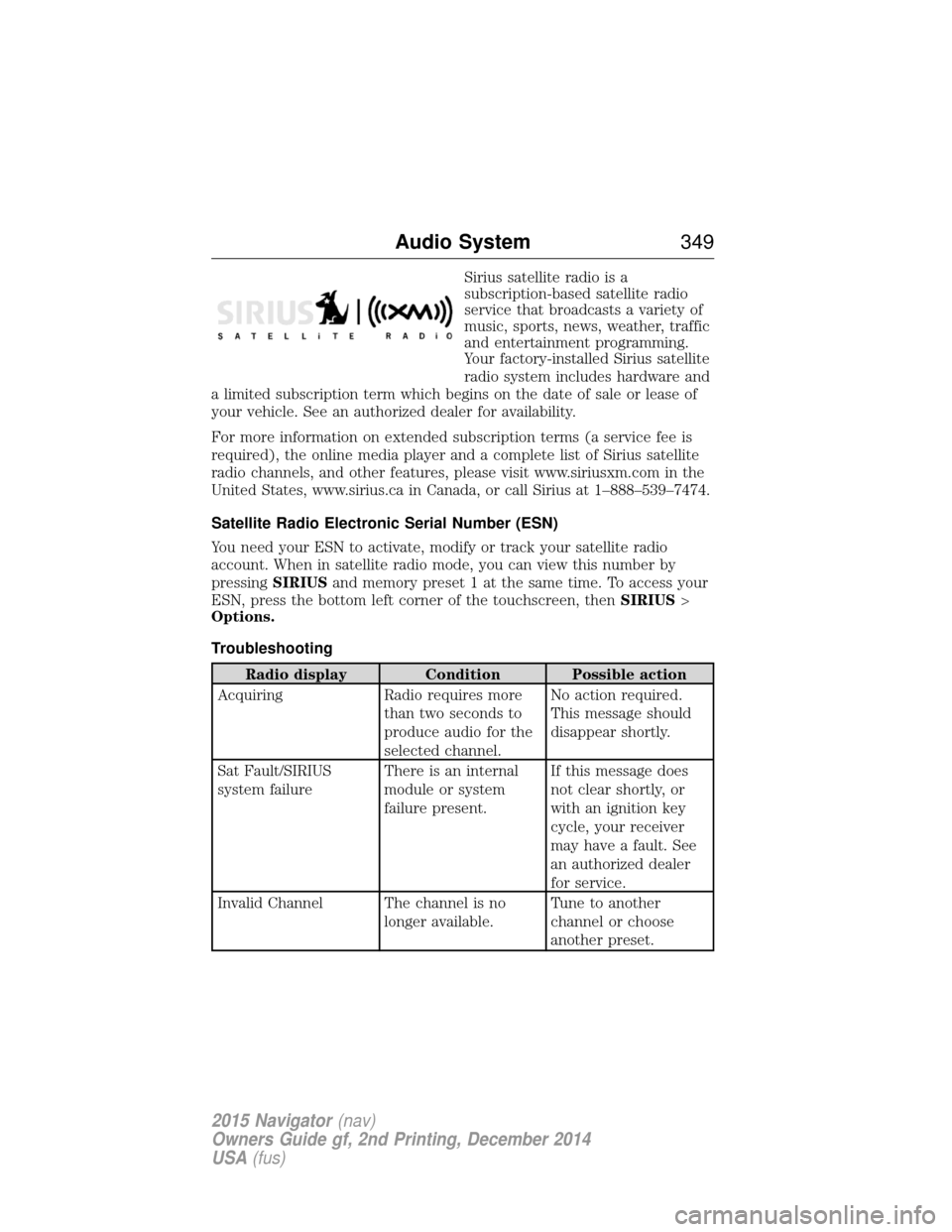
Sirius satellite radio is a
subscription-based satellite radio
service that broadcasts a variety of
music, sports, news, weather, traffic
and entertainment programming.
Your factory-installed Sirius satellite
radio system includes hardware and
a limited subscription term which begins on the date of sale or lease of
your vehicle. See an authorized dealer for availability.
For more information on extended subscription terms (a service fee is
required), the online media player and a complete list of Sirius satellite
radio channels, and other features, please visit www.siriusxm.com in the
United States, www.sirius.ca in Canada, or call Sirius at 1–888–539–7474.
Satellite Radio Electronic Serial Number (ESN)
You need your ESN to activate, modify or track your satellite radio
account. When in satellite radio mode, you can view this number by
pressing SIRIUSand memory preset 1 at the same time. To access your
ESN, press the bottom left corner of the touchscreen, then SIRIUS>
Options.
Troubleshooting
Radio display Condition Possible action
Acquiring Radio requires more
than two seconds to
produce audio for the
selected channel. No action required.
This message should
disappear shortly.
Sat Fault/SIRIUS
system failure There is an internal
module or system
failure present.If this message does
not clear shortly, or
with an ignition key
cycle, your receiver
may have a fault. See
an authorized dealer
for service.
Invalid Channel The channel is no longer available.Tune to another
channel or choose
another preset.
Audio System
349
2015 Navigator(nav)
Owners Guide gf, 2nd Printing, December 2014
USA (fus)
Page 354 of 475
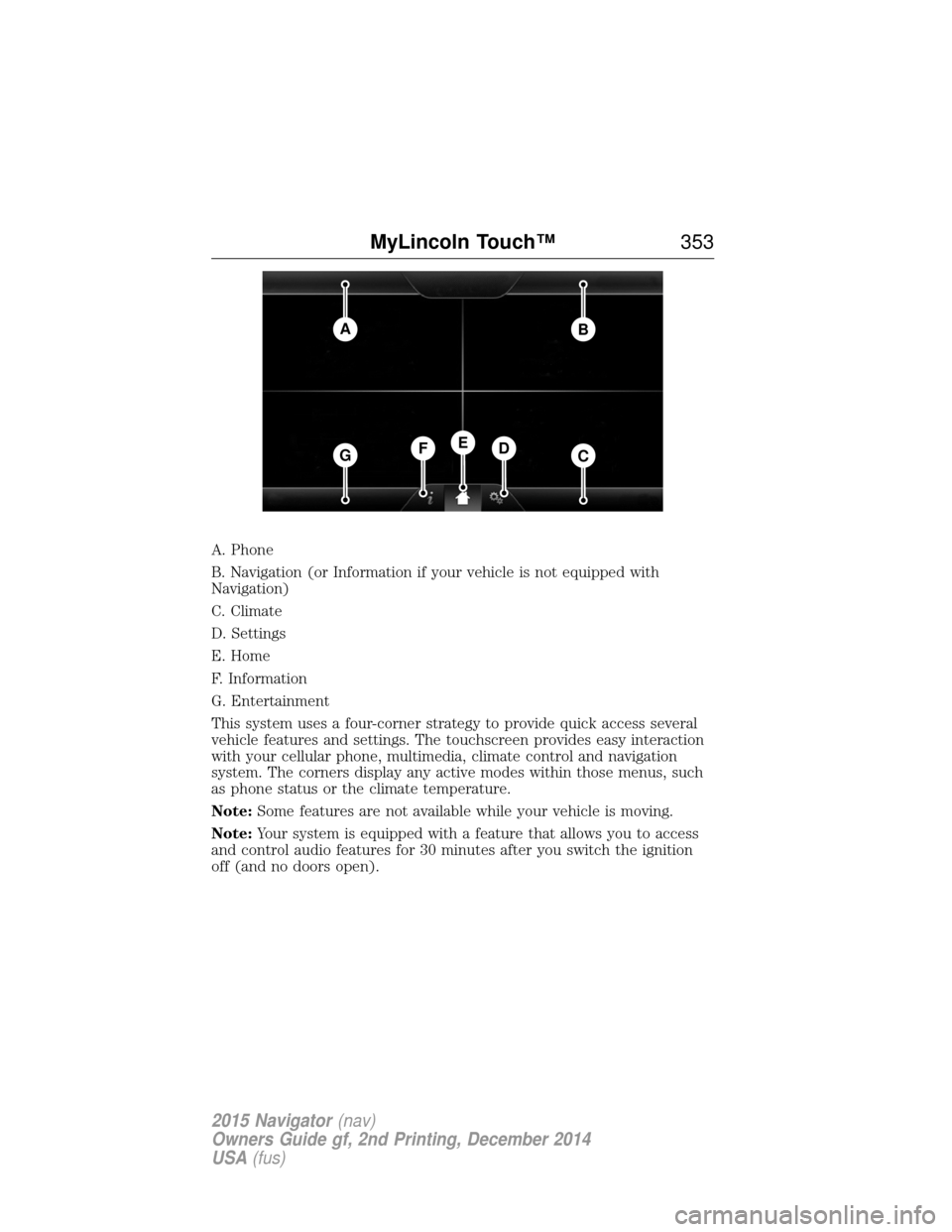
A. Phone
B. Navigation (or Information if your vehicle is not equipped with
Navigation)
C. Climate
D. Settings
E. Home
F. Information
G. Entertainment
This system uses a four-corner strategy to provide quick access several
vehicle features and settings. The touchscreen provides easy interaction
with your cellular phone, multimedia, climate control and navigation
system. The corners display any active modes within those menus, such
as phone status or the climate temperature.
Note:Some features are not available while your vehicle is moving.
Note: Your system is equipped with a feature that allows you to access
and control audio features for 30 minutes after you switch the ignition
off (and no doors open).
AB
GCDFE
MyLincoln Touch™ 353
2015 Navigator(nav)
Owners Guide gf, 2nd Printing, December 2014
USA (fus)
Page 377 of 475
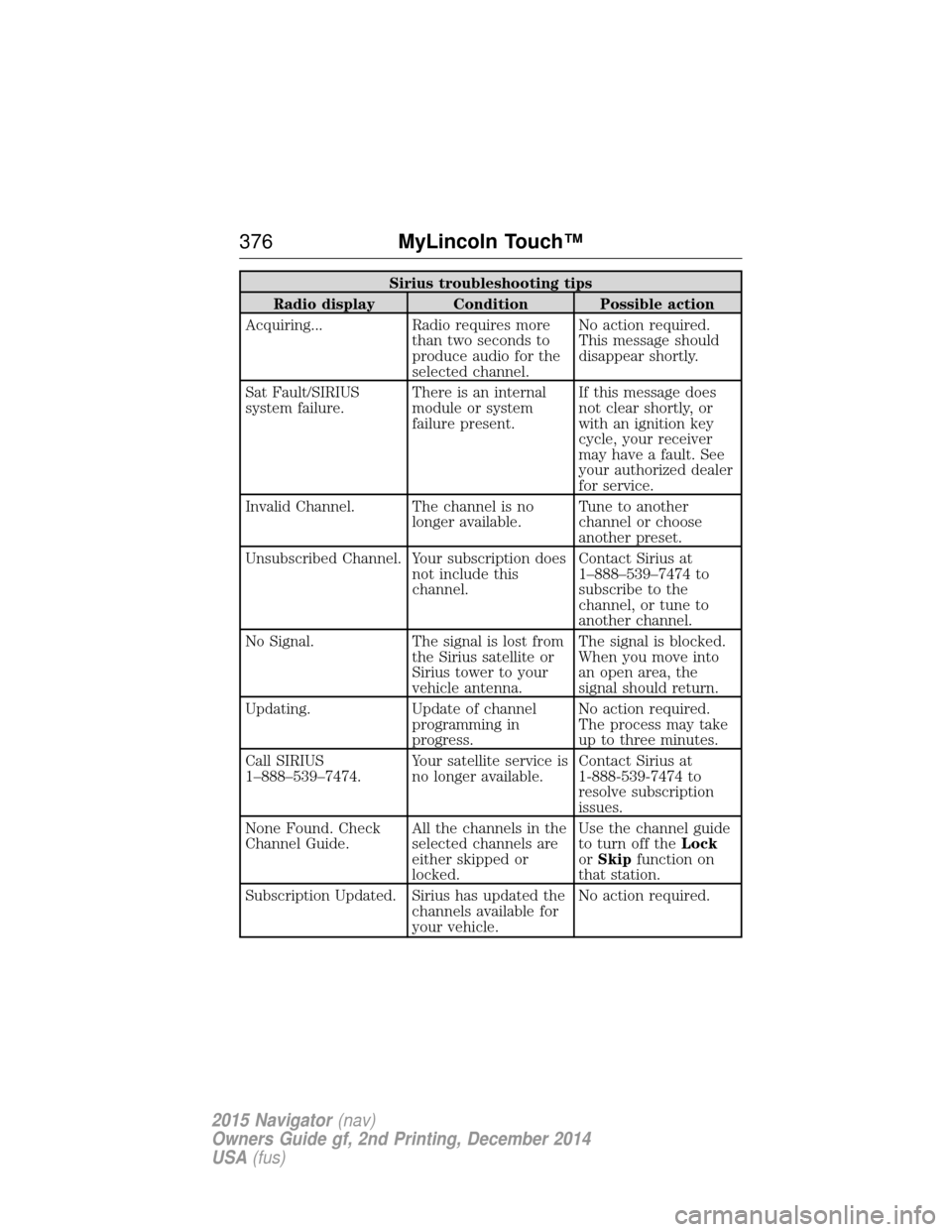
Sirius troubleshooting tips
Radio display Condition Possible action
Acquiring... Radio requires more than two seconds to
produce audio for the
selected channel.No action required.
This message should
disappear shortly.
Sat Fault/SIRIUS
system failure. There is an internal
module or system
failure present.If this message does
not clear shortly, or
with an ignition key
cycle, your receiver
may have a fault. See
your authorized dealer
for service.
Invalid Channel. The channel is no longer available.Tune to another
channel or choose
another preset.
Unsubscribed Channel. Your subscription does not include this
channel.Contact Sirius at
1–888–539–7474 to
subscribe to the
channel, or tune to
another channel.
No Signal. The signal is lost from the Sirius satellite or
Sirius tower to your
vehicle antenna.The signal is blocked.
When you move into
an open area, the
signal should return.
Updating. Update of channel programming in
progress.No action required.
The process may take
up to three minutes.
Call SIRIUS
1–888–539–7474. Your satellite service is
no longer available.Contact Sirius at
1-888-539-7474 to
resolve subscription
issues.
None Found. Check
Channel Guide. All the channels in the
selected channels are
either skipped or
locked.Use the channel guide
to turn off the
Lock
or Skip function on
that station.
Subscription Updated. Sirius has updated the channels available for
your vehicle.No action required.
376
MyLincoln Touch™
2015 Navigator(nav)
Owners Guide gf, 2nd Printing, December 2014
USA (fus)