ECO mode LINCOLN NAVIGATOR 2020 Workshop Manual
[x] Cancel search | Manufacturer: LINCOLN, Model Year: 2020, Model line: NAVIGATOR, Model: LINCOLN NAVIGATOR 2020Pages: 622, PDF Size: 6.47 MB
Page 227 of 622
Note:
This only functions if your 12-volt
battery has power and the starter can spin
the engine. If vehicle battery voltage is not
sufficient, an external 12-volt power source
such as jumper cables, battery charger or
jump pack may be required for this feature
to function.
Note: Once in this mode, sufficient battery
voltage must be maintained or your vehicle
returns to park. WARNING: When doing this
procedure, you need to take the
transmission out of park (P) which means
your vehicle can roll freely. To avoid
unwanted vehicle movement, always fully
apply the parking brake prior to doing this
procedure. Use wheels chocks if
appropriate.
1. Do not press the brake pedal. Press the START/STOP
button.
2. Fully press down on the brake pedal. Keep the brakes applied through step 7.
3. Press the accelerator pedal to the floor and hold through step 7. 4. Press the neutral (N) button on the
transmission selector.
5. Press the neutral (N) button again to enter Stay in Neutral mode.
6. Press and release the push to start button, the transmission needs a
minimum of 2 seconds to exit park.
7. When neutral (N) is displayed, the brake and accelerator pedals can be released.
To exit Stay in Neutral mode, select a
different gear.
A message appears in your information
display screen when your vehicle has
entered Stay in Neutral mode.
Drive (D)
Drive (D) is the normal driving position for
the best fuel economy. The overdrive
function allows automatic upshifts and
downshifts through gears one through ten. Adaptive Tow/Haul Mode WARNING:
Do not use tow/haul
when the road surface is slippery. Failure
to follow this instruction could result in the
loss of control of your vehicle.
Adaptive tow/haul has two modes, automatic
that is enabled by default and off.
To turn adaptive tow/haul off or on, use the
information display controls.
See General
Information (page 133). The indicator light
illuminates in the instrument cluster.
Key adaptive tow/haul features:
• The system remains in the same mode,
even after a key cycle.
• Is only available in normal drive modes
(Normal 2H and Normal 4A).
The adaptive tow/haul feature improves
transmission operation when towing a trailer
or a heavy load. All transmission gear ranges
are available when using adaptive tow/haul.
For information on towing.
See Towing (page
311).
224
Navigator (TB9) Canada/United States of America, enUSA, Edition date: 201907, Second-Printing Transmission
Page 228 of 622
SelectShift™ Automatic Transmission
Your vehicle is equipped with a SelectShift
Automatic transmission. The SelectShift
Automatic transmission gives you the ability
to change gears up or down, without a
clutch, as desired.
In order to prevent the engine from running
at too low of an RPM, which may cause it to
stall, SelectShift still automatically makes
some downshifts if it has determined that
you have not downshifted in time. Although
SelectShift makes some downshifts for you,
it still allows you to downshift at any time as
long as the SelectShift determines that
damage to the engine does not occur from
over-revving.
Note:
Engine damage may occur if you
maintain excessive engine revving without
shifting.
SelectShift does not automatically upshift,
even if the engine is approaching the RPM
limit. It must be shifted manually by pressing
the + paddle.
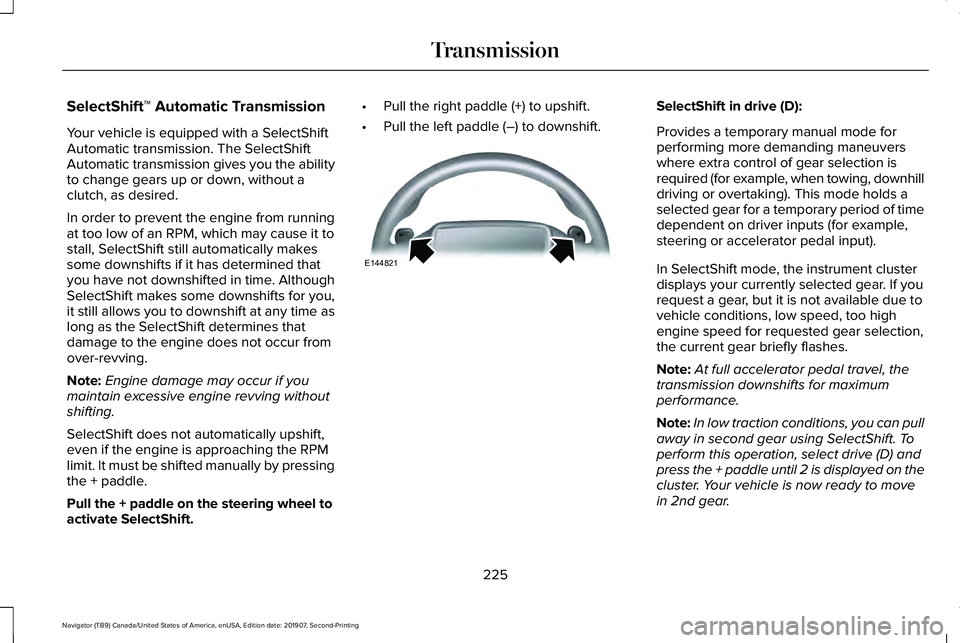
Pull the + paddle on the steering wheel to
activate SelectShift. •
Pull the right paddle (+) to upshift.
• Pull the left paddle (–) to downshift. SelectShift in drive (D):
Provides a temporary manual mode for
performing more demanding maneuvers
where extra control of gear selection is
required (for example, when towing, downhill
driving or overtaking). This mode holds a
selected gear for a temporary period of time
dependent on driver inputs (for example,
steering or accelerator pedal input).
In SelectShift mode, the instrument cluster
displays your currently selected gear. If you
request a gear, but it is not available due to
vehicle conditions, low speed, too high
engine speed for requested gear selection,
the current gear briefly flashes.
Note:
At full accelerator pedal travel, the
transmission downshifts for maximum
performance.
Note: In low traction conditions, you can pull
away in second gear using SelectShift. To
perform this operation, select drive (D) and
press the + paddle until 2 is displayed on the
cluster. Your vehicle is now ready to move
in 2nd gear.
225
Navigator (TB9) Canada/United States of America, enUSA, Edition date: 201907, Second-Printing TransmissionE144821
Page 229 of 622
Brake-Shift Interlock Override
WARNING: When doing this
procedure, you need to take the
transmission out of park (P) which means
your vehicle can roll freely. To avoid
unwanted vehicle movement, always fully
apply the parking brake prior to doing this
procedure. Use wheels chocks if
appropriate. WARNING: Do not drive your vehicle
until you verify that the stoplamps are
working. WARNING:
If the parking brake is
fully released, but the brake warning lamp
remains illuminated, the brakes may not
be working properly. Have your vehicle
checked as soon as possible.
Note: See your authorized dealer as soon
as possible if this procedure is used.
Note: For some markets this feature is
disabled. Note:
This feature only functions if your
12-volt battery has power.
Use the brake-shift interlock override to
move your transmission from the park
position in the event of an electrical
malfunction.
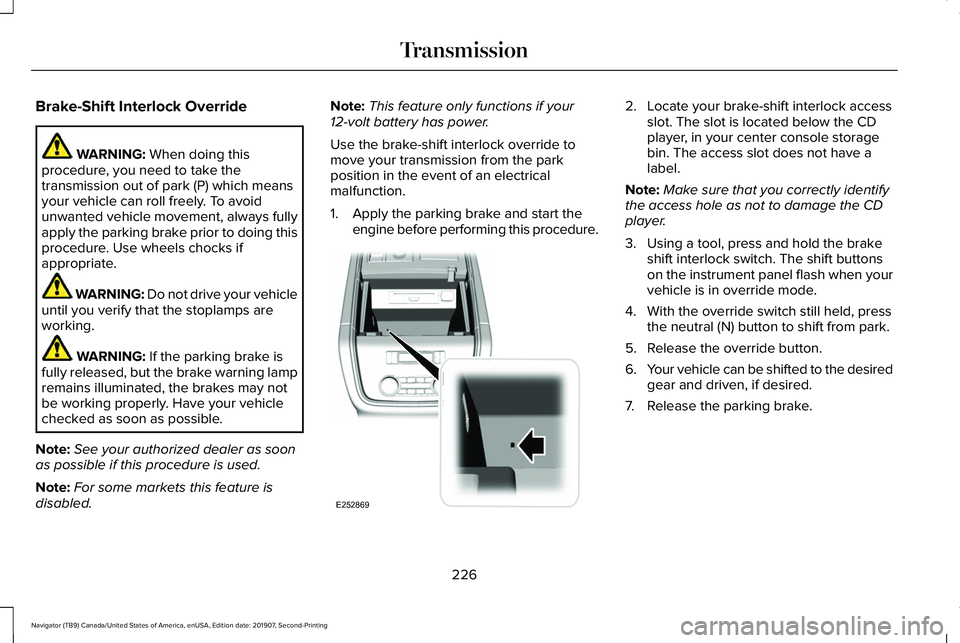
1. Apply the parking brake and start the engine before performing this procedure. 2. Locate your brake-shift interlock access
slot. The slot is located below the CD
player, in your center console storage
bin. The access slot does not have a
label.
Note: Make sure that you correctly identify
the access hole as not to damage the CD
player.
3. Using a tool, press and hold the brake shift interlock switch. The shift buttons
on the instrument panel flash when your
vehicle is in override mode.
4. With the override switch still held, press the neutral (N) button to shift from park.
5. Release the override button.
6. Your vehicle can be shifted to the desired
gear and driven, if desired.
7. Release the parking brake.
226
Navigator (TB9) Canada/United States of America, enUSA, Edition date: 201907, Second-Printing TransmissionE252869
Page 231 of 622
USING FOUR-WHEEL DRIVE
Note:
For important information regarding
safe operation of this type of vehicle, see
General Information in the Wheels and Tires
chapter.
Note: Do not use SLIPPERY, DEEP
CONDITIONS or SLOW CLIMB on dry, hard
surfaced roads. Doing so produces
excessive noise, increases tire wear and may
damage drive components. The 4X4 system
in these modes is only intended for
consistently slippery or loose surfaces.
Note: If you select a drive mode that uses
4L when your vehicle is moving above 3 mph
(5 km/h), the 4WD system does not perform
a shift. This is normal and should be no
reason for concern. Refer to Shifting to or
from 4L for proper operation.
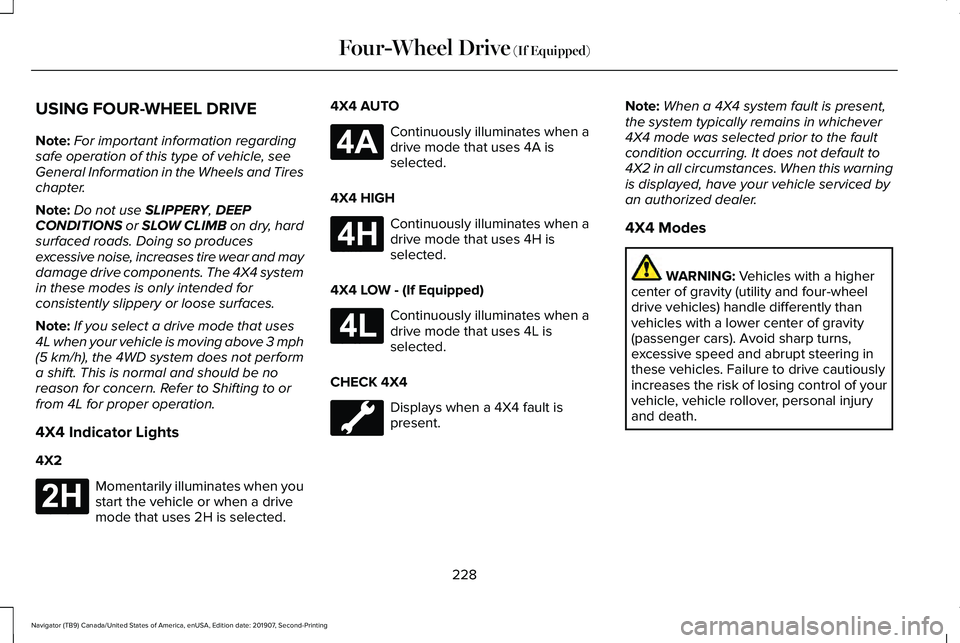
4X4 Indicator Lights
4X2 Momentarily illuminates when you
start the vehicle or when a drive
mode that uses 2H is selected. 4X4 AUTO Continuously illuminates when a
drive mode that uses 4A is
selected.
4X4 HIGH Continuously illuminates when a
drive mode that uses 4H is
selected.
4X4 LOW - (If Equipped) Continuously illuminates when a
drive mode that uses 4L is
selected.
CHECK 4X4 Displays when a 4X4 fault is
present.Note:
When a 4X4 system fault is present,
the system typically remains in whichever
4X4 mode was selected prior to the fault
condition occurring. It does not default to
4X2 in all circumstances. When this warning
is displayed, have your vehicle serviced by
an authorized dealer.
4X4 Modes WARNING:
Vehicles with a higher
center of gravity (utility and four-wheel
drive vehicles) handle differently than
vehicles with a lower center of gravity
(passenger cars). Avoid sharp turns,
excessive speed and abrupt steering in
these vehicles. Failure to drive cautiously
increases the risk of losing control of your
vehicle, vehicle rollover, personal injury
and death.
228
Navigator (TB9) Canada/United States of America, enUSA, Edition date: 201907, Second-Printing Four-Wheel Drive
(If Equipped)E181778 E181781 E181779 E181780
Page 232 of 622
Note:
The AdvanceTrac® with RSC® stability
enhancement system can be switched off
by deselecting the feature in the cluster
menu. See Using Traction Control (page
243). This disables the engine management
feature, allowing the vehicle to maintain full
power and enhanced momentum through
the obstacle.
Note: The AdvanceTrac system can take
control of the transfer case clutch and
disable it during driving maneuvers when
necessary.
Your vehicle engages 4X4 modes based on
the currently selected Drive Mode.
See
Drive Mode Control (page 299).
Note: The information display could show
messages during 4WD operation.
See
Information Messages (page 138).
2H - 4X2
2H turns on when you select
NORMAL or
CONSERVE. Power is delivered to the rear
wheels only. This mode is appropriate for
normal on-road driving on dry pavement and
provides the best fuel economy. 4A - 4X4 Auto
4A turns on when you select
EXCITE,
NORMAL 4x4 AUTO or SLIPPERY. It
provides electronically controlled four-wheel
drive with power delivered to all four wheels,
as required, for increased traction. 4A is
calibrated in conjunction with Drive Mode.
4A in EXCITE is less aggressively tuned and
is appropriate for dry road surfaces. 4A in
NORMAL 4x4 AUTO
is appropriate for all
on-road driving conditions, such as dry road
surfaces, wet pavement, light snow or gravel.
4A in
SLIPPERY is more aggressively tuned
and is appropriate for slippery surfaces, such
as light snow or gravel.
4H - 4X4 High
4H turns on when you select
DEEP
CONDITIONS. It provides electronically
locked four-wheel drive power to both the
front and rear wheels for use in off-road or
winter conditions such as deep snow, sand
or mud. This mode is not for use on dry
pavement. 4L - 4X4 Low - (If Equipped)
4L turns on when you select
SLOW CLIMB.
It provides electronically locked four-wheel
drive power to both the front and rear wheels
for use on low traction surfaces, but does so
with additional gearing for increased torque
multiplication. Intended only for off-road
applications such as deep sand, steep
grades or pulling heavy objects. 4L does not
engage when your vehicle is moving above
3 mph (5 km/h); this is normal and should be
no reason for concern.
Shifting Between 4WD System Modes
Note: Momentarily releasing the accelerator
pedal when a shift in progress message
displays improves engagement and
disengagement performance.
Note: Do not perform this operation if the
rear wheels are slipping.
Note: You may hear some noise as the
system shifts or engages; this is normal.
229
Navigator (TB9) Canada/United States of America, enUSA, Edition date: 201907, Second-Printing Four-Wheel Drive
(If Equipped)
Page 233 of 622
Shifting to or from 4L - 4X4 LOW
Note:
4L mode is not intended for use on dry
pavement.
1. Bring the vehicle to a rolling speed of 3 mph (5 km/h) or less.
2. Place the gearshift in neutral (N).
3. Rotate the drive mode knob to desired mode.
The information display shows a message
indicating a 4X4 shift is in progress. The
information display shows the system mode
selected. If any of the previous shift
conditions are not present, the shift does not
occur and the information display shows the
information guiding the driver through the
proper shifting procedures. If the previous
conditions are not satisfied in 30 seconds,
the system reverts back to the previous 4WD
mode or drive mode. If
Shift Delayed Pull Forward displays in the
information display, transfer case gear tooth
blockage is present. To alleviate this
condition, place the transmission in a forward
gear, move the vehicle forward
approximately
5 ft (2 m), and shift the
transmission back to neutral (N) to allow the
transfer case to complete the range shift.
Operating 4WD Vehicles with Spare or
Mismatched Tires
On four-wheel drive vehicles, the size of the
spare tire can affect the 4X4 system. If there
is a significant difference between the size
of the spare tire and the remaining tires, you
may have limited four-wheel drive
functionality.
When driving with the full-size dissimilar
spare wheel and tire assembly, it is
recommended that you do not:
• Exceed
50 mph (80 km/h) with a 4WD
mode turned on.
• Turn on a 4WD mode unless the vehicle
is stationary.
• Use a 4WD mode on dry pavement. Use of a dissimilar spare wheel and tire
assembly may lead to impairment of the
following:
•
Comfort and noise.
• Winter weather driving capability.
• Wet driving capability.
• Four-wheel drive capability.
How Your Vehicle Differs from Other
Vehicles WARNING:
Vehicles with a higher
center of gravity (utility and four-wheel
drive vehicles) handle differently than
vehicles with a lower center of gravity
(passenger cars). Avoid sharp turns,
excessive speed and abrupt steering in
these vehicles. Failure to drive cautiously
increases the risk of losing control of your
vehicle, vehicle rollover, personal injury
and death.
230
Navigator (TB9) Canada/United States of America, enUSA, Edition date: 201907, Second-Printing Four-Wheel Drive
(If Equipped)
Page 234 of 622
Truck and utility vehicles can differ from
some other vehicles. Your vehicle may be
higher to allow it to travel over rough terrain
without getting hung up or damaging
underbody components.
The differences that make your vehicle so
versatile also make it handle differently than
an ordinary passenger car.
Maintain steering wheel control at all times,
especially in rough terrain. Since sudden
changes in terrain can result in abrupt
steering wheel motion, make sure you grip
the steering wheel from the outside. Do not
grip the spokes.
Drive cautiously to avoid vehicle damage
from concealed objects such as rocks and
stumps.
You should either know the terrain or
examine maps of the area before driving.
Map out your route before driving in the area.
To maintain steering and braking control of
your vehicle, you must have all four wheels
on the ground and they must be rolling, not
sliding or spinning.
Driving Off-Road with Truck and Utility
Vehicles
Note:
On some models, the initial shift from
two-wheel drive to four-wheel drive when
the vehicle is moving can cause some
momentary clunk and ratcheting sounds.
This is the front drivetrain coming up to
speed and the automatic locking hubs
engaging and is not cause for concern.
Note: Your vehicle may have a front air dam.
Due to low ground clearance, you can
damage it when taking your vehicle off-road.
You can take the air dam off by removing
the bolts that secure it.
Four-wheel drive vehicles are specially
equipped for driving on sand, snow, mud and
rough terrain and have operating
characteristics that are somewhat different
from conventional vehicles, both on and off
the road.
Power is supplied to all four wheels through
a transfer case. On four-wheel drive vehicles,
the transfer case allows you to utilize
different 4X4 modes when necessary.
Information on transfer case operation and
shifting procedures can be found in this chapter and the Driving Aids chapter.
Information on transfer case maintenance
can be found in the Maintenance chapter.
You should become thoroughly familiar with
this information before you operate your
vehicle.
Four-wheel drive, when you select a
4X4-capable drive mode, it uses all four
wheels to power the vehicle. This increases
traction, enabling you to drive over terrain
and road conditions that a conventional
two-wheel drive vehicle cannot.
231
Navigator (TB9) Canada/United States of America, enUSA, Edition date: 201907, Second-Printing Four-Wheel Drive (If Equipped)
Page 235 of 622
Basic Operating Principles
•
Do not use SLIPPERY, DEEP
CONDITIONS or SLOW CLIMB on dry,
hard surfaced roads. Doing so produces
excessive noise, increases tire wear and
may damage drive components. The 4X4
system in these modes is only intended
for consistently slippery or loose
surfaces.
• Drive slower in strong crosswinds which
can affect the normal steering
characteristics of your vehicle.
• When driving your vehicle on surfaces
made slippery by loose sand, water,
gravel, snow or ice, proceed with care.
If Your Vehicle Leaves the Road
If your vehicle leaves the road, reduce your
vehicle speed and avoid severe braking.
When your vehicle speed has been reduced
ease your vehicle back onto the road. Do
not turn the steering wheel sharply when
returning your vehicle to the road. It may be safer to stay on the shoulder of the
road and slow down gradually before
returning to the road. You may lose control
if you do not slow down or if you turn the
steering wheel too sharply or abruptly.
It may be less risky to strike small objects,
such as freeway reflectors, with minor
damage to your vehicle rather than attempt
a sudden return to the road which could
cause your vehicle to slide sideways out of
control or roll over. Remember, your safety
and the safety of others should be your
primary concern.
If Your Vehicle Gets Stuck
WARNING:
Do not spin the wheels
at over 34 mph (55 km/h). The tires may
fail and injure a passenger or bystander.
Note: Do not rock your vehicle if the engine
is not at normal operating temperature,
damage to the transmission may occur.
Note: Do not rock your vehicle for more than
a minute, damage to the transmission and
tires may occur or the engine may overheat. If your vehicle gets stuck in mud or snow it
may be rocked out by shifting between
forward and reverse gears, stopping
between shifts, in a steady pattern. Press
lightly on the accelerator in each gear.
Emergency Maneuvers
In an unavoidable emergency situation
where a sudden sharp turn must be made,
remember to avoid over-driving your vehicle
(i.e. turn the steering wheel only as rapidly
and as far as required to avoid the
emergency). Excessive steering can result
in loss of vehicle control. Apply smooth
pressure to the accelerator pedal or brake
pedal when changes in vehicle speed are
required. Avoid abrupt steering, acceleration
and braking. This could result in an increased
risk of vehicle roll over, loss of vehicle control
and personal injury. Use all available road
surface to bring your vehicle to a safe
direction of travel.
In the event of an emergency stop, avoid
skidding the tires and do not attempt any
sharp steering wheel movements.
232
Navigator (TB9) Canada/United States of America, enUSA, Edition date: 201907, Second-Printing Four-Wheel Drive
(If Equipped)
Page 245 of 622
Note:
The system remembers the last setting
when you start your vehicle.
Note: When in reverse (R), Auto Hold does
not function.
When the system is off, your vehicle behaves
the same as a vehicle without Auto Hold.
There is an indicator lamp in the instrument
cluster that has two modes, active and
unavailable: The auto hold active indicator
illuminates in the information
display when the system holds
your vehicle stationary. When in active mode,
press the brake pedal and the Auto Hold
button to switch the system off. The auto hold unavailable indicator
illuminates in the information
display when the system is on but
unavailable to hold your vehicle (for example,
during Active Park Assist, Stay in Neutral
Mode, or when you do not fasten your
seatbelt or close the door). Note:
Make sure you switch off Auto Hold
or use the Stay in Neutral mode before you
enter a car wash. See Automatic
Transmission (page 222).
Using Auto Hold
1. Use the brakes to bring your vehicle to a complete stop. The auto hold active
indicator illuminates in the information
display.
2. Release the brake pedal. The system holds your vehicle at a standstill. The
auto hold active indicator remains
illuminated in the information display.
3. When you press the accelerator pedal, the system releases the brakes and you
will be able to drive off. Once you drive
off, the auto hold active indicator no
longer illuminates in the information
display.
Note: The auto-start-stop system (if
equipped) may stop the engine when you
press the brake pedal. If this occurs, it
restarts once you press the accelerator
pedal. Auto Hold still holds your vehicle at
a standstill with the engine off.
242
Navigator (TB9) Canada/United States of America, enUSA, Edition date: 201907, Second-Printing BrakesE197933 E197934
Page 249 of 622
PRINCIPLE OF OPERATION
WARNING: Hill descent control
cannot control descent in all surface
conditions and circumstances, such as ice
or extremely steep grades. Hill descent
control is a driver assist system and cannot
substitute for good judgment by the driver.
Failure to do so may result in loss of
vehicle control, crash or serious injury.
Hill descent control allows you to set and
maintain vehicle speed when descending
steep grades in various surface conditions.
Hill descent control can maintain vehicle
speeds on downhill grades between
0 mph
(3 km/h) and 20 mph (32 km/h). Above
20 mph (32 km/h), the system remains
armed, but you cannot use the system to set
or maintain the descent speed. Hill descent control requires a cooling down
interval after a period of sustained use. The
amount of time that the feature can remain
active before cooling varies with conditions.
The system provides a warning in the
message center and a tone sounds when
the system is about to disengage for cooling.
At this time, manually apply the brakes as
needed to maintain descent speed.
USING HILL DESCENT CONTROL
You can switch the hill descent
control on and off through the
information display.
To increase descent speed, press the
accelerator pedal until you reach the desired
speed. To decrease descent speed, press
the brake pedal until you reach the desired
speed.
Whether accelerating or decelerating, once
you reach the desired descent speed,
remove your feet from the pedals and hill
descent control maintains the chosen vehicle
speed. Note:
You may observe noise from the ABS
pump motor during hill descent control
operation. This is a normal characteristic of
the ABS and should be no reason for
concern.
Hill Descent Modes
• At speeds between
2 mph (3 km/h) and
20 mph (32 km/h): Your vehicle maintains
the speed you desire while in this mode.
• At speeds between
20 mph (32 km/h)
and 40 mph (64 km/h): Your vehicle does
not maintain the speed you desire and
you cannot set your descent speed.
• At speeds above 40 mph (64 km/h): You
need to switch this feature back on to
use.
Refer to the Information Display for additional
hill descent control messages.
See
Information Messages (page 138).
246
Navigator (TB9) Canada/United States of America, enUSA, Edition date: 201907, Second-Printing Hill Descent Control
(If Equipped)