transmission LINCOLN NAVIGATOR 2022 Owner's Manual
[x] Cancel search | Manufacturer: LINCOLN, Model Year: 2022, Model line: NAVIGATOR, Model: LINCOLN NAVIGATOR 2022Pages: 646, PDF Size: 7.29 MB
Page 229 of 646
Note:
Your vehicle could have side steps
that can become damaged, due to reduced
ground clearance, when taking your vehicle
off-road. Remove side steps before driving
your vehicle off-road.
SELECTING A FOUR-WHEEL DRIVE
MODE
To select a specific four-wheel drive mode
please select one of the desired drive
modes. For additional information. See
Selecting a Drive Mode (page 294).
Note: When shifting to and from four-wheel
drive information display will show shifting
in progress message indicating that the
system is in the process of making a shift.
Note: Do not perform this operation if the
rear wheels are slipping or while applying
the accelerator pedal.
If the system detects a fault, a warning
message appears in the information display.
See
Four-Wheel Drive – Information
Messages (page 229). Note:
Do not use SLIPPERY, DEEP
CONDITIONS or SLOW CLIMB on dry, hard
surfaced roads. Doing so produces
excessive noise, increases tire wear and may
damage drive components. The 4X4 system
in these modes is only intended for
consistently slippery or loose surfaces.
Shifting to or from Slow Climb (4L)
To select or exit SLOW CLIMB (4L):
1. Bring your vehicle to a speed of
3.1 mph
(5 km/h) or less.
2. Place the transmission in neutral (N).
3. Select SLOW CLIMB on the drive mode control switch.
The information display will display a
message indicating a four-wheel drive shift
is in progress. If any of the above shift
conditions are not present, the shift will not
occur and the information display will display
information guiding the driver through the
proper shifting procedures. If there is a
transfer case tooth blockage a message will display in the information display. To alleviate
this condition, place the transmission in a
forward gear, move your vehicle forward
approximately
4.9 ft (1.5 m), and shift the
transmission back to neutral (N) to allow the
transfer case to complete the range shift.
Note: You could hear some noise as the
system shifts or engages which is normal. If
the system detects a fault, a warning
message appears in the information display.
See
Four-Wheel Drive – Information
Messages (page 229).
FOUR-WHEEL DRIVE MODES
TWO-WHEEL DRIVE HIGH
2H turns on when you select NORMAL or
CONSERVE. Two-wheel drive high is for
general on-road driving. Power is sent to the
rear wheels only.
Note: Two-wheel drive high can turn on or
off based on Drive Mode selection See Drive
Mode Control
(page 293).
225
2022 Navigator (TB9) Canada/United States of America, enUSA, Edition date: 202109, First-Printing Four-Wheel Drive
(If Equipped)
Page 231 of 646
pedal when changes in vehicle speed are
required. Avoid abrupt steering, acceleration
and braking. This could result in an increased
risk of vehicle roll over, loss of vehicle control
and personal injury. Use all available road
surface to bring your vehicle to a safe
direction of travel.
In the event of an emergency stop, avoid
skidding the tires and do not attempt any
sharp steering wheel movements.
If your vehicle goes from one type of surface
to another (i.e. from concrete to gravel) there
can be a change in the way your vehicle
responds to a maneuver, i.e. steering,
acceleration or braking.
DRIVING IN SAND
When driving over sand, try to keep all four
wheels on the most solid area of the trail.
Avoid reducing the tire pressures but shift
to a lower gear and drive steadily through
the terrain. Apply the accelerator slowly and
avoid excessive wheel slip.
When driving at slow speeds in deep sand
under high outside temperatures, use a low
gear when possible. Low gear operation can
maximize the engine and transmission
cooling capability.
Avoid driving at excessive speed. This
causes vehicle momentum to work against
you and your vehicle could become stuck to
the point that assistance may be required
from another vehicle. Remember, you may
be able to back out the way you came if you
proceed with caution.
DRIVING THROUGH MUD AND WATER
WARNING: Do not spin the wheels
at over 34 mph (55 km/h). The tires may
fail and injure a passenger or bystander. Mud
Be cautious of sudden changes in vehicle
speed or direction when you are driving in
mud. Even four-wheel drive vehicles can lose
traction in slick mud. If your vehicle does
slide, steer in the direction of the slide until
you regain control of your vehicle. After
driving through mud, clean off residue stuck
to rotating driveshafts and tires. Excess mud
stuck on tires and rotating driveshafts can
cause an imbalance that could damage drive
components.
Water
If you must drive through high water, drive
slowly. Traction or brake capability may be
limited. When driving through water,
determine the depth and avoid water higher
than the bottom of the hubs. If the ignition
system gets wet, your vehicle may stall. Once
through water, test the brakes. Wet brakes
do not stop your vehicle as effectively as dry
brakes. Drying improves by applying light
pressure to the brake pedal while moving
slowly.
227
2022 Navigator (TB9) Canada/United States of America, enUSA, Edition date: 202109, First-Printing Four-Wheel Drive
(If Equipped)
Page 232 of 646
Note:
Driving through deep water may
damage the transmission. If the front or rear
axle is submerged in water, the axle
lubricant and power transfer unit lubricant
should be checked and changed if
necessary.
DRIVING ON HILLY OR SLOPING
TERRAIN
Although natural obstacles may make it
necessary to travel diagonally up or down a
hill or steep incline, you should try to drive
straight up or straight down.
Note: Avoid turning on steep slopes or hills.
A danger lies in losing traction, slipping
sideways and possible vehicle roll over.
Whenever driving on a hill, determine
beforehand the route you can use. Do not
drive over the crest of a hill without seeing
what conditions are on the other side. Do
not drive in reverse over a hill without the
aid of an observer. When climbing a steep slope or hill, start in
a lower gear rather than downshifting to a
lower gear from a higher gear once the
ascent has started. This reduces strain on
the engine and the possibility of stalling.
If your vehicle stalls, do not try to turnaround
because this could cause vehicle roll over.
It is better to reverse back to a safe location.
Apply just enough power to the wheels to
climb the hill. Too much power can cause
the tires to slip, spin or lose traction, resulting
in loss of vehicle control.
Descend a hill in the same gear you would
use to climb up the hill to avoid excessive
brake application and brake overheating. Do
not descend in neutral. Disengage overdrive
or move the transmission selector lever to a
lower gear. When descending a steep hill,
avoid sudden hard braking as you could lose
control. The front wheels have to be turning
in order to steer your vehicle.
Note:
If your vehicle has anti-lock brakes,
apply the brakes steadily. Do not pump the
brakes. DRIVING ON SNOW AND ICE
Four-wheel drive vehicles have advantages
over two-wheel drive vehicles in snow and
ice but can skid like any other vehicle.
Should you start to slide while driving on
snowy or icy roads, turn the steering wheel
in the direction of the slide until you regain
control.
Avoid sudden applications of power and
quick changes of direction on snow and ice.
Apply the accelerator slowly and steadily
when starting from a full stop. Avoid sudden
braking. Although a four-wheel drive vehicle
can accelerate better than a two-wheel drive
vehicle in snow and ice, it cannot stop any
faster as braking occurs at all four wheels.
Do not become overconfident as to road
conditions.
Make sure you allow sufficient distance
between you and other vehicles for stopping.
Drive slower than usual and consider using
one of the lower gears. In emergency
stopping situations, apply the brake steadily.
Do not pump the brake pedal. See Anti-Lock
Braking System Limitations (page 233).
228
2022 Navigator (TB9) Canada/United States of America, enUSA, Edition date: 202109, First-Printing Four-Wheel Drive
(If Equipped)
Page 233 of 646
Note:
Excessive tire slippage can cause
transmission damage. FOUR-WHEEL DRIVE –
TROUBLESHOOTING
FOUR-WHEEL DRIVE – WARNING
LAMPS Illuminates when a four-wheel
drive or power train fault is
present.
Note:
When a system fault is present, the
system can typically remain in whichever
mode was selected prior to the fault
condition occurring. It does not default to
two-wheel drive in all circumstances. When
this warning is displayed, have your vehicle
serviced by an authorized dealer.
FOUR-WHEEL DRIVE – INFORMATION MESSAGES Action
Message
A four-wheel drive system fault is present. Have your vehicle checkedas soon as possible.
Check 4x4
The four-wheel drive system is making a shift.
4x4 Shift in Progress
Displays when you attempt to switch to four-wheel drive low modeand you do not shift the transmission to neutral (N).
For 4x4 LOW Shift to N
Displays when you attempt to switch to four-wheel drive low modeand your vehicle's speed is greater than 3 mph (5 km/h).
For 4x4 LOW Slow to 3 MPH
For 4x4 LOW Slow to 5 km/h Displays when you attempt to switch from four-wheel drive low modeand you do not shift the transmission to neutral (N).
To Exit 4x4 LOW Shift to N
229
2022 Navigator (TB9) Canada/United States of America, enUSA, Edition date: 202109, First-Printing Four-Wheel Drive
(If Equipped)
Page 234 of 646
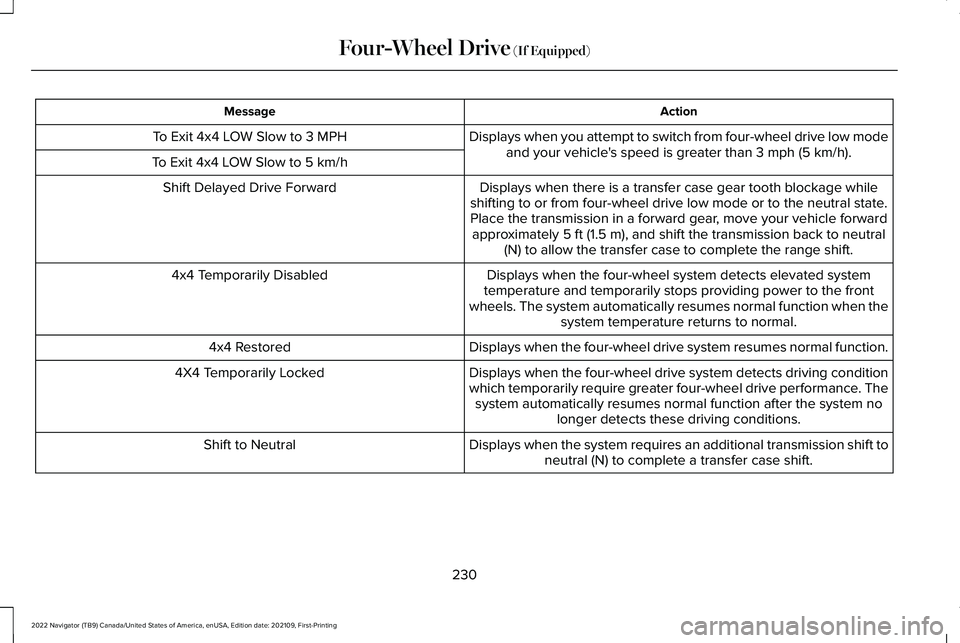
Action
Message
Displays when you attempt to switch from four-wheel drive low modeand your vehicle's speed is greater than 3 mph (5 km/h).
To Exit 4x4 LOW Slow to 3 MPH
To Exit 4x4 LOW Slow to 5 km/h Displays when there is a transfer case gear tooth blockage while
shifting to or from four-wheel drive low mode or to the neutral state. Place the transmission in a forward gear, move your vehicle forward approximately
5 ft (1.5 m), and shift the transmission back to neutral
(N) to allow the transfer case to complete the range shift.
Shift Delayed Drive Forward
Displays when the four-wheel system detects elevated system
temperature and temporarily stops providing power to the front
wheels. The system automatically resumes normal function when the system temperature returns to normal.
4x4 Temporarily Disabled
Displays when the four-wheel drive system resumes normal function.
4x4 Restored
Displays when the four-wheel drive system detects driving condition
which temporarily require greater four-wheel drive performance. Thesystem automatically resumes normal function after the system no longer detects these driving conditions.
4X4 Temporarily Locked
Displays when the system requires an additional transmission shift toneutral (N) to complete a transfer case shift.
Shift to Neutral
230
2022 Navigator (TB9) Canada/United States of America, enUSA, Edition date: 202109, First-Printing Four-Wheel Drive
(If Equipped)
Page 237 of 646
BRAKE PRECAUTIONS
WARNING: Driving your vehicle with
the warning lamp on is dangerous. A
significant decrease in braking
performance may occur. It may take you
longer to stop your vehicle. Have your
vehicle checked as soon as possible.
Driving extended distances with the
parking brake engaged can cause brake
failure and the risk of personal injury.
Wet brakes result in reduced braking
efficiency. Gently press the brake pedal a
few times when leaving a car wash or driving
from standing water to dry the brakes.
Note: Depending on applicable laws and
regulations in the country for which your
vehicle was originally built, the stoplamps
could flash during heavy braking. Following
this the hazard warning flashers could also
turn on when your vehicle comes to a stop. ANTI-LOCK BRAKING SYSTEM
ANTI-LOCK BRAKING SYSTEM
LIMITATIONS
The anti-lock braking system does not
eliminate the risk of crash when:
•
You drive too closely to the vehicle in
front of you.
• Your vehicle is hydroplaning.
• You take corners too fast.
• The road surface is poor.
Note: If the system activates, the brake
pedal could pulse and travel further.
Maintain pressure on the brake pedal.
BRAKE OVER ACCELERATOR
In the event the accelerator pedal becomes
stuck or entrapped, apply steady and firm
pressure to the brake pedal to slow the
vehicle and reduce engine power. If you
experience this condition, apply the brakes
and bring your vehicle to a safe stop. Move the transmission to park (P), switch the
engine off and apply the parking brake.
Inspect the accelerator pedal for any
interference. If none are found and the
condition persists, have your vehicle towed
to the nearest authorized dealer.
LOCATING THE BRAKE FLUID
RESERVOIR
See
Under Hood Overview (page 415).
CHECKING THE BRAKE FLUID WARNING: Do not use any fluid other
than the recommended brake fluid as this
will reduce brake efficiency. Use of
incorrect fluid could result in the loss of
vehicle control, serious personal injury or
death.
233
2022 Navigator (TB9) Canada/United States of America, enUSA, Edition date: 202109, First-Printing Brakes
Page 240 of 646
WHAT IS THE ELECTRIC PARKING
BRAKE
The electric parking brake is used to hold
your vehicle on slopes and flat roads.
APPLYING THE ELECTRIC
PARKING BRAKE
WARNING: Always fully apply the
parking brake and make sure you shift into
park (P). Failure to follow this instruction
could result in personal injury or death. WARNING:
If you drive extended
distances with the parking brake applied,
you could cause damage to the brake
system. The switch is on the lower part of
the instrument panel.
1. Pull the switch up. The red warning lamp flashes during
operation and illuminates when the parking
brake is applied.
Note:
You can apply the electric parking
brake when the ignition is off.
Note: The electric parking brake could apply
when the transmission selector is in park (P).
See
Park (P) (page 219).
APPLYING THE ELECTRIC
PARKING BRAKE IN AN
EMERGENCY
You can use the electric parking brake to
slow or stop your vehicle in an emergency.
1. Pull the switch up and hold it.
The electric parking brake continues to slow
your vehicle down unless you release the
switch.
The red warning lamp illuminates, a tone
sounds and the stoplamps turn on when you
use the electric parking brake in an
emergency. Note:
Do not apply the electric parking brake
when your vehicle is moving, except in an
emergency. If you repeatedly use the electric
parking brake to slow or stop your vehicle,
you could cause damage to the brake
system.
MANUALLY RELEASING THE
ELECTRIC PARKING BRAKE
1. Switch the ignition on.
2. Press and hold the brake pedal.
3. Push the switch down.
The red warning lamp turns off.
Pulling Away on a Hill When Towing a
Trailer
1. Press and hold the brake pedal.
2. Pull the switch upward and hold it.
3. Shift into gear.
4. Press the accelerator pedal until engine has developed sufficient torque to
prevent your vehicle from rolling down
the hill.
236
2022 Navigator (TB9) Canada/United States of America, enUSA, Edition date: 202109, First-Printing Electric Parking BrakeE267156
Page 253 of 646
Side Wind Stabilization
Side wind stabilization is an advanced
feature that works by carefully applying the
brakes on one side of the vehicle to reduce
the effect of a side wind gust on the vehicle's
path.
Traction Control
Traction control enhances your vehicle
’s
ability to maintain traction of the wheels by
detecting and controlling wheel spin. See
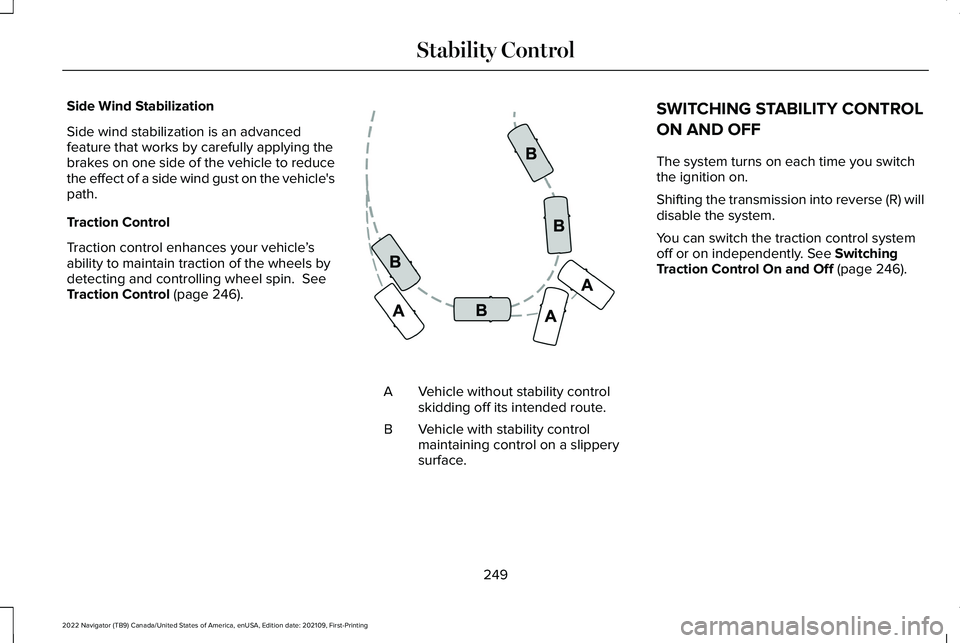
Traction Control (page 246). Vehicle without stability control
skidding off its intended route.
A
Vehicle with stability control
maintaining control on a slippery
surface.
B SWITCHING STABILITY CONTROL
ON AND OFF
The system turns on each time you switch
the ignition on.
Shifting the transmission into reverse (R) will
disable the system.
You can switch the traction control system
off or on independently.
See Switching
Traction Control On and Off (page 246).
249
2022 Navigator (TB9) Canada/United States of America, enUSA, Edition date: 202109, First-Printing Stability ControlE72903
Page 255 of 646
WHAT IS HILL DESCENT CONTROL
Hill descent control allows the driver to set
and maintain vehicle speed while
descending steep slopes in various surface
conditions.
HOW DOES HILL DESCENT
CONTROL WORK
Hill descent control can maintain vehicle
speeds on downhill slopes between
2–20 mph (3–32 km/h). Above 20 mph
(32 km/h), the system remains on but the
descent speed cannot be set or maintained.
Note: The system does not function below
2 mph (3 km/h)
.
The system requires a cool down interval
after a period of sustained use. Hill descent
control provides a warning in the message
center and a tone sounds when the system
is about to disengage for cooling. At this
time, manually apply the brakes as needed
to maintain descent speed. Note:
The amount of time that the system
can remain active before cooling varies with
conditions.
HILL DESCENT CONTROL
PRECAUTIONS WARNING:
The system does not
control speed in low traction conditions or
extremely steep slopes. The system is
designed to be an aid and does not relieve
you of your responsibility to drive with due
care and attention. Failure to follow this
instruction could result in personal injury. WARNING:
Hill descent control
cannot control descent in all surface
conditions and circumstances, such as ice
or extremely steep grades. Hill descent
control is a driver assist system and cannot
substitute for good judgment by the driver.
Failure to do so may result in loss of
vehicle control, crash or serious injury. WARNING:
The system does not
replace the parking brake. When you leave
your vehicle, always apply the parking
brake and shift the transmission into park
(P) for automatic transmission or first gear
for manual transmission.
SWITCHING HILL DESCENT
CONTROL ON AND OFF Press the button on the instrument
panel. A light illuminates and a
tone sounds when the system is
active.
SETTING THE HILL DESCENT
SPEED
To increase or decrease the descent speed,
press the accelerator or brake pedal, or use
the SET + and SET - buttons on the steering
wheel. Once you reach the preferred speed
remove your feet from the pedals.
251
2022 Navigator (TB9) Canada/United States of America, enUSA, Edition date: 202109, First-Printing Hill Descent Control
(If Equipped)E163171
Page 256 of 646
HILL DESCENT CONTROL
INDICATOR Illuminates when you switch hill
descent control on.
HILL DESCENT CONTROL – TROUBLESHOOTING
HILL DESCENT CONTROL – INFORMATION MESSAGES Action
Message
Your vehicle speed requirement for off-road mode entry has not been met.
For Hill Descent Reduce Speed XX MPH/km/h or Less
You need to select a transmission gear for hill descent mode.
For Hill Descent Select Gear
Hill descent control mode is deactivated and you must resume control.
Hill Descent Driver Resume Control
A hill descent system fault is present.
Hill Descent Control Fault
The hill descent system is cooling due to overuse.
Hill Descent Control Off System Cooling
The hill descent system cannot activate while Cruise Control is actively\
controllingspeed.
Hill Descent Control not available with Cruise Control
Active
252
2022 Navigator (TB9) Canada/United States of America, enUSA, Edition date: 202109, First-Printing Hill Descent Control (If Equipped)E163171