transmission LINCOLN NAVIGATOR 2022 User Guide
[x] Cancel search | Manufacturer: LINCOLN, Model Year: 2022, Model line: NAVIGATOR, Model: LINCOLN NAVIGATOR 2022Pages: 646, PDF Size: 7.29 MB
Page 184 of 646
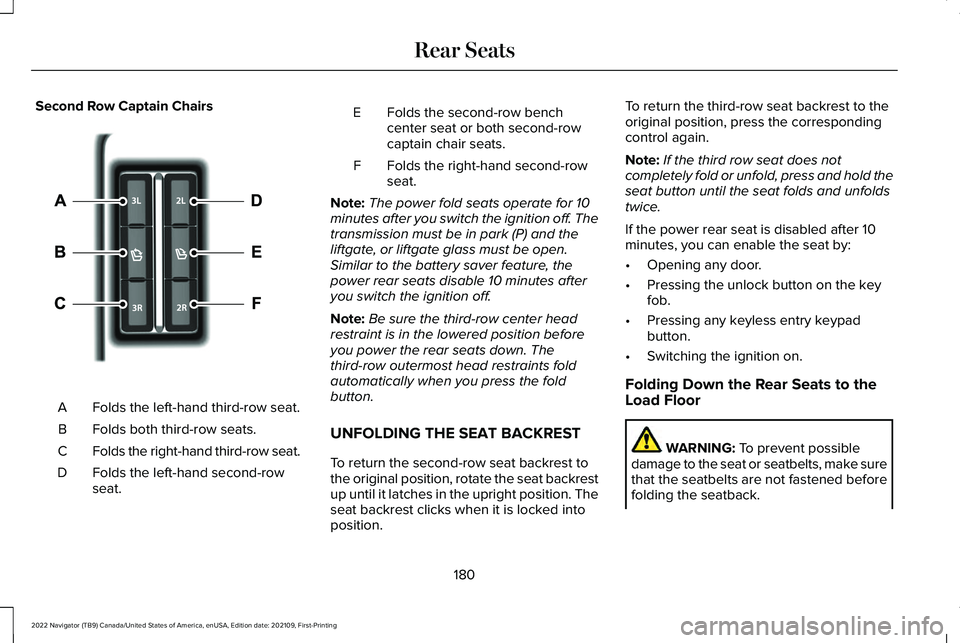
Second Row Captain Chairs
Folds the left-hand third-row seat.
A
Folds both third-row seats.
B
Folds the right-hand third-row seat.
C
Folds the left-hand second-row
seat.
D Folds the second-row bench
center seat or both second-row
captain chair seats.
E
Folds the right-hand second-row
seat.
F
Note: The power fold seats operate for 10
minutes after you switch the ignition off. The
transmission must be in park (P) and the
liftgate, or liftgate glass must be open.
Similar to the battery saver feature, the
power rear seats disable 10 minutes after
you switch the ignition off.
Note: Be sure the third-row center head
restraint is in the lowered position before
you power the rear seats down. The
third-row outermost head restraints fold
automatically when you press the fold
button.
UNFOLDING THE SEAT BACKREST
To return the second-row seat backrest to
the original position, rotate the seat backrest
up until it latches in the upright position. The
seat backrest clicks when it is locked into
position. To return the third-row seat backrest to the
original position, press the corresponding
control again.
Note:
If the third row seat does not
completely fold or unfold, press and hold the
seat button until the seat folds and unfolds
twice.
If the power rear seat is disabled after 10
minutes, you can enable the seat by:
• Opening any door.
• Pressing the unlock button on the key
fob.
• Pressing any keyless entry keypad
button.
• Switching the ignition on.
Folding Down the Rear Seats to the
Load Floor WARNING: To prevent possible
damage to the seat or seatbelts, make sure
that the seatbelts are not fastened before
folding the seatback.
180
2022 Navigator (TB9) Canada/United States of America, enUSA, Edition date: 202109, First-Printing Rear Seats E246705
Page 190 of 646
Note:
You can recall a preset memory
position when the ignition is off, or when you
place the transmission in park (P) or neutral
(N) if the ignition is on and the vehicle is not
moving.
Note: Pressing any of the preset buttons or
any memory feature control during a memory
recall cancels the operation.
You can also recall a preset memory position
by:
• Pressing the unlock button on your
remote control if you linked it to a preset
position.
• Unlocking the intelligent driver door
handle if a linked remote control is
present.
• Recalling a personal profile in your SYNC
menu.
Using a linked remote control to recall your
memory position when the ignition is off
moves the seat and steering column to the
easy entry position. To recalll a preset position on the passenger
door, press and release the preset button.
The passenger seat features move to the
position stored for that preset. You can recall
a passenger seat preset memory at any time.
Linking a Preset Position to Your
Remote Control or Passive Key
See Linking or Unlinking a Personal Profile
to a Remote Control (page 517).
186
2022 Navigator (TB9) Canada/United States of America, enUSA, Edition date: 202109, First-Printing Memory Function
Page 193 of 646
Note:
If the indicator light stays on, the
programming is complete.
Note: If the HomeLink indicator flashes
rapidly, repeat step 5.
Note: If your device still does not operate,
you must program your garage door. See
Programming the Garage Door Opener to
Your Garage Door Opener Motor (page 189).
6. To program additional buttons, repeat Steps 1 – 4.
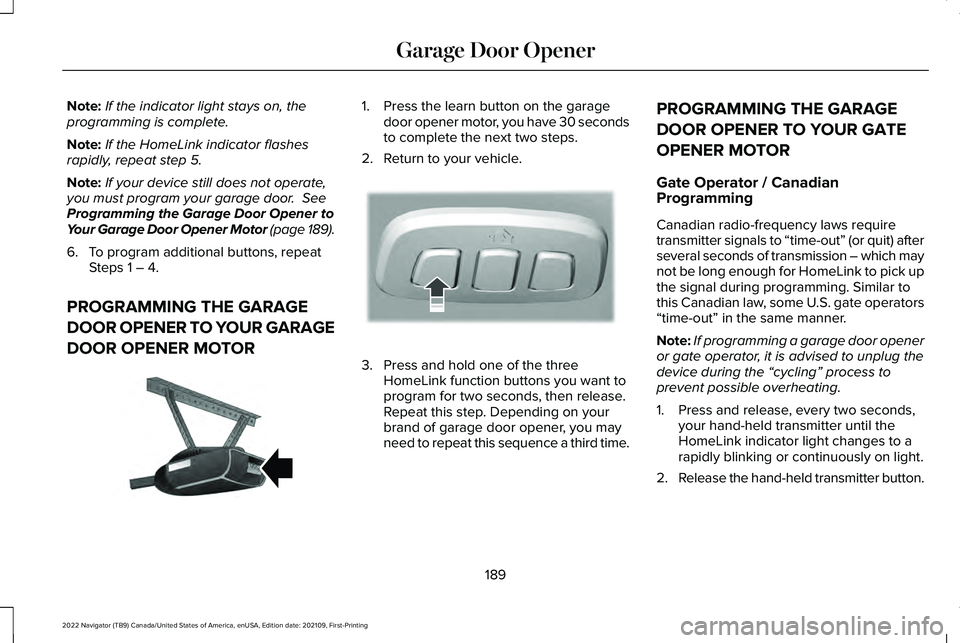
PROGRAMMING THE GARAGE
DOOR OPENER TO YOUR GARAGE
DOOR OPENER MOTOR 1. Press the learn button on the garage
door opener motor, you have 30 seconds
to complete the next two steps.
2. Return to your vehicle. 3. Press and hold one of the three
HomeLink function buttons you want to
program for two seconds, then release.
Repeat this step. Depending on your
brand of garage door opener, you may
need to repeat this sequence a third time. PROGRAMMING THE GARAGE
DOOR OPENER TO YOUR GATE
OPENER MOTOR
Gate Operator / Canadian
Programming
Canadian radio-frequency laws require
transmitter signals to “time-out” (or quit) after
several seconds of transmission – which may
not be long enough for HomeLink to pick up
the signal during programming. Similar to
this Canadian law, some U.S. gate operators
“time-out” in the same manner.
Note:
If programming a garage door opener
or gate operator, it is advised to unplug the
device during the “cycling” process to
prevent possible overheating.
1. Press and release, every two seconds, your hand-held transmitter until the
HomeLink indicator light changes to a
rapidly blinking or continuously on light.
2. Release the hand-held transmitter button.
189
2022 Navigator (TB9) Canada/United States of America, enUSA, Edition date: 202109, First-Printing Garage Door OpenerE142659 E188212
Page 205 of 646
Note:
Your vehicle has a battery saver
feature that shuts your vehicle off when it
detects a certain amount of battery drain, or
after approximately 30 minutes of inactivity
in accessory mode.
Starting the Engine
With the transmission in park (P), press the
brake pedal and press the push button
ignition switch. An indicator light on the
button illuminates when the ignition is on
and when the engine starts.
Note: The system may not function if the
passive key is close to metal objects or
electronic devices, for example keys or a
cell phone.
Note: A valid key must be inside your vehicle
to switch the ignition on and start the engine. STARTING THE ENGINE
STARTING A GASOLINE ENGINE
Before starting your vehicle, check the
following:
•
Make sure that the headlamps and
electrical accessories are off.
• Make sure that the parking brake is on.
• Make sure that the transmission is in park
(P).
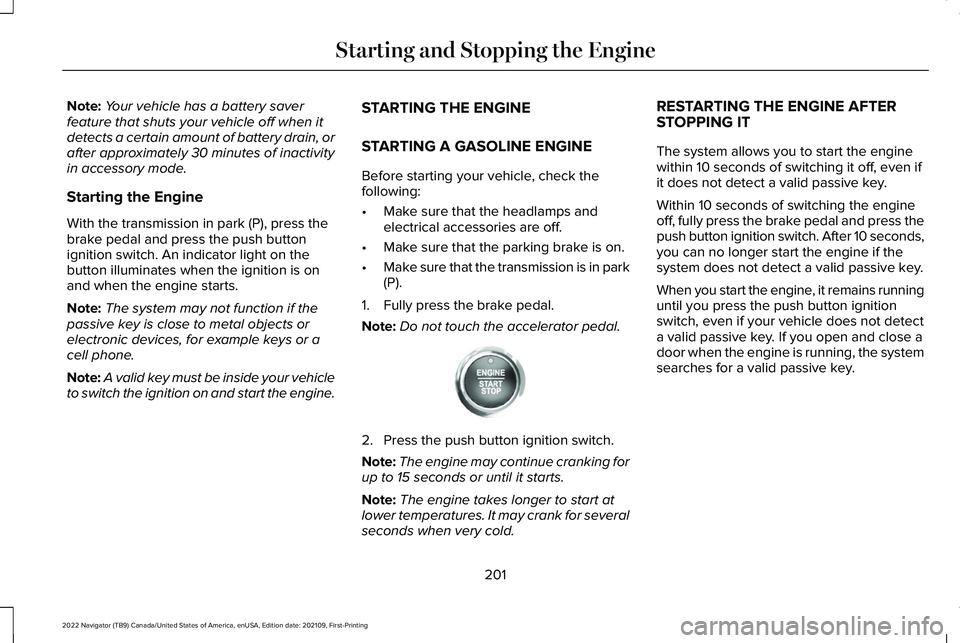
1. Fully press the brake pedal.
Note: Do not touch the accelerator pedal. 2. Press the push button ignition switch.
Note:
The engine may continue cranking for
up to 15 seconds or until it starts.
Note: The engine takes longer to start at
lower temperatures. It may crank for several
seconds when very cold. RESTARTING THE ENGINE AFTER
STOPPING IT
The system allows you to start the engine
within 10 seconds of switching it off, even if
it does not detect a valid passive key.
Within 10 seconds of switching the engine
off, fully press the brake pedal and press the
push button ignition switch. After 10 seconds,
you can no longer start the engine if the
system does not detect a valid passive key.
When you start the engine, it remains running
until you press the push button ignition
switch, even if your vehicle does not detect
a valid passive key. If you open and close a
door when the engine is running, the system
searches for a valid passive key.
201
2022 Navigator (TB9) Canada/United States of America, enUSA, Edition date: 202109, First-Printing Starting and Stopping the EngineE321258
Page 210 of 646
STARTING AND STOPPING THE
ENGINE – FREQUENTLY ASKED
QUESTIONS
Why is the engine idle speed high when I
am starting the engine?
The speed at which the engine idles
immediately after starting is optimized
to minimize vehicle emissions and
maximize cabin comfort and fuel
economy.
Why does the engine not crank? You can only attempt to start the engine
for a limited amount of time before the
starting system temporarily disables. If
you exceed the starting time limit, a
message may appear and you cannot
attempt to start the engine for at least
15 minutes. Why do I experience different driving
characteristics?
If you disconnect the battery, your
vehicle may exhibit some unusual
driving characteristics for approximately
5 mi (8 km) after you reconnect it. This
is because the engine management
system must realign itself with the
engine. You can disregard any unusual
driving characteristics during this period.
Why can I not start the engine? If you cannot start the engine after 3
attempts, wait 10 seconds and do the
following:
1. Fully press the brake pedal or the clutch
pedal.
Note: Make sure that the parking brake is
applied.
Note: Make sure that the transmission is in
park (P) or neutral (N).
2. Fully press the accelerator pedal and hold it there.
3. Press the push button ignition switch. Note:
The engine cranks for a short period
of time and then it stops.
4. Release the accelerator pedal. 5. Press the push button ignition switch.
Why does the system not detect a passive
key?
If the system does not detect a passive
key and you are unable to start the
engine, insert the passive key into the
backup position and press the push
button ignition switch to start the
engine. See Accessing the Passive Key
Backup Position
(page 204).
206
2022 Navigator (TB9) Canada/United States of America, enUSA, Edition date: 202109, First-Printing Starting and Stopping the EngineE321258
Page 211 of 646
WHAT IS AUTO-START-STOP
The system is designed to help reduce fuel
consumption and CO
2 emissions by stopping
the engine when it is idling, for example at
traffic lights.
AUTO-START-STOP PRECAUTIONS WARNING: Apply the parking brake,
shift into park (P), switch the ignition off
and remove the key before you leave your
vehicle. Failure to follow this instruction
could result in personal injury or death. WARNING: Apply the parking brake,
shift into park (P), switch the ignition off
and remove the key before you open the
hood or have any service or repair work
completed. If you do not switch the ignition
off, the engine could restart at any time.
Failure to follow this instruction could result
in personal injury or death. SWITCHING AUTO-START-STOP
ON AND OFF
The system turns on when you switch the
ignition on. Press the button to switch the
system off.
Note: OFF illuminates in the switch.
Note: Deactivating the system using the
button lasts only one key cycle.
Press the button again to switch the system
back on.
Note: The system turns off if it detects a
malfunction. If the system malfunctions,
have your vehicle checked as soon as
possible.
STOPPING THE ENGINE
Stop your vehicle, keep your foot on the
brake pedal and the transmission in drive
(D). RESTARTING THE ENGINE
Release the brake pedal or press the
accelerator pedal.
A message appears in the information
display if the system requires you to take
action.
AUTO-START-STOP INDICATORS
WARNING:
The system may require
the engine to automatically restart when
the auto-start-stop indicator illuminates
green or flashes amber. Failure to follow
this instruction could result in personal
injury. The Auto-Start-Stop indicator
illuminates green when the engine
stops. It flashes amber and a
message appears when you need to take
action.
207
2022 Navigator (TB9) Canada/United States of America, enUSA, Edition date: 202109, First-Printing Auto-Start-Stop
Page 223 of 646
AUTOMATIC TRANSMISSION
PRECAUTIONS
WARNING: Apply the parking brake,
shift into park (P), switch the ignition off
and remove the key before you leave your
vehicle. Failure to follow this instruction
could result in personal injury or death. WARNING: When your vehicle is
stationary, keep the brake pedal fully
pressed when shifting gears. Failure to
follow this instruction could result in
personal injury, death or property damage. WARNING:
Do not apply the brake
pedal and accelerator pedal
simultaneously. Applying both pedals
simultaneously for more than a few
seconds will limit engine performance,
which may result in difficulty maintaining
speed in traffic and could lead to serious
injury. AUTOMATIC TRANSMISSION
POSITIONS
PARK (P)
This position locks the driveline and prevents
the wheels from turning. Come to a complete
stop before putting your vehicle into and out
of park (P).
The electric parking brake could apply when
you shift to park (P) without the brake pedal
fully pressed. The electric parking brake
applies when you shift to park (P) on large
slopes. The electric parking brake releases
with the drive away release function or
manually as described in the Releasing the
Electric Parking Brake section. See Electric
Parking Brake (page 236).
Note: A warning tone sounds if you open the
driver door and you have not shifted the
transmission selector to park (P). REVERSE (R) WARNING:
Shift into reverse (R) only
when your vehicle is stationary.
In reverse (R) power is transmitted to the
driven wheels.
NEUTRAL (N) WARNING: In neutral (N) your vehicle
is free to roll.
In neutral (N) power is not transmitted to the
driven wheels.
DRIVE (D)
In drive (D) power is transmitted to the driven
wheels.
219
2022 Navigator (TB9) Canada/United States of America, enUSA, Edition date: 202109, First-Printing Automatic Transmission
Page 224 of 646
SHIFTING YOUR VEHICLE INTO
GEAR
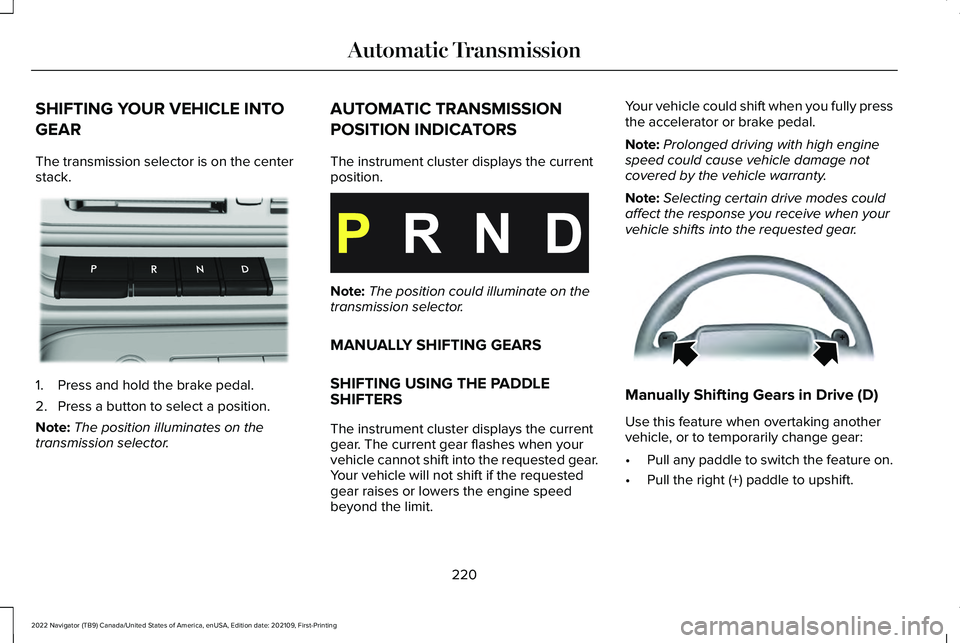
The transmission selector is on the center
stack.
1. Press and hold the brake pedal.
2. Press a button to select a position.
Note:
The position illuminates on the
transmission selector. AUTOMATIC TRANSMISSION
POSITION INDICATORS
The instrument cluster displays the current
position.
Note:
The position could illuminate on the
transmission selector.
MANUALLY SHIFTING GEARS
SHIFTING USING THE PADDLE
SHIFTERS
The instrument cluster displays the current
gear. The current gear flashes when your
vehicle cannot shift into the requested gear.
Your vehicle will not shift if the requested
gear raises or lowers the engine speed
beyond the limit. Your vehicle could shift when you fully press
the accelerator or brake pedal.
Note:
Prolonged driving with high engine
speed could cause vehicle damage not
covered by the vehicle warranty.
Note: Selecting certain drive modes could
affect the response you receive when your
vehicle shifts into the requested gear. Manually Shifting Gears in Drive (D)
Use this feature when overtaking another
vehicle, or to temporarily change gear:
•
Pull any paddle to switch the feature on.
• Pull the right (+) paddle to upshift.
220
2022 Navigator (TB9) Canada/United States of America, enUSA, Edition date: 202109, First-Printing Automatic TransmissionE247220 E358682 E144821
Page 225 of 646
•
Pull the left (-) paddle to downshift.
• Hold the + paddle for a few seconds to
switch the feature off.
Note: The feature switches off after a short
period of time if you do not pull either
paddle.
TEMPORARY NEUTRAL MODE
WHAT IS TEMPORARY NEUTRAL
MODE
This mode keeps your vehicle in neutral (N),
for a limited time, when you exit your vehicle
or switch your vehicle off.
Note: Do not tow your vehicle in this mode.
TEMPORARY NEUTRAL MODE
LIMITATIONS
Your vehicle could shift to park (P) after 30
minutes, or when the vehicle battery charge
level is low. Prolonged use of this mode can
cause the vehicle battery to run out of
charge. Do not tow your vehicle in this mode. Failure
to follow these instructions could result in
vehicle damage not covered by the vehicle
warranty.
ENTERING TEMPORARY NEUTRAL
MODE
1. Power your vehicle on.
2. Bring your vehicle to a complete stop.
3. Press and hold the brake pedal.
4. Shift into neutral (N).
Note:
An instructional message appears.
5. Press the neutral (N) button.
Note: A confirmation message appears
when your vehicle enters the mode.
6. Release the brake pedal.
Note: Your vehicle is free to roll.
7. Switch your vehicle off.
Note: Do not tow your vehicle in this mode.
Note: The neutral (N) indicator on the
transmission selector may flash in this mode. EXITING TEMPORARY NEUTRAL
MODE
1. Press the brake pedal.
2. Shift into park (P), or power your vehicle
on and shift into drive (D) or reverse (R).
AUTOMATIC RETURN TO PARK (P)
WHAT IS AUTOMATIC RETURN TO
PARK (P)
Your vehicle shifts into park (P) if you attempt
to exit your vehicle without the transmission
in park (P).
221
2022 Navigator (TB9) Canada/United States of America, enUSA, Edition date: 202109, First-Printing Automatic Transmission
Page 226 of 646
HOW DOES AUTOMATIC RETURN TO
PARK (P) WORK
Your vehicle shifts into park (P) when your
vehicle is stationary and any of the following
occur:
•
You switch the vehicle off.
• You open the driver door with your
seatbelt unlatched.
• You unlatch the driver seatbelt when the
driver door is open.
Note: Do not use automatic return to park
(P) when your vehicle is moving, except in
an emergency. See Starting and Stopping
the Engine (page 200).
AUTOMATIC RETURN TO PARK (P)
LIMITATIONS
Automatic return to park may not work if the
door ajar switch is malfunctioning.
See an authorized dealer if any of the
following occur: •
Door ajar indicator does not illuminate
with the driver door open.
• Door ajar indicator illuminates with the
driver door closed.
• Transmission not in park message
appears with the driver door closed, after
you shift out of park (P).
AUTOMATIC TRANSMISSION
AUDIBLE WARNINGS
Transmission Not In Park (P) Audible
Warning
Sounds if you open the driver door before
shifting into park (P).
Park Selection Audible Warning
Sounds when you shift into park (P).
222
2022 Navigator (TB9) Canada/United States of America, enUSA, Edition date: 202109, First-Printing Automatic Transmission