transmission LINCOLN NAVIGATOR 2022 Owner's Guide
[x] Cancel search | Manufacturer: LINCOLN, Model Year: 2022, Model line: NAVIGATOR, Model: LINCOLN NAVIGATOR 2022Pages: 646, PDF Size: 7.29 MB
Page 257 of 646
ELECTRIC POWER STEERING
ELECTRIC POWER STEERING
PRECAUTIONS
WARNING: The electric power
steering system has diagnostic checks that
continuously monitor the system. If a fault
is detected, a message displays in the
information display. Stop your vehicle as
soon as it is safe to do so. Switch the
vehicle off. After at least 10 seconds, switch
the vehicle on and watch the information
display for a steering system warning
message. If a steering system warning
message returns, have the system checked
as soon as possible. WARNING:
If the system detects an
error, you may not feel a difference in the
steering, however a serious condition may
exist. Have your vehicle checked as soon
as possible. Failure to do so may result in
loss of steering control. Adapt your speed and driving behavior
according to reduced steering assist.
Extreme continuous steering may increase
the effort to steer. This occurs to prevent
internal overheating and damage to the
steering system. If this occurs, you will not
lose the ability to steer your vehicle manually
nor will it cause damage to the system.
Normal steering and driving allows the
system to cool down and steering assist
returns to normal.
Note:
There is no fluid reservoir to check or
fill.
ELECTRIC POWER STEERING
ADAPTIVE STEERING
(If Equipped)
The adaptive steering system changes the
steering ratio with changes to vehicle speed,
optimizing the steering response in all
conditions. The system also changes when
you switch on the transmission tow/haul
feature. When you select the tow/haul button,
the adaptive steering system reduces vehicle
sensitivity to steering inputs at higher vehicle
speeds, while maintaining the ease of
parking and maneuverability at low speeds. Note:
The adaptive steering system
continuously monitors for faults. If the system
detects a fault, a message appears in the
information display. If a red warning
message displays, stop your vehicle as soon
as it is safe to do so. The message could
clear if the fault is no longer present. If an
adaptive steering system warning message
appears each time you start your vehicle,
have the system checked as soon as
possible.
Note: The system has a locking device. It
remains mechanically locked at a fixed
steering ratio with the lock engaged. You
may notice a click when you turn your
vehicle on or off.
Note: If your vehicle loses electrical power
or detects a fault when you are driving, the
system shuts down and you retain a normal
steering function with a fixed steering ratio.
During this time, it is possible that the
steering wheel could not be straight when
the vehicle is driving straight ahead. In
addition, you could notice that the steering
wheel angle required to steer your vehicle
could be different.
253
2022 Navigator (TB9) Canada/United States of America, enUSA, Edition date: 202109, First-Printing Steering
Page 262 of 646
FRONT PARKING AID AUDIBLE
WARNINGS
A warning tone sounds when there is an
object within 28 in (70 cm) from the front
bumper. As your vehicle moves closer to an
object, the rate of the tone increases.
The warning tone continuously sounds when
an object is
12 in (30 cm) or less from the
front bumper.
Note: If the detected object is
12 in (30 cm)
or less from your vehicle, visual indication
remains on.
SIDE PARKING AID
WHAT IS THE SIDE PARKING AID
The front and rear outermost parking aid
sensors map objects that are near to the
sides of your vehicle.
SIDE PARKING AID LIMITATIONS
The sensor coverage is up to
24 in (60 cm)
from the sides of your vehicle. The side parking aid may not function if:
•
Your vehicle remains stationary for over
two minutes.
• The anti-lock brake system activates.
• The traction control system activates.
• Your vehicle is in park (P).
• The steering wheel angle information is
not available. You must drive at least
492 ft (150 m) above 19 mph (30 km/h) to
reset the steering wheel angle
information.
Note: If you switch traction control off, the
side sensing system also turns off.
To reinitialize the system, drive the length of
your vehicle.
The side parking aid does not detect an
object that is moving toward the side of your
vehicle, for example another vehicle moving
at a low speed, if it does not pass a front or
rear parking aid sensor. If the transmission is in reverse (R), the side
sensing system provides audible warnings.
When your vehicle is moving slowly,
obstacles are detected within
24 in (60 cm)
and are inside the driving path of your
vehicle. If your vehicle remains stationary for
a few seconds, the audible warning turns off.
Visual indication is always present in reverse
(R).
If your vehicle is in neutral (N), the side
sensing system provides visual indication
only when your vehicle is moving slowly and
there is a front or rear parking aid obstacle
detected, and the side obstacle is within
24 in (60 cm)
from the side of your vehicle.
If your vehicle remains stationary for a few
seconds, the visual indication turns off.
If the transmission is in drive (D) or any other
forward gear, the side sensing system
provides audible and visual warnings. When
your vehicle is moving slowly, obstacles are
detected within
24 in (60 cm) and are inside
the driving path of your vehicle. If your
vehicle remains stationary for a few seconds,
the visual indication and audible warning
turns off.
258
2022 Navigator (TB9) Canada/United States of America, enUSA, Edition date: 202109, First-Printing Parking Aids
Page 265 of 646
WHAT IS THE 360 DEGREE
CAMERA
The 360 degree camera system consists of
front, side and rear cameras which provide
visibility around your vehicle.
HOW DOES THE 360 DEGREE
CAMERA WORK
The 360 Degree Camera system:
•
Allows you to see what is directly in front
of or behind your vehicle.
• Provides a cross traffic view in front of
and behind your vehicle.
• Allows you to see a top-down view of the
area outside your vehicle, including the
blind spots and obstacles near your
vehicle. 360 DEGREE CAMERA
PRECAUTIONS WARNING: The 360 degree camera
system still requires the driver to use it in
conjunction with looking out of the
windows, and checking the interior and
exterior mirrors for maximum coverage. WARNING: Objects that are close to
either corner of the bumper or under the
bumper, might not be seen on the screen
due to the limited coverage of the camera
system. WARNING:
Use caution when turning
camera features on or off when the
transmission is not in park (P). Make sure
your vehicle is not moving. WARNING:
You are responsible for
controlling your vehicle at all times. The
system is designed to be an aid and does
not relieve you of your responsibility to
drive with due care and attention. Failure
to follow this instruction could result in the
loss of control of your vehicle, personal
injury or death. WARNING:
Use caution when the
rear cargo door is ajar. If the rear cargo
door is ajar, the camera will be out of
position and the video image could be
incorrect. All guide lines disappear when
the rear cargo door is ajar. Failure to follow
this instruction could result in personal
injury. WARNING:
When manual zoom is
on, the full area behind your vehicle may
not show. Be aware of your surroundings
when using the manual zoom feature.
261
2022 Navigator (TB9) Canada/United States of America, enUSA, Edition date: 202109, First-Printing 360 Degree Camera
Page 266 of 646
360 DEGREE CAMERA
LIMITATIONS
Note:
Use caution if a door is ajar. The 360
degree camera could be out of position and
the image could be incorrect.
LOCATING THE 360 DEGREE
CAMERAS
Rear View Camera
The rear view camera is on the liftgate. It
provides a video image of the area behind
your vehicle.
Front View Camera
The front view camera is in the grille. It
provides a video image of the area in front
of your vehicle.
Side View Camera
The side view camera is on the outside
mirror. It provides a video image of the area
on the sides of your vehicle to aid you when
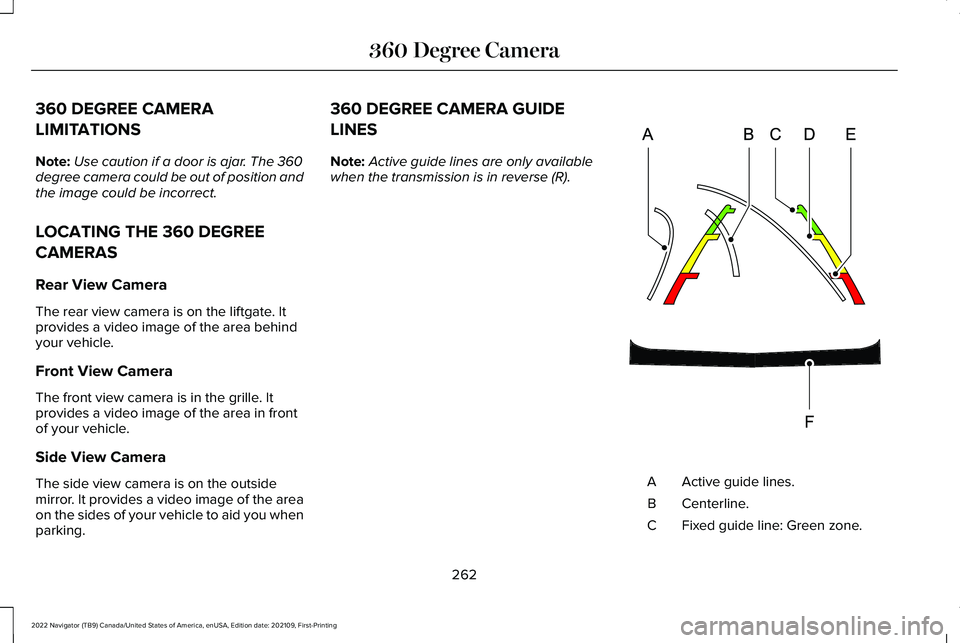
parking. 360 DEGREE CAMERA GUIDE
LINES
Note:
Active guide lines are only available
when the transmission is in reverse (R). Active guide lines.
A
Centerline.
B
Fixed guide line: Green zone.
C
262
2022 Navigator (TB9) Canada/United States of America, enUSA, Edition date: 202109, First-Printing 360 Degree CameraE306774
Page 272 of 646
Why does active park assist not search for
a parking space?
The transmission is in reverse (R). Your
vehicle must be moving forward to be
able to detect a parking space.
Why does active park assist not offer a
parking space? The sensors could be blocked. For
example, snow, ice or large
accumulations of dirt. Blocked sensors
can affect how the system functions.
Why does active park assist not offer a
parking space? The sensors in the front or rear bumper
could be damaged.
Why does active park assist not offer a
parking space? There is not enough room in the parking
space for your vehicle to safely park.
Why does active park assist not offer a
parking space? There is not enough space for the
parking maneuver on the opposite side
of the parking space. Why does active park assist not offer a
parking space?
The parking space is more than 5 ft
(1.5 m) or less than 2 ft (0.5 m) away from
your vehicle.
Why does active park assist not offer a
parking space? Your vehicle's speed is greater than
22 mph (35 km/h)
for parallel parking or
greater than 19 mph (30 km/h) for
perpendicular parking.
Why does active park assist not offer a
parking space? You recently disconnected or replaced
the battery. After you reconnect the
battery you must drive your vehicle on
a straight road for a short period of time.
Why does active park assist not correctly
position the vehicle into a parking space? An irregular curb along the parking
space prevents the system from
correctly aligning your vehicle. Why does active park assist not correctly
position the vehicle into a parking space?
Vehicles or objects bordering the space
could not be correctly parked.
Why does active park assist not correctly
position the vehicle into a parking space? Your vehicle stopped too far past the
parking space.
Why does active park assist not correctly
position the vehicle into a parking space? The tires are not correctly installed or
maintained. For example, using a spare
tire, not inflated correctly, improper size,
or of different sizes.
Why does active park assist not correctly
position the vehicle into a parking space? A repair or alteration changed the
detection capabilities.
Why does active park assist not correctly
position the vehicle into a parking space? A parked vehicle has a high attachment.
For example, a salt sprayer, snowplow
or moving truck bed.
268
2022 Navigator (TB9) Canada/United States of America, enUSA, Edition date: 202109, First-Printing Active Park Assist
Page 297 of 646
WHAT IS DRIVE MODE CONTROL
Your vehicle has various drive modes that
you can select for different driving
conditions. Depending on the drive mode
that you select, the system adjusts various
vehicle settings.
HOW DOES DRIVE MODE
CONTROL WORK
Drive mode control adjusts your vehicle
configuration for each mode you select.
Changing the drive mode adjusts the
steering effort and feel of the steering
system.
The stability and traction control assist your
vehicle control in adverse conditions or
high-performance driving.
Throttle control enhances the powertrain
response, transmission controls become
optimized with shift schedules, and
four-wheel drive settings are optimized and
tuned to each mode.
Changing the drive mode can engage or
disengage the electronic locking differentials.
Changing the drive mode changes the
four-wheel drive mode to the default setting
for the selected drive mode.
Note:
The system has diagnostic checks that
continuously monitor the system for proper
operation. If a mode is unavailable due to a
system fault, the drive mode system defaults
to normal. When the system defaults to
normal, the driveline settings remain the
same as prior to the system fault. Note:
The system reverts to the normal
mode each time you start your vehicle. At
startup the system also displays a prompt
on the instrument cluster display that gives
you the option to return to the previously
selected drive mode during the last ignition
cycle. If you select yes, the system returns
to the last selected drive mode and the
default driveline settings associated with
that mode. If you select no, the system
remains in normal mode and the driveline
settings remain the same as selected in the
prior ignition cycle. If you do not select yes
or no, the system stays in normal mode and
the driveline settings remain the same as
selected in the prior ignition cycle.
293
2022 Navigator (TB9) Canada/United States of America, enUSA, Edition date: 202109, First-Printing Drive Mode Control
Page 299 of 646
Four-wheel drive auto is the default
four-wheel drive mode. Four-wheel drive low
is selectable in deep conditions mode.
The electronic locking differential engages
when you select this mode at any speed, and
you can disengage it at any time using the
button. See What Is the Electronic
Limited-Slip Differential (page 231).
Note: Do not use this mode when driving on
pavement or packed snow. This could cause
driveline bind up and damage the system
depending on the four-wheel drive mode
selection. See Four-Wheel Drive (page 223).
EXCITE - 4X4
For sporty driving with improved
performance handling and response. This
mode increases throttle response, provides
a sportier steering feel, along with quicker
shifting. The suspension stiffens, with an
emphasis on handling and control. The
transmission also holds gears longer, helping
your vehicle accelerate faster when shifting
gears. Two-wheel drive high is the default
four-wheel drive mode. Four-wheel drive low
is not available in excite mode.
The electronic locking differential is available
below
25 mph (40 km/h). See What Is the
Electronic Limited-Slip Differential (page
231).
EXCITE - 4X2
For sporty driving with improved
performance handling and response. This
mode increases throttle response, provides
a sportier steering feel, along with quicker
shifting. The suspension stiffens, with an
emphasis on handling and control. The
transmission also holds gears longer, helping
your vehicle accelerate faster when shifting
gears.
The electronic locking differential is available
below
25 mph (40 km/h). See What Is the
Electronic Limited-Slip Differential (page
231). NORMAL - 4X4
For everyday driving. This mode is a perfect
balance of excitement, comfort and
convenience.
Two-wheel drive high is the default
four-wheel drive mode. All four-wheel drive
modes are selectable when in normal mode.
The electronic locking differential is available
below
25 mph (40 km/h). See What Is the
Electronic Limited-Slip Differential (page
231).
NORMAL - 4X2
For everyday driving. This mode is a perfect
balance of excitement, comfort and
convenience.
The electronic locking differential is available
below
25 mph (40 km/h). See What Is the
Electronic Limited-Slip Differential (page
231).
295
2022 Navigator (TB9) Canada/United States of America, enUSA, Edition date: 202109, First-Printing Drive Mode Control
Page 353 of 646
TOWING A TRAILER PRECAUTIONS
WARNING: Do not exceed the
GVWR or the GAWR specified on the
certification label. WARNING:
Towing trailers
beyond the maximum recommended
gross trailer weight exceeds the limit
of your vehicle and could result in
engine damage, transmission damage,
structural damage, loss of vehicle
control, vehicle rollover and personal
injury. WARNING:
Do not exceed the
lowest rating capacity for your vehicle
or trailer hitch. Overloading your
vehicle or trailer hitch can impair your
vehicle stability and handling. Failure
to follow this instruction could result
in the loss of control of your vehicle,
personal injury or death. WARNING:
Make sure that the
vertical load on the tow ball is between
the minimum and maximum
recommended weight at all times.
Failure to follow this instruction could
result in the loss of control of your
vehicle, personal injury or death. WARNING: Do not cut, drill, weld
or modify the trailer hitch. Modifying
the trailer hitch could reduce the hitch
rating. WARNING:
The anti-lock brake
system does not control the trailer
brakes. TRAILER BRAKE PRECAUTIONS WARNING:
Do not connect a trailer's
hydraulic brake system directly to your
vehicle's brake system. Your vehicle may
not have enough braking power and your
chances of having a collision greatly
increase. WARNING:
Do not tow a trailer fitted
with electric trailer brakes unless your
vehicle is fitted with a compatible
aftermarket electronic trailer brake
controller. Failure to follow this instruction
could result in the loss of control of your
vehicle, personal injury or death. For
additional information and assistance, we
recommend that you contact an authorized
dealer.
Electric brakes and manual, automatic or
surge-type trailer brakes are safe if you install
them properly and adjust them to the
manufacturer's specifications. The trailer
brakes must meet local and federal
regulations.
349
2022 Navigator (TB9) Canada/United States of America, enUSA, Edition date: 202109, First-Printing Towing a Trailer
Page 354 of 646
The rating for the tow vehicle's braking
system operation is at the gross vehicle
weight rating, not the gross combined weight
rating.
Certain states require functioning trailer
brakes for trailers over a specified weight.
Be sure to check state regulations for this
specified weight.
Ford Motor Company recommends separate
functioning brake systems for trailers
weighing more than 1,500 lb (680 kg) when
loaded.
TOWING A TRAILER LIMITATIONS
The vehicle's load capacity designation
is by weight, not by volume, so you
cannot necessarily use all available
space when loading a vehicle or trailer. Note:
Your vehicle could have reduced
performance when operating at high
altitudes and when heavily loaded or
towing a trailer. When driving at
elevation, to match driving performance
as perceived at sea level, reduce gross
vehicle weight and gross combination
weight by 2% per
1,000 ft (300 m)
elevation.
LOADING YOUR TRAILER
To help minimize how trailer movement
affects your vehicle when driving:
• Load the heaviest items closest to
the trailer floor.
• Load the heaviest items centered
between the left and right side trailer
tires. •
Load the heaviest items above the
trailer axles or just slightly forward
toward the trailer tongue. Do not
allow the final trailer tongue weight
to go above or below 10-15% of the
loaded trailer weight. The trailer
tongue weight should never exceed
10% of the maximum towing capacity.
• Select a ball mount with the correct
rise or drop. When both the loaded
vehicle and trailer are connected, the
trailer frame should be level, or
slightly angled down toward your
vehicle, when viewed from the side.
TRAILER TOWING HINTS
Towing a trailer places an extra load on your
vehicle's engine, transmission, axle, brakes,
tires and suspension. Periodically inspect
these components during and after any
towing operation.
When driving with a trailer or payload, a slight
takeoff vibration or shudder may be present
due to the increased payload weight.
350
2022 Navigator (TB9) Canada/United States of America, enUSA, Edition date: 202109, First-Printing Towing a Trailer
Page 355 of 646
Your vehicle may have a temporary or
conventional spare tire. A temporary spare
tire is different in diameter or width,
tread-type, or is from a different manufacturer
than the road tires on your vehicle. Consult
information on the tire label or Safety
Compliance label for limitations when using.
When towing a trailer:
•
Obey country specific regulations for
towing a trailer.
• Do not drive faster than 70 mph
(113 km/h) during the first 500 mi
(800 km).
• Do not make full-throttle starts.
• Check your hitch, electrical connections
and trailer wheel lug nuts thoroughly after
you have traveled
50 mi (80 km).
• When stopped in congested or heavy
traffic during hot weather, place the
transmission in park (P) to aid engine and
transmission cooling and to help A/C
performance.
• Turn off the speed control with heavy
loads or in hilly terrain. The speed control
may turn off when you are towing on
long, steep slopes. •
Shift to a lower gear when driving down
a long or steep hill. Do not continuously
apply the brakes, as they may overheat
and become less effective.
• If your transmission has Grade Assist or
Tow/Haul, use this feature when towing.
This provides engine braking and helps
eliminate excessive transmission shifting
for optimum fuel economy and
transmission cooling.
• Your vehicle has AdvanceTrac with roll
stability control. When towing a trailer,
additional loads could cause the
AdvanceTrac system to engage during
cornering maneuvers. Reduce cornering
speeds to make sure that you can
maintain control of the vehicle and trailer
if the AdvanceTrac system engages. •
Allow more distance for stopping with a
trailer attached. Anticipate stops and
gradually brake.
• Avoid parking on a slope. However, if
you must park on a slope, turn the
steering wheel to point your vehicle tires
away from traffic flow, set the parking
brake, place the transmission in park (P)
and place wheel chocks in front and back
of the trailer wheels.
Note: Chocks are not included with your
vehicle.
LAUNCHING OR RETRIEVING A
BOAT OR PERSONAL
WATERCRAFT
When backing down a ramp during boat
launching or retrieval:
• Do not allow the static water level to rise
above the bottom edge of the rear
bumper.
• Do not allow waves to break higher than
6 in (15 cm)
above the bottom edge of
the rear bumper.
351
2022 Navigator (TB9) Canada/United States of America, enUSA, Edition date: 202109, First-Printing Towing a Trailer