lock LINCOLN NAVIGATOR 2022 Repair Manual
[x] Cancel search | Manufacturer: LINCOLN, Model Year: 2022, Model line: NAVIGATOR, Model: LINCOLN NAVIGATOR 2022Pages: 646, PDF Size: 7.29 MB
Page 191 of 646
WHAT IS THE GARAGE DOOR
OPENER
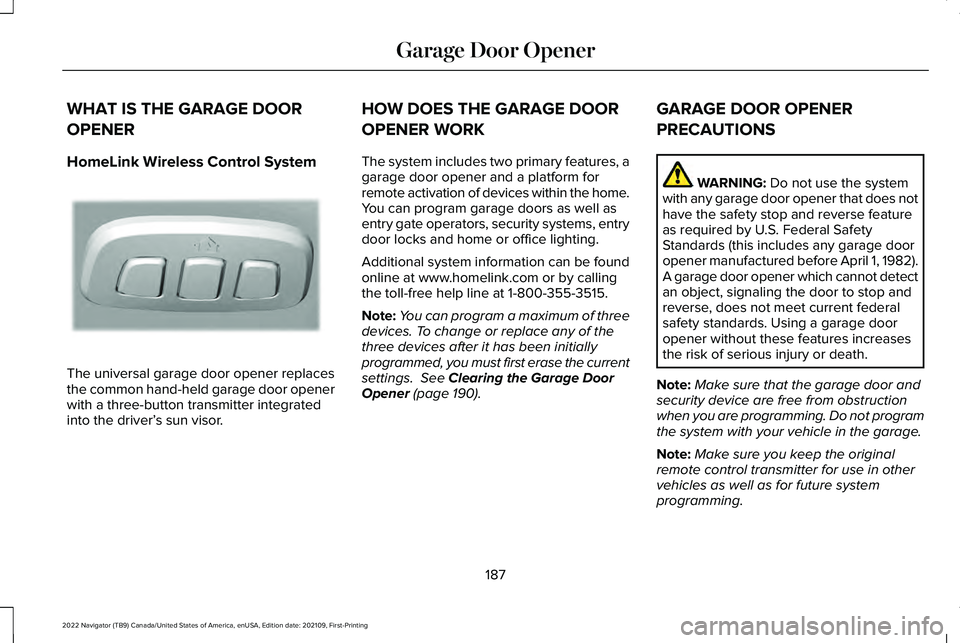
HomeLink Wireless Control System
The universal garage door opener replaces
the common hand-held garage door opener
with a three-button transmitter integrated
into the driver’
s sun visor. HOW DOES THE GARAGE DOOR
OPENER WORK
The system includes two primary features, a
garage door opener and a platform for
remote activation of devices within the home.
You can program garage doors as well as
entry gate operators, security systems, entry
door locks and home or office lighting.
Additional system information can be found
online at www.homelink.com or by calling
the toll-free help line at 1-800-355-3515.
Note:
You can program a maximum of three
devices. To change or replace any of the
three devices after it has been initially
programmed, you must first erase the current
settings. See Clearing the Garage Door
Opener (page 190). GARAGE DOOR OPENER
PRECAUTIONS WARNING:
Do not use the system
with any garage door opener that does not
have the safety stop and reverse feature
as required by U.S. Federal Safety
Standards (this includes any garage door
opener manufactured before April 1, 1982).
A garage door opener which cannot detect
an object, signaling the door to stop and
reverse, does not meet current federal
safety standards. Using a garage door
opener without these features increases
the risk of serious injury or death.
Note: Make sure that the garage door and
security device are free from obstruction
when you are programming. Do not program
the system with your vehicle in the garage.
Note: Make sure you keep the original
remote control transmitter for use in other
vehicles as well as for future system
programming.
187
2022 Navigator (TB9) Canada/United States of America, enUSA, Edition date: 202109, First-Printing Garage Door OpenerE188211
Page 206 of 646
ENGINE BLOCK HEATER (IF EQUIPPED)
ENGINE BLOCK HEATER
PRECAUTIONS WARNING:
Failure to follow engine
block heater instructions could result in
property damage or serious personal
injury. WARNING:
Do not use your heater
with ungrounded electrical systems or
two-pronged adapters. There is a risk of
electrical shock. WARNING:
Do not fully close the
hood, or allow it to drop under its own
weight when using the engine block
heater. This could damage the power cable
and may cause an electrical short resulting
in fire, injury and property damage. We recommend that you do the following for
a safe and correct operation:
•
Use a 16-gauge outdoor extension cord
that is product certified by Underwriter’ s
Laboratory (UL) or Canadian Standards
Association (CSA). This extension cord
must be suitable for use outdoors, in cold
temperatures, and be clearly marked
Suitable for Use with Outdoor
Appliances. Do not use an indoor
extension cord outdoors. This could
result in an electric shock or become a
fire hazard.
• Use as short an extension cord as
possible.
• Do not use multiple extension cords.
• Make sure that when in operation, the
extension cord plug and engine block
heater cord plug connections are free
and clear of water. This could cause an
electric shock or fire.
• If the engine block heater cord is under
the hood, do not remove the wiring from
its original location. Do not close the
hood on the extension wiring. •
Park your vehicle in a clean area, clear
of combustible materials.
• Firmly connect the engine block heater
cord and the extension cord.
• Check the extension cord for heat
anywhere when the system has been
operating for approximately 30 minutes.
• Unplug and properly stow the system
before starting and driving your vehicle.
The protective cover seals the terminals
of the engine block heater cord plug
when not in use.
• Check the engine block heater system
for proper operation before winter.
HOW DOES THE ENGINE BLOCK
HEATER WORK
The engine block heater warms the engine
coolant. This allows the climate control
system to quickly respond. The equipment
includes a heater element installed in the
engine block and a wire harness. You can
connect the system to a grounded 220-240
volt AC electrical source.
202
2022 Navigator (TB9) Canada/United States of America, enUSA, Edition date: 202109, First-Printing Starting and Stopping the Engine
Page 207 of 646
Note:
The engine block heater is most
effective when outdoor temperatures are
below 0°F (-18°C).
USING THE ENGINE BLOCK HEATER
Make sure the receptacle terminals are clean
and dry prior to use. Clean them with a dry
cloth if necessary.
The heater uses 0.4 to 1.0 kilowatt-hours of
energy per hour of use. The system does not
have a thermostat. It achieves maximum
temperature after approximately three hours
of operation. Using the engine block heater
longer than three hours does not improve
system performance and unnecessarily uses
electricity.
STOPPING THE ENGINE
STOPPING THE ENGINE WHEN YOUR
VEHICLE IS STATIONARY
1. Shift into park (P).
2. Apply the parking brake.
3. Wait until the engine reaches idle speed. 4. Press the push button ignition switch.
STOPPING THE ENGINE WHEN YOUR
VEHICLE IS MOVING
WARNING:
Switching off the engine
when your vehicle is still moving results in
a significant decrease in braking
assistance. Higher effort is required to
apply the brakes and to stop your vehicle.
A significant decrease in steering
assistance could also occur. The steering
does not lock, but higher effort could be
required to steer your vehicle. When you
switch the ignition off, some electrical
circuits, for example airbags, also turn off.
If you unintentionally switch the ignition
off, shift into neutral (N) and restart the
engine. 1. Press and hold the push button ignition
switch until the engine stops, or press it
three times within two seconds.
2. Shift into neutral and use the brakes to bring your vehicle to a safe stop.
3. Shift into park (P).
4. Apply the parking brake.
AUTOMATIC ENGINE STOP
WHAT IS AUTOMATIC ENGINE STOP
Automatic engine stop is a feature that
switches the engine off if it has been idling
for an extended period to help you save fuel.
203
2022 Navigator (TB9) Canada/United States of America, enUSA, Edition date: 202109, First-Printing Starting and Stopping the EngineE321258 E321258
Page 223 of 646
AUTOMATIC TRANSMISSION
PRECAUTIONS
WARNING: Apply the parking brake,
shift into park (P), switch the ignition off
and remove the key before you leave your
vehicle. Failure to follow this instruction
could result in personal injury or death. WARNING: When your vehicle is
stationary, keep the brake pedal fully
pressed when shifting gears. Failure to
follow this instruction could result in
personal injury, death or property damage. WARNING:
Do not apply the brake
pedal and accelerator pedal
simultaneously. Applying both pedals
simultaneously for more than a few
seconds will limit engine performance,
which may result in difficulty maintaining
speed in traffic and could lead to serious
injury. AUTOMATIC TRANSMISSION
POSITIONS
PARK (P)
This position locks the driveline and prevents
the wheels from turning. Come to a complete
stop before putting your vehicle into and out
of park (P).
The electric parking brake could apply when
you shift to park (P) without the brake pedal
fully pressed. The electric parking brake
applies when you shift to park (P) on large
slopes. The electric parking brake releases
with the drive away release function or
manually as described in the Releasing the
Electric Parking Brake section. See Electric
Parking Brake (page 236).
Note: A warning tone sounds if you open the
driver door and you have not shifted the
transmission selector to park (P). REVERSE (R) WARNING:
Shift into reverse (R) only
when your vehicle is stationary.
In reverse (R) power is transmitted to the
driven wheels.
NEUTRAL (N) WARNING: In neutral (N) your vehicle
is free to roll.
In neutral (N) power is not transmitted to the
driven wheels.
DRIVE (D)
In drive (D) power is transmitted to the driven
wheels.
219
2022 Navigator (TB9) Canada/United States of America, enUSA, Edition date: 202109, First-Printing Automatic Transmission
Page 227 of 646
HOW DOES FOUR-WHEEL DRIVE
WORK
Using the 1-Speed Automatic Four-
Wheel Drive System
The 1-speed automatic four-wheel drive
system utilizes an electronically controlled
on-demand 1-speed transfer case. This
system monitors various vehicle sensory
inputs to provide an increased level of
performance. This system offers the driver
two-wheel drive high, four-wheel drive auto
and four-wheel drive high as available modes
of operation via the selectable drive mode
switch. When four-wheel drive auto is
selected, the system continuously varies
power to the front wheels for optimum
performance for all on-road conditions. When
four-wheel drive high is selected, the system
provides power to the front and rear wheels
for use in off-road or slippery conditions such
as deep snow, sand or mud. There is further
information on driving in unique driving
conditions. See Driving Hints (page 384).
Using the 2-Speed Automatic Four-
Wheel Drive System
(If Equipped)
The 2-speed automatic four-wheel drive
system utilizes an electronically controlled
on-demand 2-speed transfer case. This
system monitors various vehicle sensory
inputs to provide an increased level of
performance. This system offers the driver
two-wheel drive high, four-wheel drive auto,
four-wheel drive high, and four-wheel drive
low as available modes of operation. When
four-wheel drive auto is selected, the system
continuously varies power to the front wheels
for optimum performance for all on-road
conditions. When either four-wheel drive high
or four-wheel drive low are selected with the
appropriate drive modes , the four-wheel
drive system provides electronically locked
power to the front and rear wheels for use
in off-road or slippery conditions such as
deep snow, sand or mud. Selecting slow
climb also provides additional gearing for
increased torque multiplication for conditions
like deep sand, snow, steep slopes, or pulling heavy objects.
See Slow Climb (page 296).
Additionally, the system is capable of
recreational flat towing by putting the
transfer case into neutral (N).
See
Recreationally Towing Your Vehicle (page
397).
There is further information on driving in
unique driving conditions. See Driving Hints
(page
384).
FOUR-WHEEL DRIVE
PRECAUTIONS WARNING:
Vehicles with a higher
center of gravity (utility and four-wheel
drive vehicles) handle differently than
vehicles with a lower center of gravity
(passenger cars). Avoid sharp turns,
excessive speed and abrupt steering in
these vehicles. Failure to drive cautiously
increases the risk of losing control of your
vehicle, vehicle rollover, personal injury
and death.
223
2022 Navigator (TB9) Canada/United States of America, enUSA, Edition date: 202109, First-Printing Four-Wheel Drive
(If Equipped)
Page 229 of 646
Note:
Your vehicle could have side steps
that can become damaged, due to reduced
ground clearance, when taking your vehicle
off-road. Remove side steps before driving
your vehicle off-road.
SELECTING A FOUR-WHEEL DRIVE
MODE
To select a specific four-wheel drive mode
please select one of the desired drive
modes. For additional information. See
Selecting a Drive Mode (page 294).
Note: When shifting to and from four-wheel
drive information display will show shifting
in progress message indicating that the
system is in the process of making a shift.
Note: Do not perform this operation if the
rear wheels are slipping or while applying
the accelerator pedal.
If the system detects a fault, a warning
message appears in the information display.
See
Four-Wheel Drive – Information
Messages (page 229). Note:
Do not use SLIPPERY, DEEP
CONDITIONS or SLOW CLIMB on dry, hard
surfaced roads. Doing so produces
excessive noise, increases tire wear and may
damage drive components. The 4X4 system
in these modes is only intended for
consistently slippery or loose surfaces.
Shifting to or from Slow Climb (4L)
To select or exit SLOW CLIMB (4L):
1. Bring your vehicle to a speed of
3.1 mph
(5 km/h) or less.
2. Place the transmission in neutral (N).
3. Select SLOW CLIMB on the drive mode control switch.
The information display will display a
message indicating a four-wheel drive shift
is in progress. If any of the above shift
conditions are not present, the shift will not
occur and the information display will display
information guiding the driver through the
proper shifting procedures. If there is a
transfer case tooth blockage a message will display in the information display. To alleviate
this condition, place the transmission in a
forward gear, move your vehicle forward
approximately
4.9 ft (1.5 m), and shift the
transmission back to neutral (N) to allow the
transfer case to complete the range shift.
Note: You could hear some noise as the
system shifts or engages which is normal. If
the system detects a fault, a warning
message appears in the information display.
See
Four-Wheel Drive – Information
Messages (page 229).
FOUR-WHEEL DRIVE MODES
TWO-WHEEL DRIVE HIGH
2H turns on when you select NORMAL or
CONSERVE. Two-wheel drive high is for
general on-road driving. Power is sent to the
rear wheels only.
Note: Two-wheel drive high can turn on or
off based on Drive Mode selection See Drive
Mode Control
(page 293).
225
2022 Navigator (TB9) Canada/United States of America, enUSA, Edition date: 202109, First-Printing Four-Wheel Drive
(If Equipped)
Page 230 of 646
FOUR-WHEEL DRIVE AUTO
4A turns on when you select EXCITE,
NORMAL 4x4 AUTO or SLIPPERY.
Four-wheel drive auto provides electronically
controlled four-wheel drive power to both
the front and rear wheels, as required, for
increased traction in varying on-road
conditions. The four-wheel drive auto tuning
varies based on selected Drive Mode. See
Selecting a Drive Mode (page 294).
Note: Four-wheel drive auto can turn on or
off automatically based on Drive Mode
selection. See Selecting a Drive Mode (page
294
).
FOUR-WHEEL DRIVE HIGH
4H turns on when you select DEEP
CONDITIONS. Four-wheel drive high
provides electronically locked four-wheel
drive power to both the front and rear wheels
for use in off-road or winter conditions such
as deep snow, sand or mud. This mode is
not for use on dry pavement. Note:
Four-wheel drive high can turn on or
off automatically based on Drive Mode
selection. See Selecting a Drive Mode (page
294
).
FOUR-WHEEL DRIVE LOW
4L turns on when you select SLOW CLIMB.
Four-wheel drive low provides electronically
or mechanically locked four-wheel drive
power to both the front and rear wheels for
use on low traction surfaces, but does so
with additional gearing for increased torque
multiplication. This mode is only for off-road
conditions such as deep sand, steep slopes,
or pulling heavy objects.
Note: Four-wheel drive low can turn on or
off automatically based on drive mode
selection. See Selecting a Drive Mode (page
294
).
FOUR-WHEEL DRIVE INDICATORS
Two-wheel Drive High Momentarily illuminates when
two-wheel drive high is selected.Four-wheel Drive Auto Continuously illuminates when
four-wheel drive auto is selected.
Four-wheel Drive High Continuously illuminates when
four-wheel drive high is selected.
Four-wheel Drive Low
(If Equipped) Continuously illuminates when
four-wheel drive low is selected.
FOUR-WHEEL DRIVE DRIVING HINTS
EMERGENCY MANEUVERS
In an unavoidable emergency situation
where a sudden sharp turn must be made,
remember to avoid over-driving your vehicle
(i.e. turn the steering wheel only as rapidly
and as far as required to avoid the
emergency). Excessive steering can result
in loss of vehicle control. Apply smooth
pressure to the accelerator pedal or brake
226
2022 Navigator (TB9) Canada/United States of America, enUSA, Edition date: 202109, First-Printing Four-Wheel Drive
(If Equipped)E181778 E181781 E181779 E181780
Page 232 of 646
Note:
Driving through deep water may
damage the transmission. If the front or rear
axle is submerged in water, the axle
lubricant and power transfer unit lubricant
should be checked and changed if
necessary.
DRIVING ON HILLY OR SLOPING
TERRAIN
Although natural obstacles may make it
necessary to travel diagonally up or down a
hill or steep incline, you should try to drive
straight up or straight down.
Note: Avoid turning on steep slopes or hills.
A danger lies in losing traction, slipping
sideways and possible vehicle roll over.
Whenever driving on a hill, determine
beforehand the route you can use. Do not
drive over the crest of a hill without seeing
what conditions are on the other side. Do
not drive in reverse over a hill without the
aid of an observer. When climbing a steep slope or hill, start in
a lower gear rather than downshifting to a
lower gear from a higher gear once the
ascent has started. This reduces strain on
the engine and the possibility of stalling.
If your vehicle stalls, do not try to turnaround
because this could cause vehicle roll over.
It is better to reverse back to a safe location.
Apply just enough power to the wheels to
climb the hill. Too much power can cause
the tires to slip, spin or lose traction, resulting
in loss of vehicle control.
Descend a hill in the same gear you would
use to climb up the hill to avoid excessive
brake application and brake overheating. Do
not descend in neutral. Disengage overdrive
or move the transmission selector lever to a
lower gear. When descending a steep hill,
avoid sudden hard braking as you could lose
control. The front wheels have to be turning
in order to steer your vehicle.
Note:
If your vehicle has anti-lock brakes,
apply the brakes steadily. Do not pump the
brakes. DRIVING ON SNOW AND ICE
Four-wheel drive vehicles have advantages
over two-wheel drive vehicles in snow and
ice but can skid like any other vehicle.
Should you start to slide while driving on
snowy or icy roads, turn the steering wheel
in the direction of the slide until you regain
control.
Avoid sudden applications of power and
quick changes of direction on snow and ice.
Apply the accelerator slowly and steadily
when starting from a full stop. Avoid sudden
braking. Although a four-wheel drive vehicle
can accelerate better than a two-wheel drive
vehicle in snow and ice, it cannot stop any
faster as braking occurs at all four wheels.
Do not become overconfident as to road
conditions.
Make sure you allow sufficient distance
between you and other vehicles for stopping.
Drive slower than usual and consider using
one of the lower gears. In emergency
stopping situations, apply the brake steadily.
Do not pump the brake pedal. See Anti-Lock
Braking System Limitations (page 233).
228
2022 Navigator (TB9) Canada/United States of America, enUSA, Edition date: 202109, First-Printing Four-Wheel Drive
(If Equipped)
Page 234 of 646
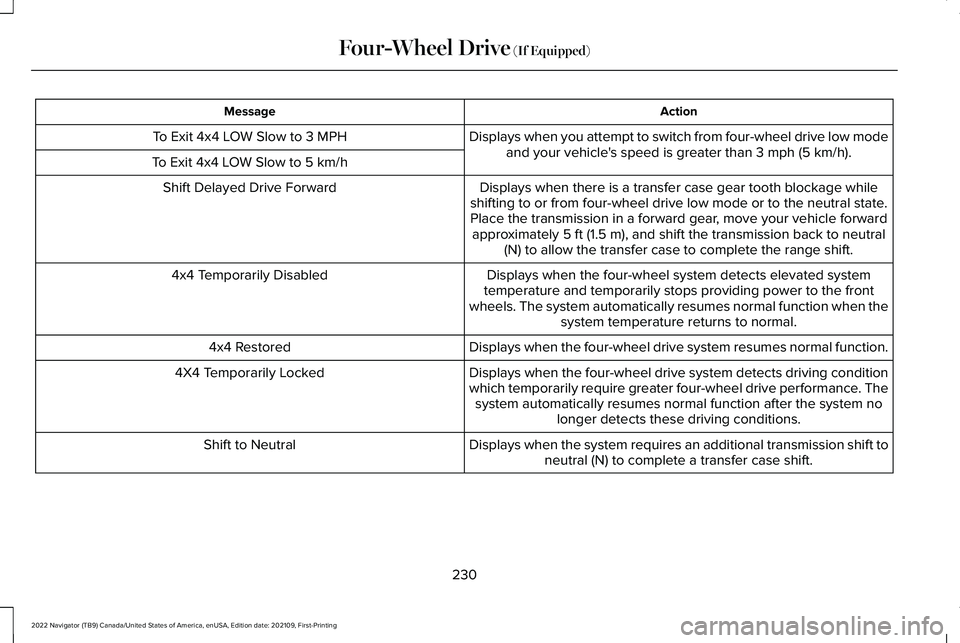
Action
Message
Displays when you attempt to switch from four-wheel drive low modeand your vehicle's speed is greater than 3 mph (5 km/h).
To Exit 4x4 LOW Slow to 3 MPH
To Exit 4x4 LOW Slow to 5 km/h Displays when there is a transfer case gear tooth blockage while
shifting to or from four-wheel drive low mode or to the neutral state. Place the transmission in a forward gear, move your vehicle forward approximately
5 ft (1.5 m), and shift the transmission back to neutral
(N) to allow the transfer case to complete the range shift.
Shift Delayed Drive Forward
Displays when the four-wheel system detects elevated system
temperature and temporarily stops providing power to the front
wheels. The system automatically resumes normal function when the system temperature returns to normal.
4x4 Temporarily Disabled
Displays when the four-wheel drive system resumes normal function.
4x4 Restored
Displays when the four-wheel drive system detects driving condition
which temporarily require greater four-wheel drive performance. Thesystem automatically resumes normal function after the system no longer detects these driving conditions.
4X4 Temporarily Locked
Displays when the system requires an additional transmission shift toneutral (N) to complete a transfer case shift.
Shift to Neutral
230
2022 Navigator (TB9) Canada/United States of America, enUSA, Edition date: 202109, First-Printing Four-Wheel Drive
(If Equipped)
Page 236 of 646
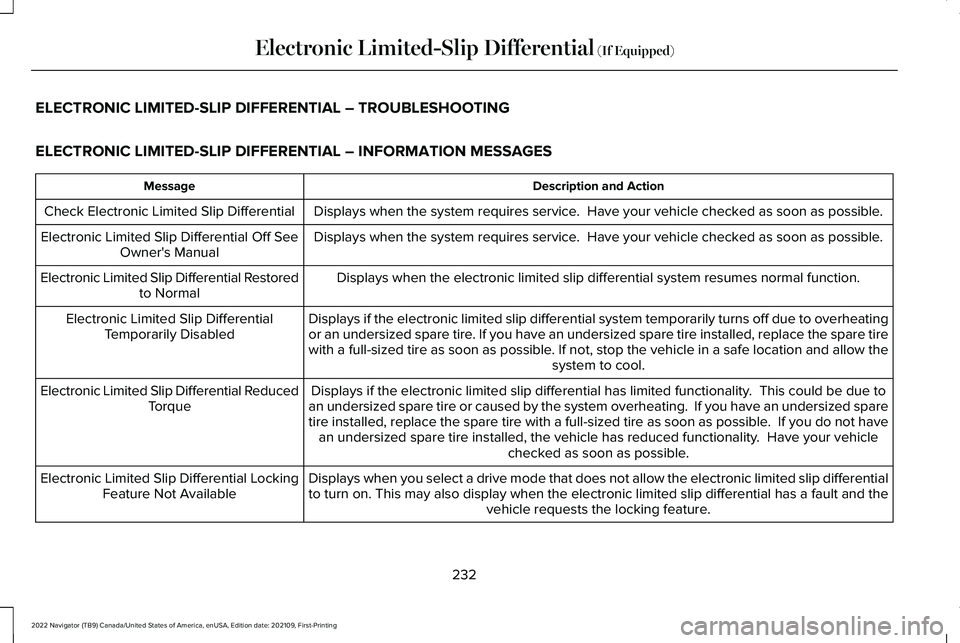
ELECTRONIC LIMITED-SLIP DIFFERENTIAL – TROUBLESHOOTING
ELECTRONIC LIMITED-SLIP DIFFERENTIAL – INFORMATION MESSAGES
Description and Action
Message
Displays when the system requires service. Have your vehicle checked as soon as possible.
Check Electronic Limited Slip Differential
Displays when the system requires service. Have your vehicle checked as soon as possible.
Electronic Limited Slip Differential Off See
Owner's Manual
Displays when the electronic limited slip differential system resumes no\
rmal function.
Electronic Limited Slip Differential Restored
to Normal
Displays if the electronic limited slip differential system temporarily \
turns off due to overheating
or an undersized spare tire. If you have an undersized spare tire installed, replace the spare tire\
with a full-sized tire as soon as possible. If not, stop the vehicle in a safe location and allow the system to cool.
Electronic Limited Slip Differential
Temporarily Disabled
Displays if the electronic limited slip differential has limited functio\
nality. This could be due to
an undersized spare tire or caused by the system overheating. If you ha\
ve an undersized spare
tire installed, replace the spare tire with a full-sized tire as soon as\
possible. If you do not have an undersized spare tire installed, the vehicle has reduced functionalit\
y. Have your vehicle checked as soon as possible.
Electronic Limited Slip Differential Reduced
Torque
Displays when you select a drive mode that does not allow the electronic\
limited slip differential
to turn on. This may also display when the electronic limited slip diffe\
rential has a fault and the vehicle requests the locking feature.
Electronic Limited Slip Differential Locking
Feature Not Available
232
2022 Navigator (TB9) Canada/United States of America, enUSA, Edition date: 202109, First-Printing Electronic Limited-Slip Differential (If Equipped)