USB LINCOLN NAVIGATOR 2023 User Guide
[x] Cancel search | Manufacturer: LINCOLN, Model Year: 2023, Model line: NAVIGATOR, Model: LINCOLN NAVIGATOR 2023Pages: 660, PDF Size: 14.04 MB
Page 647 of 660
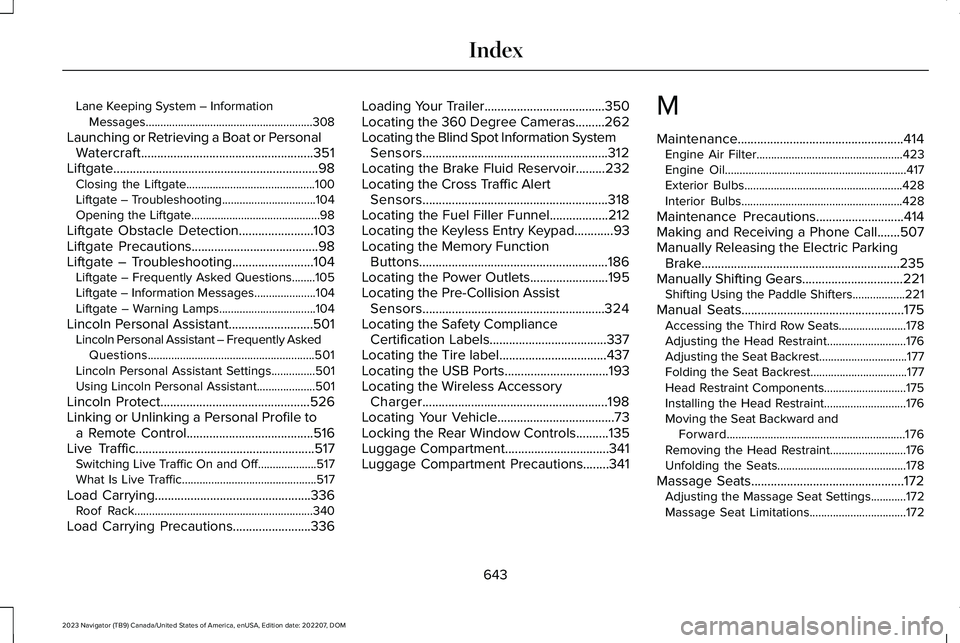
Lane Keeping System – InformationMessages.........................................................308
Launching or Retrieving a Boat or PersonalWatercraft.....................................................351Liftgate...............................................................98Closing the Liftgate............................................100Liftgate – Troubleshooting................................104Opening the Liftgate............................................98
Liftgate Obstacle Detection.......................103Liftgate Precautions.......................................98Liftgate – Troubleshooting.........................104Liftgate – Frequently Asked Questions........105Liftgate – Information Messages.....................104Liftgate – Warning Lamps.................................104
Lincoln Personal Assistant..........................501Lincoln Personal Assistant – Frequently AskedQuestions.........................................................501Lincoln Personal Assistant Settings...............501Using Lincoln Personal Assistant....................501
Lincoln Protect..............................................526Linking or Unlinking a Personal Profile toa Remote Control.......................................516Live Traffic.......................................................517Switching Live Traffic On and Off....................517What Is Live Traffic..............................................517
Load Carrying................................................336Roof Rack.............................................................340
Load Carrying Precautions........................336
Loading Your Trailer.....................................350Locating the 360 Degree Cameras.........262Locating the Blind Spot Information SystemSensors.........................................................312Locating the Brake Fluid Reservoir.........232Locating the Cross Traffic AlertSensors.........................................................318Locating the Fuel Filler Funnel..................212Locating the Keyless Entry Keypad............93Locating the Memory FunctionButtons..........................................................186Locating the Power Outlets........................195Locating the Pre-Collision AssistSensors........................................................324Locating the Safety ComplianceCertification Labels....................................337Locating the Tire label.................................437Locating the USB Ports................................193Locating the Wireless AccessoryCharger.........................................................198Locating Your Vehicle....................................73Locking the Rear Window Controls..........135Luggage Compartment................................341Luggage Compartment Precautions........341
M
Maintenance...................................................414Engine Air Filter..................................................423Engine Oil..............................................................417Exterior Bulbs......................................................428Interior Bulbs.......................................................428
Maintenance Precautions...........................414Making and Receiving a Phone Call.......507Manually Releasing the Electric ParkingBrake.............................................................235Manually Shifting Gears...............................221Shifting Using the Paddle Shifters..................221
Manual Seats..................................................175Accessing the Third Row Seats.......................178Adjusting the Head Restraint...........................176Adjusting the Seat Backrest..............................177Folding the Seat Backrest.................................177Head Restraint Components............................175Installing the Head Restraint............................176Moving the Seat Backward andForward.............................................................176Removing the Head Restraint..........................176Unfolding the Seats............................................178
Massage Seats...............................................172Adjusting the Massage Seat Settings............172Massage Seat Limitations.................................172
643
2023 Navigator (TB9) Canada/United States of America, enUSA, Edition date: 202207, DOMIndex
Page 649 of 660
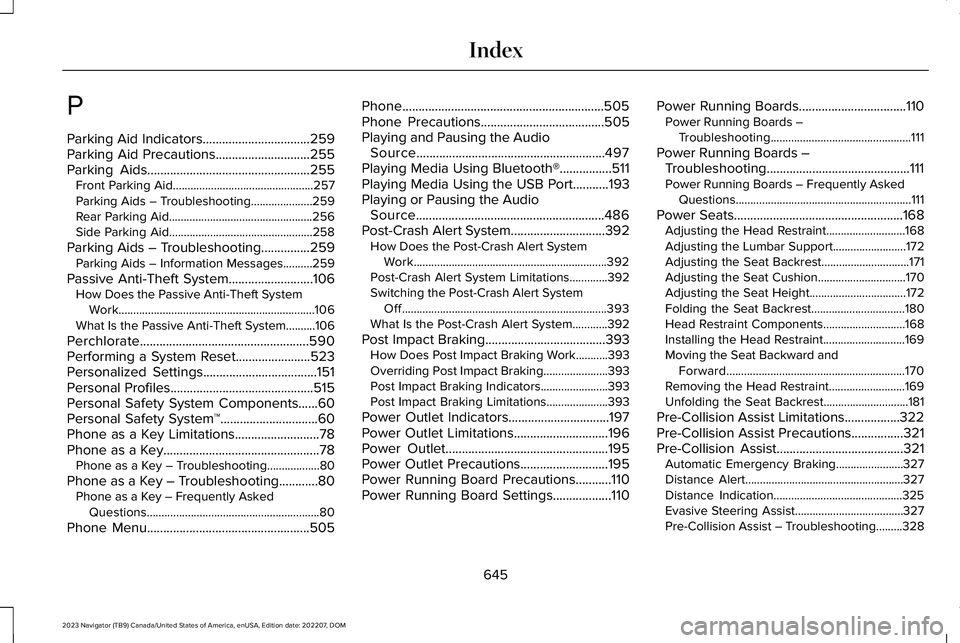
P
Parking Aid Indicators.................................259Parking Aid Precautions.............................255Parking Aids..................................................255Front Parking Aid................................................257Parking Aids – Troubleshooting.....................259Rear Parking Aid.................................................256Side Parking Aid.................................................258
Parking Aids – Troubleshooting...............259Parking Aids – Information Messages..........259
Passive Anti-Theft System..........................106How Does the Passive Anti-Theft SystemWork...................................................................106What Is the Passive Anti-Theft System..........106
Perchlorate....................................................590Performing a System Reset.......................523Personalized Settings...................................151Personal Profiles............................................515Personal Safety System Components......60Personal Safety System™..............................60Phone as a Key Limitations..........................78Phone as a Key................................................78Phone as a Key – Troubleshooting..................80
Phone as a Key – Troubleshooting............80Phone as a Key – Frequently AskedQuestions...........................................................80
Phone Menu..................................................505
Phone..............................................................505Phone Precautions......................................505Playing and Pausing the AudioSource..........................................................497Playing Media Using Bluetooth®................511Playing Media Using the USB Port...........193Playing or Pausing the AudioSource..........................................................486Post-Crash Alert System.............................392How Does the Post-Crash Alert SystemWork..................................................................392Post-Crash Alert System Limitations.............392Switching the Post-Crash Alert SystemOff......................................................................393What Is the Post-Crash Alert System............392
Post Impact Braking.....................................393How Does Post Impact Braking Work...........393Overriding Post Impact Braking......................393Post Impact Braking Indicators.......................393Post Impact Braking Limitations.....................393
Power Outlet Indicators...............................197Power Outlet Limitations.............................196Power Outlet..................................................195Power Outlet Precautions...........................195Power Running Board Precautions...........110Power Running Board Settings..................110
Power Running Boards.................................110Power Running Boards –Troubleshooting................................................111
Power Running Boards –Troubleshooting............................................111Power Running Boards – Frequently AskedQuestions............................................................111
Power Seats....................................................168Adjusting the Head Restraint...........................168Adjusting the Lumbar Support.........................172Adjusting the Seat Backrest..............................171Adjusting the Seat Cushion..............................170Adjusting the Seat Height.................................172Folding the Seat Backrest................................180Head Restraint Components............................168Installing the Head Restraint............................169Moving the Seat Backward andForward.............................................................170Removing the Head Restraint..........................169Unfolding the Seat Backrest.............................181
Pre-Collision Assist Limitations.................322Pre-Collision Assist Precautions................321Pre-Collision Assist.......................................321Automatic Emergency Braking.......................327Distance Alert......................................................327Distance Indication............................................325Evasive Steering Assist.....................................327Pre-Collision Assist – Troubleshooting.........328
645
2023 Navigator (TB9) Canada/United States of America, enUSA, Edition date: 202207, DOMIndex
Page 655 of 660
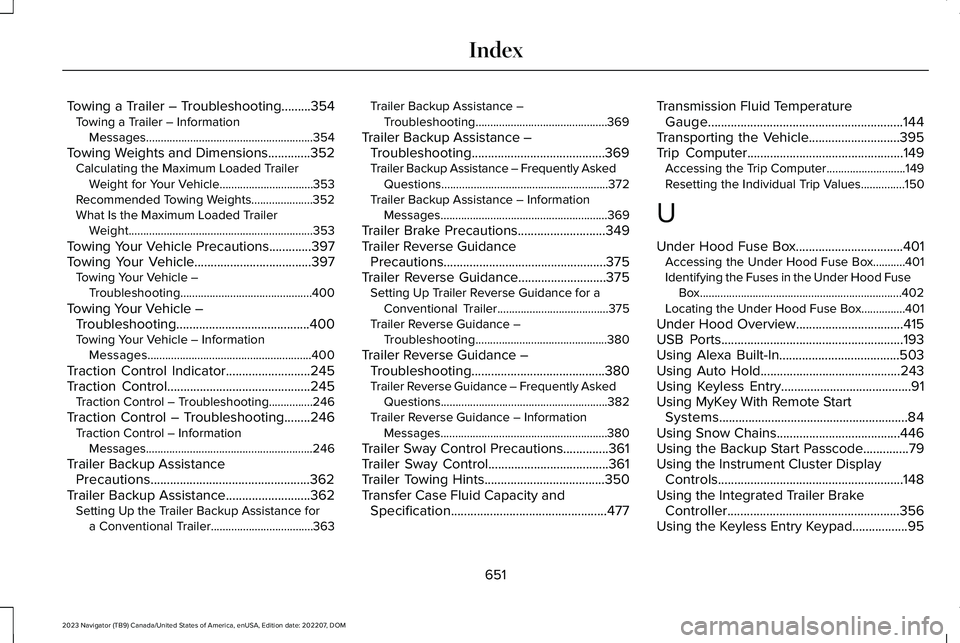
Towing a Trailer – Troubleshooting.........354Towing a Trailer – InformationMessages.........................................................354
Towing Weights and Dimensions.............352Calculating the Maximum Loaded TrailerWeight for Your Vehicle................................353Recommended Towing Weights.....................352What Is the Maximum Loaded TrailerWeight...............................................................353
Towing Your Vehicle Precautions.............397Towing Your Vehicle....................................397Towing Your Vehicle –Troubleshooting.............................................400
Towing Your Vehicle –Troubleshooting.........................................400Towing Your Vehicle – InformationMessages........................................................400
Traction Control Indicator..........................245Traction Control............................................245Traction Control – Troubleshooting...............246
Traction Control – Troubleshooting........246Traction Control – InformationMessages.........................................................246
Trailer Backup AssistancePrecautions.................................................362Trailer Backup Assistance..........................362Setting Up the Trailer Backup Assistance fora Conventional Trailer...................................363
Trailer Backup Assistance –Troubleshooting.............................................369
Trailer Backup Assistance –Troubleshooting.........................................369Trailer Backup Assistance – Frequently AskedQuestions.........................................................372Trailer Backup Assistance – InformationMessages.........................................................369
Trailer Brake Precautions...........................349Trailer Reverse GuidancePrecautions..................................................375Trailer Reverse Guidance...........................375Setting Up Trailer Reverse Guidance for aConventional Trailer......................................375Trailer Reverse Guidance –Troubleshooting.............................................380
Trailer Reverse Guidance –Troubleshooting.........................................380Trailer Reverse Guidance – Frequently AskedQuestions.........................................................382Trailer Reverse Guidance – InformationMessages.........................................................380
Trailer Sway Control Precautions..............361Trailer Sway Control.....................................361Trailer Towing Hints.....................................350Transfer Case Fluid Capacity andSpecification................................................477
Transmission Fluid TemperatureGauge............................................................144Transporting the Vehicle............................395Trip Computer................................................149Accessing the Trip Computer...........................149Resetting the Individual Trip Values...............150
U
Under Hood Fuse Box.................................401Accessing the Under Hood Fuse Box...........401Identifying the Fuses in the Under Hood FuseBox.....................................................................402Locating the Under Hood Fuse Box...............401
Under Hood Overview.................................415USB Ports........................................................193Using Alexa Built-In.....................................503Using Auto Hold...........................................243Using Keyless Entry........................................91Using MyKey With Remote StartSystems..........................................................84Using Snow Chains......................................446Using the Backup Start Passcode..............79Using the Instrument Cluster DisplayControls.........................................................148Using the Integrated Trailer BrakeController.....................................................356Using the Keyless Entry Keypad.................95
651
2023 Navigator (TB9) Canada/United States of America, enUSA, Edition date: 202207, DOMIndex