ignition LINCOLN NAVIGATOR 2023 User Guide
[x] Cancel search | Manufacturer: LINCOLN, Model Year: 2023, Model line: NAVIGATOR, Model: LINCOLN NAVIGATOR 2023Pages: 660, PDF Size: 14.04 MB
Page 87 of 660
Speed Minder
You can set a speed reminder for yourvehicle. Warning messages appear on thetouchscreen and a tone sounds if yourvehicle exceeds the set speed.
Audio System Volume Limit
The audio system maximum volume reduces.A message appears on the touchscreen ifyou attempt to exceed the volume limit.Automatic volume control turns off.
911 Assist
If you set 911 assist to always on, you cannotswitch it off with a MyKey.
Do Not Disturb
If you set do not disturb to always on, youcannot switch it off with a MyKey.
Note:If a phone is connected using AppleCarPlay or Android Auto while driving witha MyKey, the driver can receive phone callsand text messages even if the do not disturbrestriction is on. And if the vehicle comeswith satellite radio, there is no restriction onthe adult content.
Traction and Stability Control
If you set traction control or stability controlto always on, you cannot switch it off with aMyKey.
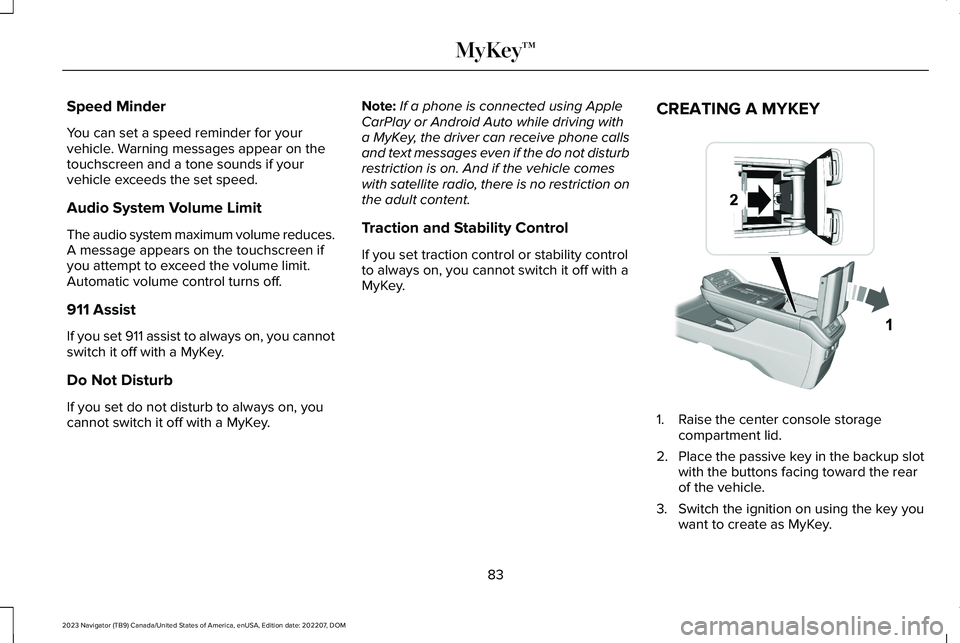
CREATING A MYKEY
1.Raise the center console storagecompartment lid.
2.Place the passive key in the backup slotwith the buttons facing toward the rearof the vehicle.
3.Switch the ignition on using the key youwant to create as MyKey.
83
2023 Navigator (TB9) Canada/United States of America, enUSA, Edition date: 202207, DOMMyKey™ E376555
Page 88 of 660
4.Press Settings on the touchscreen.
5.Press Vehicle Settings.
6.Press MyKey.
7.Press Create MyKey or Create MyKeyMobile Device.
8.Press Yes.
9.Switch the ignition off.
Note:You successfully created a MyKey. Werecommend that you label this key so youcan distinguish it from the admin keys.
Note:You can use both a passive key anda mobile device as a MyKey. You must havea second passive key and create it as aMyKey.
Note:The programmed restrictions applywhen you switch the vehicle off, open andclose the driver door and restart your vehiclewith the passive key or mobile device.
PROGRAMMING A MYKEY
You can program any remote control tobecome a restricted MyKey, but you mustleave one unmodified as an admin key.
1.Switch the vehicle on using an admin key.
2.Press Settings on the touchscreen.
3.Press Vehicle Settings.
4.Press MyKey.
5.Select and configure the settings.
CLEARING ALL MYKEYS
When you clear all MyKeys, you remove allrestrictions and return all MyKeys to theiroriginal admin key status.
1.Switch the vehicle on using an admin key.
2.Press Settings on the touchscreen.
3.Press Vehicle Settings.
4.Press MyKey.
5.Press Clear All MyKeys.
6.Press Yes.
CHECKING MYKEY SYSTEM
STATUS
You can find information about the distancetraveled using a MyKey, and the number ofadmin keys and MyKeys created for yourvehicle.
1.Switch the vehicle on.
2.Press Settings on the touchscreen.
3.Press Vehicle Settings.
4.Press MyKey.
5.Press MyKey Information.
USING MYKEY WITH REMOTE
START SYSTEMS
MyKey is not compatible with unapproved,aftermarket remote start systems. If youchoose to install a remote start system, seean authorized dealer for an approved remotestart system.
84
2023 Navigator (TB9) Canada/United States of America, enUSA, Edition date: 202207, DOMMyKey™
Page 89 of 660
MYKEY – TROUBLESHOOTING
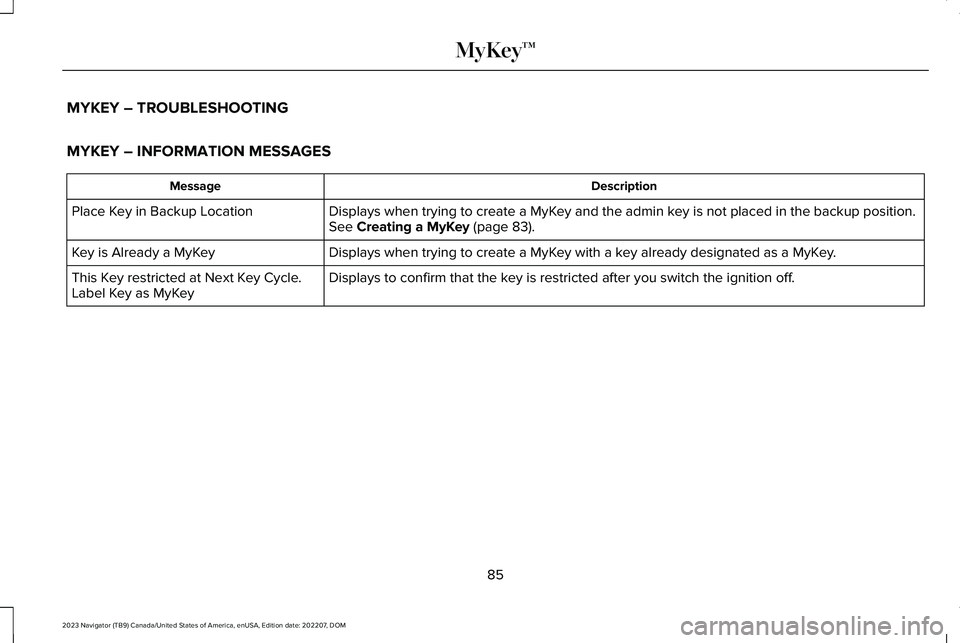
MYKEY – INFORMATION MESSAGES
DescriptionMessage
Displays when trying to create a MyKey and the admin key is not placed in the backup position.See Creating a MyKey (page 83).Place Key in Backup Location
Displays when trying to create a MyKey with a key already designated as a MyKey.Key is Already a MyKey
Displays to confirm that the key is restricted after you switch the ignition off.This Key restricted at Next Key Cycle.Label Key as MyKey
85
2023 Navigator (TB9) Canada/United States of America, enUSA, Edition date: 202207, DOMMyKey™
Page 90 of 660
MYKEY – FREQUENTLY ASKEDQUESTIONS
What is an admin key?
An admin key is a key that you have notcreated as a MyKey. See Creating aMyKey (page 83).
Why am I not able to create a MyKey?
You have not placed the admin key inthe backup position. See Creating aMyKey (page 83). The key used toswitch the ignition on is not an adminkey. The key used to switch the ignitionon is the only admin key. There has tobe at least one admin key. You did notswitch the ignition off after creating thelast MyKey.
Why am I not able to program a MyKey?
The admin key is not inside your vehicle.The key used to switch the ignition onis not an admin key. You have notcreated any MyKeys. See Creating aMyKey (page 83).
Why am I not able to clear the MyKeys?
The admin key is not inside your vehicle.The key used to switch the ignition onis not an admin key. You have notcreated any MyKeys. See Creating aMyKey (page 83).
Why is the MyKey distance notaccumulating?
The key used to start the engine is anadmin key. An admin key and a MyKeyare inside your vehicle. You have notcreated any MyKeys. See Creating aMyKey (page 83). You have cleared theMyKeys. See Clearing All MyKeys(page 84).
Why am I not able to start the engine witha MyKey?
An admin key and a MyKey are insideyour vehicle. The system recognizesonly the admin key when both arepresent.
86
2023 Navigator (TB9) Canada/United States of America, enUSA, Edition date: 202207, DOMMyKey™
Page 92 of 660
AUTOUNLOCK
WHAT IS AUTOUNLOCK
Autounlock is an unlocking feature thatunlocks the vehicle doors when your vehiclecomes to a stop.
AUTOUNLOCK REQUIREMENTS
Autounlock unlocks all the doors after all ofthe following occur.
1.All the doors are closed and your vehicleis moving at a speed greater than 12 mph(20 km/h).
2.Your vehicle comes to a stop.
3.You open the driver door within 10minutes of switching the ignition off or tothe accessory position.
Note:If you open the driver door after 10minutes, Autounlock does not unlock allother doors.
SWITCHING AUTOUNLOCK ON ANDOFF
1.Press Settings on the touchscreen.
2.Press Vehicle Settings.
3.Switch Autounlock on or off.
AUTOLOCK
WHAT IS AUTOLOCK
Autolock is a locking feature that locks yourvehicle doors when you start driving.
AUTOLOCK REQUIREMENTS
Autolock locks all the doors when all of thefollowing occur:
•All doors are closed.
•The ignition is on.
•Your vehicle reaches a speed greaterthan 12 mph (20 km/h).
MISLOCK
WHAT IS MISLOCK
Mislock is a locking feature that warns youif your vehicle has not locked.
MISLOCK LIMITATIONS
When you press the lock button once, theturn signals do not flash if:
•Any door or the tailgate is open.
•The hood is open.
If you switch mislock off, the horn does notsound if you press the lock button on theremote control when a door is open.
SWITCHING MISLOCK ON AND OFF
1.Press Settings on the touchscreen.
2.Press Vehicle Settings.
3.Switch Mislock Chirp on or off.
88
2023 Navigator (TB9) Canada/United States of America, enUSA, Edition date: 202207, DOMDoors and Locks
Page 93 of 660
DOORS AND LOCKS AUDIBLE
WARNINGS
Door Ajar Audible Warning
Sounds when a door is not fully closed andyour vehicle is moving.
DOORS AND LOCKS –
TROUBLESHOOTING
DOORS AND LOCKS – WARNINGLAMPS
Door Ajar Warning Lamp
Illuminates when you switch theignition on and remains on if anydoor or the hood is open.
DOORS AND LOCKS – INFORMATION MESSAGES
ActionMessage
Displays if a door is open. Fully close the door.Driver Door Ajar
Passenger Door Ajar
Rear Left Door Ajar
Rear Right Door Ajar
Displays if a hood is open. Fully close the hood.Hood Ajar
89
2023 Navigator (TB9) Canada/United States of America, enUSA, Edition date: 202207, DOMDoors and LocksE249859
Page 95 of 660
WHAT IS KEYLESS ENTRY
The system allows you to lock and unlockyour vehicle without taking the passive keyout of your pocket or purse.
KEYLESS ENTRY LIMITATIONS
Make sure your remote control is within 3 ft(1 m) from the front door handles and thetailgate.
The system could not function if:
•The remote control remains stationaryfor about a minute.
•The vehicle battery has no charge.
•The remote control battery has nocharge.
•There is interference causing issues withthe remote control frequencies.
•The remote control is too close to metalobjects or electronic devices, for examplekeys or a cell phone.
KEYLESS ENTRY SETTINGS
Switching Keyless Entry On and Off
1.Switch the ignition on using an originalkey that has not been created as aMyKey.
2.Press Settings on the touchscreen.
3.Press Vehicle Settings.
4.Press Locks.
Reprogramming the UnlockingFunction
You can enable two-stage unlocking functionallowing you to unlock only the driver doorwhen you touch the unlock sensor.
Press and hold both the lock and unlockbuttons on the remote control for fourseconds to disable or enable two-stageunlocking.
If you program the unlocking function so thatonly the driver door unlocks, you can unlockall of the other doors from inside your vehicleusing the power door lock control. You canunlock individual doors by pulling the interiordoor handles on those doors.
USING KEYLESS ENTRY
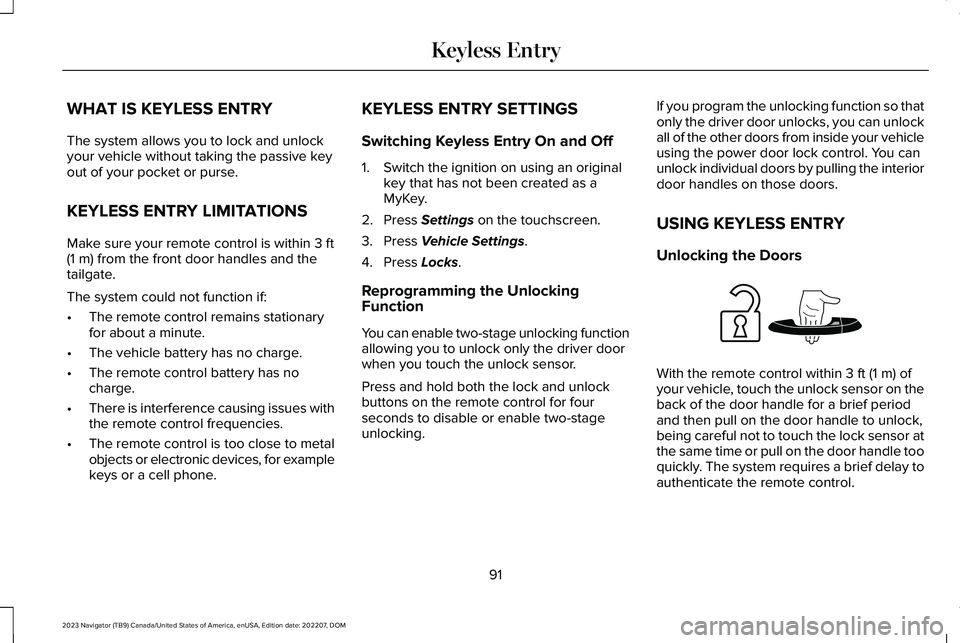
Unlocking the Doors
With the remote control within 3 ft (1 m) ofyour vehicle, touch the unlock sensor on theback of the door handle for a brief periodand then pull on the door handle to unlock,being careful not to touch the lock sensor atthe same time or pull on the door handle tooquickly. The system requires a brief delay toauthenticate the remote control.
91
2023 Navigator (TB9) Canada/United States of America, enUSA, Edition date: 202207, DOMKeyless EntryE248553
Page 99 of 660
The anti-scan feature turns off after:
•One minute of keypad inactivity.
•You press the unlock button on theremote control.
•You switch the ignition on.
•You unlock your vehicle using keylessentry.
USING THE KEYLESS ENTRY
KEYPAD
Unlocking the Doors
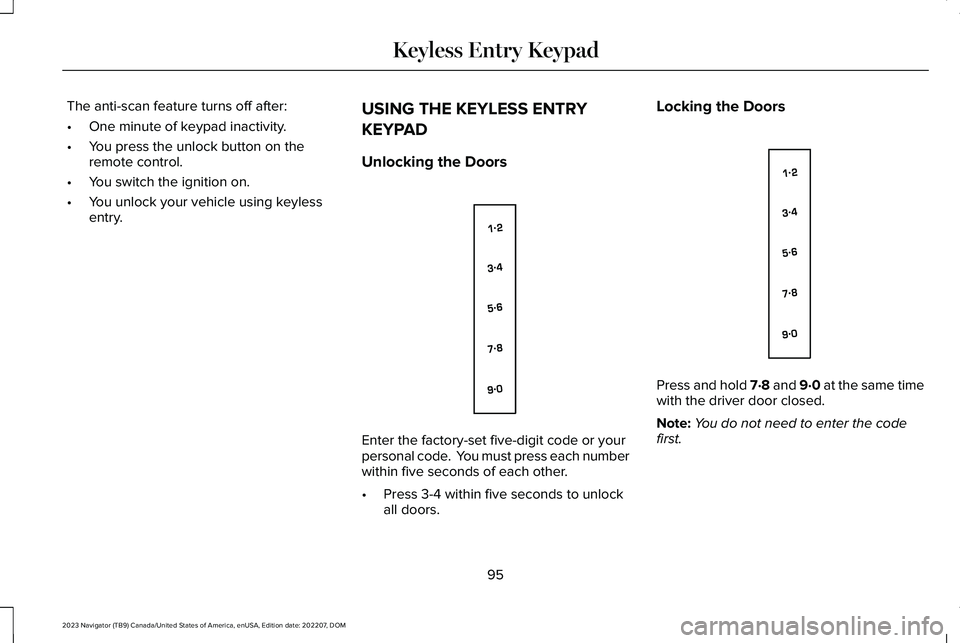
Enter the factory-set five-digit code or yourpersonal code. You must press each numberwithin five seconds of each other.
•Press 3-4 within five seconds to unlockall doors.
Locking the Doors
Press and hold 7·8 and 9·0 at the same timewith the driver door closed.
Note:You do not need to enter the codefirst.
95
2023 Navigator (TB9) Canada/United States of America, enUSA, Edition date: 202207, DOMKeyless Entry KeypadE138637 E138637
Page 101 of 660
HOW DOES EASY ENTRY AND
EXIT WORK
Easy entry and exit moves the driver seatrearward up to 2 in (5 cm) and the steeringcolumn up when you switch the ignition off.The driver seat and steering column returnto their previous positions when you switchthe ignition on.
Note:Depending on your vehicle, the columnmay move up and in.
SWITCHING EASY ENTRY AND
EXIT ON AND OFF
1.Press Settings on the touchscreen.
2.Press Vehicle.
3.Select Easy Entry/Exit.
If you press any adjustment or memorybutton when in easy exit mode, the systemcancels the operation.
97
2023 Navigator (TB9) Canada/United States of America, enUSA, Edition date: 202207, DOMEasy Entry and Exit
Page 110 of 660
PASSIVE ANTI-THEFT SYSTEM
WHAT IS THE PASSIVE ANTI-THEFTSYSTEM
The passive anti-theft system preventssomeone from starting the vehicle with anincorrectly coded key.
Note:Do not leave a duplicate coded keyin your vehicle. Always take the keys andlock all the doors when leaving your vehicle.
HOW DOES THE PASSIVE ANTI-THEFTSYSTEM WORK
The passive anti-theft system arms when youswitch the ignition off.
It disarms when the ignition is switched onwith a correctly coded key.
Note:The system is not compatible withnon-Ford aftermarket remote start systems.
Note:Do not leave a duplicate coded keyin your vehicle. Always take the keys andlock all doors when leaving your vehicle.
ANTI-THEFT ALARM SYSTEM
WHAT IS THE ANTI-THEFT ALARMSYSTEM
The anti-theft alarm system warns you of anunauthorized entry to your vehicle.
HOW DOES THE ANTI-THEFT ALARMSYSTEM WORK
When armed, the anti-theft alarm is triggeredin any of the following ways:
•If someone opens a door, the tailgate orthe hood without a correctly coded keyor remote control.
•If you turn the power on without acorrectly coded key.
•If the interior sensors detect movementinside your vehicle.
•If the inclination sensors detect anattempt to raise your vehicle.
•If someone disconnects the vehiclebattery or the battery backup alarm.
•If someone disconnects the trailer. SeeConnecting a Trailer (page 345).
Any further attempts to carry out one of theabove, sounds the alarm again.
If the anti-theft alarm is triggered, the alarmhorn sounds for 30 seconds and the turnsignals flash for five minutes.
WHAT IS THE PERIMETER ALARM
The perimeter alarm is designed to detectunauthorized access to your vehicle.
WHAT ARE THE INTERIOR SENSORS
The interior sensors are designed to detectany movement inside your vehicle.
The interior sensors are in the overheadconsole.
Note:Do not cover the interior sensors.
106
2023 Navigator (TB9) Canada/United States of America, enUSA, Edition date: 202207, DOMSecurity