towing LINCOLN NAVIGATOR 2023 Owners Manual
[x] Cancel search | Manufacturer: LINCOLN, Model Year: 2023, Model line: NAVIGATOR, Model: LINCOLN NAVIGATOR 2023Pages: 660, PDF Size: 14.04 MB
Page 7 of 660
Liftgate
Liftgate Precautions......................................98
Opening the Liftgate.....................................98
Setting the Liftgate Opening Height.......100
Closing the Liftgate.....................................100
Stopping the Liftgate Movement.............103
Liftgate Obstacle Detection......................103
Opening and Closing the Liftgate Window.......................................................................103
Liftgate – Troubleshooting........................104
Security
Passive Anti-Theft System.........................106
Anti-Theft Alarm System............................106
Anti-Theft Alarm System Settings............107
Security – Troubleshooting.......................108
Power Running Boards
Power Running Board Precautions..........110
Power Running Board Settings.................110
Deploying and Stowing the Power RunningBoards...........................................................111
Power Running Boards – Troubleshooting.........................................................................111
Steering Wheel
Adjusting the Steering Wheel....................112
Resetting the Stopping Position................112
Horn..................................................................112
Switching the Heated Steering Wheel Onand Off.........................................................112
Adjustable Pedals
Adjusting the Pedals....................................113
Wipers and Washers
Wipers..............................................................114
Autowipers......................................................114
Switching the Rear Window Wiper On andOff.................................................................115
Reverse Wipe.................................................115
Checking the Wiper Blades........................116
Replacing the Front Wiper Blades............116
Replacing the Rear Wiper Blades.............117
Washers...........................................................117
Wipers and Washers – Troubleshooting........................................................................119
Exterior Lighting
Exterior Lighting Control............................120
Headlamps....................................................120
Headlamps – Troubleshooting..................121
Autolamps.......................................................121
Exterior Lamps..............................................122
Automatic High Beam Control..................124
Automatic High Beam Control –Troubleshooting.......................................127
Glare Free Lighting......................................127
Glare Free Lighting – Troubleshooting.......................................................................130
Adaptive Front Lighting..............................130
Interior Lighting
Switching All of the Interior Lamps On andOff................................................................132
Switching the Front Interior Lamps On andOff................................................................132
Switching the Rear Interior Lamps On andOff................................................................132
3
2023 Navigator (TB9) Canada/United States of America, enUSA, Edition date: 202207, DOMTable of Contents
Page 15 of 660
Driver Alert
What Is Driver Alert.....................................330
How Does Driver Alert Work....................330
Driver Alert Precautions............................330
Driver Alert Limitations...............................331
Switching Driver Alert On and Off...........331
Driver Alert – Troubleshooting.................331
Speed Sign Recognition
What Is Speed Sign Recognition.............332
How Does Speed Sign Recognition Work......................................................................332
Speed Sign Recognition Precautions.....332
Speed Sign Recognition Limitations......332
Speed Sign Recognition Indicators........333
Setting the Speed Sign Recognition SpeedWarning......................................................333
Setting the Speed Sign Recognition SpeedTolerance...................................................333
Speed Sign Recognition – Troubleshooting......................................................................334
Load Carrying
Load Carrying Precautions.......................336
Locating the Safety ComplianceCertification Labels.................................337
What Is the Gross Axle Weight Rating......................................................................337
What Is the Gross Vehicle Weight Rating......................................................................337
What Is the Gross Combined WeightRating.........................................................337
Calculating Payload....................................338
Calculating the Load Limit........................338
Roof Rack......................................................340
Luggage Compartment
Luggage Compartment Precautions.......341
Installing and Removing the LuggageCompartment Cargo Net.......................341
Adjusting the Luggage Compartment LoadFloor...........................................................342
Adjusting the Luggage CompartmentDivider........................................................343
Connecting a Trailer
Connecting a Trailer Precautions............345
Hitches...........................................................345
Connecting a Trailer...................................346
Connecting a Trailer – Troubleshooting......................................................................348
Towing a Trailer
Towing a Trailer Precautions....................349
Trailer Brake Precautions..........................349
Towing a Trailer Limitations......................350
Loading Your Trailer...................................350
Trailer Towing Hints....................................350
Launching or Retrieving a Boat or PersonalWatercraft..................................................351
Towing Weights and Dimensions............352
Towing a Trailer – Troubleshooting........354
Integrated Trailer Brake
Controller
What Is the Integrated Trailer BrakeController..................................................356
Integrated Trailer Brake ControllerPrecautions..............................................356
Using the Integrated Trailer BrakeController..................................................356
Adjusting the Integrated Trailer BrakeController Mode......................................358
11
2023 Navigator (TB9) Canada/United States of America, enUSA, Edition date: 202207, DOMTable of Contents
Page 16 of 660
Integrated Trailer Brake Controller –Troubleshooting......................................359
Trailer Sway Control
How Does Trailer Sway Control Work.......................................................................361
Trailer Sway Control Precautions.............361
Switching Trailer Sway Control On and Off.......................................................................361
Trailer Backup Assistance
What is Trailer Backup Assistance..........362
How Does Trailer Backup Assistance Work......................................................................362
Trailer Backup Assistance Precautions......................................................................362
Setting Up the Trailer Backup Assistancefor a Conventional Trailer.....................363
Switching Trailer Backup Assistance Onand Off.......................................................366
Using the Trailer Backup AssistanceController..................................................366
Using the Trailer Backup Assistance Views......................................................................367
Trailer Backup Assistance –Troubleshooting......................................369
Trailer Reverse Guidance
What Is Trailer Reverse Guidance...........375
How Does Trailer Reverse Guidance Work......................................................................375
Trailer Reverse Guidance Precautions......................................................................375
Setting Up Trailer Reverse Guidance for aConventional Trailer...............................375
Switching Trailer Reverse Guidance Onand Off.......................................................378
Using Trailer Reverse Guidance Views......................................................................378
Trailer Reverse Guidance –Troubleshooting......................................380
Driving Hints
Cold Weather Precautions........................384
Driving on Snow and Ice...........................384
Breaking-In....................................................384
Driving Economically..................................384
Driving in Special Conditions...................385
Driving Through Shallow Water..............386
Floor Mats......................................................387
Crash and Breakdown
Information
Roadside Assistance..................................389
Switching the Hazard Flashers On and Off......................................................................390
Jump Starting the Vehicle.........................390
Post-Crash Alert System...........................392
Post Impact Braking....................................393
Automatic Crash Shutoff...........................393
Recovery Towing.........................................394
Transporting the Vehicle...........................395
Towing Your Vehicle
Towing Your Vehicle Precautions............397
Recreationally Towing Your Vehicle - 4x4......................................................................397
Recreationally Towing Your Vehicle - 4x2......................................................................399
Emergency Towing.....................................399
Towing Your Vehicle – Troubleshooting......................................................................400
12
2023 Navigator (TB9) Canada/United States of America, enUSA, Edition date: 202207, DOMTable of Contents
Page 40 of 660
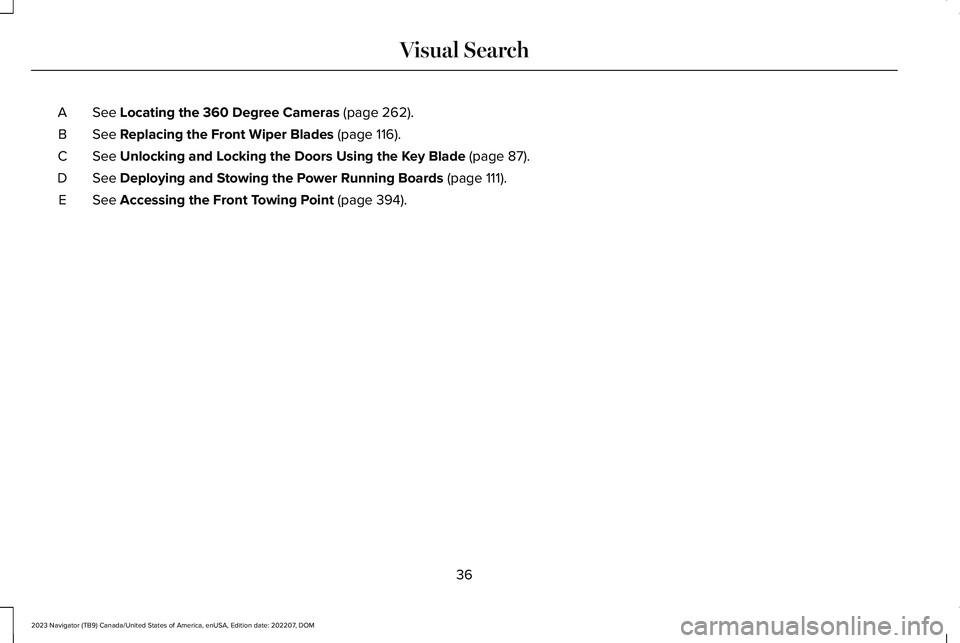
See Locating the 360 Degree Cameras (page 262).A
See Replacing the Front Wiper Blades (page 116).B
See Unlocking and Locking the Doors Using the Key Blade (page 87).C
See Deploying and Stowing the Power Running Boards (page 111).D
See Accessing the Front Towing Point (page 394).E
36
2023 Navigator (TB9) Canada/United States of America, enUSA, Edition date: 202207, DOMVisual Search
Page 115 of 660
Approach detection
When you switch Approach detection onwith Auto switched on, the running boardsdeploy when you approach your vehicle witha remote control.
DEPLOYING AND STOWING THE
POWER RUNNING BOARDS
The power running boards deploy when youapproach your vehicle with a remote control,unlock or open the door.
The power running boards stow:
•When the vehicle speed is more than3 mph (5 km/h).
•After a few seconds when you close thedoors.
•Instantly after you close and lock thedoors.
•If you unlock the door but do not openit, after the timeout.
•If you have switched Approach detectionon and do not open a door before theAuto Timer setting expires. See PowerRunning Board Settings (page 110).
Note:The power running boards reversedirection and move to the end of travel ifthey encounter an object when moving.Keep the power running boards andbrackets clean for optimum performance.
POWER RUNNING BOARDS –
TROUBLESHOOTING
POWER RUNNING BOARDS –FREQUENTLY ASKED QUESTIONS
Why is there unwanted noise coming frommy power running boards?
The power running board mechanismcould trap debris such as mud, dirt,snow, ice and salt. If this happens, setthe running boards to the deployedposition. Then, wash the system, inparticular the front and rear hinge arms,with a high-pressure car wash wand.
111
2023 Navigator (TB9) Canada/United States of America, enUSA, Edition date: 202207, DOMPower Running Boards
Page 216 of 660
FUEL QUALITY
SELECTING THE CORRECT FUEL
Your vehicle operates on regular unleadedgasoline with a minimum pump (R+M)/2octane rating of 87.
Some fuel stations, particularly those in highaltitude areas, offer fuels posted as regularunleaded gasoline with an octane ratingbelow 87. The use of these fuels could resultin engine damage that will not be coveredby the vehicle Warranty.
For best overall vehicle and engineperformance, premium fuel with an octanerating of 91 or higher is recommended. Theperformance gained by using premium fuelis most noticeable in hot weather as well asother conditions, for example when towinga trailer. See Towing a Trailer (page 349).
Do not be concerned if the enginesometimes knocks lightly. However, if theengine knocks heavily while using fuel withthe recommended octane rating, contact anauthorized dealer to prevent any enginedamage.
We recommend Top Tier detergentgasolines, where available to help minimizeengine deposits and maintain optimal vehicleand engine performance.
For additional information, visitwww.toptiergas.com.
Note:Use of any fuel for which the vehiclewas not designed can impair the emissioncontrol system, cause loss of vehicleperformance, and cause damage to theengine which may not be covered by thevehicle Warranty.
Do not use:
•Diesel fuel.
•Fuels containing kerosene or paraffin.
•Fuel containing more than 15% ethanolor E85 fuel.
•Fuels containing methanol.
•Fuels containing metallic-based additives,including manganese-based compounds.
•Fuels containing the octane boosteradditive, methylcyclopentadienylmanganese tricarbonyl (MMT).
•Leaded fuel, using leaded fuel isprohibited by law.
The use of fuels with metallic compoundssuch as methylcyclopentadienyl manganesetricarbonyl, which is a manganese-based fueladditive, will impair engine performance andaffect the emission control system.
LOCATING THE FUEL FILLER
FUNNEL
The fuel filler funnel is under the luggagecompartment floor covering.
212
2023 Navigator (TB9) Canada/United States of America, enUSA, Edition date: 202207, DOMFuel and RefuelingE161513
Page 228 of 660
HOW DOES FOUR-WHEEL DRIVE
WORK
Using the 1-Speed Automatic Four-Wheel Drive System
The 1-speed automatic four-wheel drivesystem utilizes an electronically controlledon-demand 1-speed transfer case. Thissystem monitors various vehicle sensoryinputs to provide an increased level ofperformance. This system offers the drivertwo-wheel drive high, four-wheel drive autoand four-wheel drive high as available modesof operation via the selectable drive modeswitch. When four-wheel drive auto isselected, the system continuously variespower to the front wheels for optimumperformance for all on-road conditions. Whenfour-wheel drive high is selected, the systemprovides power to the front and rear wheelsfor use in off-road or slippery conditions suchas deep snow, sand or mud. There is furtherinformation on driving in unique drivingconditions. See Driving Hints (page 384).
Using the 2-Speed Automatic Four-Wheel Drive System (If Equipped)
The 2-speed automatic four-wheel drivesystem utilizes an electronically controlledon-demand 2-speed transfer case. Thissystem monitors various vehicle sensoryinputs to provide an increased level ofperformance. This system offers the drivertwo-wheel drive high, four-wheel drive auto,four-wheel drive high, and four-wheel drivelow as available modes of operation. Whenfour-wheel drive auto is selected, the systemcontinuously varies power to the front wheelsfor optimum performance for all on-roadconditions. When either four-wheel drive highor four-wheel drive low are selected with theappropriate drive modes , the four-wheeldrive system provides electronically lockedpower to the front and rear wheels for usein off-road or slippery conditions such asdeep snow, sand or mud. Selecting slowclimb also provides additional gearing forincreased torque multiplication for conditionslike deep sand, snow, steep slopes, or pulling
heavy objects. See Slow Climb (page 297).Additionally, the system is capable ofrecreational flat towing by putting thetransfer case into neutral (N). SeeRecreationally Towing Your Vehicle (page397).
There is further information on driving inunique driving conditions. See Driving Hints(page 384).
FOUR-WHEEL DRIVE
PRECAUTIONS
WARNING: Vehicles with a highercenter of gravity (utility and four-wheeldrive vehicles) handle differently thanvehicles with a lower center of gravity(passenger cars). Avoid sharp turns,excessive speed and abrupt steering inthese vehicles. Failure to drive cautiouslyincreases the risk of losing control of yourvehicle, vehicle rollover, personal injuryand death.
224
2023 Navigator (TB9) Canada/United States of America, enUSA, Edition date: 202207, DOMFour-Wheel Drive (If Equipped)
Page 234 of 660
WHAT IS THE ELECTRONIC
LIMITED-SLIP DIFFERENTIAL
The electronic limited-slip differential systemdirects torque across the axle, enabling thevehicle to drive over terrain and roadconditions that a conventional axle cannot.The system is active at all times and requiresno input from the driver.
Note:If your vehicle is not at optimaloperating conditions or a system fault ispresent, a warning may display in theinstrument cluster. Depending on thewarning, you may need to service yourvehicle.
Operating the Electronic Limited-SlipDifferential with a Spare or MismatchedTires
If your vehicle has an electronic limited-slipdifferential, do not use a spare tire of adifferent size than the tire provided. If youhave a spare tire installed, a message mayappear indicating the system has disabledautomatically or reduced function to preventsystem overheat and damage. Werecommend you reinstall the repaired orreplaced spare tire as soon as possible.When you replace the spare tire, the systemresumes normal operation on the next keycycle.
Trailer Towing
The electronic limited-slip differentialenhances vehicle stability during trailer towoperation. During high demand traileringevents, such as steep slopes, high speedsor with a spare tire, the system may providea warning in the instrument cluster andreduce function or enter a temporarilydisabled state. To resume normal function,stop the vehicle in a safe location and allowthe unit to adequately cool. Once the systemreaches normal operating temperatures,system function restores and the electroniclimited-slip differential restored messagedisplays.
230
2023 Navigator (TB9) Canada/United States of America, enUSA, Edition date: 202207, DOMElectronic Limited-Slip Differential (If Equipped)
Page 239 of 660
WHAT IS THE ELECTRIC PARKING
BRAKE
The electric parking brake is used to holdyour vehicle on slopes and flat roads.
APPLYING THE ELECTRIC
PARKING BRAKE
WARNING: Always fully apply theparking brake. Failure to follow thisinstruction could result in personal injuryor death.
WARNING: If you drive extendeddistances with the parking brake applied,you could cause damage to the brakesystem.
The electric parking brake switchis on the center console.
Pull the switch up to apply the electricparking brake. The red warning lamp flashes,then steadily illuminates when the parkingbrake is applied.
Note:You can apply the electric parkingbrake when the ignition is off.
Note:The electric parking brake could applywhen park (P) is selected. See Park (P) (page220).
APPLYING THE ELECTRIC
PARKING BRAKE IN AN
EMERGENCY
You can use the electric parking brake toslow or stop your vehicle in an emergency.
Pull the switch up and hold it.
The red warning lamp illuminates, a tonesounds and the stoplamps turn on when youuse the electric parking brake in anemergency.
The electric parking brake continues to slowyour vehicle down unless you release theswitch.
Note:Do not apply the electric parking brakewhen your vehicle is moving, except in anemergency. If you repeatedly use the electricparking brake to slow or stop your vehicle,you could cause damage to the brakesystem.
MANUALLY RELEASING THE
ELECTRIC PARKING BRAKE
1.Switch the ignition on.
2.Press and hold the brake pedal.
3.Push the switch down.
The red warning lamp turns off.
Pulling Away on a Hill When Towing aTrailer
1.Press and hold the brake pedal.
2.Pull the switch upward and hold it.
3.Shift into gear.
4.Press the accelerator pedal until enginehas developed sufficient torque toprevent your vehicle from rolling downthe hill.
235
2023 Navigator (TB9) Canada/United States of America, enUSA, Edition date: 202207, DOMElectric Parking BrakeE267156
Page 274 of 660
HOW DOES ADAPTIVE CRUISE
CONTROL WITH STOP AND GO
WORK
Adaptive cruise control with stop and gouses radar and camera sensors to maintaina set gap between your vehicle and thevehicle in front of you while following it to acomplete stop. Stop and go can also be setto follow a vehicle directly in front of you andadjust the set speed, while you are at acomplete stop.
ADAPTIVE CRUISE CONTROL
PRECAUTIONS
WARNING: You are responsible forcontrolling your vehicle at all times. Thesystem is designed to be an aid and doesnot relieve you of your responsibility todrive with due care and attention. Failureto follow this instruction could result in theloss of control of your vehicle, personalinjury or death.
WARNING: Do not use adaptivecruise control on winding roads, in heavytraffic or when the road surface is slippery.This could result in loss of vehicle control,serious injury or death.
WARNING: Pay close attention tochanging road conditions such as enteringor leaving a highway, on roads withintersections or roundabouts, roadswithout visible lanes of travel, roads thatare unpaved, or steep slopes. Failure tofollow this instruction could result in theloss of control of your vehicle, personalinjury or death.
WARNING: The system is not a crashwarning or avoidance system.
WARNING: Do not use the systemwhen towing a trailer that has aftermarketelectronic trailer brake controls. Failure tofollow this instruction could result in theloss of control of your vehicle, personalinjury or death.
WARNING: Do not use tire sizesother than those recommended becausethis can affect the normal operation of thesystem. Failure to do so may result in a lossof vehicle control, which could result inserious injury.
WARNING: Do not use the systemwith a snow plow blade installed.
WARNING: Do not use the system inpoor visibility, for example fog, heavy rain,spray or snow.
When Following a Vehicle
WARNING: When following a vehiclethat is braking, your vehicle does notalways decelerate quickly enough to avoida crash without driver intervention. Applythe brakes when necessary. Failure tofollow this instruction could result inpersonal injury or death.
270
2023 Navigator (TB9) Canada/United States of America, enUSA, Edition date: 202207, DOMAdaptive Cruise Control