driver LINCOLN NAVIGATOR 2023 Manual PDF
[x] Cancel search | Manufacturer: LINCOLN, Model Year: 2023, Model line: NAVIGATOR, Model: LINCOLN NAVIGATOR 2023Pages: 660, PDF Size: 14.04 MB
Page 335 of 660
DRIVER ALERT LIMITATIONS
Driver alert may not function correctly if:
•The sensor cannot track the road lanemarkings.
•Your vehicle's speed is less thanapproximately 40 mph (65 km/h).
SWITCHING DRIVER ALERT ON
AND OFF
1.Press Features on the touchscreen.
2.Press Driver Assistance.
3.Switch Driver Alert on or off.
Note:The system remains on or offdepending on how it was last set.
Resetting Driver Alert
You can reset the system by either:
•Switching the ignition off and on.
•Opening and closing the driver doorwhen your vehicle is stationary, and it issafe to do so.
DRIVER ALERT – TROUBLESHOOTING
DRIVER ALERT – INFORMATION MESSAGES
ActionMessage
Stop and rest as soon as it is safe to do so.Driver Alert Warning Rest Now
Take a rest soon.Driver Alert Warning Rest Suggested
331
2023 Navigator (TB9) Canada/United States of America, enUSA, Edition date: 202207, DOMDriver Alert
Page 337 of 660
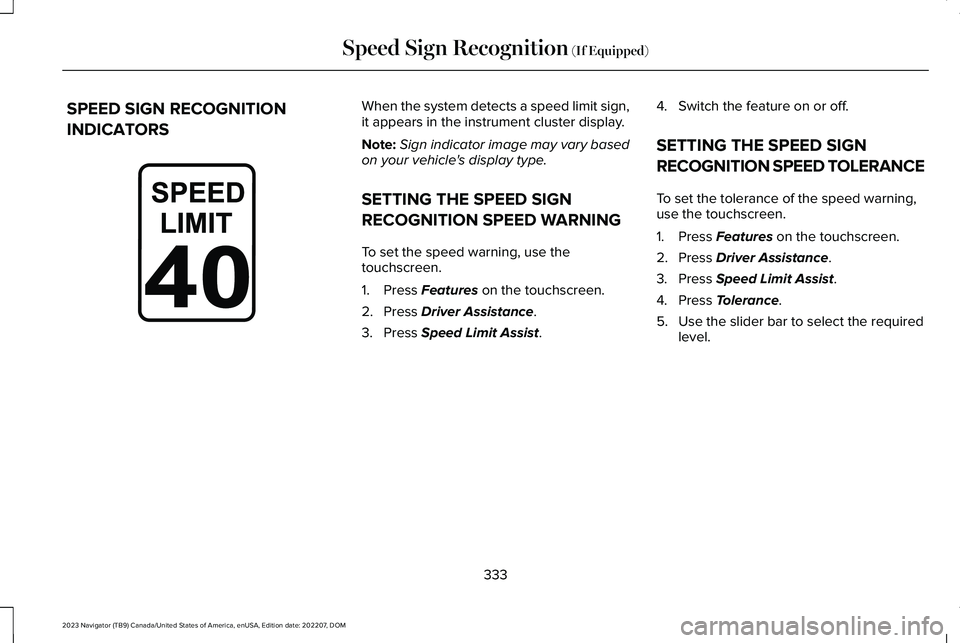
SPEED SIGN RECOGNITION
INDICATORS
When the system detects a speed limit sign,it appears in the instrument cluster display.
Note:Sign indicator image may vary basedon your vehicle's display type.
SETTING THE SPEED SIGN
RECOGNITION SPEED WARNING
To set the speed warning, use thetouchscreen.
1.Press Features on the touchscreen.
2.Press Driver Assistance.
3.Press Speed Limit Assist.
4.Switch the feature on or off.
SETTING THE SPEED SIGN
RECOGNITION SPEED TOLERANCE
To set the tolerance of the speed warning,use the touchscreen.
1.Press Features on the touchscreen.
2.Press Driver Assistance.
3.Press Speed Limit Assist.
4.Press Tolerance.
5.Use the slider bar to select the requiredlevel.
333
2023 Navigator (TB9) Canada/United States of America, enUSA, Edition date: 202207, DOMSpeed Sign Recognition (If Equipped)E317824
Page 341 of 660
LOCATING THE SAFETY
COMPLIANCE CERTIFICATION
LABELS
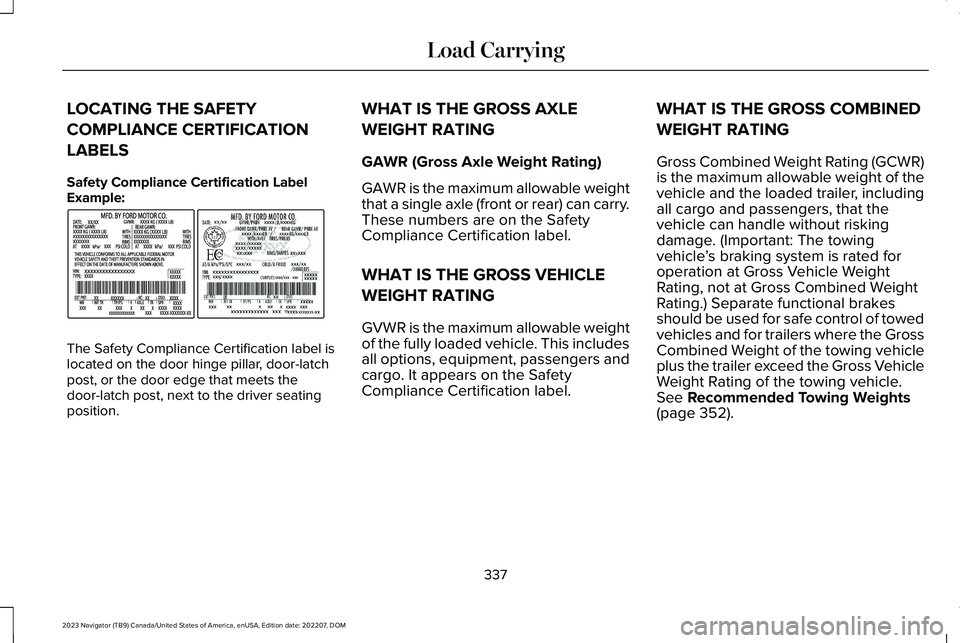
Safety Compliance Certification LabelExample:
The Safety Compliance Certification label islocated on the door hinge pillar, door-latchpost, or the door edge that meets thedoor-latch post, next to the driver seatingposition.
WHAT IS THE GROSS AXLE
WEIGHT RATING
GAWR (Gross Axle Weight Rating)
GAWR is the maximum allowable weightthat a single axle (front or rear) can carry.These numbers are on the SafetyCompliance Certification label.
WHAT IS THE GROSS VEHICLE
WEIGHT RATING
GVWR is the maximum allowable weightof the fully loaded vehicle. This includesall options, equipment, passengers andcargo. It appears on the SafetyCompliance Certification label.
WHAT IS THE GROSS COMBINED
WEIGHT RATING
Gross Combined Weight Rating (GCWR)is the maximum allowable weight of thevehicle and the loaded trailer, includingall cargo and passengers, that thevehicle can handle without riskingdamage. (Important: The towingvehicle’s braking system is rated foroperation at Gross Vehicle WeightRating, not at Gross Combined WeightRating.) Separate functional brakesshould be used for safe control of towedvehicles and for trailers where the GrossCombined Weight of the towing vehicleplus the trailer exceed the Gross VehicleWeight Rating of the towing vehicle.See Recommended Towing Weights(page 352).
337
2023 Navigator (TB9) Canada/United States of America, enUSA, Edition date: 202207, DOMLoad CarryingE198828
Page 342 of 660
CALCULATING PAYLOAD
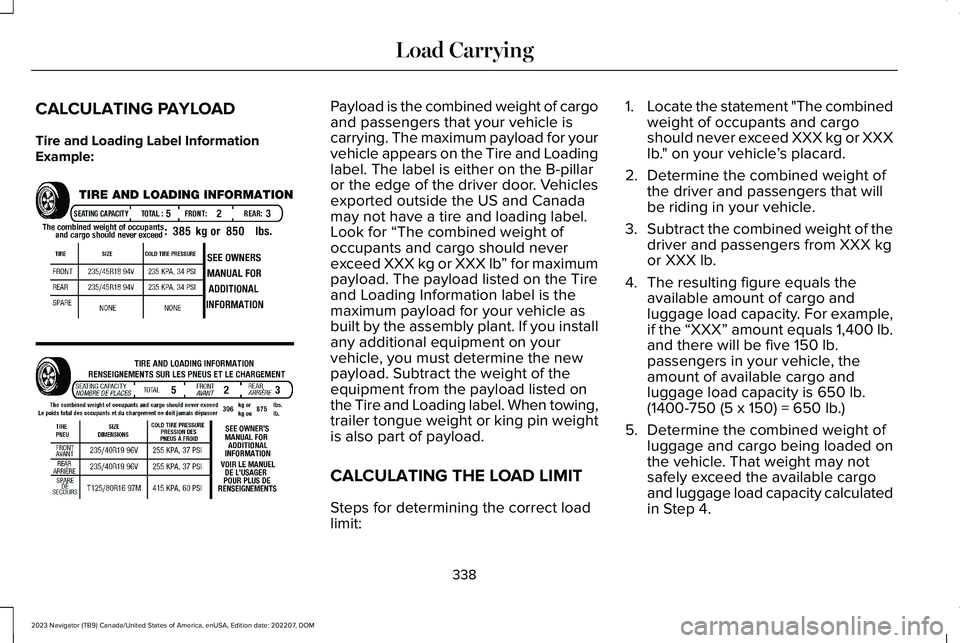
Tire and Loading Label InformationExample:
Payload is the combined weight of cargoand passengers that your vehicle iscarrying. The maximum payload for yourvehicle appears on the Tire and Loadinglabel. The label is either on the B-pillaror the edge of the driver door. Vehiclesexported outside the US and Canadamay not have a tire and loading label.Look for “The combined weight ofoccupants and cargo should neverexceed XXX kg or XXX lb” for maximumpayload. The payload listed on the Tireand Loading Information label is themaximum payload for your vehicle asbuilt by the assembly plant. If you installany additional equipment on yourvehicle, you must determine the newpayload. Subtract the weight of theequipment from the payload listed on
the Tire and Loading label. When towing,trailer tongue weight or king pin weightis also part of payload.
CALCULATING THE LOAD LIMIT
Steps for determining the correct loadlimit:
1.Locate the statement "The combinedweight of occupants and cargoshould never exceed XXX kg or XXXlb." on your vehicle’s placard.
2.Determine the combined weight ofthe driver and passengers that willbe riding in your vehicle.
3.Subtract the combined weight of thedriver and passengers from XXX kgor XXX lb.
4.The resulting figure equals theavailable amount of cargo andluggage load capacity. For example,if the “XXX” amount equals 1,400 lb.and there will be five 150 lb.passengers in your vehicle, theamount of available cargo andluggage load capacity is 650 lb.
(1400-750 (5 x 150) = 650 lb.)
5.Determine the combined weight ofluggage and cargo being loaded onthe vehicle. That weight may notsafely exceed the available cargoand luggage load capacity calculatedin Step 4.
338
2023 Navigator (TB9) Canada/United States of America, enUSA, Edition date: 202207, DOMLoad CarryingE198719
Page 357 of 660
WHAT IS THE MAXIMUM LOADEDTRAILER WEIGHT
The maximum loaded trailer weight isthe highest possible weight of a fullyloaded trailer the vehicle can tow.
CALCULATING THE MAXIMUMLOADED TRAILER WEIGHT FOR YOURVEHICLE
1.Start with the gross combined weightrating for your vehicle model andaxle ratio.
2.Subtract all of the following thatapply to your vehicle:
•Vehicle curb weight.
•Hitch hardware weight, for examplea draw bar, ball, locks or weightdistributing hardware.
•Driver weight.
•Passenger weight.
•Payload, cargo and luggage weight.
•Aftermarket equipment weight.
This equals the maximum loaded trailerweight for this combination.
Note:The trailer tongue load isconsidered part of the payload for yourvehicle. Reduce the total payload by thefinal trailer tongue weight.
Note:Consult an authorized dealer todetermine the maximum trailer weightallowed for your vehicle if you are notsure.
353
2023 Navigator (TB9) Canada/United States of America, enUSA, Edition date: 202207, DOMTowing a Trailer
Page 365 of 660
HOW DOES TRAILER SWAY
CONTROL WORK
The system applies the brakes to theindividual wheels and reduces engine torqueto aid vehicle stability.
If the trailer begins to sway, the stabilitycontrol lamp flashes and the message TrailerSway Reduce Speed appears in theinformation display.
Stop your vehicle as soon as it is safe to doso. Check the vertical weight on the tow balland trailer load distribution.
TRAILER SWAY CONTROL
PRECAUTIONS
WARNING: Turning off trailer swaycontrol increases the risk of loss of vehiclecontrol, serious injury or death. Ford doesnot recommend disabling this featureexcept in situations where speed reductionmay be detrimental (such as hill climbing),the driver has significant trailer towingexperience, and can control trailer swayand maintain safe operation.
Note:This feature only activates whensignificant trailer sway occurs.
Note:This feature does not prevent trailersway, but reduces it once it begins.
Note:This feature cannot stop all trailersfrom swaying.
Note:In some cases, if vehicle speed is toohigh, the system may activate multiple times,gradually reducing vehicle speed.
SWITCHING TRAILER SWAY
CONTROL ON AND OFF
1.Press Features on the touchscreen.
2.Press Towing.
3.Switch Trailer Sway Control on or off.
The system turns on each time you start yourvehicle.
361
2023 Navigator (TB9) Canada/United States of America, enUSA, Edition date: 202207, DOMTrailer Sway Control
Page 391 of 660
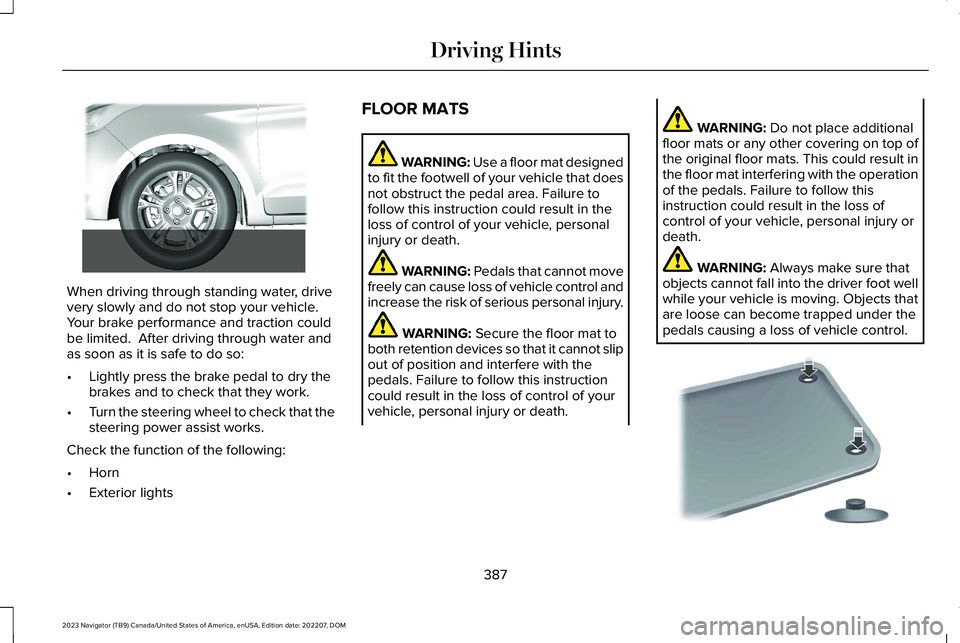
When driving through standing water, drivevery slowly and do not stop your vehicle. Your brake performance and traction couldbe limited. After driving through water andas soon as it is safe to do so:
•Lightly press the brake pedal to dry thebrakes and to check that they work.
•Turn the steering wheel to check that thesteering power assist works.
Check the function of the following:
•Horn
•Exterior lights
FLOOR MATS
WARNING: Use a floor mat designedto fit the footwell of your vehicle that doesnot obstruct the pedal area. Failure tofollow this instruction could result in theloss of control of your vehicle, personalinjury or death.
WARNING: Pedals that cannot movefreely can cause loss of vehicle control andincrease the risk of serious personal injury.
WARNING: Secure the floor mat toboth retention devices so that it cannot slipout of position and interfere with thepedals. Failure to follow this instructioncould result in the loss of control of yourvehicle, personal injury or death.
WARNING: Do not place additionalfloor mats or any other covering on top ofthe original floor mats. This could result inthe floor mat interfering with the operationof the pedals. Failure to follow thisinstruction could result in the loss ofcontrol of your vehicle, personal injury ordeath.
WARNING: Always make sure thatobjects cannot fall into the driver foot wellwhile your vehicle is moving. Objects thatare loose can become trapped under thepedals causing a loss of vehicle control.
387
2023 Navigator (TB9) Canada/United States of America, enUSA, Edition date: 202207, DOMDriving Hints E266447 E142666
Page 401 of 660
TOWING YOUR VEHICLE
PRECAUTIONS
Use the following guidelines when towingyour vehicle. Failure to follow this instructioncould result in vehicle damage not coveredby the vehicle warranty.
Note:Make sure you properly secure yourvehicle to the tow vehicle.
Note:If you are unsure of the vehicle’sconfiguration, contact an authorized dealer.
RECREATIONALLY TOWING YOUR
VEHICLE - 4X4
WARNING: Do not disconnect thebattery when recreationally towing yourvehicle. This prevents the transfer casefrom shifting properly and could cause thevehicle to roll, even if the transmission isin park (P).
WARNING: Placing the transfer casein its neutral position could cause yourvehicle to freely roll. Make sure you pressand hold the brake pedal and the vehicleis in a secure, safe position when you placethe transfer case in its neutral position.
Follow these guidelines if you have a needfor recreational towing. An example ofrecreational towing would be towing yourvehicle behind a motorhome. Theseguidelines are to make sure that you do notdamage the transmission.
You can only tow your vehicle with all wheelson the ground by placing the transfer casein its neutral position and engaging therecreational tow feature. Perform thefollowing steps after positioning your vehiclebehind the tow vehicle and properly securingthem together.
Note:Put your climate control system inrecirculated air mode to prevent exhaustfumes from entering your vehicle.
Note:Failure to put the transfer case in itsneutral position can damage vehiclecomponents.
Note: You can check the towing status atany time by opening the driver door orturning the ignition to the accessory or onposition. Neutral Tow Enabled LeaveTransmission in Neutral appears in theinstrument cluster display to confirm you canrecreationally tow your vehicle.
Note:If your vehicle has an anti-theft alarm,make sure you switch perimeter sensing onwhen towing. See Setting the AlarmSecurity Level (page 107).
Switching Neutral Tow On
1.Start your vehicle.
2.Make sure your vehicle is in NORMALmode. See Selecting a Drive Mode(page 295).
3.Place your vehicle in temporary neutralmode. See Entering Temporary NeutralMode (page 222).
397
2023 Navigator (TB9) Canada/United States of America, enUSA, Edition date: 202207, DOMTowing Your Vehicle
Page 408 of 660
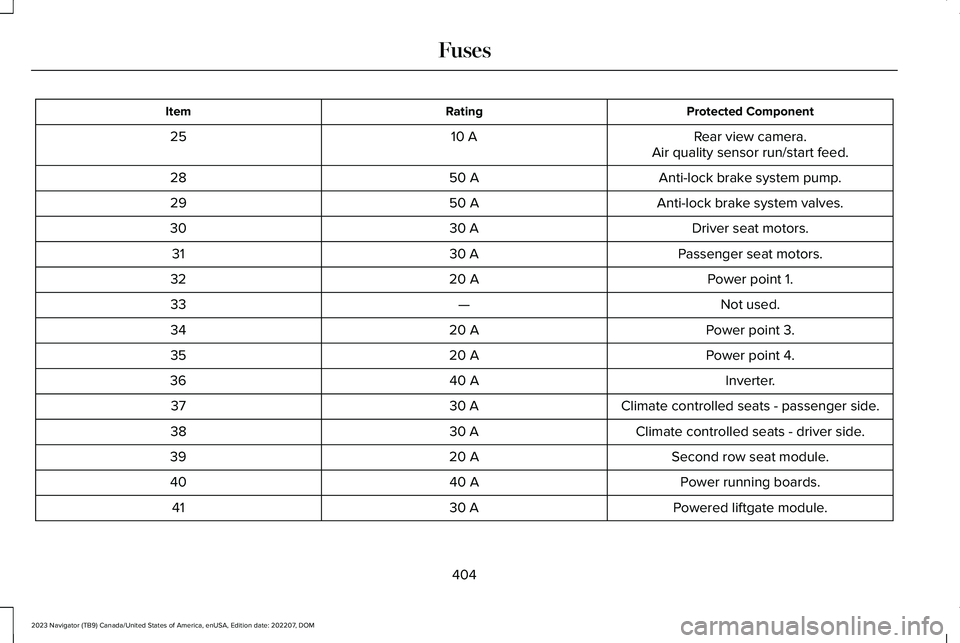
Protected ComponentRatingItem
Rear view camera.10 A25Air quality sensor run/start feed.
Anti-lock brake system pump.50 A28
Anti-lock brake system valves.50 A29
Driver seat motors.30 A30
Passenger seat motors.30 A31
Power point 1.20 A32
Not used.—33
Power point 3.20 A34
Power point 4.20 A35
Inverter.40 A36
Climate controlled seats - passenger side.30 A37
Climate controlled seats - driver side.30 A38
Second row seat module.20 A39
Power running boards.40 A40
Powered liftgate module.30 A41
404
2023 Navigator (TB9) Canada/United States of America, enUSA, Edition date: 202207, DOMFuses
Page 410 of 660
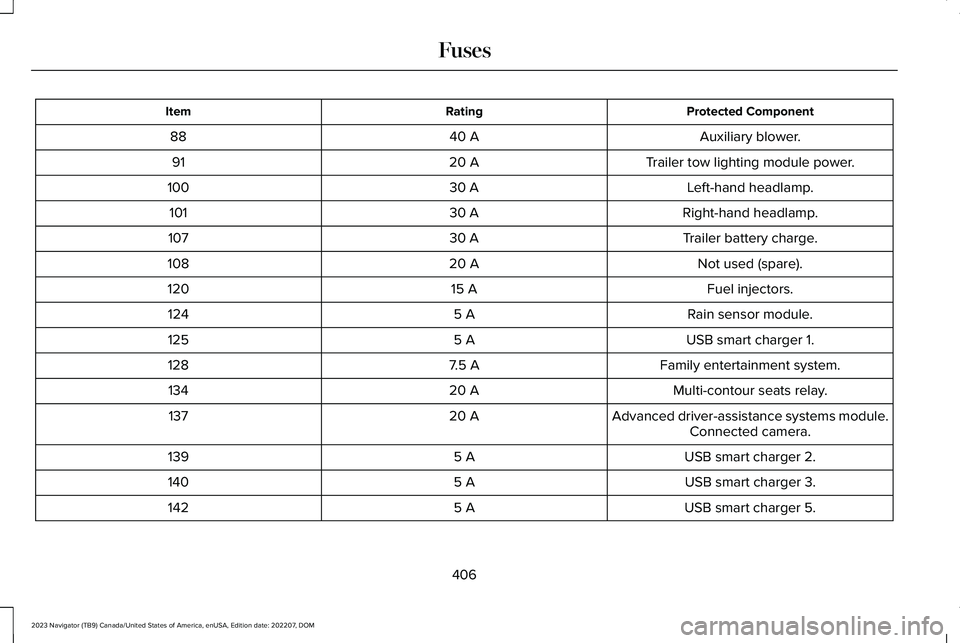
Protected ComponentRatingItem
Auxiliary blower.40 A88
Trailer tow lighting module power.20 A91
Left-hand headlamp.30 A100
Right-hand headlamp.30 A101
Trailer battery charge.30 A107
Not used (spare).20 A108
Fuel injectors.15 A120
Rain sensor module.5 A124
USB smart charger 1.5 A125
Family entertainment system.7.5 A128
Multi-contour seats relay.20 A134
Advanced driver-assistance systems module.20 A137Connected camera.
USB smart charger 2.5 A139
USB smart charger 3.5 A140
USB smart charger 5.5 A142
406
2023 Navigator (TB9) Canada/United States of America, enUSA, Edition date: 202207, DOMFuses