light LINCOLN NAVIGATOR 2023 Manual PDF
[x] Cancel search | Manufacturer: LINCOLN, Model Year: 2023, Model line: NAVIGATOR, Model: LINCOLN NAVIGATOR 2023Pages: 660, PDF Size: 14.04 MB
Page 374 of 660
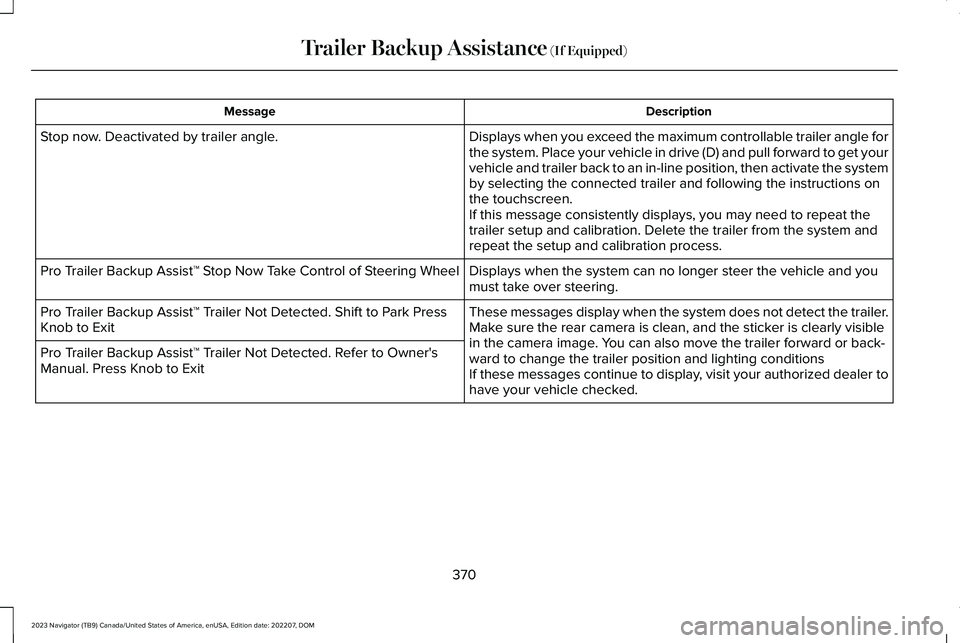
DescriptionMessage
Displays when you exceed the maximum controllable trailer angle forthe system. Place your vehicle in drive (D) and pull forward to get yourvehicle and trailer back to an in-line position, then activate the systemby selecting the connected trailer and following the instructions onthe touchscreen.If this message consistently displays, you may need to repeat thetrailer setup and calibration. Delete the trailer from the system andrepeat the setup and calibration process.
Stop now. Deactivated by trailer angle.
Displays when the system can no longer steer the vehicle and youmust take over steering.Pro Trailer Backup Assist™ Stop Now Take Control of Steering Wheel
These messages display when the system does not detect the trailer.Make sure the rear camera is clean, and the sticker is clearly visiblein the camera image. You can also move the trailer forward or back-ward to change the trailer position and lighting conditionsIf these messages continue to display, visit your authorized dealer tohave your vehicle checked.
Pro Trailer Backup Assist™ Trailer Not Detected. Shift to Park PressKnob to Exit
Pro Trailer Backup Assist™ Trailer Not Detected. Refer to Owner'sManual. Press Knob to Exit
370
2023 Navigator (TB9) Canada/United States of America, enUSA, Edition date: 202207, DOMTrailer Backup Assistance (If Equipped)
Page 376 of 660
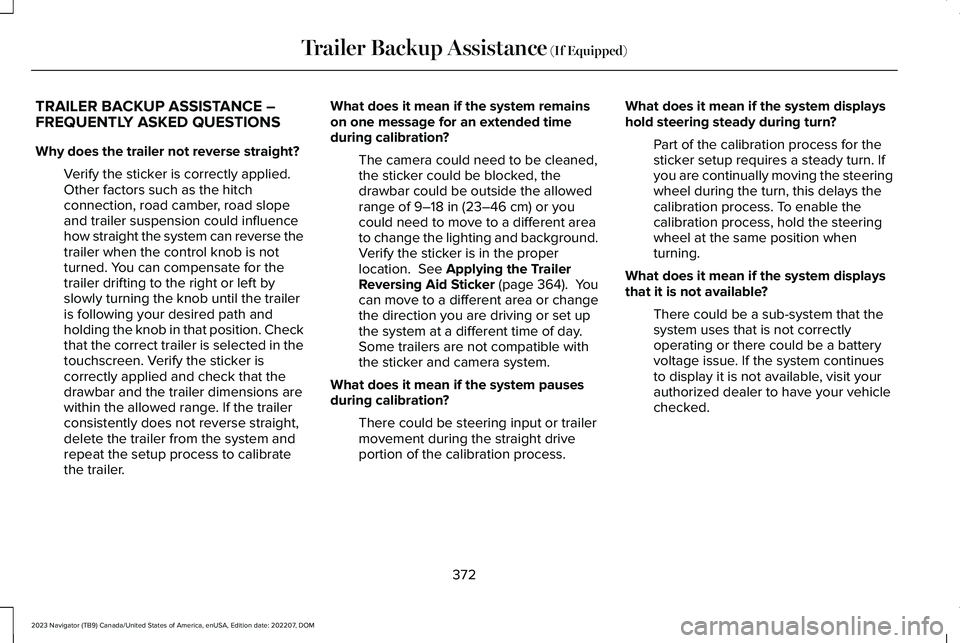
TRAILER BACKUP ASSISTANCE –FREQUENTLY ASKED QUESTIONS
Why does the trailer not reverse straight?
Verify the sticker is correctly applied.Other factors such as the hitchconnection, road camber, road slopeand trailer suspension could influencehow straight the system can reverse thetrailer when the control knob is notturned. You can compensate for thetrailer drifting to the right or left byslowly turning the knob until the traileris following your desired path andholding the knob in that position. Checkthat the correct trailer is selected in thetouchscreen. Verify the sticker iscorrectly applied and check that thedrawbar and the trailer dimensions arewithin the allowed range. If the trailerconsistently does not reverse straight,delete the trailer from the system andrepeat the setup process to calibratethe trailer.
What does it mean if the system remainson one message for an extended timeduring calibration?
The camera could need to be cleaned,the sticker could be blocked, thedrawbar could be outside the allowedrange of 9–18 in (23–46 cm) or youcould need to move to a different areato change the lighting and background.Verify the sticker is in the properlocation. See Applying the TrailerReversing Aid Sticker (page 364). Youcan move to a different area or changethe direction you are driving or set upthe system at a different time of day.Some trailers are not compatible withthe sticker and camera system.
What does it mean if the system pausesduring calibration?
There could be steering input or trailermovement during the straight driveportion of the calibration process.
What does it mean if the system displayshold steering steady during turn?
Part of the calibration process for thesticker setup requires a steady turn. Ifyou are continually moving the steeringwheel during the turn, this delays thecalibration process. To enable thecalibration process, hold the steeringwheel at the same position whenturning.
What does it mean if the system displaysthat it is not available?
There could be a sub-system that thesystem uses that is not correctlyoperating or there could be a batteryvoltage issue. If the system continuesto display it is not available, visit yourauthorized dealer to have your vehiclechecked.
372
2023 Navigator (TB9) Canada/United States of America, enUSA, Edition date: 202207, DOMTrailer Backup Assistance (If Equipped)
Page 378 of 660
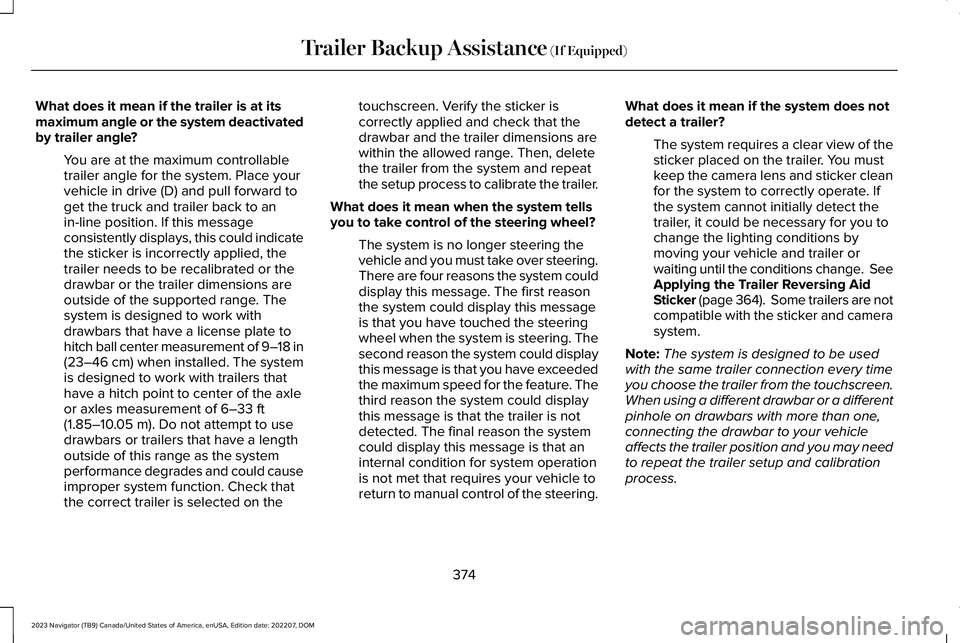
What does it mean if the trailer is at itsmaximum angle or the system deactivatedby trailer angle?
You are at the maximum controllabletrailer angle for the system. Place yourvehicle in drive (D) and pull forward toget the truck and trailer back to anin-line position. If this messageconsistently displays, this could indicatethe sticker is incorrectly applied, thetrailer needs to be recalibrated or thedrawbar or the trailer dimensions areoutside of the supported range. Thesystem is designed to work withdrawbars that have a license plate tohitch ball center measurement of 9–18 in(23–46 cm) when installed. The systemis designed to work with trailers thathave a hitch point to center of the axleor axles measurement of 6–33 ft(1.85–10.05 m). Do not attempt to usedrawbars or trailers that have a lengthoutside of this range as the systemperformance degrades and could causeimproper system function. Check thatthe correct trailer is selected on the
touchscreen. Verify the sticker iscorrectly applied and check that thedrawbar and the trailer dimensions arewithin the allowed range. Then, deletethe trailer from the system and repeatthe setup process to calibrate the trailer.
What does it mean when the system tellsyou to take control of the steering wheel?
The system is no longer steering thevehicle and you must take over steering.There are four reasons the system coulddisplay this message. The first reasonthe system could display this messageis that you have touched the steeringwheel when the system is steering. Thesecond reason the system could displaythis message is that you have exceededthe maximum speed for the feature. Thethird reason the system could displaythis message is that the trailer is notdetected. The final reason the systemcould display this message is that aninternal condition for system operationis not met that requires your vehicle toreturn to manual control of the steering.
What does it mean if the system does notdetect a trailer?
The system requires a clear view of thesticker placed on the trailer. You mustkeep the camera lens and sticker cleanfor the system to correctly operate. Ifthe system cannot initially detect thetrailer, it could be necessary for you tochange the lighting conditions bymoving your vehicle and trailer orwaiting until the conditions change. SeeApplying the Trailer Reversing AidSticker (page 364). Some trailers are notcompatible with the sticker and camerasystem.
Note:The system is designed to be usedwith the same trailer connection every timeyou choose the trailer from the touchscreen.When using a different drawbar or a differentpinhole on drawbars with more than one,connecting the drawbar to your vehicleaffects the trailer position and you may needto repeat the trailer setup and calibrationprocess.
374
2023 Navigator (TB9) Canada/United States of America, enUSA, Edition date: 202207, DOMTrailer Backup Assistance (If Equipped)
Page 385 of 660
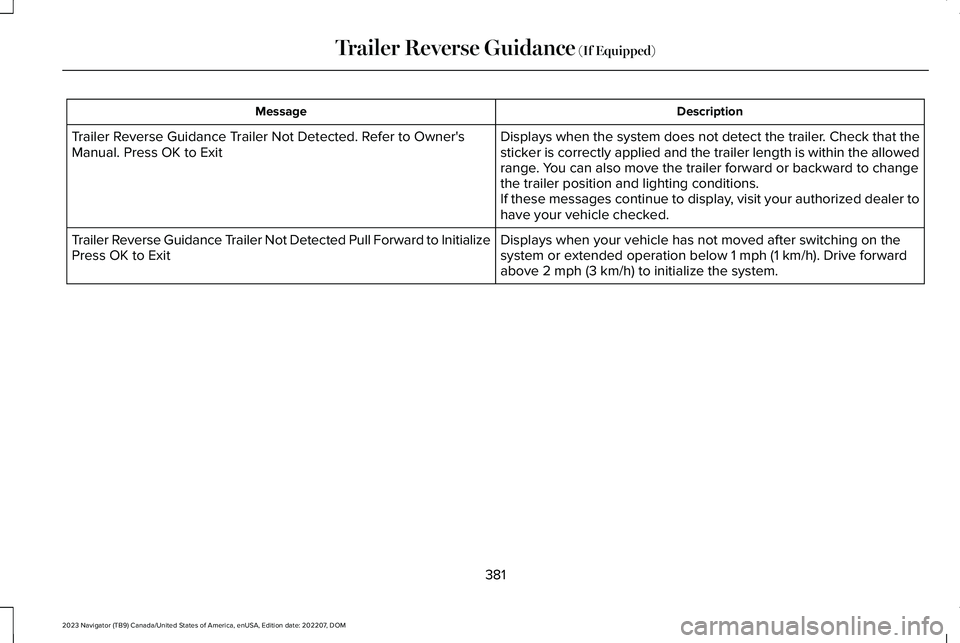
DescriptionMessage
Displays when the system does not detect the trailer. Check that thesticker is correctly applied and the trailer length is within the allowedrange. You can also move the trailer forward or backward to changethe trailer position and lighting conditions.If these messages continue to display, visit your authorized dealer tohave your vehicle checked.
Trailer Reverse Guidance Trailer Not Detected. Refer to Owner'sManual. Press OK to Exit
Displays when your vehicle has not moved after switching on thesystem or extended operation below 1 mph (1 km/h). Drive forwardabove 2 mph (3 km/h) to initialize the system.
Trailer Reverse Guidance Trailer Not Detected Pull Forward to InitializePress OK to Exit
381
2023 Navigator (TB9) Canada/United States of America, enUSA, Edition date: 202207, DOMTrailer Reverse Guidance (If Equipped)
Page 386 of 660
TRAILER REVERSE GUIDANCE –FREQUENTLY ASKED QUESTIONS
What does it mean if the system remainson one message for an extended timeduring calibration?
The camera could need to be cleaned,the sticker could be blocked, thedrawbar could be outside the allowedrange of 9–18 in (23–46 cm) or youcould need to move to a different areato change the lighting and background.Verify the sticker is in the properlocation. See Applying the TrailerReverse Aid Sticker (page 376). You canmove to a different area or change thedirection you are driving or setup thesystem at a different time of day. Sometrailers are not compatible with thesticker and camera system.
What does it mean if the system pausesduring calibration?
There could be steering input or trailermovement during the straight driveportion of the calibration process.
What does it mean if the system displayshold steering steady during turn?
Part of the calibration process for thesticker setup requires a steady turn. Ifyou are continually moving the steeringwheel during the turn, this delays thecalibration process. To enable thecalibration process, hold the steeringwheel at the same position whenturning.
What does it mean if the system displaysthat it is not available?
There could be a sub-system that thesystem uses that is not correctlyoperating or there could be a batteryvoltage issue. If the system continuesto display it is not available, visit yourauthorized dealer to have your vehiclechecked.
What does it mean if the system displaysthat driving is required to initialize steering?
The steering system needs to learninternal parameters to fully turn on thefeature. Drive your vehicle straightforward above 25 mph (40 km/h) forapproximately 5 minutes. This could alsooccur when your vehicle is new, thereis a battery voltage issue or if thesteering system has been serviced.
What does it mean if the system does notdetect a trailer?
The system requires a clear view of thesticker placed on the trailer. You mustkeep the camera lens and sticker cleanfor the system to correctly operate. Ifthe system cannot initially detect thetrailer, it could be necessary for you tochange the lighting conditions bymoving your vehicle and trailer orwaiting until the conditions change. SeeApplying the Trailer Reverse AidSticker (page 376). Some trailers are notcompatible with the sticker and camerasystem.
382
2023 Navigator (TB9) Canada/United States of America, enUSA, Edition date: 202207, DOMTrailer Reverse Guidance (If Equipped)
Page 389 of 660
DRIVING IN SPECIAL CONDITIONS
DRIVING THROUGH MUD AND WATER
Mud
Be cautious of sudden changes in vehiclespeed or direction when you are driving inmud. Even all-wheel drive and four-wheeldrive vehicles can lose traction in mud. Ifyour vehicle slides, steer in the direction ofthe slide until you regain control of yourvehicle. After driving through mud, clean offresidue stuck to rotating driveshafts and tires.Excess residue can cause an imbalance thatcould damage drive components.
Note:If your vehicle gets stuck in mud, itcould be rocked out by shifting betweenforward and reverse gears, stoppingbetween shifts in a steady pattern. Presslightly on the accelerator in each gear.
Note:Do not rock your vehicle if the engineis not at normal operating temperature, asdamage to the transmission could occur.
Note:Do not rock your vehicle for more thana minute, as damage to the transmissionand tires could occur or the engine couldoverheat.
Water
If you must drive though deep water, driveslowly. The water could limit traction or brakecapability. See Driving Through ShallowWater (page 386).
When driving though water, determine thedepth and avoid water higher than the centerof the wheel.
Once through water, always try the brakes.Wet brakes do not stop your vehicle asquickly as dry brakes. Apply light pressureto the brake pedal while slowly moving thevehicle to dry the brakes.
Note:Driving through deep water couldcause damage to the transmission. If thefront or rear axle is submerged in water,have the axle lubricant and power transferunit lubricant checked and changed ifnecessary.
DRIVING ON HILLY OR SLOPINGTERRAIN
WARNING: Extreme care should beused when steering the vehicle in reversedown a slope so as not to cause thevehicle to swerve out of control.
Although natural obstacles could make itnecessary to travel diagonally up or down ahill or steep incline, you should try to drivestraight up or straight down.
Note:Avoid turning on steep slopes or hills.A danger lies in losing traction, slippingsideways and possible vehicle roll over.Whenever driving on a hill, determinebeforehand the route you can use. Do notdrive over the crest of a hill without seeingwhat conditions are on the other side. Donot drive in reverse over a hill without theaid of an observer.
385
2023 Navigator (TB9) Canada/United States of America, enUSA, Edition date: 202207, DOMDriving Hints
Page 390 of 660
Apply just enough power to the wheels toclimb the hill. Too much power causes thetires to slip, spin or lose traction, and youcould lose control of your vehicle. Whendescending a steep hill, do not descend thehill in neutral. Avoid sudden hard braking tokeep the front wheels rolling and to maintainyour vehicle's steering.
Note:Your vehicle has anti-lock brakes,apply the brakes steadily. Do not pump thebrakes.
Note:If your vehicle gets stuck driving onhilly or sloping terrain, it could be rocked outby shifting between forward and reversegears, stopping between shifts in a steadypattern. Press lightly on the accelerator ineach gear.
Note:Do not rock your vehicle if the engineis not at normal operating temperature, asdamage to the transmission could occur.
Note:Do not rock your vehicle for more thana minute, as damage to the transmissionand tires could occur or the engine couldoverheat.
DRIVING IN SAND
When driving over sand, try to keep all fourwheels on the most solid area of the trail. Steadily drive through the terrain. Apply theaccelerator slowly and avoid excessivewheel slip. Do not drive your vehicle in deepsand for an extended period of time. Thiscould overheat the system. A messageappears in the instrument cluster display.
Note:If your vehicle gets stuck driving onhilly or sloping terrain, it could be rocked outby shifting between forward and reversegears, stopping between shifts in a steadypattern. Press lightly on the accelerator ineach gear.
Note:Do not rock your vehicle if the engineis not at normal operating temperature, asdamage to the transmission could occur.
Note:Do not rock your vehicle for more thana minute, as damage to the transmissionand tires could occur or the engine couldoverheat
DRIVING THROUGH SHALLOW
WATER
WARNING: Do not attempt to crossa deep or flowing body of water. Failure tofollow this instruction could result in theloss of control of your vehicle, personalinjury or death.
Note:Driving through standing water cancause vehicle damage.
Note:Engine damage can occur if waterenters the air filter.
Before driving through standing water, checkthe depth. Never drive through water that ishigher than the bottom of the front rockerarea of your vehicle.
386
2023 Navigator (TB9) Canada/United States of America, enUSA, Edition date: 202207, DOMDriving Hints
Page 391 of 660
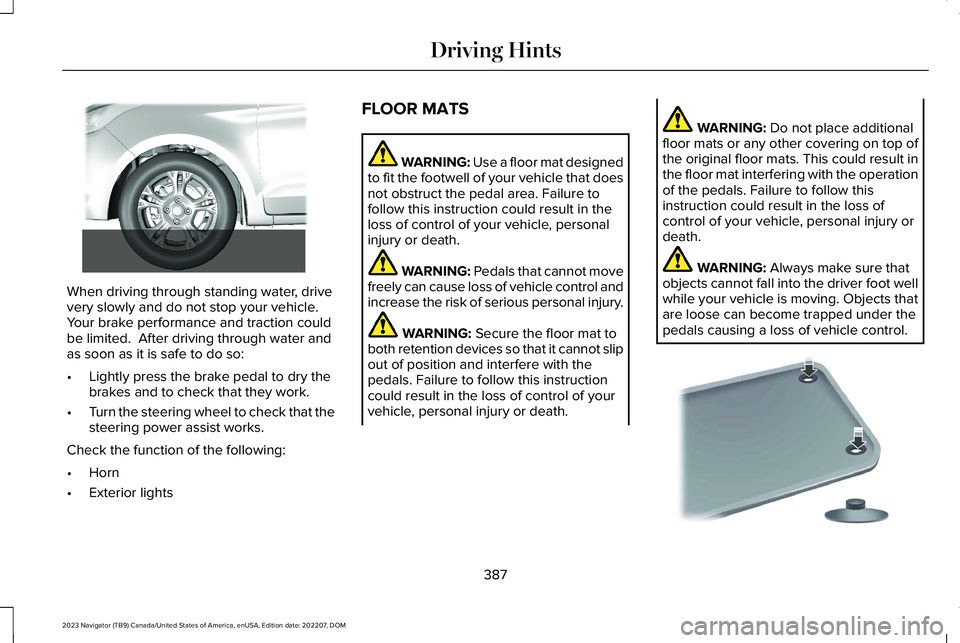
When driving through standing water, drivevery slowly and do not stop your vehicle. Your brake performance and traction couldbe limited. After driving through water andas soon as it is safe to do so:
•Lightly press the brake pedal to dry thebrakes and to check that they work.
•Turn the steering wheel to check that thesteering power assist works.
Check the function of the following:
•Horn
•Exterior lights
FLOOR MATS
WARNING: Use a floor mat designedto fit the footwell of your vehicle that doesnot obstruct the pedal area. Failure tofollow this instruction could result in theloss of control of your vehicle, personalinjury or death.
WARNING: Pedals that cannot movefreely can cause loss of vehicle control andincrease the risk of serious personal injury.
WARNING: Secure the floor mat toboth retention devices so that it cannot slipout of position and interfere with thepedals. Failure to follow this instructioncould result in the loss of control of yourvehicle, personal injury or death.
WARNING: Do not place additionalfloor mats or any other covering on top ofthe original floor mats. This could result inthe floor mat interfering with the operationof the pedals. Failure to follow thisinstruction could result in the loss ofcontrol of your vehicle, personal injury ordeath.
WARNING: Always make sure thatobjects cannot fall into the driver foot wellwhile your vehicle is moving. Objects thatare loose can become trapped under thepedals causing a loss of vehicle control.
387
2023 Navigator (TB9) Canada/United States of America, enUSA, Edition date: 202207, DOMDriving Hints E266447 E142666
Page 394 of 660
If you need to arrange roadside assistanceon your own, Lincoln reimburses areasonable amount for towing to the nearestLincoln dealership within 100 mi (160 km). Toobtain reimbursement information, UnitedStates clients, call 1-800-521-4140. Clientsneed to submit their original receipts.
Vehicles Sold in Canada: GettingRoadside Assistance
If you have a vehicle concern, Lincoln offersa complimentary roadside assistanceprogram. This program is eligible withinCanada or the continental United States.
The service is available 24 hours a day,seven days a week.
This program is separate from the NewVehicle Limited Warranty, beginning fromthe original warranty start date and lasts thelife of the vehicle for the original owner.Subsequent owners receive coverage thatis concurrent with the 6 years or 70,000 mi(110,000 km), whichever occurs first,powertrain warranty coverage period.
Note:Canadian roadside coverage andbenefits may differ from the U.S. coverage.
For complete program coverage details,review your warranty guide, contact yourdealer, call us in Canada at 1-844-665-2007,or visit our website atwww.lincolncanada.com.
If you purchased your vehicle in Canada andrequire roadside assistance, please call1-844-665-2007 or contact RoadsideAssistance using the Lincoln Way mobileapp.
Note:For quick reference, complete theroadside assistance identification card foundin the glove compartment of your vehicleand place it in your wallet.
SWITCHING THE HAZARD
FLASHERS ON AND OFF
The hazard flasher button is on theinstrument panel. Press the buttonto switch the hazard flashers on ifyour vehicle is creating a safety hazard forother road users.
When you switch the hazard flashers on, allfront and rear direction indicators flash.
Note:The hazard flashers operate when theignition is in any position, or if the key is notin the ignition. The battery loses charge andcould have insufficient power to restart yourvehicle.
Press the button again to switch them off.
JUMP STARTING THE VEHICLE
JUMP STARTING PRECAUTIONS
WARNING: Batteries normallyproduce explosive gases which can causepersonal injury. Therefore, do not allowflames, sparks or lighted substances tocome near the battery. When working nearthe battery, always shield your face andprotect your eyes. Always provide correctventilation.
390
2023 Navigator (TB9) Canada/United States of America, enUSA, Edition date: 202207, DOMCrash and Breakdown InformationE75790
Page 402 of 660
4.Switch your vehicle off by pressing thepush button ignition switch once. Amessage appears in the instrumentcluster display.
5.Switch your vehicle to accessory modeby pressing the push button ignitionswitch once without pressing the brakepedal.
6.Press and hold the brake pedal.
7.Using the instrument cluster controls onthe steering wheel, select Settings.
8.Select Neutral Tow.
9.Press and hold the OK button until aconfirmation message appears in theinformation display.
Note: If completed successfully, theinformation display shows Neutral TowEnabled Leave Transmission in Neutral. This indicates that your vehicle is safe to towwith all wheels on the ground.
Note:If you do not see a confirmationmessage in the instrument cluster display,you must perform the procedure again fromthe beginning.
Note:You may hear noise as the transfercase shifts into its neutral position. This isnormal.
10.Release the brake pedal.
11.Leave the transmission in neutral (N)and switch your vehicle off by pressingthe push button ignition switch oncewithout pressing the brake pedal.
Switching Neutral Tow Off
1.With your vehicle properly secured to thetow vehicle, press and hold the brakepedal and start the engine.
2.Switch your vehicle off by pressing thepush button ignition switch once andrelease the brake pedal.
3.Place your vehicle in accessory mode bypressing the push button ignition switchonce without pressing the brake pedal.
4.Press and hold the brake pedal.
5.Shift into park (P).
6.Release the brake pedal.
Note:If completed successfully, theinstrument cluster displays 2H and NeutralTow Disabled.
Note:You must perform the switchingneutral tow on and switching neutral tow offprocedures again from the beginning if theindicator light and message do not display.
Note:You may hear a noise as the transfercase shifts out of its neutral position. This isnormal.
7.Apply the parking brake, then disconnectyour vehicle from the tow vehicle.
8.Release the parking brake, start theengine, and shift into drive (D) to makesure the transfer case is out of the neutraltow position.
9.If the transfer case does not successfullyshift out of its neutral position, set theparking brake. Have your vehiclechecked as soon as possible.
Resolving the Shift Delayed Drive ForwardMessage
1.Press and hold the brake pedal.
2.Start your vehicle.
398
2023 Navigator (TB9) Canada/United States of America, enUSA, Edition date: 202207, DOMTowing Your Vehicle