light LINCOLN NAVIGATOR 2023 Repair Manual
[x] Cancel search | Manufacturer: LINCOLN, Model Year: 2023, Model line: NAVIGATOR, Model: LINCOLN NAVIGATOR 2023Pages: 660, PDF Size: 14.04 MB
Page 305 of 660
LANE KEEPING SYSTEM
LIMITATIONS
The lane keeping system only operates whenthe vehicle speed is greater than 40 mph(64 km/h).
The system works when the camera candetect at least one lane marking.
Note:When you select Aid or Alert and Aidmode and the system detects no steeringactivity for a short period of time, the systemalerts you to put your hands on the steeringwheel. The system may detect a light grip ortouch on the steering wheel as hands-offdriving.
The lane keeping system may not correctlyoperate in any of the following conditions:
•The lane keeping system does not detectat least one lane marking.
•You switch the turn signal on.
•You apply direct steering, accelerate fastor brake hard.
•The vehicle speed is less than 40 mph(64 km/h).
•The anti-lock brake, stability control ortraction control system activates.
•The lane is too narrow.
•Something is obscuring the camera or itis unable to detect the lane markings dueto environment, traffic or vehicleconditions.
•Entering or exiting a tight curve whendriving at high speeds.
The lane keeping system may not correctlane positioning in any of the followingconditions:
•High winds.
•Uneven road surfaces.
•Heavy or uneven loads.
•Incorrect tire pressure.
SWITCHING THE LANE KEEPING
SYSTEM ON AND OFF
To activate the lane keepingsystem, press the button on thesteering wheel.
To deactivate the lane keeping system, pressthe button again.
Note:When switching the system on or offa message appears in the information andentertainment display to show the status.
Note:The system stores the on or off settinguntil manually changed, unless it detects aMyKey™. If the system detects a MyKey™, itdefaults to the last setting for that MyKey™.
Note: If the system detects a MyKey™,pressing the button does not affect the onor off status of the system. You can onlychange the mode and intensity settings.
SWITCHING THE LANE KEEPING
SYSTEM MODE
The lane keeping system has differentsettings that you can view or adjust usingthe information display.
The system stores the last known selectionfor each of these settings. You do not needto readjust your settings each time youswitch on the system.
301
2023 Navigator (TB9) Canada/United States of America, enUSA, Edition date: 202207, DOMLane Keeping SystemE334922
Page 311 of 660
•If a vehicle is approaching in an adjacentlane at a relative speed much higher thanyour vehicle.
•Bad weather conditions are present thatobstruct the sensors.
•Attaching bike or cargo racks couldcause false alerts due to obstruction ofthe sensor.
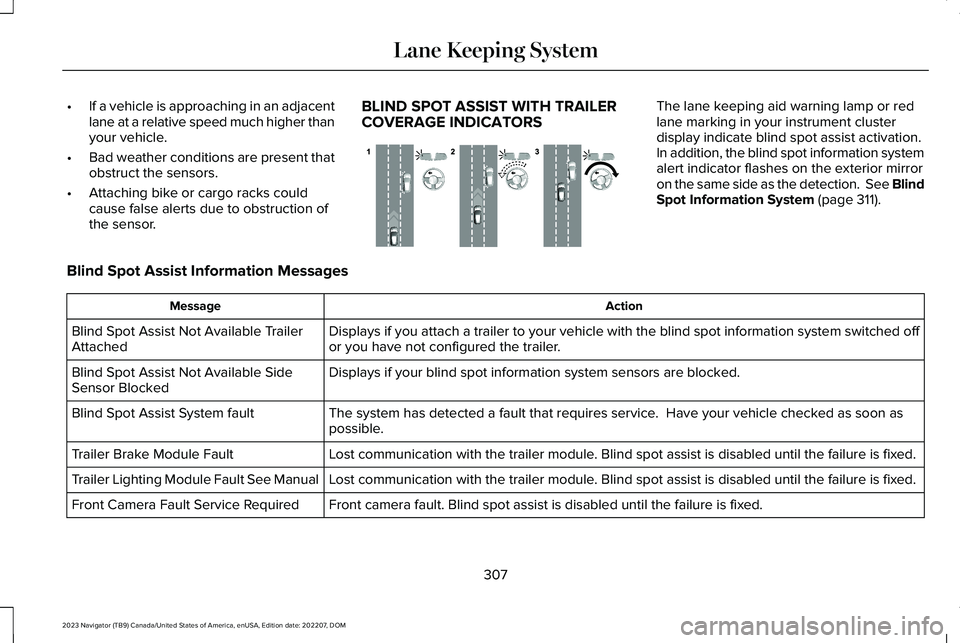
BLIND SPOT ASSIST WITH TRAILERCOVERAGE INDICATORS
The lane keeping aid warning lamp or redlane marking in your instrument clusterdisplay indicate blind spot assist activation.In addition, the blind spot information systemalert indicator flashes on the exterior mirroron the same side as the detection. See BlindSpot Information System (page 311).
Blind Spot Assist Information Messages
ActionMessage
Displays if you attach a trailer to your vehicle with the blind spot information system switched offor you have not configured the trailer.Blind Spot Assist Not Available TrailerAttached
Displays if your blind spot information system sensors are blocked.Blind Spot Assist Not Available SideSensor Blocked
The system has detected a fault that requires service. Have your vehicle checked as soon aspossible.Blind Spot Assist System fault
Lost communication with the trailer module. Blind spot assist is disabled until the failure is fixed.Trailer Brake Module Fault
Lost communication with the trailer module. Blind spot assist is disabled until the failure is fixed.Trailer Lighting Module Fault See Manual
Front camera fault. Blind spot assist is disabled until the failure is fixed.Front Camera Fault Service Required
307
2023 Navigator (TB9) Canada/United States of America, enUSA, Edition date: 202207, DOMLane Keeping SystemE310089
Page 313 of 660
LANE KEEPING SYSTEM – FREQUENTLY ASKED QUESTIONS
Why is the feature not available (lane markings are gray) when I can see the lane markings on the road?
Your vehicle speed is less than 40 mph (65 km/h).
The sun is shining directly into the camera lens.
A quick intentional lane change has occurred.
Your vehicle stays too close to the lane markings for an extended interval of time.
Driving at high speeds in curves.
The last alert warning or aid intervention occurred a short time ago.
Ambiguous lane markings, for example, in construction zones.
Rapid transition from light to dark, or from dark to light.
Sudden offset in lane markings.
ABS or AdvanceTrac™ is active.
There is a camera blockage due to dirt, grime, fog, frost or water on the windshield.
You are driving too close to the vehicle in front of you.
Transitioning between no lane markings to lane markings, or vice versa.
There is standing water on the road.
Faint lane markings, for example, partial yellow lane markings on concrete roads.
309
2023 Navigator (TB9) Canada/United States of America, enUSA, Edition date: 202207, DOMLane Keeping System
Page 317 of 660
If the sensors become blocked, a messageappears in the instrument cluster display.See Blind Spot Information System –Information Messages (page 316). The alertindicators illuminate but the system does notalert you.
BLIND SPOT INFORMATION SYSTEM
WITH TRAILER COVERAGE
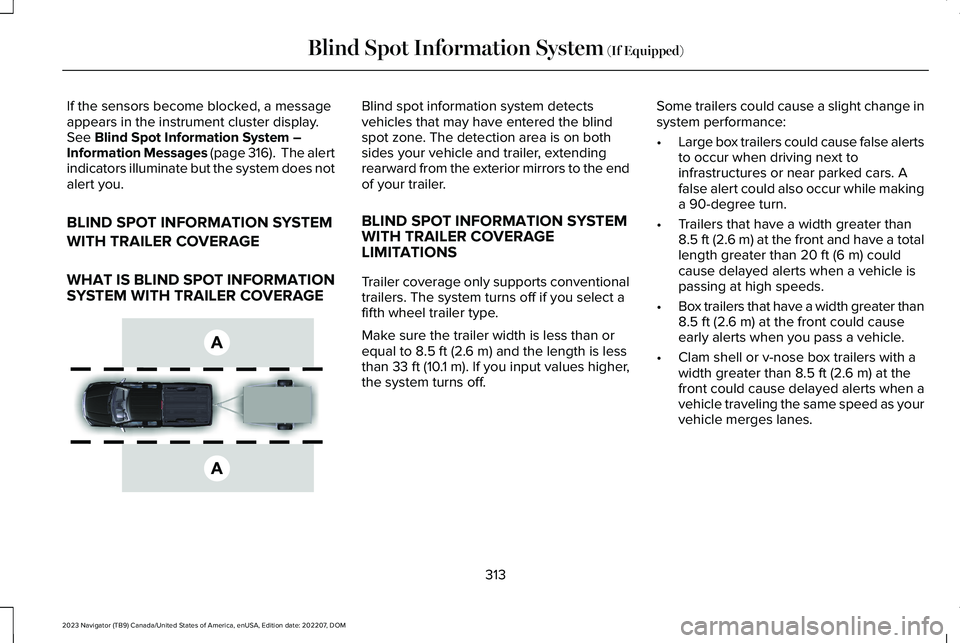
WHAT IS BLIND SPOT INFORMATIONSYSTEM WITH TRAILER COVERAGE
Blind spot information system detectsvehicles that may have entered the blindspot zone. The detection area is on bothsides your vehicle and trailer, extendingrearward from the exterior mirrors to the endof your trailer.
BLIND SPOT INFORMATION SYSTEMWITH TRAILER COVERAGELIMITATIONS
Trailer coverage only supports conventionaltrailers. The system turns off if you select afifth wheel trailer type.
Make sure the trailer width is less than orequal to 8.5 ft (2.6 m) and the length is lessthan 33 ft (10.1 m). If you input values higher,the system turns off.
Some trailers could cause a slight change insystem performance:
•Large box trailers could cause false alertsto occur when driving next toinfrastructures or near parked cars. Afalse alert could also occur while makinga 90-degree turn.
•Trailers that have a width greater than8.5 ft (2.6 m) at the front and have a totallength greater than 20 ft (6 m) couldcause delayed alerts when a vehicle ispassing at high speeds.
•Box trailers that have a width greater than8.5 ft (2.6 m) at the front could causeearly alerts when you pass a vehicle.
•Clam shell or v-nose box trailers with awidth greater than 8.5 ft (2.6 m) at thefront could cause delayed alerts when avehicle traveling the same speed as yourvehicle merges lanes.
313
2023 Navigator (TB9) Canada/United States of America, enUSA, Edition date: 202207, DOMBlind Spot Information System (If Equipped)E225007
Page 318 of 660
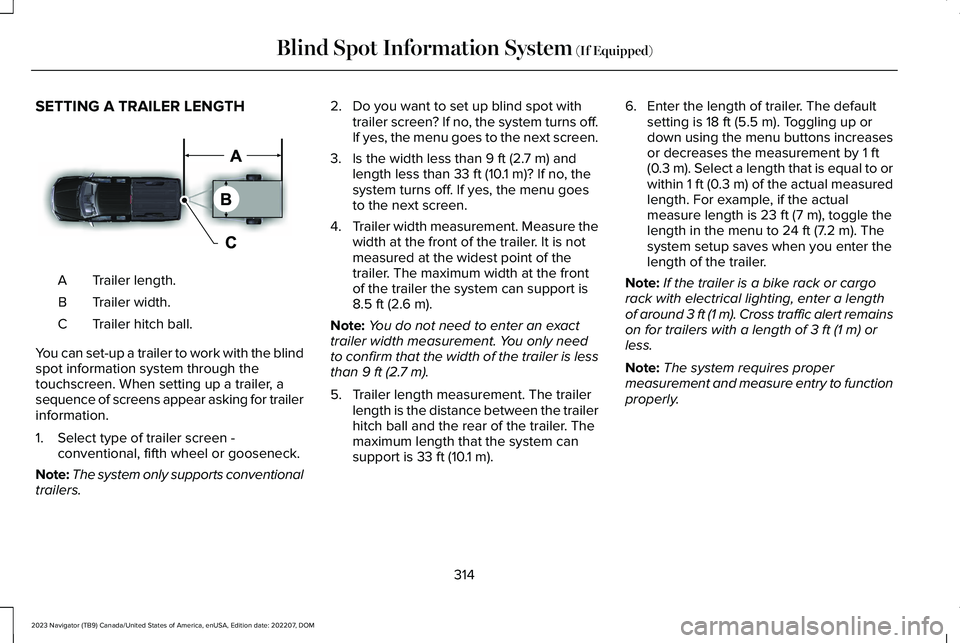
SETTING A TRAILER LENGTH
Trailer length.A
Trailer width.B
Trailer hitch ball.C
You can set-up a trailer to work with the blindspot information system through thetouchscreen. When setting up a trailer, asequence of screens appear asking for trailerinformation.
1.Select type of trailer screen -conventional, fifth wheel or gooseneck.
Note:The system only supports conventionaltrailers.
2.Do you want to set up blind spot withtrailer screen? If no, the system turns off.If yes, the menu goes to the next screen.
3.Is the width less than 9 ft (2.7 m) andlength less than 33 ft (10.1 m)? If no, thesystem turns off. If yes, the menu goesto the next screen.
4.Trailer width measurement. Measure thewidth at the front of the trailer. It is notmeasured at the widest point of thetrailer. The maximum width at the frontof the trailer the system can support is8.5 ft (2.6 m).
Note:You do not need to enter an exacttrailer width measurement. You only needto confirm that the width of the trailer is lessthan 9 ft (2.7 m).
5.Trailer length measurement. The trailerlength is the distance between the trailerhitch ball and the rear of the trailer. Themaximum length that the system cansupport is 33 ft (10.1 m).
6.Enter the length of trailer. The defaultsetting is 18 ft (5.5 m). Toggling up ordown using the menu buttons increasesor decreases the measurement by 1 ft(0.3 m). Select a length that is equal to orwithin 1 ft (0.3 m) of the actual measuredlength. For example, if the actualmeasure length is 23 ft (7 m), toggle thelength in the menu to 24 ft (7.2 m). Thesystem setup saves when you enter thelength of the trailer.
Note:If the trailer is a bike rack or cargorack with electrical lighting, enter a lengthof around 3 ft (1 m). Cross traffic alert remainson for trailers with a length of 3 ft (1 m) orless.
Note:The system requires propermeasurement and measure entry to functionproperly.
314
2023 Navigator (TB9) Canada/United States of America, enUSA, Edition date: 202207, DOMBlind Spot Information System (If Equipped)E225008
Page 325 of 660
WHAT IS PRE-COLLISION ASSIST
Pre-collision assist detects and warns ofapproaching hazards in the roadway. Thesystem provides multiple levels of assistanceto help avoid a collision if your vehicle israpidly approaching another stationaryvehicle, a vehicle traveling in the samedirection as yours, or a pedestrian or cyclistwithin your driving path.
HOW DOES PRE-COLLISION
ASSIST WORK
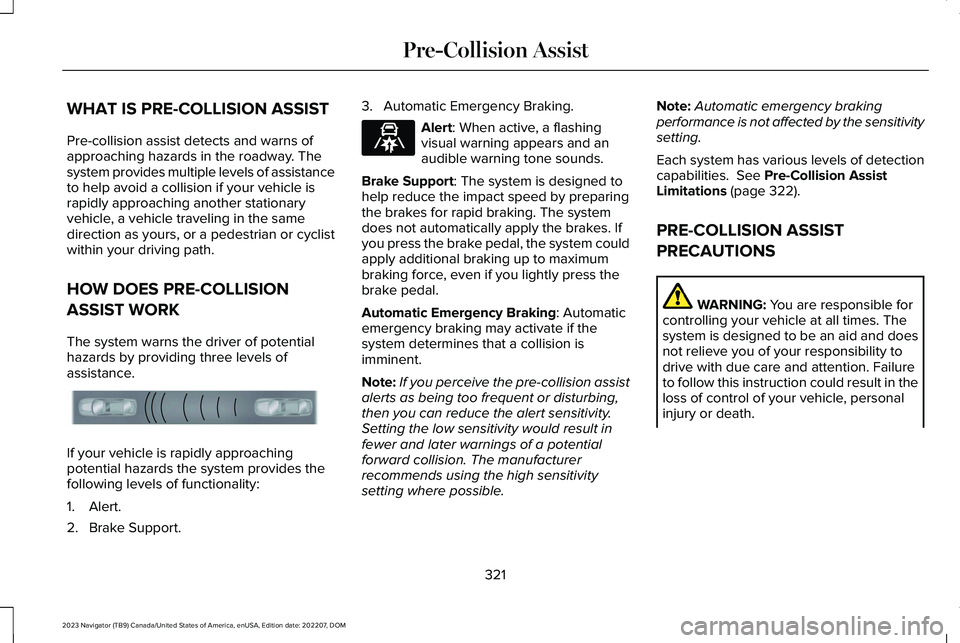
The system warns the driver of potentialhazards by providing three levels ofassistance.
If your vehicle is rapidly approachingpotential hazards the system provides thefollowing levels of functionality:
1.Alert.
2.Brake Support.
3.Automatic Emergency Braking.
Alert: When active, a flashingvisual warning appears and anaudible warning tone sounds.
Brake Support: The system is designed tohelp reduce the impact speed by preparingthe brakes for rapid braking. The systemdoes not automatically apply the brakes. Ifyou press the brake pedal, the system couldapply additional braking up to maximumbraking force, even if you lightly press thebrake pedal.
Automatic Emergency Braking: Automaticemergency braking may activate if thesystem determines that a collision isimminent.
Note:If you perceive the pre-collision assistalerts as being too frequent or disturbing,then you can reduce the alert sensitivity.Setting the low sensitivity would result infewer and later warnings of a potentialforward collision. The manufacturerrecommends using the high sensitivitysetting where possible.
Note:Automatic emergency brakingperformance is not affected by the sensitivitysetting.
Each system has various levels of detectioncapabilities. See Pre-Collision AssistLimitations (page 322).
PRE-COLLISION ASSIST
PRECAUTIONS
WARNING: You are responsible forcontrolling your vehicle at all times. Thesystem is designed to be an aid and doesnot relieve you of your responsibility todrive with due care and attention. Failureto follow this instruction could result in theloss of control of your vehicle, personalinjury or death.
321
2023 Navigator (TB9) Canada/United States of America, enUSA, Edition date: 202207, DOMPre-Collision AssistE156130 E329466
Page 326 of 660
WARNING: The system does notdetect vehicles moving in a differentdirection or animals. Apply the brakeswhen necessary. Failure to follow thisinstruction could result in the loss ofcontrol of your vehicle, personal injury ordeath.
WARNING: The system does notoperate during hard acceleration orsteering. Failure to take care may lead toa crash or personal injury.
WARNING: The system may operatewith reduced function during cold andinclement weather conditions. Snow, ice,rain, spray and fog can adversely affect thesystem. Keep the front camera and radarfree of snow and ice. Failure to follow thisinstruction may result in the loss of controlof your vehicle, serious personal injury ordeath.
WARNING: Take additional care ifyour vehicle is heavily loaded or you aretowing a trailer. These conditions couldresult in reduced performance of thissystem. Failure to follow this instructioncould result in the loss of control of yourvehicle, personal injury or death.
WARNING: The system cannot helpprevent all crashes. Do not rely on thissystem to replace driver judgment and theneed to maintain a safe distance andspeed.
WARNING: System performancecould be reduced in situations where thevehicle camera has limited detectioncapability. These situations include but arenot limited to direct or low sunlight,vehicles at night without tail lights,unconventional vehicle types, pedestriansor cyclists with complex backgrounds,
running pedestrians or fast moving cyclists,partly obscured pedestrians or cyclists,pedestrians or cyclists that the systemcannot distinguish from a group. Failure totake care may result in the loss of controlof your vehicle, personal injury or death.
PRE-COLLISION ASSIST
LIMITATIONS
Pre-collision assist depends on the detectionability of its camera and sensors. Anyobstructions or damage to these areas canlimit detection or prevent the system fromfunctioning. See Locating the Pre-CollisionAssist Sensors (page 324).
The system is active at 3 mph (5 km/h) andabove.
Note:The pre-collision assist systemautomatically disables when you selectfour-wheel drive low or manually disableAdvanceTrac™.
322
2023 Navigator (TB9) Canada/United States of America, enUSA, Edition date: 202207, DOMPre-Collision Assist
Page 351 of 660
Trailer Light Check
WARNING: Never connect any trailerlamp wiring to the vehicle's tail lamp wiring;this may damage the electrical systemresulting in fire. Contact your authorizeddealer as soon as possible for assistancein proper trailer tow wiring installation.Additional electrical equipment may berequired.
Most towed vehicles require trailer lamps.Make sure all running lights, brake lights, turnsignals and hazard lights are working.
Safety Chains
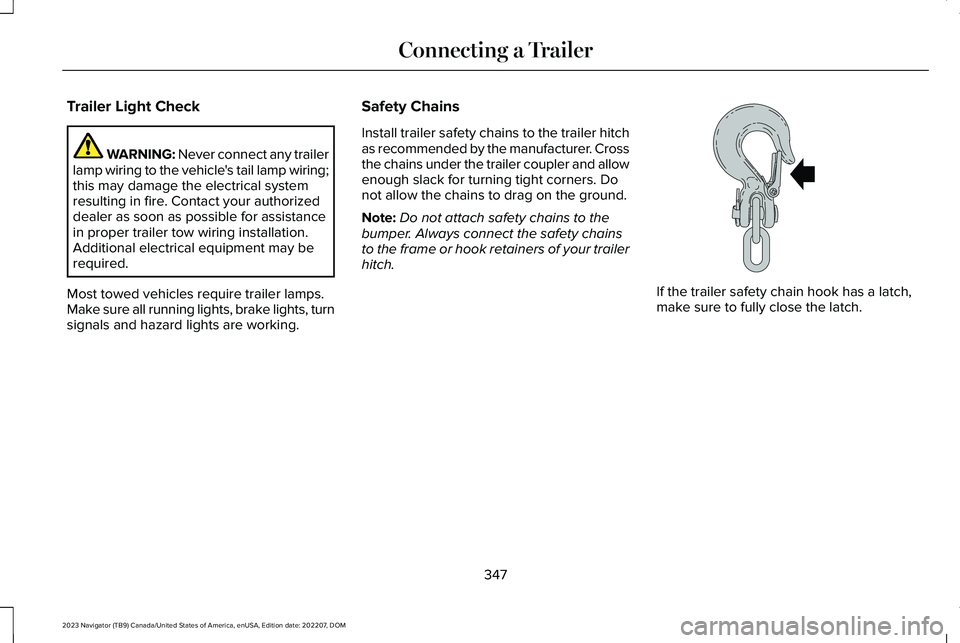
Install trailer safety chains to the trailer hitchas recommended by the manufacturer. Crossthe chains under the trailer coupler and allowenough slack for turning tight corners. Donot allow the chains to drag on the ground.
Note:Do not attach safety chains to thebumper. Always connect the safety chainsto the frame or hook retainers of your trailerhitch.
If the trailer safety chain hook has a latch,make sure to fully close the latch.
347
2023 Navigator (TB9) Canada/United States of America, enUSA, Edition date: 202207, DOMConnecting a TrailerE265060
Page 354 of 660
The rating for the tow vehicle's brakingsystem operation is at the gross vehicleweight rating, not the gross combined weightrating.
Certain states require functioning trailerbrakes for trailers over a specified weight.Be sure to check state regulations for thisspecified weight.
Ford Motor Company recommends separatefunctioning brake systems for trailersweighing more than 1,500 lb (680 kg) whenloaded.
TOWING A TRAILER LIMITATIONS
The vehicle's load capacity designationis by weight, not by volume, so youcannot necessarily use all availablespace when loading a vehicle or trailer.
Note:Your vehicle could have reducedperformance when operating at highaltitudes and when heavily loaded ortowing a trailer. When driving atelevation, to match driving performanceas perceived at sea level, reduce grossvehicle weight and gross combinationweight by 2% per 1,000 ft (300 m)elevation.
LOADING YOUR TRAILER
To help minimize how trailer movementaffects your vehicle when driving:
•Load the heaviest items closest tothe trailer floor.
•Load the heaviest items centeredbetween the left and right side trailertires.
•Load the heaviest items above thetrailer axles or just slightly forwardtoward the trailer tongue. Do notallow the final trailer tongue weightto go above or below 10-15% of theloaded trailer weight. The trailertongue weight should never exceed10% of the maximum towing capacity.
•Select a ball mount with the correctrise or drop. When both the loadedvehicle and trailer are connected, thetrailer frame should be level, orslightly angled down toward yourvehicle, when viewed from the side.
TRAILER TOWING HINTS
Towing a trailer places an extra load on yourvehicle's engine, transmission, axle, brakes,tires and suspension. Periodically inspectthese components during and after anytowing operation.
When driving with a trailer or payload, a slighttakeoff vibration or shudder may be presentdue to the increased payload weight.
350
2023 Navigator (TB9) Canada/United States of America, enUSA, Edition date: 202207, DOMTowing a Trailer
Page 358 of 660
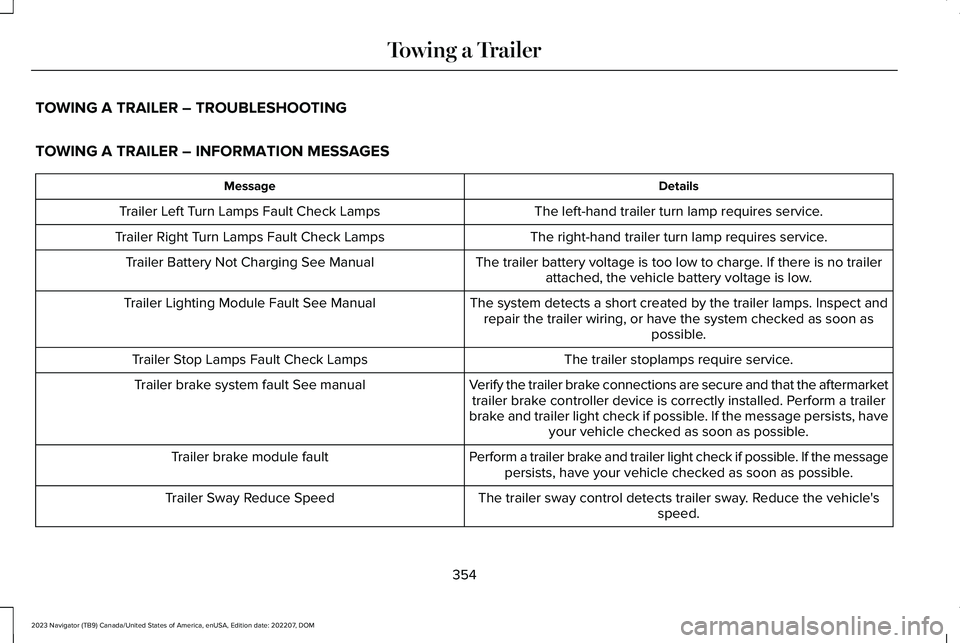
TOWING A TRAILER – TROUBLESHOOTING
TOWING A TRAILER – INFORMATION MESSAGES
DetailsMessage
The left-hand trailer turn lamp requires service.Trailer Left Turn Lamps Fault Check Lamps
The right-hand trailer turn lamp requires service.Trailer Right Turn Lamps Fault Check Lamps
The trailer battery voltage is too low to charge. If there is no trailerattached, the vehicle battery voltage is low.Trailer Battery Not Charging See Manual
The system detects a short created by the trailer lamps. Inspect andrepair the trailer wiring, or have the system checked as soon aspossible.
Trailer Lighting Module Fault See Manual
The trailer stoplamps require service.Trailer Stop Lamps Fault Check Lamps
Verify the trailer brake connections are secure and that the aftermarkettrailer brake controller device is correctly installed. Perform a trailerbrake and trailer light check if possible. If the message persists, haveyour vehicle checked as soon as possible.
Trailer brake system fault See manual
Perform a trailer brake and trailer light check if possible. If the messagepersists, have your vehicle checked as soon as possible.Trailer brake module fault
The trailer sway control detects trailer sway. Reduce the vehicle'sspeed.Trailer Sway Reduce Speed
354
2023 Navigator (TB9) Canada/United States of America, enUSA, Edition date: 202207, DOMTowing a Trailer