ven MAZDA MAZDA 2023 Owners Manual
[x] Cancel search | Manufacturer: MAZDA, Model Year: 2023, Model line: MAZDA, Model: MAZDA MAZDA 2023Pages: 623, PDF Size: 15.08 MB
Page 227 of 623
AUTOHOLD
▼AUTOHOLD
The AUTOHOLD function automatically holds the vehicle stopped, even if you take
your foot
off the brake pedal. This function can be best used while stopped in
traffic
or at a traffic light. The brakes are released when you start driving the vehicle.
WARNING
Do not rely completely on the AUTOHOLD function:
The AUTOHOLD function is only designed to assist the brake operation while the
vehicle is stopped. Neglecting to operate the brakes and relying only on the
AUTOHOLD system is dangerous and could result in an unexpected accident if the
vehicle were to suddenly move. Operate the brakes appropriately in accordance
with the road and surrounding conditions.
Note that the vehicle may move suddenly depending on the vehicle's load or if it is
towing something.
Do not release your foot from the brake pedal while the vehicle is stopped on a
steep grade:
Because there is a possibility of the vehicle not being held in the stopped position by
the AUTOHOLD function, the vehicle may move unexpectedly and result in an
accident.
Do not use the AUTOHOLD function on slippery roads such as icy or
snow-covered roads, or unpaved roads:
Even if the vehicle is held in the stopped position by the AUTOHOLD function, the
vehicle may move unexpectedly and result in an accident. Operate the accelerator
pedal, brakes, or steering wheel appropriately as necessary.
Immediately depress the brake pedal in the following cases:
Because the AUTOHOLD function is canceled forcibly, the vehicle may move
unexpectedly and result in an accident.
“Depress Brake Pedal. Brake Hold Disabled” is displayed in the multi-information
display and the warning sound is activated at the same time.
Always apply the parking brake when parking the vehicle:
Not applying the parking brake when parking the vehicle is dangerous as the vehicle
may move unexpectedly and result in an accident. When parking the vehicle, shift
the selector lever to the P position (autom atic transmission vehicle) and apply the
parking brake.
When Driving
Brake
4-82
Mazda3_8LC2-EA-22G_Edition1_new 2022-5-20 11:26:10
Page 230 of 623
3. The vehicle is held in its stoppedposition even with the brake pedal
released.
NOTE
When all of the following conditions
are met, the AUTOHOLD operates and
the brakes are held.
The ignition is switched ON (engine
is running or stopped by i-stop).
The vehicle is stopped.The brake pedal is being depressed.The AUTOHOLD active indicator
light turns on.
The accelerator pedal is not
depressed.
The driver's seat belt is fastened.The driver's door is closed.There is no problem with the
AUTOHOLD function.
The parking brake is released.There is no problem with the Electric
Pa r k i n g B ra ke ( E P B ) f u n c t i o n .
(Automatic transmission vehicle)
The selector lever is in a position
other than R position or the vehicle
tilts forward with the selector lever in
the R position.
To release AUTOHOLD and start
driving the vehicle
If you try to resume driving the vehicle,
the brakes will be released
automatically and the AUTOHOLD
active indicator light turns off.
NOTE
If the Electric Parking Brake (EPB)
switch is pulled while the
AUTOHOLD is operating, the
parking brake is applied and the
AUTOHOLD is released. In addition,
if the parking brake is released under
this condition, the AUTOHOLD
operates to hold the brakes.
Under the following conditions, the
parking brake is automatically
applied and the AUTOHOLD is
released. The AUTOHOLD is
re-enabled when the conditions
before the AUTOHOLD is released
are restored.
The driver’s seat belt is unfastened.The driver’s door is opened.When about 10 minutes or longer
have passed since the AUTOHOLD
operation started, the parking brake
is automatically applied. Because the
AUTOHOLD is restored when
releasing the parking brake, the hold
on the brakes by AUTOHOLD
function resumes.
(Manual transmission vehicle)
When starting to drive the vehicle
forward or in reverse on a down
slope, depress the clutch pedal and
shift the shift lever to the appropriate
position for driving in the desired
direction, and then depress the
accelerator pedal to release the
AUTOHOLD.
The AUTOHOLD can be canceled
forcibly by fully depressing the
accelerator pedal for 1 second or
longer while the AUTOHOLD is
operating. Forcibly cancel the
AUTOHOLD only when the
AUTOHOLD cannot be canceled due
to a system malfunction or it is
necessary to cancel the AUTOHOLD
in an emergency.
When Driving
Brake
4-85
Mazda3_8LC2-EA-22G_Edition1_new 2022-5-20 11:26:10
Page 232 of 623
Hill Launch Assist (HLA)
▼Hill Launch Assist (HLA)
The HLA functions to assist in
accelerating the vehicle from a stop on
slopes. When releasing the brake pedal
and depressing the accelerator pedal
to accelerate the vehicle from a stop
while on a slope, the function prevents
the vehicle from rolling. The HLA also
operates when reversing on a slope.
The braking force is maintained
automatically after releasing the brake
pedal on a steep slope.
For manual transmission vehicles, the
HLA operates when the vehicle is tilted
rearward with the shift lever in a
forward gear, and operates when the
vehicle is tilted forward with the shift
lever in the R position.
For automatic transmission vehicles,
the HLA operates when the vehicle is
tilted rearward with the selector lever
in a forward gear, and operates when
the vehicle is tilted forward with the
selector lever in the R position.
WARNING
Do not rely completely on
HLA:
HLA is an auxiliary device for
accelerating from a stop on a slope.
The system only operates for about 2
seconds and therefore, relying only on
the system, when accelerating from a
stop is dangerous because the vehicle
may move (roll) unexpectedly and
cause an accident.
The vehicle could roll depending on
the vehicle's load or if it is towing
something. In addition, for vehicles
with a manual transmission, the
vehicle could still roll depending on
how the clutch pedal or the accelerator
pedal is operated.
Always confirm the safety around the
vehicle before starting to drive the
vehicle.
NOTE
HLA does not operate on a gentle
slope. In addition, the gradient of
the slope on which the system will
operate changes depending on the
vehicle's load.
HLA does not operate if the parking
brake is applied, the vehicle has not
stopped completely, or the clutch
pedal is released.
While HLA is operating, the brake
pedal may feel stiff and vibrate,
however, this does not indicate a
malfunction.
HLA does not operate while the
TCS/DSC indicator light is
illuminated.
Refer to TCS/DSC Indication/
Indicator Light (Turns on) on page
7-33.
HLA does not turn off even if the
DSC OFF switch is pressed to turn off
the TCS/DSC.
When Driving
Brake
4-87
Mazda3_8LC2-EA-22G_Edition1_new 2022-5-20 11:26:10
Page 234 of 623
Traction Control System(TCS)
▼Traction Control System (TCS)
The Traction Control System (TCS)
enhances traction and safety by
controlling engine torque and braking.
When the TCS detects driving wheel
slippage, it lowers engine torque and
operates the brakes to prevent loss of
traction.
This means that on a slick surface, the
engine adjusts automatically to provide
optimum power to the drive wheels,
limiting wheel spin and loss of traction.
The warning light turns on when the
system has a malfunction.
Refer to TCS/DSC Indication/
Indicator Light (Turns on) on page
7-33.
WARNING
Do not rely on the Traction Control
System (TCS) as a substitute for safe
driving:
The Traction Control System (TCS)
cannot compensate for unsafe and
reckless driving, excessive speed,
tailgating (following another vehicle
too closely), and hydroplaning
(reduced tire friction and road contact
because of water on the road surface).
You can still have an accident.
Use snow tires or tire chains and drive
at reduced speeds when roads are
covered with ice and/or snow:
Driving without proper traction devices
on snow and/or ice-covered roads is
dangerous. The Traction Control
System (TCS) alone cannot provide
adequate traction and you could still
have an accident.
NOTE
To turn off the TCS, press the DSC OFF
switch (page 4-91).
▼
TCS/DSC Indicator Light
This indicator light stays on for a few
seconds when the ignition is switched
ON.
If the TCS or DSC is operating, the
indicator light
flashes.
If the light stays on, the TCS, DSC or
the brake assist system may have a
malfunction and they may not operate
correctly. Take your vehicle to an
Authorized Mazda Dealer.
NOTE
In addition to the indicator light
flashing, a slight lugging sound will
come from the engine. This indicates
that the TCS/DSC is operating
properly.
On slippery surfaces, such as fresh
snow, it will be impossible to achieve
high rpm when the TCS is on.
When Driving
ABS/TCS/DSC
4-89
Mazda3_8LC2-EA-22G_Edition1_new 2022-5-20 11:26:10
Page 239 of 623
i-ACTIV AWD Operation*
▼i-ACTIV AWD Operation
AWD provides excellent drivability on
snow-covered and ice-packed roads,
sand and mud, as well as on steep
slopes and other slippery surfaces.
A system malfunction or operation
conditions are indicated by a warning.
Refer to AWD Warning Indication/
Warning Light on page 7-32.
WARNING
Never spin a wheel that is
off the
ground:
Spinning a wheel that is off the ground
as a result of the vehicle being stuck or
in a ditch is dangerous. The drive
assembly could be seriously damaged
which could lead to an accident or
could even lead to overheating, oil
leakage, and a fire.
▼AWD Driving
This vehicle has not been designed for
the purpose of off-road driving or
rallies. Do not attempt to drive over
uneven or rocky surfaces, or across
rivers.
Although this vehicl
e is equipped with
AWD, acceleration, steering and
braking operations should be
conducted in the same manner as with
a non-AWD vehicle, with the emphasis
placed on safe driving.
▼ Tires and Tire Chains
The condition of the tires plays a large
role in the performance of the vehicle.
Moreover, to prevent adverse effects to
the drive assembly, please note the
following:
Tires
When replacing tires, always replace
all front and rear tires at the same
time.
All tires must be of the same size,
manufacture, brand and tread
pattern. Pay particular attention
when equipping snow or other types
of winter tires.
Do not mix tread-worn tires with
normal tires.
Inspect tire
inflation pressures at the
specified periods adjust to the
specified pressures, and initialize the
tire pressure monitoring system.
Refer to Tire Pressure Monitoring
System Initialization on page 4-228.
NOTE
Check the tire inflation pressure label
attached to driver's door frame for the
correct tire inflation pressure.
Make sure to equip the vehicle with
genuine tires of the specified size, on
all wheels. With AWD, the system is
calibrated for all 4 wheels being of
the same dimensions.
Tire chains
Install tire chains to the front tires.Do not use tire chains on the rear
wheels.
Do not drive the vehicle faster than
30 km/h (19 mph) with the tire
chains installed.
Do not drive the vehicle with tire
chains on road conditions other than
snow or ice.
▼ To w i n g
If the vehicle requires towing, have it
towed with all 4 wheels completely
off
the ground.
Refer to Towing De scription on page
7-23.
When Driving
i-ACTIV AWD
4-94*Some models.
Mazda3_8LC2-EA-22G_Edition1_new 2022-5-20 11:26:10
Page 244 of 623
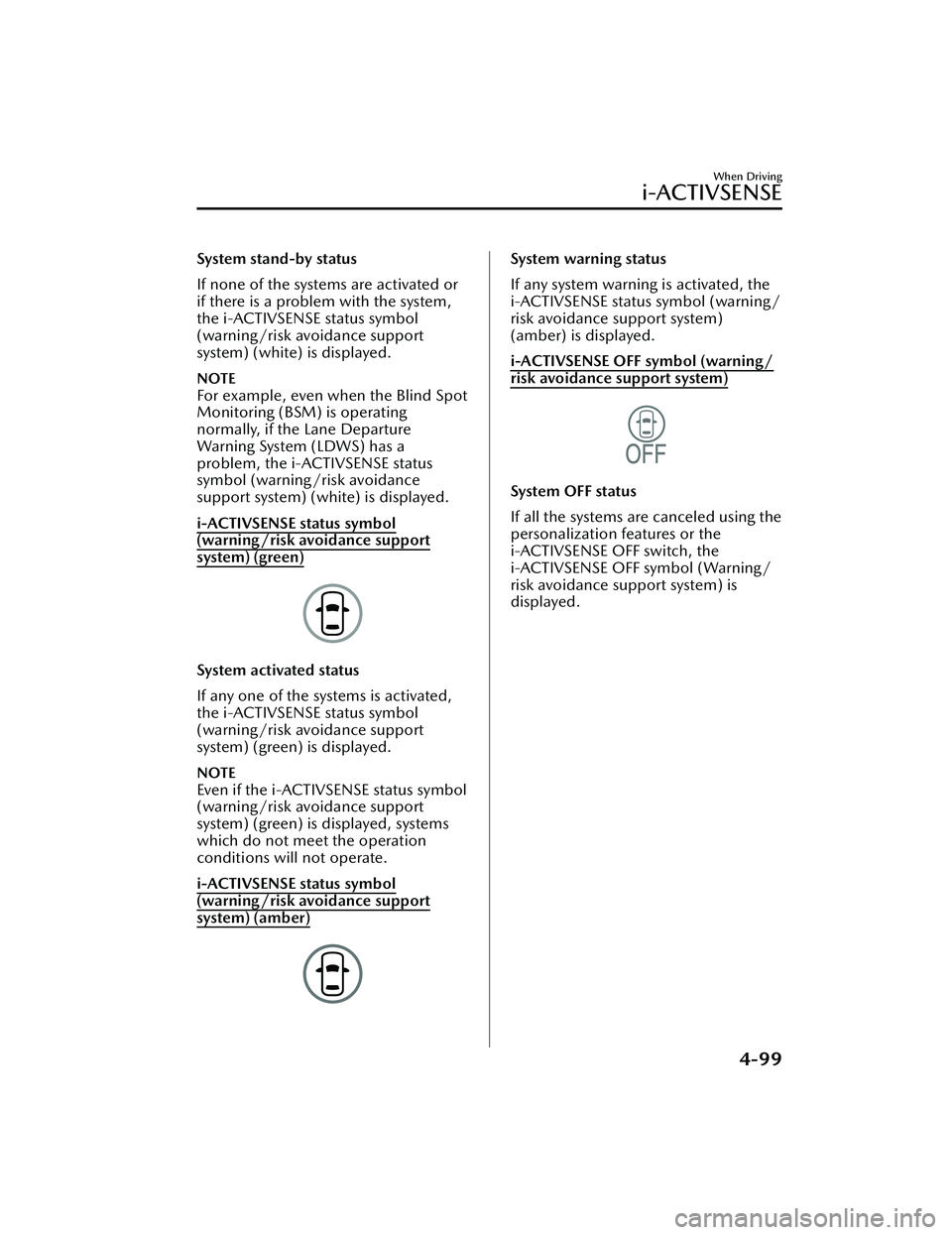
System stand-by status
If none of the systems are activated or
if there is a problem with the system,
the i-ACTIVSENSE status symbol
(warning/risk avoidance support
system) (white) is displayed.
NOTE
For example, even when the Blind Spot
Monitoring (BSM) is operating
normally, if the Lane Departure
Warning System (LDWS) has a
problem, the i-ACTIVSENSE status
symbol (warning/risk avoidance
support system) (white) is displayed.
i-ACTIVSENSE status symbol
(warning/risk avoidance support
system) (green)
System activated status
If any one of the systems is activated,
the i-ACTIVSENSE status symbol
(warning/risk avoidance support
system) (green) is displayed.
NOTE
Even if the i-ACTIVSENSE status symbol
(warning/risk avoidance support
system) (green) is displayed, systems
which do not meet the operation
conditions will not operate.
i-ACTIVSENSE status symbol
(warning/risk avoidance support
system) (amber)
System warning status
If any system warning is activated, the
i-ACTIVSENSE status symbol (warning/
risk avoidance support system)
(amber) is displayed.
i-ACTIVSENSE OFF symbol (warning/
risk avoidance support system)
System OFF status
If all the systems are canceled using the
personalization features or the
i-ACTIVSENSE OFF switch, the
i-ACTIVSENSE OFF symbol (Warning/
risk avoidance support system) is
displayed.
When Driving
i-ACTIVSENSE
4-99
Mazda3_8LC2-EA-22G_Edition1_new2022-5-20 11:26:10
Page 246 of 623
Adaptive Front LightingSystem (AFS)
*
▼Adaptive Front Lighting System
(AFS)
The adaptive front lighting system
(AFS) automatically adjusts the
headlight beams to the left or right in
conjunction with the operation of the
steering wheel after the headlights
have been turned on and the vehicle
speed is about 2 km/h (2 mph) or
higher.
A system malfunction or operation
conditions are indicated by a warning.
Refer to Exterior Light Warning
Indication/Warning Light on page
7-35.
NOTE
The Adaptive Front Lighting System
(AFS) can be switched to on/off using
the personalization function.
Refer to the Settings section in the
Mazda Connect Owner's Manual.
High Beam Control
System (HBC)
*
▼ High Beam Control System (HBC)
The HBC determines the conditions in
front of the vehicle using the Forward
Sensing Camera (FSC) while driving in
darkness to automatically switch the
headlights between high and low
beams.
Refer to Forward Sensing Camera
(FSC) on page 4-211.
While driving the vehicle at a speed of
about 30 km/h (19 mph) or more, the
headlights are switched to high beams
when there are no vehicles ahead or
approaching in the opposite direction.
The system switches the headlights to
low beams when one of the following
occurs:
The system detects a vehicle or the
headlights/lights of a vehicle
approaching in the opposite
direction.
The vehicle is driven on roads lined
with streetlamps or on roads in
well-lit cities and towns.
The vehicle is driven at less than
about 20 km/h (12 mph).
The headlight high-beam indicator
light turns on while the high beams
are on.
1. Forward Sensing Camera (FSC)*1
When Driving
i-ACTIVSENSE
*Some models.4-101
Mazda3_8LC2-EA-22G_Edition1_new
2022-5-20 11:26:10
Page 249 of 623
WARNING
Do not rely completely on the LDWS:
The LDWS system is not designed to
compensate for a driver’s lack of
caution and relying too much on the
system could lead to an accident.
The functions of the LDWS have
limitations. Always stay on course
using the steering wheel and drive
with care.
CAUTION
Heed the following cautions so that
the LDWS can operate normally.
Do not modify the vehicle's
suspensions.
Always use tires of the specified type
and size for the front and rear
wheels. Consult an Authorized
Mazda Dealer for tire replacement.
NOTE
The system may not operate normally
under the following conditions.
The white (yellow) lane lines are less
visible because of dirt or paint
flaking.
White (yellow) lane lines are less
visible because of bad weather (rain,
fog, or snow).
The vehicle is driven on a temporary
lane or section with a closed lane
resulting from construction where
there might be multiple white
(yellow) lane lines, or they are
interrupted.
The camera picks up an obscure line,
such as a temporary line being used
for construction, or because of
shade, unmelted snow, or groovesfilled with water.
The surrounding brightness suddenly
changes such as when entering or
exiting a tunnel.
Back-light is reflected off the road
surface.
The road surface is wet and shiny
after rain, or there are puddles on
the road.
The width of a lane is excessively
narrow.
The vehicle is driven on roads with
tight curves.
Heavy luggage is loaded in the
trunk/luggage compartment or on
the rear seat causing the vehicle to
tilt.
The vehicle is driven through a fork in
the road or a junction.
The shade of a guardrail parallel to a
white (yellow) lane line is cast on the
road.
The illumination of the headlights is
weakened because of dirt or the
optical axis is deviated at night.
The road is excessively uneven.The vehicle is shaken after hitting a
road bump.
A vehicle in front of your vehicle is
running near a white (yellow) lane
line making it less visible.
The windshield is dirty or foggy.Strong light is directed from the front
of the vehicle (such as sunlight, or
headlights (high-beam) of
on-coming vehicles).
The vehicle is driven through an
intersection or a roundabout.
When Driving
i-ACTIVSENSE
4-104
Mazda3_8LC2-EA-22G_Edition1_new 2022-5-20 11:26:10
Page 252 of 623
Blind Spot Monitoring(BSM)
*
▼Blind Spot Monitoring (BSM)
The BSM is designed to assist the driver
in checking the area to the rear of the
vehicle on both sides during lane
changes by notifying the driver of the
presence of vehicles approaching from
the rear in an adjacent lane.
BSM operation
The BSM detects vehicles approaching
from the rear while traveling in the
forward direction at a speed of 10
km/h (6.3 mph) or faster and notifies
the driver by turning on the BSM
warning indicator light and displaying
the vehicle detection screen.
If the turn signal lever is operated to
signal a turn in the direction in which
the BSM warning indicator light is
illuminated while the approaching
vehicle is detected, the BSM
notifies
the driver of possible danger flashing
on the BSM warning indicator light,
and by activating the warning sound
and the warning screen indicator
display.
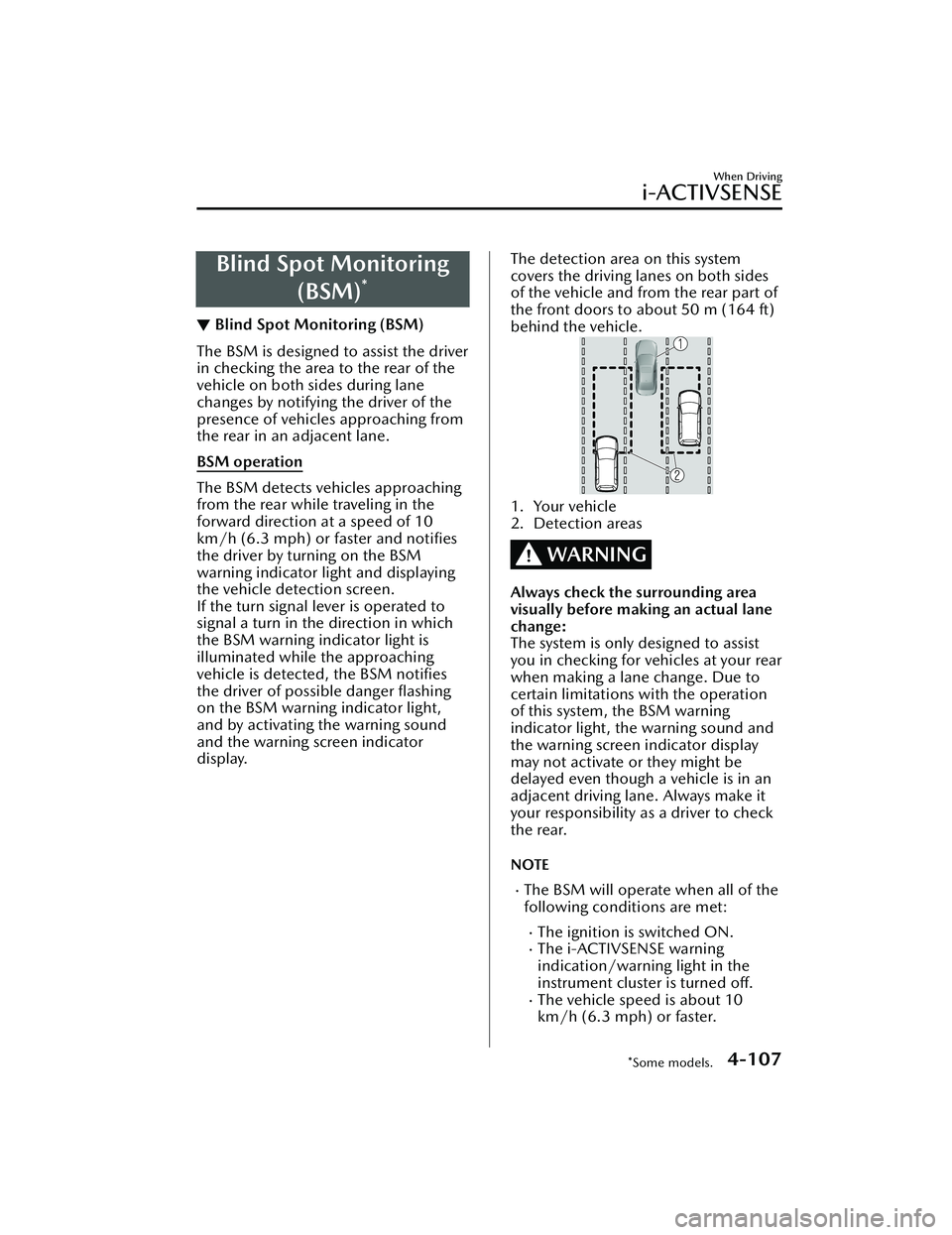
The detection area on this system
covers the driving lanes on both sides
of the vehicle and from the rear part of
the front doors to about 50 m (164 ft)
behind the vehicle.
1. Your vehicle
2. Detection areas
WARNING
Always check the surrounding area
visually before making an actual lane
change:
The system is only designed to assist
you in checking for vehicles at your rear
when making a lane change. Due to
certain limitations with the operation
of this system, the BSM warning
indicator light, the warning sound and
the warning screen indicator display
may not activate or they might be
delayed even though a vehicle is in an
adjacent driving lane. Always make it
your responsibility as a driver to check
the rear.
NOTE
The BSM will operate when all of the
following conditions are met:
The ignition is switched ON.The i-ACTIVSENSE warning
indication/warning light in the
instrument cluster is turned off.
The vehicle speed is about 10
km/h (6.3 mph) or faster.
When Driving
i-ACTIVSENSE
*Some models.4-107
Mazda3_8LC2-EA-22G_Edition1_new 2022-5-20 11:26:10
Page 253 of 623
The BSM will not operate under the
following circumstances.
The vehicle speed falls below
about 10 km/h (6.3 mph) even
though the i-ACTIVSENSE warning
indication/warning light is turnedoff.
The shift lever (manual
transmission)/selector lever
(automatic transmission) is shifted
to reverse (R) and the vehicle is
reversing.
The turning radius is small (making
a sharp turn, turning at
intersections).
In the following cases, the
i-ACTIVSENSE warning indication/
warning light turns on and operation
of the system is stopped. If the
i-ACTIVSENSE warning indication/
warning light remains illuminated,
have the vehicle inspected at an
Authorized Mazda Dealer as soon as
possible.
Some problem with the system
including the BSM warning
indicator lights is detected.
A large deviation in the installation
position of a rear side radar sensor
on the vehicle has occurred.
There is a large accumulation of
snow or ice on the rear bumper
near a rear side radar sensor.
Remove any snow, ice or mud on
the rear bumper.
Driving on snow-covered roads for
long periods.
The temperature near the rear side
radar sensor becomes extremely
hot due to driving for long periods
on slopes during the summer.
The battery voltage has decreased.Under the following conditions, the
rear side radar sensor cannot detect
target objects or it may be difficult to
detect them.
The rear bumper around the rear
side radar sensor is deformed.
Radio wave interference from a
radar sensor equipped on a nearby
vehicle.
The approaching vehicle is any of
the following shapes.
a) The size of the vehicle body is extremely small.
b) The vehicle height is extremely low or high.
c) A special type of vehicle with a complex shape.
A vehicle is in the detection area at
the rear in an adjacent driving lane
but it does not approach. The BSM
determines the condition based on
radar detection data.
A vehicle is traveling alongside
your vehicle at nearly the same
speed for an extended period of
time.
Vehicles approaching in the
opposite direction.
A vehicle in an adjacent driving
lane is attempting to pass your
vehicle.
A vehicle is in an adjacent lane on
a road with extremely wide driving
lanes. The detection area of the
rear side radar sensor is set at the
road width of expressways.
In the following case, the flashing of
the BSM warning indicator light, and
the activation of the warning sound
and the warning screen indicator
display may not occur or they may be
delayed.
A vehicle makes a lane change
from a driving lane two lanes over
to an adjacent lane.
Driving on steep slopes.Crossing the summit of a hill or
mountain pass.
When Driving
i-ACTIVSENSE
4-108
Mazda3_8LC2-EA-22G_Edition1_new 2022-5-20 11:26:10