ven MAZDA MAZDA 2023 Owners Manual
[x] Cancel search | Manufacturer: MAZDA, Model Year: 2023, Model line: MAZDA, Model: MAZDA MAZDA 2023Pages: 623, PDF Size: 15.08 MB
Page 307 of 623
NOTE
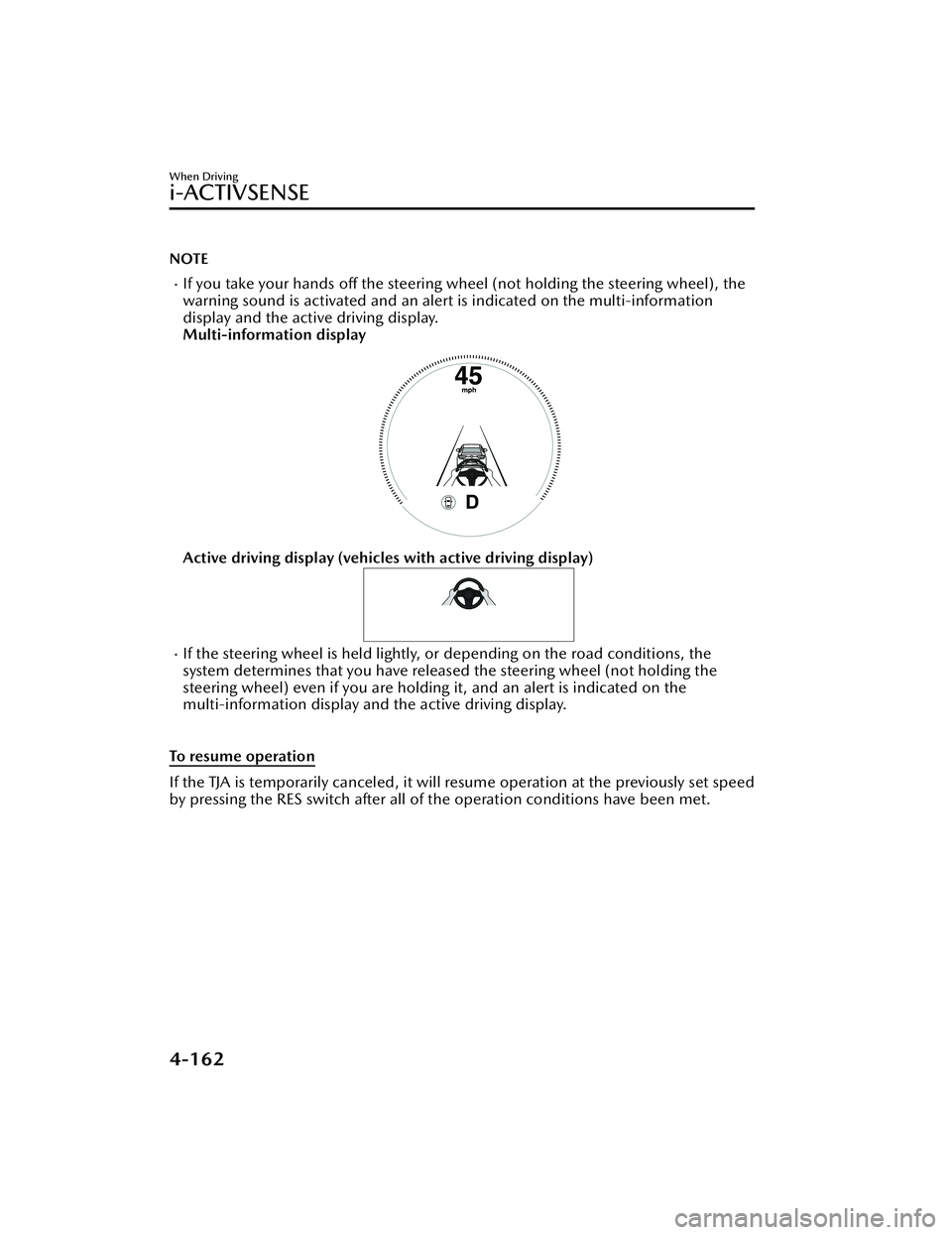
If you take your hands off the steering wheel (not holding the steering wheel), the
warning sound is activated and an alert is indicated on the multi-information
display and the active driving display.
Multi-information display
Active driving display (vehicles with active driving display)
If the steering wheel is held lightly, or depending on the road conditions, the
system determines that you have released the steering wheel (not holding the
steering wheel) even if you are holding it, and an alert is indicated on the
multi-information display and the active driving display.
To resume operation
If the TJA is temporarily canceled, it will resume operation at the previously set speed
by pressing the RES switch after all of the operation conditions have been met.
When Driving
i-ACTIVSENSE
4-162
Mazda3_8LC2-EA-22G_Edition1_new 2022-5-20 11:26:10
Page 308 of 623
NOTE
If the set speed is not indicated on the display, the system does not operate even if
the RES switch is pressed.
After the operation, the steering assist operation may not operate for a period of 5
seconds at the most until the lane lines are detected or a vehicle ahead is
recognized.
Turning off
When the TJA switch is pressed while the TJA is operating, the TJA turns off.
▼ Shift-up/Shift-down Request
Display (Manual Transmission)
The shift-up or shift-down request
display might be displayed while the
TJA is operating. When this occurs, shift
gears because the gear position is not
appropriate.
Request Indication on display
Shift up Shift Up to a Higher Gear
Shift down Shift Down to a Lower Gear
NOTE
If the gears are not shifted up even
though the shift-up request
indication is displayed, load will be
applied to the engine and the TJA
might be automatically canceled or
engine damage could occur.
If the gears are not shifted down
even though the shift-down request
indication is displayed, the TJA might
be automatically canceled or engine
stalling could occur.
▼ Stop Hold Control (Automatic
Transmission)
While in headway control using the
TJA, your vehicle will stop when a
vehicle ahead stops. When the vehicle
is stopped and the stop hold control
operates, the TJA indicator light turns
on.
NOTE
Even if the TJA is temporarily
canceled during stop hold control,
the vehicle is held in its stopped
position.
The parking brake is automatically
applied and the vehicle is held in its
stopped position when 10 minutes
or longer have passed since the stop
hold control operated. When this
occurs, the TJA is temporarily
canceled.
The brake lights turn on during stop
hold control.
When Driving
i-ACTIVSENSE
4-163
Mazda3_8LC2-EA-22G_Edition1_new 2022-5-20 11:26:10
Page 309 of 623
To resume driving
After the vehicle ahead starts moving
while your vehicle is stopped under
stop hold control, press the RES switch
or depress the accelerator pedal to
cancel the stop hold control and start
driving.
NOTE
When you resume driving by pressing
the RES switch, your vehicle does not
start moving until the distance
between your vehicle and the vehicle
ahead lengthens to the specified
distance or farther.
If the TJA is temporarily canceled,
depress the accelerator pedal and
start driving the vehicle. If the TJA is
temporarily canceled, you cannot
resume driving by pressing the RES
switch when there are no vehicles in
front of your vehicle.
If the vehicle ahead starts moving
within 3 seconds after your vehicle is
stopped by the stop hold control,
headway control will continue even if
you do not resume driving your
vehicle, such as by depressing the
accelerator pedal.
Vehicle departure information
If you do not resume driving within a
few seconds after the vehicle ahead
starts moving during stop hold control,
the multi-information display
vehicle-ahead indication flashes to
urge the driver to resume driving. If you
do not resume driving after the
indicator light flashes, a sound is
activated to urge you to resume
driving.
Lane-keep Assist System
(LAS)
*
▼Lane-keep Assist System (LAS)
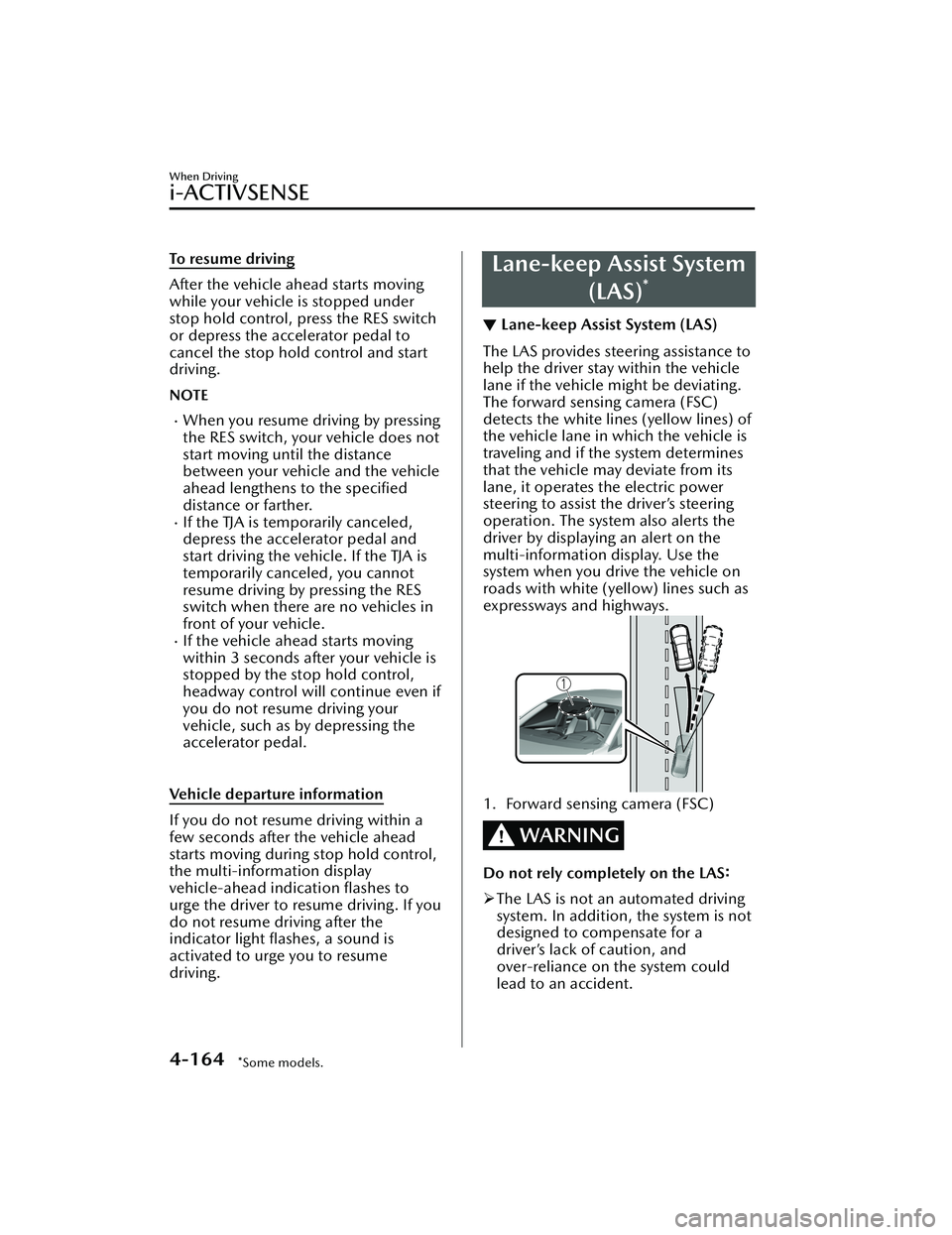
The LAS provides steering assistance to
help the driver stay within the vehicle
lane if the vehicle might be deviating.
The forward sensing camera (FSC)
detects the white lines (yellow lines) of
the vehicle lane in which the vehicle is
traveling and if the system determines
that the vehicle may deviate from its
lane, it operates the electric power
steering to assist the driver’s steering
operation. The system also alerts the
driver by displaying an alert on the
multi-information display. Use the
system when you drive the vehicle on
roads with white (yellow) lines such as
expressways and highways.
1. Forward sensing camera (FSC)
WARNING
Do not rely completely on the LAS:
The LAS is not an automated driving
system. In addition, the system is not
designed to compensate for a
driver’s lack of caution, and
over-reliance on the system could
lead to an accident.
When Driving
i-ACTIVSENSE
4-164*Some models.
Mazda3_8LC2-EA-22G_Edition1_new 2022-5-20 11:26:10
Page 310 of 623
The functions of the LAS have
limitations. Always stay on course
using the steering wheel and drive
with care.
Do not use the LAS under the
following circumstances, otherwise it
may result in an accident.
The vehicle is driven on slippery
roads such as icy or snow-covered
roads, and unpaved roads.
Tires of a
different
specified size
are used, such as a temporary
spare tire.
Tires with
insufficient tread are
used.
The tire pressures are not adjusted
to the
specified pressure.
The vehicle is being used to tow a
camper or boat trailer.
Tire chains are used.
The vehicle is driven on roads with
lane lines other than white (yellow)
lines, such as an expressway.
CAUTION
Heed the following cautions so that
the LAS can operate normally.
Do not modify the vehicle's
suspensions.
Always use tires of the specified type
and size for the front and rear
wheels. Consult an Authorized
Mazda Dealer for tire replacement.
NOTE
The system may not operate normally
under the following conditions.
The white (yellow) lane lines are less
visible because of dirt or paint
flaking.
White (yellow) lane lines are less
visible because of bad weather (rain,
fog , or snow).
The vehicle is driven on a temporary
lane or section with a closed lane
resulting from construction where
there might be multiple white
(yellow) lane lines, or they are
interrupted.
The camera picks up an obscure line,
such as a temporary line being used
for construction, or because of
shade, unmelted snow, or grooves
filled with water.
The surrounding brightness suddenly
changes such as when entering or
exiting a tunnel.
Back-light is reflected off the road
surface.
The road surface is wet and shiny
after rain, or there are puddles on
the road.
The width of a lane is excessively
narrow.
The vehicle is driven on roads with
tight curves.
Heavy luggage is loaded in the
trunk/luggage compartment or on
the rear seat causing the vehicle to
tilt.
The vehicle is driven through a fork in
the road or a junction.
The shade of a guardrail parallel to a
white (yellow) lane line is cast on the
road.
The illumination of the headlights is
weakened because of dirt or the
optical axis is deviated at night.
The road is excessively uneven.The vehicle is shaken after hitting a
road bump.
A vehicle in front of your vehicle is
running near a white (yellow) lane
line making it less visible.
The windshield is dirty or foggy.Strong light is directed from the front
of the vehicle (such as sunlight, or
headlights (high-beam) of
on-coming vehicles).
When Driving
i-ACTIVSENSE
4-165
Mazda3_8LC2-EA-22G_Edition1_new 2022-5-20 11:26:10
Page 313 of 623
▼System Canceling
The LAS can be set to inoperable.
(If only the LAS is turned
off)
Refer to the Settings section in the
Mazda Connect Owner's Manual.
(If the LAS is turned off by operating
the i-ACTIVSENSE OFF switch)
Refer to i-ACTIVSENSE OFF Switch
on page 4-100.
NOTE
If the ignition is switched OFF while
you have canceled the system using the
i-ACTIVSENSE OFF switch, the system
is automatically enabled the next time
the ignition is switched ON. However,
if the system is canceled using the
personalization features, the system is
not automatically enabled.
Smart Brake Support
(SBS)
*
▼Smart Brake Support (SBS)
The SBS is a system designed to detect
target objects using sensors and
cameras equipped on the vehicle, and
to reduce damage in the event of a
collision by operating the brake control
if there is the possibility of your vehicle
colliding with a target object.
One part of the SBS functions when
you are driving forward and the other
part functions when you are driving in
reverse.
Refer to Forward drive detection on
page 4-168.
Refer to Reverse drive detection on
page 4-170.
▼Forward drive detection
When you are driving forward, the
following functions of the Smart Brake
Support (SBS) operate.
Forward detection function
WARNING
Do not rely completely on the SBS:
The SBS is only designed to reduce
damage in the event of a collision.
The system may not operate normally
depending on the target object,
weather conditions, or traffic
conditions. Over reliance on the
system leading to the accelerator pedal
or brake pedal being mistakenly
operated could result in an accident.
CAUTION
In the following cases, turn the SBS
off
to prevent a mis-operation.
When Driving
i-ACTIVSENSE
4-168*Some models.
Mazda3_8LC2-EA-22G_Edition1_new 2022-5-20 11:26:10
Page 314 of 623
The vehicle is being towed or towing
another vehicle.
The vehicle is driven on rough roads
such as in areas where there is grass
and foliage or off-road.
Refer to Stopping the Smart Brake
Support (SBS) System Operation on
page 4-176.
NOTE
During the SBS brake control, the
brake pedal may move rearward or
become stiff. The brakes are operating,
but continue to depress the brake
pedal.
Forward detection function
The forward detection function is
designed to reduce damage in the
event of a collision with target objects
at the front.
The forward detection function detects
target objects (vehicles ahead,
pedestrians, and bicycles) using the
front radar sensor and the Forward
Sensing Camera (FSC). If there is a
possibility of your vehicle colliding with
a target object at the front, you are
notified of possible danger by a
warning sound and a warning
indication on the display.
Furthermore, if the possibility of a
collision increases, the brake control is
performed to reduce damage in the
event of a collision. In addition, when
the driver depresses the brake pedal,
the brakes are applied firmly and
quickly to assist.
(Vehicles with Driver Monitoring
(DM))
If the system determines that the driver
is not paying attention to the road, it
activates the collision warning earlier
than normal.
Operation conditions
The forward detection function
operates when all of the following
conditions are met.
The ignition is switched ON.The SBS is on.(Object is vehicle ahead)
The vehicle speed is about 4 km/h
(3 mph) or higher.
(Object is a pedestrian or bicycle)
The vehicle speed is between about
10 and 80 km/h (6.3 to 49 mph).
The DSC does not operate.
NOTE
When any of the following
conditions is met, the forward
detection function may not operate.
If there is the possibility of hitting
only a part of a vehicle or
obstruction ahead.
You are driving your vehicle at the
same speed as the vehicle ahead.
When the driver deliberately
performs driving operations
(accelerator operation, steering
wheel operation).
The accelerator pedal is depressed
abruptly.
The brake pedal is depressed.The steering wheel is being
operated.
(Automatic transmission)
The selector lever is being shifted.
The turn signal lever is being
operated.
Warnings and messages, such as a
dirty windshield, related to the
Forward Sensing Camera (FSC) or
front radar sensor are being
displayed on the multi-information
display.
When any of the following
conditions is met, the forward
detection function may operate.
When Driving
i-ACTIVSENSE
4-169
Mazda3_8LC2-EA-22G_Edition1_new 2022-5-20 11:26:10
Page 316 of 623
WARNING
Do not rely completely on the SBS:
The SBS is only designed to reduce
damage in the event of a collision.
Over reliance on the system leading to
the accelerator pedal or brake pedal
being mistakenly operated could result
in an accident.
Heed the following cautions so that
the SBS can operate normally:
Do not apply stickers (including
transparent stickers) to the areas
around the rear side radar sensors
and the rear ultrasonic sensors.
Otherwise, a rear side radar sensor
and a rear ultrasonic sensor may not
be able to detect vehicles and
obstructions correctly which could
result in an accident.
Do not disassemble the rear side
radar sensors and rear ultrasonic
sensors.
If you recognize scratches around the
rear side radar sensors and rear
ultrasonic sensors, stop using the SBS
immediately and always have the
vehicle inspected by an Authorized
Mazda Dealer.
Refer to Stopping the Smart Brake
Support (SBS) System Operation on
page 4-176.
Consult an Authorized Mazda Dealer
for rear bumper removal/
installation.
Do not modify the suspension:
If the vehicle height or inclination is
changed, the SBS may not operate
correctly because it cannot detect
obstructions correctly.
Do not hit the rear side radar sensors
and rear ultrasonic sensors forcefully:
When washing the vehicle, do not
spray highly pressurized water against
the rear side radar sensors and the rear
ultrasonic sensors, or rub them
strongly. In addition, do not hit the rear
bumper forcefully when loading and
unloading cargo. Otherwise, the
system will be unable to detect
obstructions correctly and the SBS may
not operate normally.
CAUTION
In the following cases, turn the SBS
off to prevent a mis-operation.
A trailer is pulled or an accessory
such as a bicycle carrier is installed
to the rear of the vehicle.
The vehicle is driven on rough
roads such as in areas where there
is grass and foliage or off-road.
Refer to Stopping the Smart Brake
Support (SBS) System Operation
on page 4-176.
Always use tires for all wheels that
are of the specified size, and the
same manufacture, brand, and tread
pattern. In addition, do not use tires
with significantly different wear
patterns on the same vehicle. If such
improper tires are used, the SBS may
not operate normally.
NOTE
During the SBS brake control, the
brake pedal may move rearward or
become stiff. The brakes are operating,
but continue to depress the brake
pedal.
Rearward detection function
The rearward detection function is
designed to reduce damage in the
event of a collision with a target object
when reversing.
When Driving
i-ACTIVSENSE
4-171
Mazda3_8LC2-EA-22G_Edition1_new 2022-5-20 11:26:10
Page 317 of 623
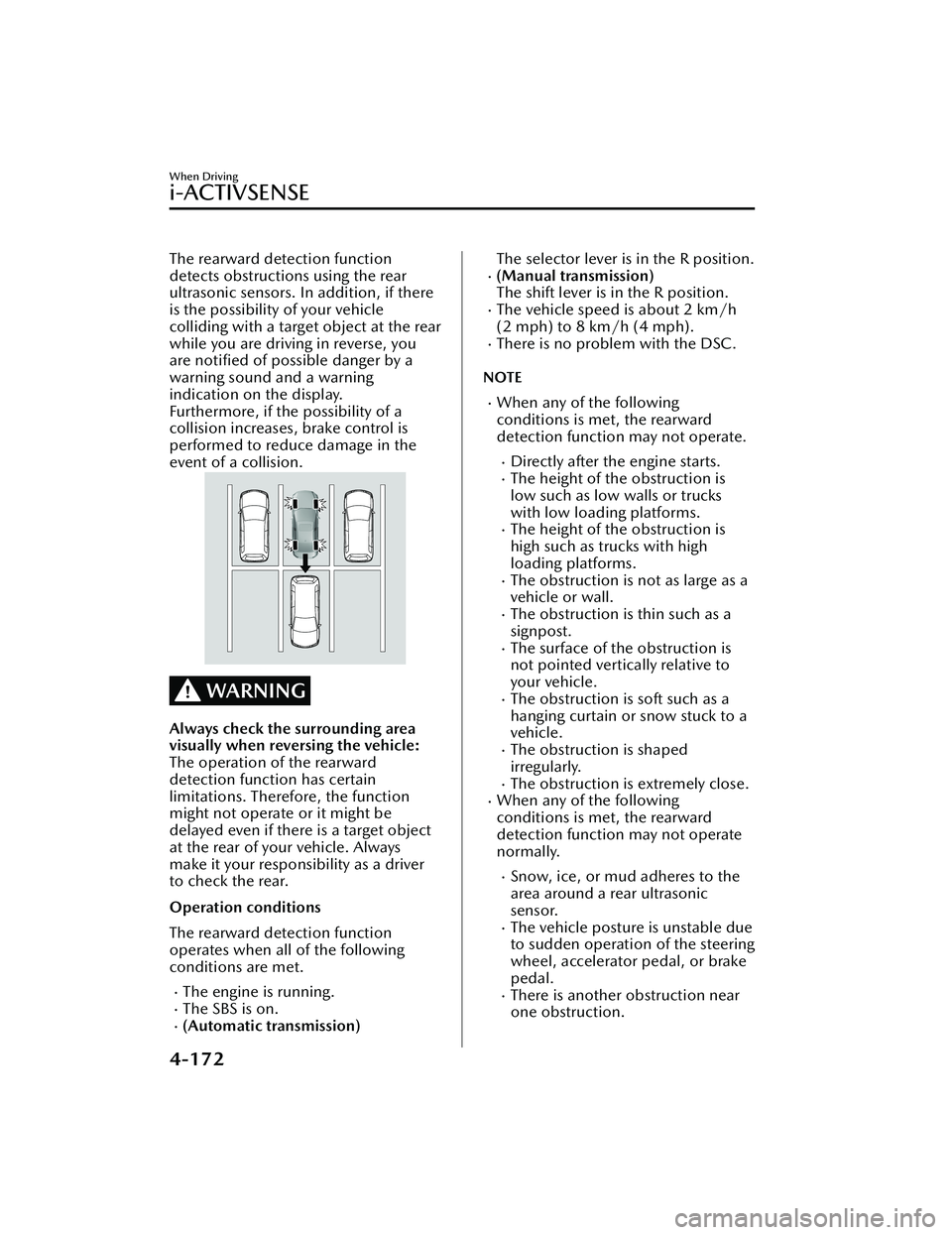
The rearward detection function
detects obstructions using the rear
ultrasonic sensors. In addition, if there
is the possibility of your vehicle
colliding with a target object at the rear
while you are driving in reverse, you
are notified of possible danger by a
warning sound and a warning
indication on the display.
Furthermore, if the possibility of a
collision increases, brake control is
performed to reduce damage in the
event of a collision.
WARNING
Always check the surrounding area
visually when reversing the vehicle:
The operation of the rearward
detection function has certain
limitations. Therefore, the function
might not operate or it might be
delayed even if there is a target object
at the rear of your vehicle. Always
make it your responsibility as a driver
to check the rear.
Operation conditions
The rearward detection function
operates when all of the following
conditions are met.
The engine is running.The SBS is on.(Automatic transmission)
The selector lever is in the R position.(Manual transmission)
The shift lever is in the R position.
The vehicle speed is about 2 km/h
(2 mph) to 8 km/h (4 mph).
There is no problem with the DSC.
NOTE
When any of the following
conditions is met, the rearward
detection function may not operate.
Directly after the engine starts.The height of the obstruction is
low such as low walls or trucks
with low loading platforms.
The height of the obstruction is
high such as trucks with high
loading platforms.
The obstruction is not as large as a
vehicle or wall.
The obstruction is thin such as a
signpost.
The surface of the obstruction is
not pointed vertically relative to
your vehicle.
The obstruction is soft such as a
hanging curtain or snow stuck to a
vehicle.
The obstruction is shaped
irregularly.
The obstruction is extremely close.When any of the following
conditions is met, the rearward
detection function may not operate
normally.
Snow, ice, or mud adheres to the
area around a rear ultrasonic
sensor.
The vehicle posture is unstable due
to sudden operation of the steering
wheel, accelerator pedal, or brake
pedal.
There is another obstruction near
one obstruction.
When Driving
i-ACTIVSENSE
4-172
Mazda3_8LC2-EA-22G_Edition1_new2022-5-20 11:26:10
Page 318 of 623
During inclement weather such as
rain, fog , and snow.
High or low humidity.High or low temperatures.Strong winds.The path of travel is not flat.Heavy luggage is loaded in the
luggage compartment or on the
rear seat and the vehicle is tilted.
Objects such as a wireless antenna,
fog light, or illuminated license
plate is installed near a rear
ultrasonic sensor.
The orientation of a rear ultrasonic
sensor has deviated for reasons
such as a collision.
The vehicle is affected by other
sound waves such as the horn,
engine noise, or rear ultrasonic
sensor of another vehicle.
When any of the following
conditions is met, the rearward
detection function may operate.
Reversing towards a steep
ascending slope.
There are grating, wheel blocks, a
road curb, or a bump.
There is a hanging curtain or
railroad crossing gate.
Reversing near objects such as
foliage, barriers, vehicles, walls, or
fences.
The vehicle is driven on rough
roads such as in areas where there
is grass and foliage or off-road.
When reversing through low gates,
narrow gates, car washing
machines, tunnels, or into a
mechanical parking garage.
A towing bar is installed or a trailer
is connected.
(Manual transmission)
On a manual transmission vehicle,
the engine stops if the clutch pedal is
not depressed when the vehicle is
stopped by the SBS brake operation.
If the vehicle is stopped by the SBS
brake operation and the brake pedal
is not depressed, the SBS brake is
automatically released after about 2
seconds.
Collision warning
If there is the possibility of your vehicle
colliding with a vehicle approaching
from the rear on the left or right, or
from the rear while you are driving in
reverse, a warning sound is activated
continuously and a warning is
displayed on the multi-information
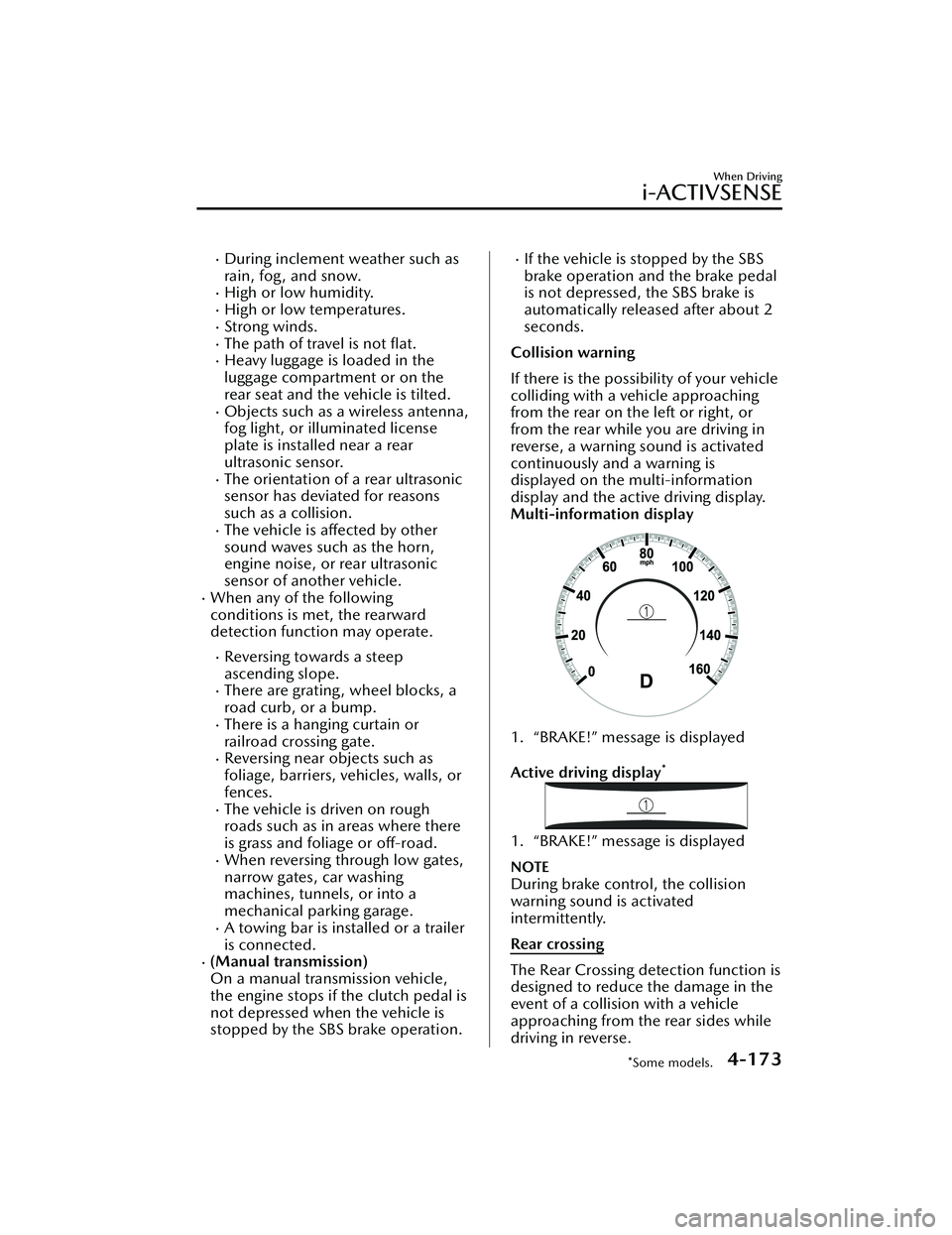
display and the active driving display.
Multi-information display
1. “BRAKE!” message is displayed
Active driving display
*
1. “BRAKE!” message is displayed
NOTE
During brake control, the collision
warning sound is activated
intermittently.
Rear crossing
The Rear Crossing detection function is
designed to reduce the damage in the
event of a collision with a vehicle
approaching from the rear sides while
driving in reverse.
When Driving
i-ACTIVSENSE
*Some models.4-173
Mazda3_8LC2-EA-22G_Edition1_new 2022-5-20 11:26:10
Page 319 of 623
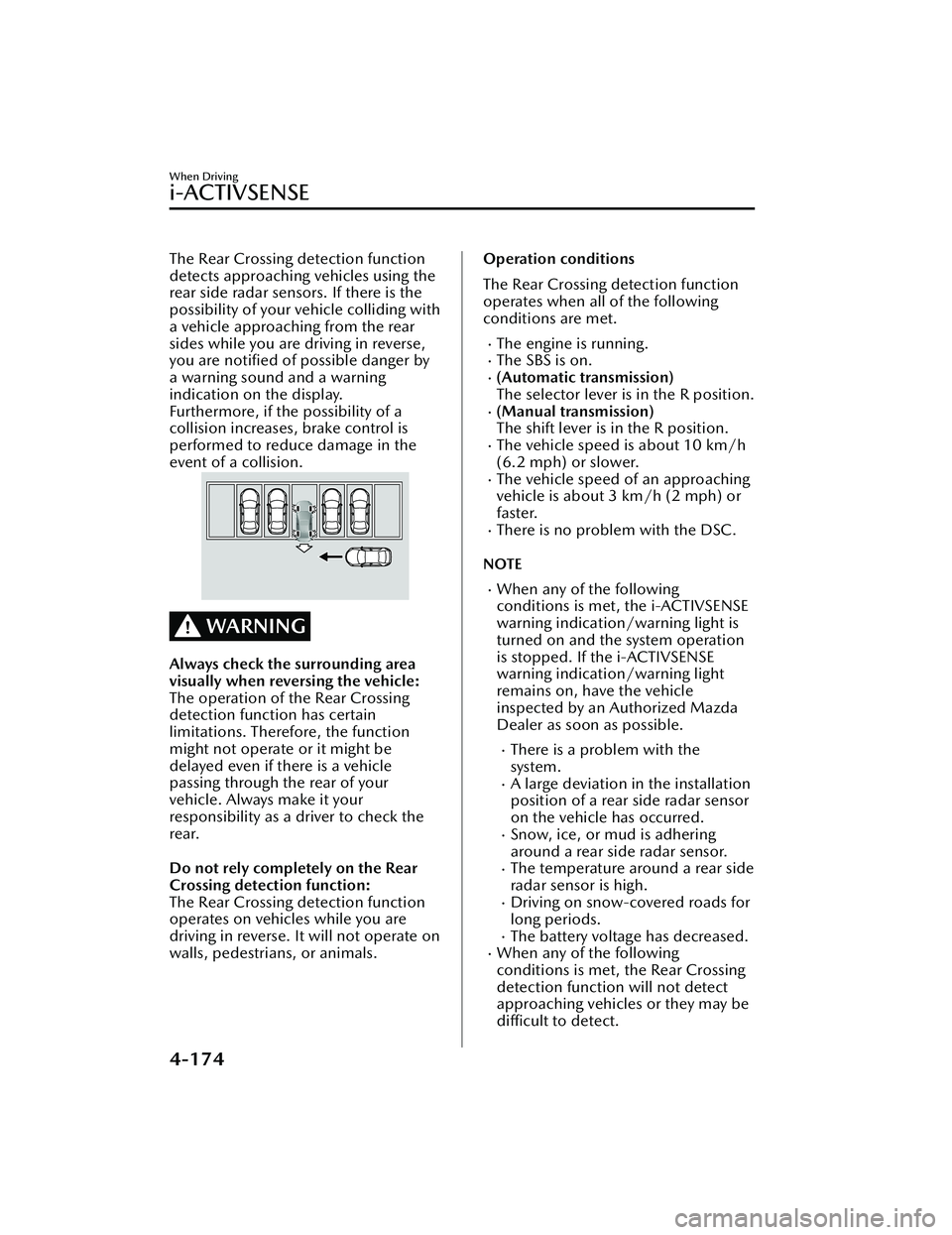
The Rear Crossing detection function
detects approaching vehicles using the
rear side radar sensors. If there is the
possibility of your vehicle colliding with
a vehicle approaching from the rear
sides while you are driving in reverse,
you are notified of possible danger by
a warning sound and a warning
indication on the display.
Furthermore, if the possibility of a
collision increases, brake control is
performed to reduce damage in the
event of a collision.
WARNING
Always check the surrounding area
visually when reversing the vehicle:
The operation of the Rear Crossing
detection function has certain
limitations. Therefore, the function
might not operate or it might be
delayed even if there is a vehicle
passing through the rear of your
vehicle. Always make it your
responsibility as a driver to check the
rear.
Do not rely completely on the Rear
Crossing detection function:
The Rear Crossing detection function
operates on vehicles while you are
driving in reverse. It will not operate on
walls, pedestrians, or animals.
Operation conditions
The Rear Crossing detection function
operates when all of the following
conditions are met.
The engine is running.The SBS is on.(Automatic transmission)
The selector lever is in the R position.
(Manual transmission)
The shift lever is in the R position.
The vehicle speed is about 10 km/h
(6.2 mph) or slower.
The vehicle speed of an approaching
vehicle is about 3 km/h (2 mph) or
faster.
There is no problem with the DSC.
NOTE
When any of the following
conditions is met, the i-ACTIVSENSE
warning indication/warning light is
turned on and the system operation
is stopped. If the i-ACTIVSENSE
warning indication/warning light
remains on, have the vehicle
inspected by an Authorized Mazda
Dealer as soon as possible.
There is a problem with the
system.
A large deviation in the installation
position of a rear side radar sensor
on the vehicle has occurred.
Snow, ice, or mud is adhering
around a rear side radar sensor.
The temperature around a rear side
radar sensor is high.
Driving on snow-covered roads for
long periods.
The battery voltage has decreased.When any of the following
conditions is met, the Rear Crossing
detection function will not detect
approaching vehicles or they may bedifficult to detect.
When Driving
i-ACTIVSENSE
4-174
Mazda3_8LC2-EA-22G_Edition1_new 2022-5-20 11:26:10