ven MAZDA MAZDA 2023 Manual PDF
[x] Cancel search | Manufacturer: MAZDA, Model Year: 2023, Model line: MAZDA, Model: MAZDA MAZDA 2023Pages: 623, PDF Size: 15.08 MB
Page 158 of 623
The automatic transmission fluid
temperature is not abnormally
high.
The steering wheel is almost in the
straight-ahead position (idling may
not stop even with the steering
wheel in the straight-ahead
position if force is applied to the
steering wheel. Release the force
applied to the steering wheel to
stop engine idling).
The vehicle is stopped by
depressing the brake pedal.
The vehicle is not on a steep slope.The vehicle is not stopped
suddenly.
(While driving)
The selector lever is in the D
position (not in second gear fixed
mode).
The vehicle is driven at a speed of
20 km/h (12 mph) or faster after
engine idling stops.
The vehicle is driven at a vehicle
speed of about 30 km/h (19 mph)
or faster after engine idling stops
while driving.
The vehicle is not driven in sport
mode.
The automatic transmission fluid
has warmed up sufficiently.
The automatic transmission fluid
temperature is not abnormally
high.
The steering wheel is almost in the
straight-ahead position (idling may
not stop even with the steering
wheel in the straight-ahead
position if force is applied to the
steering wheel. Release the force
applied to the steering wheel to
stop engine idling).
The vehicle is stopped by
depressing the brake pedal.
The vehicle is not driven on a
slope.
The vehicle is not stopped
suddenly.
NOTE
Under the following conditions, a
period of time is required to stop
engine idling
The M Hybrid battery power is
depleted for some reason such as the
vehicle has not been driven for a
long period.
The ambient temperature is high or
low.
After the battery terminals are
disconnected for some reason such
as for battery replacement.
Engine-stop period is short or time
until next engine idle stop is long
The ambient temperature is high or
low.
The M Hybrid battery power is
depleted.
Power consumption by the vehicle's
electrical parts is high.
Engine restarts automatically while
engine idling is stopped
Under the following conditions, the
engine restarts automatically.
The i-stop OFF switch is pressed until
the beep sounds.
The air conditioner is operated with
the airflow mode in the
position.The temperature setting dial of the
air conditioner is in the maximum
heating or maximum cooling (A/C
ON) position.
The cabin temperature is largely different from the set temperature of
the air conditioner.
The brakes are released slightly on a
slope and the vehicle begins to
move.
When Driving
Start/Stop Engine
4-13
Mazda3_8LC2-EA-22G_Edition1_new 2022-5-20 11:26:10
Page 159 of 623
Two minutes have elapsed since the
idling was stopped.
The M Hybrid battery power is
depleted.
(Engine idling is stopped while the
vehicle is stopped)
The accelerator pedal is depressed
with the selector lever in the D or
M (not in second gear fixed mode)
position.
The selector lever is shifted to the R
position.
The selector lever is shifted from N
or P position to D or M (not in
second gear fixed mode) position.
The steering wheel is operated
with the selector lever in the D or
M (not in second gear fixed mode)
position.
The selector lever is in the M
position and the second gear fixed
mode is selected.
The steering wheel is operated.(Engine idling is stopped while
driving)
The selector lever is in a position
other than the D position.
The accelerator pedal is depressed.Sport mode is selected.The steering wheel is operated.With the selector lever in the P or
N position, or the D/M range, the
driver's seat belt is unfastened, the
driver's door is opened, or the
hood is opened.
Selector lever is operated while
engine idling is stopped
If the selector lever is shifted from D or
M (not in second gear fixed mode)
position to N or P position while
engine idling is stopped, the engine
does not restart even when the brake
pedal is released. The engine will
restart if the brake pedal is depressed
again or the selector lever is shifted to
the D, M (not in second gear fixed
mode), or R position. (For the
purposes of safety, always keep the
brake pedal depressed when shifting
the selector lever.)
If the selector lever is shifted from the
D or M (not in second gear fixed
mode) to the N or P position, and the
driver's seat belt is unfastened or the
driver's door is opened, the engine
restarts.
Battery terminals have been
disconnected
Engine idling may not stop right after
the battery terminals have been
disconnected. In addition, if the
battery is replaced, the i-stop functions
must be verified. Consult an
Authorized Mazda Dealer.
▼ i-stop OFF Switch
When pressing the switch, the i-stop
function stops and the i-stop OFF
switch indicator light turns on. If the
switch is pressed again, the i-stop
function becomes operational and the
When Driving
Start/Stop Engine
4-14
Mazda3_8LC2-EA-22G_Edition1_new
2022-5-20 11:26:10
Page 160 of 623
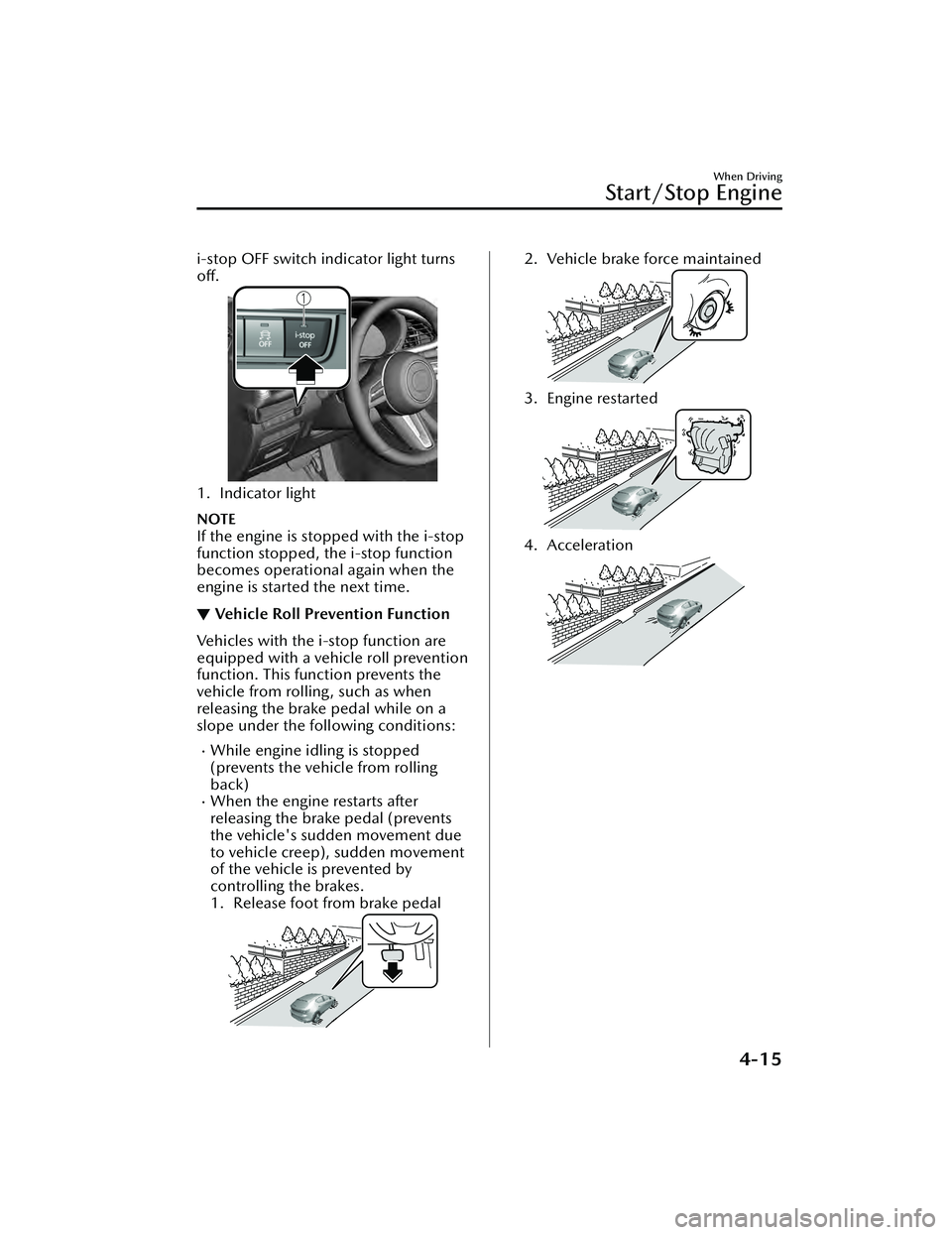
i-stop OFF switch indicator light turns
off.
1. Indicator light
NOTE
If the engine is stopped with the i-stop
function stopped, the i-stop function
becomes operational again when the
engine is started the next time.
▼Vehicle Roll Prevention Function
Vehicles with the i-
stop function are
equipped with a vehicle roll prevention
function. This function prevents the
vehicle from rolling, such as when
releasing the brake pedal while on a
slope under the following conditions:
While engine idling is stopped
(prevents the vehicle from rolling
back)
When the engine restarts after
releasing the brake pedal (prevents
the vehicle's sudden movement due
to vehicle creep), sudden movement
of the vehicle is prevented by
controlling the brakes.
1. Release foot from brake pedal
2. Vehicle brake force maintained
3. Engine restarted
4. Acceleration
When Driving
Start/Stop Engine
4-15
Mazda3_8LC2-EA-22G_Edition1_new 2022-5-20 11:26:10
Page 161 of 623
WARNING
Do not rely completely on the vehicle
roll prevention function.
The vehicle roll prevention function
is a supplementary function which
operates for a maximum of 2
seconds after releasing the brake
pedal and accelerating the vehicle
from an engine idling stop condition.
Over reliance on the system may
result in an unexpected accident if
the vehicle were to suddenly
accelerate. Before starting to drive
the vehicle, always confirm the safety
of the surroundings and operate the
selector lever, brake pedal, and
accelerator pedal appropriately.
Note that the vehicle may move
suddenly depending on the vehicle's
load or if it is towing something.
Note that the vehicle may move
suddenly after the vehicle roll
prevention function is released while
the vehicle is under the following
conditions:
The selector lever is in the N
position.
If the selector lever is shifted to the
N position and the brake pedal is
released while the i-stop function
is operating, the brake force is
gradually released. To accelerate
the vehicle, release the brake pedal
after the engine restarts and shift
the selector lever to a position
other than the N position.
NOTE
When the vehicle is stopped on a
steep grade, the vehicle roll
prevention function does not
operate because engine idling is not
stopped.
The brake pedal response may
change, sound may occur from the
brakes, or the brake pedal could
vibrate from the operation of the
vehicle roll prevention function.
However, this does not indicate a
malfunction.
▼ i-stop Warning Light (Amber)/
i-stop Indicator Light (Green)
To ensure safe and comfortable use of
the vehicle, the i-stop system
constantly monitors the driver's
operations, the vehicle's interior and
exterior environment, and the
operational status of the vehicle, and
uses the i-stop warning light (amber)
and i-stop indicator light (green) to
inform the driver of various cautions
and warnings.
NOTE
On vehicles equipped with the center
display, the i-stop operation status is
displayed in the fuel efficiency monitor
display.
Refer to the Fuel Efficiency Monitor
section in the Mazda Connect
Owner's Manual.
i-stop warning light (amber)
The light turns on/flashes continuously
if the system has a problem. Have the
vehicle inspected by an Authorized
Mazda Dealer.
i-stop indicator light (green)
When Driving
Start/Stop Engine
4-16
Mazda3_8LC2-EA-22G_Edition1_new
2022-5-20 11:26:10
Page 167 of 623
▼Odometer, Trip Meter and Trip
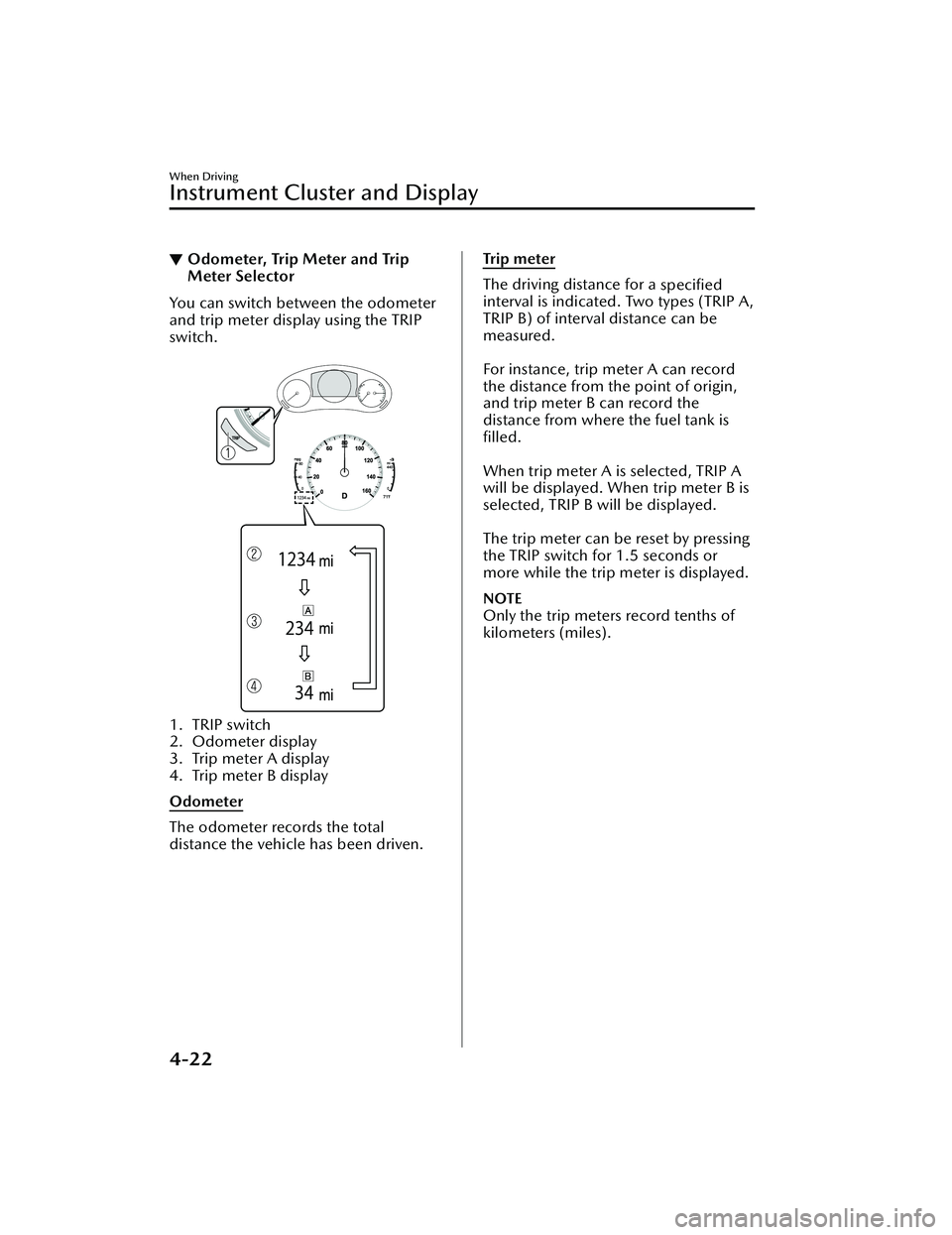
Meter Selector
You can switch between the odometer
and trip meter display using the TRIP
switch.
1. TRIP switch
2. Odometer display
3. Trip meter A display
4. Trip meter B display
Odometer
The odometer records the total
distance the vehicle has been driven.
Tr i p m e te r
The driving distance for a
specified
interval is indicated. Two types (TRIP A,
TRIP B) of interval distance can be
measured.
For instance, trip meter A can record
the distance from the point of origin,
and trip meter B can record the
distance from where the fuel tank is
filled.
When trip meter A is selected, TRIP A
will be displayed. When trip meter B is
selected, TRIP B will be displayed.
The trip meter can be reset by pressing
the TRIP switch for 1.5 seconds or
more while the trip meter is displayed.
NOTE
Only the trip meters record tenths of
kilometers (miles).
When Driving
Instrument Cluster and Display
4-22
Mazda3_8LC2-EA-22G_Edition1_new 2022-5-20 11:26:10
Page 169 of 623
If the low fuel warning light illuminates
or the fuel level is very low, refuel as
soon as possible.
If inconsistency in engine performance
or stalling occurs due to low fuel level
conditions, refuel the vehicle as soon
as possible and add at least 10 L (2.7
US gal, 2.2 Imp gal) of fuel.
Refer to Low Fuel Warning Indication/
Warning Light on page 7-35.
NOTE
After refueling, it may require some
time for the indicator to stabilize. In
addition, the indicator may deviate
while driving on a slope or curve
since the fuel moves in the tank.
The direction of the arrow ()
indicates that the fuel-filler lid is on
the left side of the vehicle.
▼ Dashboard Illumination
(Without auto-light control)
When the lights are turned on with the
ignition switched ON, the brightness of
the dashboard illumination is dimmed.
(With auto-light control)
When the lights are turned on with the
ignition switched ON, the brightness of
the dashboard illumination is dimmed.
However, when the light sensor
detects that the surrounding area is
bright such as when the lights are
turned on in the daytime, the
dashboard illumination does not dim.
NOTE
(With auto-light control)
When the ignition is switched ON in
the early evening or at dusk, the
dashboard illumination is dimmed
for several seconds until the light
sensor detects the brightness of the
surrounding area, however, the
dimming may cancel after the
brightness is detected.
When the lights are turned on, the
lights-on indicator light in the
instrument cluster turns on.
Refer to Headlights on page 4-57.
The brightness of the instrument panel
and dashboard illuminations can be
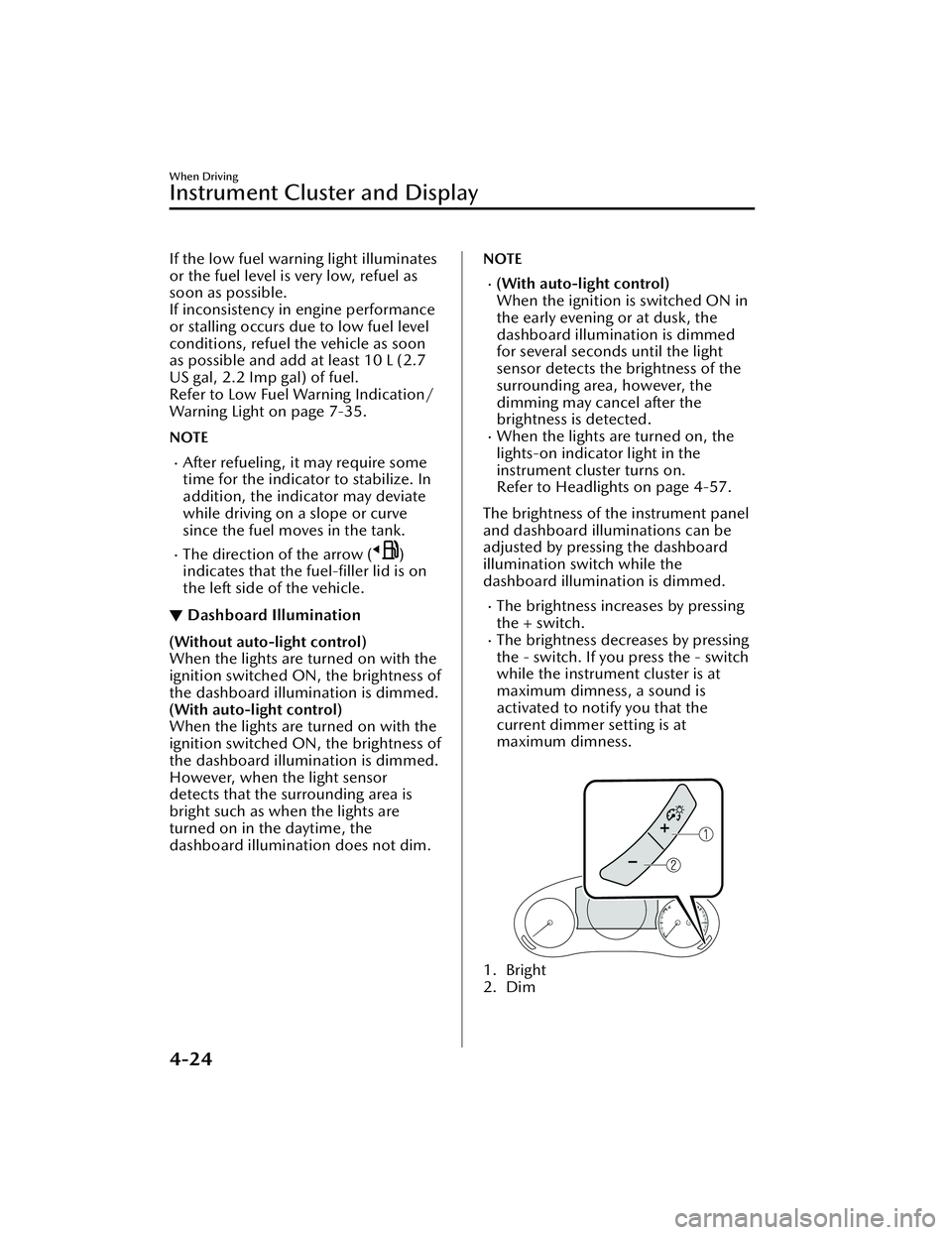
adjusted by pressing the dashboard
illumination switch while the
dashboard illumination is dimmed.
The brightness increases by pressing
the + switch.
The brightness decreases by pressing
the - switch. If you press the - switch
while the instrument cluster is at
maximum dimness, a sound is
activated to notify you that the
current dimmer setting is at
maximum dimness.
1. Bright
2. Dim
When Driving
Instrument Cluster and Display
4-24
Mazda3_8LC2-EA-22G_Edition1_new 2022-5-20 11:26:10
Page 170 of 623
Function for canceling illumination
dimmer
The illumination dimmer can be
canceled by pressing the + switch
while the instrument cluster is at
maximum dimness and while the
ignition is switched ON. If you press
the + switch again while the
illumination dimmer is canceled, a
sound is activated to notify you that it
is canceled. If the instrument cluster's
visibility is reduced due to glare from
surrounding brightness, cancel the
illumination dimmer.
NOTE
When the illumination dimmer is
canceled, the instrument cluster
cannot be dimmed even if the lights
are turned on.
When the illumination dimmer is
canceled, the screen in the center
display switches to constant display
of the daytime screen.
▼Outside Temperature Display
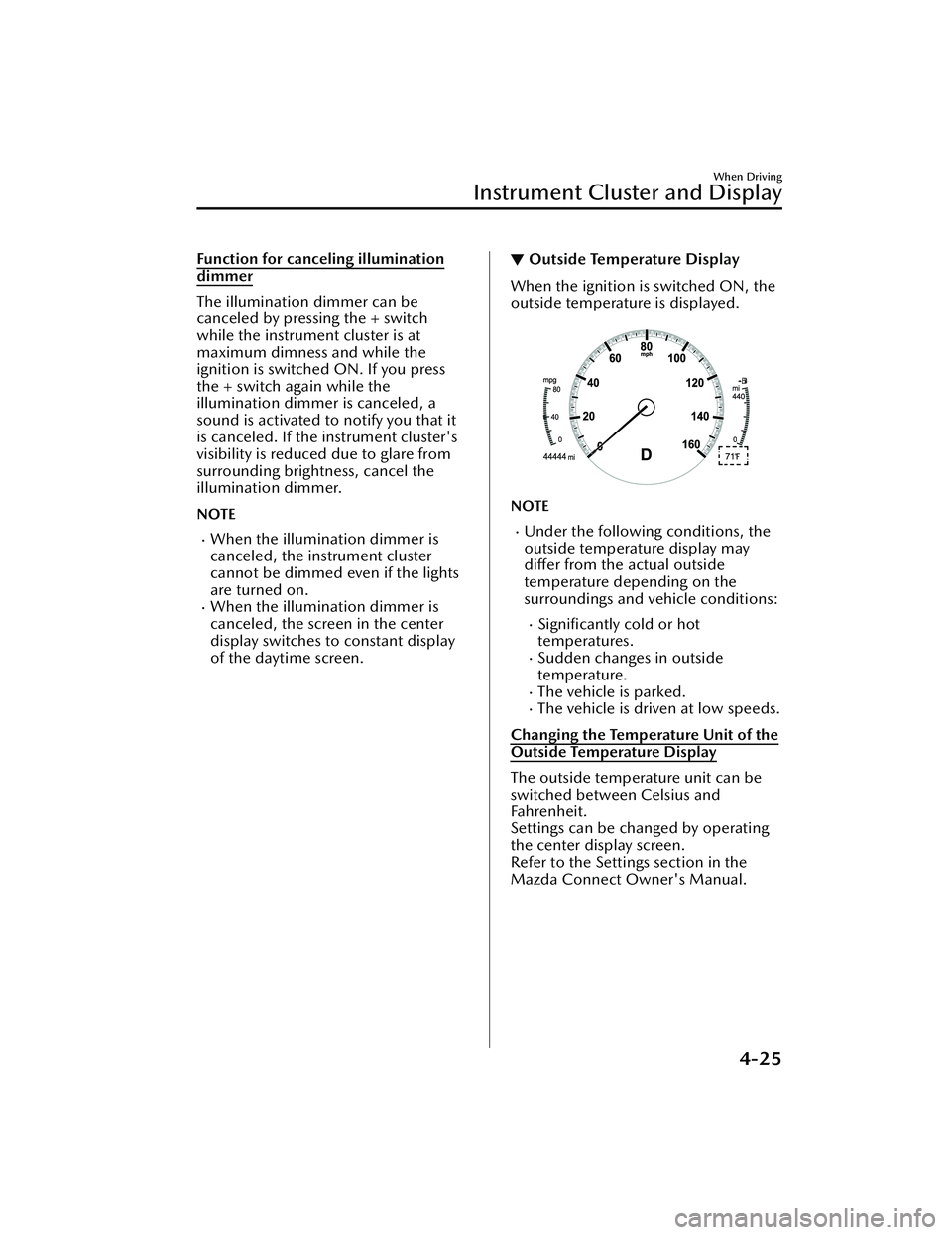
When the ignition is switched ON, the
outside temperature is displayed.
NOTE
Under the following conditions, the
outside temperature display may
differ from the actual outside
temperature depending on the
surroundings and vehicle conditions:
Significantly cold or hot
temperatures.
Sudden changes in outside
temperature.
The vehicle is parked.The vehicle is driven at low speeds.
Changing the Temperature Unit of the
Outside Temperature Display
The outside temperature unit can be
switched between Celsius and
Fahrenheit.
Settings can be changed by operating
the center display screen.
Refer to the Settings section in the
Mazda Connect Owner's Manual.
When Driving
Instrument Cluster and Display
4-25
Mazda3_8LC2-EA-22G_Edition1_new 2022-5-20 11:26:10
Page 171 of 623
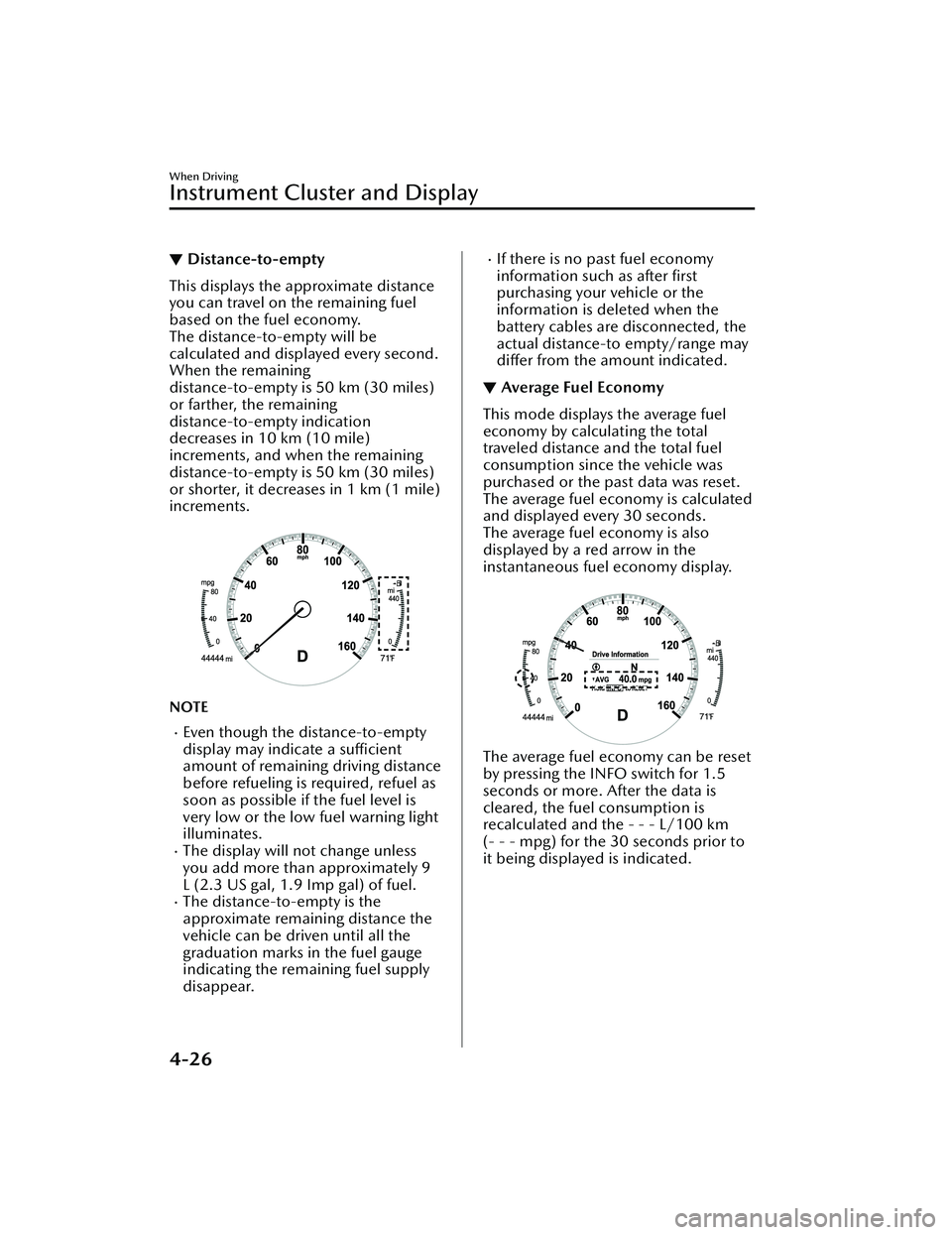
▼Distance-to-empty
This displays the approximate distance
you can travel on the remaining fuel
based on the fuel economy.
The distance-to-empty will be
calculated and displayed every second.
When the remaining
distance-to-empty is 50 km (30 miles)
or farther, the remaining
distance-to-empty indication
decreases in 10 km (10 mile)
increments, and when the remaining
distance-to-empty is 50 km (30 miles)
or shorter, it decreases in 1 km (1 mile)
increments.
NOTE
Even though the distance-to-empty
display may indicate a sufficient
amount of remaining driving distance
before refueling is required, refuel as
soon as possible if the fuel level is
very low or the low fuel warning light
illuminates.
The display will not change unless
you add more than approximately 9
L (2.3 US gal, 1.9 Imp gal) of fuel.
The distance-to-empty is the
approximate remaining distance the
vehicle can be driven until all the
graduation marks in the fuel gauge
indicating the remaining fuel supply
disappear.
If there is no past fuel economy
information such as after first
purchasing your vehicle or the
information is deleted when the
battery cables are disconnected, the
actual distance-to empty/range may
differ from the amount indicated.
▼ Average Fuel Economy
This mode displays the average fuel
economy by calculating the total
traveled distance and the total fuel
consumption since the vehicle was
purchased or the past data was reset.
The average fuel economy is calculated
and displayed every 30 seconds.
The average fuel economy is also
displayed by a red arrow in the
instantaneous fuel economy display.
The average fuel economy can be reset
by pressing the INFO switch for 1.5
seconds or more. After the data is
cleared, the fuel consumption is
recalculated and the - - - L/100 km
(- - - mpg) for the 30 seconds prior to
it being displayed is indicated.
When Driving
Instrument Cluster and Display
4-26
Mazda3_8LC2-EA-22G_Edition1_new
2022-5-20 11:26:10
Page 173 of 623
Refer to Mazda Radar Cruise Control
with Stop & Go function (MRCC
with Stop & Go function) on page
4-142.
Refer to Traffic Jam Assist (TJA) on
page 4-154.
Refer to Lane-keep Assist System
(LAS) on page 4-167.
Refer to Smart Brake Support (SBS)
on page 4-168.
Refer to Cruise Control on page
4-225.
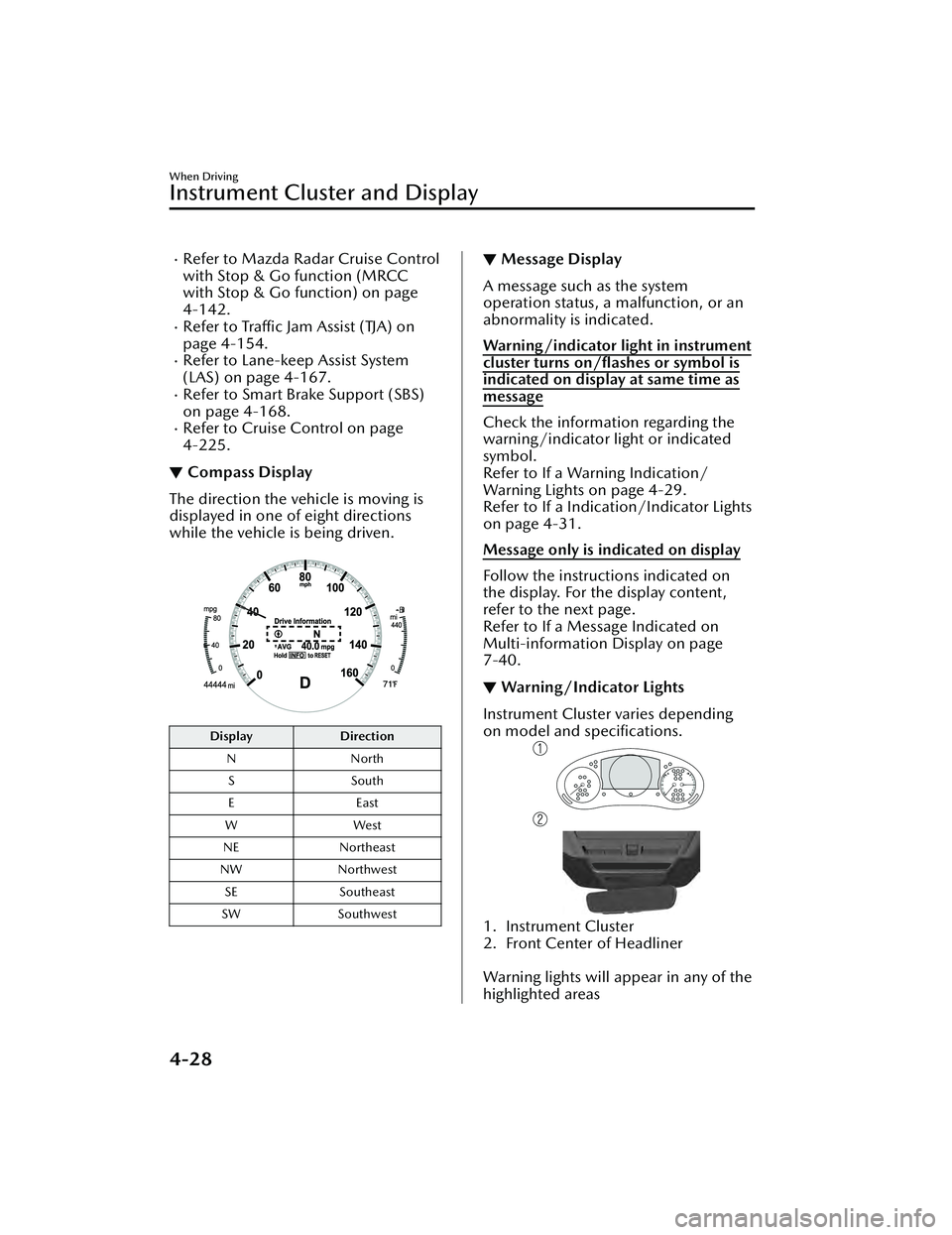
▼ Compass Display
The direction the vehicle is moving is
displayed in one of eight directions
while the vehicle is being driven.
Display
Direction
N North
SS outh
EE ast
WW est
NE Northeast
NW Northwest
SE Southeast
SW Southwest
▼Message Display
A message such as the system
operation status, a malfunction, or an
abnormality is indicated.
Warning/indicator light in instrument
cluster turns on/flashes or symbol is
indicated on display at same time as
message
Check the information regarding the
warning/indicator light or indicated
symbol.
Refer to If a Warning Indication/
Warning Lights on page 4-29.
Refer to If a Indication/Indicator Lights
on page 4-31.
Message only is indicated on display
Follow the instructions indicated on
the display. For the display content,
refer to the next page.
Refer to If a Me
ssage Indicated on
Multi-information Display on page
7-40.
▼ Warning/Indicator Lights
Instrument Cluster varies depending
on model and specifications.
1. Instrument Cluster
2. Front Center of Headliner
Warning lights will appear in any of the
highlighted areas
When Driving
Instrument Cluster and Display
4-28
Mazda3_8LC2-EA-22G_Edition1_new
2022-5-20 11:26:10
Page 180 of 623
▼Wrench Indication/Indicator Light
The wrench indication/indicator light
is displayed/turns on under the
following conditions.
When the preset maintenance
period has arrived.
Refer to the Information section in
the Mazda Connect Owner's
Manual.
CAUTION
When the maintenance period
arrives, have your vehicle inspected
by an Authorized Mazda Dealer as
soon as possible. If maintenance is
neglected, a decrease in vehicle
performance may occur which
could cause damage. Have your
vehicle inspected before the
maintenance period arrives.
If the vehicle continues to be
driven after the engine oil
replacement period has passed, it
could cause damage to the engine.
Replace the engine oil before the
maintenance period arrives.
NOTE
The wrench indication/indicator
light may display/turn on earlier than
the preset period depending on
vehicle usage conditions.
Whenever the engine oil is replaced,
a reset of the vehicle engine control
unit is necessary.
Refer to the Information section in
the Mazda Connect Owner's
Manual.
When Driving
Instrument Cluster and Display
4-35
Mazda3_8LC2-EA-22G_Edition1_new 2022-5-20 11:26:10