ven MAZDA MAZDA 2023 Owners Manual
[x] Cancel search | Manufacturer: MAZDA, Model Year: 2023, Model line: MAZDA, Model: MAZDA MAZDA 2023Pages: 623, PDF Size: 15.08 MB
Page 320 of 623
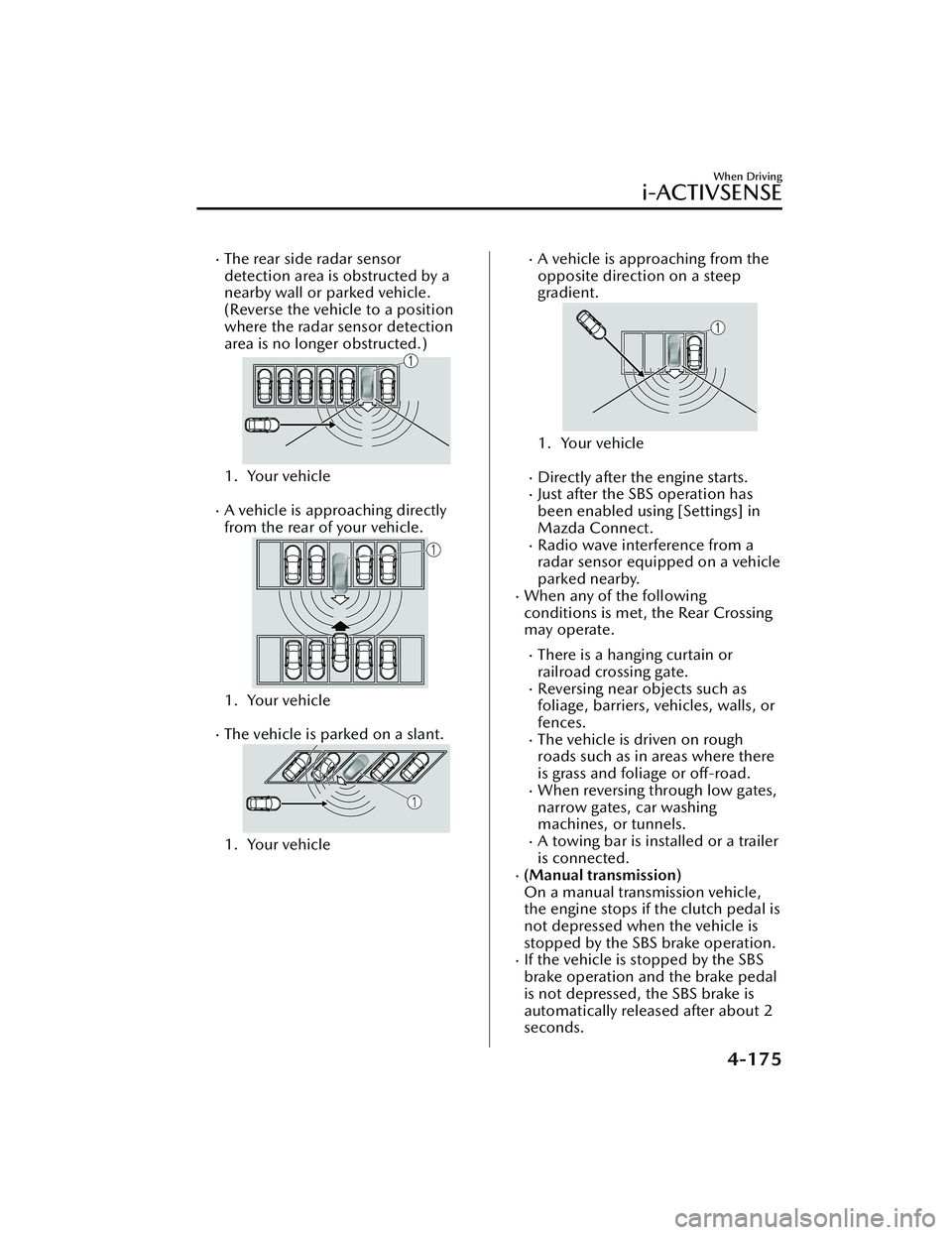
The rear side radar sensor
detection area is obstructed by a
nearby wall or parked vehicle.
(Reverse the vehicle to a position
where the radar sensor detection
area is no longer obstructed.)
1. Your vehicle
A vehicle is approaching directly
from the rear of your vehicle.
1. Your vehicle
The vehicle is parked on a slant.
1. Your vehicle
A vehicle is approaching from the
opposite direction on a steep
gradient.
1. Your vehicle
Directly after the engine starts.Just after the SBS operation has
been enabled using [Settings] in
Mazda Connect.
Radio wave interference from a
radar sensor equipped on a vehicle
parked nearby.
When any of the following
conditions is met, the Rear Crossing
may operate.
There is a hanging curtain or
railroad crossing gate.
Reversing near objects such as
foliage, barriers, vehicles, walls, or
fences.
The vehicle is driven on rough
roads such as in areas where there
is grass and foliage or off-road.
When reversing through low gates,
narrow gates, car washing
machines, or tunnels.
A towing bar is installed or a trailer
is connected.
(Manual transmission)
On a manual transmission vehicle,
the engine stops if the clutch pedal is
not depressed when the vehicle is
stopped by the SBS brake operation.
If the vehicle is stopped by the SBS
brake operation and the brake pedal
is not depressed, the SBS brake is
automatically released after about 2
seconds.
When Driving
i-ACTIVSENSE
4-175
Mazda3_8LC2-EA-22G_Edition1_new 2022-5-20 11:26:10
Page 322 of 623
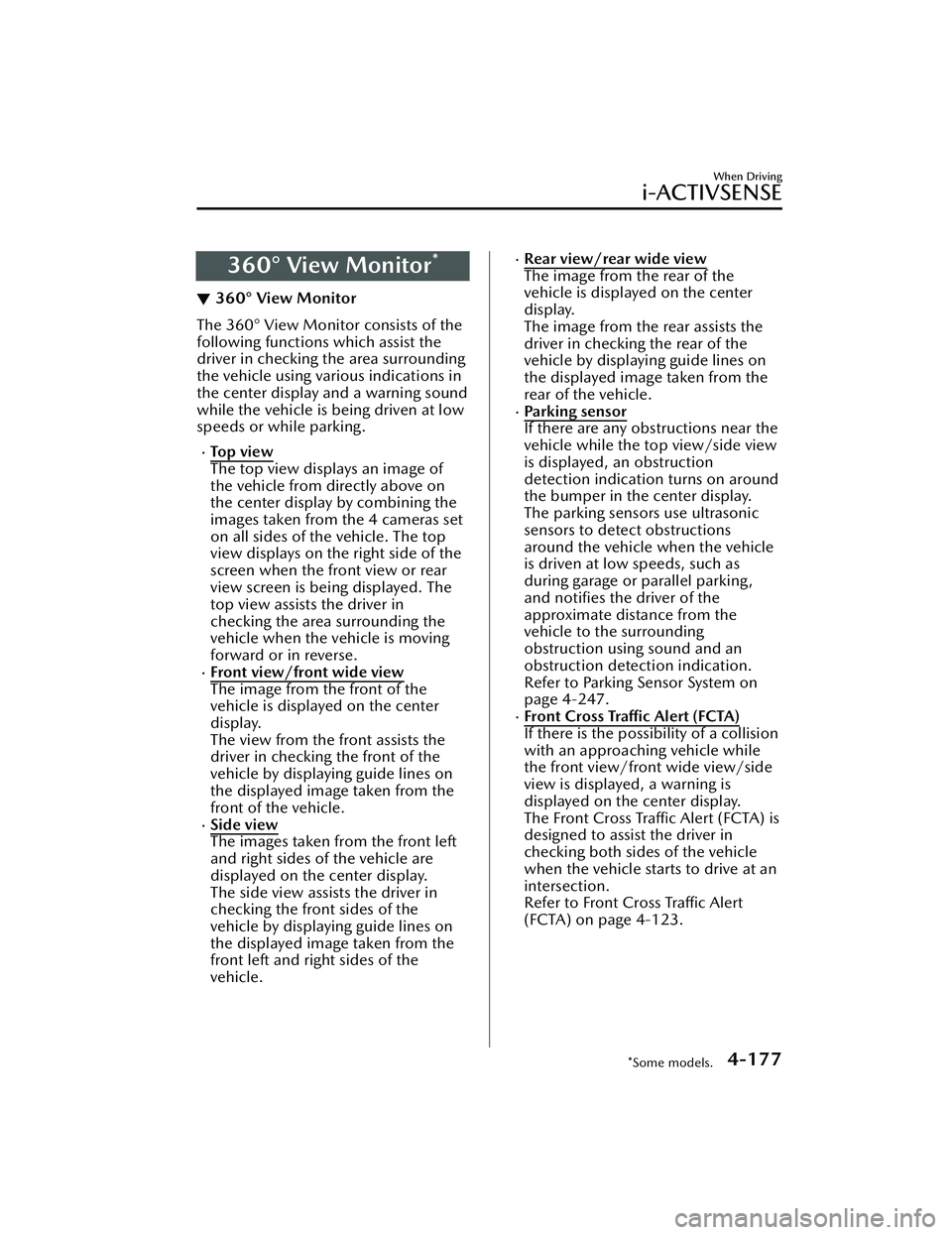
360° View Monitor*
▼360° View Monitor
The 360° View Monitor consists of the
following functions which assist the
driver in checking the area surrounding
the vehicle using various indications in
the center display and a warning sound
while the vehicle is being driven at low
speeds or while parking.
To p v i e w
The top view displays an image of
the vehicle from directly above on
the center display by combining the
images taken from the 4 cameras set
on all sides of the vehicle. The top
view displays on the right side of the
screen when the front view or rear
view screen is being displayed. The
top view assists the driver in
checking the area surrounding the
vehicle when the vehicle is moving
forward or in reverse.
Front view/front wide view
The image from the front of the
vehicle is displayed on the center
display.
The view from the front assists the
driver in checking the front of the
vehicle by displaying guide lines on
the displayed image taken from the
front of the vehicle.
Side view
The images taken from the front left
and right sides of the vehicle are
displayed on the center display.
The side view assists the driver in
checking the front sides of the
vehicle by displaying guide lines on
the displayed image taken from the
front left and right sides of the
vehicle.
Rear view/rear wide view
The image from the rear of the
vehicle is displayed on the center
display.
The image from the rear assists the
driver in checking the rear of the
vehicle by displaying guide lines on
the displayed image taken from the
rear of the vehicle.
Parking sensor
If there are any obstructions near the
vehicle while the top view/side view
is displayed, an obstruction
detection indication turns on around
the bumper in the center display.
The parking sensors use ultrasonic
sensors to detect obstructions
around the vehicle when the vehicle
is driven at low speeds, such as
during garage or parallel parking,
and notifies the driver of the
approximate distance from the
vehicle to the surrounding
obstruction using sound and an
obstruction detection indication.
Refer to Parking Sensor System on
page 4-247.
Front Cross Traffic Alert (FCTA)
If there is the possibility of a collision
with an approaching vehicle while
the front view/front wide view/side
view is displayed, a warning is
displayed on the center display.
The Front Cross Traffic Alert (FCTA) is
designed to assist the driver in
checking both sides of the vehicle
when the vehicle starts to drive at an
intersection.
Refer to Front Cross Traffic Alert
(FCTA) on page 4-123.
When Driving
i-ACTIVSENSE
*Some models.4-177
Mazda3_8LC2-EA-22G_Edition1_new
2022-5-20 11:26:10
Page 324 of 623
The camera cover is made of hard
plastic, therefore do not apply oil
film remover, organic solvents, wax,
or coating agents. If any such agent
gets on the camera cover, wipe it off
using a soft cloth immediately.
Do not rub the camera lens
forcefully, or clean it with an abrasive
or hard brush. Otherwise, it could
scratch the camera lens and
negatively affect the images.
If a camera lens is severely damaged
by flying gravel, have the camera
replaced. For camera replacement,
consult an Authorized Mazda Dealer.
Consult an Authorized Mazda Dealer
for repair, painting, or replacement
of the front/rear camera, front/rear
bumper and door mirrors.
Heed the following cautions to
assure that the 360° View Monitor
operates normally.
Do not modify the vehicle
suspensions or lower/raise the
vehicle body, or both.
Always use tires of the specified
type and size for the front and rear
wheels. Consult an Authorized
Mazda Dealer for tire replacement.
When the display is cold, images
may leave trails or the screen might
be darker than usual, making it
difficult to check the vehicle
surroundings. Always
confirm the
safety at the front and around the
vehicle visually when driving. The method for parking/stopping
the vehicle using the 360° View
Monitor differs depending on the
road circumstances/conditions and
the vehicle conditions. When and
how much you turn the steering
wheel will differ depending on the
situation, therefore always check the
vehicle surroundings directly with
your eyes while using the system.
Also, before using the system, always
make sure that the vehicle can be
parked/stopped in the parking/
stopping space.
NOTE
If there are water droplets, snow, or
mud on the camera lens, wipe it off
using a soft cloth. If the camera lens
is especially dirty, wash it
off with
mild detergent.
If the camera lens is touched or there
is any dirt on it, it could affect the
screen image. Wipe the lens using a
soft cloth.
If the area where the camera is
installed, such as the front/rear
bumper or door mirrors, has been
damaged in a vehicle accident, the
camera (position, installation angle)
may have shifted. Always consult an
Authorized Mazda Dealer to have
the vehicle inspected.
If the camera is subjected to
excessive changes in temperature
such as by pouring hot water on the
camera during cold weather, the
360° View Monitor may not operate
normally.
When Driving
i-ACTIVSENSE
4-179
Mazda3_8LC2-EA-22G_Edition1_new 2022-5-20 11:26:10
Page 325 of 623
If the vehicle is driven during cold
temperatures and the camera
temperature decreases, the top view
and the side view may become
unclear. However, this does not
indicate a problem. If the vehicle is
stopped for a while and the camera
temperature increases, the top view
and the side view will return to the
normal condition.
If the battery voltage is low, the
screen might be temporarily difficult
to view, however, this does not
indicate a problem.
The 360° View Monitor has
limitations. Objects under the
bumper or near both ends of the
bumper cannot be displayed.
Obstructions above the upper image
range of the camera are not
displayed.
Under the following conditions, the
screen might be difficult to view,
however this does not indicate a
problem.
The temperature near the lens is
high/low.
Rainy conditions, water droplets
on the camera, or high humidity.
Mud or foreign matter near the
camera.
The area around the vehicle is
dark.
Extremely bright light such as
sunlight or headlights hitting the
camera lens directly.
The surroundings are illuminated
by vehicle lights, fluorescent lights,
or LED lights (display may flicker).
Extremely small dark or white dots
appear on the screen (dots may
flicker).
An object is close to a camera.
Because the 360° View Monitor
camera uses a special lens, the
distance displayed on the screendiffers from the actual distance.
Obstructions displayed on the screen
may appear differently than in
actuality. (Obstructions may appear
fallen, larger, or longer than they
actually are.)
Do not apply stickers to a camera or
the area around it. In addition, do
not install accessories or an
illuminated number/character
license plate to the area around a
camera. Otherwise, the camera may
not correctly displa y the surrounding
conditions.
Only rear and rear wide images
displayed on the monitor from the
360° View Monitor camera are
reversed images (mirror images).
Free/open source software
information
This product includes free/open
sources. Information about the
licensing and source code is available
at the following URL.
https://www.denso.com/
global/en/opensource/svss/
mazda/
When Driving
i-ACTIVSENSE
4-180
Mazda3_8LC2-EA-22G_Edition1_new 2022-5-20 11:26:10
Page 332 of 623
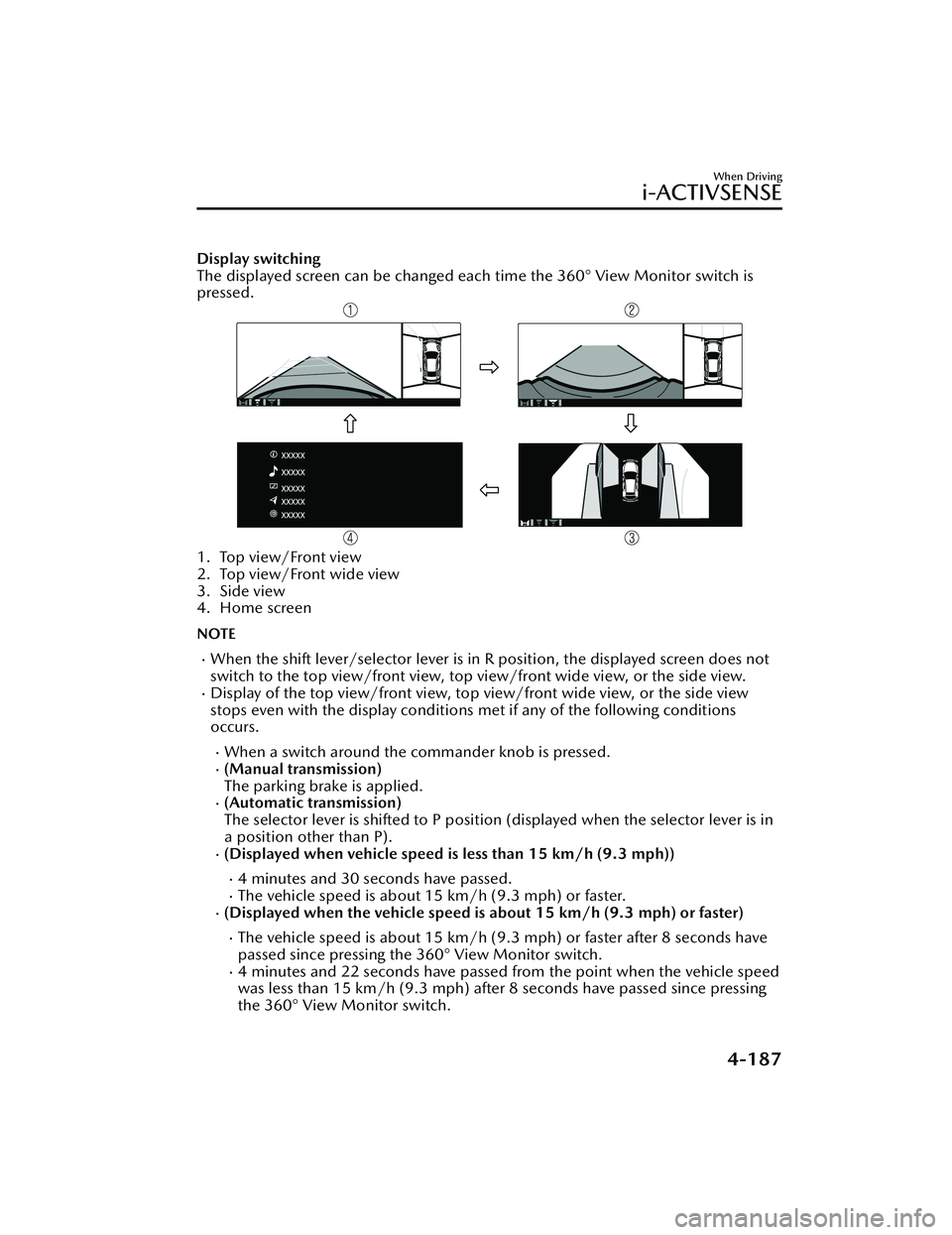
Display switching
The displayed screen can be changed each time the 360° View Monitor switch is
pressed.
1. Top view/Front view
2. Top view/Front wide view
3. Side view
4. Home screen
NOTE
When the shift lever/selector lever is in R position, the displayed screen does not
switch to the top view/front view, top view/front wide view, or the side view.
Display of the top view/front view, top view/front wide view, or the side view
stops even with the display conditions met if any of the following conditions
occurs.
When a switch around the commander knob is pressed.(Manual transmission)
The parking brake is applied.
(Automatic transmission)
The selector lever is shifted to P position (displayed when the selector lever is in
a position other than P).
(Displayed when vehicle speed is less than 15 km/h (9.3 mph))
4 minutes and 30 seconds have passed.The vehicle speed is about 15 km/h (9.3 mph) or faster.(Displayed when the vehicle speed is about 15 km/h (9.3 mph) or faster)
The vehicle speed is about 15 km/h (9.3 mph) or faster after 8 seconds have
passed since pressing the 360° View Monitor switch.
4 minutes and 22 seconds have passed from the point when the vehicle speed
was less than 15 km/h (9.3 mph) after 8 seconds have passed since pressing
the 360° View Monitor switch.
When Driving
i-ACTIVSENSE
4-187
Mazda3_8LC2-EA-22G_Edition1_new 2022-5-20 11:26:10
Page 342 of 623
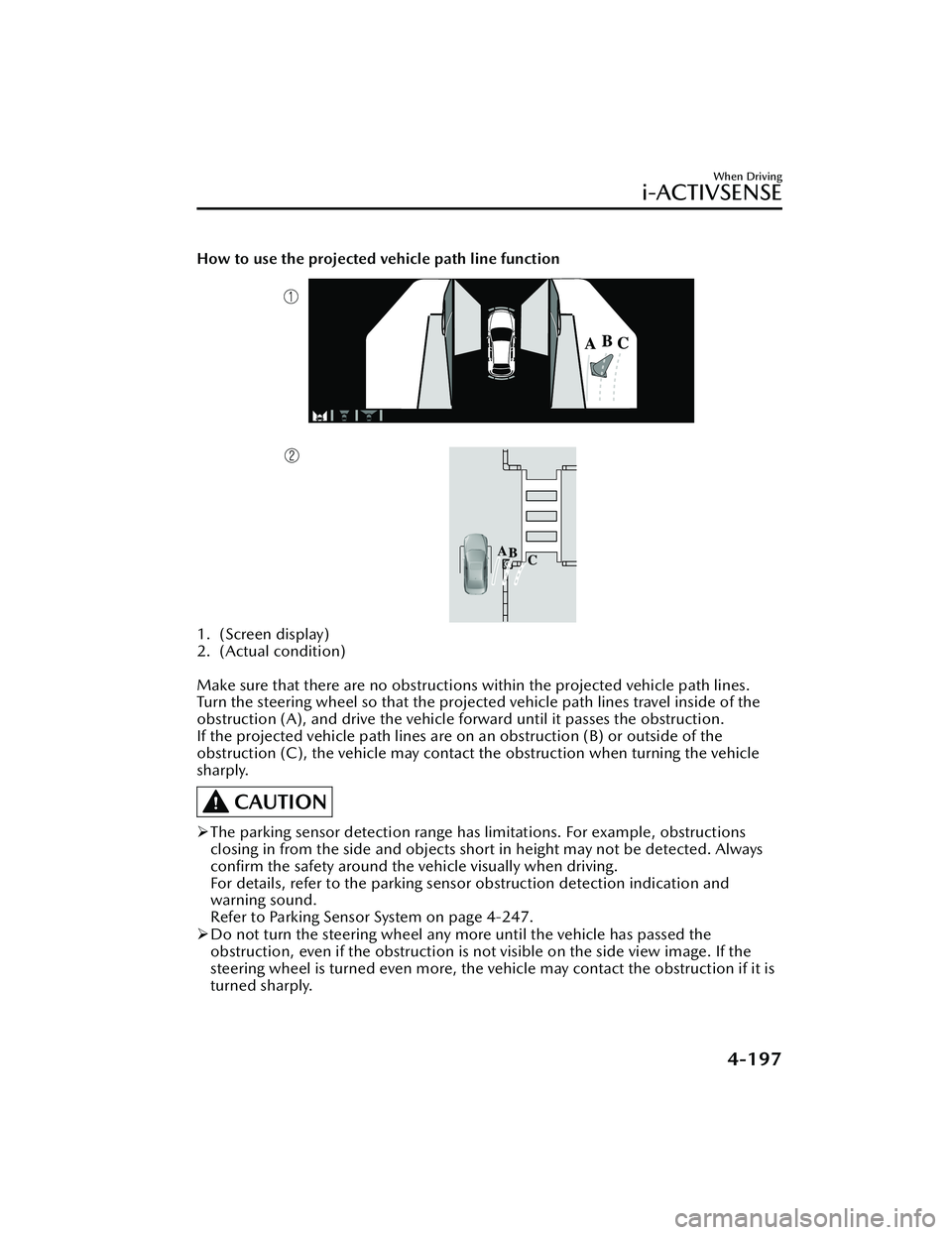
How to use the projected vehicle path line function
1. (Screen display)
2. (Actual condition)
Make sure that there are no obstructions within the projected vehicle path lines.
Turn the steering wheel so that the projected vehicle path lines travel inside of the
obstruction (A), and drive the vehicle forward until it passes the obstruction.
If the projected vehicle path lines are on an obstruction (B) or outside of the
obstruction (C), the vehicle may contact the obstruction when turning the vehicle
sharply.
CAUTION
The parking sensor detection range has limitations. For example, obstructions
closing in from the side and objects short in height may not be detected. Always
confirm the safety around the vehicle visually when driving.
For details, refer to the parking sensor obstruction detection indication and
warning sound.
Refer to Parking Sensor System on page 4-247.
Do not turn the steering wheel any mo re until the vehicle has passed the
obstruction, even if the obstruction is no t visible on the side view image. If the
steering wheel is turned even more, the vehicle may contact the obstruction if it is
turned sharply.
When Driving
i-ACTIVSENSE
4-197
Mazda3_8LC2-EA-22G_Edition1_new 2022-5-20 11:26:10
Page 343 of 623
NOTE
Because there might be a difference between the image displayed on the screen
and the actual conditions, always check the safety of the surrounding area using
the mirrors and directly with your eyes when driving.
Even though the object displayed on the screen, such as a road curb or a division
line of a parking space, and the vehicle parallel guide lines appear parallel, they
may not actually be parallel.
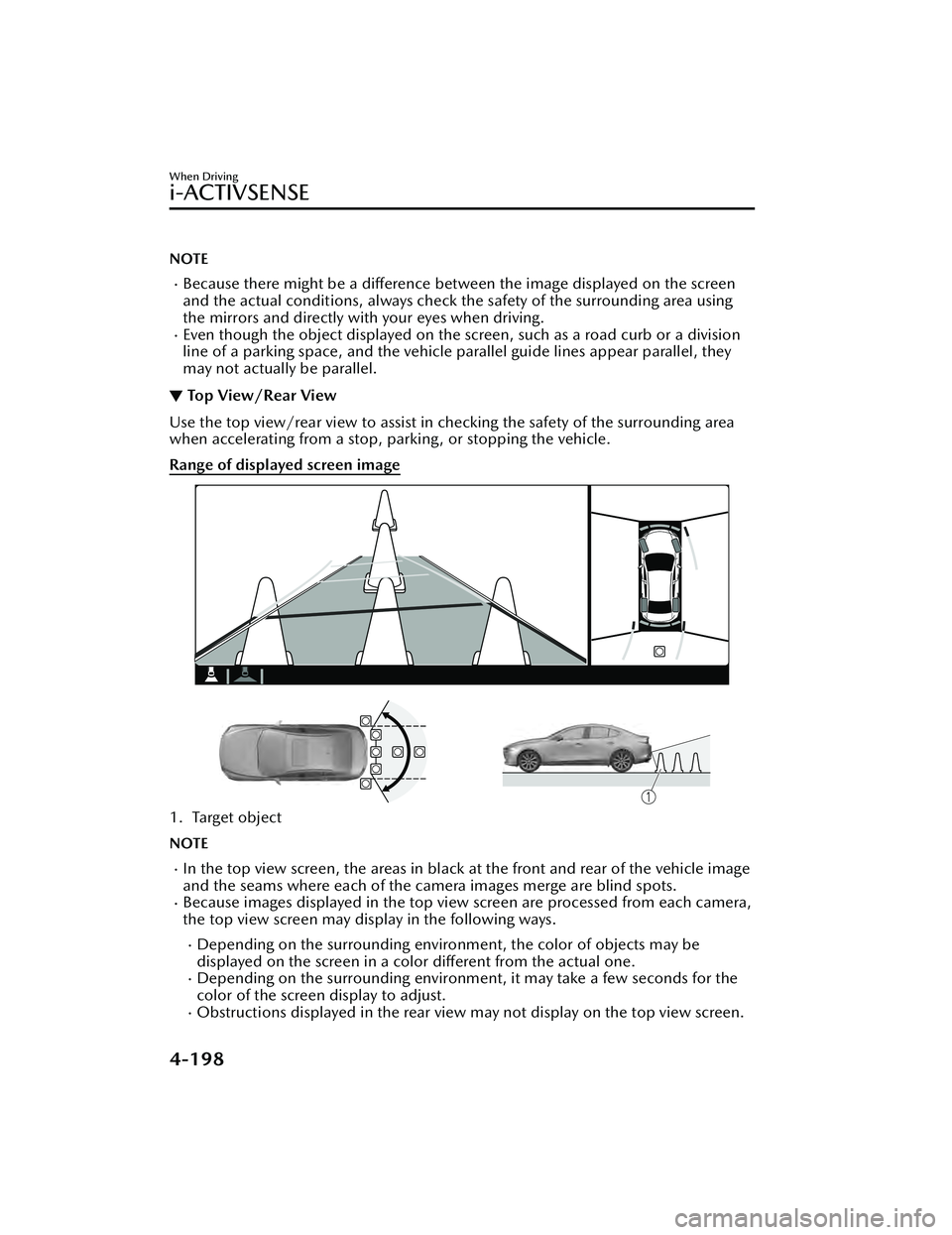
▼ Top View/Rear View
Use the top view/rear view to assist in checking the safety of the surrounding area
when accelerating from a stop, parking, or stopping the vehicle.
Range of displayed screen image
1. Target object
NOTE
In the top view screen, the areas in black at the front and rear of the vehicle image
and the seams where each of the camera images merge are blind spots.
Because images displayed in the top view screen are processed from each camera,
the top view screen may display in the following ways.
Depending on the surrounding enviro
nment, the color of objects may be
displayed on the screen in a color different from the actual one.
Depending on the surrounding environment, it may take a few seconds for the
color of the screen display to adjust.
Obstructions displayed in the rear view may not display on the top view screen.
When Driving
i-ACTIVSENSE
4-198
Mazda3_8LC2-EA-22G_Edition1_new 2022-5-20 11:26:10
Page 345 of 623
How to use the projected vehicle path line function
CAUTION
The front of the vehicle swings out wide when turning the steering wheel while
reversing. Maintain sufficient distance between the vehicle and an obstruction.
The parking sensor detection range has limitations. For example, obstructions
closing in from the side and objects short in height may not be detected. Always
confirm the safety around the vehicle visually when driving.
For details, refer to the parking sens or obstruction detection indication and
warning sound.
Refer to Parking Sensor System on page 4-247.
NOTE
Because there might be a difference between the image displayed on the screen,
such as indicated in the following, and the actual conditions when parking, always
check the safety at the rear of the vehicle and the surrounding area directly with
your eyes.
Even though the back end of the park ing space (or garage) displayed on the
screen and distance guide lines appear parallel, they may not actually be
parallel.
When parking in a space with a division line on only one side of the parking
space, even though the division line and the vehicle width guide line appear
parallel, they may not actually be parallel.
The following shows an example of vehicle parking with the steering wheel turned
to the left while backing up the vehicle. When backing into a parking space from
the opposite direction, the st eering operation is reversed.
When Driving
i-ACTIVSENSE
4-200
Mazda3_8LC2-EA-22G_Edition1_new 2022-5-20 11:26:10
Page 358 of 623
NOTE
In the following cases, the Forward
Sensing Camera (FSC) cannot detect
target objects correctly, and each
system may be unable to operate
normally.
The height of the vehicle ahead is
low.
You drive your vehicle at the same
speed as the vehicle ahead.
Headlights are not turned on
during the night or when going
through a tunnel.
In the following cases, the Forward
Sensing Camera (FSC) may not be
able to detect target objects
correctly.
Under bad weather condition,
such as rain, fog and snow.
The window washer is being used
or the windshield wipers are not
used when it's raining.
Ice, fog , snow, frost, rainfall, dirt,
or foreign matter such as a plastic
bag is stuck on the windshield.
Trucks with low loading platforms
and vehicles with an extremely low
or high profile.
When driving next to walls with no
patterning (including fences and
longitudinally striped walls).
The taillights of the vehicle ahead
are turned off.
A vehicle is outside the
illumination range of the
headlights.
The vehicle is making a sharp turn,
or ascending or descending a steep
slope.
Entering or exiting a tunnel.Heavy luggage is loaded causing
the vehicle to tilt.
Strong light is shone at the front of
the vehicle (back light or
high-beam light from on-coming
vehicles).
There are many light emitters on
the vehicle ahead.
When the vehicle ahead is not
equipped with taillights or the
taillights are turned off at
nighttime.
Elongated luggage or cargo is
loaded onto installed roof rails and
covers the Forward Sensing
Camera (FSC).
Exhaust gas from the vehicle in
front, sand, snow, and water vapor
rising from manholes and grating,
and water splashed into the air.
When towing a malfunctioning
vehicle.
The vehicle is driven with tires
having significantly different wear.
The vehicle is driven on down
slopes or bumpy roads.
There are water puddles on the
road.
The surroundings are dark such as
during the night, early evening , or
early morning , or in a tunnel or
indoor parking lot.
The illumination brightness of the
headlights is reduced or the
headlight illumination is weakened
due to dirt or a deviated optical
axis.
The target object enters the blind
spot of the Forward Sensing
Camera (FSC).
A person or object bursts onto the
road from the shoulder or cuts
right in front of you.
You change lanes and approach a
vehicle ahead.
When driving extremely close to
the target object.
When Driving
i-ACTIVSENSE
4-213
Mazda3_8LC2-EA-22G_Edition1_new2022-5-20 11:26:10
Page 361 of 623
CAUTION
Heed the following precautions to
assure correct operation of each
system.
Do not adhere stickers (including
transparent stickers) to the surface of
the radiator grille and front emblem
in and around the front radar sensor,
and do not replace the radiator grille
and front emblem with any product
that is not a genuine product
designed for use with the front radar
sensor.
The front radar sensor includes a
function for detecting soiling of the
radar sensor's front surface and
informing the driver, however,
depending on the conditions, it may
require time to detect or it may not
detect plastic shopping bags, ice or
snow. If this occurs, the system may
not operate correctly, therefore
always keep the front radar sensor
clean.
Do not install a grille guard.
If the front part of the vehicle has
been damaged in a vehicle accident,
the position of the front radar sensor
may have moved. Stop the system
immediately and always have the
vehicle inspected at an Authorized
Mazda Dealer.
Do not use the front bumper to push
other vehicles or obstructions such
as when pulling out of a parking
space. Otherwise, the front radar
sensor could be hit and its position
deviated.
Do not remove, disassemble, or
modify the front radar sensor.
For repairs, replacement or paint
work around the front radar sensor,
consult an Authorized Mazda Dealer.
Do not modify the suspensions. If
the suspensions are modified, the
vehicle's posture could change and
the front radar sensor may not be
able to correctly detect a vehicle
ahead or an obstruction.
NOTE
When the vehicle is driven on roads
in which there is an elevated road on
one side, the front radar sensor
function may be restricted
temporarily.
Under the following conditions, the
front radar sensor may not be able to
detect vehicles ahead or obstructions
correctly and each system may not
operate normally.
The rear surface of a vehicle ahead
does not reflect radio waves
effectively, such as an unloaded
trailer or an automobile with a
loading platform covered by a soft
top, vehicles with a hard plastic
tailgate, and round-shaped
vehicles.
Vehicles ahead with low vehicle
height and thus less area for
reflecting radio waves.
Visibility is reduced due to a
vehicle ahead casting
off water,
snow, or sand from its tires and
onto your windshield.
The trunk/luggage compartment is
loaded with heavy objects or the
rear passenger seats are occupied.
Ice, snow, or soiling is on the front
surface of the front emblem.
During inclement weather such as
rain, snow, or sand storms.
When driving near facilities or
objects emitting strong radio
waves.
When Driving
i-ACTIVSENSE
4-216
Mazda3_8LC2-EA-22G_Edition1_new 2022-5-20 11:26:10