ven MAZDA MAZDA 2023 Owners Manual
[x] Cancel search | Manufacturer: MAZDA, Model Year: 2023, Model line: MAZDA, Model: MAZDA MAZDA 2023Pages: 623, PDF Size: 15.08 MB
Page 362 of 623
Under the following conditions, the
front radar sensor may not be able to
detect vehicles ahead or
obstructions.
The beginning and end of a curve.Roads with continuous curves.Narrow lane roads due to road
construction or lane closures.
The vehicle ahead enters the radar
sensor's blind spot.
The vehicle ahead is running
abnormally due to accident or
vehicle damage.
Roads with repeated up and down
slopes
Driving on poor roads or unpaved
roads.
The distance between your vehicle
and the vehicle ahead is extremely
short.
A vehicle suddenly comes close,
such as by cutting into your lane.
To prevent incorrect operation of the
system, use tires of the same
specified size, manufacturer, brand,
and tread pattern on all four wheels.
In addition, do not use tires with
significantly
different wear patterns
or tire pressures on the same vehicle
(Including the temporary spare tire).
If the battery power is weak, the
system may not operate correctly.
When driving on roads with little
traffic and few vehicles ahead or
obstructions for the front radar
sensor to detect, “Safety and Driver
Support Systems Temporarily
Disabled. Front Radar Obscured.
Drive Safely” may be temporarily
displayed, however, this does not
indicate a problem.
The radar sensors are regulated by
the relevant radio wave laws of the
country in which the vehicle is
driven. If the vehicle is driven
abroad, authorization from the
country in which the vehicle is driven
may be required.
When Driving
i-ACTIVSENSE
4-217
Mazda3_8LC2-EA-22G_Edition1_new 2022-5-20 11:26:10
Page 364 of 623
The radar sensors are regulated by
the relevant radio wave laws of the
country in which the vehicle is
driven. If the vehicle is driven
abroad, authorization from the
country in which the vehicle is driven
may be required.Rear Side Radar Sensor*
▼Rear Side Radar Sensor
Your vehicle is equipped with rear side
radar sensor. The following systems
also use the rear side radar sensor.
Blind Spot Monitoring (BSM)Rear Cross Traffic Alert (RCTA)Smart Brake Support (SBS) reverse
drive detection
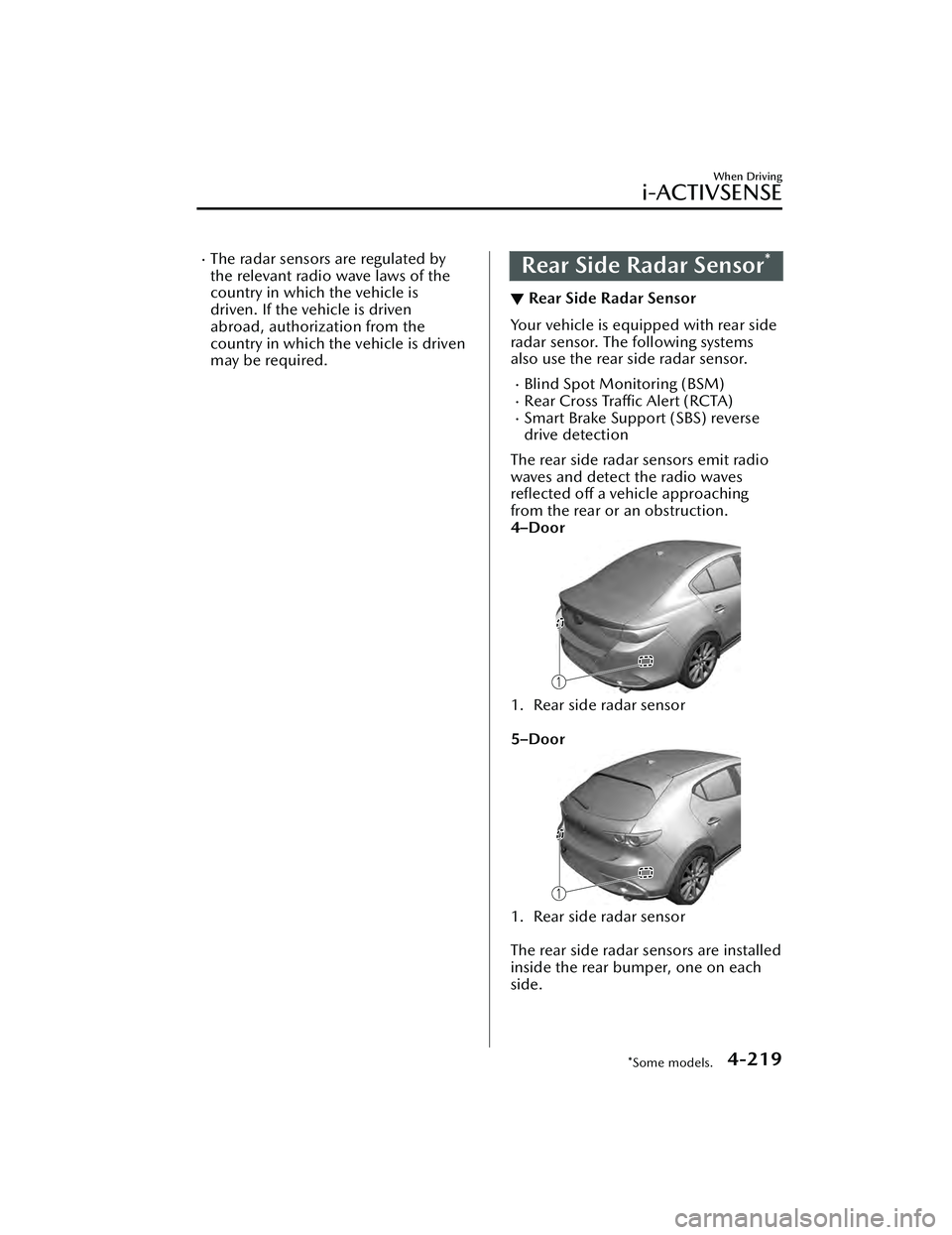
The rear side radar sensors emit radio
waves and detect the radio waves
reflected off a vehicle approaching
from the rear or an obstruction.
4–Door
1. Rear side radar sensor
5–Door
1. Rear side radar sensor
The rear side radar sensors are installed
inside the rear bumper, one on each
side.
When Driving
i-ACTIVSENSE
*Some models.4-219
Mazda3_8LC2-EA-22G_Edition1_new 2022-5-20 11:26:10
Page 365 of 623
Always keep the surface of the rear
bumper near the rear side radar
sensors clean so that they operate
normally. Also, do not apply items such
as stickers.
Refer to Exterior Care on page 6-47.
CAUTION
If the rear bumper receives a severe
impact, the system may no longer
operate normally. Stop the system
immediately and have the vehicle
inspected at an Authorized Mazda
Dealer.
NOTE
The detection ability of the rear side
radar sensor has limitations. In the
following cases, the detection ability
may lower and the system may not
operate normally.
The rear bumper near the rear side
radar sensor has become
deformed.
Snow, ice or mud adheres to the
rear side radar sensor on the rear
bumper.
Under bad weather conditions
such as rain, snow and fog.
Under the following conditions, the
rear side radar sensor cannot detect
target objects or it may be difficult to
detect them.
Small motorcycles, bicycles,
pedestrians, animals, shopping
carts, and stationary objects on a
road or a road side.
Vehicle shapes which do notreflect radar waves well such as
empty trailers with a low vehicle
height and sports cars.
Vehicles are shipped with the
direction of the rear side radar
sensor adjusted for each vehicle to a
loaded vehicle condition so that the
rear side radar sensor detect
approaching vehicles correctly. If the
direction of the rear side radar
sensor has deviated for some reason,
have the vehicle inspected at an
Authorized Mazda Dealer.
For repairs or replacement of the rear
side radar sensor, or bumper repairs,
paintwork, and replacement near the
radar sensors, consult an Authorized
Mazda Dealer.
The radar sensors are regulated by
the relevant radio wave laws of the
country in which the vehicle is
driven. If the vehicle is driven
abroad, authorization from the
country in which the vehicle is driven
may be required.
When Driving
i-ACTIVSENSE
4-220
Mazda3_8LC2-EA-22G_Edition1_new 2022-5-20 11:26:10
Page 371 of 623
The cruise control will cancel if the
vehicle speed decreases below 20
km/h (12 mph) when the cruise
control is activated, such as when
climbing a steep grade.
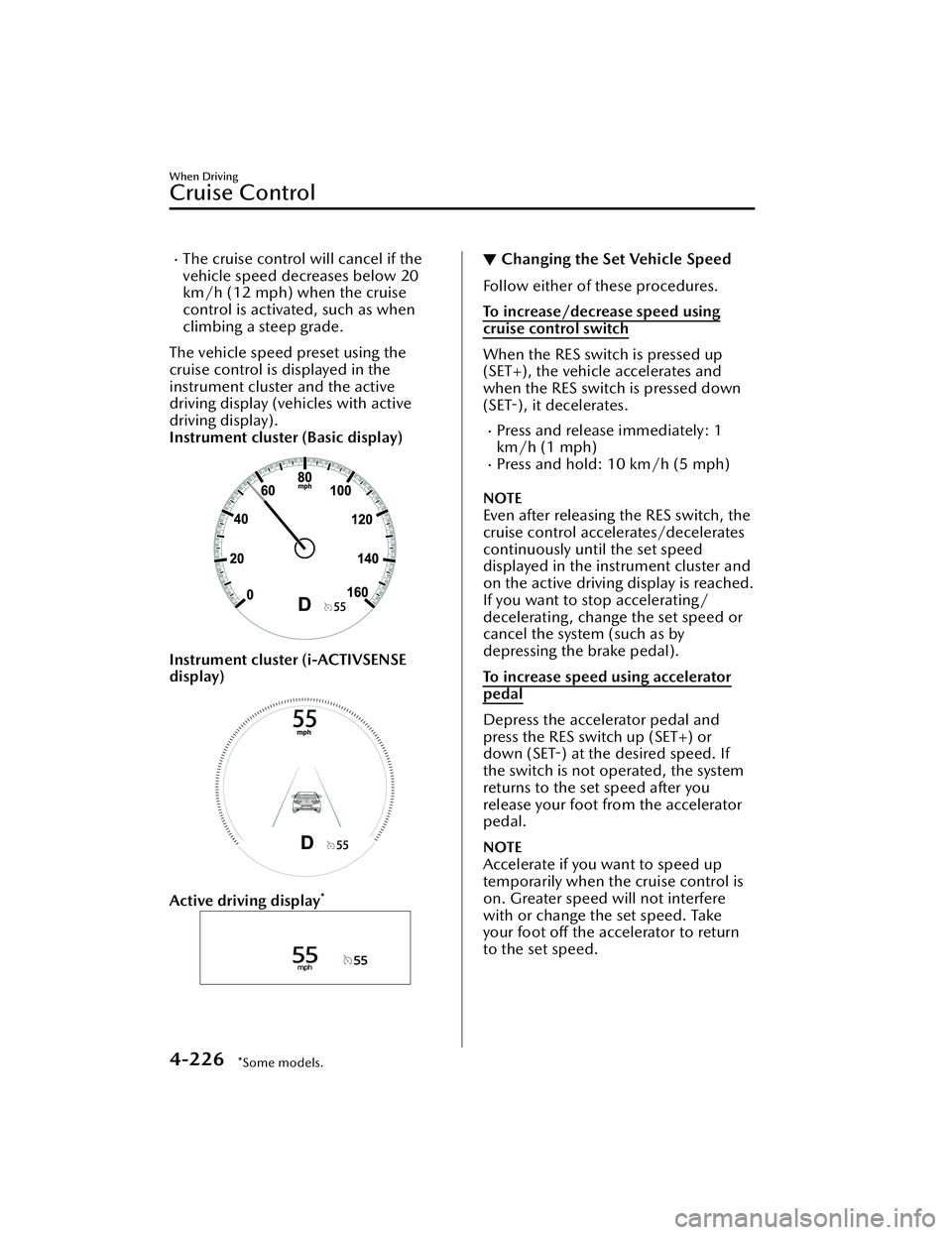
The vehicle speed preset using the
cruise control is displayed in the
instrument cluster and the active
driving display (vehicles with active
driving display).
Instrument cluster (Basic display)
Instrument cluster (i-ACTIVSENSE
display)
Active driving display*
▼ Changing the Set Vehicle Speed
Follow either of these procedures.
To increase/decrease speed using
cruise control switch
When the RES switch is pressed up
(SET+), the vehicle accelerates and
when the RES switch is pressed down
(SET-),
it decelerates.
Press and release immediately: 1
km/h (1 mph)
Press and hold: 10 km/h (5 mph)
NOTE
Even after releasing the RES switch, the
cruise control accelerates/decelerates
continuously until the set speed
displayed in the instrument cluster and
on the active driving display is reached.
If you want to stop accelerating/
decelerating, change the set speed or
cancel the system (such as by
depressing the brake pedal).
To increase speed using accelerator
pedal
Depress the accelerator pedal and
press the RES switch up (SET+) or
down (SET-) at the desired speed. If
the switch is not operated, the system
returns to the set speed after you
release your foot from the accelerator
pedal.
NOTE
Accelerate if you want to speed up
temporarily when the cruise control is
on. Greater speed will not interfere
with or change the set speed. Take
your foot off the accelerator to return
to the set speed.
When Driving
Cruise Control
4-226*Some models.
Mazda3_8LC2-EA-22G_Edition1_new
2022-5-20 11:26:10
Page 372 of 623
▼To Resume Cruising Speed at More
Than 30 km/h (19 mph)
If the cruise control system is
temporarily canceled (such as by
applying the brake pedal) and the
system is still activated, the most
recent set speed will automatically
resume when the RES switch is
pressed.
If vehicle speed is below 30 km/h (19
mph), increase the vehicle speed up to
30 km/h (19 mph) or more and press
the RES switch.
▼To Te m p o ra r i l y C a n c e l
To temporarily cancel the system, use
one of these methods:
Slightly depress the brake pedal.Press the CANCEL switch.(Manual transmission)
Depress the clutch pedal.
If the RES switch is pressed when the
vehicle speed is 30 km/h (19 mph) or
higher, the system reverts to the
previously set speed.
NOTE
If any of the following conditions
occur, the cruise control system is
temporarily canceled.
Even when the brake pedal is
slightly depressed.
The DSC is operating.There is a problem in the system.Any of the doors is opened.The driver's seat belt is unfastened.The parking brake is applied.(Automatic transmission)
The selector lever is in the P, N, or
R position.
(Manual transmission)
The shift lever is in the neutral
position.
When the cruise control system is
temporarily canceled by even one of
the applicable cancel conditions, the
speed cannot be re-set.
(Automatic transmission)
The cruise control cannot be
canceled while driving in manual
mode (selector lever shifted from D
to M position). Therefore, engine
braking will not be applied even if
the transmission is shifted down to a
lower gear. If deceleration is
required, lower the set speed or
depress the brake pedal.
▼ To D e a c t i va t e
Press the cruise switch again.
When Driving
Cruise Control
4-227
Mazda3_8LC2-EA-22G_Edition1_new
2022-5-20 11:26:10
Page 374 of 623
Please note that the TPMS is not a
substitute for proper tire
maintenance, and it is the driver's
responsibility to maintain correct tire
pressure, even if under-inflation has
not reached the level to trigger
illumination of the TPMS low tire
pressure telltale.
Your vehicle has also been equipped
with a TPMS malfunction indicator to
indicate when the system is not
operating properly.
The TPMS malfunction indicator is
combined with the low tire pressure
telltale. When the system detects a
malfunction, the telltale will flash for
approximately one minute and then
remain continuously illuminated.
This sequence will continue upon
subsequent vehicle start-ups as long
as the malfunction exists. When the
malfunction indicator is illuminated,
the system may not be able to detect
or signal low tire pressure as
intended. TPMS malfunctions may
occur for a variety of reasons,
including the installation of
replacement or alternate tires or
wheels on the vehicle that prevent
the TPMS from functioning properly.
Always check the TPMS malfunction
telltale after replacing one or more
tires or wheels on your vehicle to
ensure that the replacement or
alternate tires and wheels allow the
TPMS to continue to function
properly.
To avoid false readings, the system
samples for a little while before
indicating a problem. As a result it
will not instantaneously register a
rapid tire deflation or blow out.▼ If there is a problem with the Tire
Pressure Monitoring System
(TPMS)
If the TPMS warning light flashes, there
may be a problem with the system.
Consult an Authorized Mazda Dealer
to have the system inspected.
Refer to Tire Pressure Monitoring
System (TPMS) Warning Indication/
Warning Light (Flashing) on page
7-33.
In the following cases, the system
cannot recognize the tire pressures
correctly and the TPMS warning light
may
flash.
There is equipment or a device
nearby emitting radio signals the
same as a tire pressure sensor.
A metallic object such as a
non-genuine electronic device is
installed near the center of the
dashboard (obstructs the radio
signals from the tire pressure sensors
to the receiver).
A device such as one of the following
is used in the cabin.
Electronic devices such as a
computer.
Converter devices such as a
DC-AC converter.
There is a large accumulation of
snow or ice around the vehicle tires.
The battery in a tire pressure sensor
is dead.
A wheel not equipped with a tire
pressure sensor is used.
Tires employing steel in the sidewall
of the tire are installed.
Tire chains are used.
When Driving
Tire Pressure Monitoring System (TPMS)
4-229
Mazda3_8LC2-EA-22G_Edition1_new 2022-5-20 11:26:10
Page 377 of 623
Rear View Monitor*
▼Rear View Monitor
The rear view monitor provides visual
images of the rear of the vehicle when
reversing.
WARNING
Always drive carefully
confirming the
safety of the rear and the surrounding
conditions by looking directly with
your eyes:
Reversing the vehicle by only looking at
the screen is dangerous as it may cause
an accident or a collision with an
object. The rear view monitor is only a
visual assist device when reversing the
vehicle. The images on the screen may
be different from the actual conditions.
CAUTION
Do not use the rear view monitor
under the following conditions:
Using the rear view monitor under
the following conditions is
dangerous and could result in injury
or vehicle damage or both.
Icy or snow-covered roads.
Tire chains or a temporary spare
tire is installed.
The vehicle is on a road incline.
Bumpy roads.
When the display is cold, images
may course across the monitor or the
screen and may be dimmer than
usual, which could cause
difficulty in
confirming the surrounding
conditions of the vehicle. Always
drive carefully confirming the safety
of the rear and the surrounding
conditions by looking directly with
your eyes.
Do not apply excessive force to the
camera. The camera position and
angle may deviate.
Do not disassemble, modify, or
remove it as it may no longer be
waterproof.
The camera cover is made of plastic.
Do not apply degreasing agents,
organic solvents, wax, or glass
coating agents to the camera cover.
If any are spilled on the cover, wipe
off with a soft cloth immediately.
Do not rub the camera cover
forcefully with an abrasive or hard
brush. The camera cover or lens may
be scratched which might affect the
images.
If a camera lens is severely damaged
by flying gravel, have the camera
replaced. For camera replacement,
consult an Authorized Mazda Dealer.
NOTE
If water, snow, or mud is stuck on
the camera lens, wipe it off using a
soft cloth. If it cannot be wiped off,
use a mild detergent.
If the camera temperature changes
rapidly (Hot to cold, cold to hot), the
rear view monitor may not operate
correctly.
When replacing the tires, consult an
Authorized Mazda Dealer. Replacing
the tires could result in deviation of
the guide lines which appear on the
display.
If the vehicle's front, side, or rear has
been involved in a collision, the
alignment of the rear view parking
camera (location, installation angle)
may have deviated. Always consult
an Authorized Mazda Dealer to have
the vehicle inspected.
When Driving
Rear View Monitor
4-232*Some models.
Mazda3_8LC2-EA-22G_Edition1_new 2022-5-20 11:26:10
Page 391 of 623
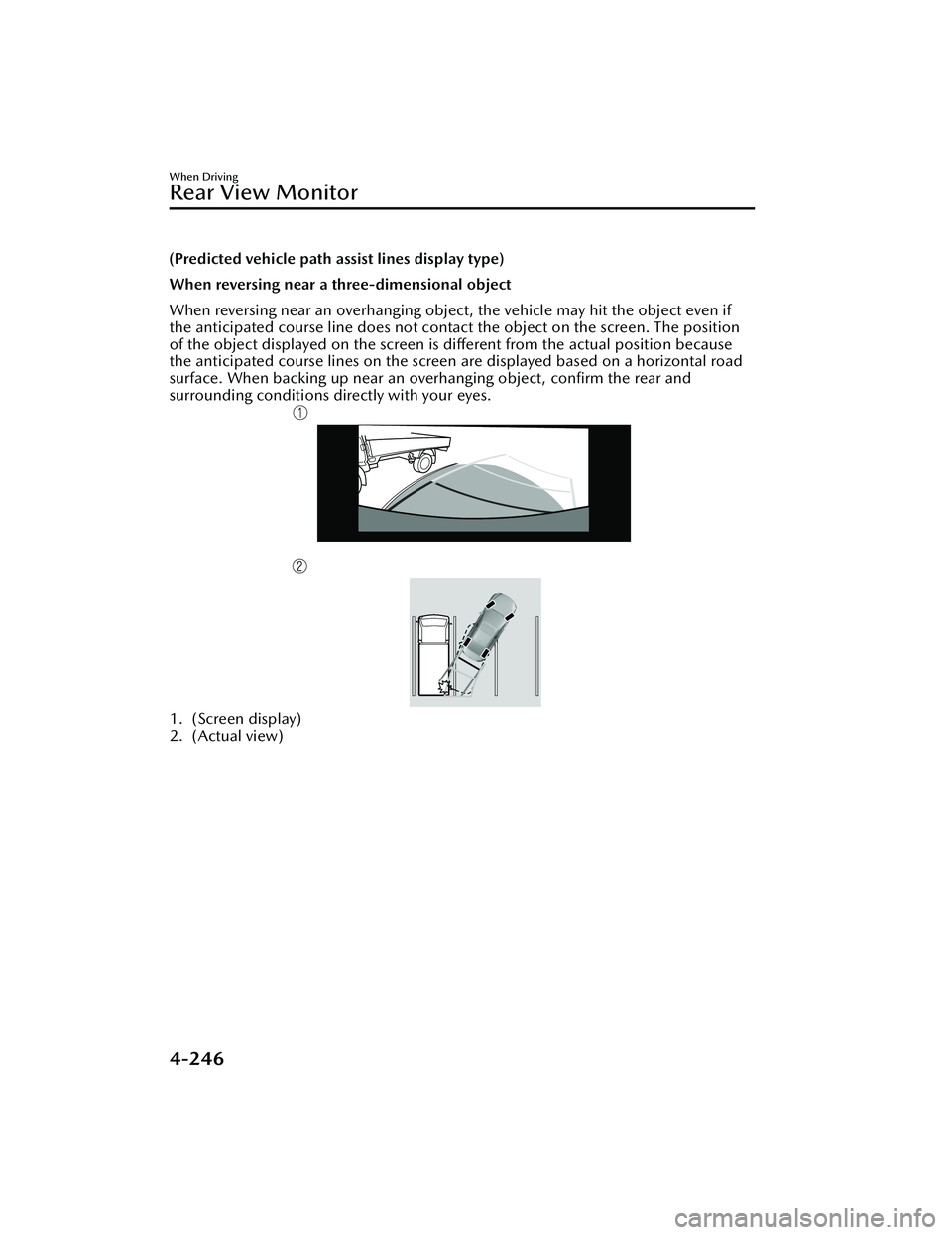
(Predicted vehicle path assist lines display type)
When reversing near a three-dimensional object
When reversing near an overhanging object, the vehicle may hit the object even if
the anticipated course line does not contact the object on the screen. The position
of the object displayed on the screen is different from the actual position because
the anticipated course lines on the screen are displayed based on a horizontal road
surface. When backing up near an overhanging object, confirm the rear and
surrounding conditions directly with your eyes.
1. (Screen display)
2. (Actual view)
When Driving
Rear View Monitor
4-246
Mazda3_8LC2-EA-22G_Edition1_new 2022-5-20 11:26:10
Page 392 of 623
Pa r k i n g S e n s o r Sys te m*
▼Parking Sensor System
The parking sensors use ultrasonic sensors which detect obstructions around the
vehicle when the vehicle is driven at low speeds, such as during garage or parallel
parking , and a buzzer sound and detection indicator notify the driver of the
approximate distance from the vehicle to the surrounding obstruction.
WARNING
Do not rely completely on the park
ing sensor system and be sure to
confirm the
safety around your vehicle visually when driving:
This system can assist the driver in operating the vehicle in the forward and
backward directions while parking. The detection ranges of the sensors are limited,
therefore, driving the vehicle while relying only on the system may cause an
accident. Always confirm the safety around your vehicle visually when driving.
CAUTION
Do not install any accessories within the detection ranges of the sensors. It may
affect the system operation.
Depending on the type of obstruction and the surrounding conditions, the
detection range of a sensor may narrow, or the sensors may not be able to detect
obstructions.
When washing the vehicle, do not spra y highly pressurized water against the
sensor area, or rub it strongly. Otherwise, it may not be able to detect obstructions
correctly and the system may not operate normally.
NOTE
When the ignition is switched OFF, th e system status before it was turned
off is
maintained. For example, if the ignition is switched OFF while the parking sensor
is activated, the system will be activate d when the ignition is switched ON the
next time.
The system may not operate normally under the following conditions:
Mud, ice, or snow is adhering to the sensor area (Returns to normal operation
when removed).
The sensor area is frozen (Returns to normal operation when the ice is thawed).The sensor is covered by a hand.The sensor is excessively shocked.The vehicle is excessively tilted.Under extremely hot or cold weather conditions.The vehicle is driven on bumps, inclines, gravel, grating, or grass covered roads.
When Driving
Pa r k i n g S e n s o r Sys te m
*Some models.4-247
Mazda3_8LC2-EA-22G_Edition1_new 2022-5-20 11:26:10
Page 393 of 623
Anything which generates ultrasonic waves such as another vehicle's horn, the
engine sound of a motorcycle, the air brake sound of a large-sized vehicle, or
another vehicle's sensors approaches the vehicle.
The vehicle is driven in heavy rain or in road conditions causing water-splash.A commercially-available fender pole or an antenna for a radio transmitter is
installed to the vehicle.
The vehicle is moving towards a tall or square curbstone, or a steep grade.An obstruction is too close to the sensor.The vehicle is moving towards an uneven wall or stairs.There are multiple obstructions.The vehicle is driven in a place with low ceilings.Obstructions under the bumper cannot be detected. Obstructions which are
lower than the sensor or thin may not be detected even though they were
detected once.
The following types of obstructions may not be detected:
Thin objects such as wire, rope or polesThings which absorb sonic waves easily such as cotton or snowAngular shaped objectsVery tall objects, and those which are wide at the topSmall, short objectsAlways have the system inspected at an Authorized Mazda Dealer if any shock is
applied to the bumpers, even in a minor accident. If the sensors are deviated, they
cannot detect obstructions.
The system may have a malfunction if a sound is not activated or the detection
indication is not displayed even when th e parking sensor OFF switch is pressed
and the parking sensor is operable. Have your vehicle inspected by an Authorized
Mazda Dealer.
The system may have a malfunction if th e indicator light does not turn on even
when the parking sensor OFF switch is turned on. Have your vehicle inspected by
an Authorized Mazda Dealer.
The system may have a malfunction if a message indicating a system malfunction is
displayed. Have your vehicle inspected by an Authorized Mazda Dealer.
A message may be displayed even when the ambient temperature is extremely
cold, or mud, ice, or snow adheres to the sensor area. Remove any foreign matter
from the sensor area.
When installing a trailer hitch, consult an Authorized Mazda Dealer.If a Mazda genuine trailer hitch is used, th e rear side of the parking sensor system
is automatically turned off.
When Driving
Pa r k i n g S e n s o r Sys te m
4-248
Mazda3_8LC2-EA-22G_Edition1_new 2022-5-20 11:26:10