ven MAZDA MAZDA 2023 Owners Manual
[x] Cancel search | Manufacturer: MAZDA, Model Year: 2023, Model line: MAZDA, Model: MAZDA MAZDA 2023Pages: 623, PDF Size: 15.08 MB
Page 416 of 623
No. MenuExplanation
(6) Settings You can change the settings for the Mazda Connect screen, sound set-
tings, and the vehicle functions.
In-Vehicle Displays:
Configures settings and content for all in-vehicle displays.
Sound Settings:
Configures
the in-vehicle listening experience.
Safety Settings:
Configures safety and driver assistance features.
Ve h i c l e S e t t i n g s :
Configures vehicle convenience features.
Connectivity Settings:
Configures Bluetooth and other device connectivity settings.
System Settings:
Configures language, time, and other general settings.
(7) Apple CarPlay You can use Apple CarPlay™ by connecting an iPhone
® compatible with
Apple CarPlay™ to the USB slot.
(8) Android Auto You can use Android Auto™ by connecting an Android™ Smartphone
compatible with Android Auto™ to the USB port.
WARNING
Always adjust Mazda Connect while the vehicle is stopped:
Do not adjust Mazda Connect with th
e Commander switch while driving the
vehicle. Adjusting Mazda Connect with the Commander switch while driving the
vehicle is dangerous as it could distract your attention from the vehicle operation
which could lead to a serious accident.
Even if the audio remote control switches are equipped on the steering wheel, learn
to use the switches without looking down at them so that you can keep your
maximum attention on the road while driving the vehicle.
Do not allow the connection plug cord to get tangled with the shift lever (manual
transmission)/selector leve r (automatic transmission):
Allowing the plug cord to become tangled with the shift lever (manual
transmission)/selector lever (automatic transmission) is dangerous as it could
interfere with driving, resulting in an accident.
Interior Features
Mazda Connect
5-17
Mazda3_8LC2-EA-22G_Edition1_new 2022-5-20 11:26:10
Page 425 of 623
Say the word, “Cancel”.
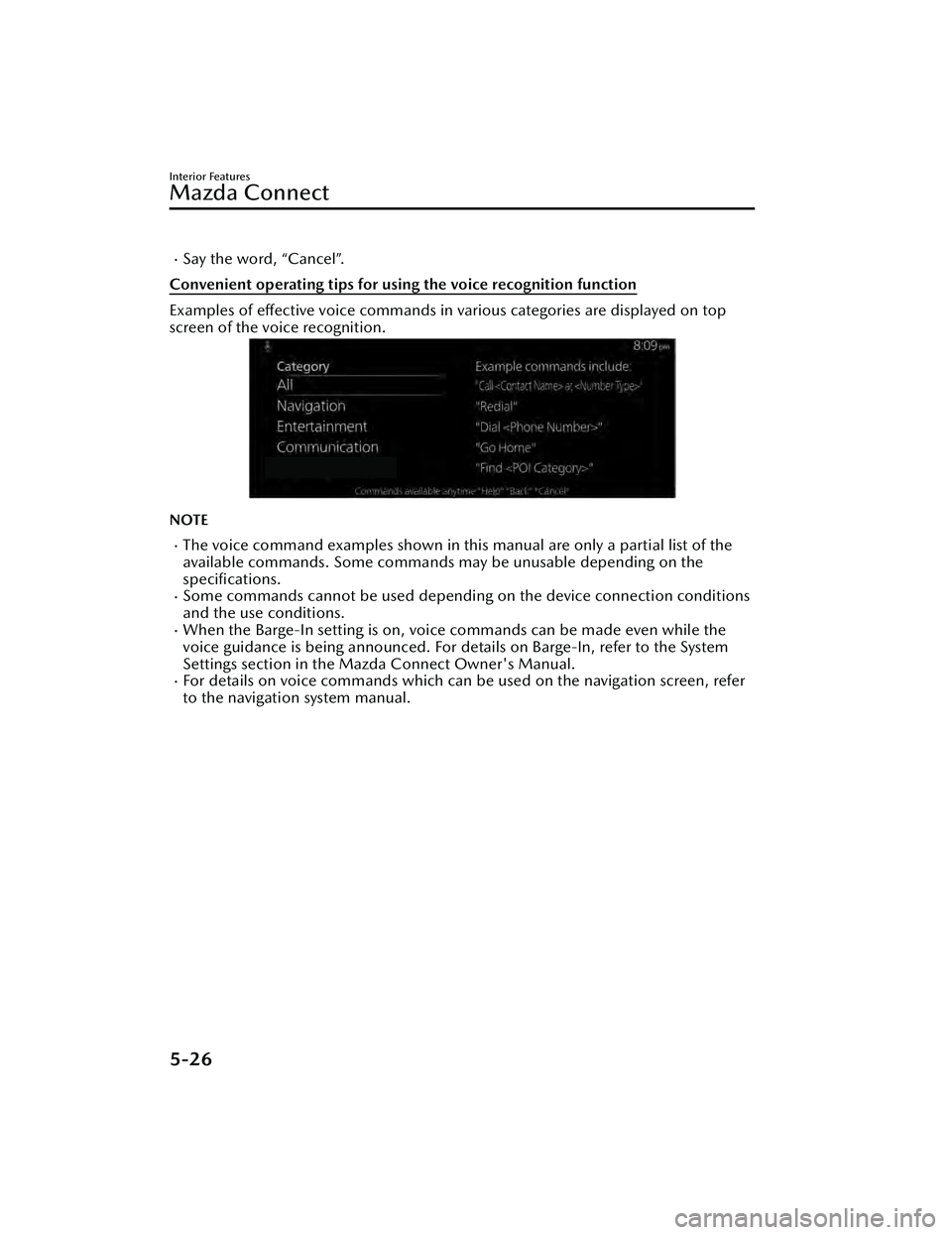
Convenient operating tips for using the voice recognition function
Examples of effective voice commands in various categories are displayed on top
screen of the voice recognition.
NOTE
The voice command examples shown in this manual are only a partial list of the
available commands. Some commands ma y be unusable depending on the
specifications.
Some commands cannot be used depending on the device connection conditions
and the use conditions.
When the Barge-In setting is on, voice commands can be made even while the
voice guidance is being announced. For details on Barge-In, refer to the System
Settings section in the Ma zda Connect Owner's Manual.
For details on voice commands which can be used on the navigation screen, refer
to the navigation system manual.
Interior Features
Mazda Connect
5-26
Mazda3_8LC2-EA-22G_Edition1_new 2022-5-20 11:26:10
Page 426 of 623
To prevent misunderstood voice commands, be aware of the following points:
Connect your mobile phone to Bluetooth® before operating the mobile phone
using voice recognition.
After pressing the talk/pick-up button, wait for the beep before speaking a
command.
Speaking in a slightly louder voice will improve voice recognition, but an
excessively loud voice is unnecessary. Try to speak in a slightly louder voice than
when talking to other passengers in the vehicle.
You do not need to speak slowly. Speak at a normal speed.When calling a person in the device's phone book, the recognition rate increases
the longer the name is. Errors may oc cur with names that are short such as
“Mama”, “Home”, or “Wife”.
Speak clearly, without pausing between words or numbers.Voice commands other than those specified , cannot be recognized. Speak in the
wording specified by the voice commands.
It is not necessary to face the microphone or approach it. Speak the voice
commands while maintaining a safe driving position.
Close the windows and the moonroof* to reduce loud noises from outside the
vehicle and to prevent the airflow of the air-conditioning system from being a
disturbance when using Bluetooth
® Hands-Free.Make sure that the air flow from the air conditioner is not blowing on the
microphone.
If the voice recognition is poor with th e guidance volume set to high, set the
Barge-In to OFF.
Examples of available voice commands
The specified name and number are put into the {}.
Common
BackHelp (You can listen to help guidance at each screen.){Line Number} (You can select the line number on the screen.)Next PagePrevious PageCancel
Menu
AllNavigationEntertainmentCommunication
Interior Features
Mazda Connect
*Some models.5-27
Mazda3_8LC2-EA-22G_Edition1_new 2022-5-20 11:26:10
Page 431 of 623
AS EXAMPLES, AND WITHOUT LIMITATION, MAZDA DISCLAIMS ANY
WARRANTY REGARDING THE ACCURACY OF DATA PROVIDED BY THE
APPLICATION, SUCH AS THE ACCURACY OF DIRECTIONS, ESTIMATED TRAVEL
TIME, SPEED LIMITS, ROAD CONDITIONS, NEWS, WEATHER, TRAFFIC, OR
OTHER CONTENT PROVIDED BY APPLE, ITS AFFILIATES, OR THIRD PARTY
PROVIDERS; MAZDA DOES NOT GUARANTEE AGAINST LOSS OF APPLICATION
DATA, WHICH MAY BE LOST AT ANY TIME; MAZDA DOES NOT GUARANTEE
THAT THE APPLICATION OR ANY SERVICES PROVIDED THROUGH THEM WILL
BE PROVIDED AT ALL TIMES OR THAT ANY OR ALL SERVICES WILL BE AVAILABLE
AT ANY PARTICULAR TIME OR LOCATION. FOR EXAMPLE, SERVICES MAY BE
SUSPENDED OR INTERRUPTED WITHOUT NOTICE FOR REPAIR, MAINTENANCE,
SECURITY FIXES, UPDATES, ETC., SERVICES MAY BE UNAVAILABLE IN YOUR AREA
OR LOCATION, ETC.
IN ADDITION, YOU UNDERSTAND THAT CHANGES IN THIRD PARTY
TECHNOLOGY OR GOVERNMENT REGULATION MAY RENDER THE SERVICES
AND/OR APPLICATIONS OBSOLETE AND/OR UNUSABLE. TO THE EXTENT NOT
PROHIBITED BY LAW, IN NO EVENT SHALL MAZDA OR ITS AFFILIATES BE LIABLE
FOR PERSONAL INJURY, OR ANY INCIDENTAL, SPECIAL, INDIRECT OR
CONSEQUENTIAL DAMAGES WHATSOEVER, INCLUDING, WITHOUT
LIMITATION, DAMAGES FOR LOSS OF PROFITS, CORRUPTION OR LOSS OF
DATA, FAILURE TO TRANSMIT OR RECEIVE ANY DATA, BUSINESS INTERRUPTION
OR ANY OTHER COMMERCIAL DAMAGES OR LOSSES, ARISING OUT OF OR
RELATED TO THE APPLICATION OR YOUR USE OF OR INABILITY TO USE THE
APPLICATION OR INFORMATION ON THE APPLICATION.
When using Apple CarPlay™, please avoid distraction and use Apple CarPlay™
responsibly.
Stay fully aware of driving conditions and always obey applicable laws.
NOTE
Apple CarPlay™ is provided by Apple® and its use is subject to your agreement to
the Apple CarPlay™ terms of use, which are included as part of the Apple iOS
terms of use.
When using Apple CarPlay™, location, speed, and other vehicle data is transferred
to your iPhone®. For further details, refer to Apple®’s Privacy Policy.
Interior Features
Mazda Connect
5-32
Mazda3_8LC2-EA-22G_Edition1_new 2022-5-20 11:26:10
Page 432 of 623
Android Auto™
CAUTION
YOU EXPRESSLY ACKNOWLEDGE AND AGREE THAT USE OF ANDROID AUTO™
(“THE APPLICATION”) IS AT YOUR SOLE RISK AND THAT THE ENTIRE RISK AS TO
SATISFACTORY QUALITY, PERFORMANCE, ACCURACY AND EFFORT IS WITH
YOU TO THE MAXIMUM EXTENT PERMITTED BY APPLICABLE LAW, AND THAT
THE APPLICATION AND INFORMATION ON THE APPLICATION IS PROVIDED “AS
IS” AND “AS AVAILABLE,” WITH ALL FAULTS AND WITHOUT WARRANTY OF ANY
KIND, AND MAZDA HEREBY DISCLAIMS ALL WARRANTIES AND CONDITIONS
WITH RESPECT TO THE APPLICATION AND INFORMATION ON THE
APPLICATION, EITHER EXPRESS, IMPLIED OR STATUTORY, INCLUDING, BUT NOT
LIMITED TO, THE IMPLIED WARRANTIES AND/OR CONDITIONS OF
MERCHANTABILITY, SATISFACTORY QUALITY, FITNESS FOR A PARTICULAR
PURPOSE, ACCURACY, QUIET ENJOYMENT, AND NONINFRINGEMENT OF
THIRD PARTY RIGHTS.
AS EXAMPLES, AND WITHOUT LIMITATION, MAZDA DISCLAIMS ANY
WARRANTY REGARDING THE ACCURACY OF DATA PROVIDED BY THE
APPLICATION, SUCH AS THE ACCURACY OF DIRECTIONS, ESTIMATED TRAVEL
TIME, SPEED LIMITS, ROAD CONDITIONS, NEWS, WEATHER, TRAFFIC, OR
OTHER CONTENT PROVIDED BY GOOGLE, ITS AFFILIATES, OR THIRD PARTY
PROVIDERS; MAZDA DOES NOT GUARANTEE AGAINST LOSS OF APPLICATION
DATA, WHICH MAY BE LOST AT ANY TIME; MAZDA DOES NOT GUARANTEE
THAT THE APPLICATION OR ANY SERVICES PROVIDED THROUGH THEM WILL
BE PROVIDED AT ALL TIMES OR THAT ANY OR ALL SERVICES WILL BE AVAILABLE
AT ANY PARTICULAR TIME OR LOCATION. FOR EXAMPLE, SERVICES MAY BE
SUSPENDED OR INTERRUPTED WITHOUT NOTICE FOR REPAIR, MAINTENANCE,
SECURITY FIXES, UPDATES, ETC., SERVICES MAY BE UNAVAILABLE IN YOUR AREA
OR LOCATION, ETC.
IN ADDITION, YOU UNDERSTAND THAT CHANGES IN THIRD PARTY
TECHNOLOGY OR GOVERNMENT REGULATION MAY RENDER THE SERVICES
AND/OR APPLICATIONS OBSOLETE AND/OR UNUSABLE. TO THE EXTENT NOT
PROHIBITED BY LAW, IN NO EVENT SHALL MAZDA OR ITS AFFILIATES BE LIABLE
FOR PERSONAL INJURY, OR ANY INCIDENTAL, SPECIAL, INDIRECT OR
CONSEQUENTIAL DAMAGES WHATSOEVER, INCLUDING, WITHOUT
LIMITATION, DAMAGES FOR LOSS OF PROFITS, CORRUPTION OR LOSS OF
DATA, FAILURE TO TRANSMIT OR RECEIVE ANY DATA, BUSINESS INTERRUPTION
OR ANY OTHER COMMERCIAL DAMAGES OR LOSSES, ARISING OUT OF OR
RELATED TO THE APPLICATION OR YOUR USE OF OR INABILITY TO USE THE
APPLICATION OR INFORMATION ON THE APPLICATION.
When using Android Auto™, please avoid distraction and use Android Auto™
responsibly.
Stay fully aware of driving conditions and always obey applicable laws.
Interior Features
Mazda Connect
5-33
Mazda3_8LC2-EA-22G_Edition1_new 2022-5-20 11:26:10
Page 435 of 623
Gracenote, the Gracenote logo and logotype, “Powered by Gracenote” and
Gracenote MusicID are either registered trademarks or trademarks of Gracenote,
Inc. in the United States and/or other countries.
Regarding the license for the audio amplifier (except vehicles with Bose audio)
License for CMSIS-RTOS RTX Implementation
Copyright (c) 1999-2009 KEIL, 2009-2015 ARM Germany GmbH, 2013-2016 ARM
Ltd All rights reserved.
Redistribution and use in source an d binary forms, with or without
modification, are
permitted provided that the following conditions are met:
Redistributions of source code must retain the above copyright notice, this list of
conditions and the following disclaimer
Redistributions in binary form must repr oduce the above copyright notice, this list
of conditions and the following disclaimer in the documentation and/or other
materials provided with the distribution.
Neither the name of ARM nor the names of its contributors may be used to
endorse or promote products derived from this software without specific prior
written permission.
THIS SOFTWARE IS PROVIDED BY THE COPYRIGHT HOLDERS AND
CONTRIBUTORS “AS IS” AND ANY EXPRESS OR IMPLIED WARRANTIES,
INCLUDING, BUT NOT LIMITED TO, THE IMPLIED WARRANTIES OF
MERCHANTABILITY AND FITNESS FOR A PARTICULAR PURPOSE ARE DISCLAIMED.
IN NO EVENT SHALL COPYRIGHT HOLDERS AND CONTRIBUTORS BE LIABLE FOR
ANY DIRECT, INDIRECT, INCIDENTAL, SP ECIAL, EXEMPLARY, OR CONSEQUENTIAL
DAMAGES (INCLUDING, BUT NOT LIMITED TO, PROCUREMENT OF SUBSTITUTE
GOODS OR SERVICES; LOSS OF USE, DATA, OR PROFITS; OR BUSINESS
INTERRUPTION) HOWEVER CAUSED AND ON ANY THEORY OF LIABILITY,
WHETHER IN CONTRACT, STRICT LIABILITY, OR TORT (INCLUDING NEGLIGENCE
OR OTHERWISE) ARISING IN ANY WAY OUT OF THE USE OF THIS SOFTWARE,
EVEN IF ADVISED OF THE POSSIBILITY OF SUCH DAMAGE.
Interior Features
Mazda Connect
5-36
Mazda3_8LC2-EA-22G_Edition1_new 2022-5-20 11:26:10
Page 438 of 623
Sunvisors
▼Sunvisors
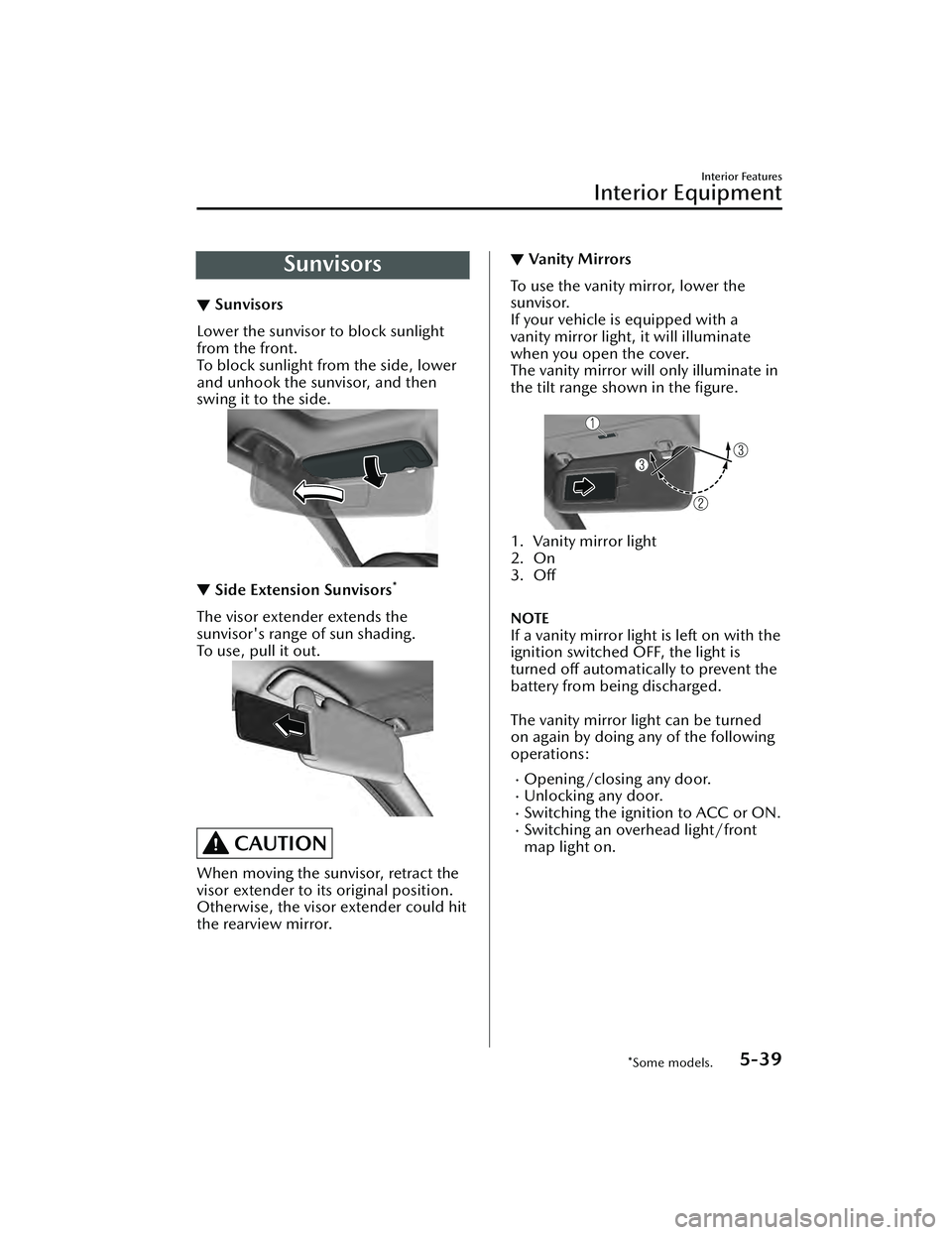
Lower the sunvisor to block sunlight
from the front.
To block sunlight from the side, lower
and unhook the sunvisor, and then
swing it to the side.
▼
Side Extension Sunvisors*
The visor extender extends the
sunvisor's range of sun shading.
To u s e , p u l l i t o u t .
CAUTION
When moving the sunvisor, retract the
visor extender to it
s original position.
Otherwise, the visor extender could hit
the rearview mirror.
▼ Va n i t y M i r ro rs
To use the vanity mirror, lower the
sunvisor.
If your vehicle is equipped with a
vanity mirror light, it will illuminate
when you open the cover.
The vanity mirror will only illuminate in
the tilt range shown in the figure.
1. Vanity mirror light
2. On
3. Off
NOTE
If a vanity mirror light is left on with the
ignition switched OFF, the light is
turned off automatically to prevent the
battery from being discharged.
The vanity mirror light can be turned
on again by doing any of the following
operations:
Opening/closing any door.Unlocking any door.Switching the ignition to ACC or ON.Switching an overhead light/front
map light on.
Interior Features
Interior Equipment
*Some models.5-39
Mazda3_8LC2-EA-22G_Edition1_new
2022-5-20 11:26:10
Page 439 of 623
Interior Lights
▼Interior Lights
NOTE
Do not leave the lights on for long
periods while the engine is turned off.
Otherwise the battery power could be
depleted.
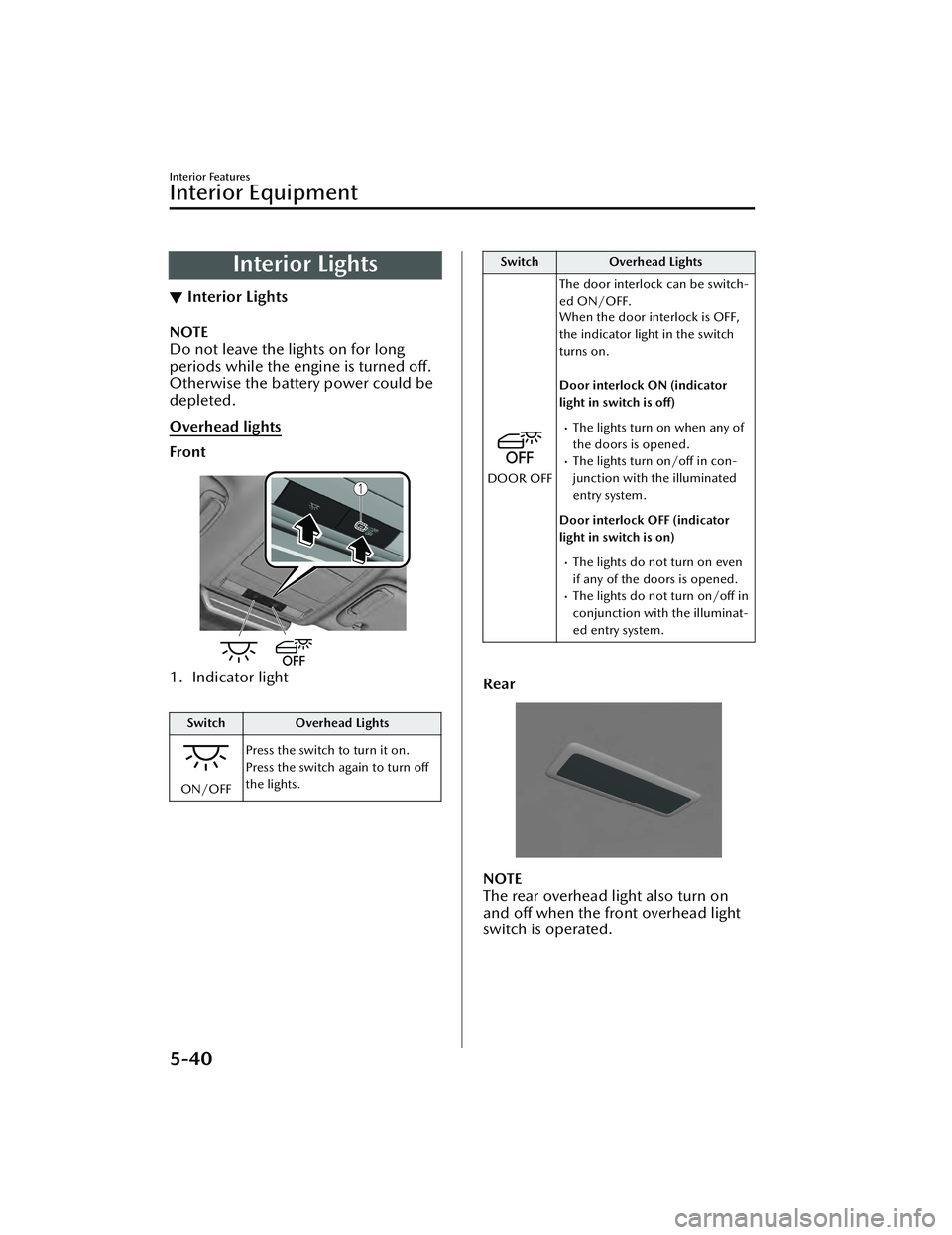
Overhead lights
Front
1. Indicator light
Switch
Overhead Lights
ON/OFFPress the switch to turn it on.
Press the switch again to turn off
the lights.
Switch
Overhead Lights
DOOR OFFThe door interlock can be switch-
ed ON/OFF.
When the door interlock is OFF,
the indicator light in the switch
turns on.
Door interlock ON (indicator
light in switch is off)
The lights turn on when any of
the doors is opened.
The lights turn on/off in con-
junction with the illuminated
entry system.
Door interlock OFF (indicator
light in switch is on)
The lights do not turn on even
if any of the doors is opened.
The lights do not turn on/off in
conjunction with the illuminat-
ed entry system.
Rear
NOTE
The rear overhead light also turn on
and off when the front overhead light
switch is operated.
Interior Features
Interior Equipment
5-40
Mazda3_8LC2-EA-22G_Edition1_new 2022-5-20 11:26:10
Page 440 of 623
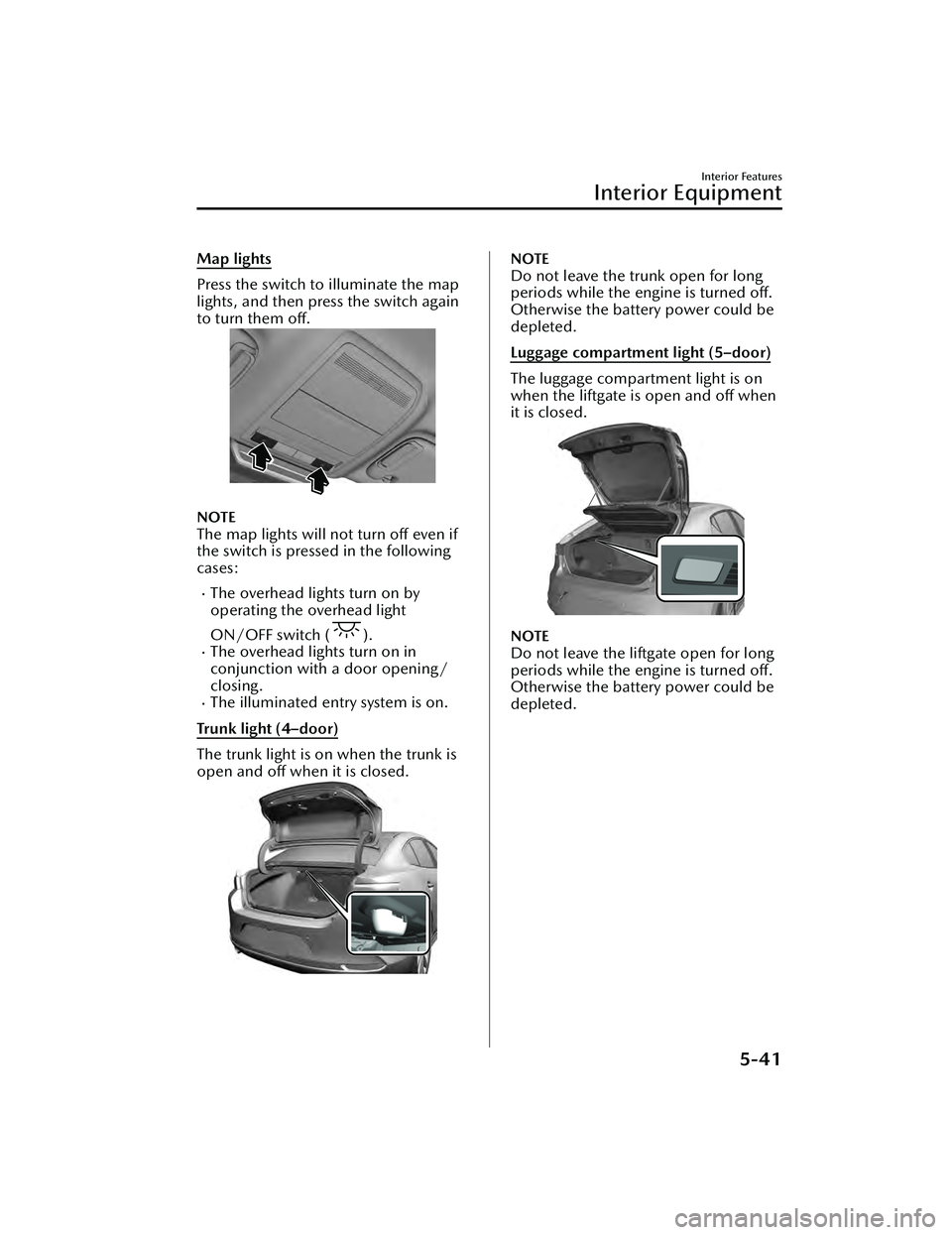
Map lights
Press the switch to illuminate the map
lights, and then press the switch again
to turn them off.
NOTE
The map lights will not turn off even if
the switch is pressed in the following
cases:
The overhead lights turn on by
operating the overhead light
ON/OFF switch (
).The overhead lights turn on in
conjunction with a door opening/
closing.
The illuminated entry system is on.
Trunk light (4–door)
The trunk light is on when the trunk is
open and off when it is closed.
NOTE
Do not leave the trunk open for long
periods while the engine is turned off.
Otherwise the battery power could be
depleted.
Luggage compartment light (5–door)
The luggage compartment light is on
when the liftgate is open and off when
it is closed.
NOTE
Do not leave the liftgate open for long
periods while the engine is turned off.
Otherwise the battery power could be
depleted.
Interior Features
Interior Equipment
5-41
Mazda3_8LC2-EA-22G_Edition1_new 2022-5-20 11:26:10
Page 441 of 623
▼Illuminated Entry System
The overhead lights turn on when any
of the following operations is done
with the overhead light switch in the
DOOR position.
The driver's door is unlocked with
the ignition is switched OFF.
The ignition is switched OFF with all
doors closed.
NOTE
The illumination time differs
depending on the operation.
The vehicle is equipped with a
battery saver. If an interior light is left
on with the ignition switched OFF,
the light turns off automatically after
a certain period of time has passed
to prevent battery depletion.
The operation of the illuminated
entry system can be changed.
Refer to the Settings section in the
Mazda Connect Owner's Manual.
The illuminated entry system does
not operate in conjunction with the
overhead lights when the overhead
lights are turned on using the
overhead light ON/OFF switch.
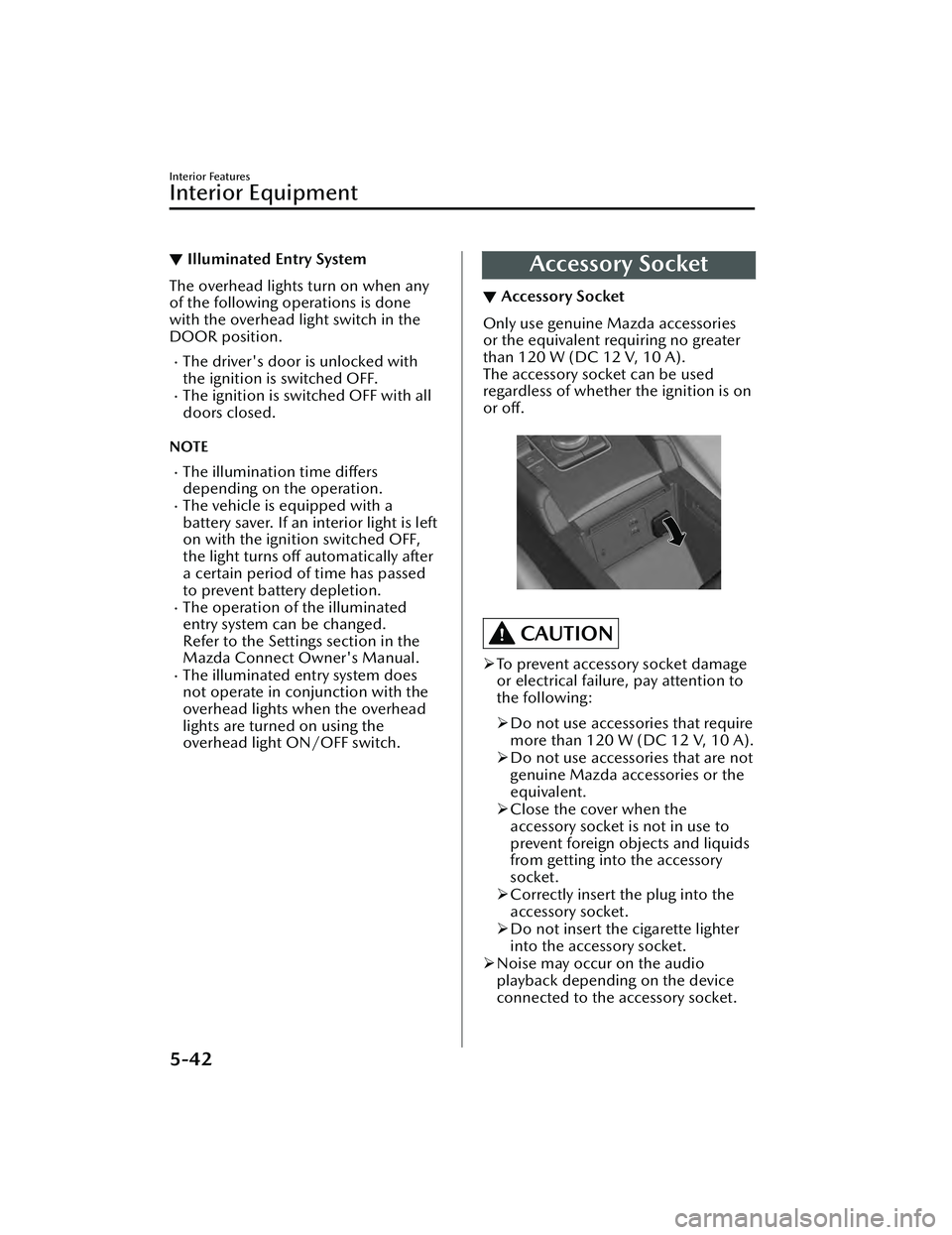
Accessory Socket
▼ Accessory Socket
Only use genuine Mazda accessories
or the equivalent requiring no greater
than 120 W (DC 12 V, 10 A).
The accessory socket can be used
regardless of whether the ignition is on
or off.
CAUTION
To prevent accessory socket damage
or electrical failure, pay attention to
the following:
Do not use accessories that require
more than 120 W (DC 12 V, 10 A).
Do not use accessories that are not
genuine Mazda accessories or the
equivalent.
Close the cover when the
accessory socket is not in use to
prevent foreign objects and liquids
from getting into the accessory
socket.
Correctly insert the plug into the
accessory socket.
Do not insert the cigarette lighter
into the accessory socket.
Noise may occur on the audio
playback depending on the device
connected to the accessory socket.
Interior Features
Interior Equipment
5-42
Mazda3_8LC2-EA-22G_Edition1_new 2022-5-20 11:26:10