Turn On MAZDA MODEL 3 4-DOOR 2010 Owners Manual
[x] Cancel search | Manufacturer: MAZDA, Model Year: 2010, Model line: MODEL 3 4-DOOR, Model: MAZDA MODEL 3 4-DOOR 2010Pages: 504, PDF Size: 5.62 MB
Page 274 of 504
Black plate (274,1)
3.“ENTER PIN ”appears for three
seconds which indicates that it is in
code input mode.
4. “SR1 - - - - ”appears which indicates
that it is ready for code input.
(Registered ID code input)
5. Input the registered ID code using channel preset buttons 1-4. Example: If
the registered ID code is “2323 ”, input
“ 2323 ”. At this time “SR1 2323 ”is
displayed.
(Registered ID code input
determination)
6. Determine the code which has been input by pressing the auto memory
button or scan button.
7. If it does not match the registered code, “SR1 Err ”is displayed and then it
returns to “SR1 - - - - ”.
8. If it matches the registered code, “SR1 LOCK ”appears for three
seconds which indicates that the code
input has been completed.
9. “SR1 LOCK 100 ”appears which
indicates that the parental lock is
activated. At this time, mute is on and
no sound is heard.
NOTE
lIf an ID code is not input for ten seconds,
“ Err ”is displayed and it returns to the
former display.
lChannel preset buttons 1, 2, 3, 4 and the
auto memory button or scan button are
used for input of the ID code. Buttons 5 and
6 cannot be used.
Lock cancellation
Setting condition: SAT mode NOTE
The scan button refers to the operation for an
In-dash CD changer-equipped vehicle, and the
auto memory button refers to the operation for
a CD player-equipped vehicle.
(Releasing a locked channel)
1. Select a channel to be released by
turning the manual tuning dial.
Example: Select the locked channel
(i.e. 100). At this time,
“SR1 LOCK 100 ”is displayed.
(Registered ID code input preparation)
2. Press and hold the auto memory button or scan button, then press channel
preset button 6. Hold both buttons
together for 1.5 seconds.
3. “ENTER PIN ”appears for three
seconds which indicates that it is in
code input mode.
4. “SR1 - - - - ”appears, which indicates
that it is ready for code input.
(Registered ID code input)
5. Input the registered ID code using channel preset buttons 1-4. Example:
When the registered ID code is “2323 ”,
input “2323 ”. At this time “SR1 2323 ”
is displayed.
NOTE
If “Err ”is displayed, go to the
“ INITIALIZATION OF ID CODE” section to
reset the ID code to [0000].
(Registered ID code input
determination)
6. Determine the input code by pressing the auto memory button or scan button.
6-44
Interior Comfort
Audio System
Mazda3_8BG3-EA-09J_Edition2 Page274
Tuesday, December 8 2009 1:29 PM
Form No.8BG3-EA-09J
Page 275 of 504
Black plate (275,1)
7. If it does not match the registered code,“SR1 Err ”is displayed and then it
returns to “SR1 - - - - ”.
8. If it matches the registered code, “SR1 UNLOCK ”appears for three
seconds which indicates that the code
input has been completed.
9. “SR1 100 ”appears which indicates that
the parental lock is off. At this time,
sound is heard.
NOTE
lIf an ID code is not input for ten seconds,
“ Err ”is displayed and it returns to the
former display.
lChannel preset buttons 1, 2, 3, 4 and the
auto memory button or scan button are
used for input of the ID code. Buttons 5 and
6 cannot be used.
Interior Comfort
Audio System
6-45
Mazda3_8BG3-EA-09J_Edition2 Page275
Tuesday, December 8 2009 1:29 PM
Form No.8BG3-EA-09J
Page 277 of 504

Black plate (277,1)
Fast-forward/Reverse
Press and hold the fast-forward button
(
) to advance through a track at high
speed.
Press and hold the reverse button (
)to
reverse through a track at high speed.
Track search
Press the track up button (
) or turn the
file dial clockwise once to skip forward to
the beginning of the next track.
Press the track down button (
) or turn
the file dial counterclockwise once to skip
back to the beginning of the current track.
Folder search (during MP3/WMA CD
playback)
To change to the previous folder, press the
folder down button (
), or press the
folder up button (
) to advance to the
next folder.
Music scan
This feature helps to find a program by
playing about the first 10 seconds of each
track.
Press the scan button (
) during
playback to start the scan play operation
(the track number will flash).
Press the scan button (
) again to
cancel scan playback.
NOTE
If the unit is left in scan, normal playback will
resume where scan was selected.
Repeat playback
During music CD playback
1. Press the repeat button (
) during
playback to play the current track
repeatedly. “RPT ”is displayed. 2. Press the button again to cancel the
repeat playback.
During MP3/WMA CD playback
(Track repeat)
1. Press the repeat button (
) during
playback to play the current track
repeatedly. “TRACK RPT ”is
displayed.
2. To cancel the repeat playback, press the button again after 3 seconds.
(Folder repeat)
1. Press the repeat button (
) during
playback, and then press the button
again within 3 seconds to play the
tracks in the current folder repeatedly.
“ FOLDER RPT ”is displayed.
2. Press the button again to cancel the repeat playback.
Random playback
Tracks are randomly selected and played.
During music CD playback
1. Press the random button (
) during
playback to play the tracks on the CD
randomly. “RDM ”is displayed.
2. Press the button again to cancel the random playback.
During MP3/WMA CD playback
(Folder random)
1. Press the random button (
) during
playback to play the tracks in the folder
randomly. “FOLDER RDM ”is
displayed.
2. To cancel the random playback, press the button again after 3 seconds.
Interior Comfort
Audio System
6-47
Mazda3_8BG3-EA-09J_Edition2 Page277
Tuesday, December 8 2009 1:29 PM
Form No.8BG3-EA-09J
Page 278 of 504

Black plate (278,1)
(CD random)
1. Press the random button (
) during
playback, and then press the button
again within 3 seconds to play the
tracks on the CD randomly.
“ DISC RDM ”is displayed.
2. Press the button again to cancel the random playback.
Switching the display
For files with a file name or other name
that have been input, the display changes
in the order of the file names or other
names each time the display button (
)
is pressed during playback.
Music CD
Track number/Elapsed time
Track name
*
Album name*
Artist name*
*
Depending on the CD, this information
may not be available.
MP3/WMA CD
File name
Folder name
Album name (ID3 Tag) Song name (ID3 Tag)
Artist name (ID3 Tag)
Folder number/File number
File number/Elapsed time
NOTE
(MP3/WMA CD)
This unit can only read English (including
numerals) one-byte characters. Depending on
the CD writing software used, proper display
may not be possible.
Display scroll
Only 12 characters can be displayed at
one time. To display the rest of the
characters of a long title, press the text
button (
). The display scrolls the
next 12 characters. Press the text button
(
) again after the last 12 characters
have been displayed to return to the
beginning of the title.
NOTE
The displayable number of characters is
limited. If the number of characters, including
the file extension (.mp3/.wma), exceeds 32
characters, it may not be fully displayed.
6-48
Interior Comfort
Audio System
Mazda3_8BG3-EA-09J_Edition2 Page278
Tuesday, December 8 2009 1:29 PM
Form No.8BG3-EA-09J
Page 282 of 504

Black plate (282,1)
Pause
To stop playback, press the Play/Pause
button (
).
Press the button again to resume
playback.
Fast-forward/Reverse
Press and hold the fast-forward button
(
) to advance through a track at high
speed.
Press and hold the reverse button (
)to
reverse through a track at high speed.
Track search
Press the track up button (
) or turn the
file dial clockwise once to skip forward to
the beginning of the next track.
Press the track down button (
) or turn
the file dial counterclockwise once to skip
back to the beginning of the current track.
Disc search
To change the disc, press the DISC button
(
or) during playback.
Folder search (during MP3/WMA CD
playback)
To change to the previous folder, press the
folder down button (
), or press the
folder up button (
) to advance to the
next folder.
Music scan
This feature helps to find a program by
playing about the first 10 seconds of each
track.
Press the scan button (
) during
playback to start the scan play operation
(the track number will flash).
Press the scan button (
) again to
cancel scan playback. NOTE
If the unit is left in scan, normal playback will
resume where scan was selected.
Repeat playback
During music CD playback
1. Press the repeat button (
) during
playback to play the current track
repeatedly. “RPT ”is displayed.
2. Press the button again to cancel the repeat playback.
During MP3/WMA CD playback
(Track repeat)
1. Press the repeat button (
) during
playback to play the current track
repeatedly. “TRACK RPT ”is
displayed.
2. To cancel the repeat playback, press the button again after 3 seconds.
(Folder repeat)
1. Press the repeat button (
) during
playback, and then press the button
again within 3 seconds to play the
tracks in the current folder repeatedly.
“ FOLDER RPT ”is displayed.
2. Press the button again to cancel the repeat playback.
Random playback
Tracks are randomly selected and played.
During music CD playback
1. Press the random button (
) during
playback to play the tracks in the CD
randomly. “RDM ”is displayed.
2. Press the button again to cancel the random playback.
6-52
Interior Comfort
Audio System
Mazda3_8BG3-EA-09J_Edition2 Page282
Tuesday, December 8 2009 1:29 PM
Form No.8BG3-EA-09J
Page 283 of 504

Black plate (283,1)
During MP3/WMA CD playback
(Folder random)
1. Press the random button (
) during
playback to play the tracks in the folder
randomly. “FOLDER RDM ”is
displayed.
2. To cancel the random playback, press the button again after 3 seconds.
(CD random)
1. Press the random button (
) during
playback, and then press the button
again within 3 seconds to play the
tracks on the CD randomly.
“ DISC RDM ”is displayed.
2. Press the button again to cancel the random playback.
Switching the display
For files with a file name or other name
that have been input, the display changes
in the order of the file names or other
names each time the display button (
)
is pressed during playback.
Music CD
Disc tray number
Disc number/Track
number/Elapsed time
Track name
*
Album name*
Artist name*
*
Depending on the CD, this information
may not be available.
MP3/WMA CD
Disc tray number
File name
Folder name
Album name (ID3 Tag) Song name (ID3 Tag)
Artist name (ID3 Tag) Disc number/Folder
number/File number
Disc number/File
number/Elapsed time
NOTE
(MP3/WMA CD)
This unit can only read English (including
numerals) one-byte characters. Depending on
the CD writing software used, proper display
may not be possible.
Display scroll
Only 12 characters can be displayed at
one time. To display the rest of the
characters of a long title, press the text
button (
). The display scrolls the
next 12 characters. Press the text button
(
) again after the last 12 characters
have been displayed to return to the
beginning of the title.
NOTE
The displayable number of characters is
limited. If the number of characters, including
the file extension (.mp3/.wma), exceeds 32
characters, it may not be fully displayed.
Interior Comfort
Audio System
6-53
Mazda3_8BG3-EA-09J_Edition2 Page283
Tuesday, December 8 2009 1:29 PM
Form No.8BG3-EA-09J
Page 286 of 504

Black plate (286,1)
Audio Control Switch
Operation
í
When the audio unit is turned on,
operation of the audio unit from the
steering wheel is possible.
NOTE
Because the audio unit will be turned off under
the following conditions, the switches will be
inoperable.
lWhen the ignition is turned off (LOCK).lWhen the power button on the audio unit is
pressed and the audio unit is turned off.
Without Bluetooth Hands-Free
With Bluetooth Hands-Free
Talk buttonPick-up buttonTalk button
Hang-up button
Pick-up button
NOTElThe talk button, pick-up button, and hang-
up button are operable with the audio unit
turned off.
lMazda has installed this system to prevent
distraction while driving the vehicle and
using audio controls on the dashboard.
Always make safe driving your first priority.
q
Adjusting the Volume
To increase the volume, pull up the
volume switch.
To decrease the volume, press down the
volume switch.
Without Bluetooth Hands-Free
With Bluetooth Hands-Free
6-56
Interior Comfort
íSome models.
Audio System
Mazda3_8BG3-EA-09J_Edition2 Page286
Tuesday, December 8 2009 1:29 PM
Form No.8BG3-EA-09J
Page 288 of 504

Black plate (288,1)
When listening to the radio or SIRIUS
digital satellite radio
Pull up or press down the seek switch, the
radio switches to the next/previous stored
station in the order that it was stored
(1― 6).
Pull up or press down the seek switch for
about 2 seconds until a beep sound is
heard to seek all usable stations at a
higher or lower frequency whether
programmed or not.
When playing a CD or BT audio
Pull up the seek switch to skip to the next
track.
Press down the seek switch to repeat the
current track.
Pull up or press down and hold the seek
switch to continuously switch the tracks
up or down.
q Mute Switchí
Press the mute switch () once to mute
audio, press it again to resume audio
output.
NOTE
If the ignition is turned off (LOCK) with the
audio muted, the mute will be canceled.
Therefore, when the engine is restarted, the
audio is not muted. To mute the audio again,
press the mute switch (
).
Without Bluetooth Hands-Free
6-58
Interior Comfort
íSome models.
Audio System
Mazda3_8BG3-EA-09J_Edition2 Page288
Tuesday, December 8 2009 1:29 PM
Form No.8BG3-EA-09J
Page 290 of 504

Black plate (290,1)
WARNING
Do not allow the connection plug cord
to get tangled with the parking brake
or the shift lever:Allowing the plug cord to become
tangled with the parking brake or
the shift lever is dangerous as it
could interfere with driving, resulting
in an accident.
CAUTION
Do not place objects or apply force to
the auxiliary jack with the plug
connected.
NOTE
lInsert the plug to the auxiliary jack
securely.
lInsert or remove the plug with the plug
perpendicular to the auxiliary jack hole.
lInsert or remove the plug by holding its
base.
To listen to a portable audio unit
1. Switch the ignition to ACC or ON.
2. Press the power/volume dial to turn the audio system on. 3. Press the AUX button (
) of the
audio unit or the mode switch (
)
of the audio control switches on the
steering wheel to change to the AUX
mode.
Audio Unit Audio Control
Switches
NOTElSet the volume of the portable audio unit to
the maximum within the range that the
sound does not become distorted, then
adjust the volume using the power/volume
dial of the audio unit or the up/down switch
of the audio control switch.
lUse your portable audio unit for operations
other than volume adjustment.
lIf the connection plug is pulled out from the
auxiliary jack while in AUX mode, noise
may occur.
6-60
Interior Comfort
Audio System
Mazda3_8BG3-EA-09J_Edition2 Page290
Tuesday, December 8 2009 1:29 PM
Form No.8BG3-EA-09J
Page 294 of 504
Black plate (294,1)
Bose Sound System-equipped model
**
*
*
*
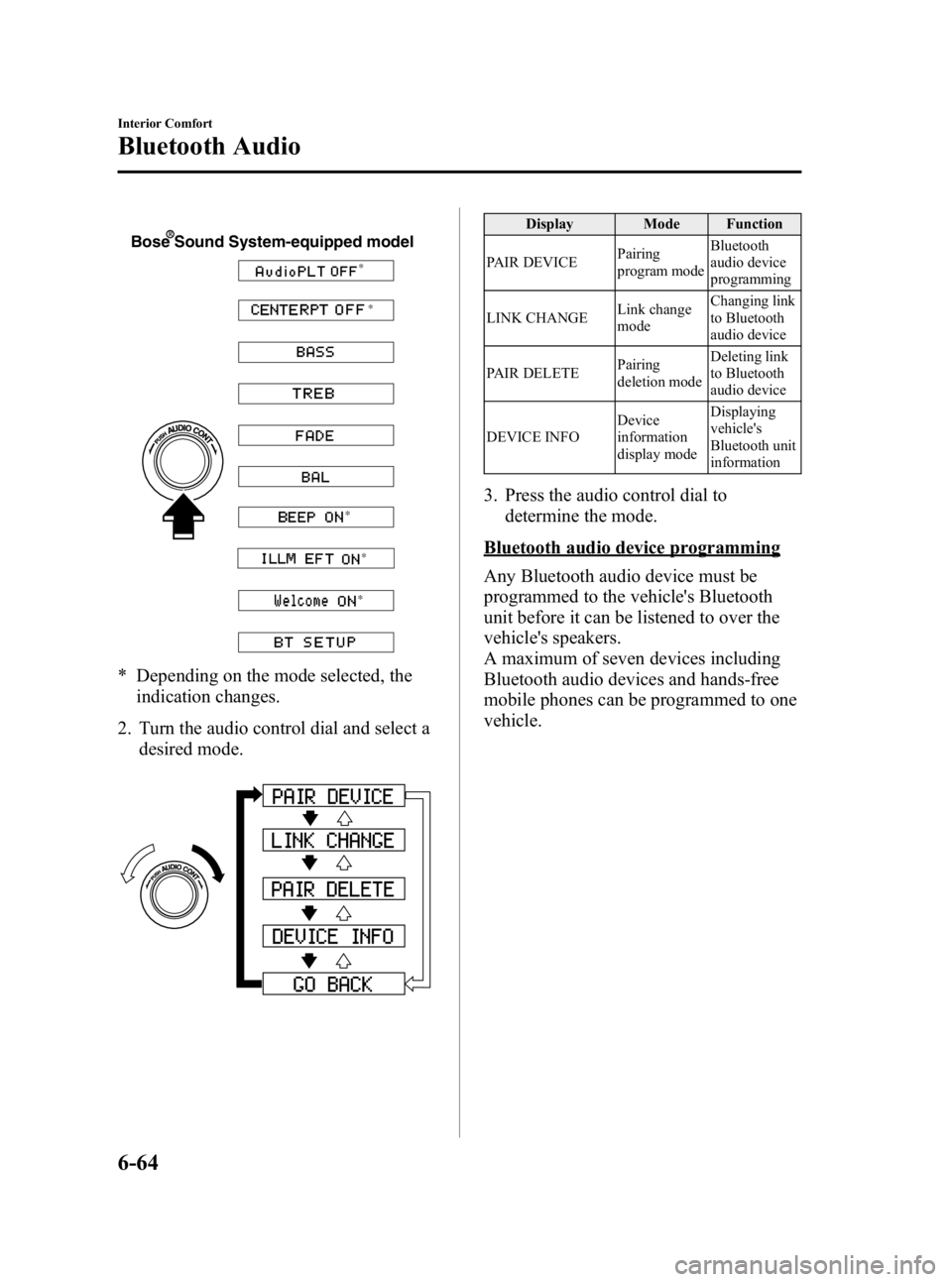
* Depending on the mode selected, theindication changes.
2. Turn the audio control dial and select a desired mode.
Display Mode Function
PAIR DEVICE Pairing
program modeBluetooth
audio device
programming
LINK CHANGE Link change
modeChanging link
to Bluetooth
audio device
PAIR DELETE Pairing
deletion modeDeleting link
to Bluetooth
audio device
DEVICE INFO Device
information
display modeDisplaying
vehicle's
Bluetooth unit
information
3. Press the audio control dial to
determine the mode.
Bluetooth audio device programming
Any Bluetooth audio device must be
programmed to the vehicle's Bluetooth
unit before it can be listened to over the
vehicle's speakers.
A maximum of seven devices including
Bluetooth audio devices and hands-free
mobile phones can be programmed to one
vehicle.
6-64
Interior Comfort
Bluetooth Audio
Mazda3_8BG3-EA-09J_Edition2 Page294
Tuesday, December 8 2009 1:29 PM
Form No.8BG3-EA-09J