Turn On MAZDA MODEL 3 4-DOOR 2010 Owners Manual
[x] Cancel search | Manufacturer: MAZDA, Model Year: 2010, Model line: MODEL 3 4-DOOR, Model: MAZDA MODEL 3 4-DOOR 2010Pages: 504, PDF Size: 5.62 MB
Page 308 of 504

Black plate (308,1)
qReceiving an Incoming Call
1. Prompt: “Incoming call, press the
pickup button to answer ”.
2. To accept the call, press the pick-up button.
To reject the call, press the hang-up
button.
qHanging Up a Call
Press the hang-up button during the call.
A beep sound will confirm that call is
ended.
qVolume Adjustment
The power/volume dial of the audio unit
is used to adjust the volume. Turn the dial
to the right to increase volume, to the left
to decrease it.
NOTElThe volume can also be adjusted using the
volume button on the steering wheel.
lThe music volume of the audio unit cannot
be adjusted while Bluetooth Hands-Free is
being used.
qVoice Guidance Interrupt Operation
Voice guidance can be stopped by
pressing the talk button with a short press
while it is being heard. A new voice input
command can then be spoken by the user.
· Press the talk button with a short press.
qHelp Function Use
The help function informs the user of all
the available voice commands under the
current conditions.
1. Press the talk button with a short press.
2. Say: [Beep] “Help ”
3. Follow the prompts to receive the appropriate voice guidance
instructions.
6-78
Interior Comfort
Bluetooth Hands-Free
Mazda3_8BG3-EA-09J_Edition2 Page308
Tuesday, December 8 2009 1:29 PM
Form No.8BG3-EA-09J
Page 309 of 504
Black plate (309,1)
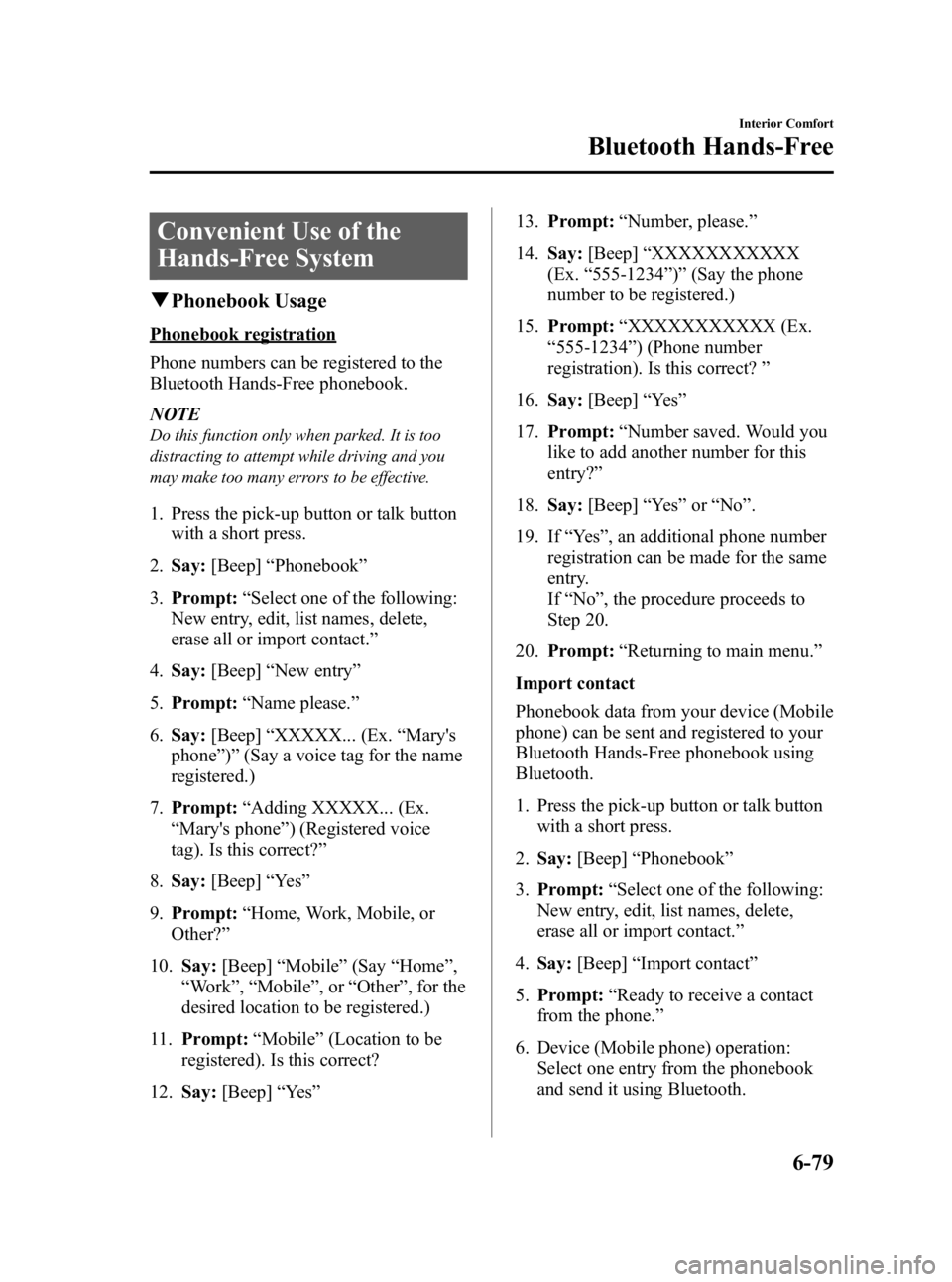
Convenient Use of the
Hands-Free System
qPhonebook Usage
Phonebook registration
Phone numbers can be registered to the
Bluetooth Hands-Free phonebook.
NOTE
Do this function only when parked. It is too
distracting to attempt while driving and you
may make too many errors to be effective.
1. Press the pick-up button or talk button
with a short press.
2. Say: [Beep] “Phonebook ”
3. Prompt: “Select one of the following:
New entry, edit, list names, delete,
erase all or import contact. ”
4. Say: [Beep] “New entry ”
5. Prompt: “Name please. ”
6. Say: [Beep] “XXXXX... (Ex. “Mary's
phone ”)” (Say a voice tag for the name
registered.)
7. Prompt: “Adding XXXXX... (Ex.
“ Mary's phone ”) (Registered voice
tag). Is this correct? ”
8. Say: [Beep] “Ye s ”
9. Prompt: “Home, Work, Mobile, or
Other? ”
10. Say: [Beep] “Mobile ”(Say “Home ”,
“ Work ”, “Mobile ”,or “Other ”, for the
desired location to be registered.)
11. Prompt: “Mobile ”(Location to be
registered). Is this correct?
12. Say: [Beep] “Ye s ” 13.
Prompt: “Number, please. ”
14. Say: [Beep] “XXXXXXXXXXX
(Ex. “555-1234 ”)” (Say the phone
number to be registered.)
15. Prompt: “XXXXXXXXXXX (Ex.
“ 555-1234 ”) (Phone number
registration). Is this correct? ”
16. Say: [Beep] “Ye s ”
17. Prompt: “Number saved. Would you
like to add another number for this
entry? ”
18. Say: [Beep] “Ye s ”or “No ”.
19. If “Ye s ”, an additional phone number
registration can be made for the same
entry.
If “No” , the procedure proceeds to
Step 20.
20. Prompt: “Returning to main menu. ”
Import contact
Phonebook data from your device (Mobile
phone) can be sent and registered to your
Bluetooth Hands-Free phonebook using
Bluetooth.
1. Press the pick-up button or talk button with a short press.
2. Say: [Beep] “Phonebook ”
3. Prompt: “Select one of the following:
New entry, edit, list names, delete,
erase all or import contact. ”
4. Say: [Beep] “Import contact ”
5. Prompt: “Ready to receive a contact
from the phone. ”
6. Device (Mobile phone) operation: Select one entry from the phonebook
and send it using Bluetooth.
Interior Comfort
Bluetooth Hands-Free
6-79
Mazda3_8BG3-EA-09J_Edition2 Page309
Tuesday, December 8 2009 1:29 PM
Form No.8BG3-EA-09J
Page 310 of 504
![MAZDA MODEL 3 4-DOOR 2010 Owners Manual Black plate (310,1)
7.Prompt: “X (Number of locations
which include data) numbers have been
imported. What name would you like
to use for these numbers?”
8. Say: [Beep] “XXXXX... (Ex. “Marys](/img/28/41015/w960_41015-309.png "MAZDA MODEL 3 4-DOOR 2010 Owners Manual Black plate (310,1)
7.Prompt: “X (Number of locations
which include data) numbers have been
imported. What name would you like
to use for these numbers?”
8. Say: [Beep] “XXXXX... (Ex. “Marys")
Black plate (310,1)
7.Prompt: “X (Number of locations
which include data) numbers have been
imported. What name would you like
to use for these numbers?”
8. Say: [Beep] “XXXXX... (Ex. “Mary's
phone ”)” (Say a voice tag for the name
registered.)
9. Prompt: “Adding XXXXX... (Ex.
“ Mary's phone ”) (Voice tag). Is this
correct? ”
10. Say: [Beep] “Ye s ”
11. Prompt: “Number saved. Would you
like to import another contact? ”
12. Say: [Beep] “Ye s ”or “No ”
13. If “Ye s ”, the procedure proceeds to
Step 5.
If “No” , the procedure proceeds to
Step 14.
14. Prompt: “Returning to main menu. ”
Making calls using the phonebook
Telephone calls can be made by saying
the name of a person (voice tag) whose
phone number has been registered in
Bluetooth Hands-Free in advance.
For the phonebook setting method, refer
to (page 6-82).
1. Press the pick-up button or talk button
with a short press.
2. Say: [Beep] “Call ”
3. Prompt: “Name please. ”
4. Say: [Beep] “XXXXX... (Ex. “John's
phone ”)” (Say a voice tag registered in
the phonebook.) 5.
Prompt: “Calling XXXXX... (Ex.
“ John's phone ”) XXXX (Ex. “at
home ”). Is this correct? ”(Voice tag and
phone number location registered in
phonebook).
6. Say: [Beep] “Ye s ”
7. Prompt: “Dialing ”
NOTE
The “Call ”command and the voice tag can be
combined.
Ex. In Step 2, say, “Call John's phone ”, then,
Steps 3 and 4 can be skipped.
q Redialing Function
Redialing the number of the person
previously dialed using the phone is
possible.
1. Press the pick-up button or talk button
with a short press.
2. Say: [Beep] “Redial ”
3. Prompt: “Dialing ”
qEmergency Calls
A call can be made to the emergency
phone number (911) using the voice input
command.
1. Press the pick-up button or talk button
with a short press.
2. Say: [Beep] “Emergency ”
3. Prompt: “Dialing “911 ”, is this
correct? ”
4. Say: [Beep] “Ye s ”
5. Prompt: “Dialing ”
6-80
Interior Comfort
Bluetooth Hands-Free
Mazda3_8BG3-EA-09J_Edition2 Page310
Tuesday, December 8 2009 1:29 PM
Form No.8BG3-EA-09J
Page 312 of 504
![MAZDA MODEL 3 4-DOOR 2010 Owners Manual Black plate (312,1)
Three-way call function
1. Press the talk button with a short press.
2.Say: [Beep] “Join call ”
3. Prompt: “Joining calls ”
Making a call using a telephone
number
1. Press](/img/28/41015/w960_41015-311.png "MAZDA MODEL 3 4-DOOR 2010 Owners Manual Black plate (312,1)
Three-way call function
1. Press the talk button with a short press.
2.Say: [Beep] “Join call ”
3. Prompt: “Joining calls ”
Making a call using a telephone
number
1. Press")
Black plate (312,1)
Three-way call function
1. Press the talk button with a short press.
2.Say: [Beep] “Join call ”
3. Prompt: “Joining calls ”
Making a call using a telephone
number
1. Press the talk button with a short press.
2.Say: [Beep] “Dial ”
3. Prompt: “Number, please ”
4. Say: [Beep] “XXXXXXXXXXX (Ex.
“ 555-1234 ”) (Telephone number) ”
5. Prompt: “Dialing XXXXXXXXXXX
(Ex. “555-1234 ”) (Telephone number)
is this correct? ”
6. Say: [Beep] “Ye s ”or “No ”.
7. When “Ye s ”is spoken, the procedure
proceeds to Step 8.
When “No ”is spoken, the procedure
returns to Step 3.
8. Prompt: “Dialing ”
Making calls using the phonebook
1. Press the talk button with a short press.
2.Say: [Beep] “Call ”
3. Prompt: “Name please. ”
4. Say: [Beep] “XXXXX... (Ex. “John's
phone ”)” (Say a voice tag registered in
the phonebook.)
5. Prompt: “Calling XXXXX... (Ex.
“ John's phone ”) XXXX (Ex. “at
home ”). Is this correct? ”(Voice tag and
phone number location registered in
phonebook).
6. Say: [Beep] “Ye s ” 7.
Prompt: “Dialing ”
Redialing function
1. Press the talk button with a short press.
2.Say: [Beep] “Redial ”
3. Prompt: “Dialing ”
Ending the current call
Press the hang-up button during the call.
qPhonebook Settings
Editing phonebook
The data registered to the Bluetooth
Hands-Free phonebook can be edited.
NOTE
Do this function only when parked. It is too
distracting to attempt while driving and you
may make too many errors to be effective.
1. Press the pick-up button or talk button
with a short press.
2. Say: [Beep] “Phonebook ”
3. Prompt: “Select one of the following:
New entry, edit, list names, delete,
erase all or import contact. ”
4. Say: [Beep] “Edit ”
5. Prompt: “Please say the name of the
entry you would like to edit or say,
“ List names ”.”
6. Say: [Beep] “XXXXX... (Ex. “Mary's
phone ”)” (Say the voice tag for the
registered name to be edited in the
phonebook.)
7. Prompt: “Home, Work, Mobile, or
Other? ”
6-82
Interior Comfort
Bluetooth Hands-Free
Mazda3_8BG3-EA-09J_Edition2 Page312
Tuesday, December 8 2009 1:29 PM
Form No.8BG3-EA-09J
Page 313 of 504
![MAZDA MODEL 3 4-DOOR 2010 Owners Manual Black plate (313,1)
8.Say: [Beep] “Home ”(Say the
registered location to be edited:
“ Home ”, “Work ”, “Mobile ”,or
“ Other ”).
9. Prompt: “XXXXX... (Ex. “Marys
phone ”) (Re](/img/28/41015/w960_41015-312.png "MAZDA MODEL 3 4-DOOR 2010 Owners Manual Black plate (313,1)
8.Say: [Beep] “Home ”(Say the
registered location to be edited:
“ Home ”, “Work ”, “Mobile ”,or
“ Other ”).
9. Prompt: “XXXXX... (Ex. “Marys
phone ”) (Re")
Black plate (313,1)
8.Say: [Beep] “Home ”(Say the
registered location to be edited:
“ Home ”, “Work ”, “Mobile ”,or
“ Other ”).
9. Prompt: “XXXXX... (Ex. “Mary's
phone ”) (Registered voice tag) XXXX
(Ex. “Home ”) (Registered location). Is
this correct? ”
10. Say: [Beep] “Ye s ”
11. Prompt: “The current number is
XXXXXXXXXXX (Ex. “555-1234 ”)
(Currently registered number). New
number, please. ”
NOTE
If there was no previous phone number
registered to a location (Ex. “Work ”), the
prompt will only read out “Number, please” .
12.Say: [Beep] “XXXXXXXXXXX
(Ex. “555-5678 ”)” (Say the new
phone number to be registered.)
13. Prompt: “XXXXXXXXXXX (Ex.
“ 555-5678 ”) (The new phone number
to be registered). Is this correct? ”
14. Say: [Beep] “Ye s ”
15. Prompt: “Number changed, returning
to main menu. ”
Phonebook data deletion
Erasing individual phonebook data
Individual data registered to the Bluetooth
Hands-Free phonebook can be cleared.
NOTE
Do this function only when parked. It is too
distracting to attempt while driving and you
may make too many errors to be effective.
1. Press the pick-up button or talk button
with a short press. 2.
Say: [Beep] “Phonebook ”
3. Prompt: “Select one of the following:
New entry, edit, list names, delete,
erase all or import contact. ”
4. Say: [Beep] “Delete ”
5. Prompt: “Please say the name of the
entry you would like to delete or say,
“ List names ”.”
6. Say: [Beep] “XXXXX... (Ex. “John's
phone ”)” (Say the registered voice tag
to be deleted from the phonebook.)
7. Prompt: “Deleting XXXXX... (Ex.
“ John's phone ”) (Registered voice tag)
Home (Registered location). Is this
correct? ”
8. Say: [Beep] “Ye s ”
9. Prompt: “XXXXX... (Ex. “John's
phone ”) (Registered voice tag) Home
(Registered location) deleted, returning
to main menu. ”
Complete deletion of the phonebook
data
All data registered to the Bluetooth
Hands-Free phonebook can be erased.
NOTE
Do this function only when parked. It is too
distracting to attempt while driving and you
may make too many errors to be effective.
1. Press the pick-up button or talk button
with a short press.
2. Say: [Beep] “Phonebook ”
3. Prompt: “Select one of the following:
New entry, edit, list names, delete,
erase all or import contact. ”
4. Say: [Beep] “Erase all ”
Interior Comfort
Bluetooth Hands-Free
6-83
Mazda3_8BG3-EA-09J_Edition2 Page313
Tuesday, December 8 2009 1:29 PM
Form No.8BG3-EA-09J
Page 314 of 504
![MAZDA MODEL 3 4-DOOR 2010 Owners Manual Black plate (314,1)
5.Prompt: “Are you sure you want to
erase everything from your Hands Free
system phonebook? ”
6. Say: [Beep] “Ye s ”
7. Prompt: “You are about to delete
everything from y](/img/28/41015/w960_41015-313.png "MAZDA MODEL 3 4-DOOR 2010 Owners Manual Black plate (314,1)
5.Prompt: “Are you sure you want to
erase everything from your Hands Free
system phonebook? ”
6. Say: [Beep] “Ye s ”
7. Prompt: “You are about to delete
everything from y")
Black plate (314,1)
5.Prompt: “Are you sure you want to
erase everything from your Hands Free
system phonebook? ”
6. Say: [Beep] “Ye s ”
7. Prompt: “You are about to delete
everything from your Hands Free
system phonebook. Do you want to
continue? ”
8. Say: [Beep] “Ye s ”
9. Prompt: “Please wait, erasing the
Hands Free system phonebook. ”
10. Prompt: “Hands-Free system
phonebook erased, returning to main
menu. ”
Read-out of names registered to the
Bluetooth Hands-Free phonebook
Bluetooth Hands-Free can read out the list
of names registered to its phonebook.
1. Press the pick-up button or talk button
with a short press.
2. Say: [Beep] “Phonebook ”
3. Prompt: “Select one of the following:
New entry, edit, list names, delete,
erase all or import contact. ”
4. Say: [Beep] “List names ”
5. Prompt: “XXXXX..., XXXXX...,
XXXXX... (Ex. “John's phone ”, Mary's
phone, Bill's phone) ”(Voice guidance
reads out the voice tags registered to
the phonebook.)
Press the talk button with a short press
during the read-out at the desired name,
and then say one of the following voice
commands to execute it.
l“ Continue ”: Continues the list read-
out.
l“ Call ”: Calls the registered phonebook
data when the talk button is short-
pressed.
l“ Edit ”: Edits the registered phonebook
data when the talk button is short-
pressed.
l“ Delete ”: Deletes the registered
phonebook data when the talk button is
short-pressed.
l“ Previous ”: Returns to the previous
phonebook data in read-out when the
talk button is short-pressed.
6. Prompt: “End of list, would you like
to start from the beginning?”
7. Say: [Beep] “No ”
8. Prompt: “Returning to main menu. ”
qDTMF (Dual Tone Multi-
Frequency Signal) Transmission
This function is used when transmitting
DTMF via the user's voice. The receiver
of a DTMF transmission is generally a
home telephone answering machine or a
company's automated guidance call center
(When you send tone signals back
according to the voice guidance
recording).
1. Press the talk button with a short press.
2. Say: [Beep] “XXXX... send ”(Say
DTMF code)
3. Prompt: “Sending XXXX... (DTMF
code) ”
6-84
Interior Comfort
Bluetooth Hands-Free
Mazda3_8BG3-EA-09J_Edition2 Page314
Tuesday, December 8 2009 1:29 PM
Form No.8BG3-EA-09J
Page 315 of 504
Black plate (315,1)
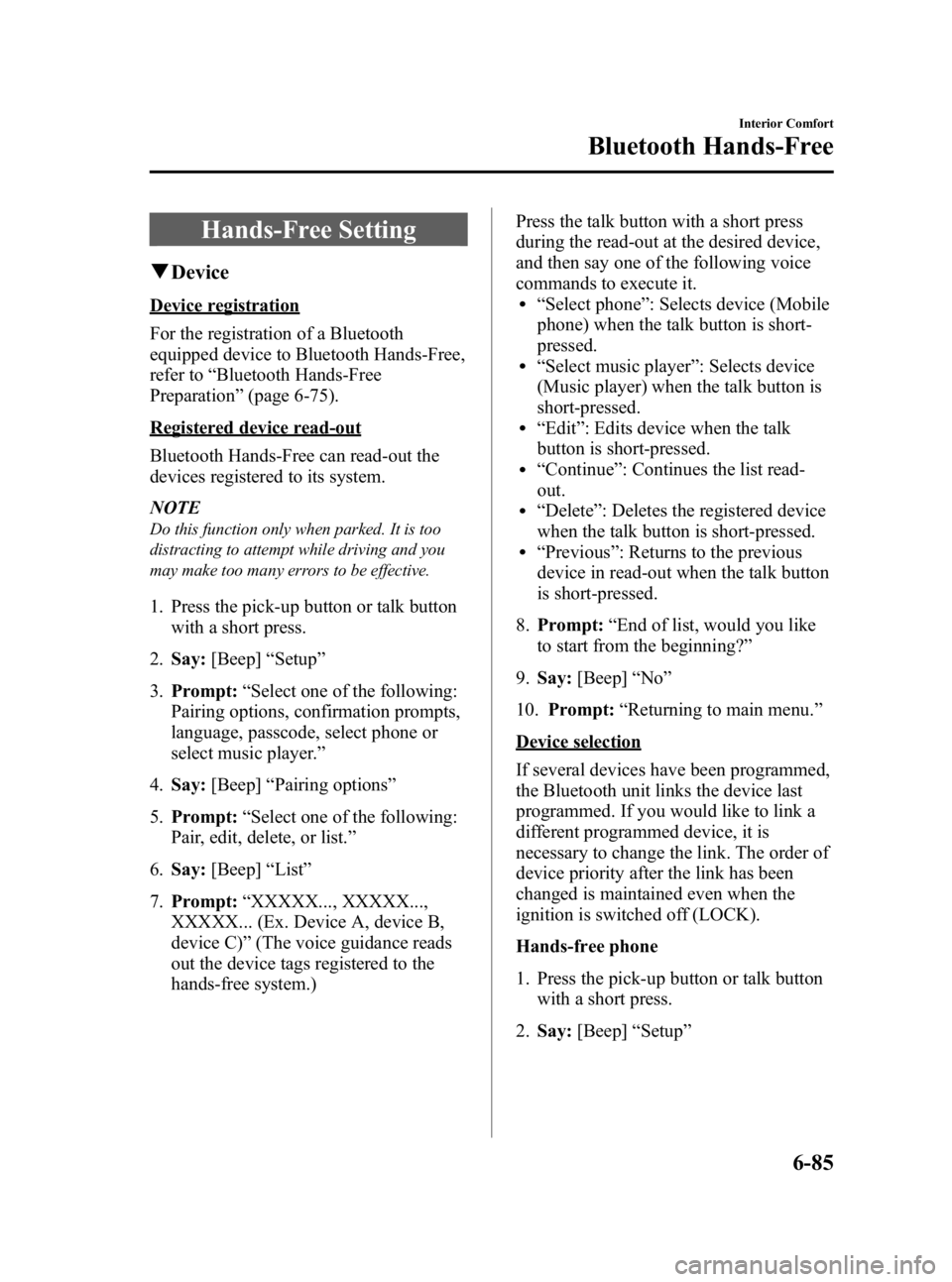
Hands-Free Setting
qDevice
Device registration
For the registration of a Bluetooth
equipped device to Bluetooth Hands-Free,
refer to “Bluetooth Hands-Free
Preparation ”(page 6-75).
Registered device read-out
Bluetooth Hands-Free can read-out the
devices registered to its system.
NOTE
Do this function only when parked. It is too
distracting to attempt while driving and you
may make too many errors to be effective.
1. Press the pick-up button or talk button
with a short press.
2. Say: [Beep] “Setup ”
3. Prompt: “Select one of the following:
Pairing options, confirmation prompts,
language, passcode, select phone or
select music player.”
4. Say: [Beep] “Pairing options ”
5. Prompt: “Select one of the following:
Pair, edit, delete, or list. ”
6. Say: [Beep] “List ”
7. Prompt: “XXXXX..., XXXXX...,
XXXXX... (Ex. Device A, device B,
device C) ”(The voice guidance reads
out the device tags registered to the
hands-free system.) Press the talk button with a short press
during the read-out at the desired device,
and then say one of the following voice
commands to execute it.
l“
Select phone ”: Selects device (Mobile
phone) when the talk button is short-
pressed.
l“ Select music player ”: Selects device
(Music player) when the talk button is
short-pressed.
l“ Edit ”: Edits device when the talk
button is short-pressed.
l“ Continue ”: Continues the list read-
out.
l“ Delete ”: Deletes the registered device
when the talk button is short-pressed.
l“ Previous ”: Returns to the previous
device in read-out when the talk button
is short-pressed.
8. Prompt: “End of list, would you like
to start from the beginning?”
9. Say: [Beep] “No ”
10. Prompt: “Returning to main menu. ”
Device selection
If several devices have been programmed,
the Bluetooth unit links the device last
programmed. If you would like to link a
different programmed device, it is
necessary to change the link. The order of
device priority after the link has been
changed is maintained even when the
ignition is switched off (LOCK).
Hands-free phone
1. Press the pick-up button or talk button
with a short press.
2. Say: [Beep] “Setup ”
Interior Comfort
Bluetooth Hands-Free
6-85
Mazda3_8BG3-EA-09J_Edition2 Page315
Tuesday, December 8 2009 1:29 PM
Form No.8BG3-EA-09J
Page 316 of 504
![MAZDA MODEL 3 4-DOOR 2010 Owners Manual Black plate (316,1)
3.Prompt: “Select one of the following:
Pairing options, confirmation prompts,
language, passcode, select phone or
select music player.”
4. Say: [Beep] “Select phone ”
5. P](/img/28/41015/w960_41015-315.png "MAZDA MODEL 3 4-DOOR 2010 Owners Manual Black plate (316,1)
3.Prompt: “Select one of the following:
Pairing options, confirmation prompts,
language, passcode, select phone or
select music player.”
4. Say: [Beep] “Select phone ”
5. P")
Black plate (316,1)
3.Prompt: “Select one of the following:
Pairing options, confirmation prompts,
language, passcode, select phone or
select music player.”
4. Say: [Beep] “Select phone ”
5. Prompt: “Please say 1 for XXXXX...
(Ex. device A), 2 for XXXXX... (Ex.
device B...) ”
6. Say: [Beep] “X ”(Say the number for
the mobile phone to be connected.)
7. Prompt: “XXXXX... (Ex. device B...)
(Registered device tag) selected, is this
correct? ”
8. Say: [Beep] “Ye s ”
9. Prompt: “XXXXX... (Ex. device B...)
(Device tag) will temporarily override
phone priorities, returning to main
menu. ”
Music player
1. Press the pick-up button or talk button with a short press.
2. Say: [Beep] “Setup ”
3. Prompt: “Select one of the following:
Pairing options, confirmation prompts,
language, passcode, select phone or
select music player.”
4. Say: [Beep] “Select music player ”
5. Prompt: “Please say 1 for XXXXX...
(Ex. device A), 2 for XXXXX... (Ex.
device B...) ”
6. Say: [Beep] “X ”(Say the number for
the music player to be connected.)
7. Prompt: “XXXXX... (Ex. device B...)
(Registered device tag) selected, is this
correct? ”
8. Say: [Beep] “Ye s ” 9.
Prompt: “XXXXX... (Ex. device B...)
(Device tag) selected. ”
NOTE
Device (Music player) selection can also be
done by operating the panel button (page
6-63).
Registered device (Mobile phone)
deletion
Registered devices (Mobile phone) can be
deleted individually or collectively.
NOTE
Do this function only when parked. It is too
distracting to attempt while driving and you
may make too many errors to be effective.
1. Press the pick-up button or talk button with a short press.
2. Say: [Beep] “Setup ”
3. Prompt: “Select one of the following:
Pairing options, confirmation prompts,
language, passcode, select phone or
select music player.”
4. Say: [Beep] “Pairing options ”
5. Prompt: “Select one of the following:
Pair, edit, delete, or list. ”
NOTE
A registered device (Mobile phone) can be
deleted using the registration list.
6. Say: [Beep] “Delete ”
7. Prompt: “Please say 1 for XXXXX...
(Ex. device A), 2 for XXXXX... (Ex.
device B...) ”(The device tag of the
registered device is read out by the
HFP.).
8. Say: [Beep] “X ”(Say the number of
the device to be deleted.)
6-86
Interior Comfort
Bluetooth Hands-Free
Mazda3_8BG3-EA-09J_Edition2 Page316
Tuesday, December 8 2009 1:29 PM
Form No.8BG3-EA-09J
Page 317 of 504
![MAZDA MODEL 3 4-DOOR 2010 Owners Manual Black plate (317,1)
NOTE
Say“All” to delete all devices (Mobile phone).
9.Prompt: “Deleting XXXXX... (Ex.
device B...) (Registered device tag). Is
this correct? ”
10. Say: [Beep] “Ye s ”
1](/img/28/41015/w960_41015-316.png "MAZDA MODEL 3 4-DOOR 2010 Owners Manual Black plate (317,1)
NOTE
Say“All” to delete all devices (Mobile phone).
9.Prompt: “Deleting XXXXX... (Ex.
device B...) (Registered device tag). Is
this correct? ”
10. Say: [Beep] “Ye s ”
1")
Black plate (317,1)
NOTE
Say“All” to delete all devices (Mobile phone).
9.Prompt: “Deleting XXXXX... (Ex.
device B...) (Registered device tag). Is
this correct? ”
10. Say: [Beep] “Ye s ”
11. Prompt: “Deleted ”
Registered device editing
1. Press the pick-up button or talk button
with a short press.
2. Say: [Beep] “Setup ”
3. Prompt: “Select one of the following:
Pairing options, confirmation prompts,
language, passcode, select phone or
select music player.”
4. Say: [Beep] “Pairing options ”
5. Prompt: “Select one of the following:
Pair, edit, delete, or list. ”
6. Say: [Beep] “Edit ”
7. Prompt: “Please say 1 for XXXXX...
(Ex. device A), 2 for XXXXX... (Ex.
device B...), which device please? ”
(The device tag of the registered device
is read out by the HFP.)
8. Say: [Beep] “X ”(Say the number of
the device to be edited.)
9. Prompt: “New name please? ”
10. Say: [Beep] “XXXXX... (Ex. device
C) ”(Speak a “device tag ”,an
arbitrary name for the device.)
11. Prompt: “XXXXX... (Ex. device C)
(Device tag), is this correct? ”
12. Say: [Beep] “Ye s ”
13. Prompt: “New name saved, returning
to main menu. ”
qSecurity Setting
If a passcode is set, the system cannot be
activated unless the passcode is input.
NOTE
Do this function only when parked. It is too
distracting to attempt while driving and you
may make too many errors to be effective.
Passcode setting
1. Press the pick-up button or talk button
with a short press.
2. Say: [Beep] “Setup ”
3. Prompt: “Select one of the following:
Pairing options, confirmation prompts,
language, passcode, select phone or
select music player.”
4. Say: [Beep] “Passcode ”
5. Prompt: “Passcode is disabled. Would
you like to enable it? ”
6. Say: [Beep] “Ye s ”
7. Prompt: “Please say a 4-digit passcode.
Remember this passcode. It will be
required to use this system.”
8. Say: [Beep] “XXXX ”(Say a desired 4-
digit passcode, “PCode ”.)
9. Prompt: “Passcode XXXX (Passcode,
PCode). Is this correct? ”
10. Say: [Beep] “Ye s ”
11. Prompt: “Passcode is enabled,
returning to main menu. ”
Using Bluetooth Hands-Free with a
passcode
1. Press the pick-up button or talk button
with a short press.
Interior Comfort
Bluetooth Hands-Free
6-87
Mazda3_8BG3-EA-09J_Edition2 Page317
Tuesday, December 8 2009 1:29 PM
Form No.8BG3-EA-09J
Page 318 of 504
![MAZDA MODEL 3 4-DOOR 2010 Owners Manual Black plate (318,1)
2.Prompt: “Hands-Free system is locked.
State the passcode to continue. ”
3. Say: [Beep] “XXXX ”(Say the set
passcode “PCode ”.)
4. If the correct passcode is input, vo](/img/28/41015/w960_41015-317.png "MAZDA MODEL 3 4-DOOR 2010 Owners Manual Black plate (318,1)
2.Prompt: “Hands-Free system is locked.
State the passcode to continue. ”
3. Say: [Beep] “XXXX ”(Say the set
passcode “PCode ”.)
4. If the correct passcode is input, vo")
Black plate (318,1)
2.Prompt: “Hands-Free system is locked.
State the passcode to continue. ”
3. Say: [Beep] “XXXX ”(Say the set
passcode “PCode ”.)
4. If the correct passcode is input, voice guidance “XXXXXX... (Ex. “Mary's
device) (Device tag) is connected ”is
announced.
If the passcode is incorrect, voice
guidance “XXXX (4-digit passcode,
Pcode) incorrect passcode, please try
again ”is announced.
Canceling the passcode
NOTE
Do this function only when parked. It is too
distracting to attempt while driving and you
may make too many errors to be effective.
1. Press the pick-up button or talk button
with a short press.
2. Say: [Beep] “Setup ”
3. Prompt: “Select one of the following:
Pairing options, confirmation prompts,
language, passcode, select phone or
select music player.”
4. Say: [Beep] “Passcode ”
5. Prompt: “Passcode is enabled. Would
you like to disable it? ”
6. Say: [Beep] “Ye s ”
7. Prompt: “Passcode is disabled,
returning to main menu. ”
Confirmation Prompts
The confirmation prompt confirms the
command content to the user before
advancing to the operation requested by
the user. When this function is turned on,
the system reads out the voice input
command previously received and
confirms whether the command is correct
before advancing to the command
execution.
When the confirmation prompt function is
turned on:
(Ex.“Calling John's device. Is this
correct? ”)
When the confirmation prompt function is
turned off:
(Ex. “Calling John's device. ”)
NOTE
If the confirmation prompt function is turned
off when making an emergency call, the system
reads out and confirms the command before
executing it.
1. Press the pick-up button or talk button with a short press.
2. Say: [Beep] “Setup ”
3. Prompt: “Select one of the following:
Pairing options, confirmation prompts,
language, passcode, select phone or
select music player.”
4. Say: [Beep] “Confirmation prompts”
5. Prompt: “Confirmation prompts are
on/off. Would you like to turn
confirmation prompts off/on? ”
6. Say: [Beep] “Ye s ”
7. Prompt: “Confirmation prompts are
off/on, returning to main menu. ”
6-88
Interior Comfort
Bluetooth Hands-Free
Mazda3_8BG3-EA-09J_Edition2 Page318
Tuesday, December 8 2009 1:29 PM
Form No.8BG3-EA-09J