radio MAZDA MODEL 3 4-DOOR 2017 User Guide
[x] Cancel search | Manufacturer: MAZDA, Model Year: 2017, Model line: MODEL 3 4-DOOR, Model: MAZDA MODEL 3 4-DOOR 2017Pages: 612
Page 212 of 612

4–82
When Driving
i-ACTIVSENSE
Pre-Crash Safety Technology
Pre-crash safety technology is designed to assist the driver in averting\
collisions or reduce
their severity in situations where they cannot be avoided.
Collision damage reduction in low vehicle speed range
Forward driving
Smart City Brake Support (SCBS)
........................................................................\
...........4-128
Collision damage reduction in medium/high speed range
Smart Brake Support (SBS)
........................................................................\
......................4-133
Camera and Sensors
Forward Sensing Camera (FSC)
The Forward Sensing Camera (FSC) detects lane indications and recogniz\
es headlights,
taillights and city lights during nighttime driving. In addition, it als\
o detects the vehicle
ahead, pedestrians, or obstructions. The following systems also use the Forward Sensing
Camera (FSC).
High Beam Control system (HBC) Lane-keep Assist System (LAS) & Lane Departure Warning System (LDWS) Traffic Sign Recognition System (TSR) Smart City Brake Support (SCBS) Smart Brake Support (SBS)
The Forward Sensing Camera (FSC) is installed at the top of the windsh\
ield near the
rearview mirror.
Refer to Forward Sensing Camera (FSC) on page
4-136.
Radar sensor (front)
The radar sensor (front) functions by detecting the radio waves reflected off a vehicle ahead
sent from the radar sensor. The following systems also use the radar sensor (front).
Mazda Radar Cruise Control (MRCC) Distance Recognition Support System (DRSS) Smart Brake Support (SBS)
The radar sensor (front) is mounted behind the radiator grille.
Refer to Radar Sensor (Front) on page
4-141.
Mazda3_8FL6-EA-16F_Edition2.indb 822016/08/10 17:36:36
Page 213 of 612
4–83
When Driving
i-ACTIVSENSE
Radar sensors (rear)
The radar sensors (rear) function by detecting the radio waves reflected off a vehicle
approaching from the rear or an obstruction sent from the radar sensors.\
The following
systems also use the radar sensors (rear).
Blind Spot Monitoring (BSM) Rear Cross Traffic Alert (RCTA)
The radar sensors (rear) are installed inside the rear bumper, one each on the left and right
sides.
Refer to Radar Sensors (Rear) on page
4-144.
Mazda3_8FL6-EA-16F_Edition2.indb 832016/08/10 17:36:36
Page 220 of 612
4–90
When Driving
i-ACTIVSENSE
In the following case, the flashing of the Blind Spot Monitoring (BSM) warning indicator
light, and the activation of the warning sound and the warning screen indicator display
may not occur or they may be delayed.
A vehicle makes a lane change from a driving lane two lanes over to an adjacent lane. Driving on steep slopes. Crossing the summit of a hill or mountain pass. The turning radius is small (making a sharp turn, turning at intersecti\
ons). When there is a difference in the height between your driving lane and the adjacent
lane. Directly after pressing the Blind Spot Monitoring (BSM) OFF switch and the system
becomes operable.
If the road width is extremely narrow, vehicles two lanes over may be detected.
The detection area of the radar sensors (rear) is set according to the road width of
expressways.
The Blind Spot Monitoring (BSM) warning indicator light may turn on an\
d the vehicle
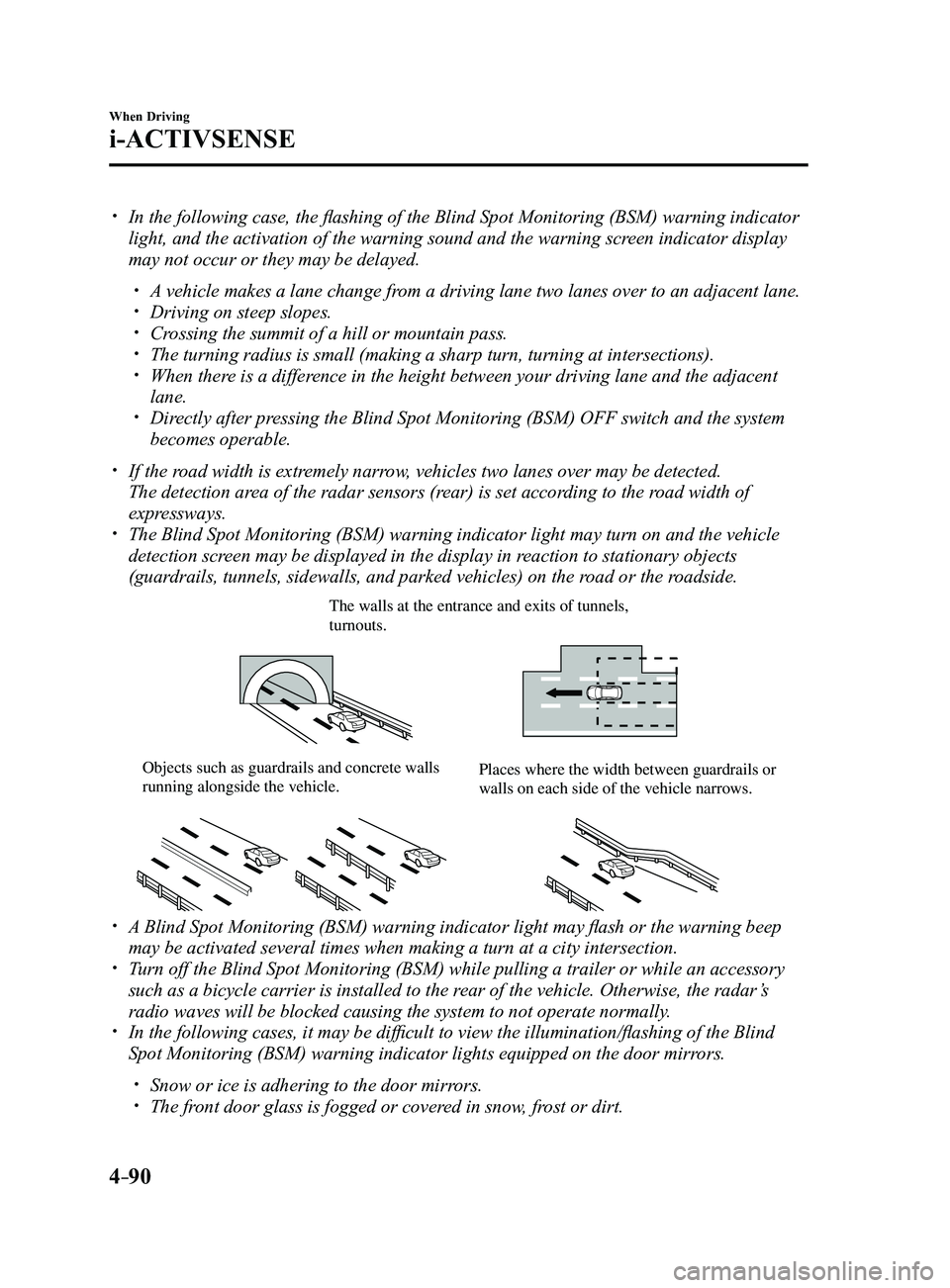
detection screen may be displayed in the display in reaction to stationary objects
(guardrails, tunnels, sidewalls, and parked vehicles) on the road or the roadside.
The walls at the entrance and exits of tunnels, turnouts.
Objects such as guardrails and concrete walls running alongside the vehicle.Places where the width between guardrails or walls on each side of the vehicle narrows.
A Blind Spot Monitoring (BSM) warning indicator light may flash or the warning beep
may be activated several times when making a turn at a city intersection\
. Turn off the Blind Spot Monitoring (BSM) while pulling a trailer or whi\
le an accessory
such as a bicycle carrier is installed to the rear of the vehicle. Otherwise, the radar’s
radio waves will be blocked causing the system to not operate normally.
In the following cases, it may be difficult to view the illumination/flashing of the Blind
Spot Monitoring (BSM) warning indicator lights equipped on the door mi\
rrors.
Snow or ice is adhering to the door mirrors. The front door glass is fogged or covered in snow, frost or dirt.
Mazda3_8FL6-EA-16F_Edition2.indb 902016/08/10 17:36:38
Page 221 of 612
4–91
When Driving
i-ACTIVSENSE
The radar sensors (rear) of the Blind Spot Monitoring (BSM) may be regulated under
the radio wave related laws of the country where the vehicle is driven. The sensors
in this system are approved for use in the U.S.A. (including territories), Canada, and
Mexico. If a vehicle with a Blind Spot Monitoring (BSM) is driven in a\
country other
than the U.S.A., Canada, or Mexico, the system has to be turned off usin\
g the Blind Spot
Monitoring (BSM) OFF switch.
The system switches to the Rear Cr oss Traffic Alert function when the shift lever (manual
transaxle) or the selector lever (automatic transaxle) is shifted to \
the reverse (R) position.
Refer to Rear Cross Traffic Alert (RCTA) on page 4-103.
Blind Spot Monitoring (BSM) Warning Indicator Lights/Blind Spot
Monitoring (BSM) Warning Beep
The Blind Spot Monitoring (BSM) or Rear Cross Traffic Alert (RCTA) system notifies the
driver of the presence of vehicles in adjacent lanes or at the rear of t\
he vehicle using the
Blind Spot Monitoring (BSM) warning indicator light, the warning sound and the display
indicator (vehicles with active driving display) while the systems are\
operational.
Blind Spot Monitoring (BSM) warning indicator lights
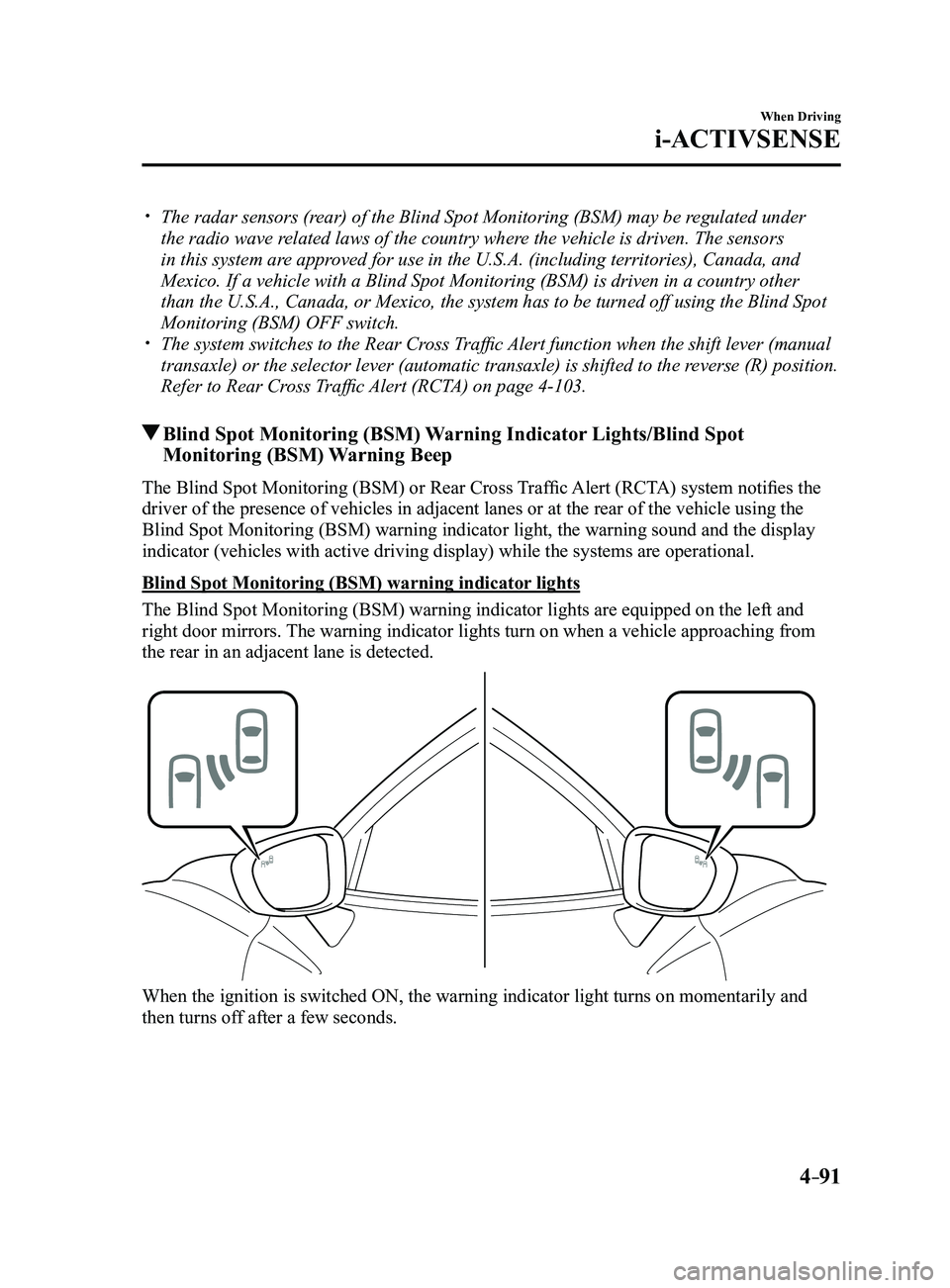
The Blind Spot Monitoring (BSM) warning indicator lights are equipped on the left and
right door mirrors. The warning indicator lights turn on when a vehicle approaching from
the rear in an adjacent lane is detected.
When the ignition is switched ON, the warning indicator light turns on momentarily and
then turns off after a few seconds.
Mazda3_8FL6-EA-16F_Edition2.indb 912016/08/10 17:36:38
Page 236 of 612
4–106
When Driving
i-ACTIVSENSE
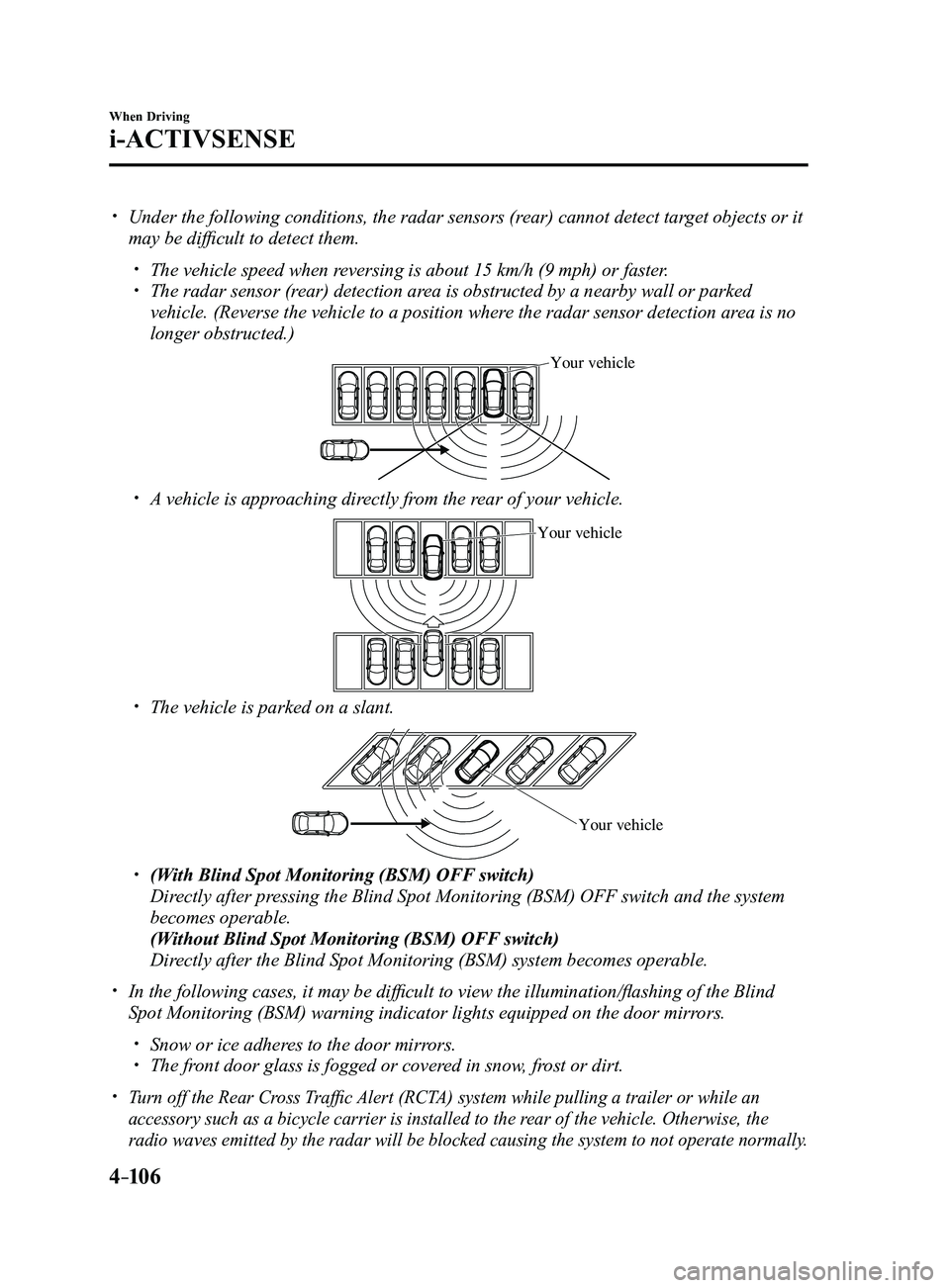
Under the following conditions, the radar sensors (rear) cannot detect target objects or it
may be difficult to detect them.
The vehicle speed when reversing is about 15 km/h (9 mph) or faster. The radar sensor (rear) detection area is obstructed by a nearby wall or parked
vehicle. (Reverse the vehicle to a position where the radar sensor detection area is no
longer obstructed.)
Your vehicle
A vehicle is approaching directly from the rear of your vehicle.
Your vehicle
The vehicle is parked on a slant.
Your vehicle
(With Blind Spot Monitoring (BSM) OFF switch)
Directly after pressing the Blind Spot Monitoring (BSM) OFF switch and the system
becomes operable.
(Without Blind Spot Monitoring (BSM) OFF switch)
Directly after the Blind Spot Monitoring (BSM) system becomes operable.
In the following cases, it may be difficult to view the illumina tion/flashing of the Blind
Spot Monitoring (BSM) warning indicator lights equipped on the door mi\
rrors.
Snow or ice adheres to the door mirrors. The front door glass is fogged or covered in snow, frost or dirt.
Turn off the Rear Cross Traffic Alert (RCTA) system while pulling a trailer or while an
accessory such as a bicycle carrier is installed to the rear of the vehicle. Otherwise, the
radio waves emitted by the radar will be blocked causing the system to n\
ot operate normally.
Mazda3_8FL6-EA-16F_Edition2.indb 1062016/08/10 17:36:45
Page 271 of 612
4–141
When Driving
i-ACTIVSENSE
Radar Sensor (Front)
Your vehicle is equipped with a radar sensor (front).
The following systems also use the radar sensor (front).
Distance Recognition Support System (DRSS) Mazda Radar Cruise Control (MRCC) Smart Brake Support (SBS)
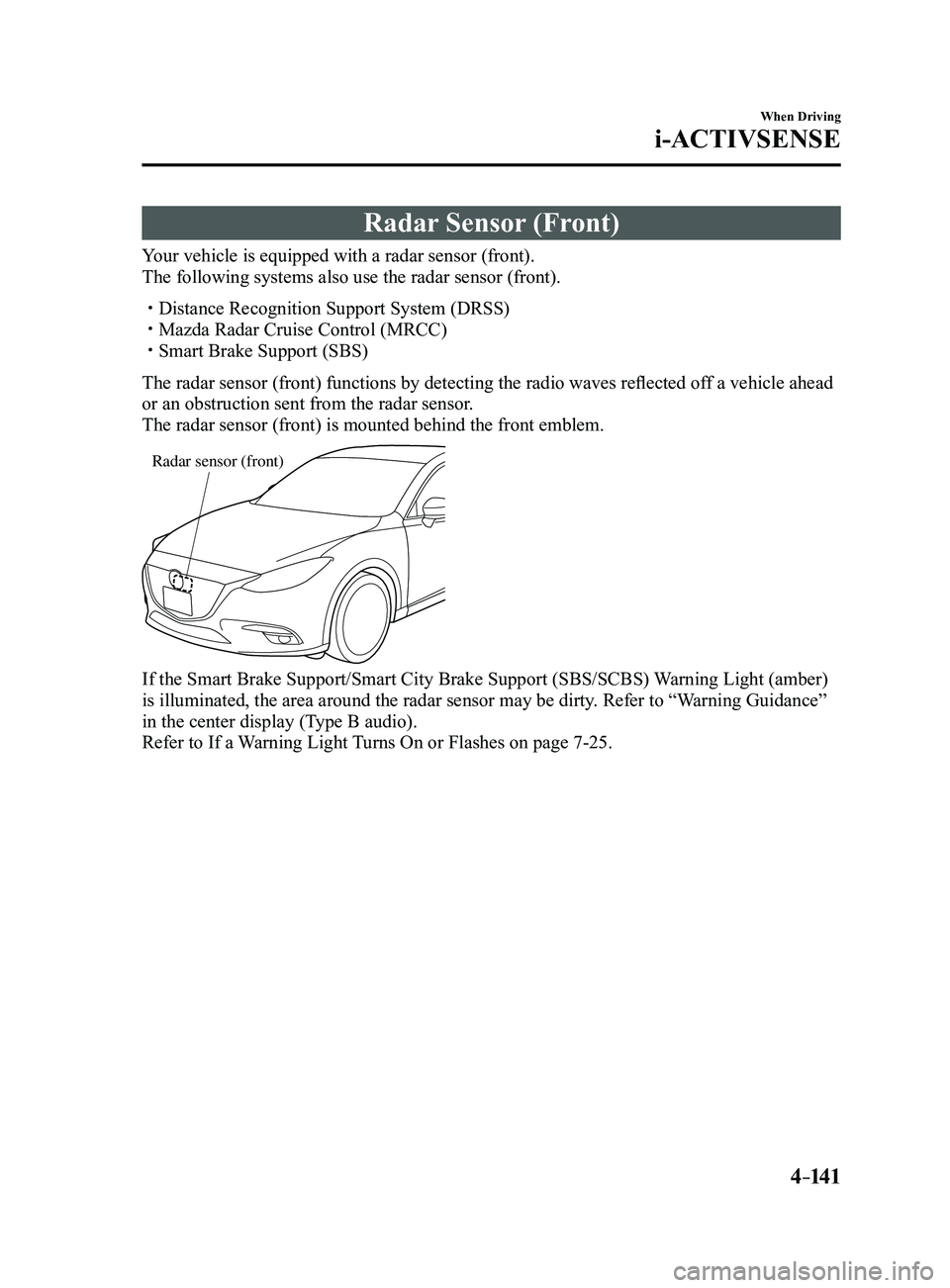
The radar sensor (front) functions by detecting the radio waves reflected off a vehicle ahead
or an obstruction sent from the radar sensor.
The radar sensor (front) is mounted behind the front emblem.
Radar sensor (front)
If the Smart Brake Support/Smart City Brake Support (SBS/SCBS) Warning Light (amber)
is illuminated, the area around the radar sensor may be dirty. Refer to “Warning Guidance”
in the center display (Type B audio).
Refer to If a Warning Light Turns On or Flashes on page
7-25.
Mazda3_8FL6-EA-16F_Edition2.indb 1412016/08/10 17:37:00
Page 273 of 612
4–14 3
When Driving
i-ACTIVSENSE
NOTE
Under the following conditions, the radar sensor (front) may not be able to detect
vehicles ahead or obstructions correctly and each system may not operate normally.
The rear surface of a vehicle ahead does not reflect radio waves effectively, such as
an unloaded trailer or an automobile with a loading platform covered by a soft top,
vehicles with a hard plastic tailgate, and round-shaped vehicles.
Vehicles ahead with low vehicle height and thus less area for reflecting radio waves. Visibility is reduced due to a vehicle ahead casting off water, snow, or sand from its
tires and onto your windshield. The trunk/luggage compartment is loaded with heavy objects or the r ear passenger
seats are occupied. Ice, snow, or soiling is on the front surface of the front emblem. During inclement weather such as rain, snow, or sand storms. When driving near facilities or objects emitting str ong radio waves.
Under the following conditions, the radar sensor (fr ont) may not be able to detect
vehicles ahead or obstructions.
The beginning and end of a curve. Roads with continuous curves. Narrow lane roads due to road construction or lane closures. The vehicle ahead enters the radar sensor's blind spot. The vehicle ahead is running abnormally due to accident or vehicle damag\
e. Roads with repeated up and down slopes Driving on poor r oads or unpaved roads. The distance between your vehicle and the vehicle ahead is extr emely short. A vehicle suddenly comes close such as by cutting into the lane.
To prevent incorrect operation of the system, use tires of the same specified size,
manufacturer, brand, and tread pattern on all four wheels. In addition, do not use tires
with significantly different wear patterns or tire pressures on the same vehicle (Including
the temporary spare tire).
If the battery power is weak, the system may not operate correctly. If the vehicle is driven on a road with little traffic and few vehicles ahead or obstructions
for the radar sensor (front) to detect, the sensor detects that the radar sensor (front) is
dirty and the Smart Brake Support/Smart City Brake Support (SBS/SCBS) \
Warning Light
(amber) may be temporarily turned on. However, it does not indicate a malfunction.
Mazda3_8FL6-EA-16F_Edition2.indb 1432016/08/10 17:37:00
Page 274 of 612
4–14 4
When Driving
i-ACTIVSENSE
Radar Sensors (Rear)
Your vehicle is equipped with radar sensors (rear). The following systems also use the radar
sensors (rear).
Blind Spot Monitoring system (BSM) Rear Cross Traffic Alert (RCTA)
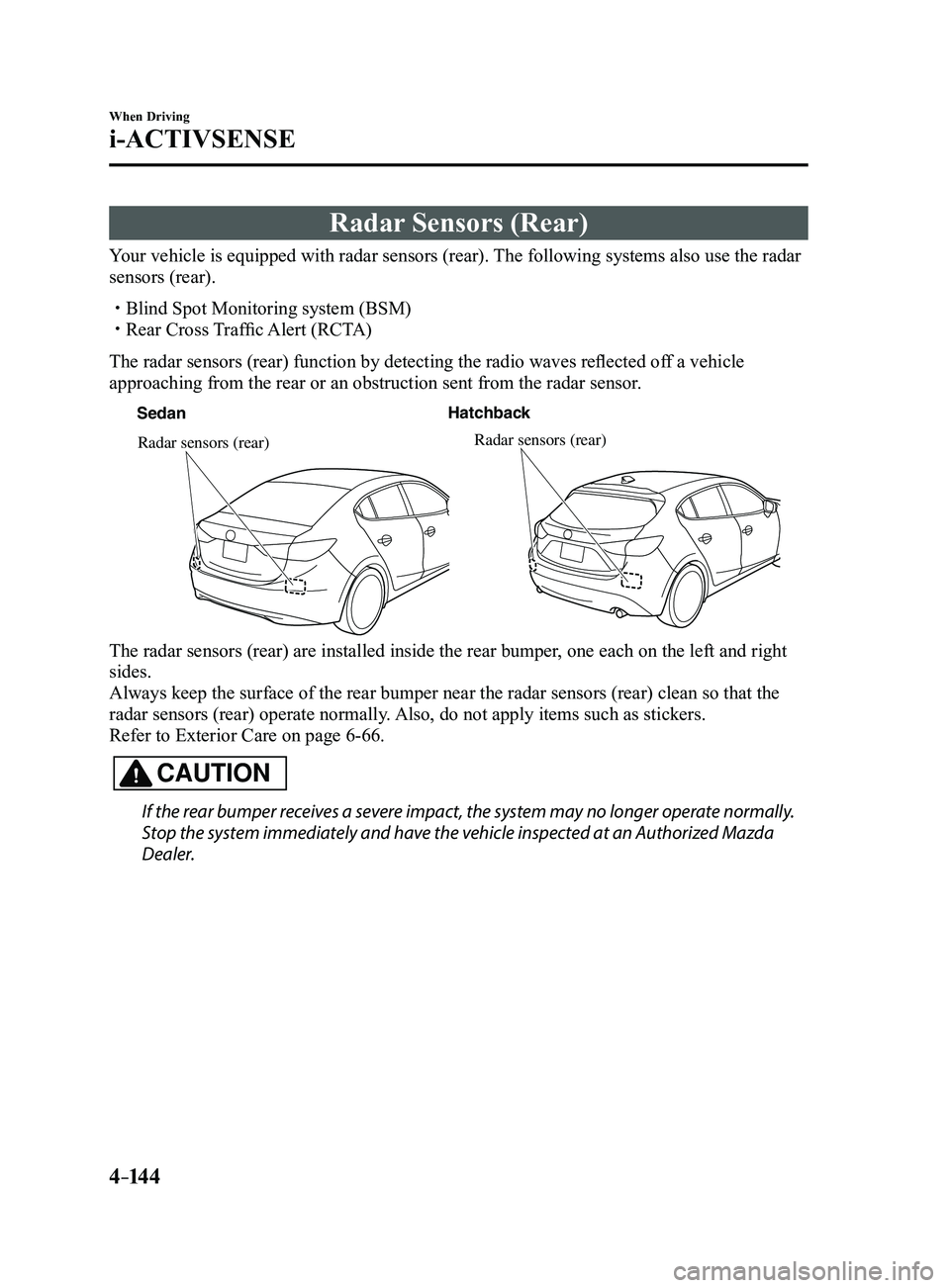
The radar sensors (rear) function by detecting the radio waves reflected off a vehicle
approaching from the rear or an obstruction sent from the radar sensor.
SedanHatchback
Radar sensors (rear)Radar sensors (rear)
The radar sensors (rear) are installed inside the rear bumper, one each on the left and right
sides.
Always keep the surface of the rear bumper near the radar sensors (rear\
) clean so that the
radar sensors (rear) operate normally. Also, do not apply items such as stickers.
Refer to Exterior Care on page
6-66.
CAUTION
If the rear bumper receives a severe impact, the system may no longer operate normally.
Stop the system immediately and have the vehicle inspected at an Authorized Mazda
Dealer.
Mazda3_8FL6-EA-16F_Edition2.indb 1442016/08/10 17:37:00
Page 275 of 612
4–14 5
When Driving
i-ACTIVSENSE
NOTE
The detection ability of the radar sensors (rear) has limitations. In the following cases,
the detection ability may lower and the system may not operate normally.
The rear bumper near the radar sensors (rear) has become deformed. Snow, ice or mud adheres to the radar sensors (rear) on the rear bumper. Under bad weather conditions such as rain, snow and fog.
Under the following conditions, the radar sensors (r ear) cannot detect target objects or it
may be difficult to detect them.
Stationary objects on a road or a road side such as small, two-wheeled vehicles,
bicycles, pedestrians, animals, and shopping carts. Vehicle shapes which do not reflect radar waves well such as empty trailers with a low
vehicle height and sports cars.
Vehicles are shipped with the direction of the radar sensors (rear) adjusted for each
vehicle to a loaded vehicle condition so that the radar sensors (rear) detect approaching
vehicles correctly. If the direction of the radar sensors (rear) has deviated for some
reason, have the vehicle inspected at an Authorized Mazda Dealer.
For repairs or replacement of the radar sensors (rear), or bumper repairs, paintwork,
and replacement near the radar sensors, consult an Authorized Mazda Dealer. Turn off the system while pulling a trailer or while an accessory such as\
a bicycle carrier
is installed to the rear of the vehicle. Otherwise, the radio waves emitted by the radar will\
be blocked causing the system to not operate normally.
The radar sensors are regulated by the relevant radio wave laws of the country in which
the vehicle is driven. If the vehicle is driven abroad, authorization from the country in
which the vehicle is driven may be required.
Mazda3_8FL6-EA-16F_Edition2.indb 1452016/08/10 17:37:01
Page 308 of 612
5–16
Interior Features
Audio System
*Some models.
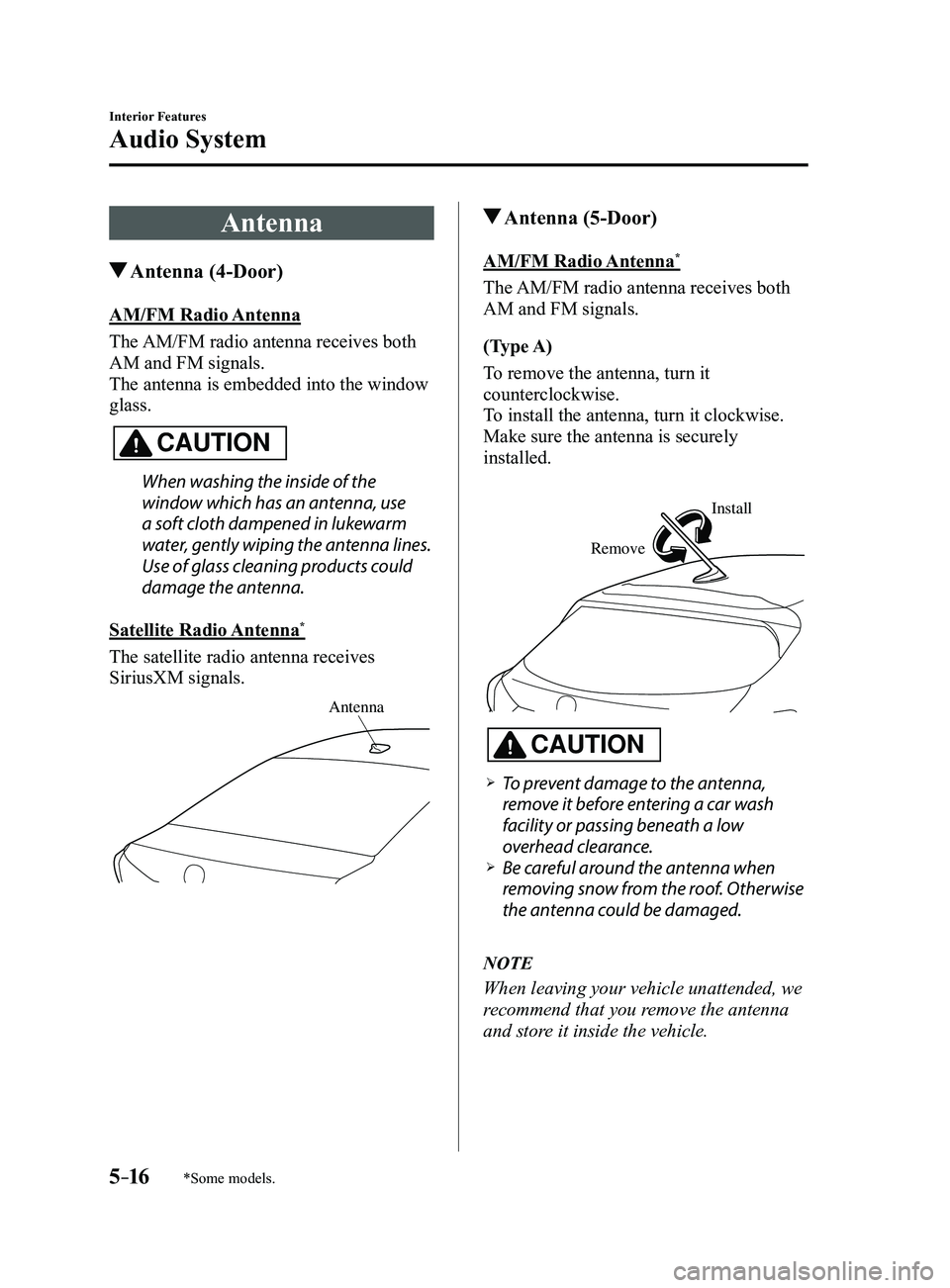
Antenna
Antenna (4-Door)
AM/FM Radio Antenna
The AM/FM radio antenna receives both
AM and FM signals.
The antenna is embedded into the window
glass.
CAUTION
When washing the inside of the
window which has an antenna, use
a soft cloth dampened in lukewarm
water, gently wiping the antenna lines.
Use of glass cleaning products could
damage the antenna.
Satellite Radio Antenna
*
The satellite radio antenna receives
SiriusXM signals.
Antenna
Antenna (5-Door)
AM/FM Radio Antenna*
The AM/FM radio antenna receives both
AM and FM signals.
(Type A)
To remove the antenna, turn it
counterclockwise.
To install the antenna, turn it clockwise.
Make sure the antenna is securely
installed.
Remove
Install
CAUTION
To prevent damage to the antenna,
remove it before entering a car wash
facility or passing beneath a low
overhead clearance.
Be careful around the antenna when
removing snow from the roof. Otherwise
the antenna could be damaged.
NOTE
When leaving your vehicle unattended, we
recommend that you remove the antenna
and store it inside the vehicle.
Mazda3_8FL6-EA-16F_Edition2.indb 162016/08/10 17:37:19