roof MAZDA MODEL 3 4-DOOR 2017 User Guide
[x] Cancel search | Manufacturer: MAZDA, Model Year: 2017, Model line: MODEL 3 4-DOOR, Model: MAZDA MODEL 3 4-DOOR 2017Pages: 612
Page 77 of 612
3–1*Some models.
3Before Driving
Use of various features, including keys, doors, mirrors and windows.
Keys ......................................................3-2
Keys ...............................................3-2
Keyless Entry System ....................3-3
Advanced Keyless Entry System .....3-10
Advanced Keyless Entry
System* .........................................3-10
Operational Range .......................3-11
Doors and Locks ................................3-12
Door Locks ...................................3-12
Liftgate/Trunk Lid ........................3-21
Inside Trunk Release Lever
(4-Door)* ......................................3-26
Fuel and Emission .............................3-28
Fuel and Engine Exhaust
Precautions
...................................3-28
Fuel-Filler Lid and Cap ................3-31
Steering Wheel ...................................3-33
Steering Wheel .............................3-33
Mirrors ...............................................3-34
Mirrors .........................................3-34
Windows .............................................3-37
Power Windows ...........................3-37
Moonroof * ...................................3-40
Security System .................................3-42
Modification and Add-On
Equipment
....................................3-42
Immobilizer System .....................3-42
Theft-Deterrent System* ...............3-44
Driving Tips .......................................3-46
Break-In Period ............................3-46
Saving Fuel and Protection of the
Environment
.................................3-46
Hazardous Driving .......................3-47
Floor Mat .....................................3-47
Rocking the Vehicle .....................3-48
Winter Driving .............................3-49
Driving In Flooded Area ..............3-51
Overloading ..................................3-51
Driving on Uneven Road .............3-52
Towing ................................................3-53
Trailer Towing ..............................3-53
Recreational Towing ....................3-53
Mazda3_8FL6-EA-16F_Edition2.indb 12016/08/10 17:35:15
Page 88 of 612
3–12
Before Driving
Doors and Locks
Door Locks
WARNING
Always take all children and pets with
you or leave a responsible person with
them:Leaving a child or a pet unattended in
a parked vehicle is dangerous. In hot
weather, temperatures inside a vehicle
can become high enough to cause
brain damage or even death.
Do not leave the key in your vehicle with
children and keep them in a place where
your children will not find or play with
them: Leaving children in a vehicle with the
key is dangerous. This could result in
someone being badly injured or even
killed.
Keep all doors locked when driving: Unlocked doors in a moving vehicle
are dangerous. Passengers can fall out
if a door is accidentally opened and
can more easily be thrown out in an
accident.
Always close all the windows and
moonroof, lock the doors and the
liftgate/trunk lid and take the key
with you when leaving your vehicle
unattended: Leaving your vehicle unlocked is
dangerous as children could lock
themselves in a hot vehicle, which
could result in death. Also, a vehicle left
unlocked becomes an easy target for
thieves and intruders. After closing the doors and the liftgate/
trunk lid, always verify that they are
securely closed:
Doors and the liftgate/trunk lid not
securely closed are dangerous, if the
vehicle is driven with a door and the
liftgate/trunk lid not securely closed,
the door and the liftgate/trunk lid
could open unexpectedly resulting in
an accident.
Always confirm the safety around the
vehicle before opening a door and the
liftgate/trunk lid: Suddenly opening a door and the
liftgate/trunk lid is dangerous. A
passing vehicle or a pedestrian could
be hit and cause an accident.
CAUTION
Always confirm the conditions around
the vehicle before opening/closing the
doors and the liftgate/trunk lid and use
caution during strong winds or when
parked on an incline. Not being aware
of the conditions around the vehicle is
dangerous because fingers could get
caught in the door and the liftgate/
trunk lid or a passing pedestrian could
be hit, resulting in an unexpected
accident or injury.
Mazda3_8FL6-EA-16F_Edition2.indb 122016/08/10 17:35:19
Page 116 of 612
3–40
Before Driving
Windows
*Some models.
Moonroof *
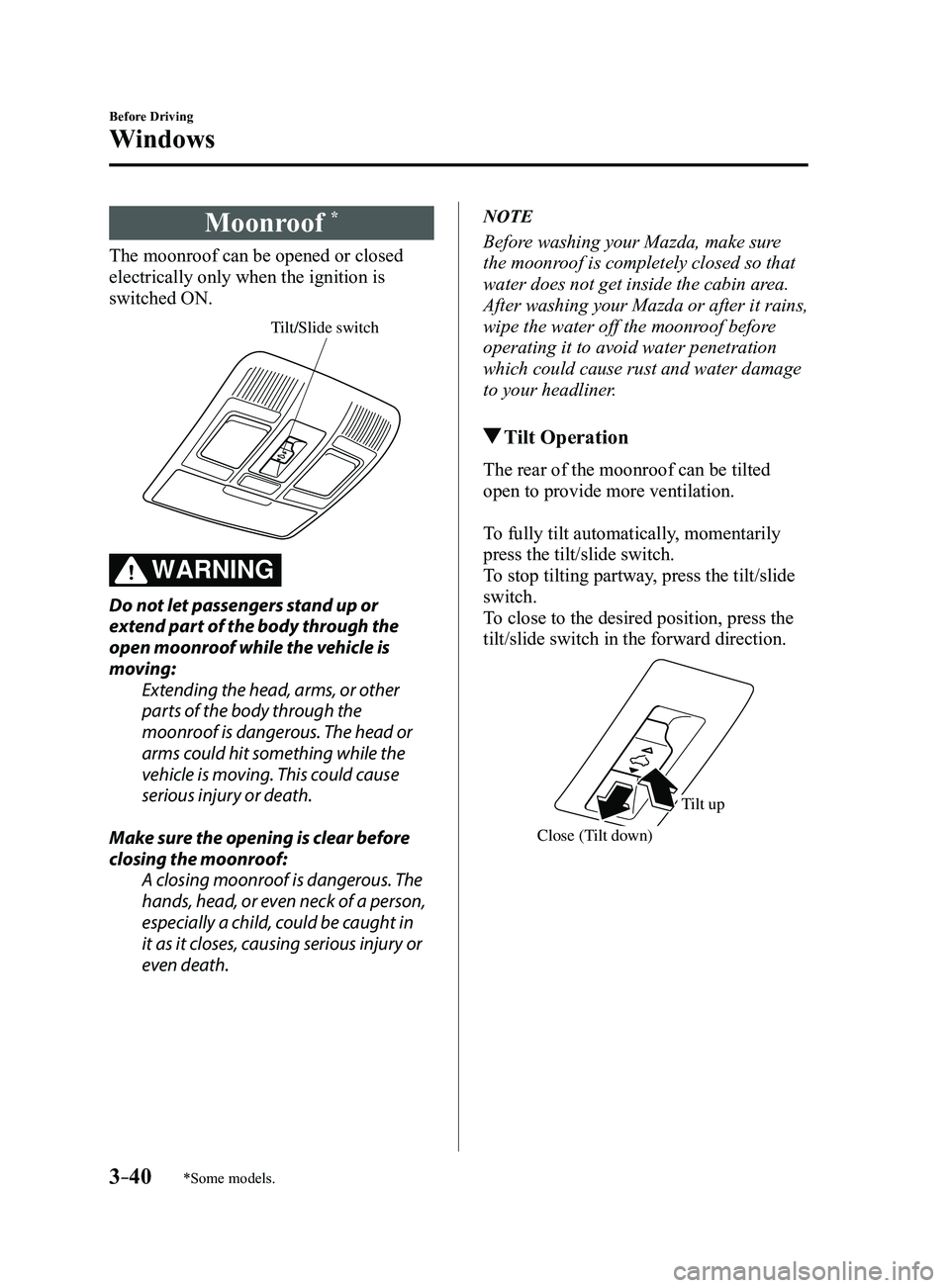
The moonroof can be opened or closed
electrically only when the ignition is
switched ON.
Tilt/Slide switch
WARNING
Do not let passengers stand up or
extend part of the body through the
open moonroof while the vehicle is
moving:Extending the head, arms, or other
parts of the body through the
moonroof is dangerous. The head or
arms could hit something while the
vehicle is moving. This could cause
serious injury or death.
Make sure the opening is clear before
closing the moonroof: A closing moonroof is dangerous. The
hands, head, or even neck of a person,
especially a child, could be caught in
it as it closes, causing serious injury or
even death.
NOTE
Before washing your Mazda, make sure
the moonroof is completely closed so that
water does not get inside the cabin area.
After washing your Mazda or after it rains,
wipe the water off the moonroof before
operating it to avoid water penetration
which could cause rust and water damage
to your headliner.
Tilt Operation
The rear of the moonroof can be tilted
open to provide more ventilation.
To fully tilt automatically, momentarily
press the tilt/slide switch.
To stop tilting partway, press the tilt/slide
switch.
To close to the desired position, press the
tilt/slide switch in the forward direction.
Close (Tilt down)
Tilt up
Mazda3_8FL6-EA-16F_Edition2.indb 402016/08/10 17:35:35
Page 117 of 612
3–41
Before Driving
Windows
Slide Operation
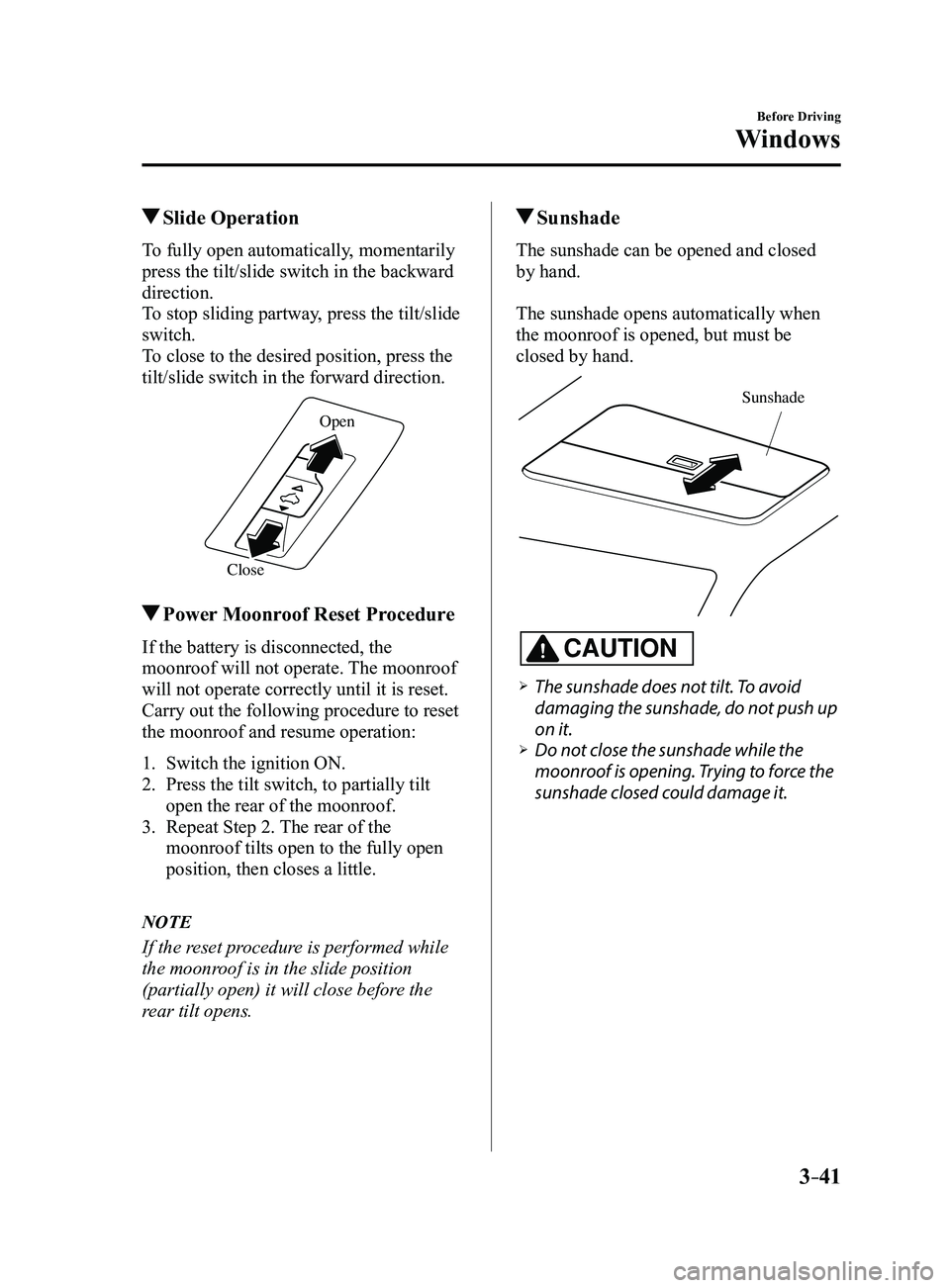
To fully open automatically, momentarily
press the tilt/slide switch in the backward
direction.
To stop sliding partway, press the tilt/slide
switch.
To close to the desired position, press the
tilt/slide switch in the forward direction.
CloseOpen
Power Moonroof Reset Procedure
If the battery is disconnected, the
moonroof will not operate. The moonroof
will not operate correctly until it is reset.
Carry out the following procedure to reset
the moonroof and resume operation:
1. Switch the ignition ON.
2. Press the tilt switch, to partially tilt
open the rear of the moonroof.
3. Repeat Step 2.
The rear of the
moonroof tilts open to the fully open
position, then closes a little.
NOTE
If the reset procedure is performed while
the moonroof is in the slide position
(partially open) it will close before the
rear tilt opens.
Sunshade
The sunshade can be opened and closed
by hand.
The sunshade opens automatically when
the moonroof is opened, but must be
closed by hand.
Sunshade
CAUTION
The sunshade does not tilt. To avoid
damaging the sunshade, do not push up
on it.
Do not close the sunshade while the
moonroof is opening. Trying to force the
sunshade closed could damage it.
Mazda3_8FL6-EA-16F_Edition2.indb 412016/08/10 17:35:36
Page 120 of 612
3–44
Before Driving
Security System
*Some models.
Theft-Deterrent System*
If the theft-deterrent system detects an
inappropriate entry into the vehicle,
which could result in the vehicle or its
contents being stolen, the alarm alerts the
surrounding area of an abnormality by
sounding the horn and flashing the hazard
warning lights.
The system will not function unless it's
properly armed. So when you leave the
vehicle, follow the arming procedure
correctly.
Operation
System triggering conditions
The horn sounds intermittently and the
hazard warning lights flash for about 30
seconds when the system is triggered by
any one of the following:
Unlocking a door with the key, door
lock switch, or an inside door-lock knob. Forcing open a door, the hood or the
liftgate/trunk lid. Opening the hood by operating the hood
release handle. Switching the ignition ON without using
the push button start.
If the system is triggered again, the lights
and horn will activate until the driver's
door is unlocked with the transmitter.
(With the advanced keyless function)
The lights and horn can also be
deactivated by pressing the request switch
on a door.
NOTE
If the battery goes dead while the theft-
deterrent system is armed, the horn will
activate and the hazard warning lights
will flash when the battery is charged or
replaced.
How to Arm the System
1. Close the windows and the moonroof *
securely.
2. Switch the ignition OFF .
3. Make sure the hood, the doors, and the
liftgate/trunk lid are closed.
4. Press the lock button on the transmitter
or lock the driver's door from the
outside with the auxiliary key.
The hazard warning lights will flash
once.
The following method will also arm the
theft-deterrent system:
Press the door-lock switch “” while
any door is open and then close all of
the doors.
(With the advanced keyless function)
Press a request switch.
The security indicator light in the
instrument cluster flashes twice per
second for 20 seconds.
5. After 20 seconds, the system is fully
armed.
Mazda3_8FL6-EA-16F_Edition2.indb 442016/08/10 17:35:37
Page 151 of 612
4–21
When Driving
Instrument Cluster and Display
*Some models.
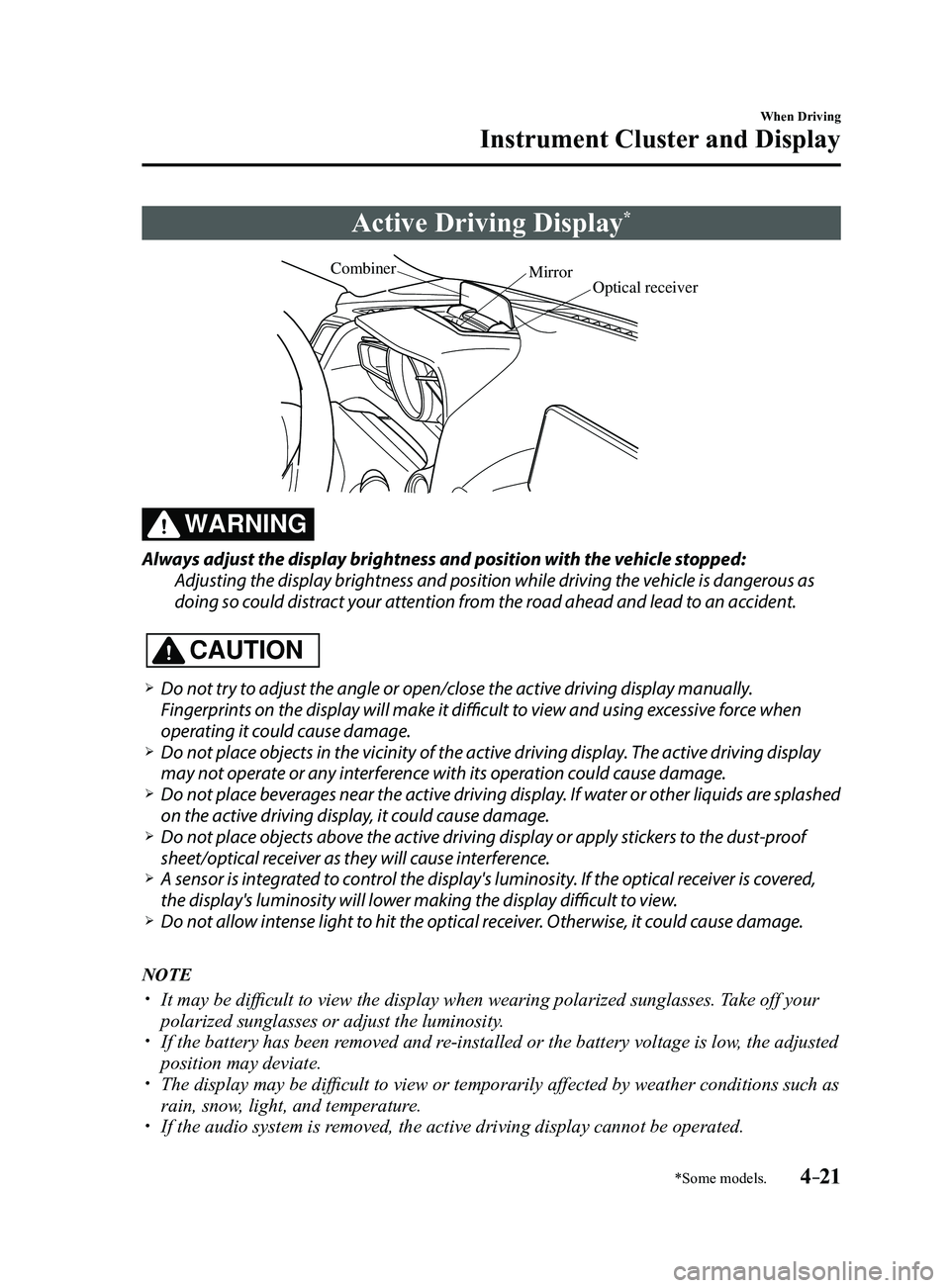
Active Driving Display*
Optical receiver
Mirror
Combiner
WARNING
Always adjust the display brightness and position with the vehicle stopped:
Adjusting the display brightness and position while driving the vehicle is dangerous as
doing so could distract your attention from the road ahead and lead to an accident.
CAUTION
Do not try to adjust the angle or open/close the active driving display manually.
Fingerprints on the display will make it difficult to view and using excessive force when
operating it could cause damage.
Do not place objects in the vicinity of the active driving display. The active driving display
may not operate or any interference with its operation could cause damage. Do not place beverages near the active driving display. If water or other liquids are splashed
on the active driving display, it could cause damage. Do not place objects above the active driving display or apply stickers to the dust-proof
sheet/optical receiver as they will cause interference. A sensor is int
egrated to control the display's luminosity. If the optical receiver is covered,
the display's luminosity will lower making the display difficult to view. Do not allow intense light to hit the optical receiver. Otherwise, it could cause damage.
NOTE
It may be difficult to view the display when wearing polarized s unglasses. Take off your
polarized sunglasses or adjust the luminosity. If the battery has been removed and re-installed or the battery voltage is low, the adjusted
position may deviate. The display may be difficult to view or temporarily affected by weather conditions such as
rain, snow, light, and temperature. If the audio system is removed, the active driving display cannot be operated.
Mazda3_8FL6-EA-16F_Edition2.indb 212016/08/10 17:35:51
Page 269 of 612
4–139
When Driving
i-ACTIVSENSE
In the following cases, the Forward Sensing Camera (FSC) may not be able to detect
target objects correctly.
Under bad weather condition, such as rain, fog and snow . The window washer is being used or the windshield wipers ar e not used when it's
raining. Ice, fog, snow, frost, rainfall, dirt, or foreign matter such as a plastic bag is stuck on
the windshield. Trucks with low loading platforms and vehicles with an extremely low or high profile. When driving next to walls with no patterning (including fences and lon\
gitudinally
striped walls). The taillights of the vehicle ahead ar e turned off. A vehicle is outside the illumination range of the headlights. The vehicle is making a sharp turn, or ascending or descending a steep s\
lope. Entering or exiting a tunnel. Heavy luggage is loaded causing the vehicle to tilt. Strong light is shone at the front of the vehicle (back light or high-beam light from on-
coming vehicles). There are many light emitters on the vehicle ahead. When the vehicle ahead is not equipped with taillights or the taillights\
ar e turned off at
nighttime. Elongated luggage or cargo is loaded onto installed roof rails and covers the Forward
Sensing Camera (FSC). Exhaust gas from the vehicle in front, sand, snow, and water vapor rising from
manholes and grating, and water splashed into the air. When towing a malfunctioning vehicle. The vehicle is driven with tir es having significantly different wear. The vehicle is driven on down slopes or bumpy r oads. There are water puddles on the road. The surroundings are dark such as during the night, early evening, or early morning,
or in a tunnel or indoor parking lot. The illumination brightness of the headlights is r educed or the headlight illumination
is weakened due to dirt or a deviated optical axis. The target object enters the blind spot of the Forward Sensing Camera (FSC). A person or object bursts onto the road from the shoulder or cuts right in front of you. You change lanes and approach a vehicle ahead. When driving extremely close to the target object. Tire chains or a temporary spare tire is installed. The vehicle ahead has a special shape. For example, a vehicle towing a t\
railer house
or a boat, or a vehicle carrier carrying a vehicle with its front pointed rearward.
Mazda3_8FL6-EA-16F_Edition2.indb 1392016/08/10 17:36:59
Page 285 of 612

4–155
When Driving
Rear View Monitor
*Some models.
Rear View Monitor*
The rear view monitor provides visual images of the rear of the vehicle \
when reversing.
WARNING
Always drive carefully confirming the safety of the rear and the surrounding conditions
by looking directly with your eyes:Reversing the vehicle by only looking at the screen is dangerous as it may cause an
accident or a collision with an object. The rear view monitor is only a visual assist device
when reversing the vehicle. The images on the screen may be different from the actual
conditions.
CAUTION
Do not use the rear view monitor under the following conditions: Using the rear view
monitor under the following conditions is dangerous and could result in injury or vehicle
damage or both.
Icy or snow-covered roads. Tire chains or a temporary spare tire is installed. The liftgate/trunk lid is not fully closed. The vehicle is on a road incline.
When the display is cold, images may course across the monitor or the screen and may be
dimmer than usual, which could cause difficulty in confirming the surrounding conditions
of the vehicle. Always drive carefully confirming the safety of the rear and the surrounding
conditions by looking directly with your eyes.
Do not apply excessive force to the camera. The camera position and angle may deviate. Do not disassemble, modify, or remove it as it may no longer be waterproof. The camera cover is made of plastic. Do not apply degreasing agents, organic solvents,
wax, or glass coating agents to the camera cover. If any are spilled on the cover, wipe off
with a soft cloth immediately.
Do not rub the camera cover forcefully with an abrasive or hard brush. The camera cover or
lens may be scratched which might affect the images.
Mazda3_8FL6-EA-16F_Edition2.indb 1552016/08/10 17:37:05
Page 308 of 612
5–16
Interior Features
Audio System
*Some models.
Antenna
Antenna (4-Door)
AM/FM Radio Antenna
The AM/FM radio antenna receives both
AM and FM signals.
The antenna is embedded into the window
glass.
CAUTION
When washing the inside of the
window which has an antenna, use
a soft cloth dampened in lukewarm
water, gently wiping the antenna lines.
Use of glass cleaning products could
damage the antenna.
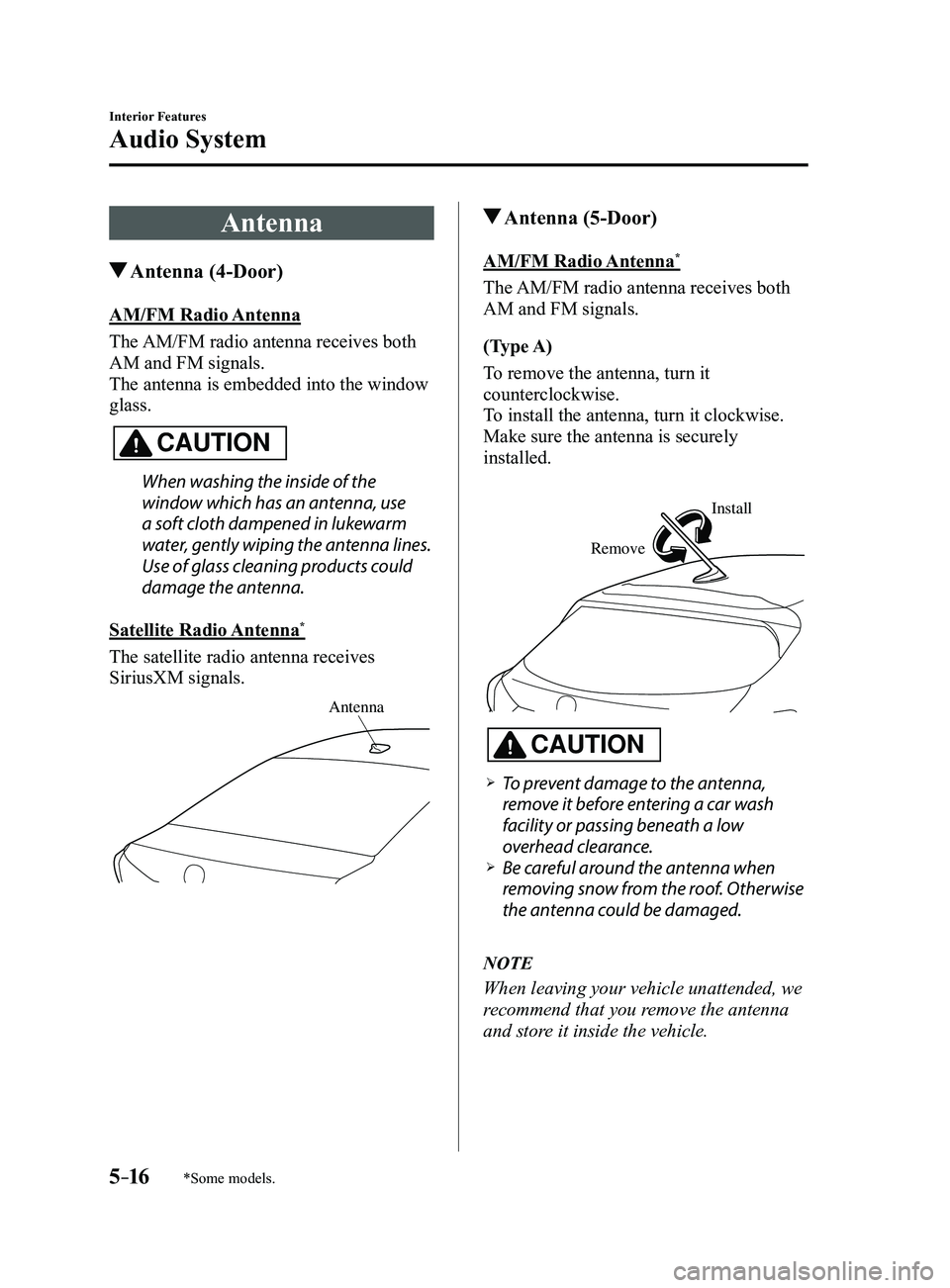
Satellite Radio Antenna
*
The satellite radio antenna receives
SiriusXM signals.
Antenna
Antenna (5-Door)
AM/FM Radio Antenna*
The AM/FM radio antenna receives both
AM and FM signals.
(Type A)
To remove the antenna, turn it
counterclockwise.
To install the antenna, turn it clockwise.
Make sure the antenna is securely
installed.
Remove
Install
CAUTION
To prevent damage to the antenna,
remove it before entering a car wash
facility or passing beneath a low
overhead clearance.
Be careful around the antenna when
removing snow from the roof. Otherwise
the antenna could be damaged.
NOTE
When leaving your vehicle unattended, we
recommend that you remove the antenna
and store it inside the vehicle.
Mazda3_8FL6-EA-16F_Edition2.indb 162016/08/10 17:37:19
Page 372 of 612
5–80
Interior Features
Bluetooth®
To prevent a deterioration in the voice
recognition rate and voice quality, the
following points should be observed:
The voice recognition cannot be
performed while voice guidance or
the beep sound is operating. Wait
until the voice guidance or the beep
sound is finished before saying your
commands.
Phone related commands are available
only when your phone is connected via
Bluetooth®. Make sure your phone is
connected via Bluetooth® before you
operate phone related voice commands.
Music play commands, such as Play
Artist and Play Album can be used only
in USB audio mode.
Do not speak too slowly or loudly (no
loud voice). Speak clearly , without pausing between
words or numbers. Dialects or dif ferent wording other
than hands-free prompts cannot be
recognized by voice recognition. Speak
in the wording specified by the voice
commands.
It is not necessary to face the
microphone or approach it. Speak the
voice commands while maintaining a
safe driving position.
Close the windows and/or the moonroof
to reduce loud noises from outside
the vehicle, or turn down the airflow
of the air-conditioning system while
Bluetooth
® Hands-Free is being used. Make sure the vents are not directing air
up towards the microphone.
NOTE
If the voice recognition performance is not
satisfactory.
Refer to Troubleshooting on page
5-106.
Mazda3_8FL6-EA-16F_Edition2.indb 802016/08/10 17:38:01