change MAZDA MODEL 6 2017 (in English) Owner's Manual
[x] Cancel search | Manufacturer: MAZDA, Model Year: 2017, Model line: MODEL 6, Model: MAZDA MODEL 6 2017Pages: 578, PDF Size: 54.72 MB
Page 140 of 578
4–16
When Driving
Instrument Cluster and Display
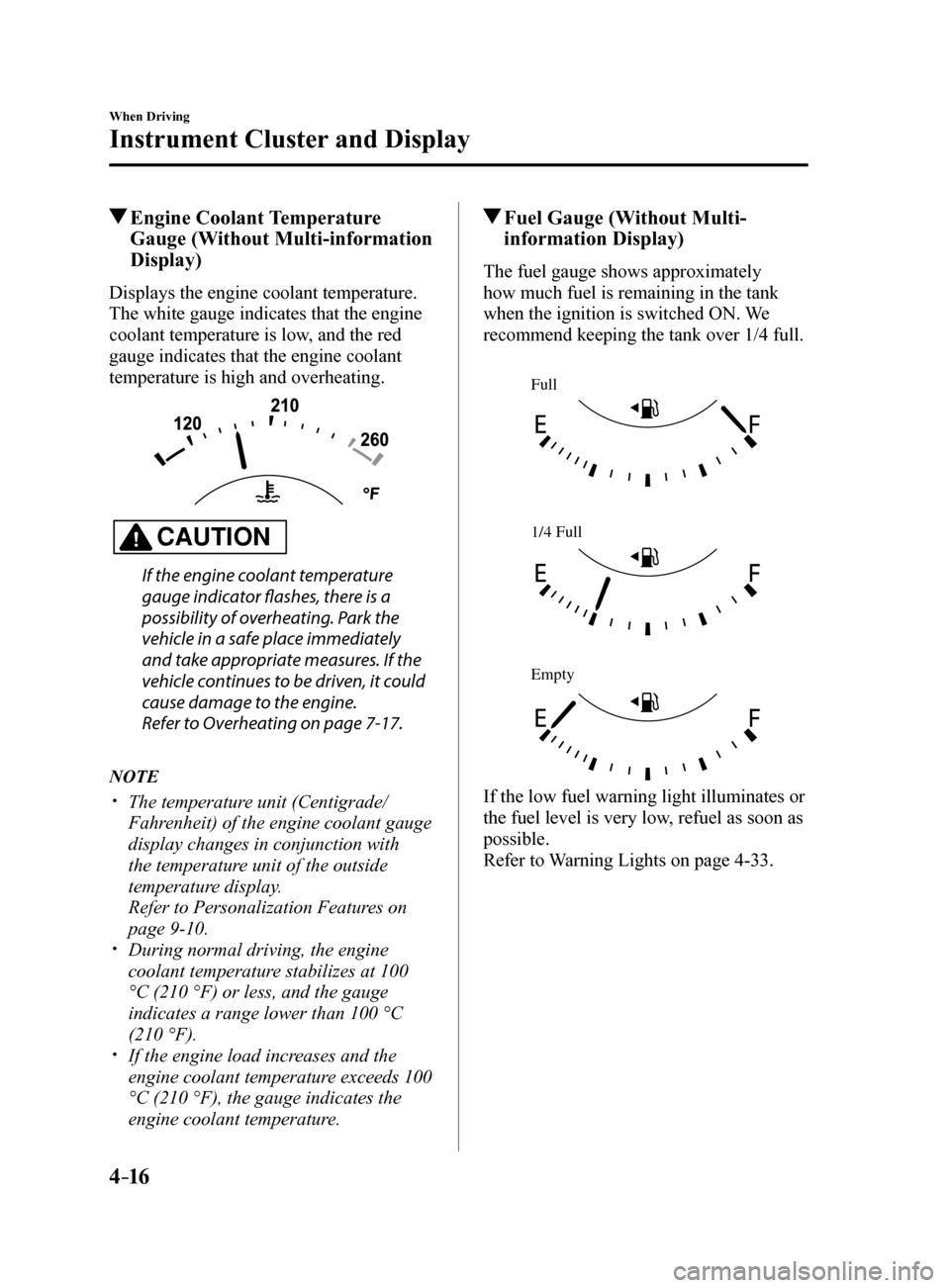
Engine Coolant Temperature Gauge (Without Multi-information
Display)
Displays the engine coolant temperature.
The white gauge indicates that the engine
coolant temperature is low, and the red
gauge indicates that the engine coolant
temperature is high and overheating.
CAUTION
If the engine coolant temperature
gauge indicator flashes, there is a
possibility of overheating. Park the
vehicle in a safe place immediately
and take appropriate measures. If the
vehicle continues to be driven, it could
cause damage to the engine.
Refer to Overheating on page 7-17.
NOTE
The temperature unit (Centigrade/
Fahrenheit) of the engine coolant gauge
display changes in conjunction with
the temperature unit of the outside
temperature display.
Refer to Personalization Features on
page 9-10.
During normal driving, the engine
coolant temperature stabilizes at 100
°C (210 °F) or less, and the gauge
indicates a range lower than 100 °C
(210 °F).
If the engine load increases and the
engine coolant temperature exceeds 100
°C (210 °F), the gauge indicates the
engine coolant temperature.
Fuel Gauge (Without Multi-
information Display)
The fuel gauge shows approximately
how much fuel is remaining in the tank
when the ignition is switched ON. We
recommend keeping the tank over 1/4 full.
Full
1/4 Full
Empty
If the low fuel warning light illuminates or
the fuel level is very low, refuel as soon as
possible.
Refer to Warning Lights on page 4-33.
Mazda6_8FH2-EA-16F_Edition2.indb 162016/07/07 13:44:36
Page 142 of 578
4–18
When Driving
Instrument Cluster and Display
Function for cancelling illumination
dimmer
The illumination dimmer can be canceled
by rotating the dashboard illumination
knob to the right until a beep sound is
heard while the instrument cluster is
dimmed with the ignition switched ON.
If the instrument cluster's visibility is
reduced due to glare from surrounding
brightness, cancel the illumination
dimmer.
NOTE
(With Multi-information Display)
The illumination dimmer can be
canceled by pressing the dashboard
illumination knob.
When the illumination dimmer is
canceled, the instrument cluster cannot
be dimmed even if the position lights are
turned on.
When the illumination dimmer is
canceled, the screen in the center
display switches to constant display of
the daytime screen.
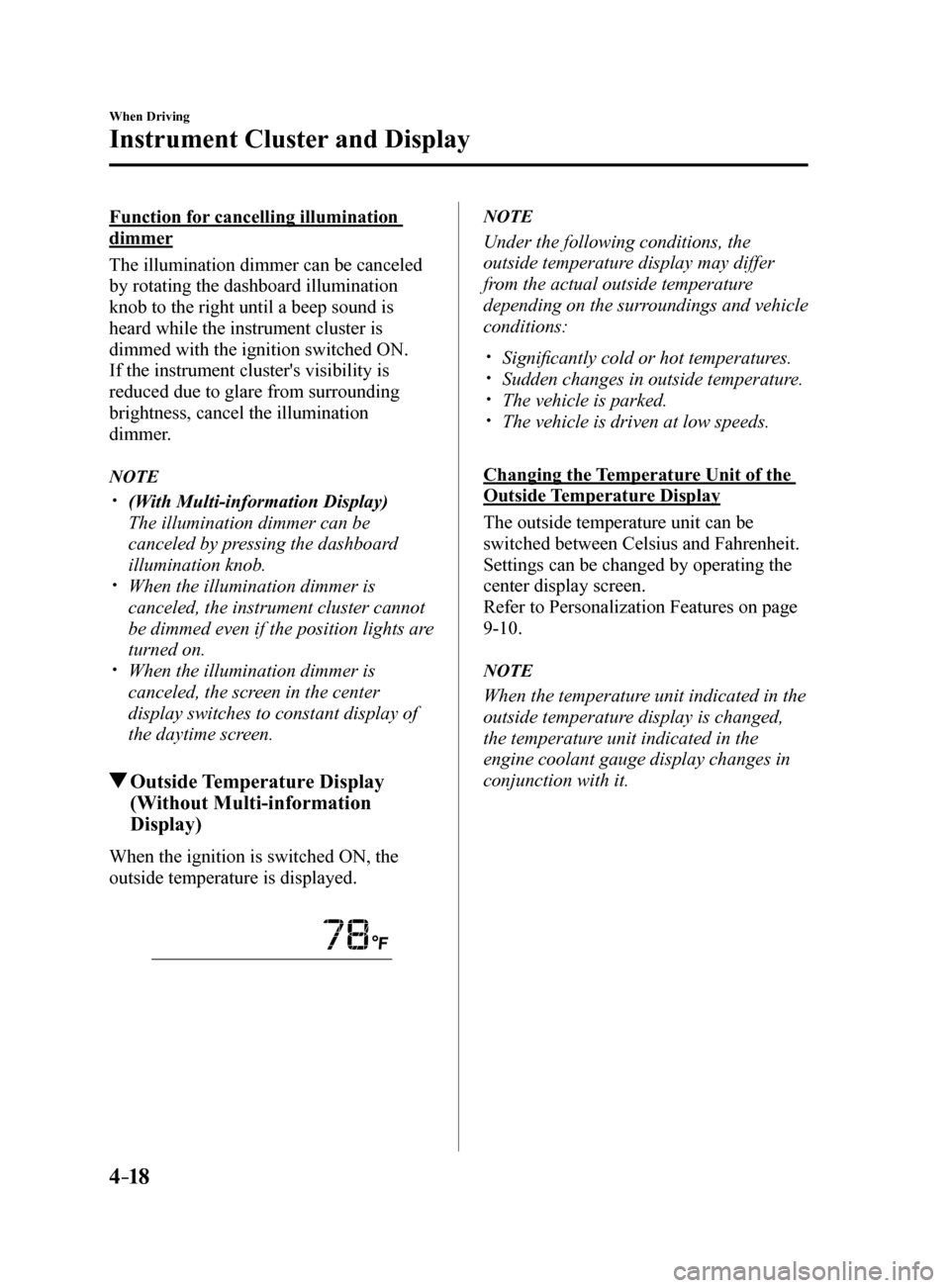
Outside Temperature Display
(Without Multi-information
Display)
When the ignition is switched ON, the
outside temperature is displayed.
NOTE
Under the following conditions, the
outside temperature display may differ
from the actual outside temperature
depending on the surroundings and vehicle
conditions:
Significantly cold or hot temperatures. Sudden changes in outside temperature. The vehicle is parked. The vehicle is driven at low speeds.
Changing the Temperature Unit of the
Outside Temperature Display
The outside temperature unit can be
switched between Celsius and Fahrenheit.
Settings can be changed by operating the
center display screen.
Refer to Personalization Features on page
9-10.
NOTE
When the temperature unit indicated in the
outside temperature display is changed,
the temperature unit indicated in the
engine coolant gauge display changes in
conjunction with it.
Mazda6_8FH2-EA-16F_Edition2.indb 182016/07/07 13:44:36
Page 143 of 578
4–19
When Driving
Instrument Cluster and Display
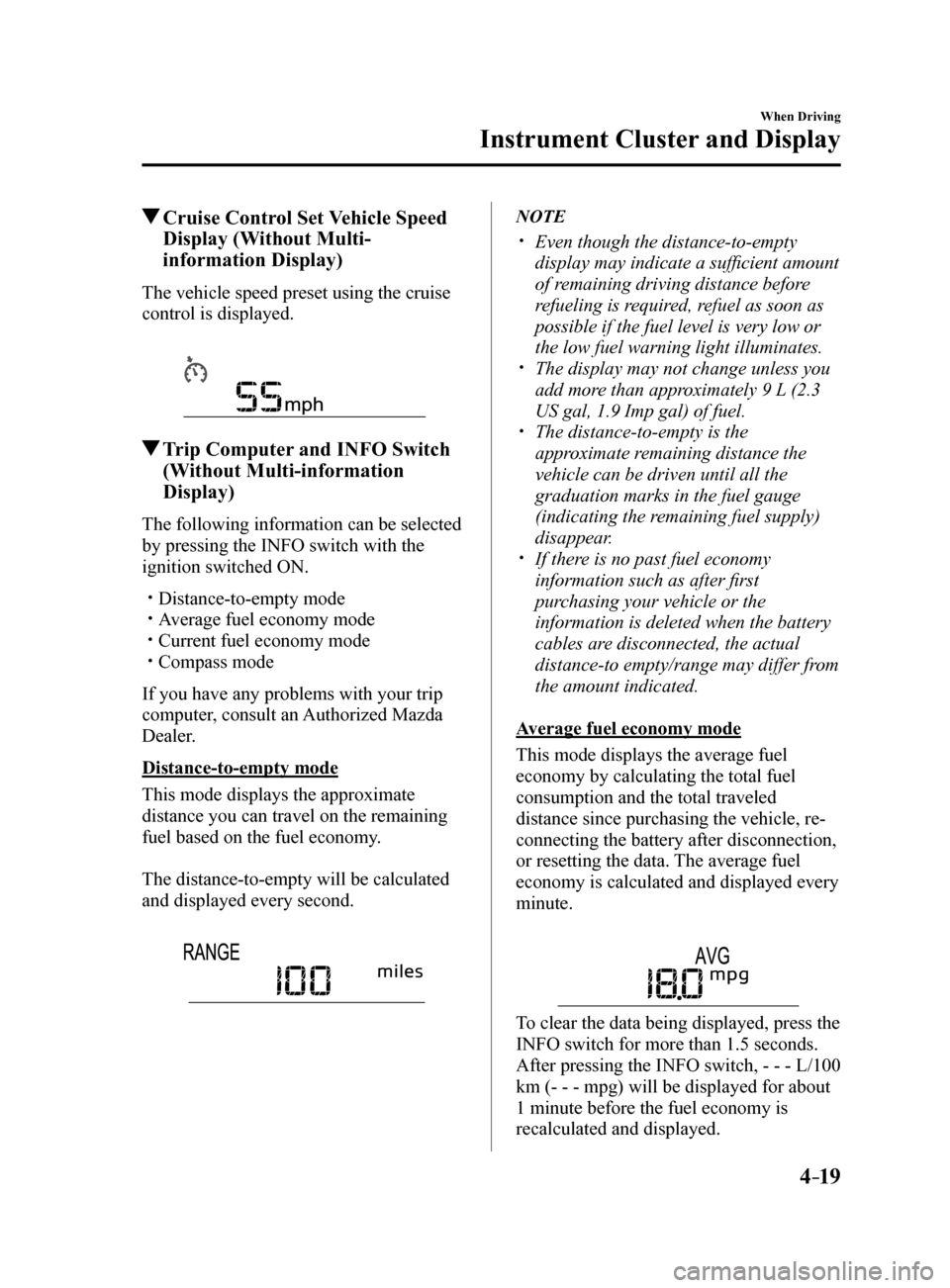
Cruise Control Set Vehicle Speed
Display (Without Multi-
information Display)
The vehicle speed preset using the cruise
control is displayed.
Trip Computer and INFO Switch
(Without Multi-information
Display)
The following information can be selected
by pressing the INFO switch with the
ignition switched ON.
Distance-to-empty mode Average fuel economy mode Current fuel economy mode Compass mode
If you have any problems with your trip
computer, consult an Authorized Mazda
Dealer.
Distance-to-empty mode
This mode displays the approximate
distance you can travel on the remaining
fuel based on the fuel economy.
The distance-to-empty will be calculated
and displayed every second.
NOTE
Even though the distance-to-empty
display may indicate a sufficient amount
of remaining driving distance before
refueling is required, refuel as soon as
possible if the fuel level is very low or
the low fuel warning light illuminates.
The display may not change unless you
add more than approximately 9 L (2.3
US gal, 1.9 Imp gal) of fuel.
The distance-to-empty is the
approximate remaining distance the
vehicle can be driven until all the
graduation marks in the fuel gauge
(indicating the remaining fuel supply)
disappear.
If there is no past fuel economy
information such as after first
purchasing your vehicle or the
information is deleted when the battery
cables are disconnected, the actual
distance-to empty/range may differ from
the amount indicated.
Average fuel economy mode
This mode displays the average fuel
economy by calculating the total fuel
consumption and the total traveled
distance since purchasing the vehicle, re-
connecting the battery after disconnection,
or resetting the data. The average fuel
economy is calculated and displayed every
minute.
To clear the data being displayed, press the
INFO switch for more than 1.5 seconds.
After pressing the INFO switch, - - - L/100
km (- - - mpg) will be displayed for about
1 minute before the fuel economy is
recalculated and displayed.
Mazda6_8FH2-EA-16F_Edition2.indb 192016/07/07 13:44:37
Page 146 of 578
4–22
When Driving
Instrument Cluster and Display
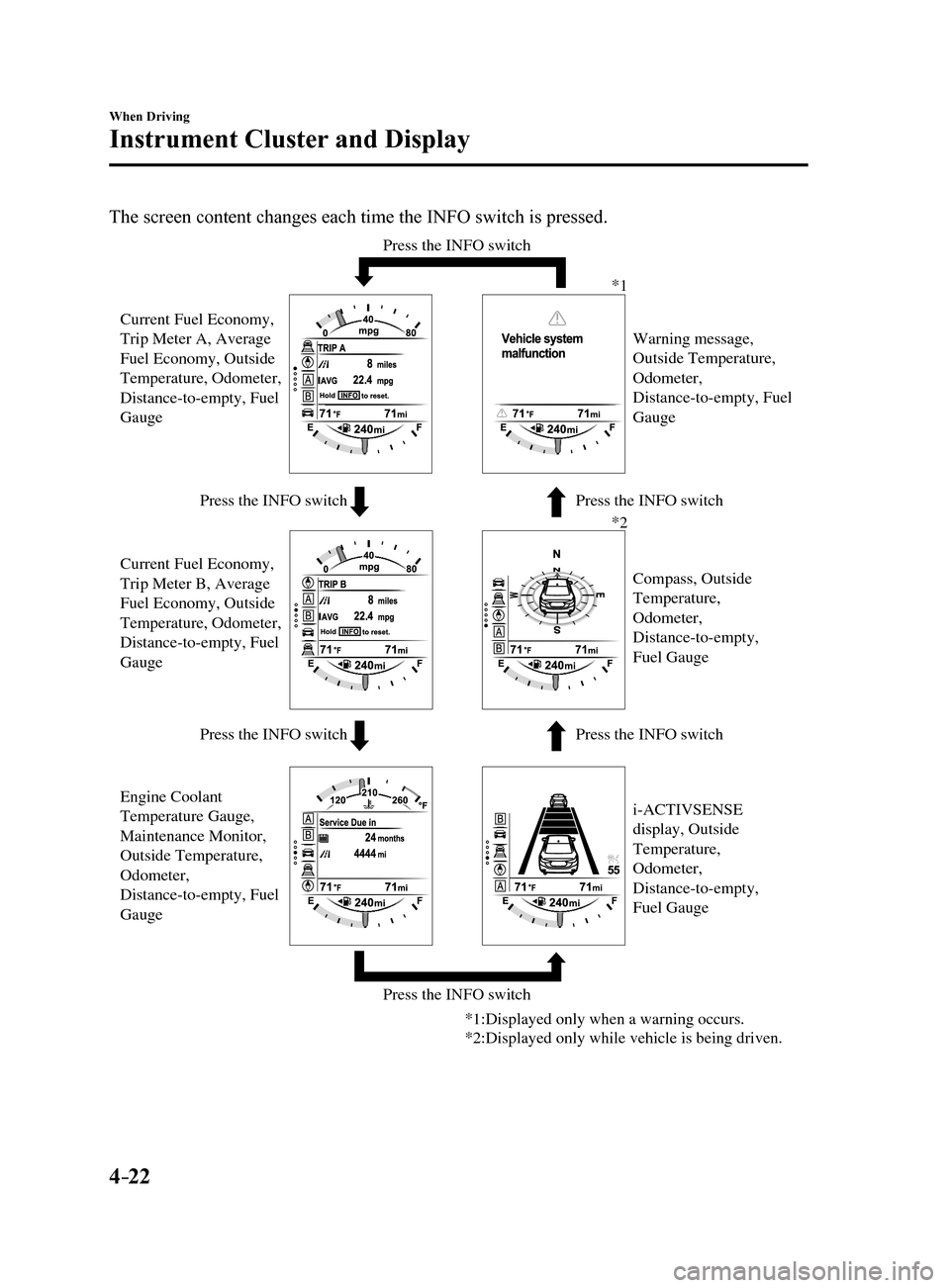
The screen content changes each time the INFO switch is pressed.
Press the INFO switchPress the INFO switch
Press the INFO switch Press the INFO switch
Press the INFO switch
Press the INFO switch
Current Fuel Economy,
Trip Meter A, Average
Fuel Economy, Outside
Temperature, Odometer,
Distance-to-empty, Fuel
Gauge
Current Fuel Economy,
Trip Meter B, Average
Fuel Economy, Outside
Temperature, Odometer,
Distance-to-empty, Fuel
Gauge
i-ACTIVSENSE
display, Outside
Temperature,
Odometer,
Distance-to-empty,
Fuel Gauge Compass, Outside
Temperature,
Odometer,
Distance-to-empty,
Fuel Gauge Warning message,
Outside Temperature,
Odometer,
Distance-to-empty, Fuel
Gauge
*1
*2
*1:Displayed only when a warning occurs.
*2:Displayed only while vehicle is being driven.
Engine Coolant
Temperature Gauge,
Maintenance Monitor,
Outside Temperature,
Odometer,
Distance-to-empty, Fuel
Gauge
Mazda6_8FH2-EA-16F_Edition2.indb 222016/07/07 13:44:38
Page 148 of 578
4–24
When Driving
Instrument Cluster and Display
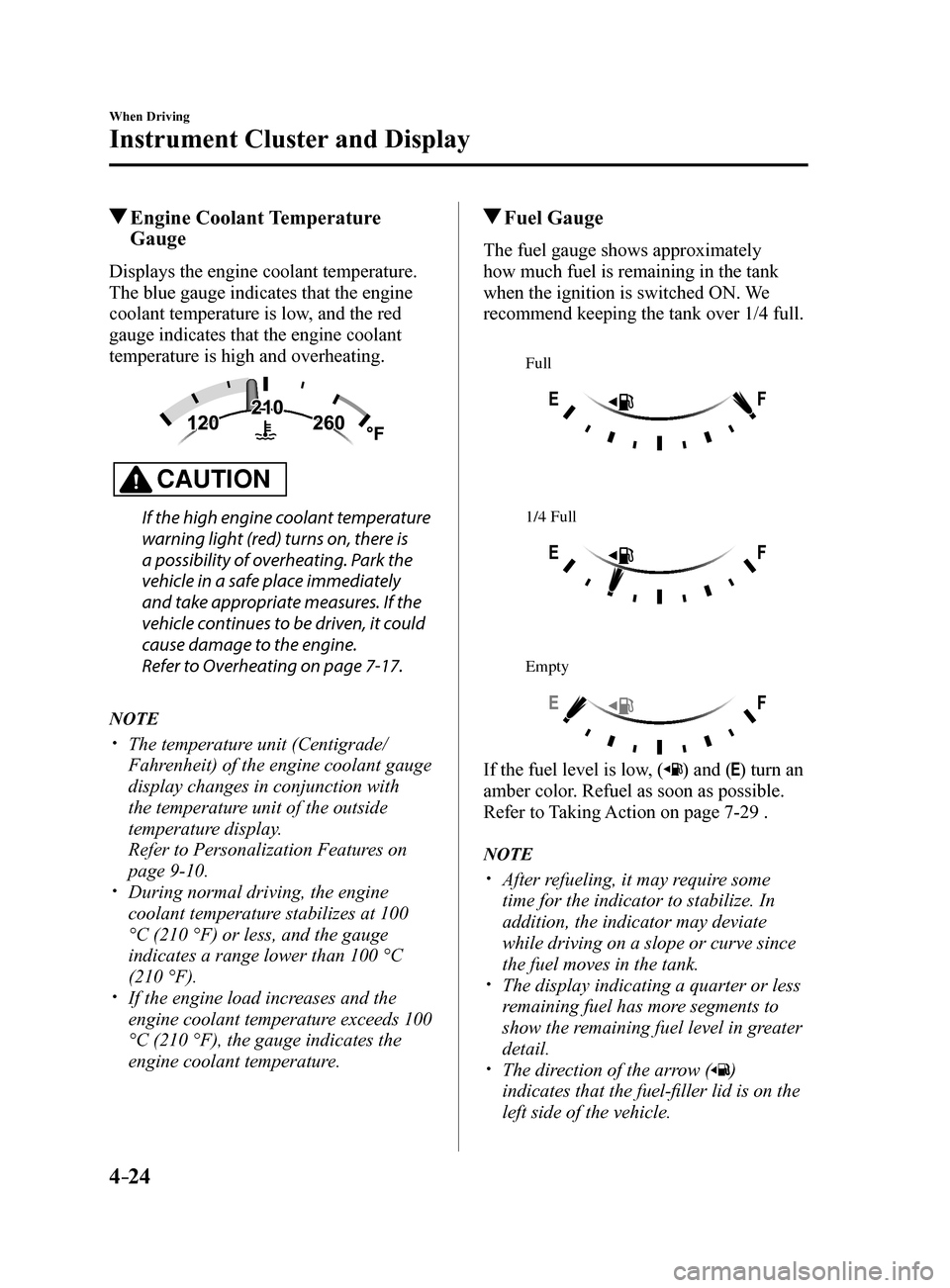
Engine Coolant Temperature Gauge
Displays the engine coolant temperature.
The blue gauge indicates that the engine
coolant temperature is low, and the red
gauge indicates that the engine coolant
temperature is high and overheating.
CAUTION
If the high engine coolant temperature
warning light (red) turns on, there is
a possibility of overheating. Park the
vehicle in a safe place immediately
and take appropriate measures. If the
vehicle continues to be driven, it could
cause damage to the engine.
Refer to Overheating on page 7-17.
NOTE
The temperature unit (Centigrade/
Fahrenheit) of the engine coolant gauge
display changes in conjunction with
the temperature unit of the outside
temperature display.
Refer to Personalization Features on
page 9-10.
During normal driving, the engine
coolant temperature stabilizes at 100
°C (210 °F) or less, and the gauge
indicates a range lower than 100 °C
(210 °F).
If the engine load increases and the
engine coolant temperature exceeds 100
°C (210 °F), the gauge indicates the
engine coolant temperature.
Fuel Gauge
The fuel gauge shows approximately
how much fuel is remaining in the tank
when the ignition is switched ON. We
recommend keeping the tank over 1/4 full.
Full
1/4 Full
Empty
If the fuel level is low, () and () turn an
amber color. Refuel as soon as possible.
Refer to Taking Action on page 7-29 .
NOTE
After refueling, it may require some
time for the indicator to stabilize. In
addition, the indicator may deviate
while driving on a slope or curve since
the fuel moves in the tank.
The display indicating a quarter or less
remaining fuel has more segments to
show the remaining fuel level in greater
detail.
The direction of the arrow ()
indicates that the fuel-filler lid is on the
left side of the vehicle.
Mazda6_8FH2-EA-16F_Edition2.indb 242016/07/07 13:44:39
Page 149 of 578
4–25
When Driving
Instrument Cluster and Display
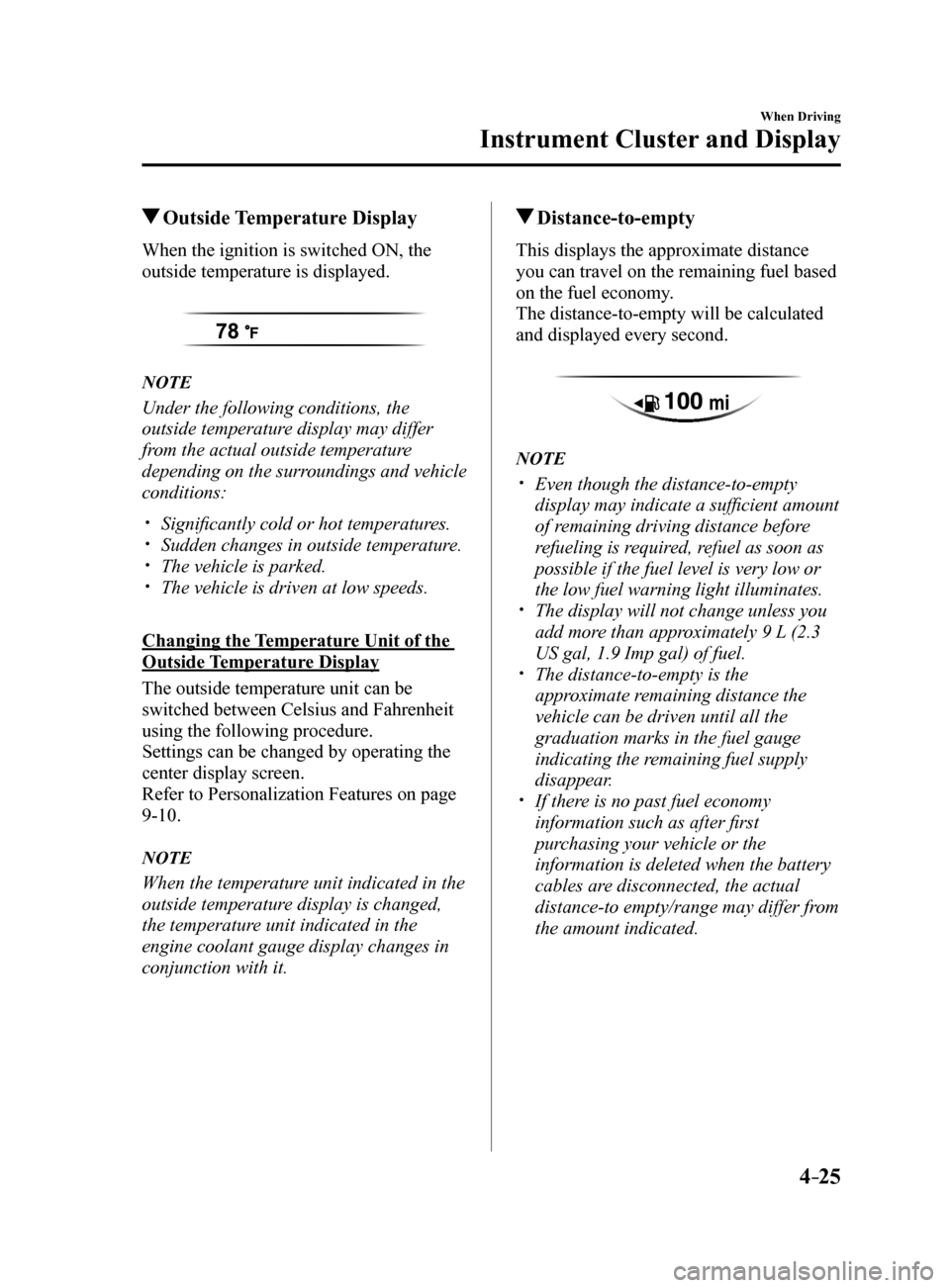
Outside Temperature Display
When the ignition is switched ON, the
outside temperature is displayed.
NOTE
Under the following conditions, the
outside temperature display may differ
from the actual outside temperature
depending on the surroundings and vehicle
conditions:
Significantly cold or hot temperatures. Sudden changes in outside temperature. The vehicle is parked. The vehicle is driven at low speeds.
Changing the Temperature Unit of the
Outside Temperature Display
The outside temperature unit can be
switched between Celsius and Fahrenheit
using the following procedure.
Settings can be changed by operating the
center display screen.
Refer to Personalization Features on page
9-10.
NOTE
When the temperature unit indicated in the
outside temperature display is changed,
the temperature unit indicated in the
engine coolant gauge display changes in
conjunction with it.
Distance-to-empty
This displays the approximate distance
you can travel on the remaining fuel based
on the fuel economy.
The distance-to-empty will be calculated
and displayed every second.
NOTE
Even though the distance-to-empty
display may indicate a sufficient amount
of remaining driving distance before
refueling is required, refuel as soon as
possible if the fuel level is very low or
the low fuel warning light illuminates.
The display will not change unless you
add more than approximately 9 L (2.3
US gal, 1.9 Imp gal) of fuel.
The distance-to-empty is the
approximate remaining distance the
vehicle can be driven until all the
graduation marks in the fuel gauge
indicating the remaining fuel supply
disappear.
If there is no past fuel economy
information such as after first
purchasing your vehicle or the
information is deleted when the battery
cables are disconnected, the actual
distance-to empty/range may differ from
the amount indicated.
Mazda6_8FH2-EA-16F_Edition2.indb 252016/07/07 13:44:39
Page 150 of 578
4–26
When Driving
Instrument Cluster and Display
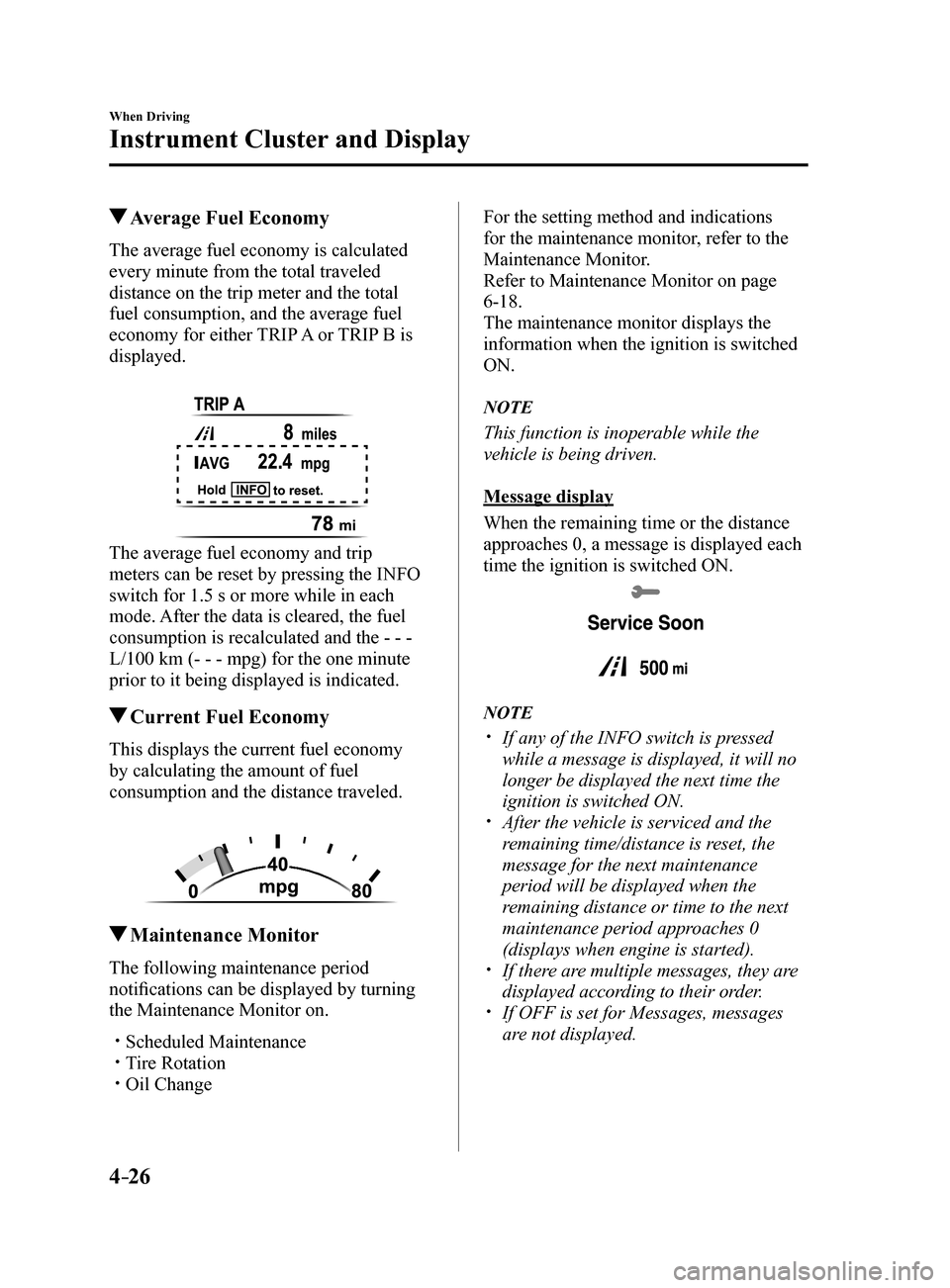
Average Fuel Economy
The average fuel economy is calculated
every minute from the total traveled
distance on the trip meter and the total
fuel consumption, and the average fuel
economy for either TRIP A or TRIP B is
displayed.
The average fuel economy and trip
meters can be reset by pressing the INFO
switch for 1.5 s or more while in each
mode. After the data is cleared, the fuel
consumption is recalculated and the - - -
L/100 km (- - - mpg) for the one minute
prior to it being displayed is indicated.
Current Fuel Economy
This displays the current fuel economy
by calculating the amount of fuel
consumption and the distance traveled.
Maintenance Monitor
The following maintenance period
notifications can be displayed by turning
the Maintenance Monitor on.
Scheduled Maintenance Tire Rotation Oil Change
For the setting method and indications
for the maintenance monitor, refer to the
Maintenance Monitor.
Refer to Maintenance Monitor on page
6-18.
The maintenance monitor displays the
information when the ignition is switched
ON.
NOTE
This function is inoperable while the
vehicle is being driven.
Message display
When the remaining time or the distance
approaches 0, a message is displayed each
time the ignition is switched ON.
NOTE
If any of the INFO switch is pressed
while a message is displayed, it will no
longer be displayed the next time the
ignition is switched ON.
After the vehicle is serviced and the
remaining time/distance is reset, the
message for the next maintenance
period will be displayed when the
remaining distance or time to the next
maintenance period approaches 0
(displays when engine is started).
If there are multiple messages, they are
displayed according to their order.
If OFF is set for Messages, messages
are not displayed.
Mazda6_8FH2-EA-16F_Edition2.indb 262016/07/07 13:44:40
Page 155 of 578
4–31
When Driving
Instrument Cluster and Display
Each setting/adjustment for the active driving display can be performed on the center
display.
1. Select the
icon on the home screen and display the Settings screen.
2. Select the AD-Disp tab.
3. Select the desired item and perform the setting/adjustment.
Method for adjusting screen brightness (automatically/manually) Screen brightness initial settings (automatic adjustment is selected) Screen brightness adjustment (manual adjustment is selected) Display position of active driving display (display height) The combination of street name display, lane guidance, and turn by turn (TBT) can be
changed. (navigation guidance)
Active driving display ON/OFF (indication) Reset settings (reset)
NOTE
The desired driving position (display position, brightness level, display inform\
ation) can be
called up after programming the position.
Refer to Driving Position Memory on page 2-8.
Mazda6_8FH2-EA-16F_Edition2.indb 312016/07/07 13:44:42
Page 160 of 578
4–36
When Driving
Instrument Cluster and Display
*Some models.
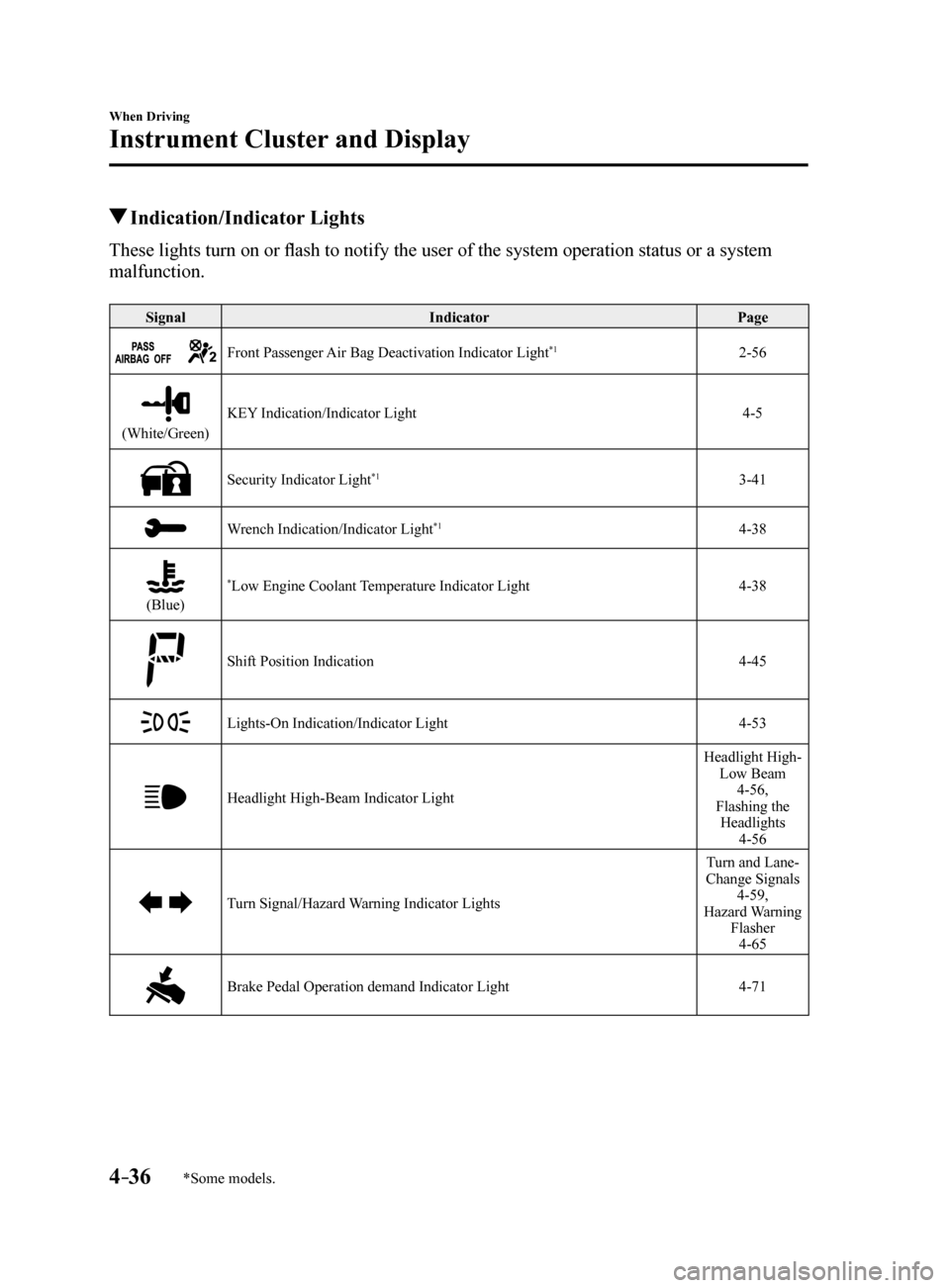
Indication/Indicator Lights
These lights turn on or flash to notify the user of the system operation status or a system
malfunction.
SignalIndicator Page
Front Passenger Air Bag Deactivation Indicator Light*12-56
(White/Green)KEY Indication/Indicator Light
4-5
Security Indicator Light*13-41
Wrench Indication/Indicator Light*14-38
(Blue)
*Low Engine Coolant Temperature Indicator Light4-38
Shift Position Indication 4-45
Lights-On Indication/Indicator Light4-53
Headlight High-Beam Indicator LightHeadlight High-
Low Beam 4-56,
Flashing the Headlights 4-56
Turn Signal/Hazard Warning Indicator Lights Turn and Lane-
Change Signals 4-59,
Hazard Warning Flasher4-65
Brake Pedal Operation demand Indicator Light 4-71
Mazda6_8FH2-EA-16F_Edition2.indb 362016/07/07 13:44:47
Page 163 of 578
4–39
When Driving
Manual Transaxle Operation
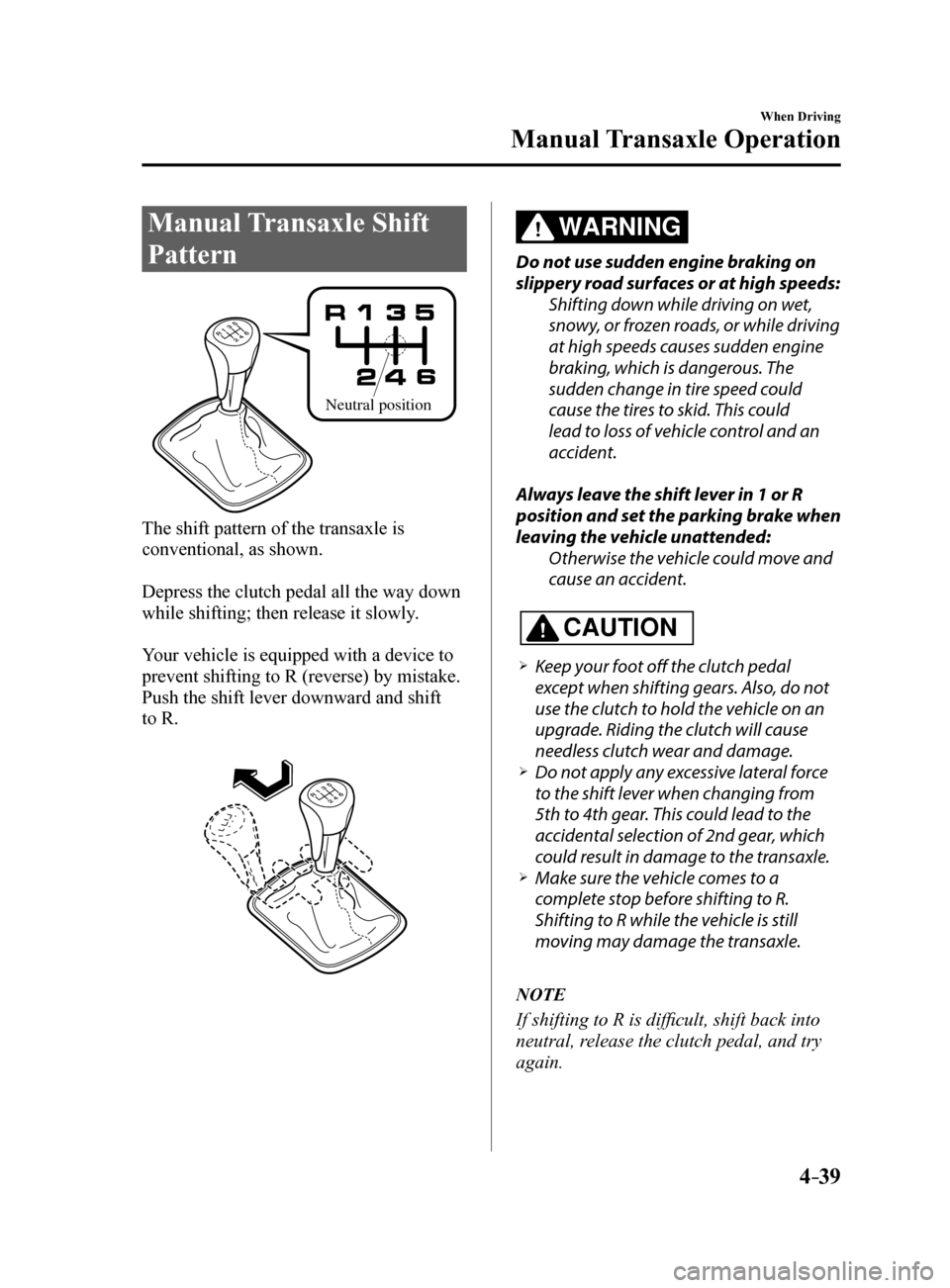
Manual Transaxle Shift
Pattern
Neutral position
The shift pattern of the transaxle is
conventional, as shown.
Depress the clutch pedal all the way down
while shifting; then release it slowly.
Your vehicle is equipped with a device to
prevent shifting to R (reverse) by mistake.
Push the shift lever downward and shift
to R.
WARNING
Do not use sudden engine braking on
slippery road surfaces or at high speeds:Shifting down while driving on wet,
snowy, or frozen roads, or while driving
at high speeds causes sudden engine
braking, which is dangerous. The
sudden change in tire speed could
cause the tires to skid. This could
lead to loss of vehicle control and an
accident.
Always leave the shift lever in 1 or R
position and set the parking brake when
leaving the vehicle unattended: Otherwise the vehicle could move and
cause an accident.
CAUTION
Keep your foot off the clutch pedal
except when shifting gears. Also, do not
use the clutch to hold the vehicle on an
upgrade. Riding the clutch will cause
needless clutch wear and damage.
Do not apply any excessive lateral force
to the shift lever when changing from
5th to 4th gear. This could lead to the
accidental selection of 2nd gear, which
could result in damage to the transaxle.
Make sure the vehicle comes to a
complete stop before shifting to R.
Shifting to R while the vehicle is still
moving may damage the transaxle.
NOTE
If shifting to R is difficult, shift back into
neutral, release the clutch pedal, and try
again.
Mazda6_8FH2-EA-16F_Edition2.indb 392016/07/07 13:44:50