wheel MAZDA MODEL 6 2017 (in English) Service Manual
[x] Cancel search | Manufacturer: MAZDA, Model Year: 2017, Model line: MODEL 6, Model: MAZDA MODEL 6 2017Pages: 578, PDF Size: 54.72 MB
Page 264 of 578
 Service Manual 4–14 0
When Driving
i-ACTIVSENSE
NOTE
The Smart City Brake Support (SCBS) system will operate under the foll\
owing conditions.
The engine is running. “Smart City Brake Support Malfunct")
4–14 0
When Driving
i-ACTIVSENSE
NOTE
The Smart City Brake Support (SCBS) system will operate under the foll\
owing conditions.
The engine is running. “Smart City Brake Support Malfunction. Forward SCBS Disabled.” is not displayed in
the multi-information display. (with multi-information display)
The Smart Brake Support/Smart City Brake Support (SBS/SCBS) system war\
ning
indication/warning light (amber) does not illuminate.
(Rear-end collision warning)
The vehicle speed is about 4 to 80 km/h (2 to 50 mph).
(Brake control (SCBS brake))
The vehicle speed is about 4 to 30 km/h (2 to 18 mph).
The Smart City Brake Support (SCBS) system is not turned off.
Under the following conditions, the Smart City Brake Support (SCBS) sy\
stem may not
operate normally:
The Smart City Brake Support (SCBS) system will not operate if the dri\
ver is
deliberately performing driving operations (accelerator pedal and steer\
ing wheel).
If there is the possibility of partial contact with a vehicle ahead. The vehicle is driven on a slippery road surface such as wet roads or icy or snow-
bound roads.
The braking performance is adversely affected due to cold temperatures or wet brakes. The vehicle is driven at the same speed as the vehicle ahead. The accelerator pedal is depressed. The brake pedal is depressed. The steering wheel is being operated. The selector lever is being operated.
In the following cases, the Forward Sensing Camera (FSC) determines that there is a
vehicle ahead and the Smart City Brake Support (SCBS) may operate.
Objects on the road at the entrance to a curve. Vehicles passing in the opposite lane while making a curve. Metal objects, bumps, or protruding objects on the road. When passing through a toll gate. When passing through low gates, narrow gates, car washing machines, or tunnels. If you suddenly come close to a vehicle ahead. 2-wheeled vehicles, pedestrians, animals or standing trees. Vehicle is driven with some of the tires having significant wear.
(Manual transaxle)
If the vehicle is stopped by the SCBS operation and the clutch pedal is \
not depressed, the
engine stops.
Mazda6_8FH2-EA-16F_Edition2.indb 1402016/07/07 13:45:19
Page 268 of 578
 Service Manual 4–14 4
When Driving
i-ACTIVSENSE
NOTE
The Smart Brake Support (SBS) system operates when all of the followin\
g conditions are
met:
The ignition is switched ON. The Smart Brake Support (")
4–14 4
When Driving
i-ACTIVSENSE
NOTE
The Smart Brake Support (SBS) system operates when all of the followin\
g conditions are
met:
The ignition is switched ON. The Smart Brake Support (SBS) system is on. The vehicle speed is about 15 km/h or faster (10 mph or faster). The relative speed between your vehicle and the vehicle ahead is about 15 km/\
h or
faster (10 mph or faster).
The Dynamic Stability Control (DSC) is not operating.
The Smart Brake Support (SBS) system may not operate under the followi\
ng conditions:
If the vehicle is accelerated rapidly and it comes close to a vehicle ah\
ead. The vehicle is driven at the same speed as the vehicle ahead. The accelerator pedal is depressed. The brake pedal is depressed. The steering wheel is being operated. The selector lever is being operated. The turn signal is being used. When the vehicle ahead is not equipped with taillights or the taillights\
are turned off. When warnings and messages, such as a dirty windshield, related to the Forward
Sensing Camera (FSC) are being displayed in the multi-information display.
Although the objects which activate the system are four-wheeled vehicles, the radar
sensor (front) could detect the following objects, determine them to be an obstru\
ction, and
operate the Smart Brake Support (SBS) system.
Objects on the road at the entrance to a curve (including guardrails and snow banks). A vehicle appears in the opposite lane while cornering or rounding a curve. When crossing a narrow bridge. When passing under a low gate or through a tunnel or narrow gate. When entering an underground parking area. Metal objects, bumps, or protruding objects on the road. If you suddenly come close to a vehicle ahead. When driving in areas where there is high grass or forage. Two-wheeled vehicles such as motorbikes or bicycles. Pedestrians or non-metallic objects such as standing trees.
When the system operates, the user is notified by the multi-information display. The Smart Brake Support (SBS) warning indication (amber) turns on wh\
en the system has
a malfunction.
Refer to Warning Indication/Warning Lights on page 4-32.
Mazda6_8FH2-EA-16F_Edition2.indb 1442016/07/07 13:45:20
Page 271 of 578
4–147
When Driving
i-ACTIVSENSE
Heed the following cautions to assure the correct operation of the Forward Sensing Camera
(FSC).
Be careful not to scratch the Forward Sensing Camera (FSC) lens or allow it to get dirty. Do not remove the Forward Sensing Camera (FSC) cover. Do not place objects on the dashboard which reflect light. Always keep the windshield glass around the camera clean by removing dirt or fogging.
Use the windshield defroster to remove fogging on the windshield.
Consult an Authorized Mazda Dealer regarding cleaning the interior side of the
windshield around the Forward Sensing Camera (FSC).
Consult an Authorized Mazda Dealer before performing repairs around the Forward
Sensing Camera (FSC).
The Forward Sensing Camera (FSC) is installed to the windshield. Consult an Authorized
Mazda Dealer for windshield repair and replacement.
When cleaning the windshield, do not allow glass cleaners or similar cleaning fluids to
get on the Forward Sensing Camera (FSC) lens. In addition, do not touch the Forward
Sensing Camera (FSC) lens.
When performing repairs around the rearview mirror, consult an Authorized Mazda
Dealer.
Consult an Authorized Mazda Dealer regarding cleaning of the camera lens. Do not hit or apply strong force to the Forward Sensing Camera (FSC) or the area around
it. If the Forward Sensing Camera (FSC) is severely hit or if there are cracks or damage
caused by flying gravel or debris in the area around it, stop using the following systems
and consult an Authorized Mazda Dealer.
High Beam Control System (HBC) Lane-keep Assist System (LAS) & Lane Departure Warning System (LDWS) Traffic Sign Recognition System (TSR) Smart City Brake Support (SCBS) Smart Brake Support (SBS)
The direction in which the Forward Sensing Camera (FSC) is pointed has been finely
adjusted. Do not change the installation position of the Forward Sensing Camera (FSC)
or remove it. Otherwise, it could result in damage or malfunction.
Always use tires for all wheels that are of the specified size, and the same manufacturer,
brand, and tread pattern. In addition, do not use tires with significantly different wear
patterns on the same vehicle as the system may not operate normally.
The Forward Sensing Camera (FSC) includes a function for detecting a soiled windshield
and informing the driver, however, depending on the conditions, it may not detect plastic
shopping bags, ice or snow on the windshield. In such cases, the system cannot accurately
determine a vehicle ahead and may not be able to operate normally. Always drive carefully
and pay attention to the road ahead.
Mazda6_8FH2-EA-16F_Edition2.indb 1472016/07/07 13:45:20
Page 276 of 578
4–152
When Driving
i-ACTIVSENSE
NOTE
Under the following conditions, the radar sensor (front) may not be able to detect
vehicles ahead or obstructions correctly and each system may not operate normally.
The rear surface of a vehicle ahead does not reflect radio waves effectively, such as
an unloaded trailer or an automobile with a loading platform covered by a soft top,
vehicles with a hard plastic tailgate, and round-shaped vehicles.
Vehicles ahead with low vehicle height and thus less area for reflecting radio waves. Visibility is reduced due to a vehicle ahead casting off water, snow, or sand from its
tires and onto your windshield.
The trunk compartment is loaded with heavy objects or the rear passenger seats are
occupied.
Ice, snow, or soiling is on the front surface of the front emblem. During inclement weather such as rain, snow, or sand storms. When driving near facilities or objects emitting strong radio waves.
Under the following conditions, the radar sensor (front) may not be able to detect
vehicles ahead or obstructions.
The beginning and end of a curve. Roads with continuous curves. Narrow lane roads due to road construction or lane closures. The vehicle ahead enters the radar sensor's blind spot. The vehicle ahead is running abnormally due to accident or vehicle damag\
e. Roads with repeated up and down slopes Driving on poor roads or unpaved roads. The distance between your vehicle and the vehicle ahead is extremely short. A vehicle suddenly comes close such as by cutting into the lane.
To prevent incorrect operation of the system, use tires of the same specified size,
manufacturer, brand, and tread pattern on all four wheels. In addition, do not use tires
with significantly different wear patterns or tire pressures on the same vehicle (Including
the temporary spare tire).
If the battery power is weak, the system may not operate correctly. When driving on roads with little traffic and few vehicles ahead or obstructions for
the radar sensor (front) to detect, “Front Radar Sensor Blocked” may be temporarily
displayed, however, this does not indicate a problem.
Mazda6_8FH2-EA-16F_Edition2.indb 1522016/07/07 13:45:20
Page 278 of 578
4–154
When Driving
i-ACTIVSENSE
NOTE
The detection ability of the radar sensors (rear) has limitations. In the following cases,
the detection ability may lower and the system may not operate normally.
The rear bumper near the radar sensors (rear) has become deformed. Snow, ice or mud adheres to the radar sensors (rear) on the rear bumper. Under bad weather conditions such as rain, snow and fog.
Under the following conditions, the radar sensors (rear) cannot detect target objects or it
may be difficult to detect them.
Stationary objects on a road or a road side such as small, two-wheeled vehicles,
bicycles, pedestrians, animals, and shopping carts.
Vehicle shapes which do not reflect radar waves well such as empty trailers with a low
vehicle height and sports cars.
Vehicles are shipped with the direction of the radar sensors (rear) adjusted for each
vehicle to a loaded vehicle condition so that the radar sensors (rear) detect approaching
vehicles correctly. If the direction of the radar sensors (rear) has deviated for some
reason, have the vehicle inspected at an Authorized Mazda Dealer.
For repairs or replacement of the radar sensors (rear), or bumper repairs, paintwork,
and replacement near the radar sensors, consult an Authorized Mazda Dealer.
Turn off the system while pulling a trailer or while an accessory such as\
a bicycle carrier
is installed to the rear of the vehicle. Otherwise, the radio waves emitted by the radar will\
be blocked causing the system to not operate normally.
The radar sensors are regulated by the relevant radio wave laws of the country in which
the vehicle is driven. If the vehicle is driven abroad, authorization from the country in
which the vehicle is driven may be required.
Mazda6_8FH2-EA-16F_Edition2.indb 1542016/07/07 13:45:21
Page 283 of 578
 Service Manual 4–159
When Driving
Tire Pressure Monitoring System
Tire Pressure Monitoring System
The Tire Pressure Monitoring System (TPMS) monitors the air pressure of all\
four tires. If
the air pressure of o")
4–159
When Driving
Tire Pressure Monitoring System
Tire Pressure Monitoring System
The Tire Pressure Monitoring System (TPMS) monitors the air pressure of all\
four tires. If
the air pressure of one or more tires is too low, the system warns the driver by indicating the
tire pressure monitoring system warning light in the instrument cluster \
and operating a beep
sound. The system monitors the tire pressures indirectly using the data sent from the ABS
wheel speed sensors.
To allow the system to operate correctly, the system needs to be initialized with the specified
tire pressure (value on the tire pressure label). Follow the procedure\
and perform the
initialization.
Refer to Tire Pressure Monitoring System Initialization on page 4-162.
The warning light flashes when the system has a malfunction.
Refer to Warning Indication/Warning Lights on page 4-33.
ABS wheel speed sensor
Mazda6_8FH2-EA-16F_Edition2.indb 1592016/07/07 13:45:22
Page 284 of 578
4–160
When Driving
Tire Pressure Monitoring System
CAUTION
Each tire, including the spare (if provided), should be checked monthly when cold and
inflated to the inflation pressure recommended by the vehicle manufacturer on the vehicle
placard or tire inflation pressure label. (If your vehicle has tires of a different size than the
size indicated on the vehicle placard or tire inflation pressure label, you should determine
the proper tire inflation pressure for those tires.)
As an added safety feature, your vehicle has been equipped with a tire pressure monitoring
system (TPMS) that illuminates a low tire pressure telltale when one or more of your tires
is significantly under-inflated. Accordingly, when the low tire pressure telltale illuminates,
you should stop and check your tires as soon as possible, and inflate them to the proper
pressure. Driving on a significantly under-inflated tire causes the tire to overheat and can
lead to tire failure. Under-inflation also reduces fuel efficiency and tire tread life, and may
affect the vehicle's handling and stopping ability.
Please note that the TPMS is not a substitute for proper tire maintenance, and it is the
driver's responsibility to maintain correct tire pressure, even if under-inflation has not
reached the level to trigger illumination of the TPMS low tire pressure telltale.
Your vehicle has also been equipped with a TPMS malfunction indicator to indicate when
the system is not operating properly.
The TPMS malfunction indicator is combined with the low tire pressure telltale. When the
system detects a malfunction, the telltale will flash for approximately one minute and then
remain continuously illuminated. This sequence will continue upon subsequent vehicle
start-ups as long as the malfunction exists. When the malfunction indicator is illuminated,
the system may not be able to detect or signal low tire pressure as intended. TPMS
malfunctions may occur for a variety of reasons, including the installation of replacement
or alternate tires or wheels on the vehicle that prevent the TPMS from functioning properly.
Always check the TPMS malfunction telltale after replacing one or more tires or wheels on
your vehicle to ensure that the replacement or alternate tires and wheels allow the TPMS to
continue to function properly.
To avoid false readings, the system samples for a little while before indicating a problem. As
a result it will not instantaneously register a rapid tire deflation or blow out.
Mazda6_8FH2-EA-16F_Edition2.indb 1602016/07/07 13:45:22
Page 286 of 578
4–162
When Driving
Tire Pressure Monitoring System
Tire Pressure Monitoring System
Initialization
In the following cases, system
initialization must be performed so that the
system operates normally.
A tire pressure is adjusted. Tire rotation is performed. A tire or wheel is replaced. The battery is replaced or completely
drained.
The tire pressure monitoring system
warning light is illuminated.
Initialization method
1. Park the car in a safe place and firmly
apply the parking brake.
2. Let the tires cool, then adjust the tire
pressure of all four (4) tires to the
specified pressure indicated on the tire
pressure label located on the driver's
door frame (door open).
Refer to Tires on page 9-8.
3. Switch the ignition ON.
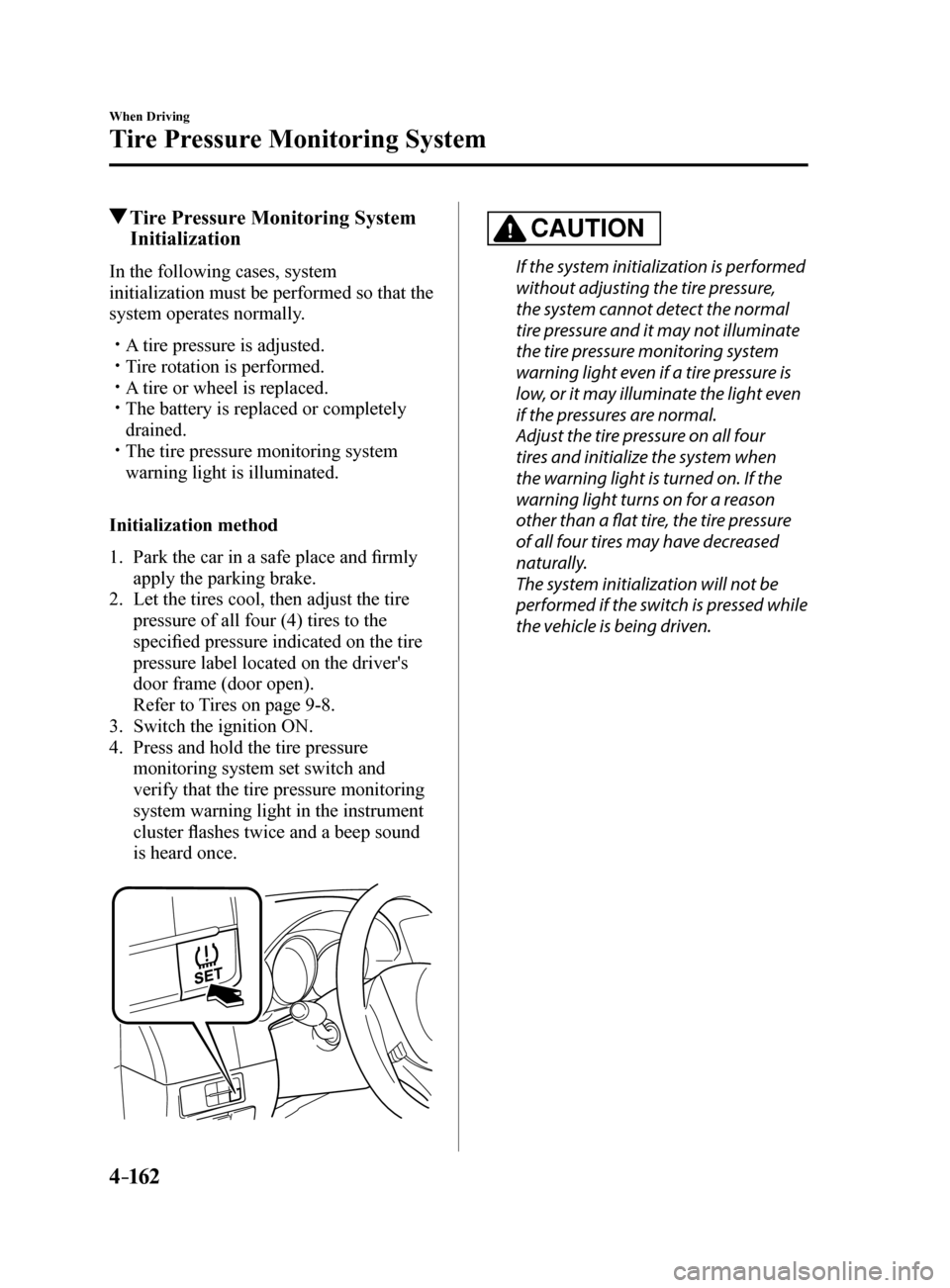
4. Press and hold the tire pressure
monitoring system set switch and
verify that the tire pressure monitoring
system warning light in the instrument
cluster flashes twice and a beep sound
is heard once.
CAUTION
If the system initialization is performed
without adjusting the tire pressure,
the system cannot detect the normal
tire pressure and it may not illuminate
the tire pressure monitoring system
warning light even if a tire pressure is
low, or it may illuminate the light even
if the pressures are normal.
Adjust the tire pressure on all four
tires and initialize the system when
the warning light is turned on. If the
warning light turns on for a reason
other than a flat tire, the tire pressure
of all four tires may have decreased
naturally.
The system initialization will not be
performed if the switch is pressed while
the vehicle is being driven.
Mazda6_8FH2-EA-16F_Edition2.indb 1622016/07/07 13:45:22
Page 290 of 578
4–16 6
When Driving
Rear View Monitor
Viewing the Display
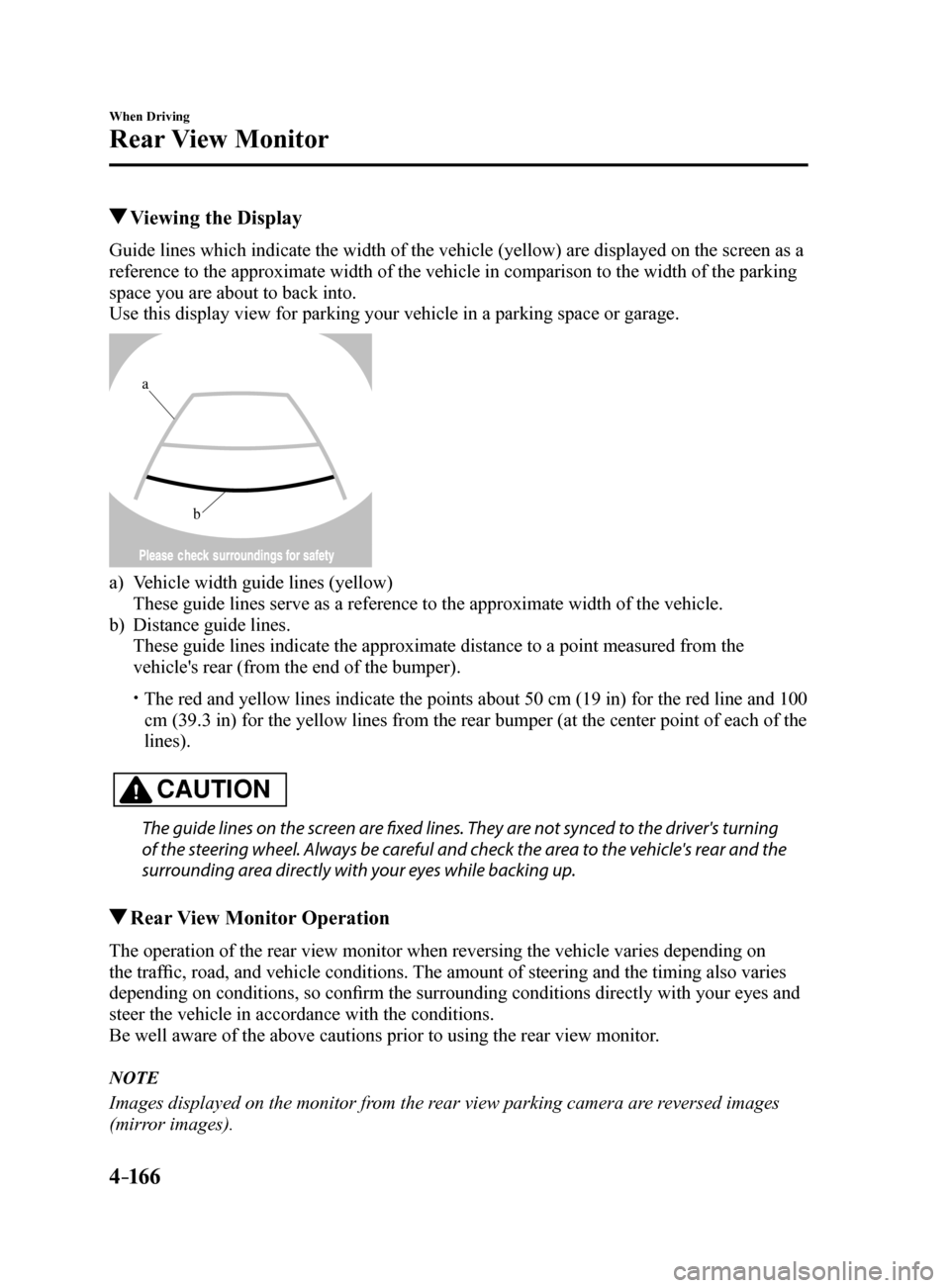
Guide lines which indicate the width of the vehicle (yellow) are displayed on the screen as a
reference to the approximate width of the vehicle in comparison to the w\
idth of the parking
space you are about to back into.
Use this display view for parking your vehicle in a parking space or gar\
age.
b
a
a) Vehicle width guide lines (yellow)
These guide lines serve as a reference to the approximate width of the v\
ehicle.
b) Distance guide lines.
These guide lines indicate the approximate distance to a point measured \
from the
vehicle's rear (from the end of the bumper).
The red and yellow lines indicate the points about 50 cm (19 in) for t\
he red line and 100
cm (39.3 in) for the yellow lines from the rear bumper (at the center\
point of each of the
lines).
CAUTION
The guide lines on the screen are fixed lines. They are not synced to the driver's turning
of the steering wheel. Always be careful and check the area to the vehicle's rear and the
surrounding area directly with your eyes while backing up.
Rear View Monitor Operation
The operation of the rear view monitor when reversing the vehicle varies\
depending on
the traffic, road, and vehicle conditions. The amount of steering and the timing also varies
depending on conditions, so confirm the surrounding conditions directly with your eyes and
steer the vehicle in accordance with the conditions.
Be well aware of the above cautions prior to using the rear view monitor.
NOTE
Images displayed on the monitor from the rear view parking camera are reversed images
(mirror images).
Mazda6_8FH2-EA-16F_Edition2.indb 1662016/07/07 13:45:23
Page 291 of 578
4–167
When Driving
Rear View Monitor
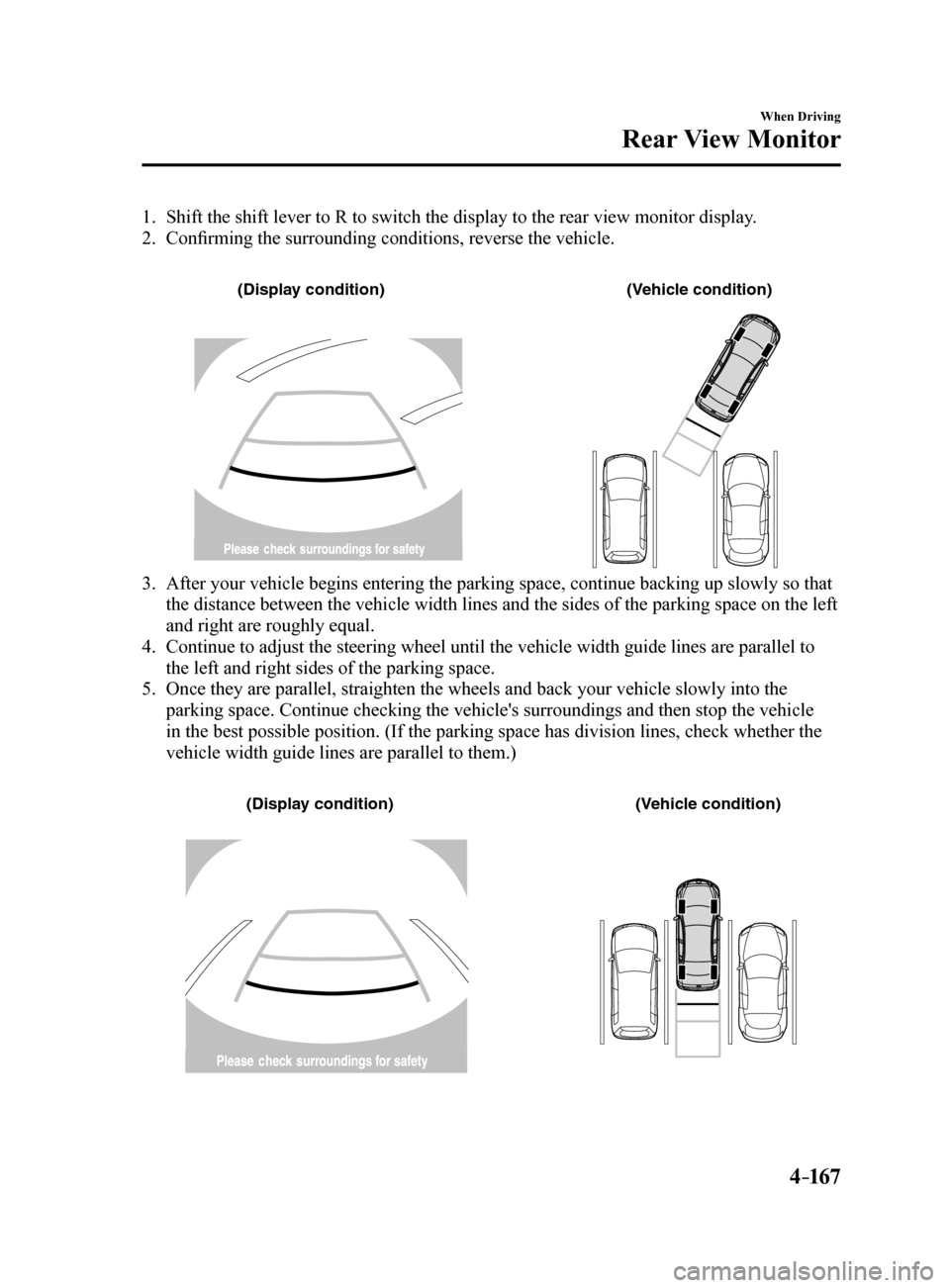
1. Shift the shift lever to R to switch the display to the rear view monitor display.
2. Confirming the surrounding conditions, reverse the vehicle.
(Displa y condition) (Vehic le condition)
3. After your vehicle begins entering the parking space, continue backing u\
p slowly so that
the distance between the vehicle width lines and the sides of the parkin\
g space on the left
and right are roughly equal.
4. Continue to adjust the steering wheel until the vehicle width guide line\
s are parallel to
the left and right sides of the parking space.
5. Once they are parallel, straighten the wheels and back your vehicle slow\
ly into the
parking space. Continue checking the vehicle's surroundings and then sto\
p the vehicle
in the best possible position. (If the parking space has division lines\
, check whether the
vehicle width guide lines are parallel to them.)
(Displa y condition) (Vehic le condition)
Mazda6_8FH2-EA-16F_Edition2.indb 1672016/07/07 13:45:24