display MAZDA MODEL CX-5 2017 Smart Start Guide (in English)
[x] Cancel search | Manufacturer: MAZDA, Model Year: 2017, Model line: MODEL CX-5, Model: MAZDA MODEL CX-5 2017Pages: 58, PDF Size: 4.81 MB
Page 25 of 58
m{zd{ cx-5 24
VOICE CONTROL
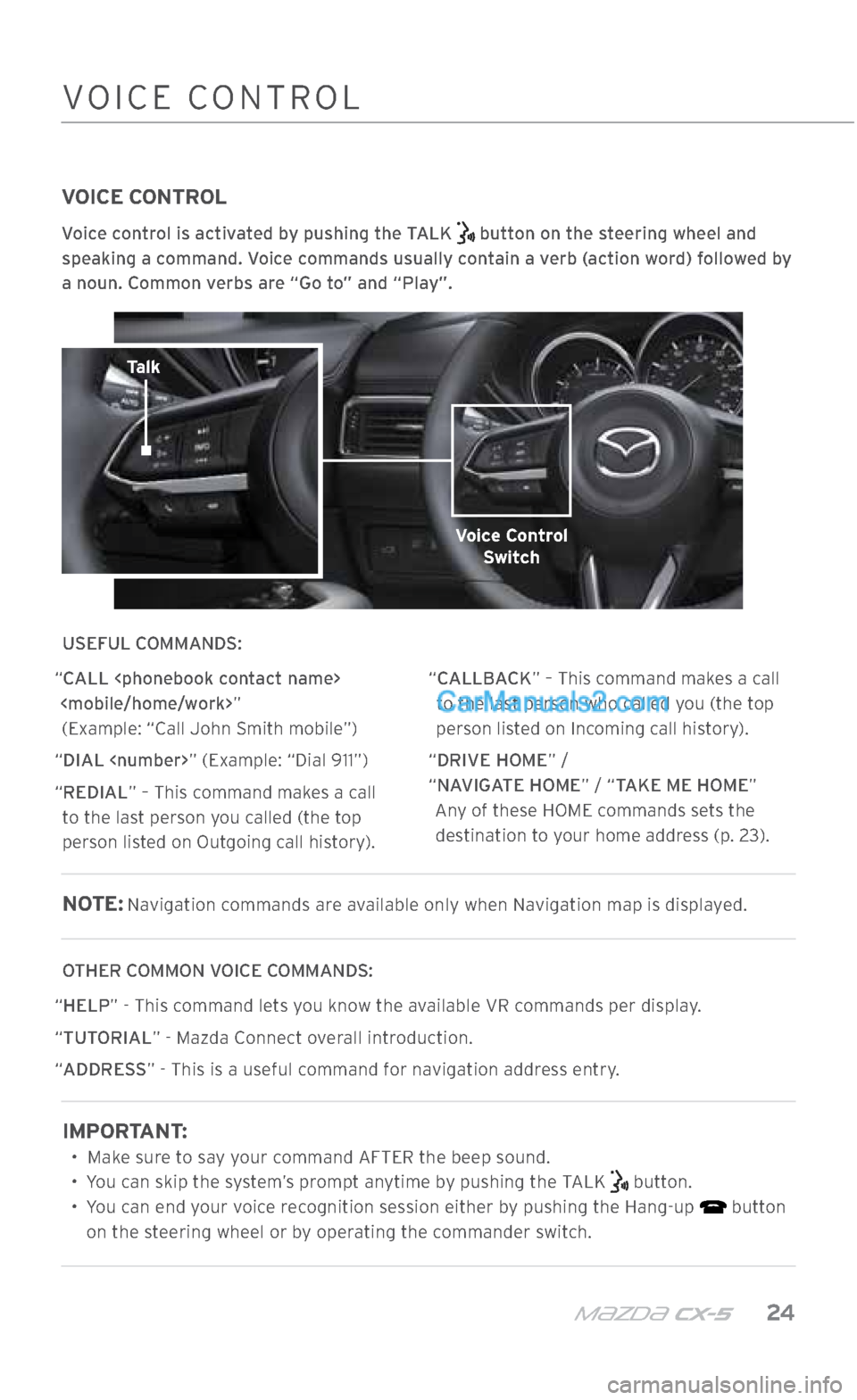
Voice control is activated by pushing the TALK button on the steering wheel and
speaking a command. Voice commands usually contain a verb (action word) followed by
a noun. Common verbs are “Go to” and “Play”.
USEFUL COMMANDS:
“CALL
“DIAL
“REDIAL” – This command makes a call to the last person you called (the top
person listed on Outgoing call history). “CALLBACK” – This command makes a call
to the last person who called you (the top
person listed on Incoming call history).
“DRIVE HOME” /
“NAVIGATE HOME” / “TAKE ME HOME” Any of these HOME commands sets the destination to your home address (p. 23).
NOTE: Navigation commands are available only when Navigation map is displayed.
OTHER COMMON VOICE COMMANDS:
“ HELP” - This command lets you know the available VR commands per display.
“ TUTORIAL” - Mazda Connect overall introduction.
“ ADDRESS” - This is a useful command for navigation address entry.
IMPORTANT:
• Make sure to say your command AFTER the beep sound.
• You can skip the system’s prompt anytime by pushing the TALK
button.
• You can end your voice recognition session either by pushing the Hang-up
button
on the steering wheel or by operating the commander switch.
COMMANDER SWITCHVOICE CONTROL
Talk
Voice Control Switch
2364256 17a CX-5 SSG 030117.indd 243/1/17 5:51 PM
Page 26 of 58
25 MAZDAUSA.COM
MAZDA RADAR CRUISE CONTROL (MRCC)
WITH STOP & GO FUNCTION
The MRCC with Stop & Go function maintains vehicle speed and
following distance using a radar sensor to detect a vehicle ahead.
The driver simply presets the vehicle speed between 0 mph and 90 mph and the system will maintain a safe following distance
without having to turn the cruise control off or use the accelerator
or brake pedals. If the vehicle ahead stops while you are following behind it, your vehicle will stop automatically.
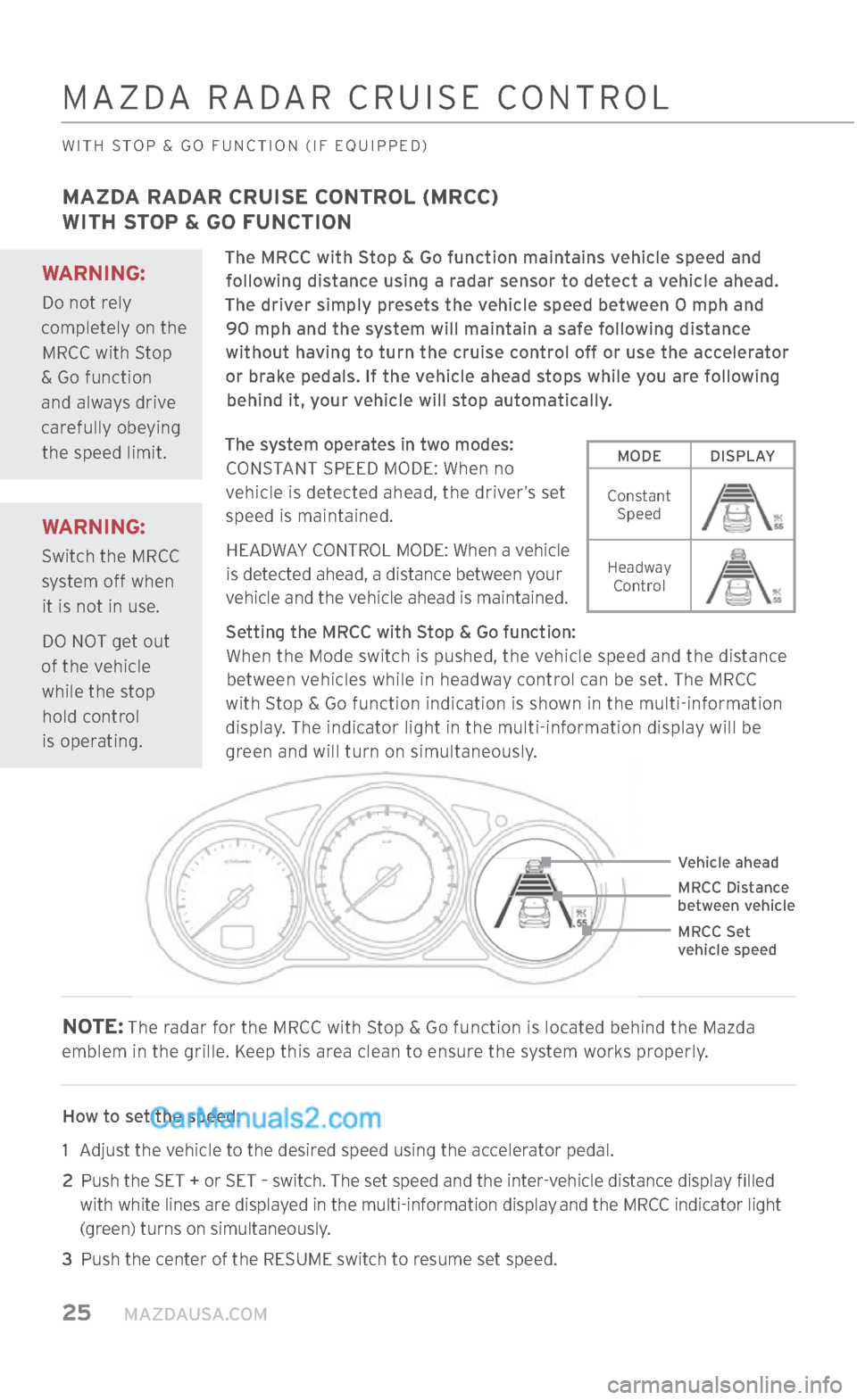
The system operates in two modes: CONSTANT SPEED MODE: When no
vehicle is detected ahead, the driver’s set
speed is maintained.
HEADWAY CONTROL MODE: When a vehicle is detected ahead, a distance between your
vehicle and the vehicle ahead is maintained.
Setting the MRCC with Stop & Go function: When the Mode switch is pushed, the vehicle speed and the distance between vehicles while in headway control can be set. The MRCC
with Stop & Go function indication is shown in the multi-information
display. The indicator light in the multi-information display will be
green and will turn on simultaneously.
NOTE: The radar for the MRCC with Stop & Go function is located behind the Mazda
emblem in the grille. Keep this area clean to ensure the system works properly.
How to set the speed:
1 Adjust the vehicle to the desired speed using the accelerator pedal.
2 Push the SET + or SET – switch. The set speed and the inter-vehicle distance display filled
with white lines are displayed in the multi-information display
and the MRCC indicator light
(green) turns on simultaneously.
3
Push the center of the RESUME switch to resume set speed.
Vehicle ahead
MRCC Distance
between vehicle
MRCC Set
vehicle speed
MAZDA RADAR CRUISE CONTROL
WITH STOP & GO FUNCTION (IF EQUIPPED)
MODE DISPLAY
Constant Speed
Headway Control
WARNING:
Switch the MRCC
system off when it is not in use.
DO NOT get out
of the vehicle while the stop hold control
is operating.
WARNING:
Do not rely
completely on the MRCC with Stop
& Go function and always drive
carefully obeying the speed limit.
2364256 17a CX-5 SSG 030117.indd 253/1/17 5:51 PM
Page 27 of 58
m{zd{ cx-5 26
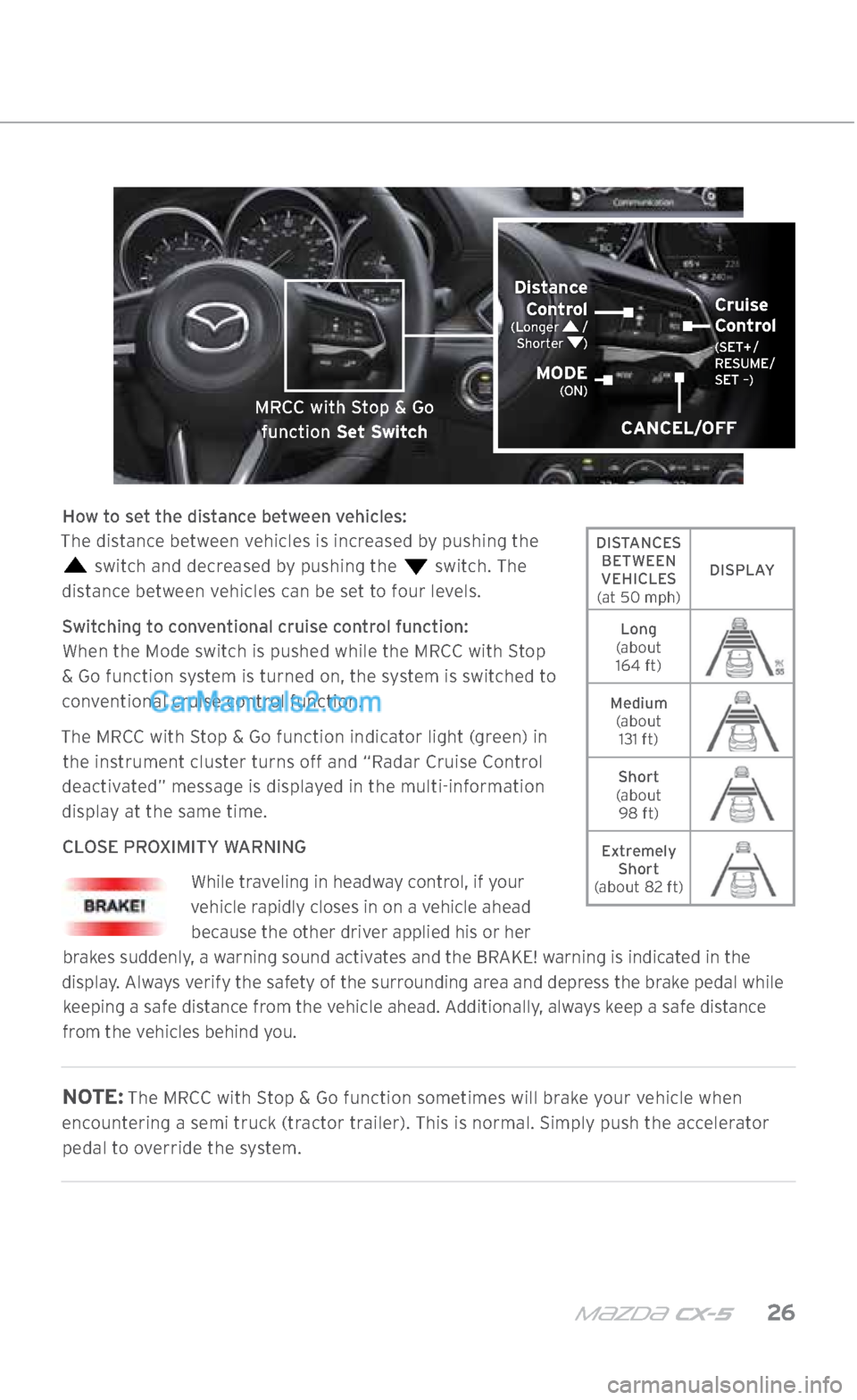
How to set the distance between vehicles:
The distance between vehicles is increased by pushing the
switch and decreased by pushing the switch. The
distance between vehicles can be set to four levels.
Switching to conventional cruise control function: When the Mode switch is pushed while the MRCC with Stop
& Go function system is turned on, the system is switched to conventional cruise control function.
The MRCC with Stop & Go function indicator light (green) in the instrument cluster turns off and “Radar Cruise Control
deactivated” message is displayed in the multi-information
display at the same time.
CLOSE PROXIMITY WARNING While traveling in headway control, if your
vehicle rapidly closes in on a vehicle ahead because the other driver applied his or her
brakes suddenly, a warning sound activates and the BRAKE! warning is indicated in the
display. Always verify the safety of the surrounding area and depress the brake pedal while keeping a safe distance from the vehicle ahead. Additionally, always keep a safe distance
from the vehicles behind you.
NOTE: The MRCC with Stop & Go function sometimes will brake your vehicle when
encountering a semi truck (tractor trailer). This is normal. Simply push the accelerator pedal to override the system.
MAZDA RADAR CRUISE CONTROL
WITH STOP & GO FUNCTION (IF EQUIPPED)
CANCEL/OFF
Distance Control
(Longer /
Shorter )
MODE (ON)
Cruise
Control (SET+ /
RESUME/
SET –)
MRCC with Stop & Go
function Set Switch
DISTANCES BETWEEN
VEHICLES
(at 50 mph) DISPLAY
Long
(about 164 ft)
Medium (about 131 ft)
Short
(about 98 ft)
Extremely Short
(about 82 ft)
2364256 17a CX-5 SSG 030117.indd 263/1/17 5:51 PM
Page 29 of 58
m{zd{ cx-5 28
SMART BRAKE SUPPORT (SBS)
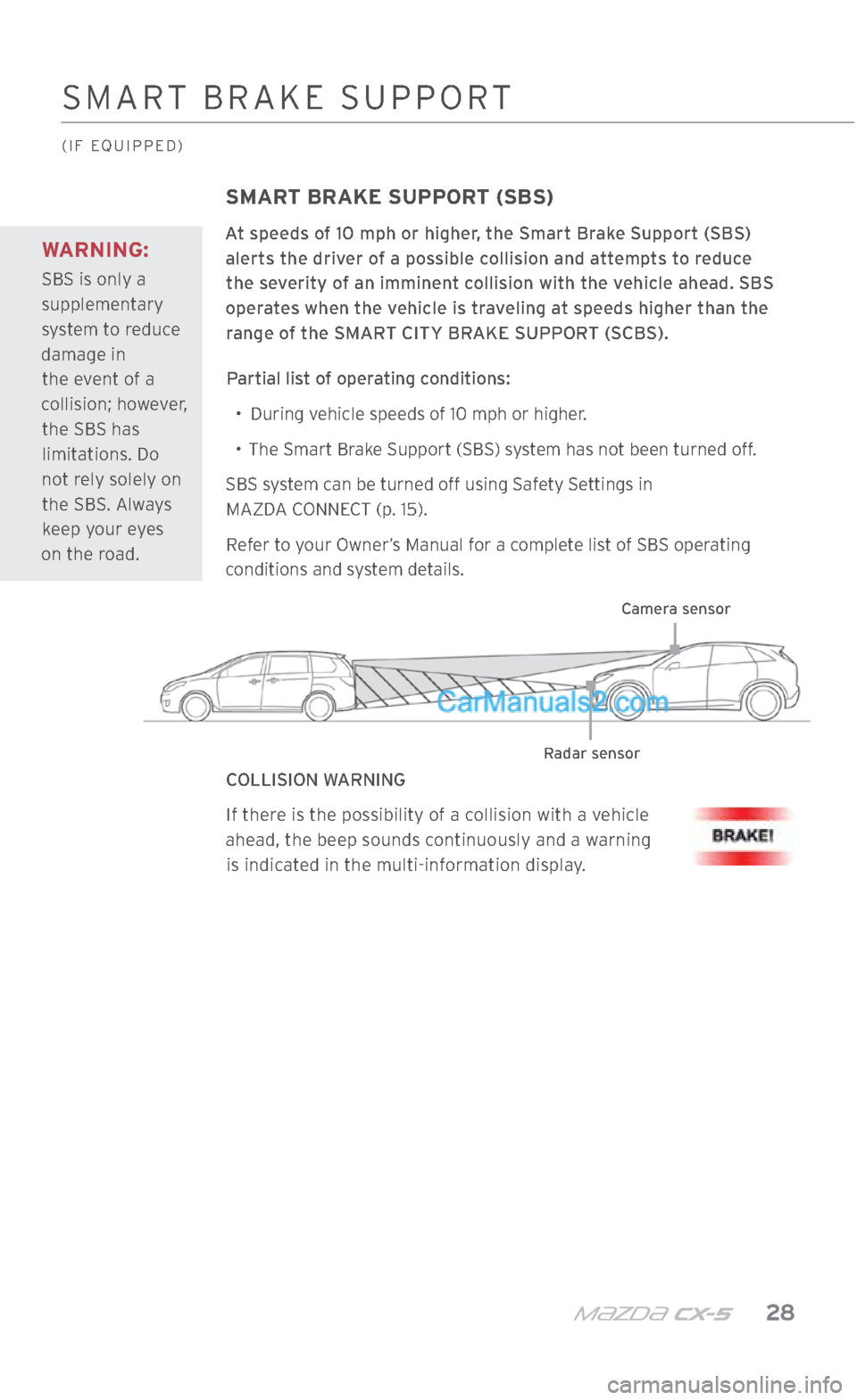
At speeds of 10 mph or higher, the Smart Brake Support (SBS) alerts the driver of a possible collision and attempts to reduce the severity of an imminent collision with the vehicle ahead. SBS
operates when the vehicle is traveling at speeds higher than the range of the SMART CITY BRAKE SUPPORT (SCBS).
Partial list of operating conditions: •
During vehicle speeds of 10 mph or higher.
•
The Smart Brake Support (SBS) system has not been turned off.
SBS system can be turned off using Safety Settings in
MAZDA CONNECT (p. 15).
Refer to your Owner’s Manual for a complete list of SBS operating
conditions and system details.
COLLISION WARNINGIf there is the possibility of a collision with a vehicle
ahead, the beep sounds continuously and a warning is indicated in the multi-information display.
Camera sensor
Radar sensor
WARNING:
SBS is only a
supplementary
system to reduce
damage in the event of a
collision; however, the SBS has limitations. Do
not rely solely on the SBS. Always keep your eyes
on the road.
SMART BRAKE SUPPORT
(IF EQUIPPED)
2364256 17a CX-5 SSG 030117.indd 283/1/17 5:51 PM
Page 31 of 58

m{zd{ cx-5 30
NOTE: Any driver vehicle input (e.g., turn signal, steering or
acceleration, hands off, Traction Control System switch off) will
cancel warning and steering assist.
The steering operation assist for the Lane-keep Assist System and Lane Departure Warning System can be turned off. Refer to the
Owner’s Manual for further information.
Use the LAS and LDWS switch to turn the system ON or OFF.WARNING:
The Lane
Departure Warning
System (LDWS) is
not an automatic
driving system.
• The recognition
ability of the
Lane Departure
Warning
System (LDWS)
is limited.
• Over-reliance
on the system
could lead to
an accident.
• Always stay
on course using
the steering
wheel and
drive with care.
LANE-kEEP ASSIST SYSTEM /
LANE DEPARTURE WARNING SYSTEM
(IF EQUIPPED)
INDICATOR LIGHT* ACTIVE DRIVING
DISPLAY MULTI-
INFORMATION DISPLAY CONDITION
The painted road lane lines are
not recognized OR one side
is recognized OR the vehicle speed is less than 37 mph.
**
Both side painted road lane
lines are recognized at vehicle speeds of 37 mph or more.
1: Warning (Flashes)
Warning is triggered when vehicle deviates from its lane (depending on personalization setting).
1. When equipped with Active Driving Display.
2. When not equipped with Active Driving Display.
2
: No Active Driving Display
OFF
indicator
turns on.LAS and LDWS OFF
* When the steering assistance is off, indicator light is NOT displayed.
** When the steering assistance is off, indicator light is NOT displayed.
LAS and LDWS Switch
2364256 17a CX-5 SSG 030117.indd 303/1/17 5:51 PM
Page 32 of 58

31 MAZDAUSA.COM
DISTANCE RECOGNITION SUPPORT SYSTEM
(IF EQUIPPED)
Vehicle ahead
The distance area
between vehicles is
illuminated in white.
DISTANCE RECOGNITION SUPPORT SYSTEM (DRSS)
The Distance Recognition Support System (DRSS) measures the distance between
your vehicle and the vehicle ahead. DRSS uses a radar sensor (front) while the vehicle speed is 19 mph or faster and indicates a recommended distance to maintain between the vehicles. Furthermore, if your vehicle approaches a vehicle ahead more closely
than the appropriate distance to maintain between the vehicles, the vehicle ahead indication in the display is illuminated in white to advise the driver to keep a safe
distance from the vehicle ahead.
DISPLAY
DISTANCE BETWEEN
VEHICLES
(at 25 mph) About
82 ft About
66 ft About
49 ft About
33 ft
DISTANCE BETWEEN
VEHICLES
(at 50 mph) About
164 ft About
131 ft About
98 ft About
65 ft
2364256 17a CX-5 SSG 030117.indd 313/1/17 5:51 PM
Page 33 of 58

m{zd{ cx-5 32
TRAFFIC SIGN RECOGNITION
(IF EQUIPPED)
TRAFFIC SIGN RECOGNITION (TSR) SYSTEM
The Traffic Sign Recognition (TSR) System helps prevent the driver from overlooking
traffic signs and provides support for safe driving by displaying traffic signs on the
Active Driving Display. TSR recognizes traffic signs by using the Forward Sensing
Camera (FSC) or the navigation system while driving.
When vehicle speed exceeds the speed limit sign displayed in the Active Driving Display,
the system notifies the driver with an indication in the Active Driving Display and a
warning sound.
ACTIVE DRIVING DISPLAY GUIDE
The TSR displays the SPEED LIMIT
(including auxiliary signs), DO NOT ENTER , and
traffic STOP
signs.
NOTE: The Traffic Sign Recognition (TSR) System is not supported in some countries
or regions. For more information, consult an Authorized Mazda Dealer. The Traffic
Sign Recognition (TSR) System operates only if the navigation system SD card (Mazda
Genuine) is inserted in the SD card slot. Consult an Authorized Mazda Dealer for details.
SPEED LIMIT SIGN DISPLAYEDSPEED LIMIT SIGN RECOGNIZEDSTOP SIGN RECOGNIZED AND DISPLAYED
2364256 17a CX-5 SSG 030117.indd 323/1/17 5:51 PM
Page 40 of 58
39 MAZDAUSA.COM
AUDIO CONTROLS
(IF EQUIPPED)
AUDIO OPERATION
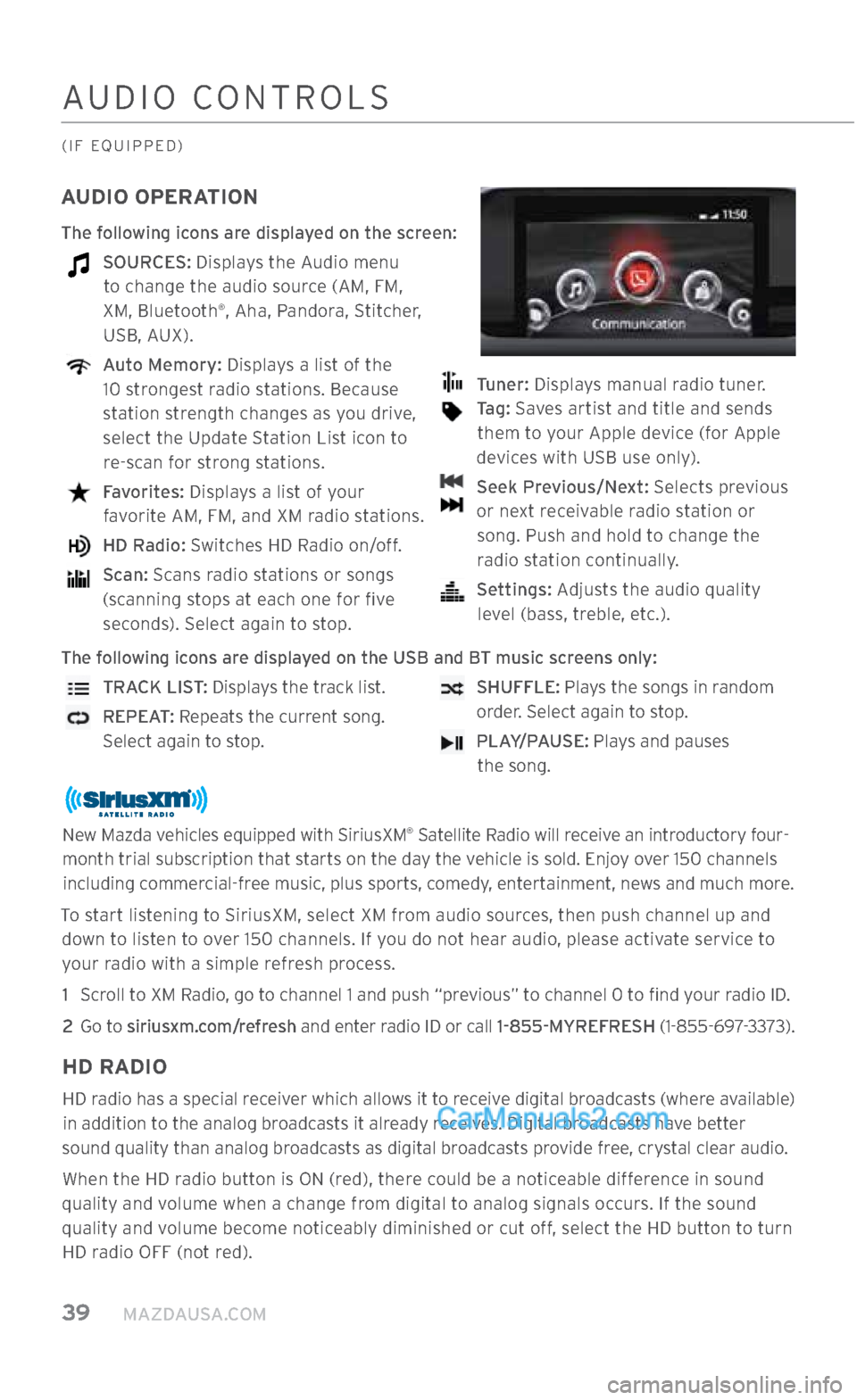
The following icons are displayed on the screen:
SOURCES: Displays the Audio menu to change the audio source (AM, FM,
XM, Bluetooth
®, Aha, Pandora, Stitcher,
USB, AUX).
Auto Memory: Displays a list of the
10 strongest radio stations. Because
station strength changes as you drive,
select the Update Station List icon to re-scan for strong stations.
Favorites: Displays a list of your
favorite AM, FM, and XM radio stations.
HD Radio: Switches HD Radio on/off.
Scan: Scans radio stations or songs
(scanning stops at each one for five seconds). Select again to stop.
Tuner: Displays manual radio tuner.
Tag: Saves artist and title and sends
them to your Apple device (for Apple
devices with USB use only).
Seek Previous/Next: Selects previous
or next receivable radio station or song. Push and hold to change the radio station continually.
Settings: Adjusts the audio quality
level (bass, treble, etc.).
The following icons are displayed on the USB and BT music screens only:
TRACK LIST: Displays the track list.
REPEAT: Repeats the current song.
Select again to stop.
SHUFFLE: Plays the songs in random
order. Select again to stop.
PLAY/PAUSE: Plays and pauses
the song.
New Mazda vehicles equipped with SiriusXM® Satellite Radio will receive an introductory four-
month trial subscription that starts on the day the vehicle is sold. Enjoy over 150 channels including commercial-free music, plus sports, comedy, entertainment, news and much more.
To start listening to SiriusXM, select XM from audio sources, then push channel up and down to listen to over 150 channels. If you do not hear audio, please activate service to your radio with a simple refresh process.
1 Scroll to XM Radio, go to channel 1 and push “previous” to channel 0 to find your radio ID.
2
Go to siriusxm.com/refresh and enter radio ID or call 1-855-MYREFRESH (1-855-697-3373).
HD RADIO
HD radio has a special receiver which allows it to receive digital broadcasts (where available) in addition to the analog broadcasts it already receives. Digital broadcasts have better
sound quality than analog broadcasts as digital broadcasts provide free, crystal clear audio.
When the HD radio button is ON (red), there could be a noticeable difference in sound
quality and volume when a change from digital to analog signals occurs. If the sound
quality and volume become noticeably diminished or cut off, select the HD button to turn HD radio OFF (not red).
2364256 17a CX-5 SSG 030117.indd 393/1/17 5:52 PM
Page 41 of 58
m{zd{ cx-5 40
AUDIO CONTROLS
(IF EQUIPPED)
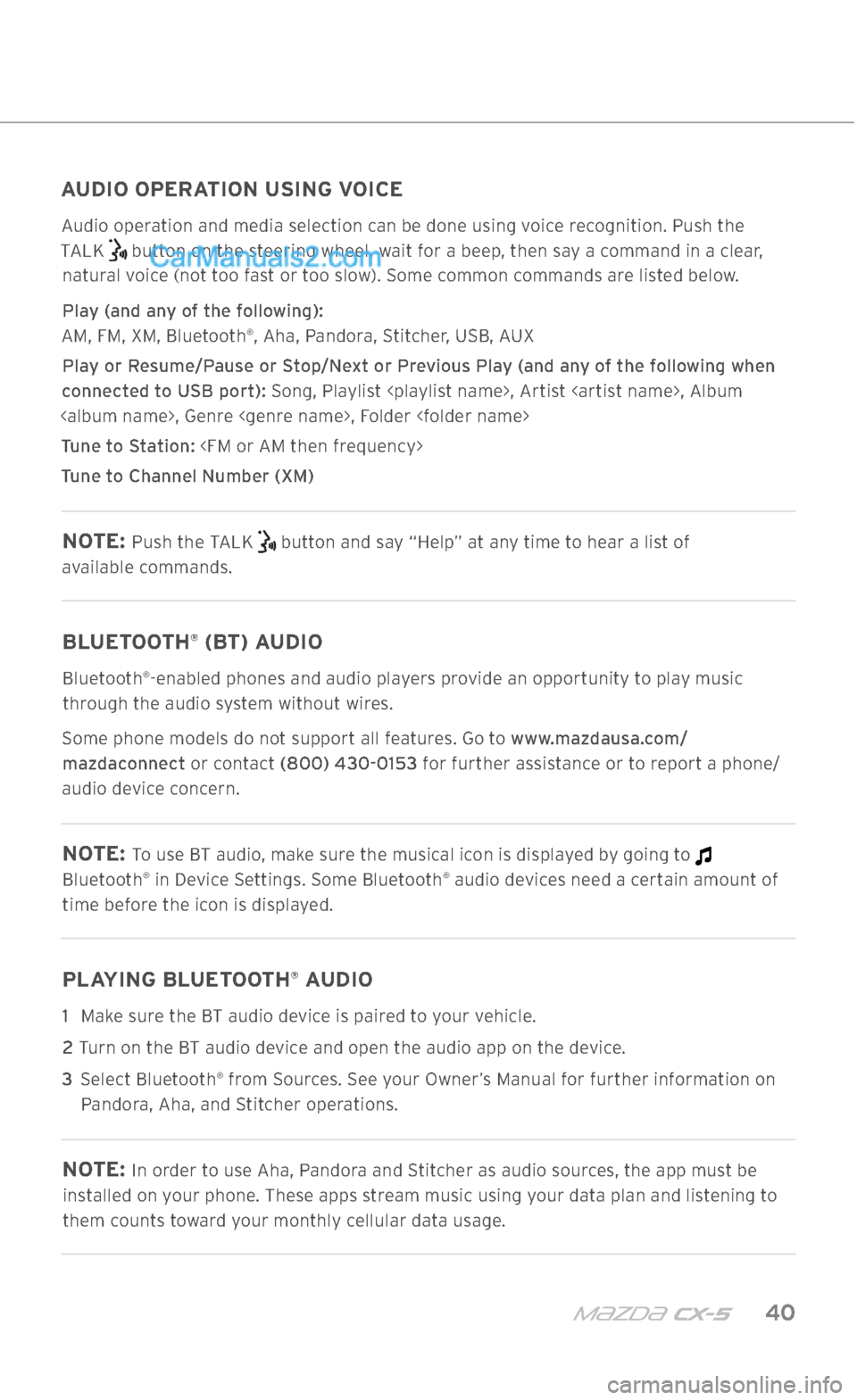
AUDIO OPERATION USING VOICE
Audio operation and media selection can be done using voice recognition. Push the
TALK
button on the steering wheel, wait for a beep, then say a command in a clear,
natural voice (not too fast or too slow). Some common commands are listed below.
Play (and any of the following):
AM, FM, XM, Bluetooth
®, Aha, Pandora, Stitcher, USB, AUX
Play or Resume/Pause or Stop/Next or Previous Play (and any of the following when
connected to USB port): Song, Playlist
Tune to Station:
Tune to Channel Number (XM)
NOTE: Push the TALK button and say “Help” at any time to hear a list of
available commands.
BLUETOOTH® (BT) AUDIO
Bluetooth®-enabled phones and audio players provide an opportunity to play music
through the audio system without wires.
Some phone models do not support all features. Go to www.mazdausa.com/ mazdaconnect or contact (800) 430-0153 for further assistance or to report a phone/
audio device concern.
NOTE: To use BT audio, make sure the musical icon is displayed by going to
Bluetooth® in Device Settings. Some Bluetooth® audio devices need a certain amount of
time before the icon is displayed.
PLAYING BLUETOOTH® AUDIO
1 Make sure the BT audio device is paired to your vehicle.
2
Turn on the BT audio device and open the audio app on the device.
3 Select Bluetooth
® from Sources. See your Owner’s Manual for further information on
Pandora, Aha, and Stitcher operations.
NOTE: In order to use Aha, Pandora and Stitcher as audio sources, the app must be
installed on your phone. These apps stream music using your data plan and listening to
them counts toward your monthly cellular data usage.
2364256 17a CX-5 SSG 030117.indd 403/1/17 5:52 PM
Page 46 of 58
45 MAZDAUSA.COM
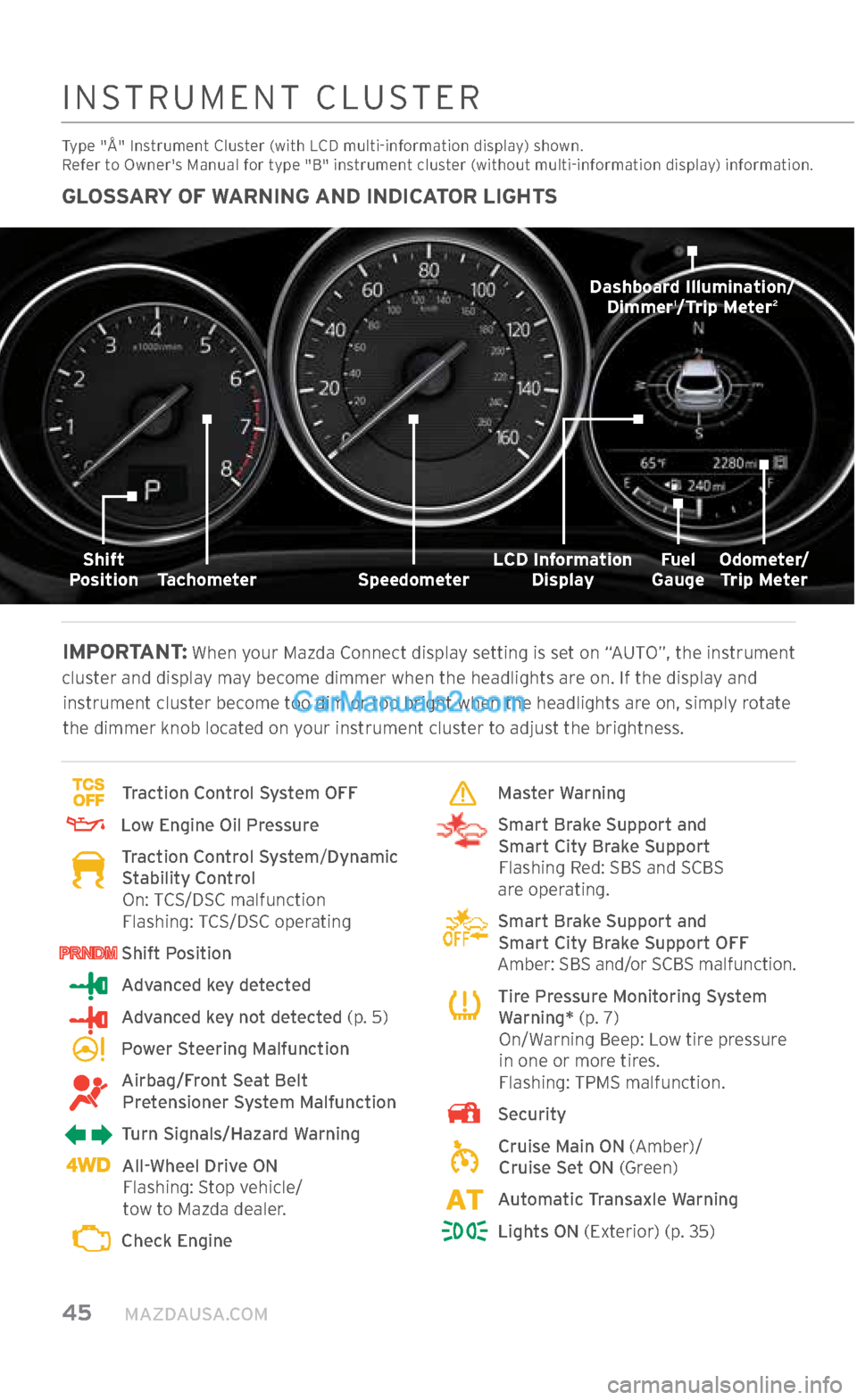
GLOSSARY OF WARNING AND INDICATOR LIGHTS
IMPORTANT:
When your Mazda Connect display setting is set on “AUTO”, the instrument
cluster and display may become dimmer when the headlights are on. If the display and instrument cluster become too dim or too bright when the headlights are on, simply rotate
the dimmer knob located on your instrument cluster to adjust the brightness.
Traction Control System OFF
Low Engine Oil Pressure
Traction Control System/ Dynamic
Stability Control
On: TCS/DSC malfunction
Flashing: TCS/DSC operating
Shift Position
Advanced key detected
Advanced key not detected (p. 5)
Power Steering Malfunction
Airbag/Front Seat Belt
Pretensioner System Malfunction
Turn Signals/Hazard Warning
All-Wheel Drive ON
Flashing: Stop vehicle/
tow to Mazda dealer.
Check Engine
Master Warning
Smart Brake Support and
Smart City Brake Support
Flashing Red: SBS and SCBS
are operating.
Smart Brake Support and
Smart City Brake Support OFF
Amber: SBS and/or SCBS malfunction.
Tire Pressure Monitoring System
Warning* (p. 7)
On/Warning Beep: Low tire pressure in one or more tires.
Flashing: TPMS malfunction.
Security
Cruise Main ON (Amber)/
Cruise Set ON (Green)
Automatic Transaxle Warning
Lights ON (Exterior) (p. 35)
INSTRUMENT CLUSTER
Type "Å" Instrument Cluster (with LCD multi-information display) shown.
Refer to Owner's Manual for type "B" instrument cluster (without multi-information display) information.
Fuel
Gauge
LCD Information
Display
Dashboard Illumination/
Dimmer1/Trip Meter2
Speedometer
Tachometer
Shift
Position Odometer/
Trip Meter
2364256 17a CX-5 SSG 030117.indd 453/1/17 5:53 PM