phone MAZDA MODEL CX-7 2010 (in English) User Guide
[x] Cancel search | Manufacturer: MAZDA, Model Year: 2010, Model line: MODEL CX-7, Model: MAZDA MODEL CX-7 2010Pages: 510, PDF Size: 8.55 MB
Page 310 of 510

Black plate (310,1)
3. The name of the Bluetooth unit device
is displayed.
4. Rotate the audio control dial to select
the information for the Bluetooth unit
which you would like to view.
Device nameBT address
NOTE
When“GO BACK”is selected and the audio
control dial is pressed, the display returns to
“DEVICE INFO”.
qHow to Use the Bluetooth Audio
System
Switching to Bluetooth audio mode
To listen to music or voice audio recorded
to a Bluetooth audio device, switch to the
Bluetooth audio mode to operate the
audio device using the audio system
control panel.
Any Bluetooth audio device must be
programmed to the vehicle's Bluetooth
unit before it can be used. (Refer to
“Bluetooth audio device programming”)
1. Turn the ignition switch to the ACC or
ON position.2. Turn on the Bluetooth audio device's
power.
Make sure that the“
”symbol is
displayed in the information display.
The symbol is not displayed if an
unprogrammed Bluetooth audio device
is being used or the vehicle's Bluetooth
unit has a malfunction.
NOTE
Some Bluetooth audio devices need a certain
amount of time before the“
”symbol is
displayed.
3. Press the AUX button to switch the
Bluetooth audio mode to“BT Audio”.
4. The audio recorded to the Bluetooth
audio device begins playback.
NOTE
lIf the Bluetooth audio device does not begin
playback, press the Play/Pause button
(
).lIf the mode is switched from Bluetooth
audio mode to another mode (radio mode),
audio playback from the Bluetooth audio
device stops.
lIf a call is received on a hands-free mobile
phone during playback from the Bluetooth
audio device, the playback is stopped.
Playback from the Bluetooth audio device
resumes after the call ends.
Playback
1. To listen to a Bluetooth audio device
over the vehicle's speaker system,
switch the mode to Bluetooth audio
mode. (Refer to
“Switching to Bluetooth audio mode”)
2. To stop playback, press the Play/Pause
button (
).
3. Press the button again to resume
playback.
6-70
Interior Comfort
Bluetooth Audio
CX-7_8AS7-EA-09E_Edition2 Page310
Friday, June 5 2009 2:26 PM
Form No.8AS7-EA-09E
Page 312 of 510

Black plate (312,1)
Bluetooth Hands-Freeí
qWhat is Bluetooth Hands-Free?
Bluetooth Hands-Free Outline
By connecting a Bluetooth equipped
device (Mobile phone) to the hands-free
unit equipped on the vehicle, making and
receiving calls are possible using the talk
button, pick-up button and hang-up button
located on the steering wheel, and saying
the voice commands.
WARNING
Perform phonebook registration related
operations while the vehicle is parked:
Performing phonebook registration
while driving the vehicle could be a
distraction to your driving and result
in an accident. In addition, a mistake
in performing the phonebook
operation could result in the loss of
important data.
Bluetooth equipped device (Mobile
phone)
A Bluetooth equipped device (Mobile
phone) communicates with the hands-free
unit equipped on the vehicle using radio
transmission (Bluetooth).
For example, if the device (Mobile phone)
is placed in a coat pocket, the phone calls
can be made through your mobile service
without taking out and handling the
device (Mobile phone).
CAUTION
The types of devices (Mobile phone)
which can be connected to the
hands-free unit are limited, so before
purchasing or changing your device
(Mobile phone) model, consult
Mazda Bluetooth Hands-Free
Customer Service or visit
www.MazdaUSA.com/bluetooth for a
complete list of compatible phones.
Devices (Mobile phone) which can be
connected to the hands-free system
need to be compliant with Bluetooth
specifications and the appropriate
profile, however, even among these
Bluetooth devices (Mobile phone) are
some which will not connect with
your Mazda or will have limited
function. Therefore, consult Mazda
Bluetooth Hands-Free Customer
Service for information regarding
device (Mobile phone) compatibility:
Phone: 800-430-0153
Web: www.MazdaUSA.com/
bluetooth
Applicable Bluetooth specification
Ver. 2.0 or higher
Response profile
lHFP (Hands Free Profile) Ver. 1.5lDUN (Dial-up Networking Profile)
Ver. 1.1
lPBAP (Phone Book Access Profile)
Ver. 1.0
lA2DP (Advanced Audio Distribution
Profile) Ver. 1.0
lAVRCP (Audio/Video Remote Control
Profile) Ver. 1.0
6-72
Interior Comfort
íSome models.
Bluetooth Hands-Free
CX-7_8AS7-EA-09E_Edition2 Page312
Friday, June 5 2009 2:26 PM
Form No.8AS7-EA-09E
Page 313 of 510
Black plate (313,1)
lOPP (Object Push Profile) Ver. 1.1
Bluetooth is the registered trademark of
Bluetooth SIG. Inc.
NOTE
lThe Bluetooth Hands-Free system is
operable several seconds after turning the
ignition switch to the ACC or ON position
(requires less than 15 seconds).
lIf the ignition switch is turned off during a
hands-free call, the line is transferred to the
device (Mobile phone) automatically.
lIf the device (Mobile phone) is in a location
where radio reception is difficult such as a
metal container or in the trunk, the call may
not be connected using Bluetooth. If
communication is not possible, change the
location of the device (Mobile phone).
qComponent Parts
Bluetooth Hands-Free consists of the
following items:
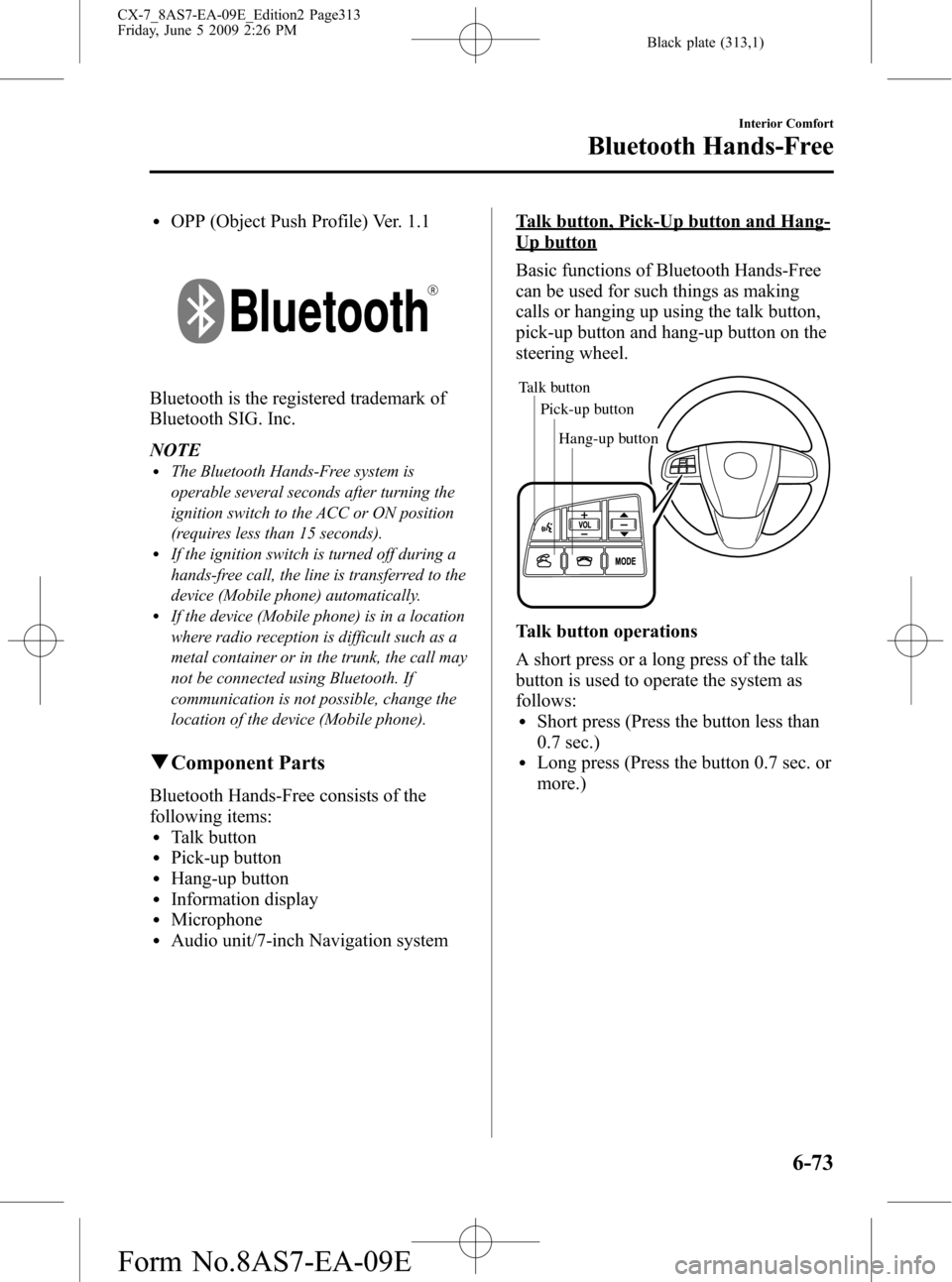
lTalk buttonlPick-up buttonlHang-up buttonlInformation displaylMicrophonelAudio unit/7-inch Navigation system
Talk button, Pick-Up button and Hang-
Up button
Basic functions of Bluetooth Hands-Free
can be used for such things as making
calls or hanging up using the talk button,
pick-up button and hang-up button on the
steering wheel.
Talk button
Pick-up buttonTalk button
Hang-up button Pick-up button
Talk button operations
A short press or a long press of the talk
button is used to operate the system as
follows:
lShort press (Press the button less than
0.7 sec.)
lLong press (Press the button 0.7 sec. or
more.)
Interior Comfort
Bluetooth Hands-Free
6-73
CX-7_8AS7-EA-09E_Edition2 Page313
Friday, June 5 2009 2:26 PM
Form No.8AS7-EA-09E
Page 314 of 510
Black plate (314,1)
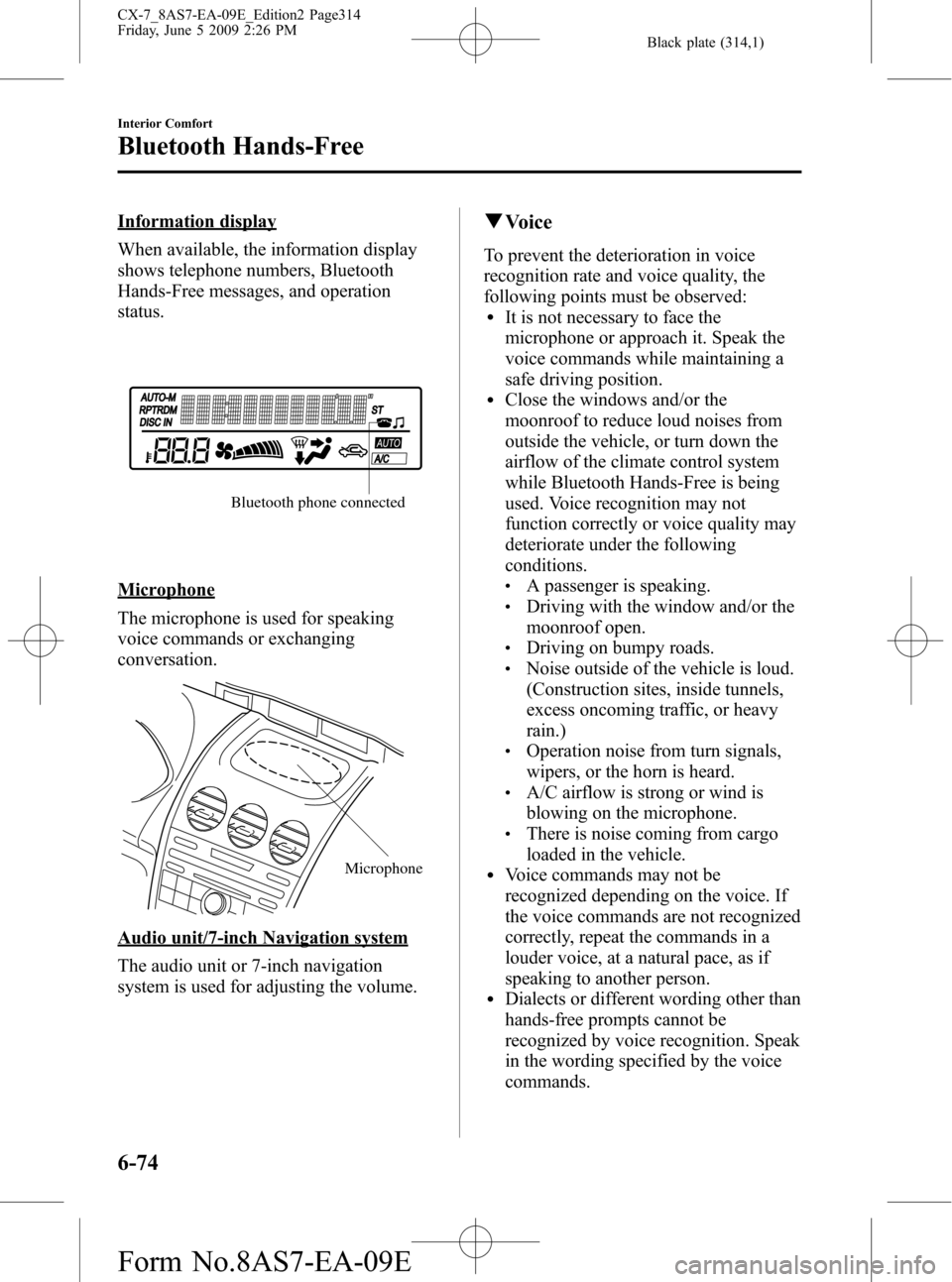
Information display
When available, the information display
shows telephone numbers, Bluetooth
Hands-Free messages, and operation
status.
Bluetooth phone connected
Microphone
The microphone is used for speaking
voice commands or exchanging
conversation.
Microphone
Audio unit/7-inch Navigation system
The audio unit or 7-inch navigation
system is used for adjusting the volume.
qVoice
To prevent the deterioration in voice
recognition rate and voice quality, the
following points must be observed:
lIt is not necessary to face the
microphone or approach it. Speak the
voice commands while maintaining a
safe driving position.
lClose the windows and/or the
moonroof to reduce loud noises from
outside the vehicle, or turn down the
airflow of the climate control system
while Bluetooth Hands-Free is being
used. Voice recognition may not
function correctly or voice quality may
deteriorate under the following
conditions.
lA passenger is speaking.lDriving with the window and/or the
moonroof open.
lDriving on bumpy roads.lNoise outside of the vehicle is loud.
(Construction sites, inside tunnels,
excess oncoming traffic, or heavy
rain.)
lOperation noise from turn signals,
wipers, or the horn is heard.
lA/C airflow is strong or wind is
blowing on the microphone.
lThere is noise coming from cargo
loaded in the vehicle.
lVoice commands may not be
recognized depending on the voice. If
the voice commands are not recognized
correctly, repeat the commands in a
louder voice, at a natural pace, as if
speaking to another person.
lDialects or different wording other than
hands-free prompts cannot be
recognized by voice recognition. Speak
in the wording specified by the voice
commands.
6-74
Interior Comfort
Bluetooth Hands-Free
CX-7_8AS7-EA-09E_Edition2 Page314
Friday, June 5 2009 2:26 PM
Form No.8AS7-EA-09E
Page 315 of 510
Black plate (315,1)
NOTE
If the voice recognition performance is not
satisfactory, refer to“Voice Recognition
Learning Function (Speaker Enrollment)”
(page 6-93).
Please be aware that the voice recognition
may error despite following the above
points.
qFunction Restrictions While
Using Bluetooth Hands-Free
Some functions are limited while
Bluetooth Hands-Free is being used. They
include:
lBeep sound and voice guidance related
to the audio unit and 7-inch navigation
system are not heard.
lBeep sound related to the A/C
operation is not heard.
lThe 7-inch navigation system's voice
recognition command does not
function.
qHow to Use This Section
Descriptions in the text are as follows:
Say:Voice commands to be spoken by
you.
Prompt:Voice guidance output from the
speaker.
NOTE
Say voice commands after the beep sound
[Beep] is heard.
Example)
Say:[Beep]“Dial”
Prompt:“Number, please”
Say:[Beep]“XXXXXXXXXXX (Ex.
“555-1234”) (Telephone number)”NOTE
To cancel a particular voice guidance in
midstream and have the system perform a
different operation, press the talk button and
say the applicable voice command while the
voice guidance is playing.
Bluetooth Hands-Free Activation
Method
Press the pick-up button (with/without 7-
inch navigation system) or talk button
with a short press (without 7-inch
navigation system) or a long press (with
7-inch navigation system).
NOTE
For vehicles with the 7-inch navigation system,
you can also press the talk button with a short
press and say: [Beep]“Telephone”or
“Phone”.
The hands-free system is activated.
Functions of the hands-free telephone,
such as making and receiving calls, can be
used after the activation. (For details on
the telephone functions, refer to“Basic
Bluetooth Hands-Free Operation”or
“Convenient Use of the Hands-Free
System”.)
NOTE
For vehicles with a 7-inch navigation system,
the system operates by speaking the voice
recognition command of the 7-inch navigation
system after pressing the talk button with a
short press. For voice recognition details with
the 7-inch navigation system, refer to the
separate“NAVIGATION SYSTEM Owner's
Manual”.
Interior Comfort
Bluetooth Hands-Free
6-75
CX-7_8AS7-EA-09E_Edition2 Page315
Friday, June 5 2009 2:26 PM
Form No.8AS7-EA-09E
Page 316 of 510
Black plate (316,1)
Tutorial
The tutorial explains how to use
Bluetooth Hands-Free.
To activate the tutorial, do the following:
1. Press the pick-up button (with/without
7-inch navigation system) or talk
button with a short press (without 7-
inch navigation system) or a long press
(with 7-inch navigation system).
NOTE
For vehicles with the 7-inch navigation system,
you can also press the talk button with a short
press and say: [Beep]“Telephone”or
“Phone”.
2.Say:[Beep]“Tutorial”
3. Follow the prompts to receive the
appropriate voice guidance
instructions.
Cancel
The Bluetooth Hands-Free system
transitions to idling status if the following
operation is performed while the system is
activating.
Press the hang-up button, or the talk
button with a long press.
Basic Bluetooth Hands-
Free Operation
qBluetooth Hands-Free Preparation
Language setting
The available languages are English,
Spanish, and Canadian French. If the
language setting is changed, all of the
voice guidance and voice input
commands are done in the selected
language.
NOTE
lIf the language setting is changed, device
registration is maintained.
Phonebook records are not cleared, but
each language has a separate phonebook.
Therefore, entries created in one language
will need to be re-entered in the phonebook
of the new language.
lDo these steps before you start driving.
These less used functions are too
distracting to undertake while driving until
you are fully familiar with the system.
Method 1
1. Press the pick-up button (with/without
7-inch navigation system) or talk
button with a short press (without 7-
inch navigation system) or a long press
(with 7-inch navigation system).
NOTE
For vehicles with the 7-inch navigation system,
you can also press the voice recognition/
hands-free switch with a short press and say:
[Beep]“Telephone”or“Phone”.
2.Say:[Beep]“Setup”
3.Prompt:“Select one of the following:
Pairing options, confirmation prompts,
language, passcode, select phone or
select music player.”
6-76
Interior Comfort
Bluetooth Hands-Free
CX-7_8AS7-EA-09E_Edition2 Page316
Friday, June 5 2009 2:26 PM
Form No.8AS7-EA-09E
Page 317 of 510
![MAZDA MODEL CX-7 2010 (in English) User Guide Black plate (317,1)
4.Say:[Beep]“Language”
5.Prompt:“Select a language: English,
French, or Spanish.”
6.Say:[Beep]“French”(Speak the
desired language:“English”,“French”
or“Spanis](/img/28/13897/w960_13897-316.png "MAZDA MODEL CX-7 2010 (in English) User Guide Black plate (317,1)
4.Say:[Beep]“Language”
5.Prompt:“Select a language: English,
French, or Spanish.”
6.Say:[Beep]“French”(Speak the
desired language:“English”,“French”
or“Spanis")
Black plate (317,1)
4.Say:[Beep]“Language”
5.Prompt:“Select a language: English,
French, or Spanish.”
6.Say:[Beep]“French”(Speak the
desired language:“English”,“French”
or“Spanish”)
NOTE
Other language settings can also be made
while in the current setting by saying the name
of the language in the native pronunciation.
7.Prompt:“French (Desired language)
selected. Is this correct?”
8.Say:[Beep]“Ye s”
9.Prompt:“French (Desired language)
selected, returning to main menu”
(Spoken in the newly selected
language).
Method 2
1. Press the pick-up button (with/without
7-inch navigation system) or talk
button with a short press (without 7-
inch navigation system) or a long press
(with 7-inch navigation system).
NOTE
For vehicles with the 7-inch navigation system,
you can also press the voice recognition/
hands-free switch with a short press and say:
[Beep]“Telephone”or“Phone”.
2.Say:[Beep]“French”(Say the desired
language:“English”,“French”,or
“Spanish”.) (Change the desired
language by saying the language
name.)
NOTE
Other language settings can also be made
while in the current setting by saying the name
of the language in the native pronunciation.
3.Prompt:“Would you like to change
the language to French (Desired
language) ?”
4.Say:[Beep]“Ye s”
5.Prompt:“Please wait. Switching to
French phonebook. French selected,
returning to main menu”(Spoken in
the newly selected language).
Device programming (Pairing)
To use Bluetooth Hands-Free, the device
equipped with Bluetooth has to be
programmed to the hands-free unit using
the following procedure.
A maximum of seven devices including
hands-free mobile phones and Bluetooth
audio devices can be programmed to one
vehicle.
NOTE
lA device can be programmed only when the
vehicle is parked. If the vehicle starts to
move, the pairing procedure will end.
Programming is dangerous while driving -
pair up your device before you start
driving. Park the car in a safe place before
programming.
lIf a Bluetooth device has already been
programmed to the vehicle as a Bluetooth
audio device, it does not need to be
programmed again when using the device
as a hands-free mobile phone. Conversely,
it does not need to be programmed again as
a Bluetooth audio device if it has already
been programmed as a hands-free mobile
phone.
lSince the communication range of a
Bluetooth equipped device is about 10
meters (32 ft), if a device is placed within a
10-meter (32 ft) radius of the vehicle, it may
be detected/programmed unintentionally
while another device is being programmed.
Interior Comfort
Bluetooth Hands-Free
6-77
CX-7_8AS7-EA-09E_Edition2 Page317
Friday, June 5 2009 2:26 PM
Form No.8AS7-EA-09E
Page 318 of 510

Black plate (318,1)
1. Activate the Bluetooth application of
the device.
NOTE
For the operation of the device, refer to its
instruction manual.
2. Press the pick-up button (with/without
7-inch navigation system) or talk
button with a short press (without 7-
inch navigation system) or a long press
(with 7-inch navigation system).
NOTE
For vehicles with the 7-inch navigation system,
you can also press the voice recognition/
hands-free switch with a short press and say:
[Beep]“Telephone”or“Phone”.
3.Say:[Beep]“Setup”
4.Prompt:“Select one of the following:
Pairing options, confirmation prompts,
language, passcode, select phone or
select music player.”
5.Say:[Beep]“Pairing options”
6.Prompt:“Select one of the following:
Pair, edit, delete, or list.”
7.Say:[Beep]“Pair”
8.Prompt:“Please say a 4-digit pairing
code.”
9.Say:[Beep]“XXXX”(Speak an
arbitrary 4-digit pairing code. This can
be any combination of 4 numbers.)
NOTE
lSome devices accept only a particular
pairing code (Usually,“0000”or“1234”).
If pairing cannot be completed, refer to the
owner's manual of your mobile device, and
try those numbers if necessary.
lRecord the code as it will be used to
program your device in Step 16.
10.Prompt:“Pairing code XXXX (4-
digit number). Is this correct?”
11.Say:[Beep]“Ye s”or“No”
12. If“Ye s”, go to Step 13.
If“No”, the procedure returns to Step
8.
13.Prompt:“Start pairing procedure on
the device. See the device manual for
instructions.”
14. Using the device, perform a search
for the Bluetooth device (Peripheral
device).
NOTE
For the operation of the device, refer to its
instruction manual.
15. Select“Mazda”from the device list
searched by the device.
16. Input the 4-digit pairing code set in
Step 9 to the device.
17.Prompt:“Please say the name of the
device after the beep.”
18.Say:[Beep]“XXXX - - -”(Speak a
“device tag”, an arbitrary name for
the device.)
Example:“Stan's device.”
NOTE
Speak a programmed“device tag”within 10
seconds.
If more than two devices are to be
programmed, they cannot be programmed with
the same or similar“device tag”.
19.Prompt:“Adding XXXXXX - - -
(Ex.“Stan's device”) (Device tag). Is
this correct?”
20.Say:[Beep]“Ye s”
21.Prompt:“Pairing complete”
6-78
Interior Comfort
Bluetooth Hands-Free
CX-7_8AS7-EA-09E_Edition2 Page318
Friday, June 5 2009 2:26 PM
Form No.8AS7-EA-09E
Page 319 of 510

Black plate (319,1)
After a device is registered, the system
automatically identifies the device. By
activating Bluetooth Hands-Free again, or
by activating Bluetooth Hands-Free first
after turning the ignition switch from the
LOCK to the ACC position, the system
reads out a voice guidance,“XXXXXX -
- - (Ex.“Stan's device”) (Device tag) is
connected”.
NOTE
lDevice registration can also be done by
operating the audio unit or panel buttons
on the navigation unit. Refer to“Bluetooth
Audio Preparation”(page 6-64)(For audio
unit) or the separate manual
“NAVIGATION SYSTEM Owner's Manual”
(For navigation unit).
lDepending on the device, the registration
status may be lost after a certain period of
time. If this occurs, repeat the entire
process from Step 1.
qMaking a Call Using a Telephone
Number
NOTE
Practice this while parked until you are
confident you can do it while driving in a non-
taxing road situation. If you are not completely
comfortable, make all calls from a safe
parking position, and move out only when fully
under control and you can devote your eyes
and mind to driving.
1. Press the pick-up button (with/without
7-inch navigation system) or talk
button with a short press (without 7-
inch navigation system) or a long press
(with 7-inch navigation system).
NOTE
For vehicles with the 7-inch navigation system,
you can also press the voice recognition/
hands-free switch with a short press and say:
[Beep]“Telephone”or“Phone”.
2.Say:[Beep]“Dial”
3.Prompt:“Number, please”
4.Say:[Beep]“XXXXXXXXXXX (Ex.
“555-1234”) (Telephone number)”
5.Prompt:“Dialing XXXXXXXXXXX
(Ex.“555-1234”) (Telephone number)
is this correct?”
6.Say:[Beep]“Ye s”or“No”.
7. When“Ye s”is spoken, the procedure
proceeds to Step 8.
When“No”is spoken, the procedure
returns to Step 3.
8.Prompt:“Dialing”
NOTE
The“Dial”command and a telephone number
can be combined.
Ex. In Step 2, say,“Dial 123-4567”, then,
Steps 3 and 4 can be skipped.
qReceiving an Incoming Call
1.Prompt:“Incoming call, press the
pickup button to answer”.
2. To accept the call, press the pick-up
button.
To reject the call, press the hang-up
button.
Interior Comfort
Bluetooth Hands-Free
6-79
CX-7_8AS7-EA-09E_Edition2 Page319
Friday, June 5 2009 2:26 PM
Form No.8AS7-EA-09E
Page 321 of 510

Black plate (321,1)
Convenient Use of the
Hands-Free System
qPhonebook Usage
Phonebook registration
Phone numbers can be registered to the
Bluetooth Hands-Free phonebook.
NOTE
Do this function only when parked. It is too
distracting to attempt while driving and you
may make too many errors to be effective.
1. Press the pick-up button (with/without
7-inch navigation system) or talk
button with a short press (without 7-
inch navigation system) or a long press
(with 7-inch navigation system).
NOTE
For vehicles with the 7-inch navigation system,
you can also press the voice recognition/
hands-free switch with a short press and say:
[Beep]“Telephone”or“Phone”.
2.Say:[Beep]“Phonebook”
3.Prompt:“Select one of the following:
New entry, edit, list names, delete,
erase all or import contact.”
4.Say:[Beep]“New entry”
5.Prompt:“Name please.”
6.Say:[Beep]“XXXXX... (Ex.“Mary's
phone”)”(Say a voice tag for the name
registered.)
7.Prompt:“Adding XXXXX... (Ex.
“Mary's phone”) (Registered voice
tag). Is this correct?”
8.Say:[Beep]“Ye s”
9.Prompt:“Home, Work, Mobile, or
Other?”10.Say:[Beep]“Mobile”(Say“Home”,
“Work”,“Mobile”,or“Other”, for the
desired location to be registered.)
11.Prompt:“Mobile”(Location to be
registered). Is this correct?
12.Say:[Beep]“Ye s”
13.Prompt:“Number, please.”
14.Say:[Beep]“XXXXXXXXXXX
(Ex.“555-1234”)”(Say the phone
number to be registered.)
15.Prompt:“XXXXXXXXXXX (Ex.
“555-1234”) (Phone number
registration). Is this correct?”
16.Say:[Beep]“Ye s”
17.Prompt:“Number saved. Would you
like to add another number for this
entry?”
18.Say:[Beep]“Ye s”or“No”.
19. If“Ye s”, an additional phone number
registration can be made for the same
entry.
If“No”, the procedure proceeds to
Step 20.
20.Prompt:“Returning to main menu.”
Import contact
Phonebook data from your device (Mobile
phone) can be sent and registered to your
Bluetooth Hands-Free phonebook using
Bluetooth.
1. Press the pick-up button (with/without
7-inch navigation system) or talk
button with a short press (without 7-
inch navigation system) or a long press
(with 7-inch navigation system).
Interior Comfort
Bluetooth Hands-Free
6-81
CX-7_8AS7-EA-09E_Edition2 Page321
Friday, June 5 2009 2:26 PM
Form No.8AS7-EA-09E