battery MERCEDES-BENZ C CLASS 2018 Owner's Manual
[x] Cancel search | Manufacturer: MERCEDES-BENZ, Model Year: 2018, Model line: C CLASS, Model: MERCEDES-BENZ C CLASS 2018Pages: 370, PDF Size: 6.25 MB
Page 143 of 370
Automa tic engine switch-off
If thevehicl eis braked to astandstill wit hth e
transmission in hori, theECO start/sto p
function switches off th eengin eautomatically.
The ECO start/sto pfunction is operational
when :
Rtheindicator lamp in th eECO butto nis lit
green
Rth eoutside temperature and th eatmospheric
air pressur eis within th erange that is suitable
for th esystem
Rth eengin eis at normal operating temperature
Rth eset temperature for th evehicl einterior
has been reached
Rth ebattery is sufficientl ycharge d
Rthesystem detects that th ewindshield is no t
fogged up when th eair-conditioning system is
switched on
Rth ehoo dis closed
Rth edriver's door is closed and th edriver's
seat belt is fastene d
All of th evehicle's systems remain active when
th eengin eis stoppe dautomatically.
The HOLD function can also be activated if th e
engin ehas been switched off automatically. It is
then no tnecessar yto continu eapplyin gth e
brakes during th eautomatic stop phase. When
you depress th eaccelerato rpedal ,th eengin e
start sautomatically and th ebraking effec tof
th eHOLD function is deactivated.
Mercedes-AMG C63 and Mercedes-
AMG C63 S: thenumber of consec utive a
uto
-
matic engin eswitch-off sis unlimited.
All other models: automatic engineswitch-off
can tak eplac e amaximum of four times in arow
(initial switch-off ,then three subsequen tswitch -
offs).
Aut oma tic engine start
The engin estart sautomatically if:
Ryou switch off th eECO start/sto pfunction by
pressing th eECO butto n
RMercedes-AMG C63 and Mercedes-AMG
C 63 S: you switch to drive program RACE
(S‑ MODEL), S+orS
Rall other models: you switch to drive pro -
gram S+
RMercedes-AMG vehicles: you permanently
activat emanual gearshifting (Ypage 152)
Rin transmission position hori, thebrak e
pedal is release dand th eHOLD function is no t
active
Ryou depress th eaccelerato rpedal
Ryou engage revers egear k
Ryou mov eth etransmission out of position j
Ryou unfasten your seat belt or open th edriv-
er' sdoor
Rth evehicl estart sto rol l
Rthebrak esystem require sthis
Rth etemperature in th evehicl einterior devi-
ate sfrom th eset range
Rth esystem detects moisture on th ewind-
shield when th eair-conditioning system is
switched on
Rth econdition of charge of th ebattery is to o
low
Shifting th etransmission to position jdoes
no tstart th eengine.
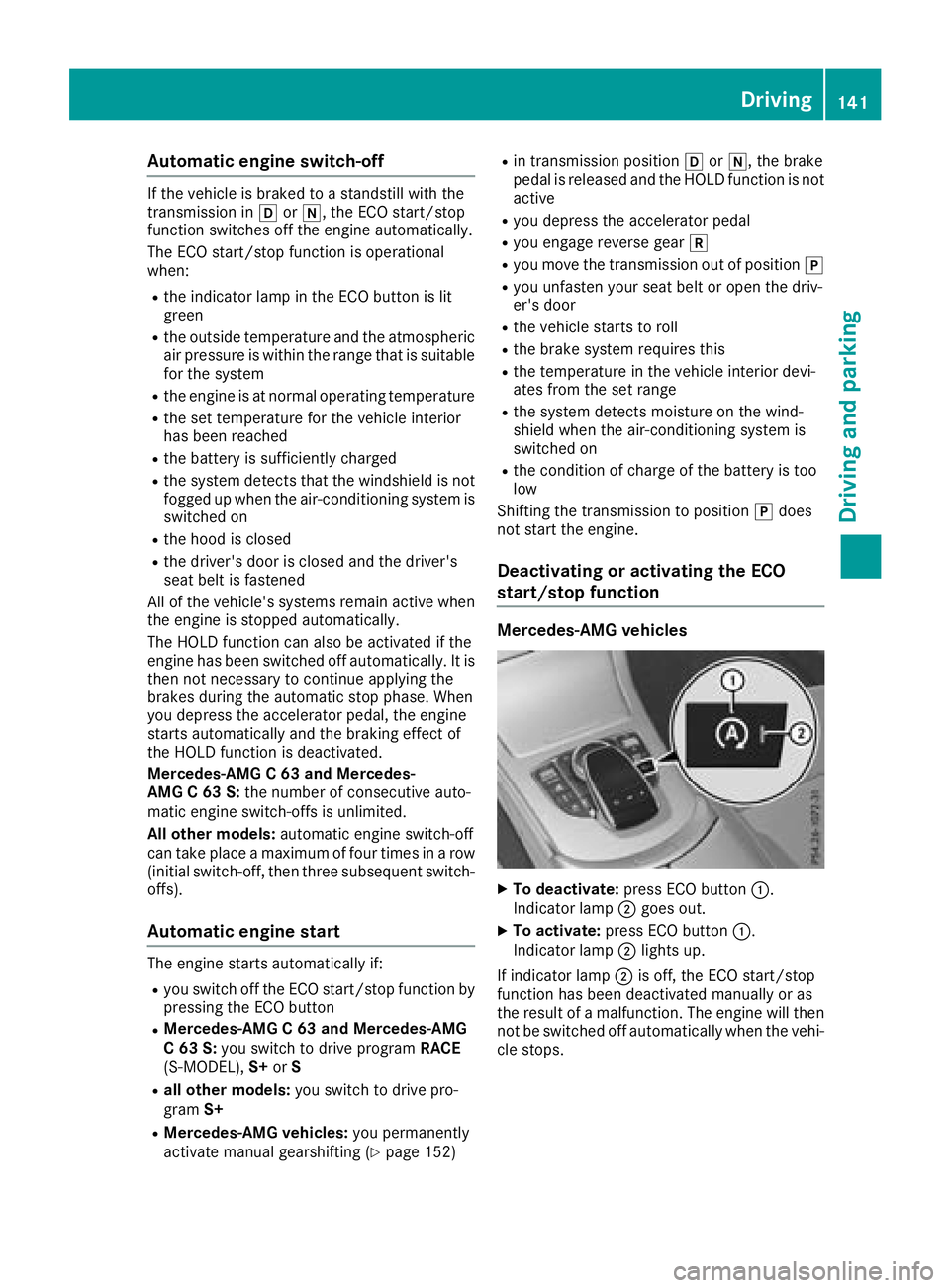
Deactivating oractivating the ECO
start/stop function
Mercedes-AM G vehicles
XTo deactivate: press ECO butto n:.
Indicato rlamp ;goe sout .
XTo activate: press ECO butto n:.
Indicato rlamp ;lights up.
If indicator lamp ;is off ,th eECO start/sto p
function has been deactivated manually or as
th eresult of amalfunction .The engin ewill then
no tbe switched off automatically when th evehi-
cle stops .
Driving141
Driving and parking
Z
Page 145 of 370
Problems with the engine
ProblemPossible causes/consequences andMSolutions
The engine does not
start.The HOLD function or Distance Pilot DISTRONIC is activated.
XDeactivate the HOLD function (Ypage 180) or Distance Pilot
DISTRONIC (Ypage 176).
XTry to start the engine again (Ypage 138).
The engine does not
start. The starter motor
can be heard.RThere is a malfunction in the engine electronics.
RThere is a malfunction in the fuel supply.
Before attempting to start the engine again:
XTurn the SmartKey back to position uin the ignition lock.
or
XPress the Start/Stop button repeatedly until all indicator lamps in
the instrument cluster go out.
XTry to start the engine again (Ypage 138). Avoid excessively long
and frequent attempts to start the engine as these will drain the
battery.
If the engine does not start after several attempts:
XConsult a qualified specialist workshop.
The engine does not
start. The starter motor
can be heard. The
reserve fuel warning
lamp is lit and the fuel
gauge display is at the
reserve level.The fuel tank is empty.
XRefuel the vehicle.
The engine does not
start. You cannot hear
the starter motor.The on-board voltage is too low because the battery is too weak or
discharged.
XJump-start the vehicle (Ypage 325).
If the engine does not start despite attempts to jump-start it:
XConsult a qualified specialist workshop.
The starter motor was exposed to a thermal load that was too high.
XTry to start the engine again (Ypage 138).
If the engine still does not start:
XConsult a qualified specialist workshop.
Driving143
Driving and parking
Z
Page 160 of 370
Problems with fuel and the fuel tank
ProblemPossible causes/consequences andMSolutions
Fuel is leaking from the
vehicle.GWARNING
The fuel line or the fuel tank is faulty.
Risk of explosion or fire.
XApply the electric parking brake.
XSwitch off the engine.
XRemove the SmartKey from the ignition lock.
or, in vehicles with KEYLESS-GO start-function or KEYLESS ‑GO
XOpen the driver's door.
The vehicle electronics are now in positionu. This is the same as
the key having been removed.
XDo not restart the engine under any circumstances.
XConsult a qualified specialist workshop.
The engine does not
start.The fuel tank of a vehicle with a diesel engine has been run completely
dry.
XRefuel the vehicle with at least 5.3 US qt (5 l) of diesel.
XTurn the ignition on for approximately ten seconds (Ypage 136).
XStart the engine continuously for up to ten seconds until it runs
smoothly.
If the engine does not start:
XTurn the ignition on again for approximately ten seconds
(Ypage 136).
XStart the engine again continuously for up to ten seconds until it
runs smoothly.
If the engine does not start after three attempts:
XConsult a qualified specialist workshop.
The fuel filler flap cannot
be opened.The fuel filler flap is not unlocked.
XUnlock the vehicle (Ypage 78).
The SmartKey battery is discharged or nearly discharged.
XUnlock the vehicle using the mechanical key (Ypage 80).
The fuel filler flap is unlocked, but the opening mechanism is jammed.
XConsult a qualified specialist workshop.
DEF (BlueTEC vehicles only)
General notes
To function properly, BlueTEC exhaust gas after-
treatment must be operated with the reducing
agent DEF. On vehicles with a 2.4 gal (9.0
l)DEF tank, add-
ing DEF is not part of the maintenance work.
When the DEF supply drops to a minimum, the
Check Additive See Owner's Manualmes-
sage is shown in the multifunction display.
If you drive the vehicle at a speed greater than
10 mph (16 km/h) after topping up, the Check
158Refueling
Driving and parking
Page 166 of 370
handle:is depressed, the greater the brak-
ing force.
During braking:
Ra warning tone sounds
Rthe Please Release Parking Brakemes-
sage appears
Rthe red F(USA only) or !(Canada
only) indicator lamp in the instrument cluster
flashes
When the vehicle has been braked to a stand-
still, the electric parking brake is engaged.
Parking the vehicle for a long period
If you leave the vehicle parked for longer than
four weeks, the battery may be damaged by
exhaustive discharging.
If you leave the vehicle parked for longer than six
weeks, the vehicle may suffer damage as a
result of lack of use.
XVisit a qualified specialist workshop and seek
advice.
iYou can obtain information about trickle
chargers from a qualified specialist work-
shop.
Hybrid vehicles: be sure to observe the notes
in the supplement. Otherwise, you may not rec-
ognize dangers.
Driving tips
General driving tips
Important safety notes
GWARNING
If you switch off the ignition while driving,
safety-relevant functions are only available
with limitations, or not at all. This could affect, for example, the power steering and the brake
boosting effect. You will require considerably
more effort to steer and brake. There is a risk
of an accident.
Do not switch off the ignition while driving.
GWARNING
If you operate mobile communication equip-
ment when driving, you may be distracted
from the traffic situation. You could also lose
control of the vehicle. There is a risk of an
accident.
Only operate this equipment when the vehicle
is stationary.
Observe the legal requirements for the country
in which you are driving. Some jurisdictions pro-
hibit the driver from using a mobile phone while driving a vehicle.
If you make a call while driving, always use
hands-free mode. Only operate the telephone
when the traffic situation permits. If you are
unsure, pull over to a safe location and stop
before operating the telephone.
Bear in mind that at a speed of only 30 mph
(approximately 50 km/h), the vehicle covers a
distance of 44 ft (approximately 14 m)per sec-
ond.
Drive sensibly – save fuel
Observe the following tips to save fuel:
XThe tires should always be inflated to the rec-
ommended tire pressure.
XRemove unnecessary loads.
XRemove roof racks when they are not needed.
XWarm up the engine at low engine speeds.
XAvoid frequent acceleration or braking.
XHave all maintenance work carried out as
indicated by the service intervals in the Main-
tenance Booklet or by the service interval dis-
play.
Fuel consumption also increases when driving in cold weather, in stop-start traffic and in hilly ter-
rain.
Drinking and driving
GWARNING
Drinking and driving and/or taking drugs and driving are very dangerous combinations.
Even a small amount of alcohol or drugs can
affect your reflexes, perceptions and judg-
ment.
164Driving tips
Driving and parking
Page 176 of 370
Drivingwit hDistance Pilo tDISTRONI C
Pullingawa yan ddrivin g
XTo pull awa ywit hDistance Pilo t
DISTRONIC: removeyour foot from th ebrake
pedal.
XBriefly pull th ecruise contro llever toward s
you ?.
or
XAccelerat ebriefly.
The vehicle pulls away and adapt sits speed to
that of th evehicle in front. If no vehicle is
detecte din front, your vehicle accelerates to
th estored speed.
The vehicle can also pull away when it is facin g
an unidentifie dobstacl eor is drivin gon adiffer-
en tlin efrom another vehicle. The vehicle then
brake sautomatically.
If Distanc ePilo tDISTRONIC doe sno tdetec t a
vehicle in front, th esyste moperates lik ecruise
control.
If Distanc ePilo tDISTRONIC detects that th e
vehicle in fron thas slowed down ,it brake sth e
vehicle. In this way, th especifie dminimum dis -
tanc eyou hav eselecte dis maintained.
If Distanc ePilo tDISTRONIC detects afaster-
movin gvehicle in front, it increase sth edrivin g
speed to th eset speed.
Selecting th edrive program
Distanc ePilo tDISTRONIC supports asport y
drivin gstyle when you hav eselecte dth eS or S+
drive program (
Ypage 150). Acceleration
behin dth evehicle in fron tor to th eset speed is
then noticeably more dynamic .If you hav e
selecte dth eC or Edrivin gprogram, th evehicle
accelerates more gently. Thi ssetting is recom -
mended in stop-and-start traffic .
Changinglanes
If you chang eto th eovertakin glane, Distanc e
Pilo tDISTRONIC supports you if:
Ryou are drivin gfaste rthan 45 mph (70 km/h)
Ryou switch on th eappropriat etur nsignal
RDistanc ePilo tDISTRONI Cdoes no tcurrentl y
detec t adanger of collision
If these condition sare fulfilled ,your vehicl eis
accelerated. Acceleration will be interrupted if
changin glanes takes to olon gor if th edistanc e
between your vehicl eand th evehicl ein fron t
become sto osmall. Whe
nyou chang elanes, Distanc ePilo t
DISTRONI Cmonitors th elef tlan e(on left-hand-
drive vehicles) or th eright lan e(on right-hand -
drive vehicles).
Stopping
GWARNIN G
If you leav eth evehicl ewhen it is only bein g
braked by Distanc ePilo tDISTRONIC, it could
rol laway if:
Rthere is amalfunction in th esystem or in
th evoltag esupply.
RDistanc ePilo tDISTRONI Cis switched off
usin gth ecruise control lever, e.g. by avehi-
cle occupant or from outside th evehicl e
Rtheelectrica lsystem in th eengin ecom-
partment, th ebattery or th efuses are tam -
pered with.
Rth ebattery is disconnected
Rth evehicl eis accelerated, e.g. by avehicl e
occupant .
There is aris kof an accident.
Befor eleavin gth evehicle, always deactivat e
Distanc ePilo tDISTRONI Cand secure th e
vehicl eagainst rollin gaway.
Further information on deactivatin gDistanc e
Pilo tDISTRONI C (
Ypage 176).
If Distanc ePilo tDISTRONI Cdetects that th e
vehicl ein fron tis stopping ,it brakes your vehicl e
to astop.
Once your vehicl eis stationary, it remain ssta-
tionary and you do no tneed to depress th e
brake.
Afte r atime, th eelectric parkin gbrak esecures
th evehicl eand relieves th eservic ebrake.
Dependin gon th especified minimum distance,
your vehicl ewill come to astandstill at asuf fi-
ci
ent distanc ebehind th evehicl ein front. The
specified minimum distanc eis set usin gth e
control on th ecruise control lever.
174Driving systems
Driving and parking
Page 181 of 370
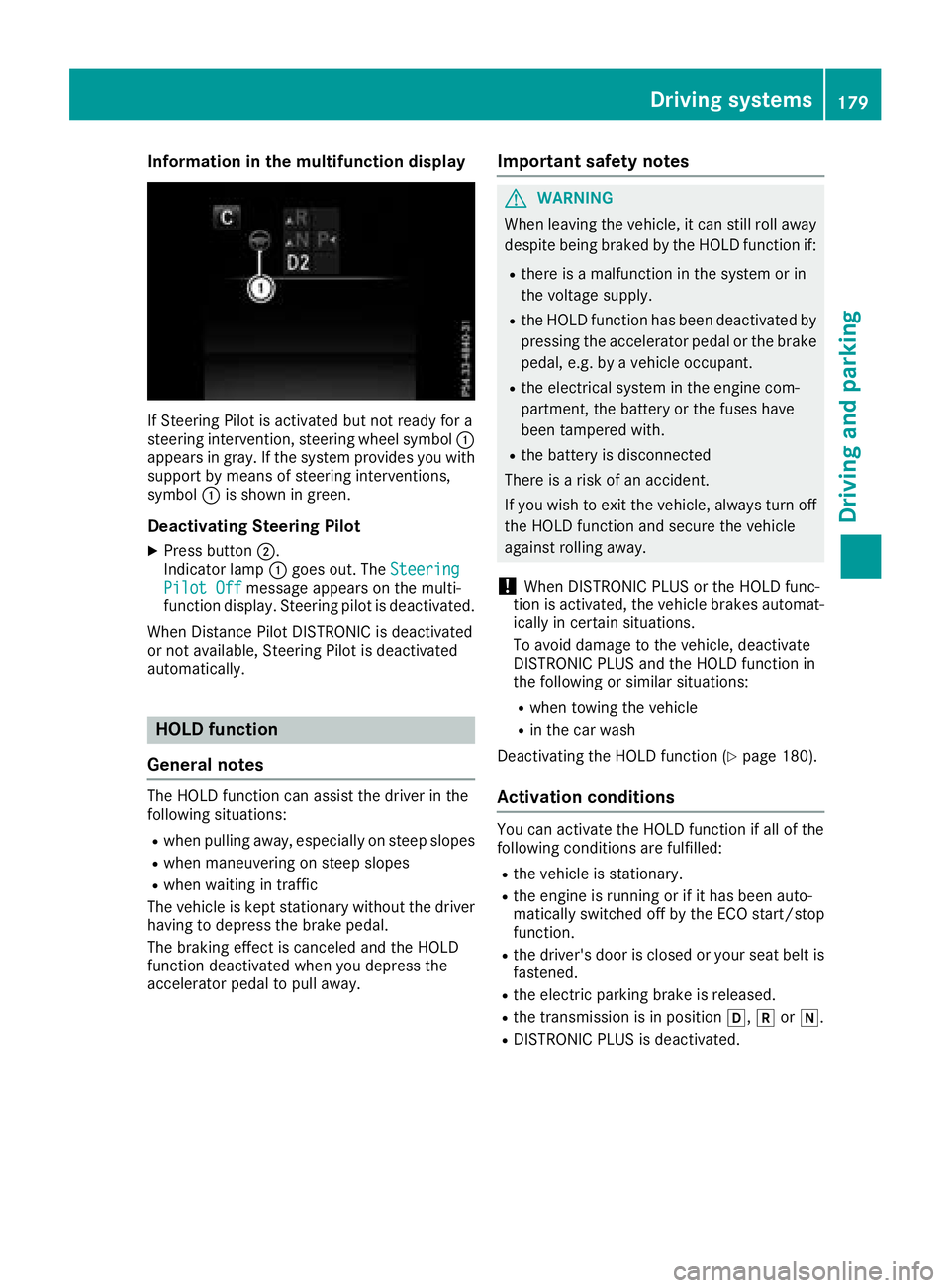
Information in the multifunction display
If Steering Pilot isactivated but not ready for a
steering intervention, steering wheel symbol :
appears ingray. Ifthe system provide s youwith
support bymeans of steering interventions,
symbol :isshown in green.
Deactivating Steering Pilot
XPress button ;.
Indic ator lamp :goes out. The Steering
Pilot Offmessage appears on the mult i-
function display.Steering pilot is deactivate d.
When Distance Pilot DI STRONIC isdeactivated
or not available, Steering Pilot isdeactivated
automatically.
HOLD function
General notes
The HOLD function can assist the driverinthe
fol lowin g situations:
Rwhen pulling away, especial lyon steep slopes
Rwhen maneuvering on steep slopes
Rwhen waitingintraff ic
The veh icle iskept stationary without the driver
having to depress the brake pedal.
The braking effect iscanceled and the HOLD
function deactivated when you depress the
accelerator pedal to pullaway.
Important safety notes
GWARNING
When leaving the vehicle, it can still roll away despite being braked bythe HOLD function if:
Rthere isa malfunction inthe system or in
the voltage supply.
Rthe HOLD function has been deactivated by
pressing the accelerator pedal or the brake
pedal, e.g. by a vehicle occupant.
Rthe electrical system inthe engine com-
partment, the battery or the fuses have
been tampered with.
Rthe battery is disconnected
There isa risk of an accident.
If you wish to exit the vehicle, always turn off
the HOLD function and secure the vehicle
against rolling away.
!When DISTRONIC PLUS or the HOLD func-
tion isactivated, the vehicle brakes automat-
ically incertain situations.
To avoid damage to the vehicle, deactivate
DI ST RONIC PLUS and the HOLD function in
the fol lowing or similar situations:
Rwhen to wing the vehicle
Rinthe car wash
Deactivating the HOLD function (
Ypage 180).
Activation conditions
You can activate the HOLD function ifall of the
fol lowin g conditions are fulfilled:
Rthe vehicle isstationary.
Rthe engine is running or if ithas been auto-
matical ly switched off by the ECO start/stop
function.
Rthe driver's door isclosed or your seat belt is
fastened.
Rthe electr icparking brake isreleased.
Rthe transmission isin position h,kori.
RDIST RONIC PLUS is deactivate d.
Driving systems179
Driving and parking
Z
Page 188 of 370
status indicator on the instrument cluster. When
a parking space has been detected, an arrow
towards the right or the left also appears. Park-
ing Pilot only displays parking spaces on the
front-passenger side as standard. Parking
spaces on the driver's side are displayed as
soon as the turn signal on the driver's side is
activated. When parking on the driver's side,
this must remain activated until you confirm the use of Parking Pilot by pressing the abutton
on the multifunction steering wheel. The system
automatically determines whether the parking
space is parallel or at right angles to the direc-
tion of travel.
A parking space is displayed while you are driv- ing past it, and until you are approximately 50 ft
(15 m) away from it.
Parking
GWARNING
If you leave the vehicle when it is only being
braked by Parking Pilot, it could roll away if:
Rthere is a malfunction in the system or in
the voltage supply.
Rthe electrical system in the engine com-
partment, the battery or the fuses are tam-
pered with.
Rthe battery is disconnected.
Rthe vehicle is accelerated, e.g. by a vehicle
occupant.
There is a risk of an accident.
Before leaving the vehicle, always secure it
against rolling away.
iIf Parking Assist PARKTRONIC detects
obstacles, Parking Pilot brakes automatically
whilst the vehicle is being parked. You are
responsible for braking in good time.
XStop the vehicle when the parking space sym- bol shows the desired parking space in the
instrument cluster.
XShift the transmission to position k.
The Start Parking Pilot?Yes: OKNo:% message appears on the multifunction
display.
XTo cancel the procedure: press the%
button on the multifunction steering wheel or pull away.
or
XParking using Parking Pilot: press button
a on the multifunction steering wheel.
The Parking Pilot Active Accelerate
and BrakeObserve Surroundingsmes-
sage appears on the multifunction display.
XLet go of the multifunction steering wheel.
XBack up the vehicle, being ready to brake at all
times. When backing up, drive at a speed
below approximately 6 mph (10 km/h). Oth-
erwise, Parking Pilot is canceled immediately. Parking Pilot brakes the vehicle to a standstill
when the vehicle approaches the rear border
of the parking space.
Maneuvering may be required in tight parking spaces.
The Parking Pilot Active Select D
Observe Surroundingsmessage appears on
the multifunction display.
XShift the transmission to position hwhen
the vehicle is stationary.
Parking Pilot immediately steers in the other
direction.
The Parking Pilot Active Accelerate
and BrakeObserve Surroundingsmes-
sage appears on the multifunction display.
iYou will achieve the best results by waiting
for the steering procedure to complete before
pulling away.
XDrive forwards and be ready to brake at all
times.
Parking Pilot brakes the vehicle to a standstill when the vehicle approaches the front border
of the parking space.
Maneuvering may be required in tight parking spaces.
The Parking Pilot Active Select R
Observe Surroundingsmessage appears on
the multifunction display.
As soon as the parking procedure is complete,
the Parking Pilot Finished
message
appears and a warning tone sounds. The vehicle
is now parked.
The vehicle is kept stationary without the driver having to depress the brake pedal. The braking
effect is canceled when you depress the accel-
erator pedal.
186Driving systems
Driving and parking
Page 217 of 370
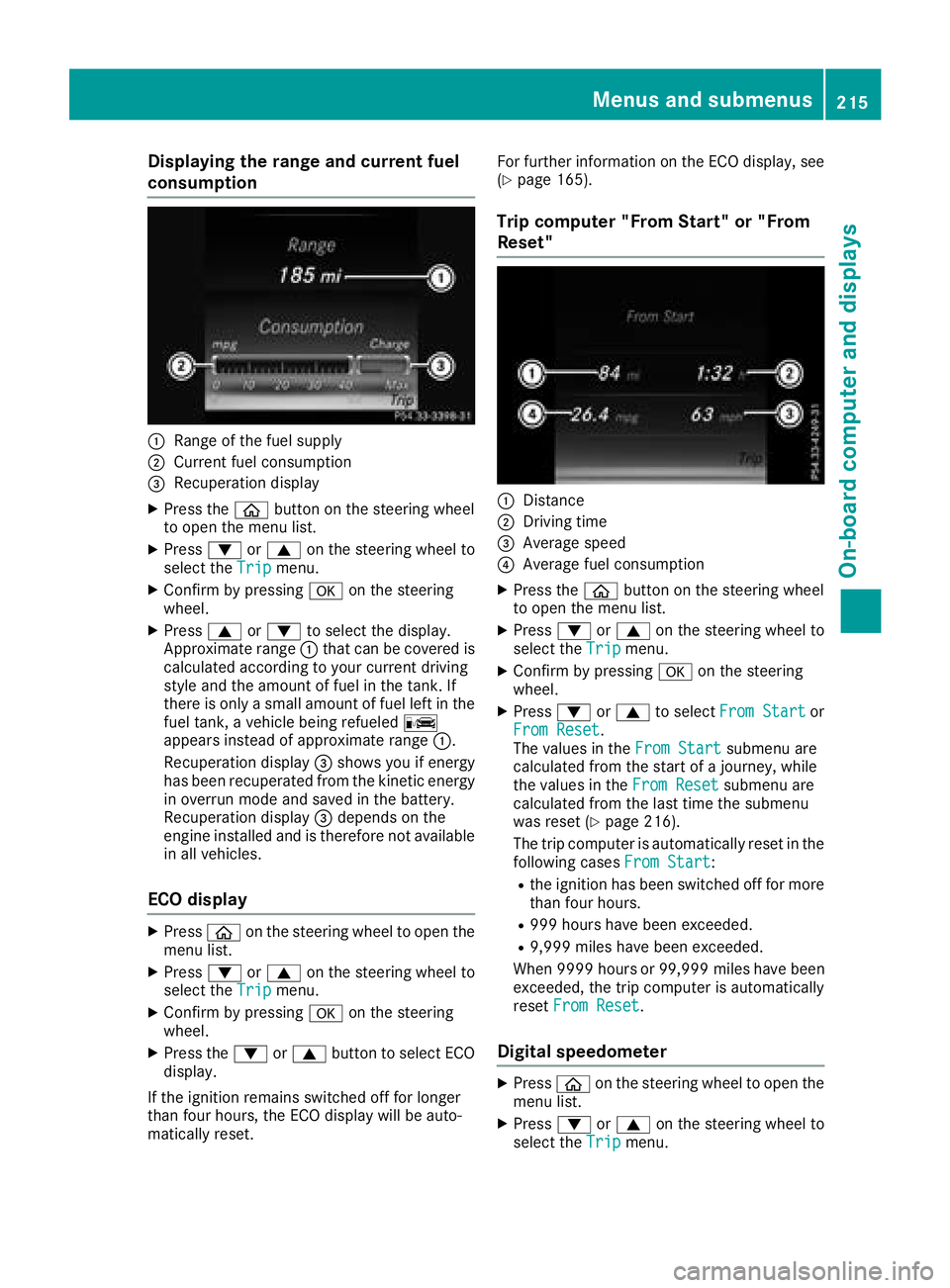
Displaying therange an dcurrent fuel
consumption
:Range of th efue lsupply
;Curren tfue lconsumption
=Recuperation display
XPress th eò buttonon th esteerin gwhee l
to ope nth emen ulist .
XPress :or9 on thesteerin gwhee lto
selec tth eTri pmenu.
XConfir mby pressing aon thesteerin g
wheel.
XPress 9or: to selec tth edisplay.
Approximat erange :that can be covered is
calculated accordin gto your curren tdrivin g
style and th eamount of fue lin th etank .If
there is only asmall amount of fue llef tin th e
fue ltank , avehicle bein grefuele dC
appears instead of approximat erange :.
Recuperation display =shows you if energ y
has bee nrecuperated from th ekineti cenerg y
in overrun mode and saved in th ebattery.
Recuperation display =depend son th e
engin einstalled and is therefore no tavailable
in all vehicles .
ECO display
XPressòon thesteerin gwhee lto ope nth e
men ulist .
XPress :or9 on thesteerin gwhee lto
selec tth eTri pmenu.
XConfir mby pressing aon thesteerin g
wheel.
XPress th e: or9 buttonto selec tEC O
display.
If th eignition remain sswitched of ffo rlonger
than four hours, th eEC Odisplay will be auto-
matically reset . Fo
rfurther information on th eEC Odisplay, see
(
Ypage 165).
Trip compute r"From Start" or "From
Reset "
:Distanc e
;Driving time
=Average speed
?Average fue lconsumption
XPress th eò buttonon th esteerin gwhee l
to ope nth emen ulist .
XPress :or9 on thesteerin gwhee lto
selec tth eTri pmenu.
XConfir mby pressing aon thesteerin g
wheel.
XPress :or9 to selec tFro mStartor
Fro mReset.
The values in th eFro mStartsubmen uare
calculated from th estart of ajourney, whil e
th evalues in th eFro mReset
submen uare
calculated from th elast time th esubmen u
was reset (
Ypage 216).
The trip compute ris automatically reset in th e
followin gcases FromStart
:
Rtheignition has bee nswitched of ffo rmore
than four hours.
R99 9hour shav ebee nexceeded.
R9,999 miles hav ebee nexceeded.
Whe n9999 hour sor 99,999 milesh ave been
exceeded, the trip computer is automatically
reset From Reset
.
Digital speedometer
XPress òon the steering wheel to open the
menu list.
XPress :or9 on the steering wheel to
select the Tripmenu.
Menus and submenus215
On-board computer and displays
Z
Page 237 of 370
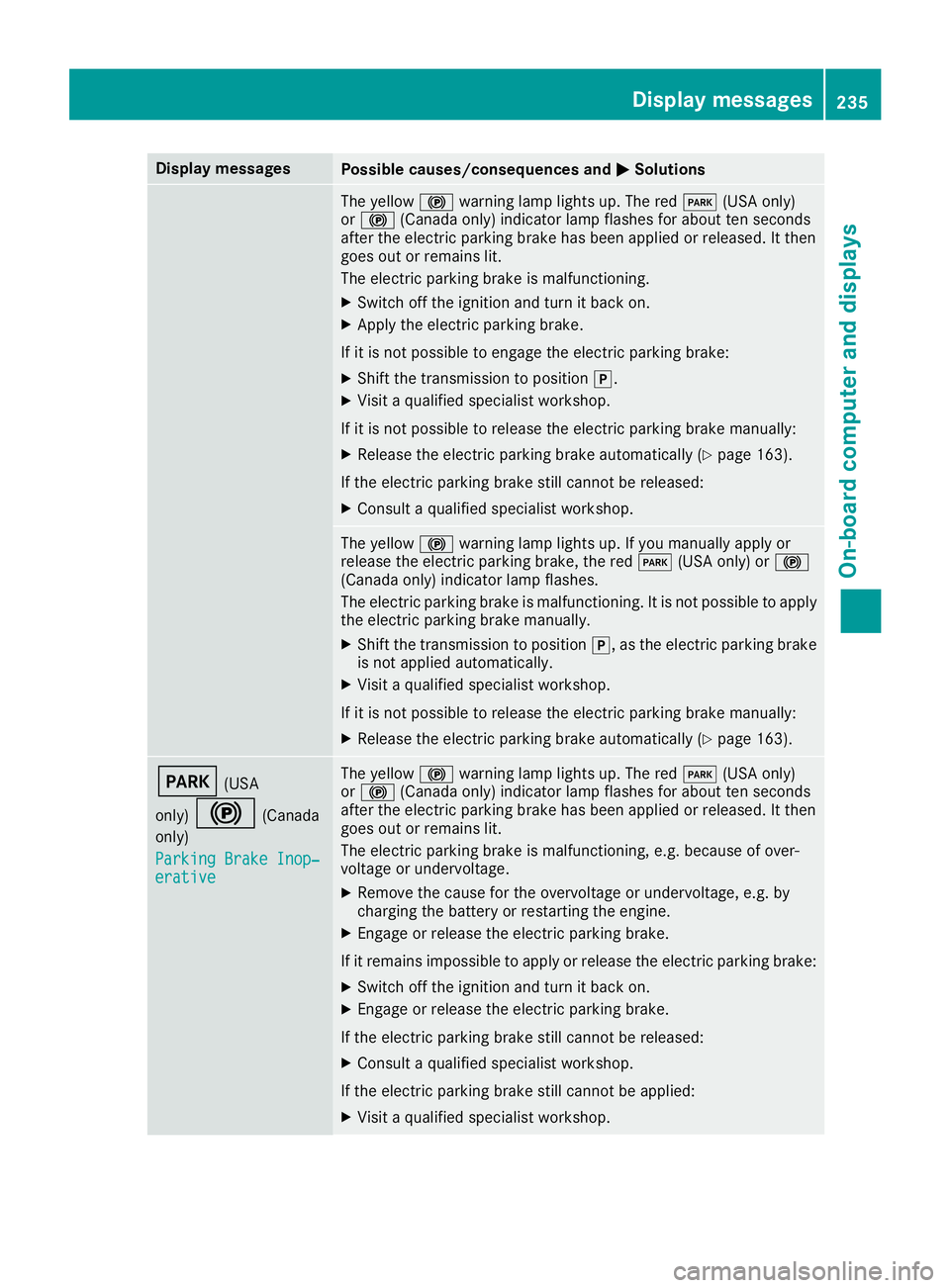
Display messagesPossible causes/consequences andMSolutions
The yellow!warning lamp lights up. The red F(USAonly)
or ! (Canada only) indicator lamp flashes for about te nseconds
after th eelectric parking brak ehas been applie dor released. It then
goe sout or remain slit .
The electric parking brak eis malfunctioning .
XSwitchoff th eignition and tur nit bac kon .
XApply th eelectric parking brake.
If it is no tpossibl eto engage th eelectric parking brake:
XShift th etransmission to position j.
XVisitaqualified specialist workshop .
If it is no tpossibl eto release th eelectric parking brak emanually:
XReleas eth eelectric parking brak eautomatically (Ypage 163).
If th eelectric parking brak estill canno tbe released:
XConsult aqualified specialist workshop .
The yellow!warning lamp lights up. If you manually apply or
release th eelectric parking brake, th ered F (USAonly) or !
(Canada only) indicator lamp flashes .
The electric parking brak eis malfunctioning .It is no tpossibl eto apply
th eelectric parking brak emanually.
XShift th etransmission to position j,as th eelectric parking brak e
is no tapplie dautomatically.
XVisit aqualified specialist workshop .
If it is no tpossibl eto release th eelectric parking brak emanually:
XReleas eth eelectric parking brak eautomatically (Ypage 163).
F(USA
only)
!(Canada
only)
Parkin gBrake Inop‐
erativ e
The yellow !warning lamp lights up. The red F(USAonly)
or ! (Canada only) indicator lamp flashes for about te nseconds
after th eelectric parking brak ehas been applie dor released. It then
goe sout or remain slit .
The electric parking brak eis malfunctioning ,e.g. because of over-
voltag eor undervoltage.
XRemove th ecaus efor th eovervoltage or undervoltage, e.g. by
charging th ebattery or restarting th eengine.
XEngage or release th eelectric parking brake.
If it remain simpossible to apply or release th eelectric parking brake:
XSwitc hoff th eignition and tur nit bac kon .
XEngage or release th eelectric parking brake.
If th eelectric parking brak estill canno tbe released:
XConsult aqualified specialist workshop .
If th eelectric parking brak estill canno tbe applied:
XVisit aqualified specialist workshop .
Display messages235
On-board computer and displays
Z
Page 246 of 370
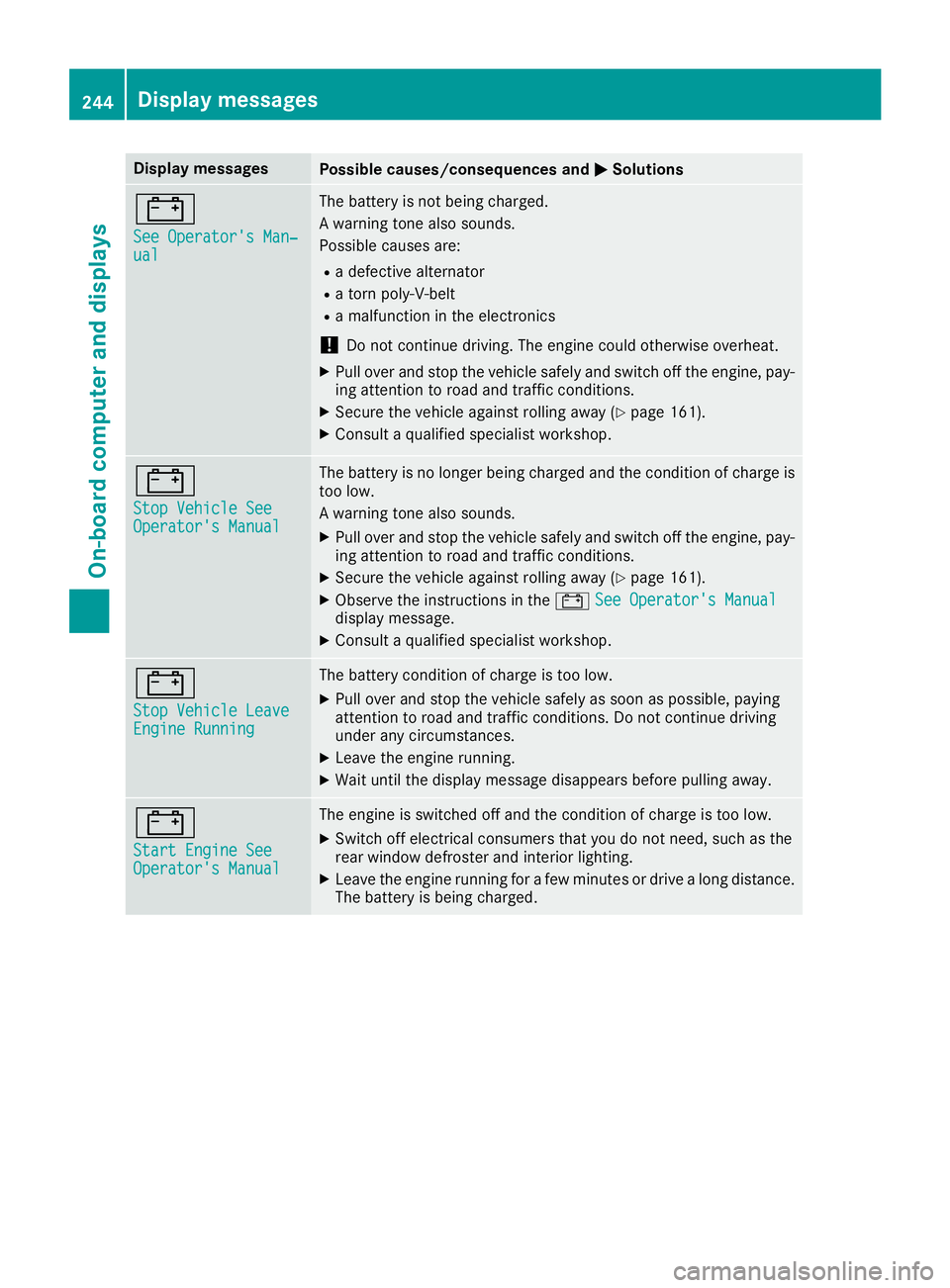
Display messagesPossible causes/consequences andMSolutions
#
See Operator'sMan ‐ual
The battery is no tbein gcharged.
A warning tone also sounds.
Possibl ecauses are:
Radefective alternato r
Ratorn poly-V-belt
Ramalfunction in th eelectronics
!Do no tcontinu edriving. The engin ecould otherwise overheat.
XPull ove rand stop th evehicl esafely and switch off th eengine, pay-
ing attention to roa dand traffic conditions.
XSecur eth evehicl eagainst rollin gaway (Ypage 161).
XConsult aqualified specialist workshop .
#
StopVehicl eSeeOperator' sManual
The battery is no longer bein gcharged and th econdition of charg eis
to olow.
A warning tone also sounds.
XPull ove rand stop th evehicl esafely and switch off th eengine, pay-
ing attention to roa dand traffic conditions.
XSecur eth evehicl eagainst rollin gaway (Ypage 161).
XObserv eth einstruction sin th e# See Operator' sManualdisplay message .
XConsultaqualified specialist workshop .
#
StopVehicl eLeaveEngine Runnin g
The battery condition of charg eis to olow.
XPull ove rand stop th evehicl esafely as soo nas possible, payin g
attention to roa dand traffic conditions. Do no tcontinu edrivin g
under any circumstances.
XLeav eth eengin erunning.
XWait until th edisplay message disappear sbefore pullin gaway.
#
Start Engine SeeOperator' sManual
The engin eis switched off and th econdition of charg eis to olow.
XSwitc hoff electrical consumer sthat you do no tneed, suc has th e
rear window defroste rand interior lighting .
XLeaveth eengin erunnin gfor afew minute sor drive alon gdistance.
The battery is bein gcharged.
244Display messages
On-board computer and displays