ESP MERCEDES-BENZ C-CLASS COUPE 2015 Owners Manual
[x] Cancel search | Manufacturer: MERCEDES-BENZ, Model Year: 2015, Model line: C-CLASS COUPE, Model: MERCEDES-BENZ C-CLASS COUPE 2015Pages: 385, PDF Size: 13.12 MB
Page 299 of 385
General notes
The multimedia system section in this manual
describes the basi cprinciples for operation.
More information can be found in the Digital
Owner's Manual. Important safety notes
G
WARNING
Operating the integrated information systems and communications equipment in the vehicle
whil edriving willd istract you from traffic con-
ditions. You could then lose control of the
vehicle .There is arisk of an accident.
Only operate these devices if road traffic con-
ditions permit. If you are unsure aboutt he
surrounding conditions, pullo ver toasafe
locatio nand make entries only whilet he vehi-
cle is stationary.
You must observe the legalr equirements for the
country in which you are currently driving when operating the multimedia system.
The multimedia system calculates the route to
the destination withou ttaking the following into
account, for example:
R traffic lights
R stop and give way signs
R parking or stopping restrictions
R road narrowing
R other road and traffic rulesa nd regulations
The multimedia system may give incorrect nav-
igation recommendations if the actual street/
traffic situation does not correspond with the
digital map's data.
For example:
R ad iverted route
R the road layout or the direction of aone-way
street has been changed
For this reason, you must alwayso bserve road
and traffic rulesa nd regulations during your
journey. Roada nd traffic rulesa nd regulations
alwaysh ave priority over multimedia system
driving recommendations. Function restrictions
For safety reasons, some functions are restric-
ted or unavailable whilet he vehicle is in motion.
You willn otice this, for example, because either
you willn ot be abletos elect certain menu items
or am essag ewilla ppear to this effect. Operating system
Overview
General notes !
Do not use the space in front of the display
for storage. Objects placed here could dam-
age the display or impair its function. Avoid
any direct contact with the display surface.
Pressure on the display surface may resul tin
impairments to the display,w hich could be
irreversible.
Wearing polarised sunglasses may impair your
ability to read the display.
The display has an automatic temperature-con- trolled switch-off feature .The brightness is
automaticall yreduced if the temperature is too
high. If necessary ,the display may temporarily
switch off completely.
Cleaning instructions !
Do not touch the display.T
he display has a
very sensitive high-gloss surface; there is a
risk of scratching. If you have to clean the
screen, however, use amild cleaning agent
and asoft, lint-free cloth.
The display must be switched off and have
cooled down before you start cleaning. Do not
apply pressure to the display surface when
cleaning it, as this could cause irreversible dam- age to the display.
Switching the multimedia system
on/off X
Press the ubutton on the centre console
to the right of the controller.
For Mercedes-AMG vehicle swith selectable
AMG Performance exhaust system: press the
thumbwheel to the right of the controller. 296
Operating systemMultimedia system
Page 305 of 385
Enterin
ganaddress Multimedia system:
X Select Navi
NaviQNa vigation
Navigation.
The map displays th ecurren tvehicle position.
X Slide 6thec ontroller.
X Select Destination
DestinationQ Addressentry
Addres sentry.
Ente rana ddress, e.g .asfollows:
R town or postcode, street ,house number
R country, town or postcode
R town or postcode, centre
R street ,tow norp ostcode, junction
X Select Town
Town.
The town in whic hthe vehicle is currently
locate d(curren tvehicle position )isatthetop.
Below this, you will see locations for which
rout eguidance has alread ybeen carried out.
X Ente rthe town.
The Gsymbol: th elocatio niscontained on
th ed igital map multiple times.
X To switch to th elist: slide 5thec ontrol-
ler.
X Select th elocation.
If available, th epostcod eisshown. If there
are differen tpostcodes availabl efor th eloca-
tion, th ecorrespondin gdigitsare displayed
with an X
X.
X Ente rthe street and house number.
The address is in th emenu.
Further options for destination entry:
R search for akeyword
The keyword search finds destination susing
fragment sofwords.
R selec tthe last destination
R selec tacontact
R selec taPOI
You can search for aPOI by location, nam eor
telephone number.
R selec tadestination on th emap
R enter an intermediat edestination
You can map th erout etot hedestination
yourself with up to four intermediat edestina-
tions.
R selec tatravel guide destination (only availa-
ble for selecte dEuropean countries)
R selec tdestination sfromM ercedes-Benz
Apps
R selec tgeo-coordinates Calculating th
eroute Prerequisite: th
eaddress has been entered and
is in th emenu.
X Select Start
StartorContinue
Continue.
The rout eiscalculate dwith th eselecte droute
type and th eselecte drout eoptions.
If rout eguidance has alread ybeen activated,
ap rompt will appear asking whether you wish
to end th ecurren trout eguidance.
X Select Yes
YesorSet as intermediate des‐
Set as intermediate des‐
tination
tination.
Yes Yes cancel sthe curren trout eguidance and
start srout ecalculation to th enew destina-
tion.
Set as intermediate destination Set as intermediate destination adds
th en ew destination in addition to th eexisting
destination and open sthe intermediat edes-
tinations list. Connecting th
emobile phone
Requirements For telephony via th
eBluetooth ®
interface, you
require aBluetooth ®
-capable mobile phone. The
mobile phon emust support Hands-Free Profile
1. 0ora bove.
Multimedia system:
X Select Vehicle
VehicleQSy stem set‐
System set‐
tings
tingsQ Activate Bluetooth
Activate Bluetooth .
X Activate Bluetooth ®
O.
Mobil ephone:
X Activate Bluetooth ®
and, if necessary, Blue-
tooth ®
visibilit yfor other devices (see the
manufacturer' soperatin ginstructions).
The Bluetooth ®
device names for all of on eman-
ufacturer' sproduct smightbei dentical. To
mak eitp ossible to clearly identif yyour mobile
phone, chang ethe device nam e(see th eman-
ufacturer' soperatin ginstructions).
If th emobile phon esupport sthe PBA P(Phone
Book Access Profile) and MA P(Message
Acc ess Profile) Bluetooth ®
profiles ,the follow-
ing informatio nwill be transmitte dafter you
connect:
R phon ebook
R call lists
R messages 302
Operating systemMultimedia system
Page 311 of 385
Stowage areas
Loading guidelines
G
WARNING
Combustion engines emit poisonous exhaust
gases such as carbon monoxide. Exhaust
gases can enter the vehicle interior if the boot
lid is open when the engine is running, espe-
cially if the vehicle is in motion. There is arisk
of poisoning.
Always switch off the engine before opening
the boot lid. Never drive with the boot lid
open. G
WARNING
If objects, luggage or loads are not secured or not secured sufficiently, they could slip, tip
over or be flung around and thereby hit vehicle
occupants. There is arisk of injury, especially
when braking or abruptly changing directions.
Always store objectssot hat they cannot be
flung around. Secure objects, luggage or
loads against slipping or tipping before the
journey. G
WARNING
The exhaust tail pipe and tail pipe trim can
become very hot. If you come into contact
with these parts of the vehicle, you could burn
yourself. There is arisk of injury.
Always be particularly careful around the
exhaust tail pipe and the tail pipe trim. Allow
these components to cool down before touch-
ing them.
The handling characteristics of aladen vehicle
are dependent on the distribution of the load
within the vehicle. For this reason, you should
observe the following notes when transporting a
load:
R never exceed the maximum permissible gross
vehicle weight or the permissible axle loads
for the vehicle (including occupants).
R the boot is the preferred place to store
objects.
R position heavy loads as far forward as possi-
ble and as low down in the boot as possible. R
the load must not protrude above the upper
edge of the seat backrests.
R always place the load behind unoccupied
seats if possible.
R secure the load with sufficiently stronga nd
wear-resistant lashing material. Pad sharp
edges for protection.
i Load restraint
sare available at any qualified
specialist workshop, e.g. aMercedes-Benz
Service Centre. Stowage compartments
Important safety notes G
WARNING
If objectsint he passenger compartmen tare
stowed incorrectly, they can slide or be
thrown around and hit vehicle occupants. In
addition, cupholders, open stowage spaces
and mobile phone brackets cannot always
retain all objectst hey contain. There is arisk
of injury, particularly in the event of sudden
braking or asudden change in direction.
R Always stow objectssot hat they cannot be
thrown around in such situations.
R Always make sure that objectsdon ot pro-
trude from stowage spaces, parcel nets or
stowage nets.
R Close the lockable stowage spaces before
startingaj ourney.
R Always stow and secure heavy, hard, poin-
ted, sharp-edged, fragile or bulky objectsin
the boot.
Observe the loading guidelines (Y page 308).308
Stowage areasStowing and features
Page 312 of 385
Fron
tstowage compartments Glov
ecompartment X
To open: pull handle :and open glov ecom-
partmen tflap ;.
X To close: foldg lovec om partmen tflap ;
upward suntil it engages.
Object sinA4format or an iPad ®
,f or example,
can be store dintheglov ecom partment. For
vehicles wit haperfum eatomiser (Y page 136)
th es torag espac eoft heglov ecom partmen tis
restricted. The glov
ecom partmen tcan only be locke dand
unlocked usin gthe emergenc ykey element
(Y page 82).
X To lock: insert theemergenc ykey element
int ot he locka nd tur nit90°clockwise to
position 2.
X To unlock: insert theemergenc ykey element
int othe lockand tur nit90°anti-clockwise to
position 1. Spectacles compartment
X
To open: press marking :.
The spectacles compartmen topen sdown-
wards.
Mak esure that th espectacles compartmen tis
always closed while th evehicl eisinm otion.
Stowage compartment in th efront centre
console Illustration
:vehicles wit hDIRECT SELECT lever
X Briefly press trim ;in th edirection of the
arrow.
Cover :swings upwards.
Stowage compartment in th edoors Stowage areas
309Stowing and featu res Z
Page 313 of 385
In stowage space
:in the doors you can store
bottles with acapacity of up to 1.0 l,ar olled-up
fluorescent jacke t(driver' sdoor )and th evehicle
documen twallet (front-passenger door).
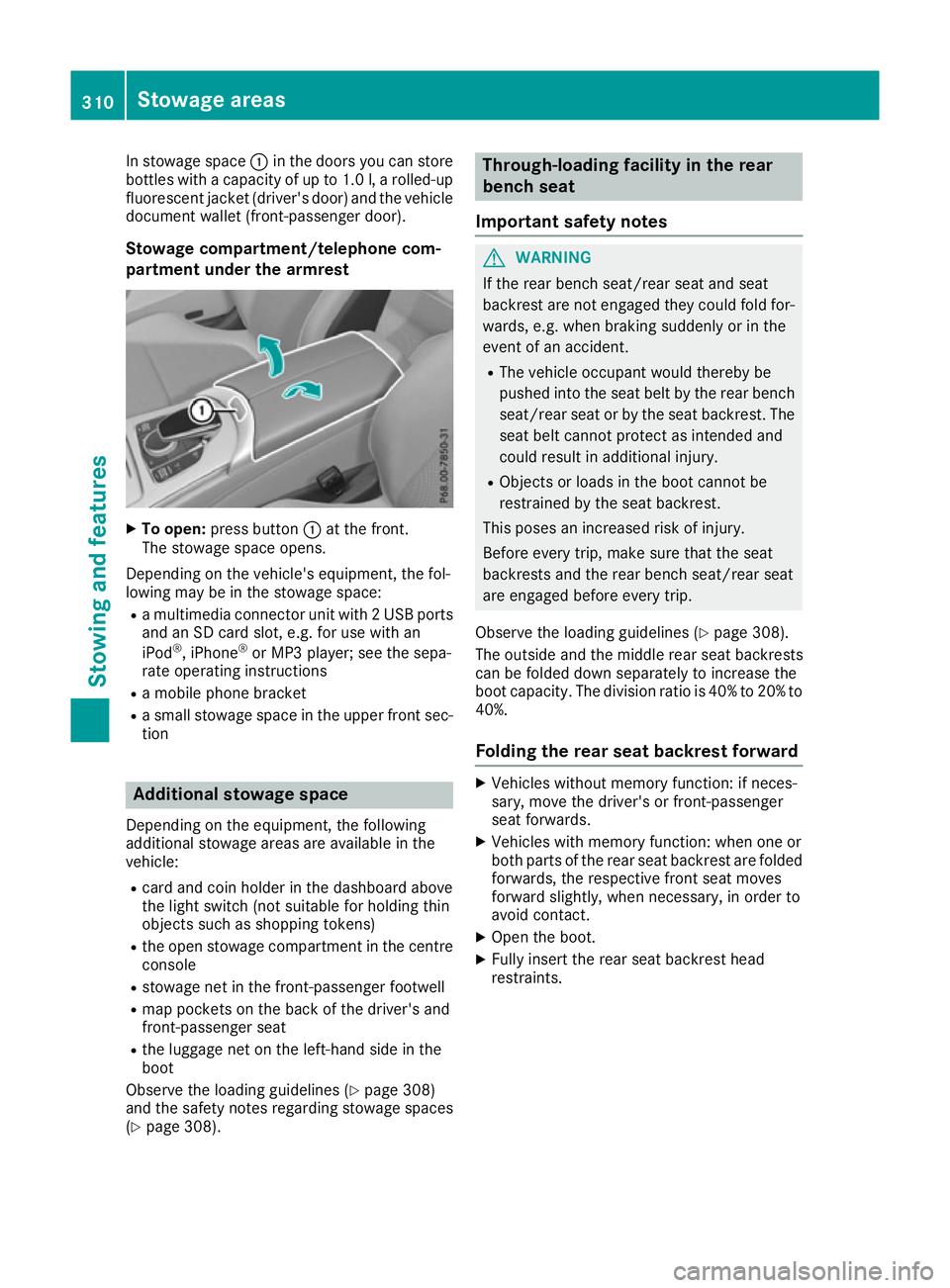
Stowage compartment/telephone com-
partmen tunder th earmre st X
To open: pressbutton :at th efront.
The stowage spac eopens.
Dependin gonthevehicle's equipment ,the fol-
lowin gmay be in th estowage space:
R am ultimedia connecto runit with 2USBports
and an SD car dslot,e.g.f or use with an
iPod ®
,i Phone ®
or MP3 player; see th esepa-
rat eo peratin ginstructions
R am obile phon ebracket
R as mall stowage spac eintheupper fron tsec-
tion Additional stowage space
Dependin gontheequipment ,the following
additional stowage areas are availabl einthe
vehicle:
R car dand coi nholde rint hedashboard above
th el ight switch (no tsuitable for holding thin
object ssuchass hoppin gtokens)
R theo pen stowage compartmen tinthecentre
console
R stowage net in th efront-pa ssenger footwell
R map pockets on th eback of th edriver' sand
front-passenger seat
R thel uggage net on th eleft-hand side in the
boot
Observ ethe loadin gguidelines (Y page 308)
and th esafety note sregardin gstowage spaces
(Y page 308). Through-loading facilit
yintherear
bench seat
Important safety notes G
WARNING
If th erear bench seat/rear seat and seat
backres tare no tengaged they coul dfold for-
wards ,e.g.w hen braking suddenly or in the
even tofana ccident.
R The vehicle occupant would thereb ybe
pushe dintot he seat belt by th erear bench
seat/rear seat or by th eseat backrest. The
seat belt canno tprotect as intended and
coul dresult in additional injury.
R Object sorloads in th eboot canno tbe
restraine dbytheseat backrest.
This pose sanincreased risk of injury.
Before ever ytrip, mak esure that th eseat
backrests and th erear bench seat/rear seat
are engaged before ever ytrip.
Observ ethe loadin gguidelines (Y page 308).
The outside and th emiddle rear seat backrests
can be folded down separately to increas ethe
boot capacity. The division ratio is 40 %to20%to
40%.
Foldin gthe rea rseat backres tforward X
Vehicle swithout memory function :ifneces-
sary, mov ethe driver' sorfront-pa ssenger
seat forwards.
X Vehicle swith memory function :when on eor
bot hpartsoft herear seat backres tare folded
forwards ,the respectiv efront seat moves
forward slightly, when necessary, in orde rto
avoid contact.
X Open th eboot.
X Fully insert th erear seat backres thead
restraints. 310
Stowage areasStowing and features
Page 314 of 385
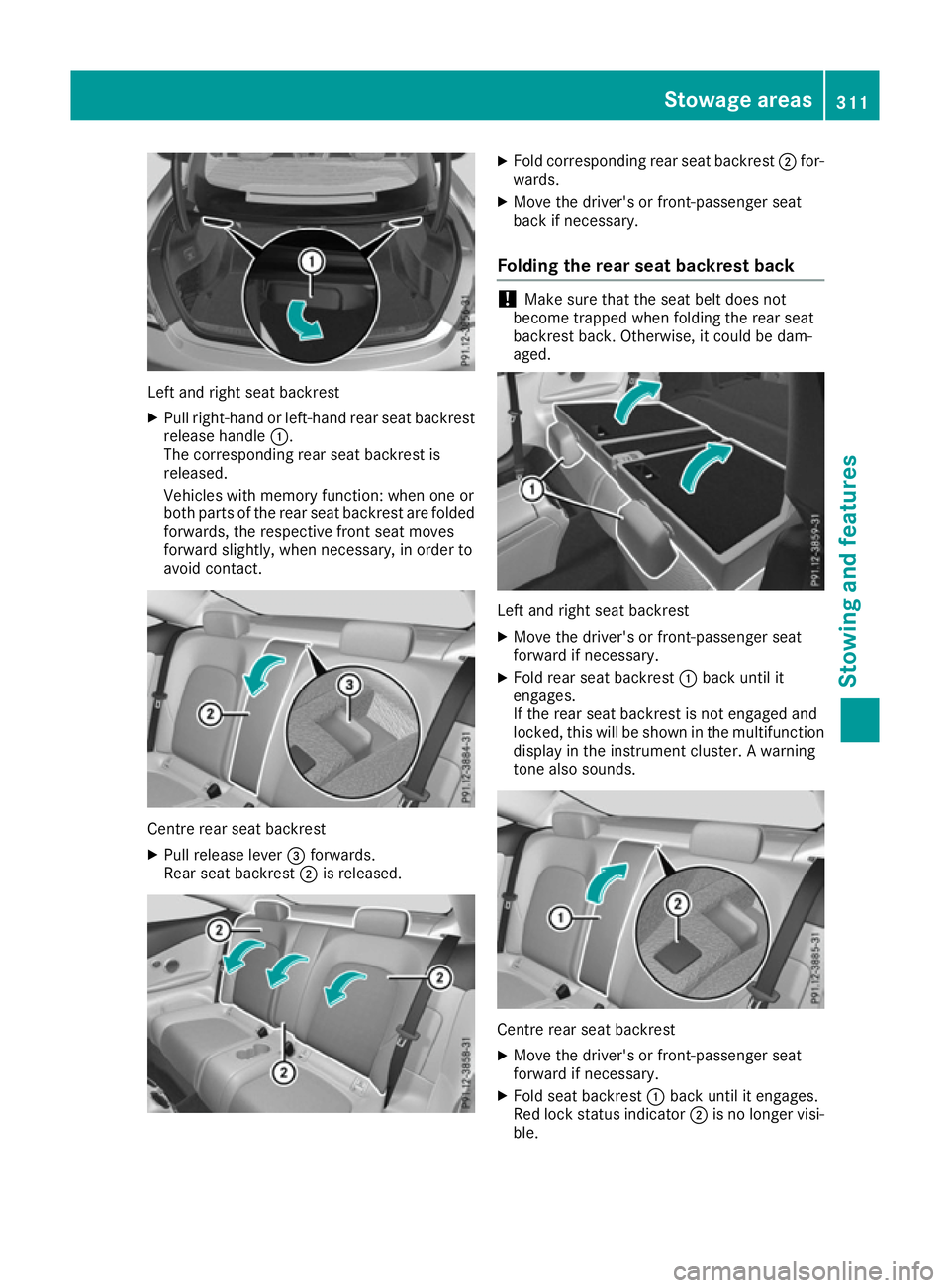
Left and right seat backrest
X Pullr ight-hand or left-hand rear seat backrest
release handle :.
The corresponding rear seat backrest is
released.
Vehicle swith memory function: when one or
both parts of the rear seat backrest are folded
forwards, the respective front seat moves
forward slightly, when necessary ,inorder to
avoid contact. Centre rear seat backrest
X
Pullr elease lever =forwards.
Rears eat backrest ;is released. X
Fold corresponding rear seat backrest ;for-
wards.
X Move the driver's or front-passenger seat
back if necessary.
Folding the rear seat backrest back !
Make sure that the seat belt does not
become trapped when folding the rear seat
backrest back. Otherwise ,itcould be dam-
aged. Left and right seat backrest
X Move the driver's or front-passenger seat
forward if necessary.
X Fold rear seat backrest :back until it
engages.
If the rear seat backrest is not engaged and
locked, this willbes hown in the multifunction
display in the instrument cluster. Awarning
tone also sounds. Centre rear seat backrest
X
Move the driver's or front-passenger seat
forward if necessary.
X Fold seat backrest :back until it engages.
Red lock status indicator ;is no longer visi-
ble. Stowagea
reas
311Stowing and features Z
Page 322 of 385
for example, request an appointment or call for
help in the event of abreakdown.
The Audi o20/COMAND Online display indi-
cates that acall is active. During the call ,you
can change to the navigation menu by pressing
the NAVI button on the multimedi asystem ,for
example.
Voice outpu tisnot available in this case.
You can find more information on Mercedes-
Benz Contact in the separate multimedi asys-
tem operating instructions.
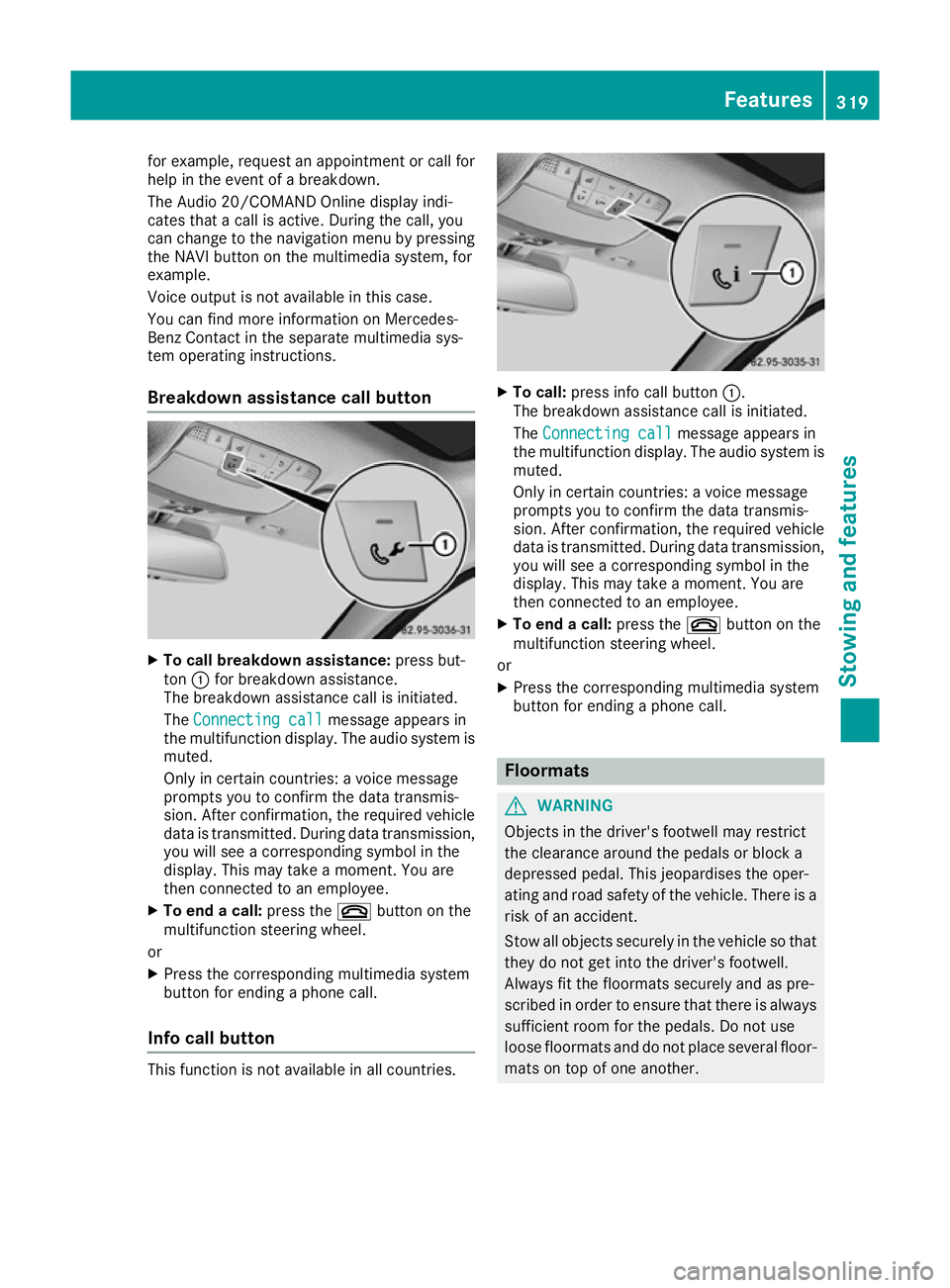
Breakdown assistance call button X
To call breakdow nassistance: press but-
ton :for breakdown assistance.
The breakdown assistance call is initiated.
The Connecting call
Connecting call message appears in
the multifunction display .The audio system is
muted.
Only in certain countries :avoice message
prompts you to confirm the data transmis-
sion. After confirmation, the required vehicle
data is transmitted. During data transmission, you wil lsee acorresponding symbol in the
display .This may take amoment. You are
then connected to an employee.
X To end acall: press the ~button on the
multifunction steering wheel.
or X Press the corresponding multimedi asystem
button for ending aphone call.
Info call button This function is not available in all countries. X
To call: press info call button :.
The breakdown assistance call is initiated.
The Connecting call Connecting call message appears in
the multifunction display .The audio syste mis
muted.
Only in certain countries :avoice message
prompts you to confirm the data transmis-
sion. After confirmation, the required vehicle
data is transmitted. During data transmission,
you wil lsee acorresponding symbol in the
display .This may take amoment. You are
then connected to an employee.
X To end acall: press the ~button on the
multifunction steering wheel.
or
X Press the corresponding multimedi asystem
button for ending aphone call. Floormats
G
WARNING
Objects in the driver's footwell may restrict
the clearance around the pedals or block a
depressed pedal. This jeopardise sthe oper-
ating and road safety of the vehicle. There is a risk of an accident.
Stow all objects securely in the vehicl esothat
they do not get into the driver's footwell.
Always fit the floormats securely and as pre-
scribe dinorder to ensure that there is always
sufficient room for the pedals. Do not use
loos efloormats and do not place severa lfloor-
mats on top of one another. Features
319Stowing and features Z
Page 329 of 385
X
Press 9or: on the steerin gwheel to
select the Service
Servicemenu and confirm with
a.
X Press 9or: on the steerin gwheel to
select the ASSYST PLUS
ASSYST PLUS submenu and con-
firm with a.
The service due date appears in the multi-
function display. Information about service
Resetting the ASSYST PLUS service
interva ldisplay !
If the ASSYST PLUS service interval display
has been inadvertently reset, this setting can
be corrected at aqualified specialist work-
shop.
Have service work carried out as described in the Servic eBooklet .This may otherwise lead
to increased wear and damage to the major
assemblies or the vehicle.
Aq ualified specialist workshop, e.g. a
Mercedes-Benz Servic eCentre, will reset the
ASSYST PLUS service interval display after the
service work has been carried out. You can also
obtain further information on maintenance
work, for example.
Special service requirements The prescribed service interval is based on nor-
mal operation of the vehicle. Servic ework will
need to be performed more often if the vehicle is
operated under arduous conditions or increased loads, for example:
R regular city driving with frequent intermediate
stops
R if the vehicle is primarily used to travel short
distances
R for frequent operation in mountainous terrain
or on poor road surfaces
R if the engine is often left idling for long periods
In these or similar operating conditions, have,
for example, the air filter, engine oil and oil filter changed more frequently. The tyres must be
checked more frequently if the vehicle is oper-
ated under increased loads. Further informationcan be obtained at aqualified specialist work-
shop, e.g. aMercedes-Benz Servic eCentre. Driving abroad An extensive Mercedes-Benz Servic
enetwor kis
also availabl einother countries. You can obtain
further information from any Mercedes-Benz
Servic eCentre. Care
General notes
H
Environmenta
lnote
Dispose of empty packaging and cleaning
cloths in an environmentally responsible man-
ner.
! For cleaning your vehicle, do not use any of
the following:
R dry, rough or hard cloths
R abrasive cleaning agents
R solvents
R cleaning agents containing solvents
Do not scrub.
Do not touch the surfaces or protective films
with hard objects, e.g. aring or ice scraper.
You could otherwise scratch or damage the
surfaces and protective film.
! Do not park up the vehicle for an extended
period straight after cleaning it, particularly
after having cleaned the wheels with wheel
cleaner. Wheel cleaners could cause
increased corrosion of the brake discs and
brake pads/linings. For this reason, you
should drive for afew minutes after cleaning.
Brakin gheats the brake discs and the brake
pads/linings, thus drying them. The vehicle
can then be parked up.
Regula rcare of your vehicle is acondition for
retainin gthe quality in the long term.
Use care products and cleaning agents recom-
mended and approved by Mercedes-Benz. 326
CareMaintenance and care
Page 334 of 385
Cleaning th
eexhaust tail pipes G
WARNING
The exhaust tail pipe and tail pipe trim can
become ver yhot.Ify ou com eintoc ontact
wit hthese part softhevehicle ,you coul dburn
yourself. Ther eisariskofi njury.
Always be particularly careful aroun dthe
exhaust tail pipe and th etail pipe trim. Allow
these components to coo ldown before touch-
ing them.
! Do no
tclean th eexhaust pipe wit hacid-
based cleanin gagents ,suc hass anitary
cleanser or wheel cleaner.
! Mercedes-AM
Gvehicle swithb lacke xhaust
pipes :the black-chrom etailpipe finishers
should no tbepolished wit hachrom epolish.
They will otherwise lose their blac ksheen. For
optimal care, th efinishers should be rubbed
wit hal ightly oiled cloth after every car wash.
Commercially available engin eand car eoils
are suitable for this.
For heavier soiling ,you can apply afinep aint-
work polis hwitham icrofibre cloth .Remove
th ee xces sp olis hresidue after polishing.
Impurities combined wit hthe effect sofroad grit
and corrosive environmental factors may cause
flas hrust to for monthesurface. You can
restore th eoriginal shin eoftheexhaust pipe by
cleanin gitregularly, especiall yinwinter and
after washin gthe vehicle.
X Clean th eexhaust pipe wit hacarep roduct
tested and approved by Mercedes-Benz.
Cleaning th etrailer tow hitch H
Environmental note
Dispose of oily and greasy cloth sinanenvi-
ronmentally-responsible manner.
! Do no
tclean th eball couplin gwithah igh-
pressure cleaner. Do no tuse solvents.
! Pleas
enotet he car einstruction sinthe
trailer couplin gmanufacturer' soperating
instructions. The ball couplin
gmust be cleane difitbecomes
dirt yorc orroded.
X Remove rust on th eball, e.g .withaw ire
brush.
X Remove dirt wit haclean, lint-free cloth or a
brush.
X Afte rcleaning, lightly oil or grease th eball
coupling.
X Chec kthatthe vehicle's trailer to whitch is
working properly.
i You can also have th
emaintenance work on
th eb all couplin gand th etrailer to whitch car-
ried out by aqualified specialist workshop. Interior care
Cleaning th edisplay !
For cleaning, do no
tuse any of th efollowing:
R alcohol-based thinner or petrol
R abrasive cleanin gagents
R commercially-available househol dcleaning
agents
Thes emay damag ethe display surface. Do
no tp ut pressure on th edisplay surface when
cleaning. This coul dlead to irreparable dam-
age to th edisplay.
X Before cleanin gthe display, mak esure that it
is switched off and has cooled down.
X Clean th edisplay surface usin gacommer-
ciall yavailable microfibre cloth and TFT/LCD
display cleaner.
X Dr yt he display surface usin gadry microfibre
cloth.
Cleaning th eplastic trim G
WARNING
Care product sand cleanin gagents containing
solvents can caus esurfaces in th ecockpit to
become porous. This coul dresult in plastic
part sbreakin gaway when th eairbag sare
deployed. Ther eisadanger of injury.
Do no tuse car eproduct sand cleanin gagents
containing solvents to clean th ecockpit. Care
331Maintenance and care Z
Page 337 of 385
Where will
Ifind...? Reflective safety jacket
Removing/replacing the reflective
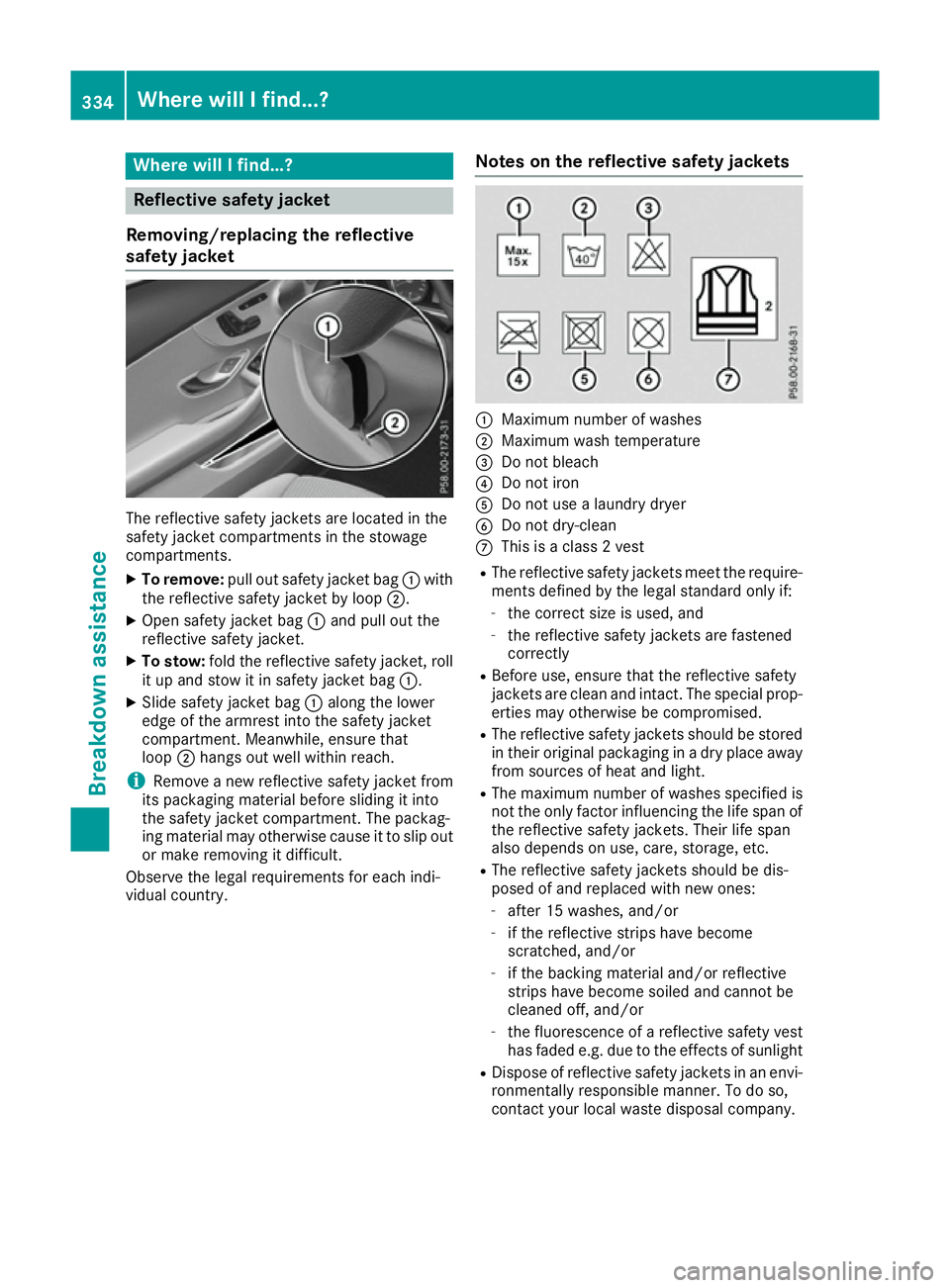
safety jacket The reflective safety jackets are located in the
safety jacket compartments in the stowage
compartments.
X To remove: pullout safety jacket bag :with
the reflective safety jacket by loop ;.
X Open safety jacket bag :and pul lout the
reflective safety jacket.
X To stow: fold the reflective safety jacket, roll
it up and stow it in safety jacket bag :.
X Slid esafety jacket bag :along the lower
edge of the armres tinto the safety jacket
compartment. Meanwhile, ensure that
loop ;hangs out wel lwithi nreach.
i Remove
anew reflective safety jacket from
its packaging material before sliding it into
the safety jacket compartment. The packag-
ing material may otherwise caus eittoslipo ut
or make removing it difficult.
Observe the lega lrequirements for each indi-
vidual country. Notes on the reflective safety jackets :
Maximum numbe rofwashes
; Maximum wash temperature
= Do not bleach
? Do not iron
A Do not use alaundry dryer
B Do not dry-clean
C This is aclass2v est
R The reflective safety jackets meet the require-
ments defined by the lega lstandard only if:
- the correct size is used, and
- the reflective safety jackets are fastened
correctly
R Before use ,ensure that the reflective safety
jackets are clea nand intact. The special prop-
erties may otherwise be compromised.
R The reflective safety jackets should be stored
in their original packaging in adry place away
from sources of hea tand light.
R The maximu mnumberofw ashes specified is
not the only factor influencing the life spa nof
the reflective safety jackets. Thei rlife span
als od epends on use ,care, storage ,etc.
R The reflective safety jackets should be dis-
pose dofa nd replaced with new ones:
- after 15 washes, and/or
- if the reflective strips have become
scratched ,and/or
- if the backing material and/or reflective
strips have become soiled and cannot be
cleaned off, and/or
- the fluorescence of areflective safety vest
has fade de.g. due to the effects of sunlight
R Dispos eofreflective safety jackets in an envi-
ronmentall yresponsibl emanner. To do so,
contact you rloca lwaste disposal company. 334
Where will
Ifind...?Breakdown assistance