ESP MERCEDES-BENZ C-CLASS COUPE 2015 Manual Online
[x] Cancel search | Manufacturer: MERCEDES-BENZ, Model Year: 2015, Model line: C-CLASS COUPE, Model: MERCEDES-BENZ C-CLASS COUPE 2015Pages: 385, PDF Size: 13.12 MB
Page 208 of 385
X
Vehicles with automatic transmission:
shift the transmissio
ntoposition Dor R.
Vehicles with manual transmission: shift
to forward or reverse gear.
The Start Start Park
ParkAssist?
Assist? Yes:
Yes:OK
OKNo:
No: %
message appears in the multifunction display.
X To cance lthe procedure: press the%
button on the multifunction steering wheel or pull away.
or
X To exit
aparkin gspac eusing Active Park-
in gA ssis t:press the abutton on the mul-
tifunction steering wheel.
The ParkAssist active Accelerate
Par kAssist active Accelerate
and brake
and brake Observesurroundings
Observ esurroundings mes-
sage appears in the multifunction display.
X Releas ethe multifunction steering wheel.
X Pull away ,being ready to brake at al ltimes. Do
not excee damaximum speed of approx-
imately 10 km/h when exiting aparking
space. Otherwise, Active Parking Assist will
be cancelled.
X Vehicles with automatic transmission:
depending on the message or as required,
shift the transmissio ntoposition Dor R.
Vehicles with manual transmission:
depending on the message or as required,
engage forward or reverse gear.
Active Parking Assist immediately steers in
the othe rdirection. The ParkAssist
Par kAssist
active Accelerat eand brake
active Accelerat eand brake Observe Observe
surroundings
surroundings message appears in the mul-
tifunction display.
i Yo
uw illa chieve the bes tresults by waiting
for the steering procedure to complete before
pulling away.
If yo ureverse afte ractivation, the steering
wheel is move dtothe straight-ahea dposi-
tion.
X Drive forward sand reverse as prompte dby
the PARKTRONIC warning displays, several
time sifn ecessary.
Once yo uhavee xited the parking space com-
pletely, the steering wheel is move dtothe
straight-ahea dposition. Yo uhearat one and the
Park Park Assist
Assist switched
switched off
offmessage appears
in the multifunction display .You will then have
to stee rand merg einto traffic on your own.
PARKTRONIC is stil lavailable .You can take over
the steering before the vehicl ehasexited the
parking space completely .Thisisu seful, for example, when yo
urecognis ethat it is already
possible to pull ou tofthe parking space.
Cancellin gActive Parking Assist X
Stop the movement of the multifunction
steering wheel or stee ryourself.
Active Parking Assist will be cancelled at
once. The ParkAssist cancelled
Par kAssist cancelled mes-
sage appears in the multifunction display.
or X Press the PARKTRONIC button (Y page 200).
PARKTRONIC is switche doff and Active Park-
ing Assist is immediately cancelled. The
Par kAssist cancelled
Par kAssist cancelled message appears
in the multifunction display.
Active Parking Assist is cancelled automatically if:
R the electri cparking brake is applied
R transmissio nposition Pis selected in vehicles
with automatic transmission
R parking using Active Parking Assist is no lon-
ger possible
R youa re driving faster tha n10km/h
R aw heel spins and ESP ®
intervene sorfails.
The ÷ warning lamp lights up in the instru-
ment cluster.
Aw arning tone sounds. The parking symbo ldis-
appears and the multifunction display shows the
Par kAssist cancelled
Par kAssist cancelled message.
Whe nActive Parking Assist is cancelled, you
mus tstee rand brake agai nyourself.
If as ystem malfunction occurs, the vehicl eis
braked to astandstill. To drive on, depres sthe
accelerato rpedal again. Driving systems
205Driving and parking Z
Page 209 of 385
Reversin
gcamera
General notes Reversing camera
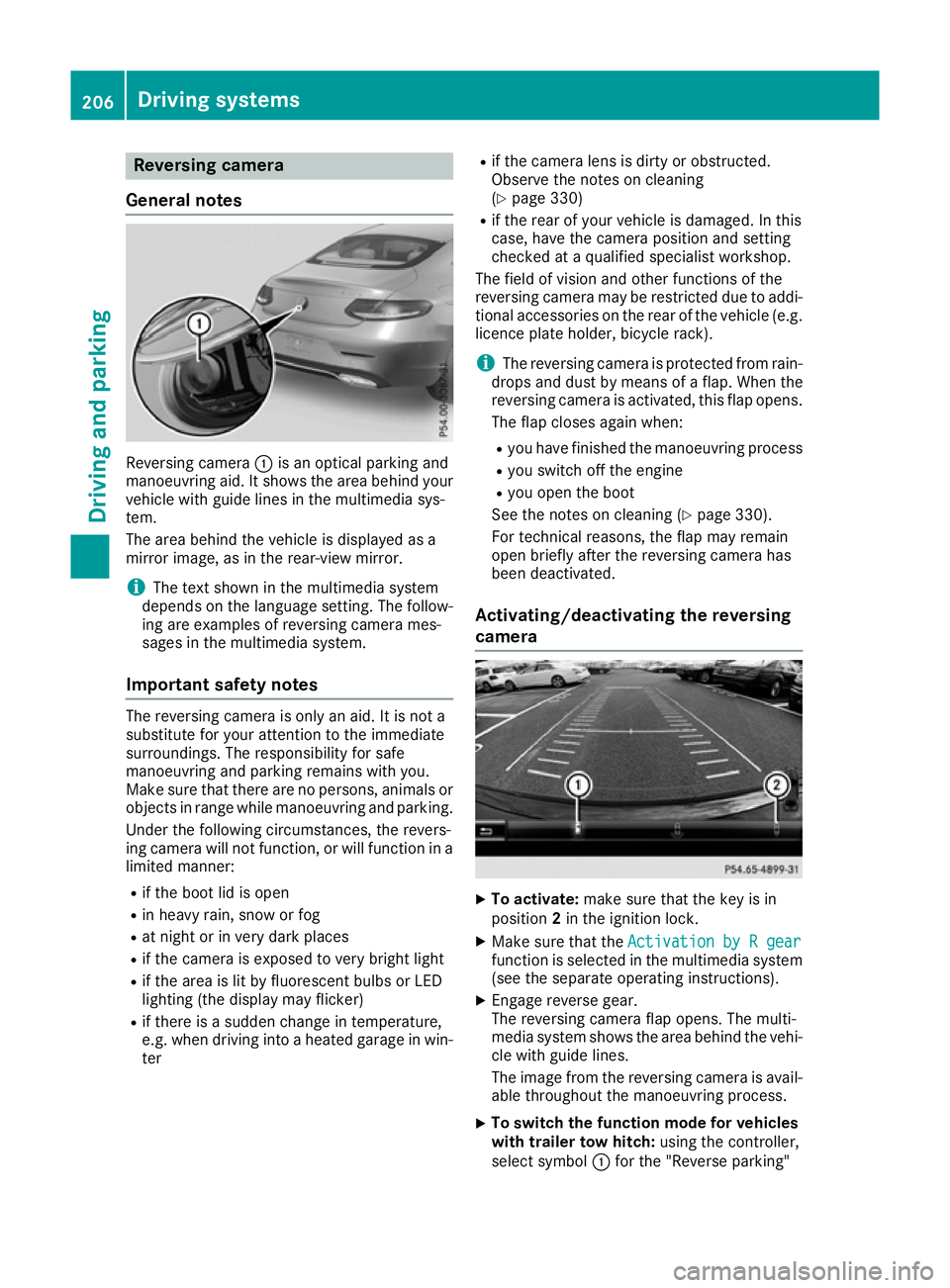
:is an optical parking and
manoeuvring aid. It shows the are abehind your
vehicl ewithg uide lines in the multimedi asys-
tem.
The are abehind the vehicl eisdisplayed as a
mirror image, as in the rear-vie wmirror.
i The text shown in the multimedi
asystem
depends on the languag esetting. The follow-
ing are examples of reversing camera mes-
sages in the multimedi asystem.
Important safety notes The reversing camera is only an aid. It is not a
substitute for your attention to the immediate
surroundings. The responsibility for safe
manoeuvring and parking remains with you.
Make sure that there are no persons ,animal sor
objects in rang ewhile manoeuvring and parking.
Unde rthe following circumstances, the revers-
ing camera will not function, or will function in a limite dmanner:
R if the boo tlid is open
R in heavy rain, snow or fog
R at nigh torinv ery dark places
R if the camera is exposed to very bright light
R if the are aislitby fluorescent bulb sorLED
lighting (the display may flicker)
R if there is asudde nchange in temperature,
e.g. when driving into aheated garag einwin-
ter R
if the camera lens is dirty or obstructed.
Observe the notes on cleaning
(Y page 330)
R if the rea rofyourv ehicl eisd amaged. In this
case, have the camera position and setting
checke dataq ualified specialist workshop.
The field of visio nand othe rfunctions of the
reversing camera may be restricte ddueto addi-
tiona laccessorie sonthe rea rofthe vehicl e(e.g.
licence plate holder ,bicycl erack).
i The reversing camera is protected from rain-
drops and dust by means of aflap. Whe nthe
reversing camera is activated, this fla popens.
The fla pcloses agai nwhen:
R youh avef inishe dthe manoeuvring process
R yous witch off the engine
R youo pent he boot
See the notes on cleaning (Y page 330).
For technical reasons ,the fla pmay remain
ope nbriefl yafterthe reversing camera has
bee ndeactivated.
Activating/deactivatin gthe reversing
camera X
To activate: make sure that the key is in
position 2in the ignition lock.
X Make sure that the Activation byRgear
Activation by Rgear
function is selected in the multimedi asystem
(se ethe separate operating instructions).
X Engag ereverse gear.
The reversing camera fla popens. The multi-
media system shows the are abehind the vehi-
cle with guid elines.
The image from the reversing camera is avail- able throughout the manoeuvring process.
X To switc
hthe functio nmode for vehicles
with trailer tow hitch: using the controller,
select symbol :for the "Reverse parking" 206
Driving systemsDriving and parking
Page 210 of 385
function or symbol
;for "Coupling up a
trailer".
The symbol of the selected function is high-
lighted.
To deactivate: the reversing camera deacti-
vates if you shift the transmission to Por after
driving forwards ashort distance.
Multimedi adisplay The reversing camera may show
adistorted view
of obstacles or show them incorrectly or not at
all .O bstacles are not show nbythe reversing
camera in the following locations:
R very close to the rear bumper
R under the rear bumper
R in the area immediately above the handl eon
the boot lid
! Objects not at ground leve
lmay appear to
be further away than they actually are, e.g.:
R the bumper of aparked vehicle
R the drawbar of atrailer
R the bal lcoupling of atrailer tow hitch
R the rear section of an HGV
R as lanted post
Use the guidelines only for orientation.
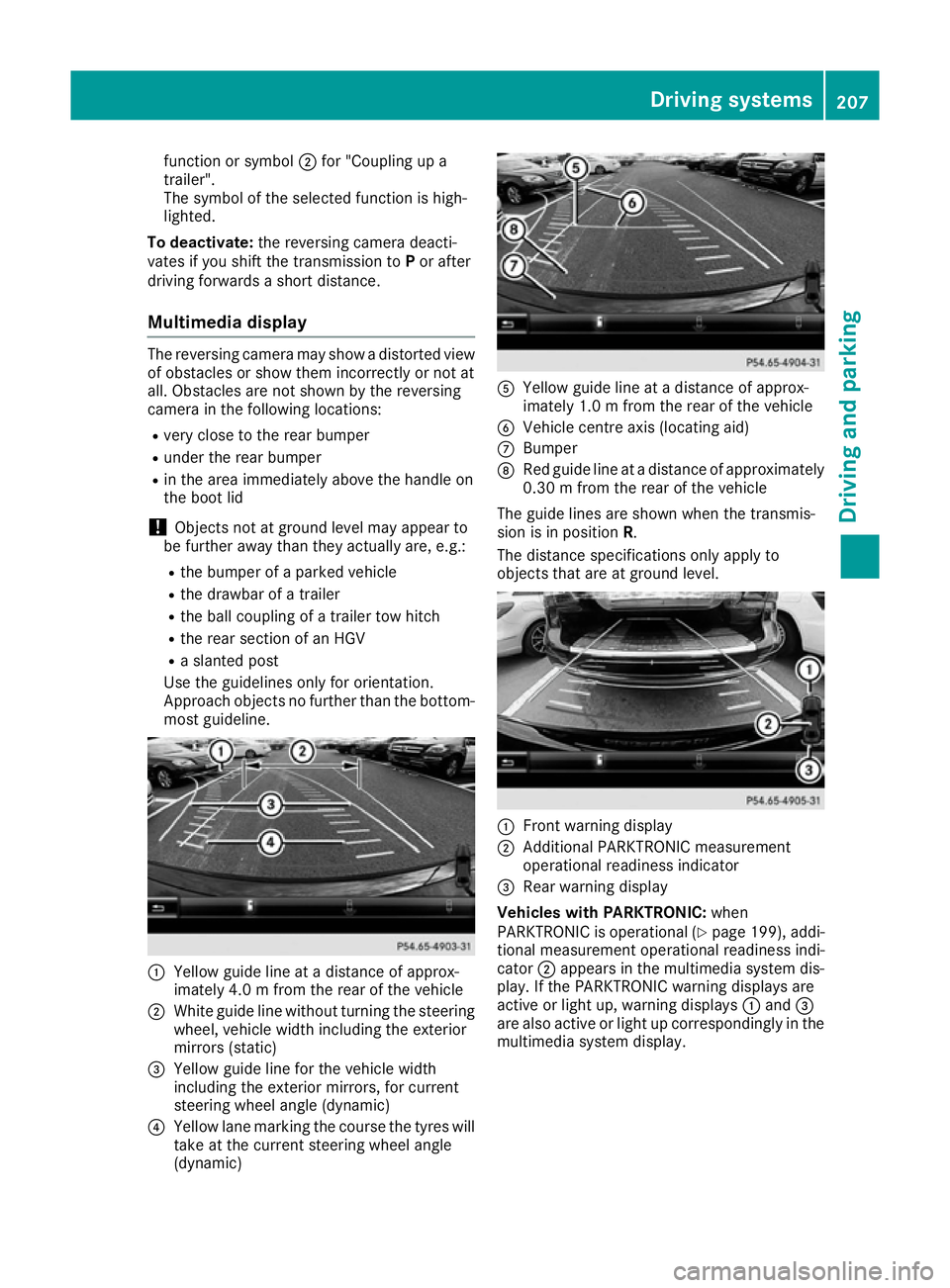
Approach objects no further than the bottom- most guideline. :
Yellow guide line at adistance of approx-
imately 4.0 mfrom the rear of the vehicle
; White guide line without turning the steering
wheel, vehicl ewidth including the exterior
mirrors (static)
= Yellow guide line for the vehicl ewidth
including the exterior mirrors, for current
steering whee langle (dynamic)
? Yellow lane marking the course the tyres will
take at the current steering whee langle
(dynamic) A
Yellow guide line at adistance of approx-
imately 1.0 mfrom the rear of the vehicle
B Vehicle centre axis (locating aid)
C Bumper
D Red guide line at adistance of approximately
0.30 mfrom the rear of the vehicle
The guide lines are show nwhen the transmis-
sion is in position R.
The distance specifications only apply to
objects that are at ground level. :
Front warning display
; Additional PARKTRONIC measurement
operational readiness indicator
= Rea rwarning display
Vehicles with PARKTRONIC: when
PARKTRONIC is operational (Y page199) ,addi-
tional measurement operational readiness indi-
cator ;appears in the multimedi asystem dis-
play. If the PARKTRONIC warning display sare
active or light up, warning displays :and =
are als oactive or light up correspondingl yinthe
multimedi asyste mdisplay. Driving systems
207Driving and parking Z
Page 212 of 385
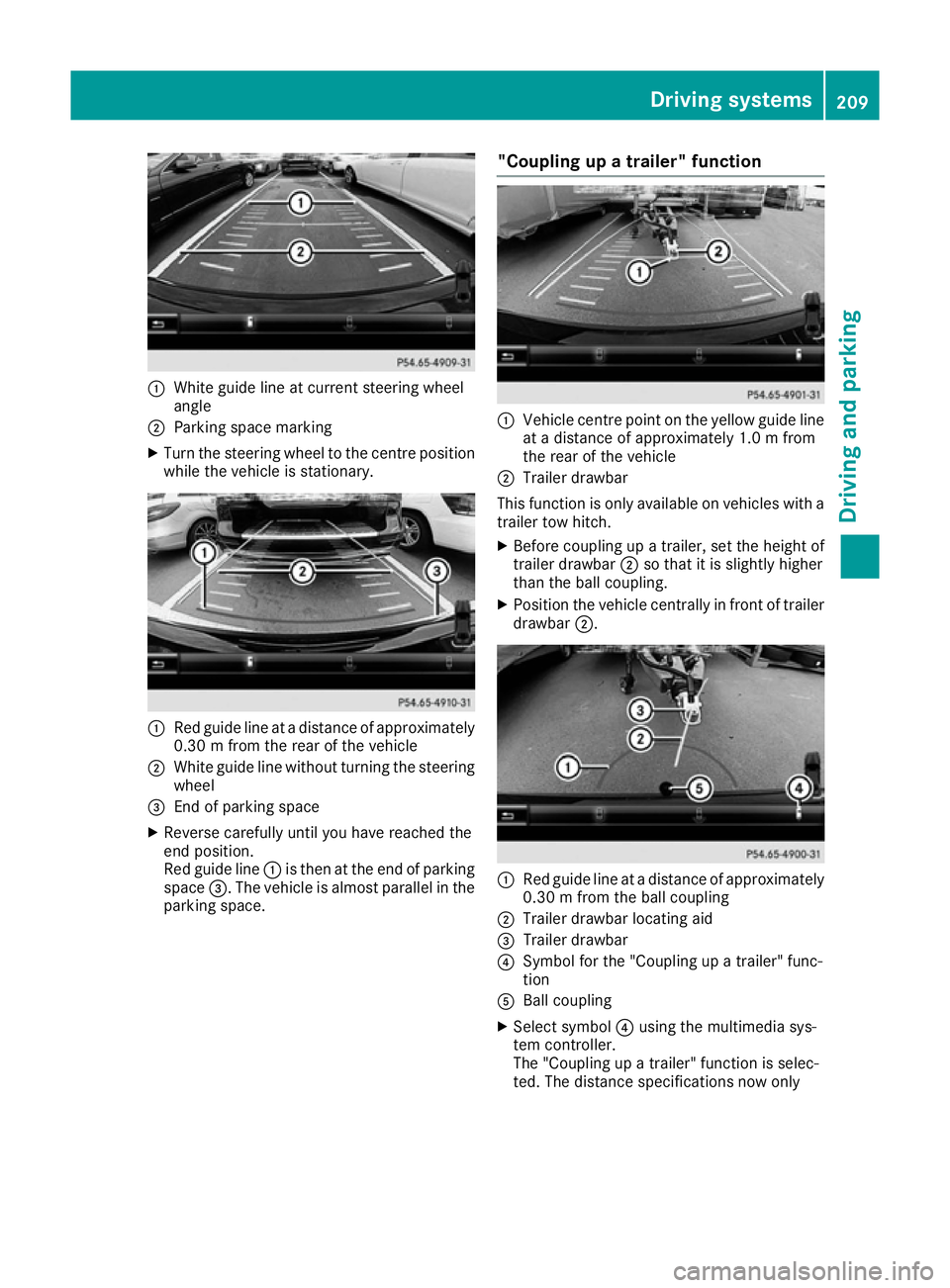
:
White guide line at curren tsteerin gwheel
angle
; Parking space marking
X Turn the steerin gwheel to the centre position
while the vehicle is stationary. :
Red guide line at adistanc eofapproximately
0.30mf rom the rear of the vehicle
; White guide line without turning the steering
wheel
= Endofp arking space
X Reverse carefully until you have reached the
end position.
Red guide line :is then at the end of parking
space =.The vehicle is almost parallel in the
parking space. "Coupling up
atrailer" function :
Vehicle centre point on the yellow guide line
at ad istanc eofapproximately 1.0 mfrom
the rear of the vehicle
; Trailer drawbar
This function is only available on vehicles with a
trailer tow hitch.
X Before coupling up atrailer, set the height of
trailer drawbar ;so that it is slightly higher
than the ball coupling.
X Position the vehicle centrally in fron toftrailer
drawbar ;. :
Red guide line at adistanc eofapproximately
0.30mf rom the ball coupling
; Trailer drawbar locatin gaid
= Trailer drawbar
? Symbol for the "Coupling up atrailer" func-
tion
A Ball coupling
X Select symbol ?using the multimedia sys-
tem controller.
The "Coupling up atrailer" function is selec-
ted. The distanc especifications now only Driving systems
209Driving and parking Z
Page 213 of 385
apply to object
sthata re at th esame leve las
th eb all coupling.
X Reverse carefully, making sure that trailer
drawbar locatin gaid; points approximately
in th edirection of trailer drawbar =.
X Reverse carefully until trailer drawbar =rea-
ches th ered guide line.
The distanc ebetween th etrailer drawbar and
th er ed guide line is no wapproximately
0.30 m.
X Couple up th etrailer (Y page 227).
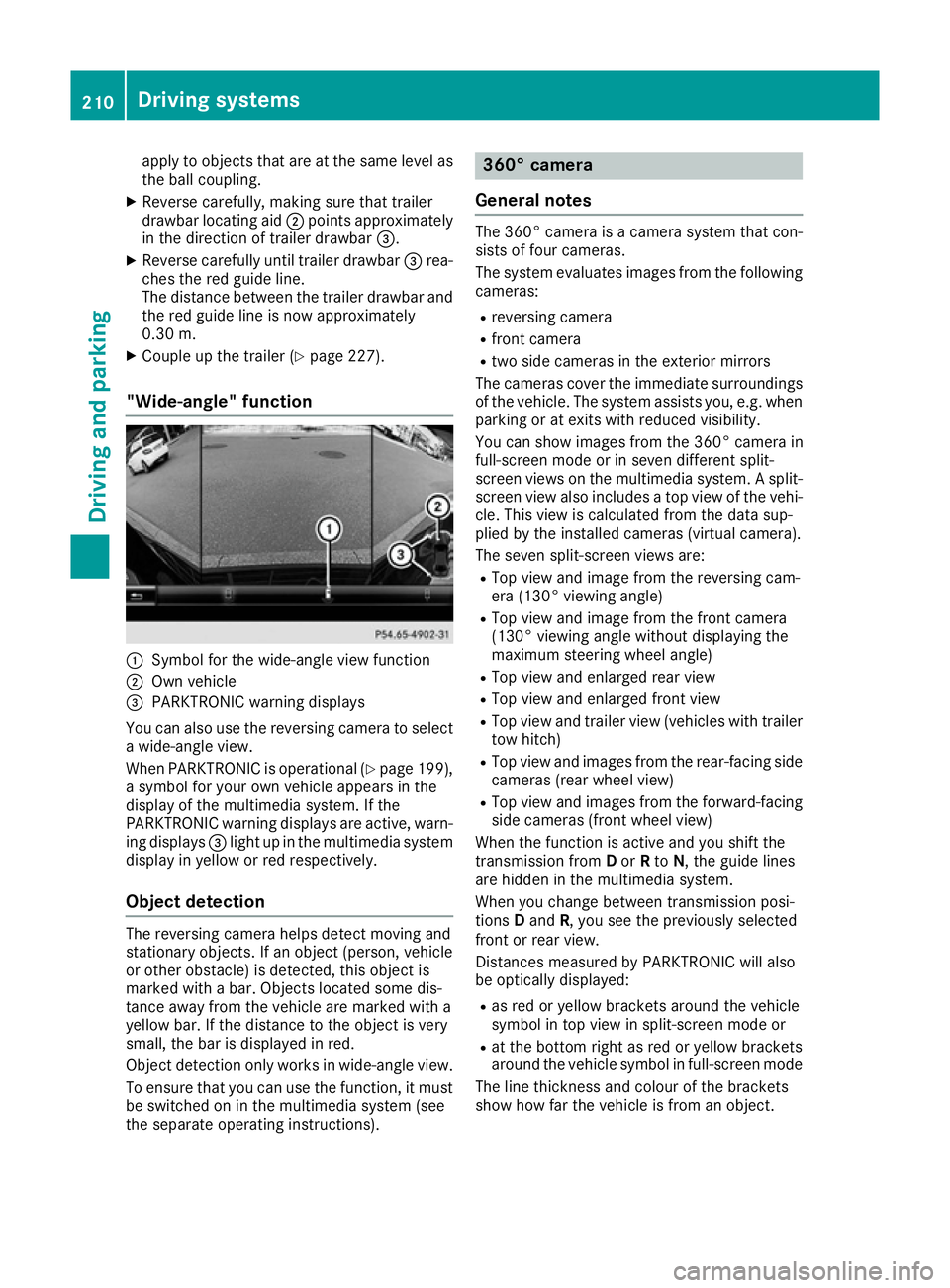
"Wide-angle" function :
Symbol for th ewide-angle view function
; Own vehicle
= PARKTRONIC warning displays
You can also use th ereversing camera to select
aw ide-angle view.
When PARKTRONIC is operational (Y page 199),
as ymbo lfor your own vehicle appear sinthe
display of th emultimedia system. If the
PARKTRONIC warning displays are active, warn-
ing displays =light up in th emultimedia system
display in yellow or red respectively.
Object detection The reversing camera helps detect moving and
stationar
yobjects. If an object (person ,vehicle
or other obstacle )isdetected, this object is
marke dwithabar. Object slocate dsom edis-
tance away from th evehicle are marke dwith a
yellow bar. If th edistanc etotheobject is very
small ,the bar is displaye dinred.
Object detection only work sinwide-angle view.
To ensure that you can use th efunction ,itmust
be switched on in th emultimedia system (see
th es eparate operatin ginstructions). 360° camera
General notes The 360° camera is
acamera system that con-
sist soff our cameras.
The system evaluates image sfromt hefollowing
cameras:
R reversing camera
R fron tcamera
R two side cameras in th eexterio rmirrors
The cameras cover th eimmediat esurroundings
of th evehicle .The system assists you, e.g .when
parking or at exits with reduced visibility.
You can show image sfromt he360° camera in
full-screen mode or in seven differen tsplit-
screen views on th emultimedia system. Asplit-
screen view also includes atop view of th evehi-
cle .This view is calculate dfromt hedat asup-
plied by th einstalled cameras (virtual camera).
The seven split-screen views are: R Top view and image from th ereversing cam-
era (130° viewin gangle)
R Top view and image from th efront camera
(130° viewing angle without displaying the
maximum steering wheel angle)
R Top view and enlarge drear view
R Top view and enlarge dfront view
R Top view and trailer view (vehicle swith trailer
to wh itch)
R Top view and image sfromt herear-facin gside
cameras (rear wheel view)
R Top view and image sfromt heforward-facing
side cameras (fron twheel view)
When th efunction is active and you shif tthe
transmission from Dor Rto N,t heguide lines
are hidde ninthemultimedia system.
When you chang ebetween transmission posi-
tions Dand R,you see th epreviously selected
fron torr ear view.
Distances measured by PARKTRONIC will also
be optically displayed:
R as red or yellow brackets aroun dthe vehicle
symbo lintopview in split-screen mode or
R at th ebotto mrightasr ed or yellow brackets
aroun dthe vehicle symbo linfull-screen mode
The line thicknes sand colour of th ebrackets
show how far th evehicle is from an object. 210
Driving systemsDriving and parking
Page 214 of 385
R
yello wbrackets wit hthinl ines: PARKTRONIC
is active
R yello wbrackets wit hnorma llines: an objec tis
presen tinclose range of th evehicle
R red line: an objec tispresen tintheimmediate
close range of th evehicle
Important safety notes The 360° camera is only an aid and may sho
wa
distorted vie wofobstacles, sho wthemi ncor-
rectl yorn otat all. The 360° camera is no ta
substitut efor attentive driving.
The responsibilit yfor saf emanoeuvrin gand
parkin gremain swithy ou. Mak esuret hatthe re
are no persons, animals or objects in range
while manoeuvrin gand parking.
You are always responsibl efor safety, and must
always pay attention to your surroundings when
parkin gand manoeuvring. This applies to the
area sbehind ,infront of and beside th evehicle.
You could otherwise endanger yourself and oth- ers.
The 360° camera will no tfunction or will func-
tion only in alimite dmanner:
R if th edoors are open
R if th eexter iorm irror sare folded in
R if th ebootlid is open
R in heav yrain ,sno worf og
R at night or in ver ydark places
R if th ecameras are exposed to ver ybright light
R if th earea is lit by fluorescent bulbs or LED
lighting (the display may flicker)
R if th ecamera lenses mis tup, e.g. when driving
into aheated garage in winter, causin garapid
chang eintemperature
R if th ecamera lenses are dirty or covered
R if th evehicl ecom ponent sinwhichthe cam-
eras are fitte dare damaged. In this event,
hav ethe camera position and setting checked
at aq ualified specialist workshop.
Do no tuse th e360°c amera under suc hcir-
cumstances. You could otherwise injur eothers
or damage objects when parkin gthe vehicle.
The guide lines in th emultimedia system display
sho wthe distances to your vehicle. The distan-
ce so nlya pply to roa dlevel.
In trailer mode, th eguide lines are shown at the
level of th etrailer to whitch.
The camera in th erear area is protected by
mean sofaf lap.This flap open swhen th e360° camera is activated. Se
ethe note sonc leaning
(Y page 330). Fo rtechnic al reasons, th eflap
may remain open briefl yafter th e360°c amera
has been deactivated.
The field of vision and other function softhe
camera system may be restricted due to addi-
tional accessories on th erear of th evehicl e(e.g.
licence plat eholder, bicycle rack).
On vehicles wit hheight-adjustable suspension,
due to th etechnic al conditions, leavin gthe
standard height can result in:
R inaccuracies in th eguide lines
R inaccuracies in th edisplay of generated
images (top view)
Activation conditions The 360° camera imag
ecan be displayed if:
R them ultimedia system is switched on
R the 360°c amera
360 °c amera function is switched on
i If you are drivin
gfaste rtha natam oderate
speed and switch on th e360°c amera, a
warnin gmessage appears.
The warnin gmessage disappear sif:
R you are again drivin gatamoderatespeed.
The 360° camera is then activated.
R them essage is confirmed wit hthe %
button.
Switchin gthe 360° camer aon/off
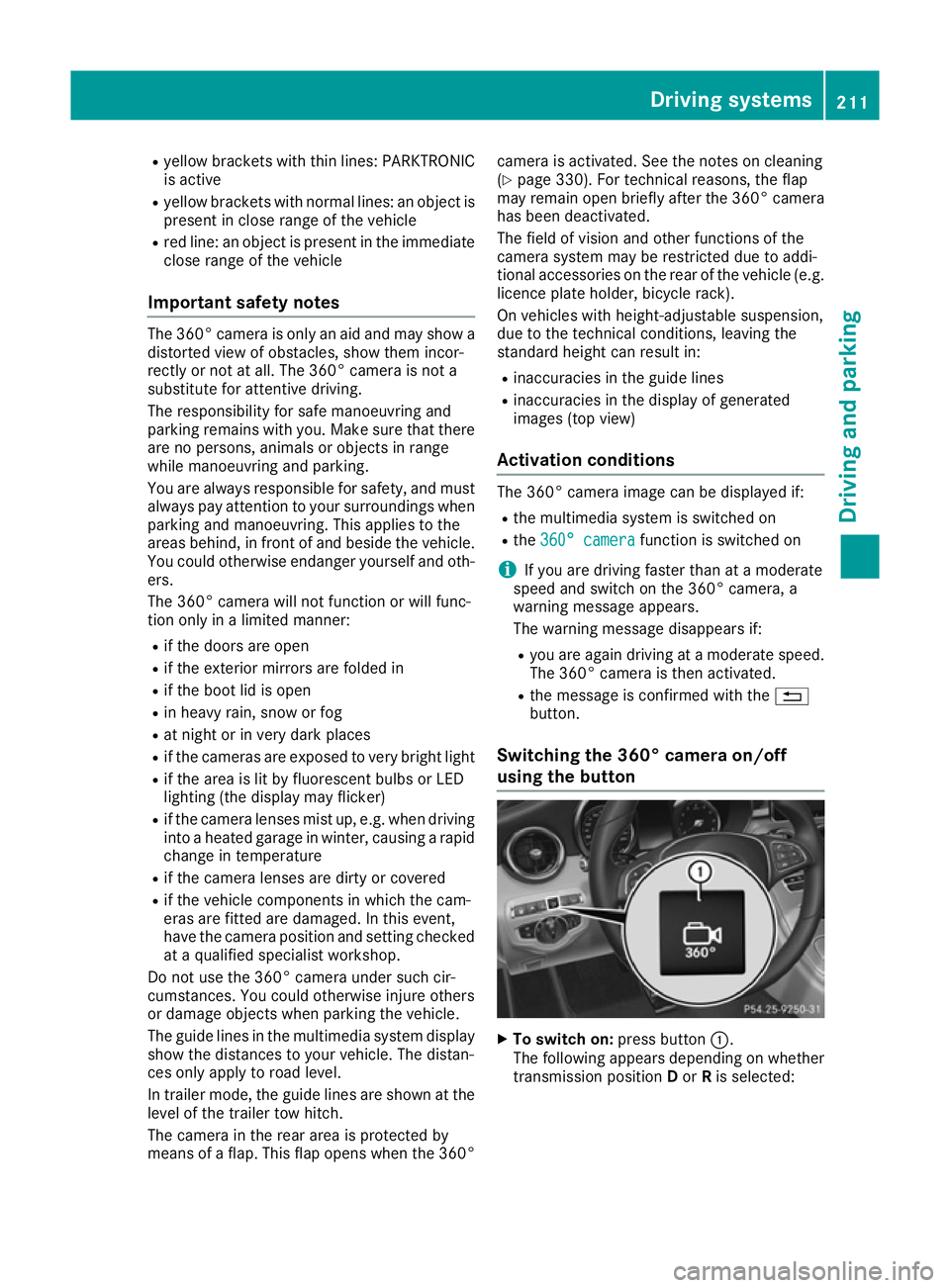
using th ebutton X
To switch on: press button:.
The followin gappears dependin gonwhether
transmission position Dor Ris selected: Driving systems
211Driving and parking Z
Page 215 of 385
R
as plit-screen with to pview and th eimage
from th efront camera or
R as plit-screen with to pview and th eimage
from th ereversing camera
X To switch off: pressbutton :.
Switching on th e360° camera using
revers egear You can show image
sfromt he360° camera
automatically by engagin grevers egear.
X Mak esure that th ekeyis in position 2in the
ignition lock.
X Mak esure that the ActivationbyRgear
Activatio nbyRgear
function is selecte dinthemultimedia system
(see th eDigital Owner' sManual).
X To show th e360° camera image: engage
revers egear.
The multimedia system show sthe area
behin dthe vehicle in split-screen mode .You
see th etop view of th evehicle and th eimage
from th ereversing camera.
Selecting th esplit-screen view or full
screen mode Switching between split screen views:
X To switch to th eline with th evehicle icons:
slide 5thec ontroller.
X To selec tavehicle icon: tur nthe controller.
Switching to full screen mode:
X 180 °v iew
180 °v iew Turn and pres sthe controller.
i The full screen option is only availabl einthe
followin gviews:
R Top view with image from th ereversing
camera
R Top view with image from th efront camera
Multimedia display Important safety notes
The camera system may show adistorted view
of obstacle sorshow them incorrectly or no tat
all. Obstacle sare no tshow nbyt hesystem in the
followin glocations:
R unde rthe fron tand rear bumpers
R ver yclose to th efront and rear bumpers
R in th earea immediately abov ethe handle on
th eb oot lid R
ver yclose to th eexterio rmirrors
R in th etransitional areas between th evarious
cameras in th evirtual to pview
! Object
snotat ground leve lmay appear to
be further away than they actually are, e.g.:
R theb umpe rofap arked vehicle
R thed rawbar of atrailer
R theb all coupling of atrailer to whitch
R ther ear sectio nofanHGV
R as lante dpost
Use th eguidelines only for orientation.
Approac hobject snof urther than th ebottom-
mos tguideline.
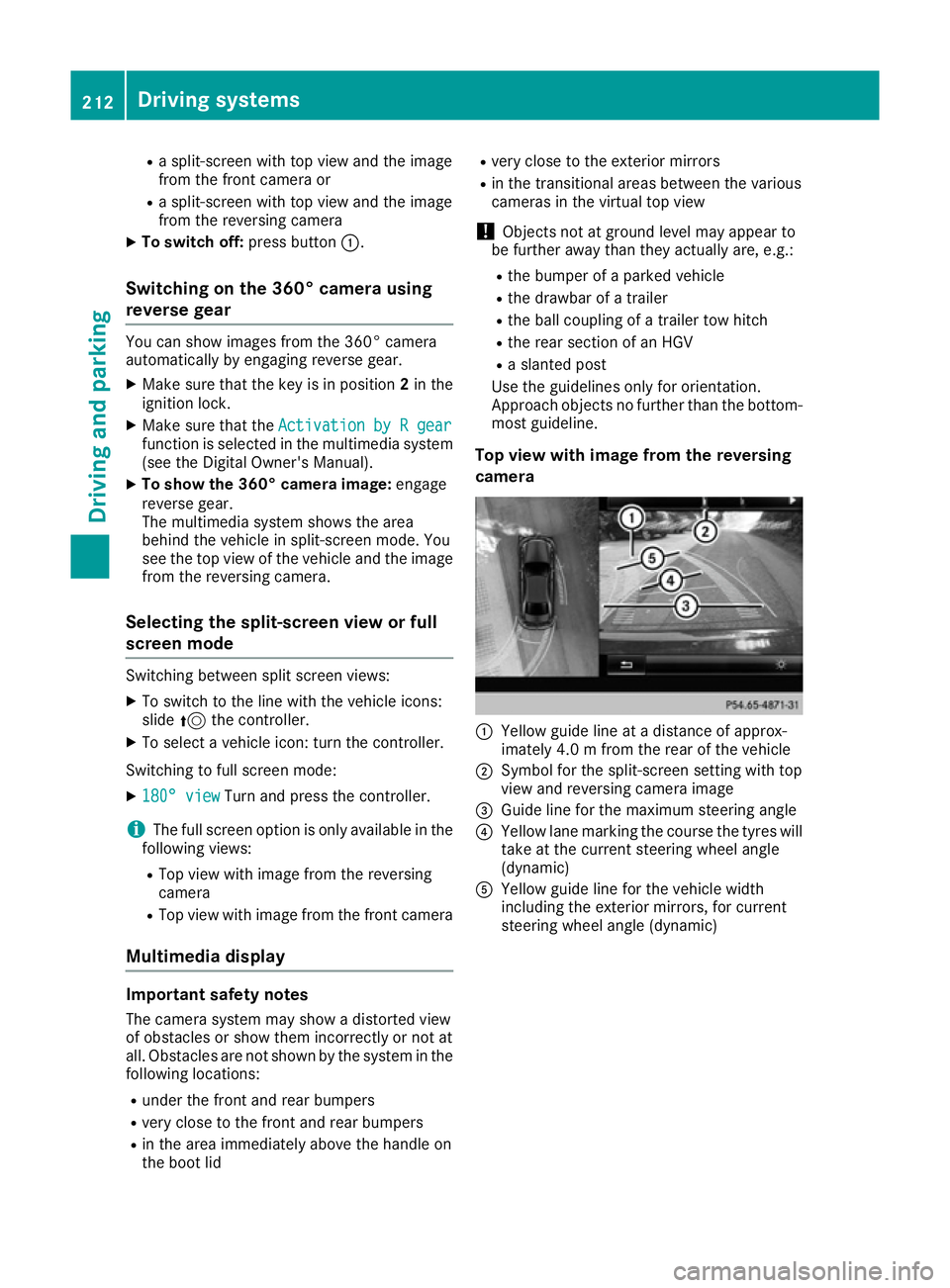
Top view with image from th ereversing
camera :
Yellow guide line at adistanc eofapprox-
imately 4. 0mfromt herear of th evehicle
; Symbol for th esplit-screen settin gwith top
view and reversing camera image
= Guide line for th emaximum steering angle
? Yellow lane markin gthe course th etyres will
tak eatt hecurren tsteering wheel angle
(dynamic)
A Yellow guide line for th evehicle width
includin gthe exterio rmirrors, for current
steering wheel angle (dynamic) 212
Driving systemsDriving and parking
Page 219 of 385
corresponds to the last selectio
nactivated
(standard/sensitive).
Warning in the multifunctio ndisplay If fatigu
eorincreasing lapse sinconcentration
are detected, awarning appears in the multi-
function display: ATTENTIONASSIST
ATTENTIO NASSIST Take a
Take a
break!
break!.
In addition to the messag eshown in the multi-
function display ,you will then hea rawarning
tone.
X If necessary, take abreak.
X Confirm the messag ebypressing the a
button on the steering wheel.
On long journeys, take regula rbreaks in good
time that allow for adequate recuperation. If you do not take abreak and ATTENTION ASSIST still
detects increasing lapse sinconcentration, you
will be warned agai nafter1 5m inutes at the
earliest. Thi swillo nly happe nifATTEN-
TION ASSIST stil ldetects typica lindicator sof
fatigu eorincreasing lapse sinconcentration.
Vehicles with COMAND Online: ifaw arning is
outpu tinthe multifunction display ,aservice
station search is performe dinCOMAND Online.
You can select aservice station and navigation
to this service station will then begin. Thi sfunc-
tion can be activate dand deactivated in
COMAND Online (se ethe separate operating
instructions). Traffic Sig
nAssist
General notes Traffic Sign Assist display
sthe maximum speed
permitted and overtaking restrictions to the
driver in the instrument cluster. Driving onto a
section of roa dinthe wrong direction triggers a warning. Traffic Sign Assist detects traffi
csigns
with multifunction camera :attached at the
top of the windscreen. The data and general
traffi cregulations store dinthe navigation sys-
tem are also used to determine the current
speed limit.
If at raffi csignt hat is relevant to your vehicle is
passed, the display of the speed limits and over-
taking restrictions is updated.
The display can also be updated withou tavisible
traffi csigni f:
R the vehicle changes roads (e.g .motorway exit
or sli proad)
R av illage or town boundary is passe dwhich is
store dinthe digita lmap
R the last traffi csignd etected by the camera
ha sn ot bee nrepeated
If as igni ndicating the end of arestriction (speed
limit or overtaking restriction) is passed, the
sig nisd isplayed for five seconds. The currently
applicabl etraffi cregulation continues to be
shown in the assistance graphi cdisplay
(Y page 243).
The camera also detects traffi csigns with a
restriction indicated by an additiona lsign( e.g .in
we tconditions).
The traffi csigns are only displayed with the
restrictions if:
R the regulation mus tbeo bserve dwitht he
restriction, or
R Traffic Sign Assist is unabl etodetermine
whether the restriction applies
If Traffic Sign Assist is unabl etodetermine a
maximum permitted speed from any of the avail- able sources, no speed limit is displayed in the
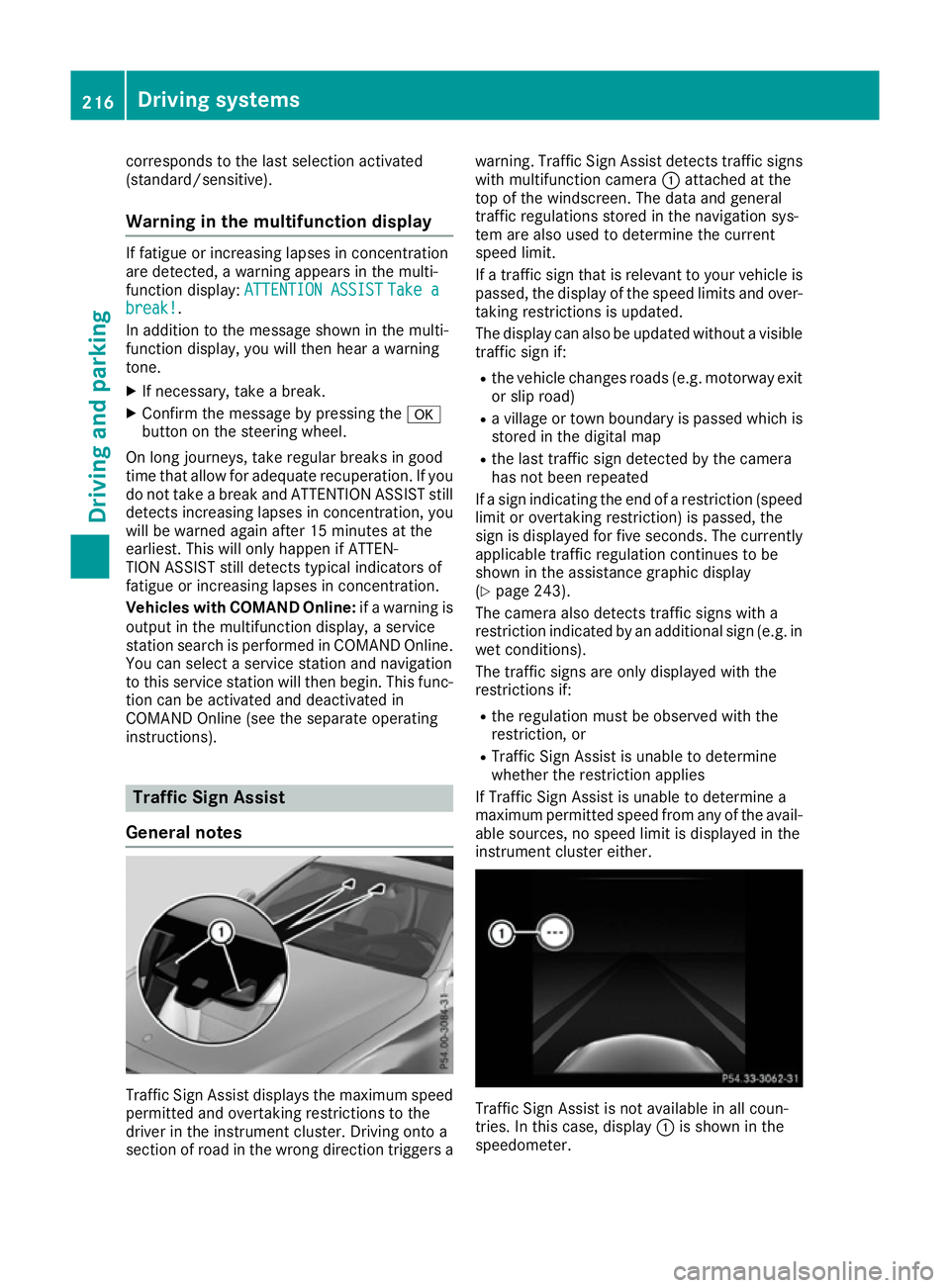
instrument cluster either. Traffic Sign Assist is not available in al
lcoun-
tries. In this case ,display :is shown in the
speedometer. 216
Drivin
gsystemsDrivin gand parking
Page 220 of 385
Important safety notes
Traffic Sig
nAssist is only an aid and is no talways
able to correctl ydisplay spee dlimits and over-
taking restrictions. Traffic sign salways have pri-
ority ove rthe Traffic Sig nAssist display.
The system may be either functionally impaired
or temporarily unavailable if:
R visibilit yispoor,e.g.d ue to snow, rain ,fog or
spray
R there is glare, e.g. from th esun bein glow in
th es ky
R there is dirt ,ice or misting on th ewindscreen
in th evicinity of th ecamera
R traffic sign sare hard to detec t(dirt, ice ,sno w)
R thet raffic sign sare insufficientl ylit at night
R sign sare ambiguous (e.g. traffic sign soncon-
struction sites or in adjacent lanes)
R thei nformation in th edigital stree tmap of the
navigation system is incorrec torout of date
Activating Traffic Sign Assist X
Activat ethe Traffic Sig nAssist display using
th eo n-bo ard computer (Y page 245).
If you hav eactivated th eTraffic Sig nAssist dis-
play in th eon-bo ard computer, th etraffic regu-
lation s(speed limits and overtaking restrictions)
are displayed in th einstrumen tcluste rfor five
seconds respectively. The wrong-way warning
and th etraffic sign display for spee dlimits and
overtaking restriction sremain active in the
Assist graphic eve nwhen th edisplay has been
deactivated. Instrumen
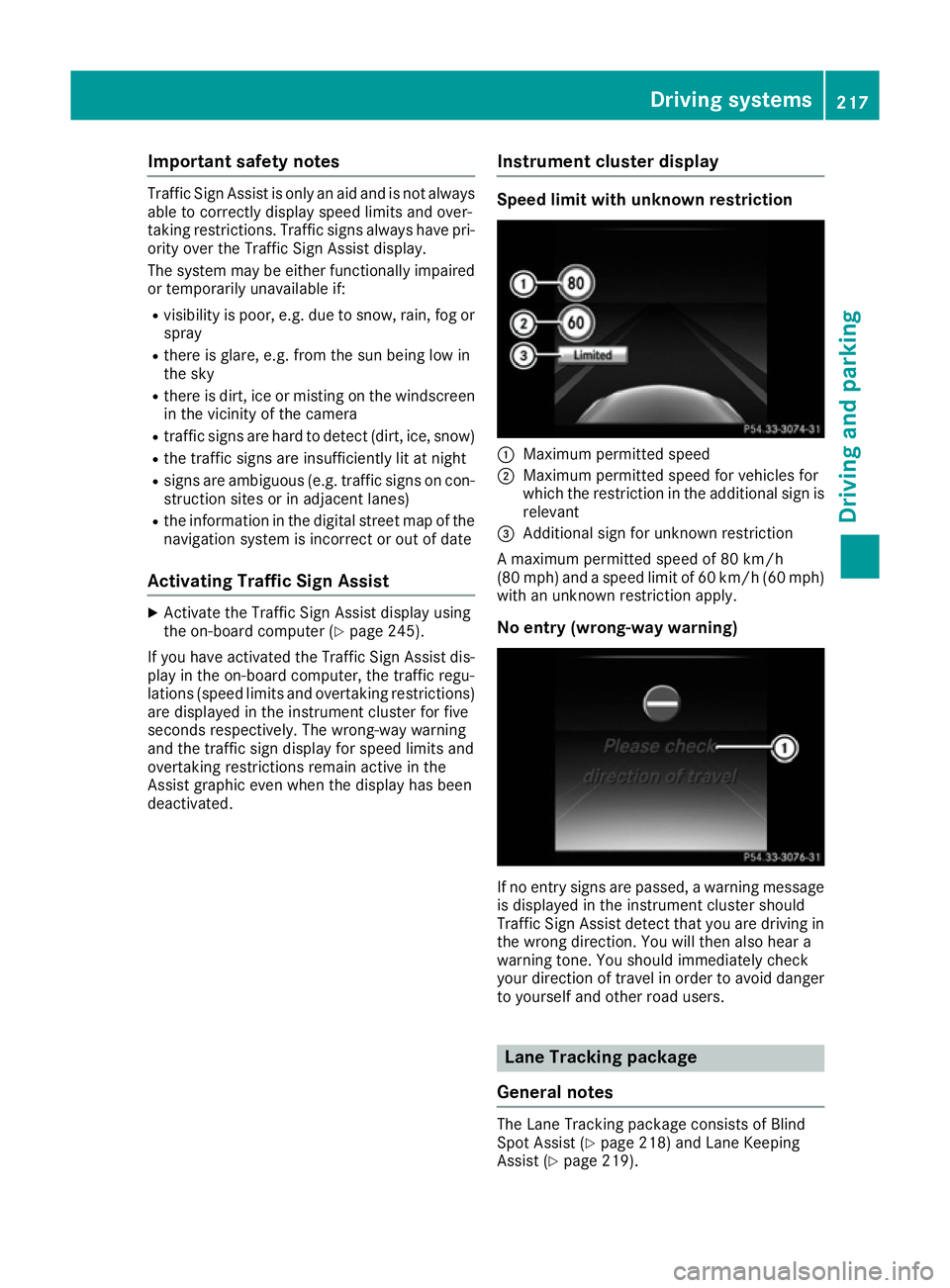
tcluster display Speed limit with unknown restriction
:
Maximum permitte dspeed
; Maximum permitte dspee dfor vehicles for
whic hthe restriction in th eadditional sign is
relevant
= Additional sign for unknown restriction
Am aximum permitte dspee dof80k m/h
(80 mph )and aspee dlimi tof60k m/h(60 mph)
wit hanu nknown restriction apply.
No entry (wrong-way warning) If no entr
ysign sare passed, awarning message
is displayed in th einstrumen tcluste rshould
Traffic Sig nAssist detec ttha ty ou are driving in
th ew rong direction .You will then also hear a
warning tone .You should immediately check
your direction of travel in order to avoi ddanger
to yourself and other road users. Lane Tracking package
General notes The Lan
eTrackin gpackag econsists of Blind
Spot Assist (Y page 218) and Lan eKeeping
Assist (Y page 219). Driving systems
217Driving and parking Z
Page 221 of 385
Blind Spo
tAssist General notes
Blind Spo tAssist monitors the areas on either
side of the vehicl ethata re not visible to the
driver with two lateral, rear-facing radar sen-
sors. Awarning display in the exterio rmirrors
draws your attentio ntovehicles detecte dinthe
monitore darea. If yo uthen switch on the cor-
responding turn signa ltochange lanes, yo uwill
also receive avisua land audibl ecollision warn-
ing.
Blind Spo tAssist supports yo ufrom aspeed of
approximatel y30km/h.
Important safety notes G
WARNING
Blind Spo tAssist does not react to vehicles:
R overtake ntoo closel yonthe side ,placing
them in the blind spo tarea
R when the difference in the speed of
approach and overtaking is too great
As aresult, Blind Spo tAssist canno twarn
driver sinthesesituations. There is ariskofan
accident.
Alway spaycarefu lattentio ntothe traffic sit-
uatio nand maintain asafed istance at the side
of the vehicle.
Blind Spo tAssist is onl yanaid.Itm ayfailto
detect som evehicles and is no substitute for
attentive driving .Alway sensure tha tther eis
sufficient distance to the side for othe rroad
users and obstacles.
Radar sensors
The radar sensors for Blind Spo tAssist are inte-
grated into the rea rbum per. Make sure tha tthe
bumpers are free from dirt, ice or slush. The
sensors must not be covered ,for exampl eby
cycl eracks or overhanging loads. Following a
severe impact or in the event of damage to the
bumpers, have the functio nofthe radar sensors
checked at aquali fied specialist workshop.
Blind Spo tAssist ma ynolonger work properly. Monitorin
grange
In particular, the detection of obstacle scan be
impaired in the cas eof:
R dirt on the sensors or obscured sensors
R poor visibility ,e.g.d ue to fog ,heavy rain,
snow or spray
R narrow vehicles, e.g .motorcycle sorbicycles
R ver yw idel an es
R narrow lanes
R vehicles not driving in the middl eoftheirlane
R barriers or othe rroa db oundaries
Vehicles in the monitoring rang eare then not
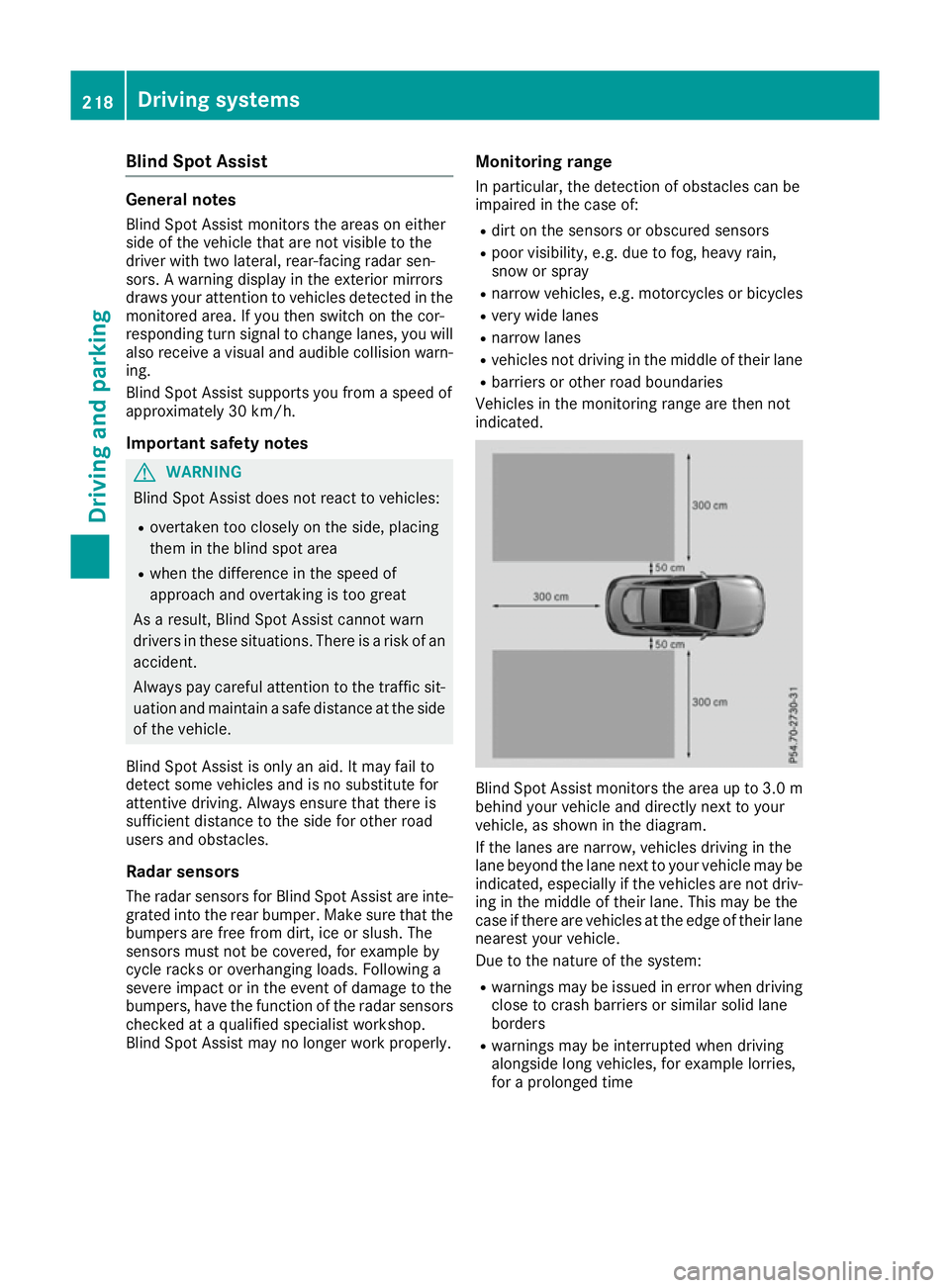
indicated. Blind Spo
tAssist monitors the are aupto3.0 m
behind your vehicl eand directl ynext to your
vehicle, as shown in the diagram.
If the lanes are narrow ,vehicles driving in the
lane beyond the lane next to your vehicl emaybe
indicated ,especially if the vehicles are not driv-
ing in the middl eoftheirlan e. Thi smaybe the
cas eift hereare vehicles at the edge of thei rlane
neares tyou rv ehicle.
Due to the nature of the system:
R warning smaybe issued in error when driving
close to crash barriers or similar solid lane
borders
R warning smaybe interrupte dwhend riving
alongsid elon gv ehicles, for exampl elorries,
for aprolonged time 218
Driving systemsDriving an
dparking