heating MERCEDES-BENZ C-CLASS COUPE 2015 User Guide
[x] Cancel search | Manufacturer: MERCEDES-BENZ, Model Year: 2015, Model line: C-CLASS COUPE, Model: MERCEDES-BENZ C-CLASS COUPE 2015Pages: 385, PDF Size: 13.12 MB
Page 111 of 385
Adjusting th
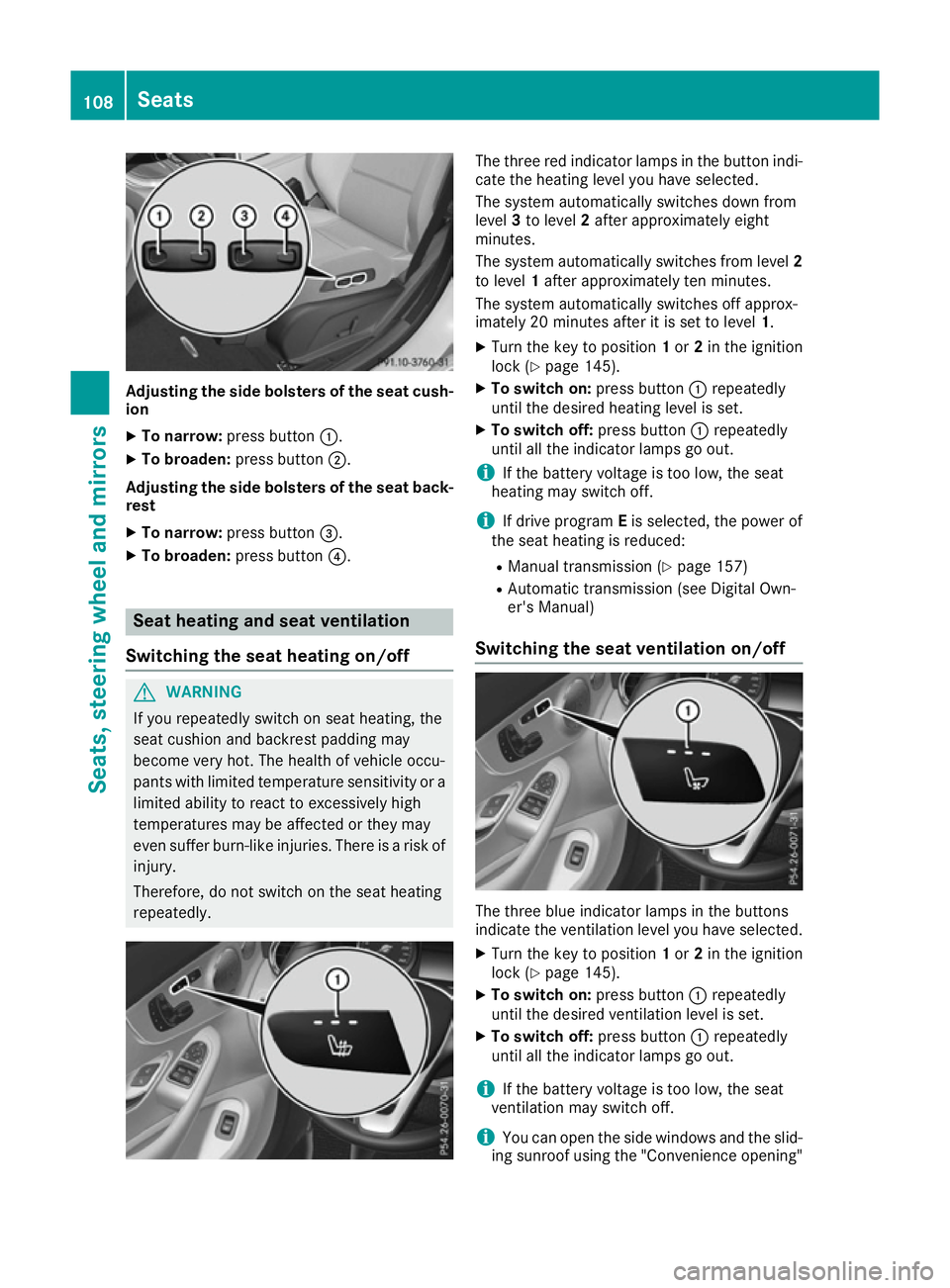
esideb olsters of th eseat cush-
ion
X To narrow: press button :.
X To broaden: press button;.
Adjusting th esideb olsters of th eseat back-
rest
X To narrow: press button =.
X To broaden: press button?. Seat heatin
gand seat ventilation
Switching th eseat heatin gon/off G
WARNING
If you repeatedly switch on seat heating ,the
seat cushion and backres tpaddin gmay
become ver yhot.T he healt hofvehicle occu-
pants wit hlimited temperatur esensitivit yora
limited abilit ytor eac ttoe xcessively high
temperatures may be affected or they may
eve nsuffer burn-like injuries .Ther eisar iskof
injury.
Therefore, do no tswitch on th eseat heating
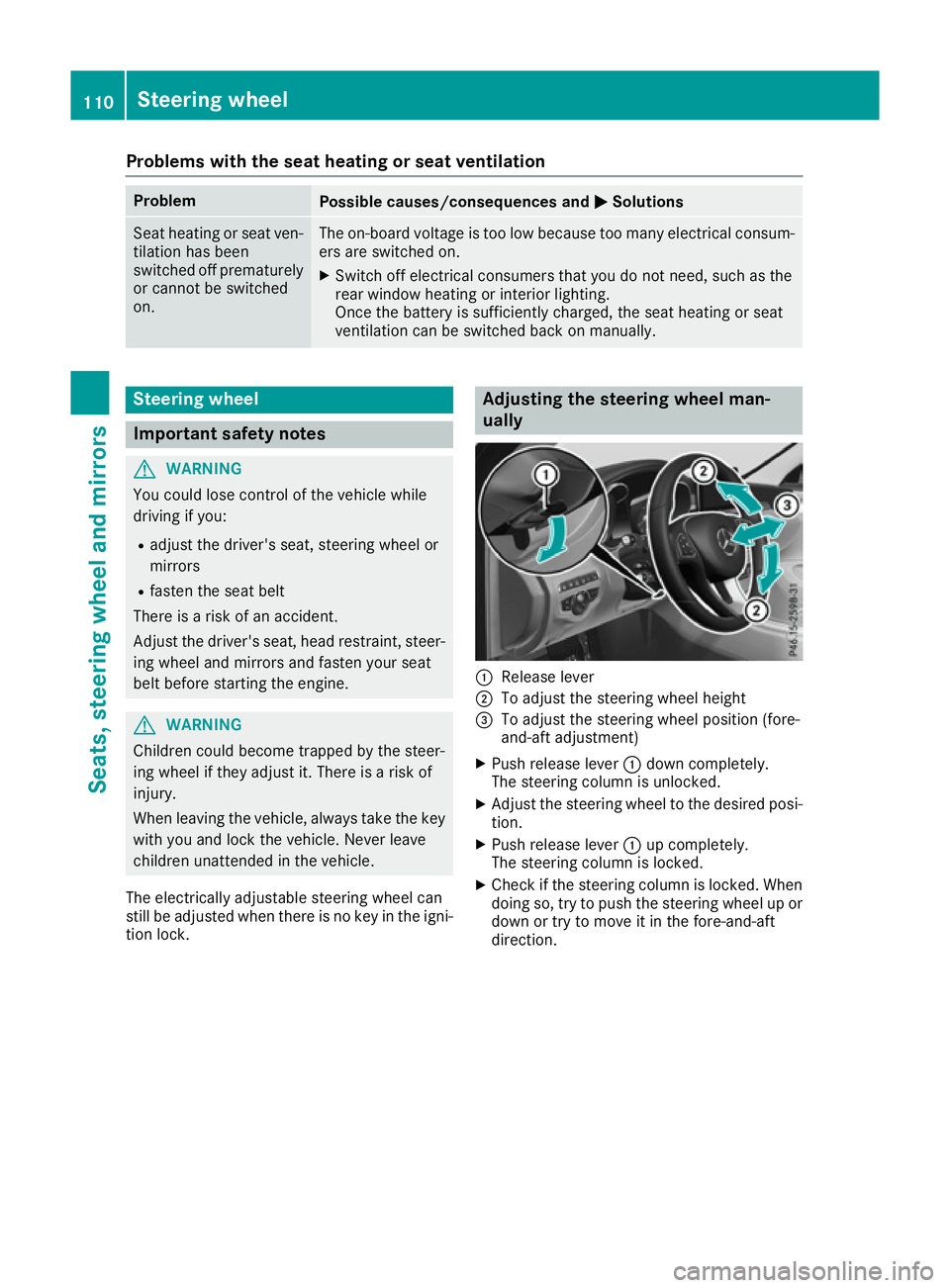
repeatedly. The three red indicator lamps in th
ebutto nindi-
cat ethe heating leve lyou have selected.
The system automaticall yswitches down from
level 3to level 2after approximately eight
minutes.
The system automaticall yswitches from level 2
to level 1after approximately te nminutes.
The system automaticall yswitches off approx-
imately 20 minute safter it is set to level 1.
X Turn th ekeyto position 1or 2in th eignition
loc k(Ypage 145).
X To switch on: press button:repeatedly
until th edesired heating leve lisset.
X To switch off: press button:repeatedly
until all th eindicator lamps go out.
i If th
ebattery voltage is to olow, th eseat
heating may switch off.
i If driv eprogram Eis selected, th epower of
th es eat heating is reduced:
R Manual transmission (Y page 157)
R Automatic transmission (see Digital Own-
er' sM anual)
Switching th eseat ventilation on/off The three blue indicator lamps in th
ebuttons
indicat ethe ventilatio nleve lyou have selected.
X Turn th ekeyto position 1or 2in th eignition
loc k(Ypage 145).
X To switch on: press button:repeatedly
until th edesired ventilatio nleve liss et.
X To switch off: press button:repeatedly
until all th eindicator lamps go out.
i If th
ebattery voltage is to olow, th eseat
ventilatio nmay switch off.
i You can open th
eside windows and th eslid-
ing sunroo fusin gthe "Convenience opening" 108
SeatsSeats, steerin
gwheel and mirrors
Page 113 of 385
Problems with the seat heating or seat ventilation
Problem
Possible causes/consequences and
M
MSolutions Seat heating or seat ven-
tilation has been
switched off prematurely
or cannot be switched
on. The on-board voltage is too low because too many electrical consum-
ers are switched on.
X Switch off electrical consumers that you do not need, such as the
rear window heating or interior lighting.
Once the battery is sufficiently charged, the seat heating or seat
ventilation can be switched back on manually. Steering wheel
Important safety notes
G
WARNING
You could lose control of the vehicle while
driving if you:
R adjust the driver's seat, steering wheel or
mirrors
R fasten the seat belt
There is arisk of an accident.
Adjust the driver's seat, head restraint ,steer-
ing wheel and mirrors and fasten your seat
belt before startingt he engine.G
WARNING
Children could become trapped by the steer-
ing wheel if they adjust it. There is arisk of
injury.
When leaving the vehicle, always take the key with you and lock the vehicle. Never leave
children unattended in the vehicle.
The electrically adjustable steering wheel can
still be adjusted when there is no key in the igni-
tion lock. Adjusting the steering wheel man-
ually
:
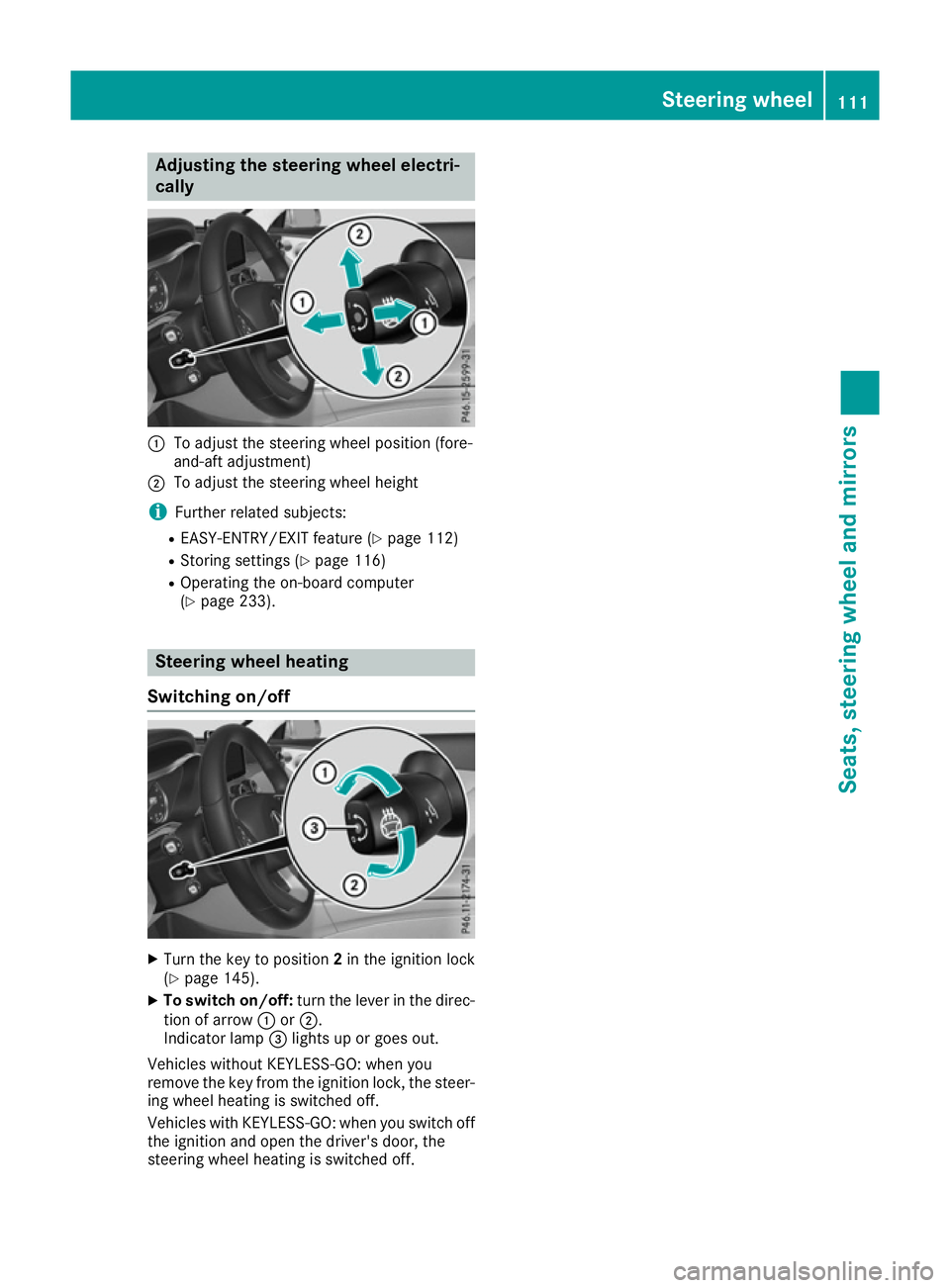
Release lever
; To adjust the steering wheel height
= To adjust the steering wheel position (fore-
and-aft adjustment)
X Push release lever :down completely.
The steering column is unlocked.
X Adjust the steering wheel to the desired posi-
tion.
X Push release lever :up completely.
The steering column is locked.
X Check if the steering column is locked. When
doing so, try to push the steering wheel up or
down or try to move it in the fore-and-aft
direction. 110
Steering wheelSeats, steering wheela
nd mirrors
Page 114 of 385
Adjusting th
esteering wheel electri-
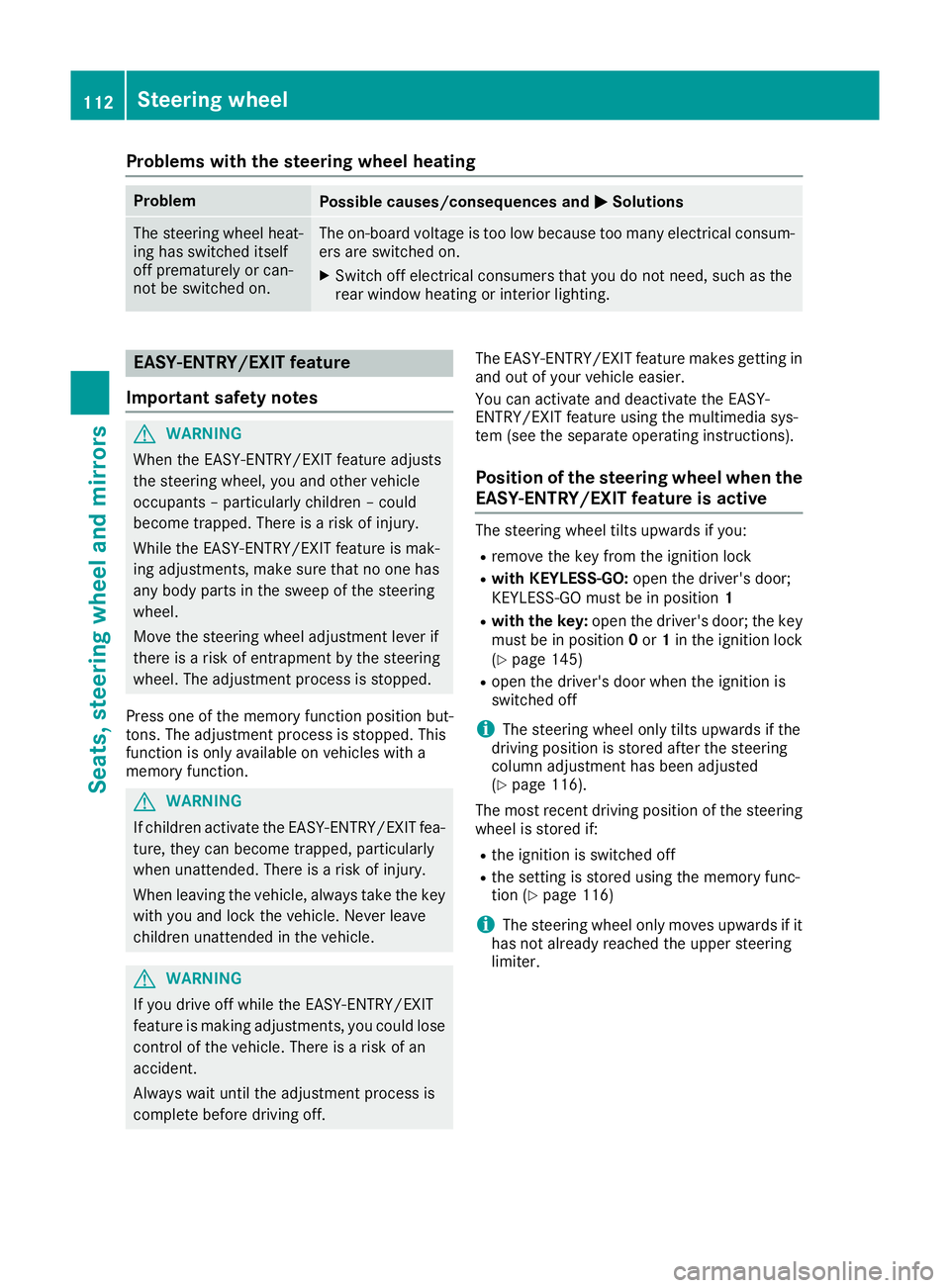
cally :
To adjust th esteering whee lposition (fore-
and-af tadjustment)
; To adjust th esteering whee lheight
i Further relate dsubjects:
R EASY-ENTRY/EXIT feature (Y page 112)
R Storing setting s(Ypage 116)
R Operating th eon-bo ard computer
(Y page 233). Steering wheel heating
Switchin gon/off X
Turn th ekeyto position 2in th eignition lock
(Y page 145).
X To switch on/off: turnthe lever in th edirec-
tion of arrow :or;.
Indicato rlamp =lights up or goe sout.
Vehicles without KEYLESS-GO :when you
remove th ekeyfrom th eignition lock, th esteer-
ing whee lheating is switched off.
Vehicles wit hKEYLESS-GO :when you switch off
th ei gnition and open th edriver's door ,the
steering whee lheating is switched off. Steering wheel
111Seats,steering wheel and mirrors Z
Page 115 of 385
Problems with the steering wheel heating
Problem
Possible causes/consequences and
M
MSolutions The steering wheel heat-
ing has switched itself
off prematurely or can-
not be switched on. The on-board voltage is too low because too many electrical consum-
ers are switched on.
X Switch off electrical consumers that you do not need, such as the
rear window heating or interior lighting. EASY-ENTRY/EXIT feature
Important safety notes G
WARNING
When the EASY-ENTRY/EXIT feature adjusts
the steering wheel, you and other vehicle
occupants –particularly children –could
become trapped. There is arisk of injury.
While the EASY-ENTRY/EXIT feature is mak-
ing adjustments, make sure that no one has
any body parts in the sweep of the steering
wheel.
Move the steering wheel adjustment lever if
there is arisk of entrapment by the steering
wheel. The adjustment process is stopped.
Press one of the memory function position but-
tons. The adjustment process is stopped. This
function is only available on vehicles with a
memory function. G
WARNING
If children activate the EASY-ENTRY/EXIT fea- ture, they can become trapped, particularly
when unattended. There is arisk of injury.
When leaving the vehicle, always take the key with you and lock the vehicle. Never leave
children unattended in the vehicle. G
WARNING
If you drive off while the EASY-ENTRY/EXIT
feature is making adjustments, you could lose
control of the vehicle. There is arisk of an
accident.
Always wait until the adjustment process is
complete before driving off. The EASY-ENTRY/EXIT feature makes gettingin
and out of your vehicle easier.
You can activate and deactivate the EASY-
ENTRY/EXIT feature using the multimedia sys-
tem (see the separate operating instructions).
Position of the steering wheel when the EASY-ENTRY/EXIT featureisa ctive The steering wheel tilts upwards if you:
R remove the key from the ignition lock
R with KEYLESS-GO: open the driver's door;
KEYLESS-GO must be in position 1
R with the key: open the driver's door; the key
must be in position 0or 1in the ignition lock
(Y page 145)
R open the driver's door when the ignition is
switched off
i The steering wheel only tilts upwards if the
driving position is stored after the steering
column adjustment has been adjusted
(Y page 116).
The most recent driving position of the steering
wheel is stored if:
R the ignition is switched off
R the settingiss tored using the memory func-
tion (Y page 116)
i The steering wheel only moves upwards if it
has not already reached the upper steering
limiter. 112
Steering wheelSeats, steering wheela
nd mirrors
Page 117 of 385
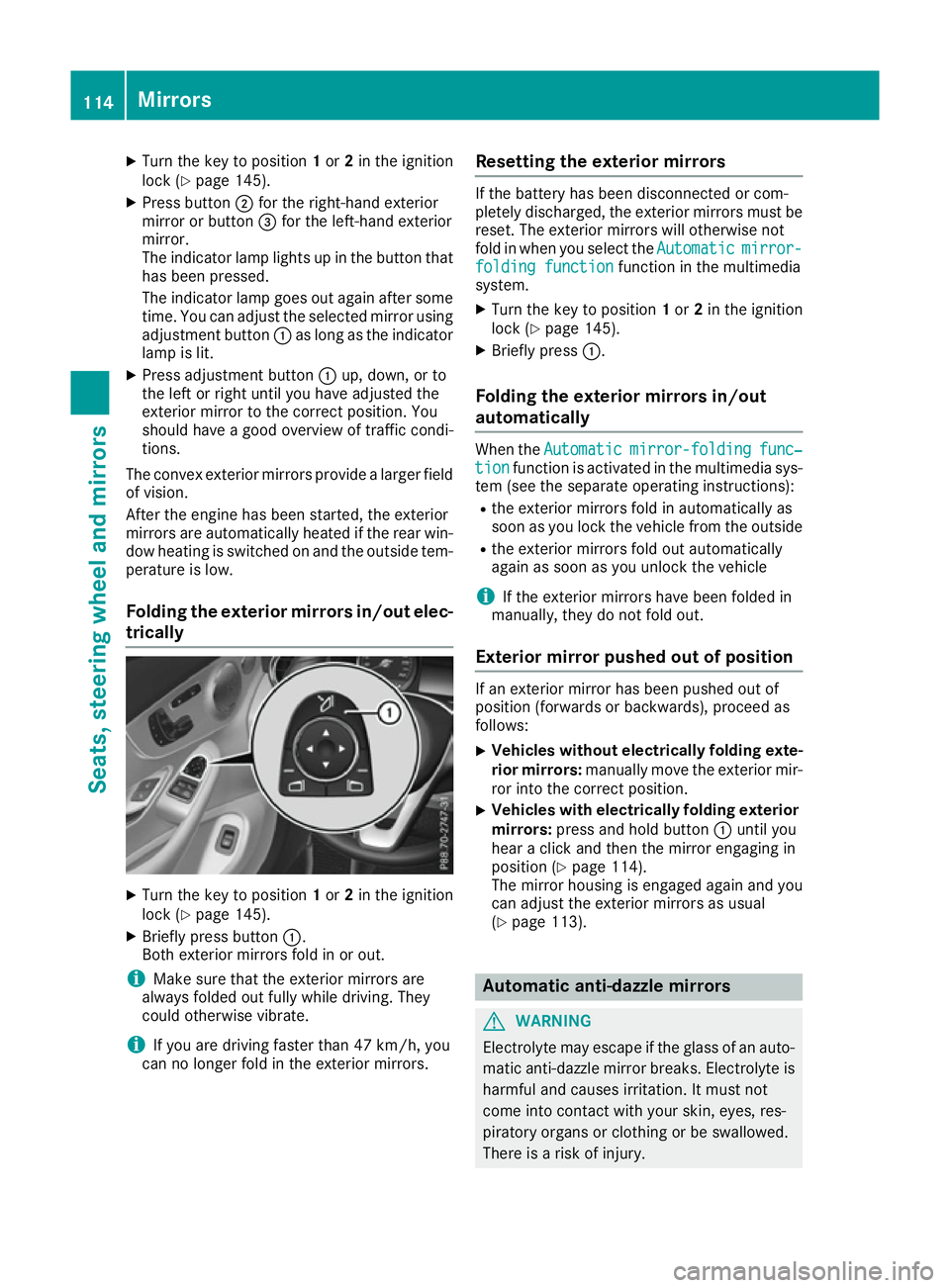
X
Turn the key to position 1or 2in the ignition
lock (Y page 145).
X Press button ;for the right-hand exterior
mirror or button =for the left-hand exterior
mirror.
The indicator lamp lights up in the button that has been pressed.
The indicator lamp goes out again after some
time. You can adjust the selected mirror using adjustmen tbutton :as long as the indicator
lamp is lit.
X Press adjustmen tbutton :up, down, or to
the left or right until you have adjusted the
exterior mirror to the correc tposition. You
should have agood overview of traffic condi-
tions.
The convex exterior mirrors provide alarger field
of vision.
After the engine has been started, the exterior
mirrors are automatically heated if the rear win-
dow heating is switched on and the outside tem- perature is low.
Folding the exterior mirrors in/out elec- trically X
Turn the key to position 1or 2in the ignition
lock (Y page 145).
X Briefly press button :.
Both exterior mirrors fold in or out.
i Make sure that the exterior mirrors are
alway sfolded out fully while driving. They
could otherwise vibrate.
i If you are driving faster than 47 km/h,
you
can no longer fol dintheexterio rmirrors. Resetting th
eexterior mirrors If th
ebattery has been disconnected or com-
pletely discharged, th eexter iorm irror smustbe
reset .The exterio rmirror swill otherwise not
fol dinw hen you select the Automatic Automaticmirror-
mirror-
foldin gfunction
foldin gfunction function in th emultimedia
system.
X Turn th ekeyto position 1or 2in th eignition
loc k(Ypage 145).
X Briefly press :.
Folding th eexterior mirror sin/out
automatically Whe
nthe Automatic
Automatic mirror-folding
mirror-folding func‐
func‐
tion
tion function is activated in th emultimedia sys-
te m( see th eseparat eoperating instructions):
R thee xter iorm irror sfoldina utomatically as
soo nasy ou loc kthe vehicl efromt heoutside
R thee xter iorm irror sfoldo ut automatically
again as soo nasyou unloc kthe vehicle
i If th
eexter iorm irror shaveb een folded in
manually, they do no tfoldo ut.
Exterior mirror pushe dout of position If an exterio
rmirror has been pushed out of
position (forwards or backwards), proceed as
follows:
X Vehicles withou
telectricall yfolding exte-
rior mirrors: manually mov ethe exterio rmir-
ror into th ecorrect position.
X Vehicles wit
helectricall yfolding exterior
mirrors: press and hold button :until you
hear aclick and then th emirror engaging in
position (Y page 114).
The mirror housin gisengage dagain and you
can adjust th eexter iorm irror sasu sual
(Y page 113). Automatic anti-dazzle mirrors
G
WARNING
Electrolyt emay escape if th eglassofana uto-
matic anti-dazzl emirror breaks .Electrol yteis
harmful and causes irritation .Itmustn ot
come into contact wit hyour skin ,eyes ,res-
piratory organs or clothin gorbeswallowed.
There is ariskofi njury. 114
Mir
rorsSeats ,steering wheel and mirrors
Page 133 of 385
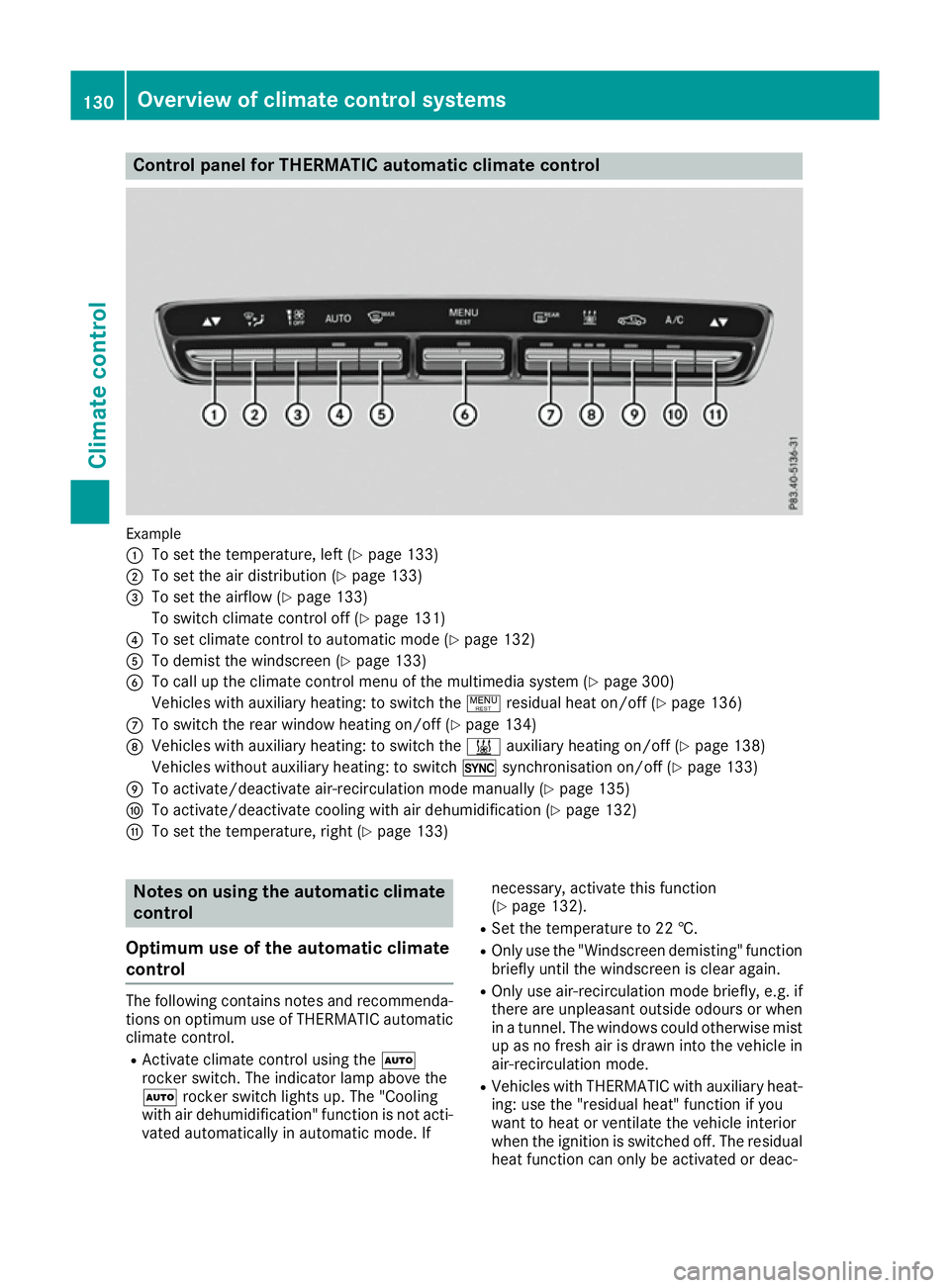
Control panel for THERMATIC automatic climat
econtrol Example
:
To set th etem perature, left (Y page 133)
; To set th eair distribution (Y page 133)
= To set th eairflow (Y page 133)
To switch climate control off (Y page 131)
? To set climate control to automatic mod e(Ypage 132)
A To demist th ewindscree n(Ypage 133)
B To call up th eclimate control men uofthemultimedia system (Y page 300)
Vehicle switha uxiliary heating :toswitch the !residual heat on/of f(Ypage 136)
C To switch th erear window heating on/of f(Ypage 134)
D Vehicle switha uxiliary heating :toswitch the &auxiliary heating on/of f(Y page 138)
Vehicle swithout auxiliary heating :toswitch 0synchronisation on/of f(Ypage 133)
E To activate/deactivat eair-recirculation mod emanually (Y page 135)
F To activate/deactivat ecoolin gwitha ir dehumidification (Y page 132)
G To set th etem perature, righ t(Ypage 133) Notes on usin
gthe automatic climate
control
Optimu muse of th eautomatic climate
control The followin
gcontain snotes and recommenda-
tions on optimum use of THERMATIC automatic climate control.
R Activate climate control usin gthe Ã
rocke rswitch .The indicator lamp abov ethe
à rockerswitch light sup. The "Cooling
wit hair dehumidification "function is no tacti-
vated automaticall yinautomatic mode. If necessary, activat
ethisf unction
(Y page 132).
R Set th etem peratur eto22†.
R Only use th e"Windscree ndemisting "function
briefly until th ewindscree nisclear again.
R Only use air-recirculation mod ebriefly, e.g .if
there are unpleasan toutside odour sorwhen
in at unnel. The windows coul dotherwise mist
up as no fresh air is drawn int othe vehicle in
air-recirculation mode.
R Vehicle swithT HERMATIC wit hauxiliary heat-
ing :use th e"residual heat "function if you
want to heat or ventilate th evehicle interior
when th eignition is switched off .The residual
heat function can only be activated or deac- 130
Overview of climat
econtrol systemsClimate control
Page 134 of 385
tivated with the ignition switched off
.The
residua lhea tfun ctio nisd eactivated when the
ignition is switched on.
DYNAMIC SELECT switc h(exce pt
Mercedes-AMG vehicles) Yo
uc an choose between various drive programs
with the DYNAMIC SELEC Tswitch:
R manua ltransmission (Y page 154)
R automatic transmission (Y page 154)
If yo uhaves elect ed drive program E:
R the cooling outpu tisr educe dwhenc ooling
R when heating, the electrical heate rbooste ris
deactivated and heat outpu tisr educe dasa
result
R the rea rwindo wh eating running tim eis
reduced
If yo uhaves elect ed drive program C,Sor S+ ,
the current climate setting saremaintained.
EC Os tart/sto pfunction During automatic engine switch-off
,the climate
contro lonlyo perates at areduce dcapacity. If
yo ur equire the full climate contro loutput, you
can switch off the ECO start/sto pfunctio nby
pressing the ECO button (Y page 151).Operatin
gthe climate contro lsystem Switchin
gthe climate contro lon/off
General notes When climate contro
lisswitched off ,the air
supply and ai rcirculation ar ealsos witched off.
The windows could mist up .Therefore ,only
switch off climate contro lbriefly.
Switch on climate contro lprimaril yusing the
à rockerswitch (Y page 132).
Activating/deactivating X
Turn the key to position 2in the ignition lock
(Y page 145).
X To switc hon:setthe airflow to level 1or
highe rusing the Hrockerswitch.
X To switc hoff:setthe airflow to level 0using
the H rockerswitch. Operatin
gthe climate contro lsystem
131Climate control
Page 136 of 385
however, continues to be controlled automati-
cally. When the manually set function switches
back to automatic mode, the indicator lamp
above the Ãrocker switch lights up again. Setting the temperature
Differentt emperatures can be set for the driv-
er's and front-passenger sides.
X Turn the key to position 2in the ignition lock
(Y page 145).
X To increase or reduce: press thew
rocker switch up or down.
Only change the temperature settingins mall
increments. Start at 22 †. Setting the air distribution
Air distribution settings ¯
Directst he airflow through the demister
vents
P Directst he airflow through the centre
and side air vents
O Directst he airflow through the footwell
air vents
S Directst he airflow through the centre
and side air vents as well as the footwell
air vents
a Directst he airflow through the footwell
and demister vents
_ Directst he airflow through the demister
vents, the centre and side air vents as
well as the footwell air vents
b Directst he airflow through the centre
and side air vents as well as the demister
vents
W Sets the air distribution to automatic
Setting X
Turn the key to position 2(Y page 145).
X Press the _rocker switch up or down.
The various air distribution settings appearin the multimedia system. Setting the airflow
X Turn the key to position 2in the ignition lock
(Y page 145).
X To increase or reduce: press theH
rocker switch up or down. Activating/deactivating the synchro-
nisation function
General notes The "Synchronisation
"function is only available
with THERMATIC (2‑zone) automatic climate
control.
Climate control can be set centrally using the
synchronisation function. The temperature set-
ting is adopted for the front-passenger side.
Activating/deactivating THERMATIC automatic climate control (2-
zone) without auxiliary heating
X Press the upper or lower section of the 0
rocker switch.
The indicator lamp above the 0rocker
switch lights up or goes out.
The synchronisation function is deactivated if
the settings for the front-passenger side are
changed.
THERMATIC automatic climate control (2- zone) with auxiliary heating
X Activate or deactivate the "Synchronisation"
function using the multimedia system
(Y page 301).
The synchronisation function is deactivated if
the settings for the front-passenger side are
changed. Demisting the windscreen
General notes You can use this function to defrost the wind-
screen or to demist the inside of the windscreen
and the front side windows.
Switch off the windscreen demisting function as
soon as the windscreen is clear again. Operating the climate control system
133Climatecontrol
Page 137 of 385
Switching the "Windscreen demisting"
function on or off
X
Turn the key to position 2in the ignition lock
(Y page 145).
X To switch on: press the¬rocker switch
on the front control unit up or down.
The indicator lamp above the ¬rocker
switch lights up. The current climate control
settings are deactivated.
The climate control system switches to the
following functions:
R high airflow
R high temperature
R air distribution to the windscreen and front
side windows
R air-recirculation mode off
i If necessary, the "Cooling with air dehumid-
ification" function is activated. In this case,
the indicator lamp above the ¿rocker
switch remains switched off.
X To switch off: press the¬rocker switch
up or down.
The indicator lamp above the ¬rocker
switch goes out. The previous settings are
reactivated. Air-recirculation mode remains
deactivated. Demisting the windows
Windows misted up on the inside X
Activate the "Cooling with air dehumidifica-
tion" function with the ¿rocker switch.
i For THERMOTRONIC automatic climate
control with auxiliary heating, the "Cooling
with air dehumidification" function can only
be activated using the multimedia system.
X Switch on automatic mode using the Ã
rocker switch.
X If the windows continue to mist up, activate
the windscreen demisting function using the
¬ rocker switch.
i You should only select this settingu
ntil the
windscreen is clear again. Windows misted up on the outside X
Switch on the windscreen wipers.
X Switch on automatic mode using the Ã
rocker switch.
i If you clean the windows regularly
,they do
not mist up so quickly. Rear window heating
General notes The rear window heating has
ahigh current
draw. You should therefore switch it off as soon as the window is clear. It otherwise switches off
automatically after several minutes.
If the battery voltage is too low, the rear window heating may switch off.
Switching the sound on/off X
Turn the key to position 2in the ignition lock
(Y page 145).
X Press the ¤rocker switch up or down.
The indicator lamp above the ¤rocker
switch lights up or goes out. 134
Operating the climate control systemClimatec
ontrol
Page 138 of 385
Problems with the rear window heating
Problem
Possible causes/consequences and
M
MSolutions The rear window heating
has switched off prema-
turely or cannot be acti-
vated. The battery has not been sufficiently charged.
X Switch off any consumers that are not required, e.g. reading lamps,
interior lighting or the seat heating.
When the battery is sufficiently charged, the rear window heating
can be activated again. Switching air-recirculation mode
on/off
General notes You can also temporarily deactivate the flow of
fresh air manually if unpleasant odours are
enteringt he vehicle from outside. The air
already inside the vehicle will then be recircula-
ted.
If you activate air-recirculation mode, the win-
dows can mist up more quickly, in particular at
low temperatures. Only use air-recirculation
mode briefly to prevent the windows misting up.
Activating/deactivating X
Turn the key to position 2in the ignition lock
(Y page 145).
X To activate: press thegrocker switch up
or down.
The indicator lamp above the grocker
switch lights up.
Air-recirculation mode is activated automati-
cally:
R at high outside temperatures
R inat unnel (vehicles with anavigation system
only)
The indicator lamp above the grocker
switch is not lit when automatic air-recirculation mode is activated. Outside air is added after
approximately 30 minutes.
X To deactivate: press thegrocker switch
up or down.
The indicator lamp above the grocker
switch goes out. Air-recirculation mode is deactivated automati-
cally:
R after approximately five minutes at outside
temperatures below approximately 5†
R after approximately five minutes if "Cooling
with air dehumidification" is deactivated
R after approximately 30 minutes at outside
temperatures above approximately 5†if the
"Cooling wit hair dehumidification" function is
activated Convenience opening or closing using
the air-recirculatio nbutton G
WARNING
When the convenience closing feature is oper- ating, parts of the body coul dbecome trapped
in the closing area of the side window and the
sliding sunroof. There is arisk of injury.
Observ ethe complete closing procedure
when the convenience closing feature is oper-
ating. When closing make sure that no parts of the body are in the closing area. G
WARNING
During convenience opening parts of the body coul dbed rawninorb ecome trapped
between the side window and window frame.
There is arisk of injury.
When opening, make sure that nobody is
touching the side window. If someone
become strapped, immediately press
the W switch in the door to stop the move-
ment of the side windows. To continue closing
the side window, pul lontheW switch. Operating the climate control system
135Climate control Z