towing MERCEDES-BENZ C-CLASS COUPE 2015 User Guide
[x] Cancel search | Manufacturer: MERCEDES-BENZ, Model Year: 2015, Model line: C-CLASS COUPE, Model: MERCEDES-BENZ C-CLASS COUPE 2015Pages: 385, PDF Size: 13.12 MB
Page 162 of 385
Children could also set th
evehicle in motion,
for example by:
R releasin gthe parking brake
R shiftin gthe automatic transmission out of
park position P
R starting th eengine.
Ther eisar iskofana ccidentand injury.
When leaving th evehicle ,always tak ethe key
wit hyou and loc kthe vehicle .Never leave
children unattende dinthevehicle .Always
keep th ekeyout of reac hofchildren.
X If th etransmission is in position Dor R:p ush
th eD IRECT SELECT leve rupordown to the
first poin tofresistance.
X If th etransmission is in position P:depress
th eb rak epedal and push th eDIRECT SELECT
leve rupord own to th efirst poin tofresist-
ance.
If you switch th eengineo ff wit hthe transmis-
sion in position Ror D,t heautomatic transmis-
sion shifts to Nautomatically.
Wit hthe key: if you then open th edriver' sdoor
or th efront-pa ssenger door or remove th ekey
from th eignition ,the automatic transmission
shifts to Pautomatically.
Wit hthe Start/Stop button: if you then open
th ed river' sdoor or th efront-pa ssenger door,
th ea utomatic transmission shifts to Pautomat-
ically.
If you want th eautomatic transmission to
remain in neutral N,e.g.w hen having th evehicle
cleane dinana utomatic car wash wit hatowing
system:
X Vehicles with th
eStart-Sto pbutton:
remove th eStart-Sto pbutto nfromt heigni-
tio nlock.
X Inser tthe keyintot he ignition lock.
X All vehicles: switch theignition on.
X Depress th ebrak epedal and keep it
depressed.
X Shift to neutral N.
X Release th ebrak epedal.
X Release th eelectric parking brake.
X Switch off th eignition and leave th ekeyin the
ignition lock. Engaging drive position D X
If th etransmission is in position Ror N:p ush
th eD IRECT SELECT leve rdown past th efirst
poin tofr esistance.
X If th etransmission is in position P:depress
th eb rak epedal and push th eDIRECT SELECT
leve rdown past th efirst poin tofresistance. Transmission position and drive pro-
gram display
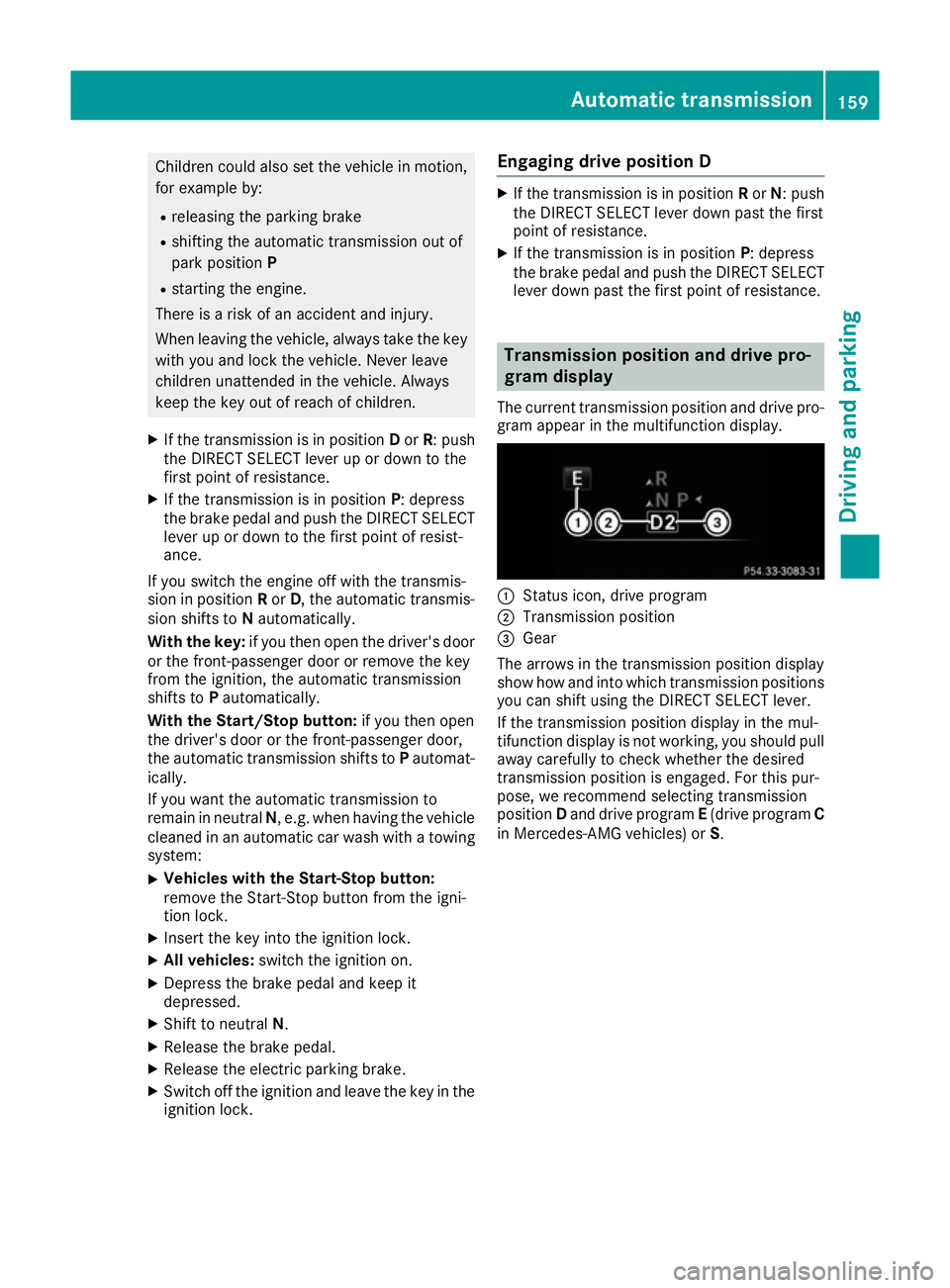
The curren ttransmission positio nand driv epro-
gram appear in th emultifunction display. :
Status icon, driv eprogram
; Transmissio nposition
= Gear
The arrows in th etransmission positio ndisplay
sho whow and int owhichtransmission positions
you can shif tusin gthe DIRECT SELECT lever.
If th etransmission positio ndisplay in th emul-
tifunctio ndisplay is no tworking ,you should pull
away carefull ytoc heck whether th edesired
transmission positio nisengaged .For this pur-
pose ,wer ecommen dselecting transmission
position Dand driv eprogram E(drive program C
in Mercedes-AM Gvehicles) or S. Automatic transmission
159Driving and parking Z
Page 164 of 385
reduces loadc
hange reactions and is conducive
to as porty driving style .The sound generated by
the double-clutch function depends on the drive progra mselected.
Kickdown Use kickdown for maximu
macceleration:
X Depress the accelerator peda lbeyond the
pressure point.
The transmission shifts to alower gear
depending on the engine speed.
X Ease off the accelerator peda lonce the
desired spee disreached.
The automatic transmission shifts back up.
Rocking the vehicle free Rocking the vehicl
efree by shifting the trans-
mission repeatedly between transmission posi-
tions Dand Rmay help to free the vehicl eifithas
become stuck in mud or snow.
The vehicle's engine management restricts
repeated shifting between transmission posi-
tions Dand Rup to amaximu mspeed of
9k m/h.
To shift back and forth between transmission
positions Dand R,m ove the DIRECT SELECT
lever up and down past the point of resistance.
Glidin gmode (Mercedes-AMG vehicles) Gliding mode is characterised by the following:
R the combustion engine is disconnected from
the drive train
R the engine speed is equal to the engine idling
speed
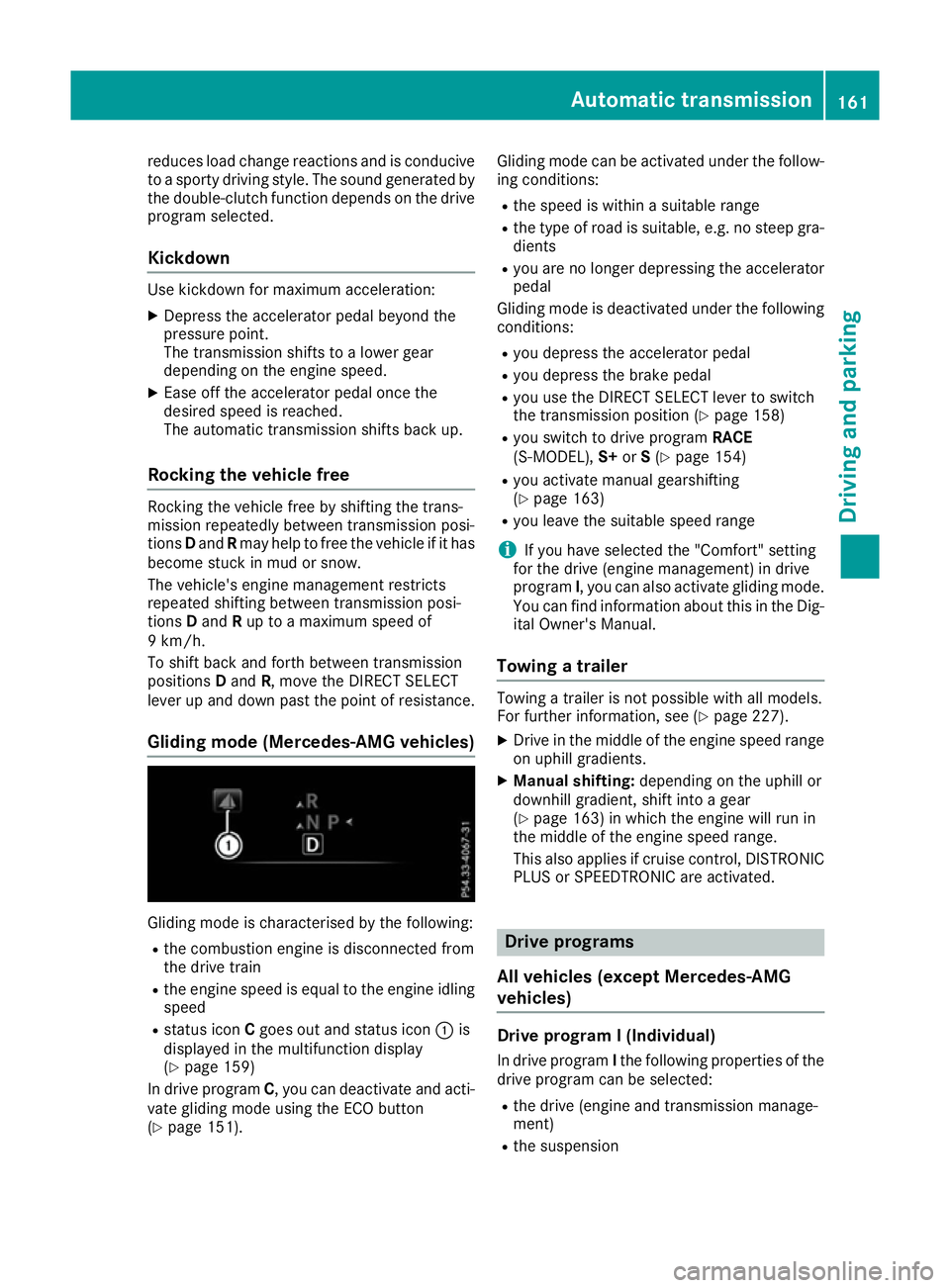
R status icon Cgoes out and status icon :is
displayed in the multifunction display
(Y page1 59)
In drive program C,you can deactivate and acti-
vate gliding mode using the ECO button
(Y page1 51). Gliding mode can be activated under the follow-
ing conditions:
R the spee diswithinas uitable range
R the type of road is suitable ,e.g. no steep gra-
dients
R you are no longer depressing the accelerator
pedal
Gliding mode is deactivated under the following conditions:
R you depress the accelerator pedal
R you depress the brake pedal
R you use the DIRECT SELECT lever to switch
the transmission position (Y page158)
R you switch to drive program RACE
(S‑MODEL), S+orS(Y page1 54)
R you activate manua lgearshifting
(Y page1 63)
R you leave the suitable spee drange
i If you have selected the "Comfort" setting
for the drive (engine management) in drive
program I,you can alsoa ctivate gliding mode.
You can find informatio nabout this in the Dig-
ital Owner's Manual.
Towing atrailer Towing
atrailer is not possible with all models.
For further information, see (Y page227).
X Drive in the middle of the engine spee drange
on uphill gradients.
X Manual shifting: depending on the uphill or
downhill gradient, shift into agear
(Y page1 63) in which the engine willr un in
the middle of the engine spee drange.
This alsoa ppliesifcruise control, DISTRONIC
PLUS or SPEEDTRONIC are activated. Drive programs
All vehicles (except Mercedes-AMG
vehicles) Drive program
I(Individual)
In drive program Ithe following properties of the
drive progra mcan be selected:
R the drive (engine and transmission manage-
ment)
R the suspension Automatic transmission
161Driving and parking Z
Page 176 of 385
To ensure that the vehicle is safeguarded
against rolling away unintentionally:
R the electric parking brake must be applied
R on vehicles with manual transmission, engage
1st gear or reverse gear
R on vehicles with automatic transmission, the
transmission must be in position Pand the
key must be removed from the ignition lock
R the front wheels must be turned towards the
kerb on steep uphill or downhill gradients
R the empty vehicle must be secured at the
front axle with awheel chock or similar
object ,for example, on uphill or downhill gra-
dients
R al aden vehicle must also be secured at the
rear axle with awheel chock or similar object,
for example, on uphill or downhill gradients Switching off the engine
Important safety notes G
WARNING
The automatic transmission switches to neu-
tral position Nwhen you switch off the engine.
The vehicle may roll away.T here isarisk of an
accident.
After switching off the engine, alway sswitch
to parking position P.Prevent the parked vehi-
cle from rolling away by applying the parking
brake.
Vehicles with manual transmission X
Shift to either 1st gear or reverse gear R.
X Turn the key to position 0in the ignition lock
and remove it.
The immobiliser is activated.
X Apply the electric parking brake.
Vehicles with automatic transmission X
Apply the electric parking brake.
X Shift the transmission to position P.X
With the key: turn the key to position 0in the
ignition lock and remove it.
The immobiliser is activated.
X With the Start/Stop button: press the
Start/Stop button (Y page 145).
The engine stops and all the indicator lamps in the instrument cluster go out.
When the driver's door is closed, this corre-
sponds to key position 1.When the driver's
door is open, this corresponds to key position
0:" key removed".
If you switch the engine off with the transmis-
sion in position Ror D,t he automatic transmis-
sion shifts to Nautomatically.
With the key: if you then open the driver's door
or the front-passenger door or remove the key
from the ignition, the automatic transmission
shifts to Pautomatically.
With the Start/Stop button: if you then open
the driver's door or the front-passenger door,
the automatic transmission shifts to Pautomat-
ically.
If you want the automatic transmission to
remain in neutral N,e.g. when having the vehicle
cleaned in an automatic car wash with atowing
system:
X Vehicles with the Start-Stop button:
remove the Start-Stop button from the igni-
tion lock.
X Insert the key into the ignition lock.
X All vehicles: switch the ignition on.
X Depress the brake pedal and keep it
depressed.
X Shift to neutral N.
X Release the brake pedal.
X Release the electric parking brake.
X Switch off the ignition and leave the key in the
ignition lock.
The engine can be switched off while the vehicle is in motion by pressing and holding the Start/
Stop button for about three seconds. This func- tion operates independently of the ECO start/
stop automatic engine switch-off function. Parking
173Driving and parking Z
Page 181 of 385
note of thi
swhend riving aladen vehicl eand
when towing atrailer.
Thi salsoa pplies if cruis econtrol, DISTRONIC
PLU SorS PEEDTRONIC is activated.
Thi sw illu se the braking effect of the engine, so
less braking will be required to maintain vehicle
speed .Thisr elieves the load on the brake sys-
tem and prevents the brakes from overheating
and wearing too quickly.
Heavy and light loads G
WARNING
The braking system can overheat if yo ulea ve
your foo tonthe brake peda lwhile driving.
Thi sincreases the braking distance and could
eve ncause the braking system to fail. There is
ar iskofana ccident.
Never us ethe brake peda lasafootrest. Do
not simultaneousl ydepress both the brake
peda land the accelerato rpedal whiledriving.
! Depressing the brake peda
lconstantly
results in excessive and premature wear to
the brake pads.
If heavy demands are made on the brakes, do
not park the vehicl eimmediately. Driv eonfor a
short while. Thi sallow sthe airflow to cool the
brakes more quickly.
If the brakes have been used onl ymoderately,
yo us houl doccasionall ytest thei reffectiveness.
To do this, brake more firmly from ahigher
speed whil epayin gattentio ntothe traffic con-
ditions. Thi simprove sthe gri pofthe brakes.
Wet road surfaces If yo
uhaved riven for alon gt ime in heavy rain
withou tbraking ,ther em aybe adelayed reac-
tio nfrom the brakes when braking for the first
time .Thism ayalso occu rafte rac ar wash or
afte rdriving throug hdeepw ater.
Yo uw illh avetod epress the brake peda lmore
firmly .Maintain agreate rdistance to the vehicle
in front.
After driving on awetroa dorh aving the vehicle
washed, brake firmly whil epayin gattentio nto
the traffic conditions. Thi swillw armupt he
brake discs, thereb ydrying them more quickly
and protecting them against corrosion. Limite
dbraking performanc eonsalt-
treate droads If yo
udrive on salt-treate droads, alayer of salt
ma yform on the brake discs and pads. Thi scan
increas ethe braking distance considerably.
R In order to prevent any salt build-up, appl ythe
brakes occasionall ywhile paying attentio nto
the traffic conditions.
R Carefull ydepress the brake peda latthe end
of the journey and when starting the next
journey.
R Maintain amuchg reate rdistance to the vehi-
cle in front.
New brake discs and brake pads/
linings Brake pads/lining
sand discs tha tare either new
or have been replaced achieve optimu mbraking
effect onl yaftersevera lhun dre dkilometres of
driving .Com pensate for the reduce dbraking
effect by applying greate rforce to the brake
pedal.
For safety reasons ,Mercedes-Benz recom-
mend sonlyf itting the following brake discs and
brake pads/linings:
R brake discs tha thaveb eena pproved by
Mercedes-Benz
R brake pads/lining sthath aveb eena pproved
by Mercedes-Benz or tha tare of an equivalent
standard of quality
Othe rbrake discs or brake pads/lining scan
compromise the safety of your vehicle.
Alway sreplace al lbrake discs and brake pads/
lining sonana xleatt he same time .Alway sfit
new brake pads/lining swhenr eplacing brake
discs.
The vehicl eisequippe dwithl ightweight brake
discs to which the whee lassembl ywithr im and
threaded connectio nism atched.
The us eofbrake discs othe rtha nt hose
approved by Mercedes-Benz ma yalter track
width and is subject to approval ,ifapplicable.
Shock-typ eloads when handling the brake
discs, such as when changing wheels ,can lead
to areduction in comfort when driving with light-
weight brake discs. Avoi dshock-typ eloads on
the lightweight brake discs, particularly on the
brake plate. 178
Driving tipsDriving an
dparking
Page 188 of 385
In such cases, DISTRONIC PLUS may:
R give an unnecessary warning and then
brake the vehicle
R neither give awarning nor intervene
R accelerate or brake unexpectedly
There is arisk of an accident.
Continue to drive carefully and be prepared to
brake, particularly if DISTRONIC PLUS warns
you. G
WARNING
DISTRONIC PLUS brakes yourv ehicle with up
to 50% of the maximum possible deceleration.
If this deceleration is not sufficient,
DISTRONIC PLUS alerts you with avisuala nd
acoustic warning. There is arisk of an acci-
dent.
Apply the brakes yourself in these situations
and try to take evasive action.
! When DISTRONIC PLUS or the HOLD func-
tion is activated, the vehicle brakes automat- icallyinc ertain situations.
To avoid damage to the vehicle ,deactivate
DISTRONIC PLUS and the HOLD function in
the following or similar situations:
R when towing away
R in ac ar wash
If you fail to adapt yourd riving style, DISTRONIC
PLUS can neither reduce the risk of an accident
nor override the lawsofp hysics. DISTRONIC
PLUS cannot take road and weather conditions
or traffic conditions into account. DISTRONIC
PLUS is only an aid.Y ou are responsible for the
distance to the vehicle in front, for vehicle
speed,f or braking in good time, and for staying
in lane.
Do not use DISTRONIC PLUS:
R in road and traffic conditions which do not
allow you to maintain aconstant speed,e .g. in
heavy traffic or on winding roads
R on smooth or slippery roads. Braking or accel-
erating can cause the drive wheelstol ose
traction and the vehicle could then skid
R when there is poor visibility, e.g. due to fog,
heavy rain or snow DISTRONIC PLUS may not detect narrow vehi-
cles driving in front, e.g. motorcycles, or vehi-
cles driving on
adifferent line.
In particular, the detection of obstacle scan be
impaired in the case of:
R dirt on the sensors or obscured sensors
R snow or heavy rain
R interference by other radars ources
R the possibility of strong radarr eflections, for
example ,inmulti-storey car parks
If DISTRONIC PLUS no longer detects avehicle
in front, it may unexpectedly accelerate to the
speed stored.
This speed can:
R be too high for afilter lane or aslip road
R be so high in the right lane that you pass vehi-
cles driving on the left (left-hand drive coun-
tries)
R be so high in the left lane that you pass vehi-
cles driving on the right (right-hand drive
countries)
If there is achange of drivers, advise the new
driver of the speed stored.
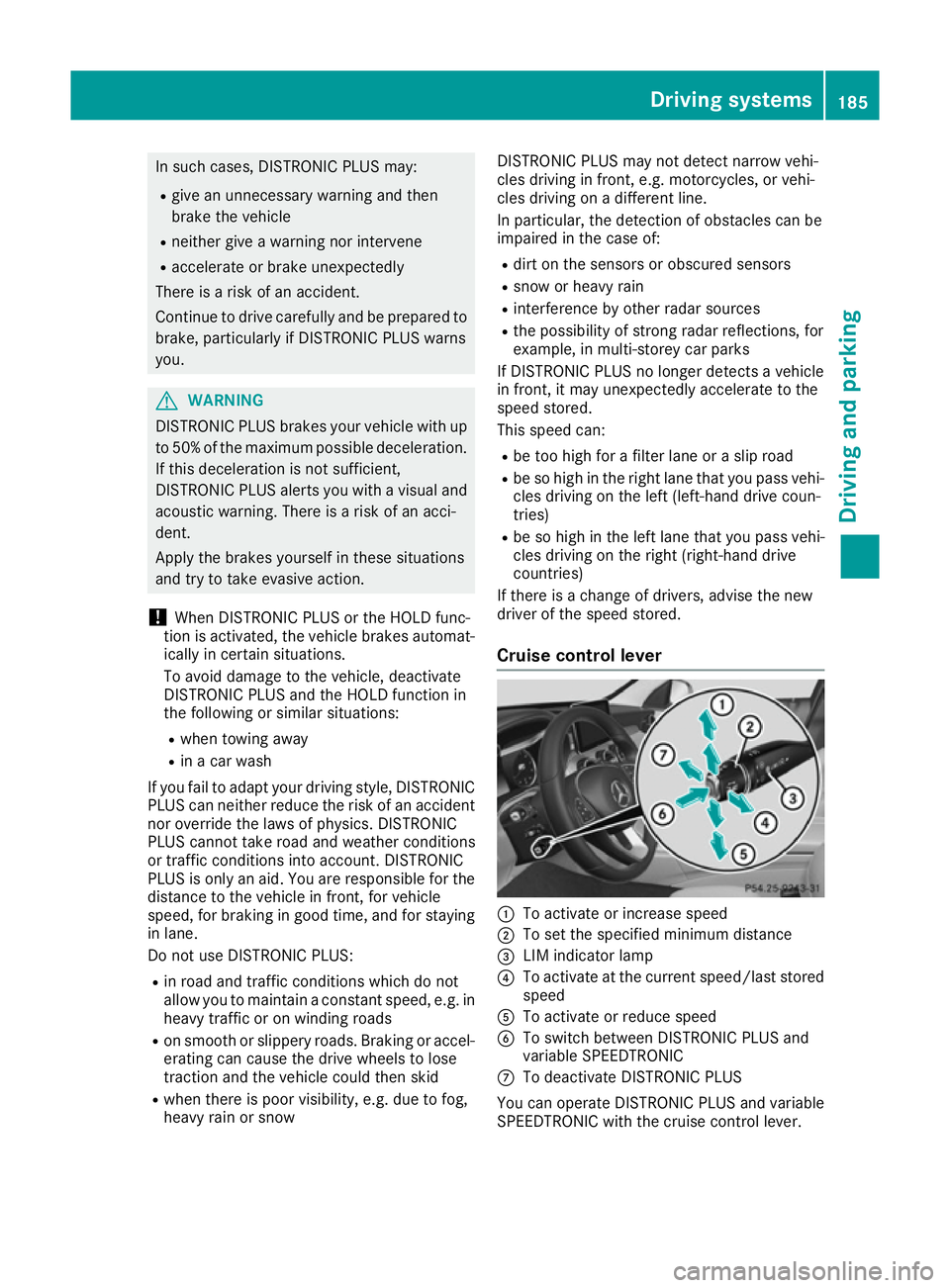
Cruise control lever :
To activate or increase speed
; To set the specifie dminimum distance
= LIM indicator lamp
? To activate at the current speed/last stored
speed
A To activate or reduce speed
B To switch betwee nDISTRONIC PLUS and
variable SPEEDTRONIC
C To deactivate DISTRONIC PLUS
You can operate DISTRONIC PLUS and variable
SPEEDTRONIC with the cruise control lever. Driving systems
185Driving and parking Z
Page 195 of 385
Steering Assist and Stop&G
oPilot canno tpro-
vid ea ssistance:
R on very sharp corners
R when towing atrailer
R ifal os soft yre pressure or adefectiv etyre has
bee ndetected and displayed
Pa ya ttention also to the important safety notes
for DISTRONIC PLU S(Ypage 184).
The steering interventions are carrie doutwith a
limite dsteering moment. The system requires
the driver to keep his hands on the steering
wheel and to stee rhimself.
If yo udon ot stee ryoursel forify outake your
hands off the steering wheel for aprolonged
perio doftime,the system will firs talert yo uwith
av isua lwarning .As teering wheel symbol
appears in the multifunction display .Ifyouhave
stil lnot started to stee rand have not taken hold
of the steering wheel afte rfive seconds at the
latest, awarning tone also sounds to remind you
to take control of the vehicle. Steering Assist
and Stop&G oPilot switch to passive mode.
DISTRONIC PLU Sremains active.
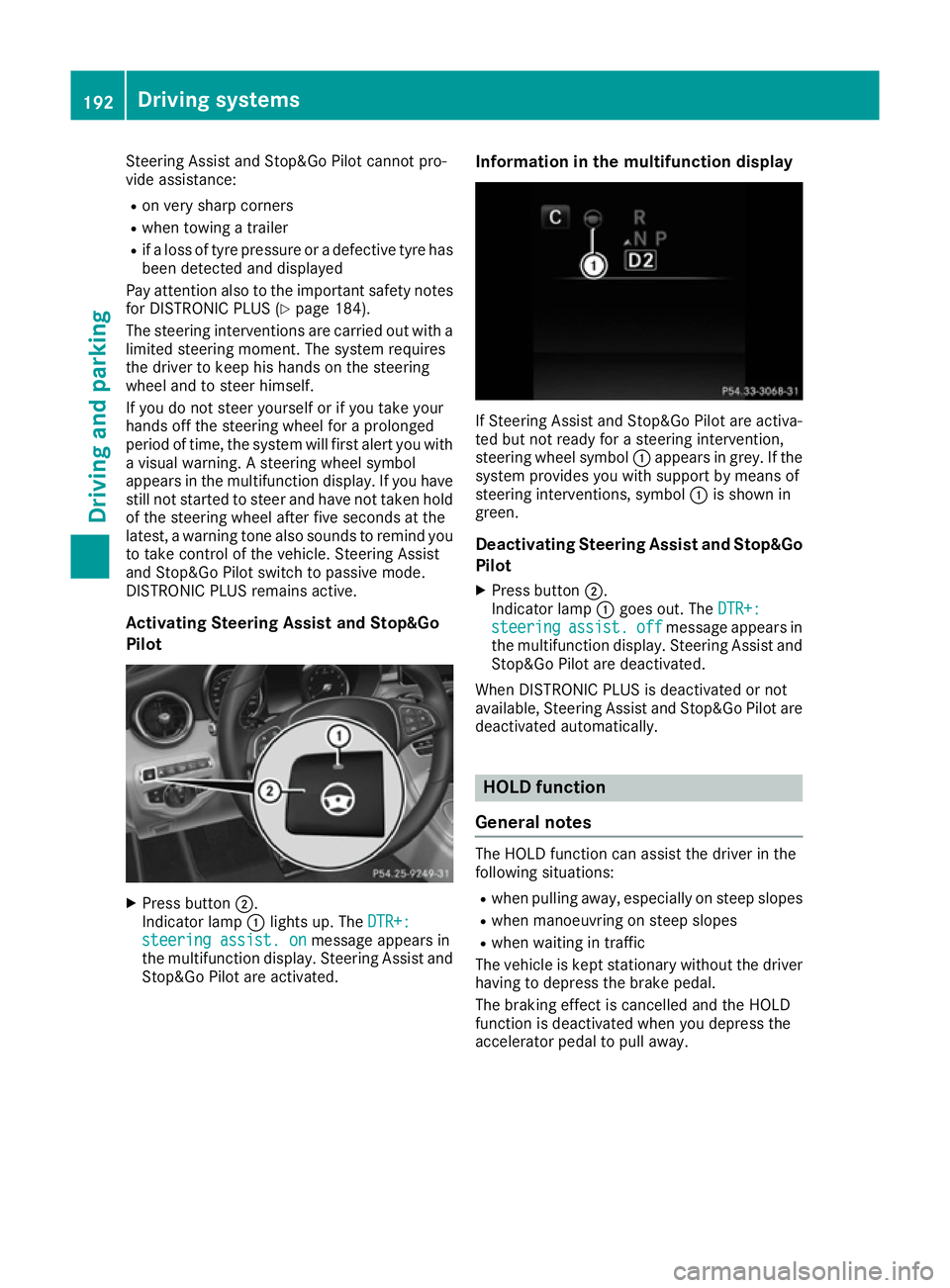
Activating Steering Assist and Stop&Go
Pilot X
Press button ;.
Indicato rlamp :lights up .The DTR+: DTR+:
steering assist. on
steering assist. on message appears in
the multifunction display .Steering Assist and
Stop&G oPilot are activated. Information in the multifunctio
ndisplay If Steering Assist and Stop&G
oPilot are activa-
ted bu tnot ready for asteering intervention,
steering wheel symbol :appears in grey. If the
system provides yo uwiths upport by means of
steering interventions, symbol :is shown in
green.
Deactivatin gSteering Assist and Stop&Go
Pilot
X Press button ;.
Indicato rlamp :goe sout.T he DTR+:
DTR+:
steering
steering assist.
assist.off
offmessage appears in
the multifunction display .Steering Assist and
Stop&G oPilot are deactivated.
Whe nDISTRONIC PLU Sisdeactivated or not
available ,Steering Assist and Stop&G oPilot are
deactivated automatically. HOL
Dfunction
General notes The HOLD function can assis
tthe driver in the
following situations:
R when pulling away ,especially on stee pslopes
R when manoeuvring on stee pslopes
R when waiting in traffic
The vehicl eiskept stationary withou tthe driver
having to depress the brake pedal.
The braking effect is cancelled and the HOLD
function is deactivated when yo udepress the
accelerato rpedal to pull away. 192
Drivin
gsystemsDriving and parking
Page 222 of 385
Warning display
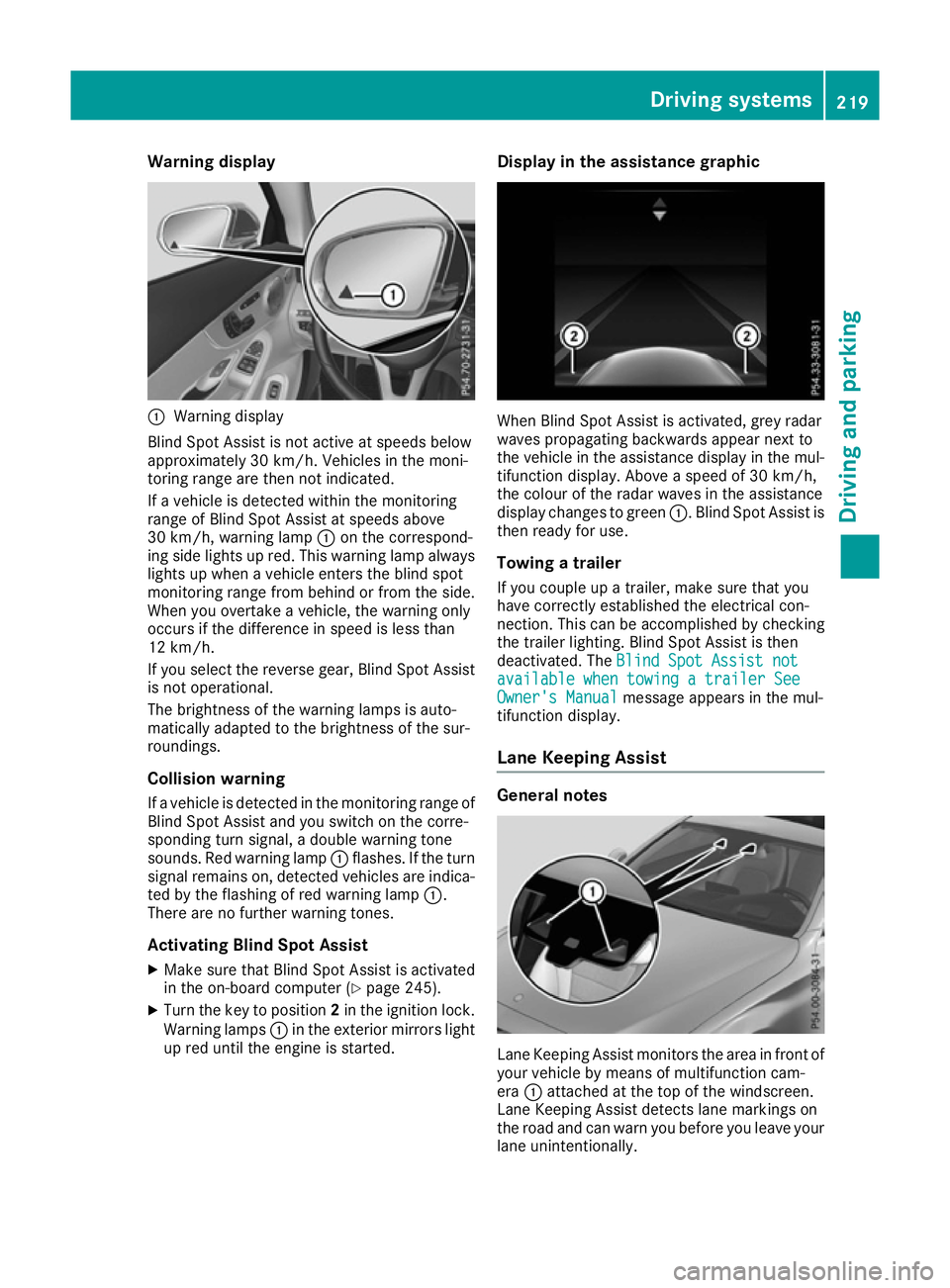
:
Warning display
Blind Spot Assist is not active at speeds below
approximately 30 km/h. Vehicles in the moni-
toring range are then not indicated.
If av ehicl eisd etected withi nthe monitoring
range of Blind Spot Assist at speeds above
30 km/h, warning lamp :on the correspond-
ing side lights up red. This warning lamp always lights up when avehicl eenters the blind spot
monitoring range from behind or from the side.
When you overtake avehicle, the warning only
occurs if the difference in spee disless than
12 km/h.
If you select the reverse gear, Blind Spot Assist
is not operational.
The brightness of the warning lamp sisauto-
matically adapted to the brightness of the sur-
roundings.
Collisionw arning
If av ehicl eisd etected in the monitoring range of
Blind Spot Assist and you switch on the corre-
sponding turn signal, adouble warning tone
sounds. Red warning lamp :flashes. If the turn
signa lremains on, detected vehicles are indica-
ted by the flashing of red warning lamp :.
There are no further warning tones.
Activating Blind Spot Assist X Make sure that Blind Spot Assist is activated
in the on-board computer (Y page245).
X Turn the key to position 2in the ignition lock.
Warning lamps :in the exterior mirrors light
up red until the engine is started. Display in the assistance graphic
When Blind Spot Assist is activated, grey radar
waves propagating backwards appear next to
the vehicl einthe assistance display in the mul-
tifunction display .Above aspee dof30k m/h,
the colou rofthe rada rwaves in the assistance
display changes to green :.Blind Spot Assist is
then read yfor use.
Towing atrailer
If you coupl eupatrailer, make sure that you
have correctly established the electrical con-
nection. This can be accomplishe dbychecking
the trailer lighting. Blind Spot Assist is then
deactivated. The Blind Spot Assist not Blind Spot Assist not
available when towing atrailer See
available when towing atrailer See
Owner's Manual
Owner's Manual message appears in the mul-
tifunction display.
Lane Keepin gAssist General notes
Lane Keeping Assist monitors the area in front of
you rvehicl ebym eans of multifunction cam-
era :attached at the top of the windscreen.
Lane Keeping Assist detects lane markings on
the road and can warn you before you leave your lane unintentionally. Driving systems
219Driving and parking Z
Page 226 of 385
Visual and acousti
ccollision warning
If yo uswitch on the turn signal stochange lanes
and avehicl eisd etected in the sid emonitoring
range, yo ureceive avisua land acoustic collision
warning .You will then hea radoublewarning
tone and red warning lamp :flashes. If the turn
signal remains on, detected vehicles are indica-
ted by the flashing of red warning lamp :.
There are no further warning tones.
Course-correctin gbrake application
If Active Blind Spot Assist detects ariskofa side
impact in the monitoring range, acourse-cor-
recting brake application is carrie dout.T hisis
designed to hel pyou avoid acollision. G
WARNING
Ac ourse-correcting brake application cannot
always prevent acollision. There is ariskofan
accident.
Alway ssteer, brake or accelerate yourself,
especially if Active Blind Spot Assist warns
yo uorm akesac ourse-correcting brake appli-
cation. Alway smaintai nasafed istance at the
sides.
If ac ourse-correcting brake application occurs,
red warning lamp :flashe sinthe exterio rmir-
ror and adualw arning tone sounds. In addition,
display ;underlining the danger of asidec ol-
lisio nappea rs in the multifunctio ndisplay.
In very rar ecases, the system may make an
inappropriate brake application. Acourse-cor-
recting brake application may be interrupted at
any time if yo ustee rslightl yint he opposite
direction or accelerate.
The course-correcting brake application is avail-
able in the speed rang ebetween 30 km/h and
200 km/h.
Eithe racourse-correcting brake application
appropriate to the driving situation, or none at
all, may occu rif:
R ther eare vehicles or obstacles, e.g. crash
barriers ,onboth sides of your vehicle
R av ehicl eapproaches too closel yonthe side
R youh avea dopte das porty driving style with
high cornering speeds
R youc learl ybrake or accelerate
R ad riving safety system intervenes, such as
ESP ®
or PRE-SAFE ®
Brake R
ESP ®
is deactivated
R al ossoft yre pressure or adefective tyre is
detected
Activatin gActive Blind Spo tAssist
X Make sure tha tActive Blind Spot Assist is
activate dinthe on-board computer
(Y page 245).
X Turn the key to position 2in the ignition lock.
Warning lamps :in the exterio rmirrors light
up red for approximatel y1.5 seconds .Grey
radar waves propagating backwards appear
next to the vehicl einthe assistance display in
the multifunctio ndisplay.
Towin gatrailer
If yo ucoupl eupa trailer, make sure tha tyou
have correctly established the electrical con-
nection. Thi scan be accomplished by checking
the traile rlighting. Active Blind Spot Assist is
then deactivated. The radar waves next to the
vehicl eare hidden in the assistance display .The
Active Blind Spo tAssist not availa‐
Active Blind Spo tAssist not availa‐
ble ble when
when towing a
towing a trailer
trailerSee
SeeOwner's
Owner's
Manual
Manual message appears in the multifunction
display.
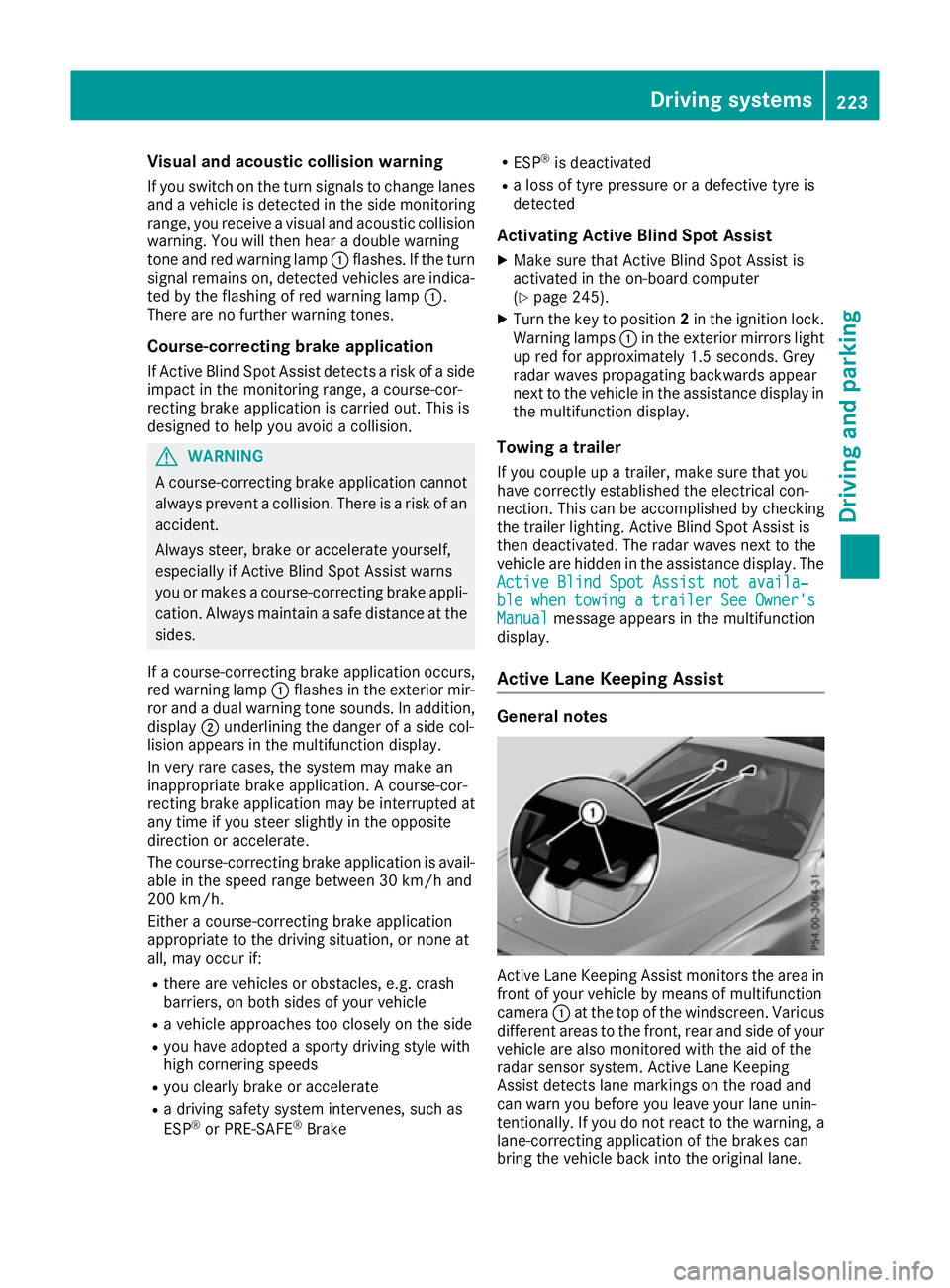
Active Lan eKeeping Assist General notes
Active Lane Keeping Assist monitors the are
ain
front of your vehicl ebymeans of multifunction
camera :at the top of the windscreen. Various
different areas to the front, rea rand sid eofyour
vehicl eare also monitore dwitht he ai doft he
radar sensor system .Active Lane Keeping
Assist detects lane marking sonthe roa dand
can warn yo ubefore yo uleave your lane unin-
tentionally .Ifyoudo not react to the warning ,a
lane-correcting application of the brakes can
bring the vehicl ebacki nto the original lane. Driving systems
223Driving and parking Z
Page 229 of 385
R
you brak ehard.
R you steer actively, e.g. swerve to avoid an
obstacle or chang elan eq uickly.
R you cut th ecorner onashar pbend.
In order that you are warned only when neces-
sar yand in goo dtimeify ou cross th elan em ark-
ing, th esystem detects certain condition sand
warn syou accordingly.
The warnin gvibration occur searlier if:
R you approac hthe outer lan emarking on a
bend
R ther oadh as ver ywide lanes, e.g. amotorway
R thes ystem detects soli dlanem arkings
The warnin gvibration occur slater if:
R ther oadh as narrow lanes
R you cut th ecorner onabend
Towing atrailer
If you couple up atrailer ,makes uret haty ou
hav ecorrectly established th eelectrica lcon-
nection .This can be accomplished by checking
th et railer lighting. Towing
atrailer Important safety notes
G
WARNING
You could lose control of th evehicle/trailer
combination if it begins to swerve. The vehi-
cle/trailer combination could eve noverturn.
There is ariskofana ccident.
On no accoun tshould you attemp tto
straighten out th evehicle/trailer combina-
tion by increasing speed. Decrease your
speed and do no tcountersteer. Brake if nec-
essary. G
WARNING
If th emaximum permissibl eload for acarrier
system is exceeded ,the carrie rcould come
loos efromt hevehicl eand endanger other
roa dusers. There is ariskofana ccidentand
injury.
Never exceed th emaximum permissibl eload
when usin gacarrier. Exceedin
gthe maximum permissibl enose-
weigh tofthetrailer drawbar on th eball coupling
may caus edamage to th efollowing:
R your vehicle
R trailer
R ball coupling
R trailer to whitch
The vehicle/trailer combination could become
unstable.
If th enoseweight used is lower than th emini-
mum permissibl enoseweight ,the vehicle/
trailer combination could also become unstable.
To avoid hazardous situations:
R mak esuretoc heckthen oseweight before
eac hjourney
R use adrawbar noseweight as close as possi-
ble to th emaximum noseweight
R do no texcee dthe maximum permissible
noseweight
R do no tuse an oseweight lower than th emin-
imum noseweight
Mak esuret hatthe followin gvalue sare not
exceeded:
R thep ermissibl etrailer drawbar noseweight
R thep ermissibl etrailer load
R thep ermissibl erear axl eload of th etow ing
vehicle
R them aximum permissibl egross vehicle
weigh tofbotht he towin gvehicl eand the
trailer
The applicable permissibl evalues, whic hmust
no tbee xceeded,can be found:
R in your vehicl edocuments
R on th eidentification plates of th etrailer tow
hitch and th etrailer
R on th evehicl eidentification plate
If th evalue sdiffer ,the lowes tvalue applies.
You will fin dthe value sapprove dbythemanu-
facturer on th evehicl eidentification plates and
those for th etow ingv ehicl eunder "Technical
data" (Y page 378). G
WARNING
If you release th eball couplin goritdoes not
engage correctl ywhen foldin gin, it will swing
out .Within pivotin grange of th eball coupling,
there is an increase driskofana ccidentand
injury. 226
Towin
gatrailerDriving and pa rking
Page 230 of 385
Only release the ball coupling if the pivoting
range is unobstructed. Alwaysm ake sure that
the ball coupling engages when folding in.
When reversing the vehicle towards the trailer,
make sure there is nobody between the trailer
and the vehicle.
Couple and uncouple the trailer carefully.Ify ou
do not couple the trailer to the towing vehicle
correctly, the trailer could become detached.
When towing atrailer, your vehicle's handling
characteristics will be different in comparison to when driving without atrailer.
The vehicle/trailer combination:
R is heavier
R is restricted in its acceleration and gradient-
climbing capability
R has an increased braking distance
R is affected more by strong crosswinds
R demands more sensitive steering
R has alarger turning circle
This can impair the vehicle's handling charac-
teristics. Adapt your driving style accordingly.
Maintain asafe distance. Drive carefully.
When towing atrailer, always adjust your speed
to the current road and weather conditions. Do
not exceed the maximum permissibles peed for
your vehicle/trailer combination. Notes on towing
atrailer
General notes Trailer towing is not permissibleont
he following
models:
R Mercedes AMG C63
R Mercedes AMG C63S
When towing atrailer, set the tyre pressure on
the rear axle of the towing vehicle for the max-
imum load. Further information on the tyre pres-
sure table in the fuel filler flap (Y page 356).
On vehicles without level control, the height of
the ball coupling will alter according to the load
placed on the vehicle. If necessary, use atrailer
with aheight-adjustable drawbar.
You will find fitting dimensions and loads under "Technical data" (Y page 378). Driving tips Observe the notes on ESP
®
trailer stabilisation
(Y page 74).
The maximum permissibles peed for vehicle/
trailer combinations depends on the type of
trailer. Before beginning the journey, check the
trailer's documents to see what the maximum
permitted speed is. Observe the legally prescri-
bed maximum speed in the relevant country.
For certain Mercedes-Benz vehicles, the maxi-
mum permissibler ear axle load is increased
when towing atrailer. See the "Technical data"
section to find out whether this applies to your
vehicle (Y page 378). If you utilise any of the
added maximum rear axle load when towing a
trailer, the vehicle/trailer combination may not
exceed amaximum speed of 100 km/h for rea-
sons concerning the operating permit. This also applies in countries in which the permissible
maximum speed for vehicle/trailer combina-
tions is above 100 km/h.
When towing atrailer, your vehicle's handling
characteristics will be different in comparison to
when driving without atrailer and it will con-
sume more fuel.
Change into alower gear in good time on long
and steep downhill gradients.
This also applies if cruise control, DISTRONIC
PLUS or SPEEDTRONIC are activated.
This will use the braking effect of the engine, so
less braking will be required to maintain vehicle speed. This relieves the load on the brake sys-
tem and prevents the brakes from overheating
and wearing too quickly. If you need additional
braking, depress the brake pedal repeatedly
rather than continuously.
Driving tips If the trailer swings from side to side:
X Do not accelerate.
X Do not countersteer.
X Brake if necessary.
R Maintain agreater distance to the vehicle in
front than when driving without atrailer.
R Avoid braking abruptly.Ifp ossible,brake gen-
tly at first to allow the trailer to run on. Then,
increase the braking force rapidly.
R The valuesg iven for gradient-climbing capa-
bilities from astandstill refer to sea level.
When driving in mountainous areas, note that Towing
atrailer
227Driving and parking Z