service MERCEDES-BENZ C-CLASS COUPE 2015 Owner's Manual
[x] Cancel search | Manufacturer: MERCEDES-BENZ, Model Year: 2015, Model line: C-CLASS COUPE, Model: MERCEDES-BENZ C-CLASS COUPE 2015Pages: 385, PDF Size: 13.12 MB
Page 179 of 385
Parking up the vehicle
If you leave the vehicle parked up for longer than
four weeks, the battery may be damaged by
exhaustive discharging.
If you leave the vehicle parked up for longer than six weeks, it may suffer from lack of use.
X Contact aqualified specialist workshop and
seek advice.
i You can obtain information about trickle
chargers from aqualified specialist work-
shop. Driving tips
General driving tips
Important safety notes G
WARNING
If you switch off the ignition while driving,
safety-relevant functions are only available
with limitations, or not at all. This could affect, for example, the power steering and the brake
boosting effect.Y ou will require considerably
more effort to steer and brake. There is arisk
of an accident.
Do not switch off the ignition while driving.
Drive sensibly–s ave fuelObserve the following tips to save fuel:
X The tyres should always be inflated to the rec-
ommended tyre pressure.
X Remove unnecessary loads.
X Remove roof racks when they are not needed.
X Warm up the engine at low engine speeds.
X Avoid frequent acceleration or braking.
X Have all maintenance work carried out as
indicated by the service intervals in the Ser-
vice Booklet or by the service interval display.
Fuel consumption also increases when driving in
cold weather, in stop-start traffic, on short jour- neys and in hilly terrain. ECO display
The ECO display shows you how economical
your driving style is. The ECO display assists you
in achieving the most economical driving style
for the selected settings and prevailing condi-
tions. Consumption can be significantly influ-
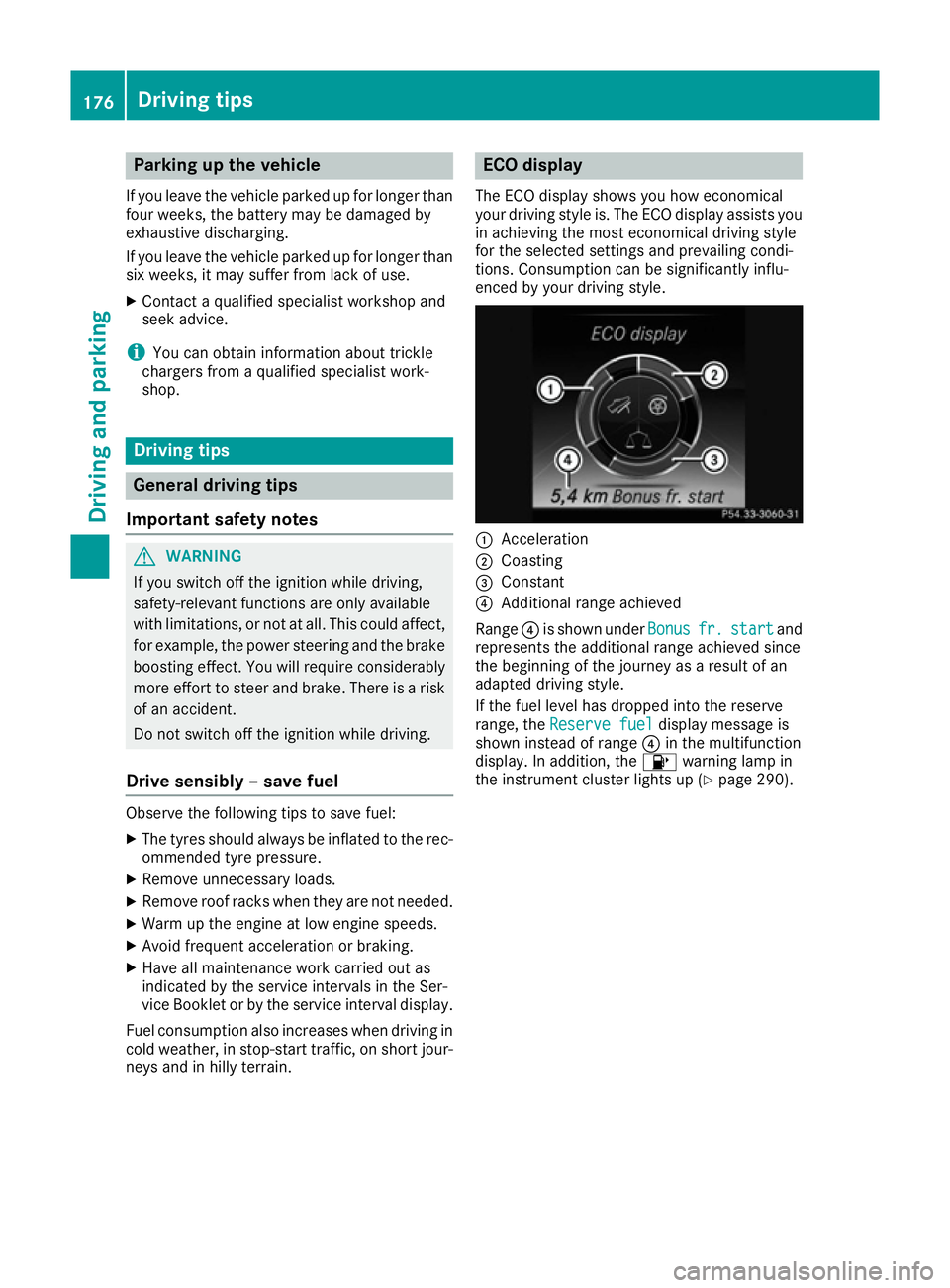
enced by your driving style. :
Acceleration
; Coasting
= Constant
? Additional range achieved
Range ?is shown under Bonus Bonusfr. fr.start
start and
represents the additional range achieved since
the beginning of the journey as aresult of an
adapted driving style.
If the fuel level has dropped into the reserve
range, the Reserve fuel Reserve fuel display message is
shown instead of range ?in the multifunction
display.Ina ddition, the 8warning lamp in
the instrumen tcluster lights up (Y page 290).176
Driving tipsDriving and parking
Page 182 of 385
High-performance and ceramic brakes
(Mercedes-AMG vehicles) The AMG brake systems are designed for heavy
loads. This may lea dtonoise when braking. This
is dependent on:
R speed
R braking force
R environmental conditions, such as tempera-
ture and humidity
The wea rofindividua lbrake system compo-
nents such as the brake pads/linings or brake
discs depends on individuald riving style and
operating conditions.
For this reason, it is impossible to state amile-
age (service life )that wil lbevalidu nder all cir-
cumstances. An aggressive driving style will
lea dtoh igh wear. You can obtai nmore infor-
mation on this from aqualified specialist work-
shop.
Brake pads/linings and discs that are either new or have been replaced only achieve optimum
braking effect after severa lhundre dkilometres
of driving. Compensate for the reduced braking
effect by applying greater force to the brake
pedal. Always be aware of this and adapt your
driving and braking accordingly during the run-
ning-in period.
Excessive heavy braking results in correspond-
ingly high brake wear. Observe the brake wear
warning lamp in the instrument cluste rand note
any brake status messages in the multifunction
display .Ifyou regularl ydrive at high speeds, it is
particularly important to have the brake system
checked and maintained regularly. Driving on wetr
oads
Aquaplaning If wate
rhas accumulated to acertain depth on
the road surface, there is adange rofa quaplan-
ing occurring, even if:
R you are driving at low speeds
R the tyres have adequate tread depth
For this reason, drive in the following manner in
the event of heavy rain or in conditions in which aquaplaning can occur:
R lower you rspeed
R avoi dtyre ruts R
avoi dsudden steering movements
R brake carefully
Driving on flooded roads !
Bear in mind that vehicles travelling in front
or in the opposite direction create waves. This may caus ethe maximu mpermissible water
depth to be exceeded.
These notes must be observed under all cir-
cumstances. You coul dotherwise damage
the engine, the electronics or the transmis-
sion.
If you must drive on stretches of road on which
wate rhas collected, please bea rinmind that:
R in the case of standing water, the wate rlevel
must be no higher than the lower edge of the vehicl ebody
R you should drive no faster than walking pace Winter driving
G
WARNING
If you shift downonas lippery road surface in
an attempt to increas ethe engine's braking
effect, the drive wheels coul dlose their grip.
This increases the risk of skidding and having
an accident.
Do not shift dow nfor additiona lengine brak-
ing on aslippery road surface. G
DANGER
If the exhaust pipeisb locked or adequate
ventilation is not possible,p oisonous gases
such as carbon monoxide (CO )may enter the
vehicle. This is the case, e.g. if the vehicle
become strappe dinsnow. There is arisk of
fatal injury.
If you leave the engine or the auxiliary heating
running, make sure the exhaust pipea nd area
around the vehicl eare clea rofsnow. To
ensure an adequate supply of fresh air, open a windo wont he side of the vehicl ethat is not
facing into the wind.
Have you rvehicl ewinterproofed at aqualified
specialist worksho patthe onset of winter. Driving tips
179Driving and parking Z
Page 191 of 385
Stopping
G
WARNING
When leaving the vehicle, even if it is braked
only by DISTRONIC PLUS, it could roll away if:
R there is amalfunction in the system or in
the voltage supply.
R DISTRONIC PLUS has been deactivated
with the cruise control lever, e.g. by avehi-
cle occupant or from outside the vehicle.
R the electrical system in the engine com-
partment,t he battery or the fuses have
been tampered with.
R the battery is disconnected.
R the accelerator pedal has been depressed,
e.g. by avehicle occupant.
There is arisk of an accident.
If you wish to exit the vehicle, always turn off
DISTRONIC PLUS and secure the vehicle
against rolling away.
Further information on deactivating DISTRONIC PLUS (Y page 190).
If DISTRONIC PLUS detectst hat the vehicle in
front is stopping, it brakes your vehicle until it is stationary.
Once your vehicle is stationary, it remains sta-
tionary and you do not need to depress the
brake.
i After
ashort period, the vehicle is secured
by the electric parking brake, thus relieving
the service brake.
i Depending on the specified minimum dis-
tance, your vehicle will come to astandstill at
as ufficient distance behind the vehicle in
front.T he specified minimum distance is set
using the control on the cruise control lever.
When DISTRONIC PLUS is activated, the trans-
mission is shifted automatically to position Pif:
R the driver's seat belt is not fastened and the
driver's door is open
R the engine is switched off, unless it is auto-
matically switched off by the ECO start/stop
function The electric parking brake secures the vehicle
automatically if DISTRONIC PLUS is activated
when the vehicle is stationary and:
R as ystem fault occurs
R the power supply is insufficient
If af ault occurs, the transmission may also shift
into position Pautomatically.
Setting aspeed X
Press the cruise control lever up :for a
higher speed or down Afor alower speed.
X Keep the cruise control lever pressed until the
desired speed is reached.
X Release the cruise control lever.
The new speed is stored. DISTRONIC PLUS is
activated and adjusts the vehicle's speed to
the new speed stored.
X To adjust the set speed in
1km/h incre-
ments: briefly press the cruise control lever
up : or down Ato the pressure point.
The last stored speed increases or decreases
in 1k m/h increments.
X To adjust the set speed in 10 km/h incre-
ments: briefly press the cruise control lever
up : or down Abeyond the pressure point.
The last stored speed increases or decreases in 10 km/h increments.
i If you accelerate to overtake, DISTRONIC
PLUS adjusts the vehicle's speed to the last
speed stored after you have finished overtak-
ing.
Setting the specified minimum distance You can set the specified minimum distance for
DISTRONIC PLUS by varying the time span
between one and two seconds. With this func-
tion, you can set the minimum distance that
DISTRONIC PLUS maintains to the vehicle in
front,d ependent on vehicle speed. You can see
this distance in the multifunction display
(Y page 189).
i Make sure that you maintain the minimum
distance to the vehicle in front as required by law. Adjust the distance to the vehicle in front
if necessary. 188
Driving systemsDriving and parking
Page 219 of 385
corresponds to the last selectio
nactivated
(standard/sensitive).
Warning in the multifunctio ndisplay If fatigu
eorincreasing lapse sinconcentration
are detected, awarning appears in the multi-
function display: ATTENTIONASSIST
ATTENTIO NASSIST Take a
Take a
break!
break!.
In addition to the messag eshown in the multi-
function display ,you will then hea rawarning
tone.
X If necessary, take abreak.
X Confirm the messag ebypressing the a
button on the steering wheel.
On long journeys, take regula rbreaks in good
time that allow for adequate recuperation. If you do not take abreak and ATTENTION ASSIST still
detects increasing lapse sinconcentration, you
will be warned agai nafter1 5m inutes at the
earliest. Thi swillo nly happe nifATTEN-
TION ASSIST stil ldetects typica lindicator sof
fatigu eorincreasing lapse sinconcentration.
Vehicles with COMAND Online: ifaw arning is
outpu tinthe multifunction display ,aservice
station search is performe dinCOMAND Online.
You can select aservice station and navigation
to this service station will then begin. Thi sfunc-
tion can be activate dand deactivated in
COMAND Online (se ethe separate operating
instructions). Traffic Sig
nAssist
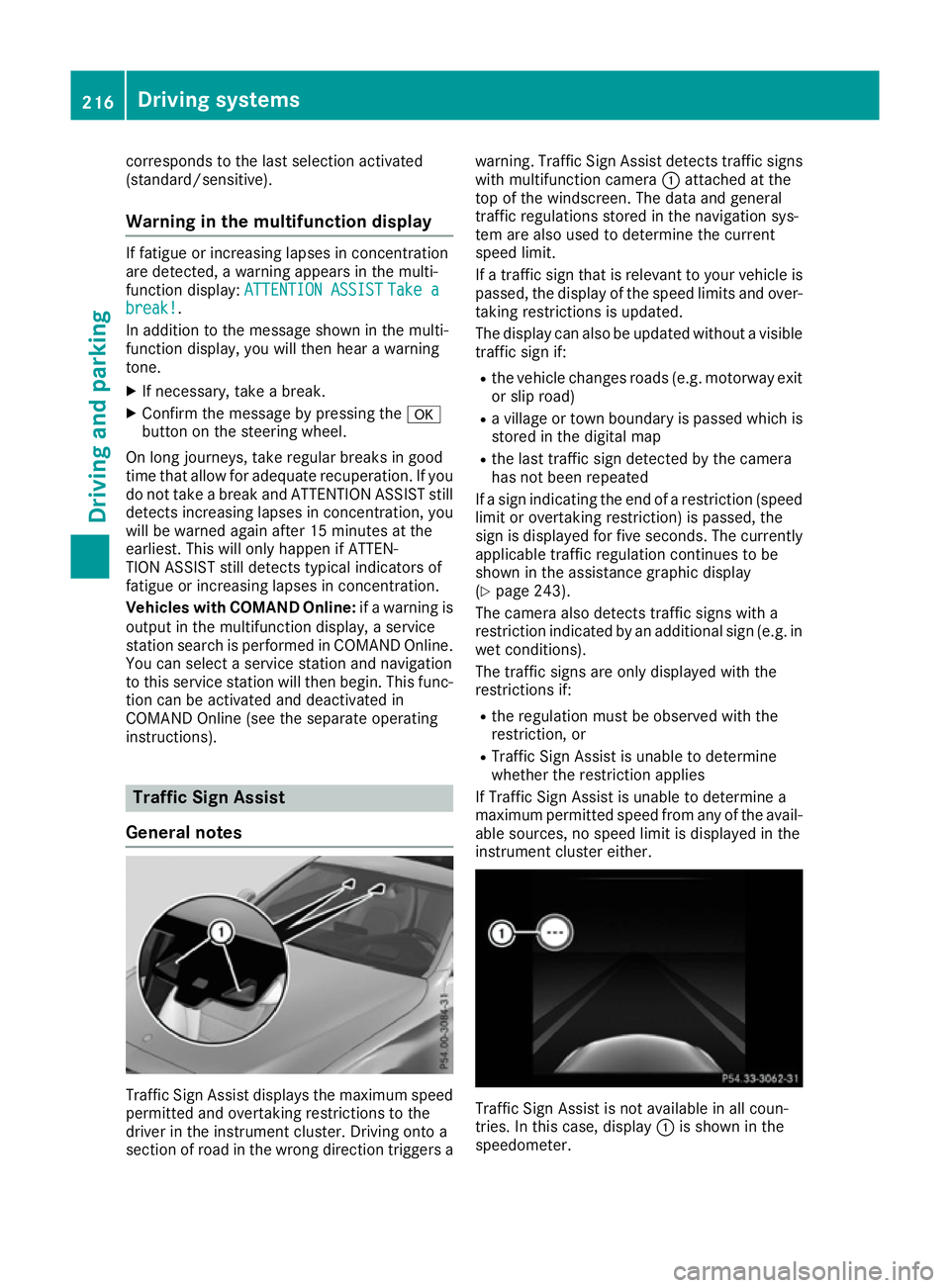
General notes Traffic Sign Assist display
sthe maximum speed
permitted and overtaking restrictions to the
driver in the instrument cluster. Driving onto a
section of roa dinthe wrong direction triggers a warning. Traffic Sign Assist detects traffi
csigns
with multifunction camera :attached at the
top of the windscreen. The data and general
traffi cregulations store dinthe navigation sys-
tem are also used to determine the current
speed limit.
If at raffi csignt hat is relevant to your vehicle is
passed, the display of the speed limits and over-
taking restrictions is updated.
The display can also be updated withou tavisible
traffi csigni f:
R the vehicle changes roads (e.g .motorway exit
or sli proad)
R av illage or town boundary is passe dwhich is
store dinthe digita lmap
R the last traffi csignd etected by the camera
ha sn ot bee nrepeated
If as igni ndicating the end of arestriction (speed
limit or overtaking restriction) is passed, the
sig nisd isplayed for five seconds. The currently
applicabl etraffi cregulation continues to be
shown in the assistance graphi cdisplay
(Y page 243).
The camera also detects traffi csigns with a
restriction indicated by an additiona lsign( e.g .in
we tconditions).
The traffi csigns are only displayed with the
restrictions if:
R the regulation mus tbeo bserve dwitht he
restriction, or
R Traffic Sign Assist is unabl etodetermine
whether the restriction applies
If Traffic Sign Assist is unabl etodetermine a
maximum permitted speed from any of the avail- able sources, no speed limit is displayed in the
instrument cluster either. Traffic Sign Assist is not available in al
lcoun-
tries. In this case ,display :is shown in the
speedometer. 216
Drivin
gsystemsDrivin gand parking
Page 239 of 385
AMG displays in th
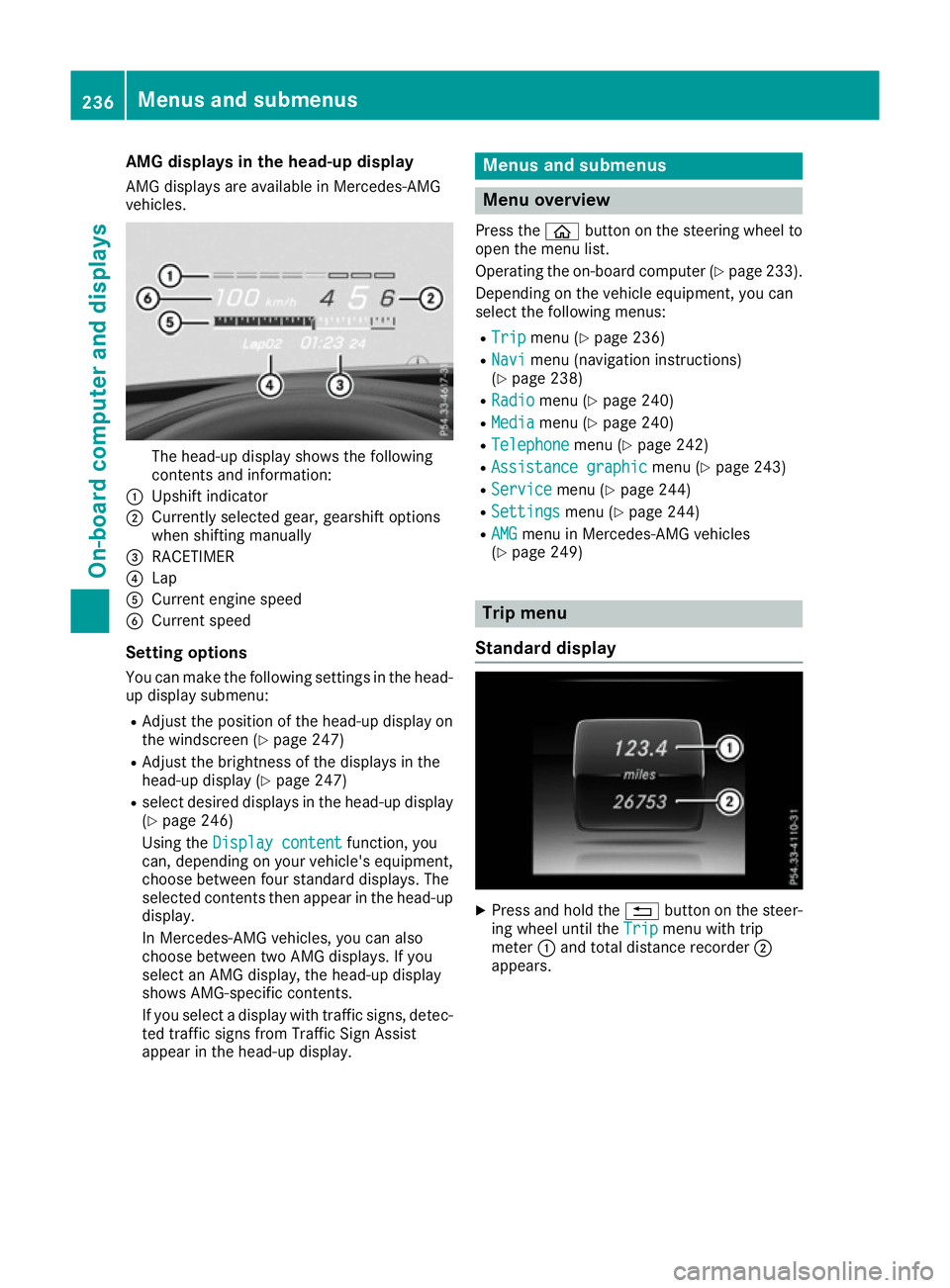
ehead-up display
AM Gd isplays are available in Mercedes-AMG
vehicles. The head-up display shows th
efollowing
contents and information:
: Upshif tindicator
; Currently selected gear ,gearshif toptions
when shiftin gmanually
= RACETIMER
? Lap
A Curren tengines peed
B Curren tspeed
Settin goptions
You can mak ethe followin gsettings in th ehead-
up display submenu:
R Adjus tthe positio nofthehead-up display on
th ew indscree n(Ypage 247)
R Adjus tthe brightness of th edisplays in the
head-up display (Y page 247)
R select desired displays in th ehead-up display
(Y page 246)
Usin gthe Displa ycontent
Displa ycontent function ,you
can ,depending on your vehicle's equipment,
choos ebetween four standard displays. The
selected contents then appear in th ehead-up
display.
In Mercedes-AM Gvehicles, you can also
choos ebetween two AM Gdisplays. If you
select an AM Gdisplay, th ehead-up display
shows AMG-specific contents.
If you select adisplay wit htraffic signs, detec-
te dt raffic sign sfromT raffic Sig nAssist
appear in th ehead-up display. Menu
sand submenus Menu overview
Press the òbuttonont hesteering whee lto
open th emenulist.
Operating th eon-bo ard computer (Y page 233).
Dependin gonthevehicl eequipment, you can
select th efollowin gmenus:
R Trip Trip menu(Ypage 236)
R Navi
Navi menu(navigation instructions)
(Y page 238)
R Radio
Radio menu(Ypage 240)
R Media
Media menu(Ypage 240)
R Telephone
Telephone menu(Ypage 242)
R Assistanc egraphic
Assistanc egraphic menu(Ypage 243)
R Service
Service menu(Ypage 244)
R Settings
Settings menu(Ypage 244)
R AMG
AMG men uinM ercedes-AM Gvehicles
(Y page 249) Trip menu
Standar ddisplay X
Press and hold the %buttonont hesteer-
ing whee luntil the Trip Tripmenuwitht rip
meter :and total distanc erecorder ;
appears. 236
Menu
sand submenusOn-boar dcomputer and displays
Page 245 of 385
X
To select the next or previous scen
einthe
scen elist: press :or9 briefly.
X To select
ascene in the scen elistu sing
rapid scroll: press and hold :or9
unti ldesir ed scene :hasb eenr eached.
X Press ato confirm your selection.
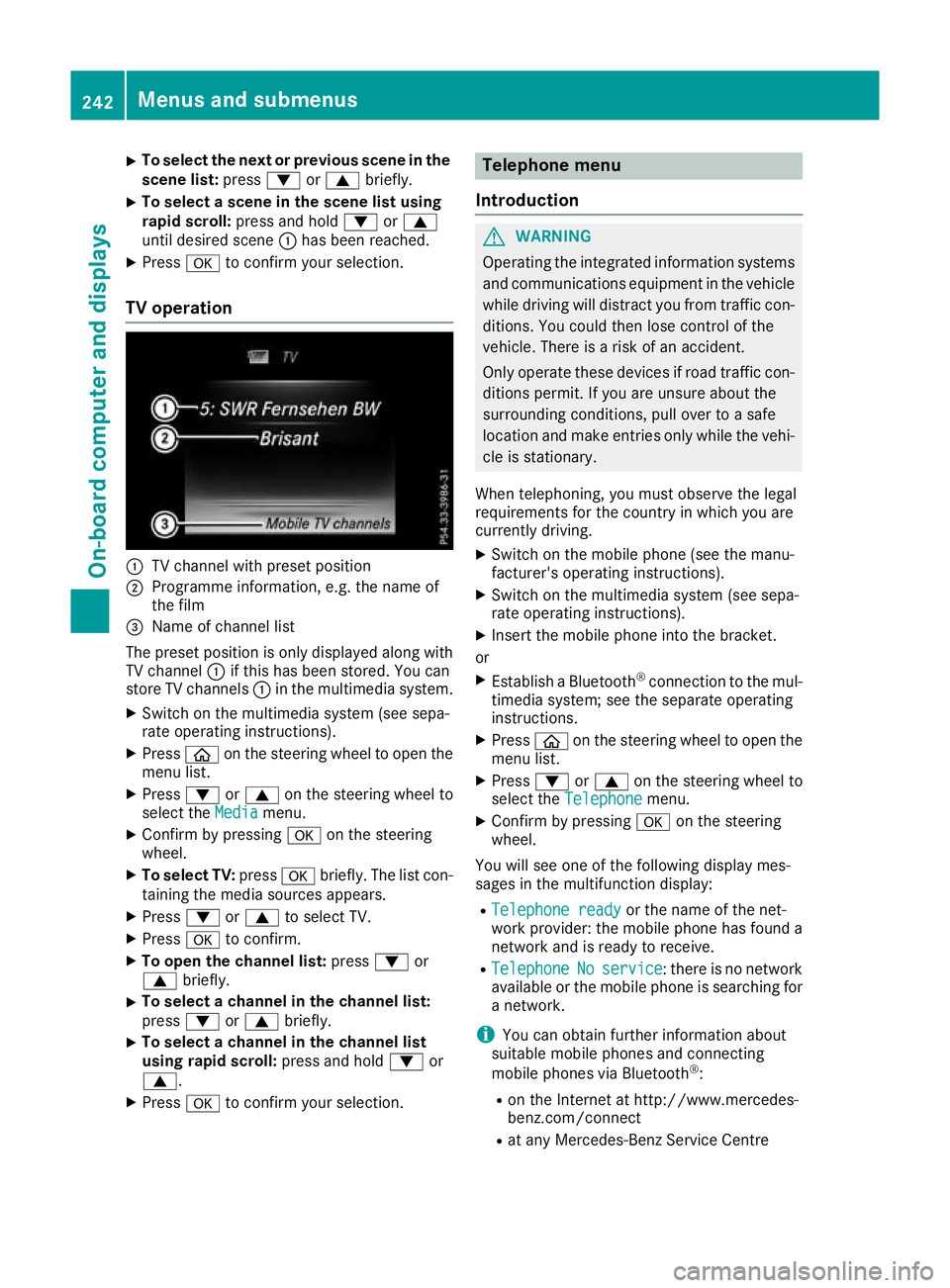
TV operation :
TV channel with preset position
; Programme information, e.g .the name of
the film
= Name of channel list
The preset positio niso nlyd isplayed along with
TV channel :if thi shasbeen stored .You can
stor eTVc hannels :in the multimedia system.
X Switch on the multimedia system (se esepa-
rate operating instructions).
X Press òon the steering whee ltoopent he
menu list.
X Press :or9 on the steering whee lto
select the Media
Media menu.
X Confir mbypressing aon the steering
wheel.
X To select TV: pressabriefly. The list con-
taining the media sources appears.
X Press :or9 to select TV.
X Press ato confirm.
X To ope nthe channel list: press:or
9 briefly.
X To select
achannel in the channel list:
press :or9 briefly.
X To select
achannel in the channel list
using rapid scroll: press and hold:or
9.
X Press ato confirm your selection. Telephone menu
Introduction G
WARNING
Operating the integrated informatio nsystems
and communications equipment in the vehicle
whil edriving will distract yo ufrom traffic con-
ditions. Yo ucould then lose contro lofthe
vehicle. There is ariskofana ccident.
Onl yoperate thes edevice sifr oadt raffic con-
ditions permit. If yo uare unsur eabout the
surrounding conditions, pull ove rtoasafe
location and make entries onl ywhile the vehi-
cle is stationary.
Whe ntelephoning, yo umusto bserve the legal
requirements for the country in which yo uare
currentl ydriving.
X Switch on the mobil ephone (se ethe manu-
facturer's operating instructions).
X Switch on the multimedia system (se esepa-
rate operating instructions).
X Insert the mobil ephone into the bracket.
or X Establis haBluetooth ®
connectio ntothe mul-
timedi asystem ;see the separate operating
instructions.
X Press òon the steering whee ltoopent he
menu list.
X Press :or9 on the steering whee lto
select the Telephone
Telephone menu.
X Confir mbypressing aon the steering
wheel.
Yo uw ills ee one of the following display mes-
sages in the multifunctio ndisplay:
R Telephone ready
Telephone ready or the nameofthe net-
work provider: the mobil ephone ha sfound a
network and is ready to receive.
R Telephone
Telephone No
Noservice
service:t hereisnon etwork
available or the mobil ephone is searching for
an etwork.
i Youc an obtai nfurther informatio nabout
suitabl emobilephones and connecting
mobil ephones via Bluetooth ®
:
R on the Interne tath ttp://www.mercedes-
benz.com/connect
R at any Mercedes-Benz Service Centre 242
Menus and submenusOn-board computer and displays
Page 247 of 385
R
DISTRONI CPLUS(Ypage 184)
R Traffi cSignA ssist (Y page 216)
R Distance warning functio nand autono-
mou sbraking system of COLLISION PRE-
VENTION ASSIST PLU S(Ypage 69)
R PRE-SAFE ®
Brake (Y page 75)
R Blind Spo tAssist (Y page 218 )orActive
Blind Spo tAssist (Y page 221)
R ATTENTION ASSIST (Y page 215)
R Lane Keeping Assist (Y page 219)orActive
Lane Keeping Assist (Y page223)
X Press :to display the ATTENTION ASSIST
assessment. Servic
emenu
Introduction Depending on the equipment fitted in the vehi-
cle, you have the following options in the Ser‐
Ser‐
vice
vice menu:
R Calling up display messages in the message
memory (Y page253)
R Restarting the tyre pressure loss warning sys-
tem (Y page358) or checking the tyre pres-
sure electronically (Y page360)
R Calling up the service due date
(Y page3 25)
R Displaying the AdBlue ®
level and range
(Y page2 44) (BlueTEC vehicles only)
Displayin gthe AdBlue ®
level and range The
AdBlue
AdBlue menu is only available in BlueTEC
vehicles.
X Press òon the steering whee ltoopen the
menu list.
X Press :or9 on the steering whee lto
select the Service
Service menu.
X Confirm by pressing aon the steering
wheel.
X Press :or9 to select the AdBlue AdBlue
submenu.
X Press ato confirm yours election.
The range and AdBlue ®
level appear in abar
grap hint he multifunction display.
Observe the informatio nand notes on "Refuel-
ling" (Y page169). Setting
smenu
Introduction Depending on the equipment fitted in the vehi-
cle, you have the following options in the
Set‐ Set‐
tings
tings menu:
R Changing assistance settings (Y page244)
R Changing head-up display settings
(Y page2 46)
R Changing the light settings (Y page247)
R Changing the instrument cluster settings
(Y page2 48)
R Changing the vehicl esettings (Y page248)
R Restoring the factory settings (Y page249)
Assistanc esubmenu Deactivating/activating ESP
®
Observe the "Important safety notes" section in the description of ESP ®
(Y page7 2). G
WARNING
If you deactivate ESP ®
,E SP ®
no longer sta-
bilises the vehicle. There is an increase drisk
of skidding and an accident.
Only deactivate ESP ®
in the situations descri-
bed in the following.
It may be best to deactivate ESP ®
in the follow-
ing situations:
R when using snow chains
R in deep snow
R on sand or gravel
Deactivating/activating ESP ®
on Mercedes-
AMG vehicles (Y page73).
For further informatio nabout ESP ®
,s ee
(Y page7 1).
X Start the engine.
X Press òon the steering whee ltoopen the
menu list.
X Press :or9 on the steering whee lto
select the Settings
Settings menu.
X Confirm by pressing aon the steering
wheel.
X Press :or9 to select the Assistance Assistance
submenu.
X Press ato confirm.
X Select ESP
ESPwith : or9. 244
Menus and submenusOn-board computer and displays
Page 256 of 385
Display messages
Introduction
General notes Display messages appear in th
emultifunction display.
Display messages wit hgraphi csymbols are simplified in th eOwner' sManual and may diffe rfrom
th es ymbols in th emultifunction display.
Please respon dinaccordance wit hthe display messages and follow th eadditional note sinthis
Owner' sManual.
Wit hcertai ndisplay messages, you will also hear awarnin gtone.
You can hide th edisplay messages. The display messages are then stored in th emessag ememory.
Rectify th ecause of adisplay messag eassoonasp ossible.
Whe nyou stop and par kthe vehicle, please observ ethe note son:
R HOLD function (Y page 192)
R Parking (Y page 172)
Hiding display messages X
Press the aor% buttonont hesteerin gwheel.
The multifunction display hide sthe display message.
High-priorit ydisplay messages are shown in red in th emultifunction display. Some high-priority
display messages canno tbehidden.
The multifunction display shows these messages continuously until th ecauses fo rthe messages
hav ebeenr emedied.
Message memory The on-boar
dcom pute rsaves certain display messages in the message memory.You can cal lup
th ed isplay messages:
X Press òon thesteerin gwhee ltoo pent he men ulist.
X Press :or9 on thesteerin gwhee ltos elec tthe Service Service menu.
X Confir mbyp ressing aon thesteerin gwheel.
X Press :or9 to selec tthe messag ememory.
If there are no display messages, the No messages
No messages display appears in th emultifunction display.
Whe nthere are display messages, th enumber of stored messages appears.
X Press ato confirm.
X Press :or9 to scroll through th edisplay messages. Display
messages
253On-boardcomputer an ddisplays Z
Page 286 of 385

Display messages
Possible causes/consequences and
M
MSolutions Ð
Power steering mal‐ Power steering mal‐
function See Own‐ function See Own‐
er'
sM anual
er' sM anual The powe
rsteering assistanc eisfaulty.
Aw arning tone also sounds.
G WARNING
You will need to use mor eforce to steer.
There is ariskofana ccident.
X Chec kwhether you are able to apply th eextra force required.
If you ar eabletos teer safely:
X Drive on carefully.
X Consult aqualified specialist workshop immediately.
If you ar eunable to steer safely:
X Do no tdrive on.
X Consult aqualified specialist workshop. Ð
Steering malfunc‐ Steering malfunc‐
tio
nS ee Owner's
tio nS ee Owner's
Manual Manual Vehicl
ewithm anual transmission :the electric steering loc kismal-
functioning.
G WARNING
The steering may be locke dbytheelectric steering lock.
There is ariskofana ccident.
X Pull ove rand stop th evehicl esafely as soo naspossible, paying
attention to roa dand traffic conditions.
X Safeguar dthe vehicl eagainst rollin gaway (Y page 172).
X Do no tdrive on.
X Consult aqualified specialist workshop. _
Before Before
starting
starting the
the
engine ,turnt he
engine ,turnt he
steering wheel.
steering wheel. Vehicl
ewithm anual transmission :the electric steering loc kismal-
functioning.
X Remove th ekeyfrom th eignition lock.
X To unloc kthe steering ,movet he steering whee lslightly.
X Inser tthe keyintot he ignition loc kagain. Telephone Telephone
No
Noservice
service Your vehicl
eisoutside th enetwork provider' stransmitter/receiver
range.
X Wait until th emobile phone operational readiness symbol appears
in th emultifunction display. ¥
Top up washer fluid Top up washer fluid The washer flui
dlevel in th ewasher flui dreservoir has dropped below
th em inimum.
X Top up th ewasher flui d(Ypage 325). Display
messages
283On-boardcomputer an ddisplays Z
Page 311 of 385
Stowage areas
Loading guidelines
G
WARNING
Combustion engines emit poisonous exhaust
gases such as carbon monoxide. Exhaust
gases can enter the vehicle interior if the boot
lid is open when the engine is running, espe-
cially if the vehicle is in motion. There is arisk
of poisoning.
Always switch off the engine before opening
the boot lid. Never drive with the boot lid
open. G
WARNING
If objects, luggage or loads are not secured or not secured sufficiently, they could slip, tip
over or be flung around and thereby hit vehicle
occupants. There is arisk of injury, especially
when braking or abruptly changing directions.
Always store objectssot hat they cannot be
flung around. Secure objects, luggage or
loads against slipping or tipping before the
journey. G
WARNING
The exhaust tail pipe and tail pipe trim can
become very hot. If you come into contact
with these parts of the vehicle, you could burn
yourself. There is arisk of injury.
Always be particularly careful around the
exhaust tail pipe and the tail pipe trim. Allow
these components to cool down before touch-
ing them.
The handling characteristics of aladen vehicle
are dependent on the distribution of the load
within the vehicle. For this reason, you should
observe the following notes when transporting a
load:
R never exceed the maximum permissible gross
vehicle weight or the permissible axle loads
for the vehicle (including occupants).
R the boot is the preferred place to store
objects.
R position heavy loads as far forward as possi-
ble and as low down in the boot as possible. R
the load must not protrude above the upper
edge of the seat backrests.
R always place the load behind unoccupied
seats if possible.
R secure the load with sufficiently stronga nd
wear-resistant lashing material. Pad sharp
edges for protection.
i Load restraint
sare available at any qualified
specialist workshop, e.g. aMercedes-Benz
Service Centre. Stowage compartments
Important safety notes G
WARNING
If objectsint he passenger compartmen tare
stowed incorrectly, they can slide or be
thrown around and hit vehicle occupants. In
addition, cupholders, open stowage spaces
and mobile phone brackets cannot always
retain all objectst hey contain. There is arisk
of injury, particularly in the event of sudden
braking or asudden change in direction.
R Always stow objectssot hat they cannot be
thrown around in such situations.
R Always make sure that objectsdon ot pro-
trude from stowage spaces, parcel nets or
stowage nets.
R Close the lockable stowage spaces before
startingaj ourney.
R Always stow and secure heavy, hard, poin-
ted, sharp-edged, fragile or bulky objectsin
the boot.
Observe the loading guidelines (Y page 308).308
Stowage areasStowing and features