ECO mode MERCEDES-BENZ C-CLASS COUPE 2015 Owner's Guide
[x] Cancel search | Manufacturer: MERCEDES-BENZ, Model Year: 2015, Model line: C-CLASS COUPE, Model: MERCEDES-BENZ C-CLASS COUPE 2015Pages: 385, PDF Size: 13.12 MB
Page 181 of 385
note of thi
swhend riving aladen vehicl eand
when towing atrailer.
Thi salsoa pplies if cruis econtrol, DISTRONIC
PLU SorS PEEDTRONIC is activated.
Thi sw illu se the braking effect of the engine, so
less braking will be required to maintain vehicle
speed .Thisr elieves the load on the brake sys-
tem and prevents the brakes from overheating
and wearing too quickly.
Heavy and light loads G
WARNING
The braking system can overheat if yo ulea ve
your foo tonthe brake peda lwhile driving.
Thi sincreases the braking distance and could
eve ncause the braking system to fail. There is
ar iskofana ccident.
Never us ethe brake peda lasafootrest. Do
not simultaneousl ydepress both the brake
peda land the accelerato rpedal whiledriving.
! Depressing the brake peda
lconstantly
results in excessive and premature wear to
the brake pads.
If heavy demands are made on the brakes, do
not park the vehicl eimmediately. Driv eonfor a
short while. Thi sallow sthe airflow to cool the
brakes more quickly.
If the brakes have been used onl ymoderately,
yo us houl doccasionall ytest thei reffectiveness.
To do this, brake more firmly from ahigher
speed whil epayin gattentio ntothe traffic con-
ditions. Thi simprove sthe gri pofthe brakes.
Wet road surfaces If yo
uhaved riven for alon gt ime in heavy rain
withou tbraking ,ther em aybe adelayed reac-
tio nfrom the brakes when braking for the first
time .Thism ayalso occu rafte rac ar wash or
afte rdriving throug hdeepw ater.
Yo uw illh avetod epress the brake peda lmore
firmly .Maintain agreate rdistance to the vehicle
in front.
After driving on awetroa dorh aving the vehicle
washed, brake firmly whil epayin gattentio nto
the traffic conditions. Thi swillw armupt he
brake discs, thereb ydrying them more quickly
and protecting them against corrosion. Limite
dbraking performanc eonsalt-
treate droads If yo
udrive on salt-treate droads, alayer of salt
ma yform on the brake discs and pads. Thi scan
increas ethe braking distance considerably.
R In order to prevent any salt build-up, appl ythe
brakes occasionall ywhile paying attentio nto
the traffic conditions.
R Carefull ydepress the brake peda latthe end
of the journey and when starting the next
journey.
R Maintain amuchg reate rdistance to the vehi-
cle in front.
New brake discs and brake pads/
linings Brake pads/lining
sand discs tha tare either new
or have been replaced achieve optimu mbraking
effect onl yaftersevera lhun dre dkilometres of
driving .Com pensate for the reduce dbraking
effect by applying greate rforce to the brake
pedal.
For safety reasons ,Mercedes-Benz recom-
mend sonlyf itting the following brake discs and
brake pads/linings:
R brake discs tha thaveb eena pproved by
Mercedes-Benz
R brake pads/lining sthath aveb eena pproved
by Mercedes-Benz or tha tare of an equivalent
standard of quality
Othe rbrake discs or brake pads/lining scan
compromise the safety of your vehicle.
Alway sreplace al lbrake discs and brake pads/
lining sonana xleatt he same time .Alway sfit
new brake pads/lining swhenr eplacing brake
discs.
The vehicl eisequippe dwithl ightweight brake
discs to which the whee lassembl ywithr im and
threaded connectio nism atched.
The us eofbrake discs othe rtha nt hose
approved by Mercedes-Benz ma yalter track
width and is subject to approval ,ifapplicable.
Shock-typ eloads when handling the brake
discs, such as when changing wheels ,can lead
to areduction in comfort when driving with light-
weight brake discs. Avoi dshock-typ eloads on
the lightweight brake discs, particularly on the
brake plate. 178
Driving tipsDriving an
dparking
Page 195 of 385
Steering Assist and Stop&G
oPilot canno tpro-
vid ea ssistance:
R on very sharp corners
R when towing atrailer
R ifal os soft yre pressure or adefectiv etyre has
bee ndetected and displayed
Pa ya ttention also to the important safety notes
for DISTRONIC PLU S(Ypage 184).
The steering interventions are carrie doutwith a
limite dsteering moment. The system requires
the driver to keep his hands on the steering
wheel and to stee rhimself.
If yo udon ot stee ryoursel forify outake your
hands off the steering wheel for aprolonged
perio doftime,the system will firs talert yo uwith
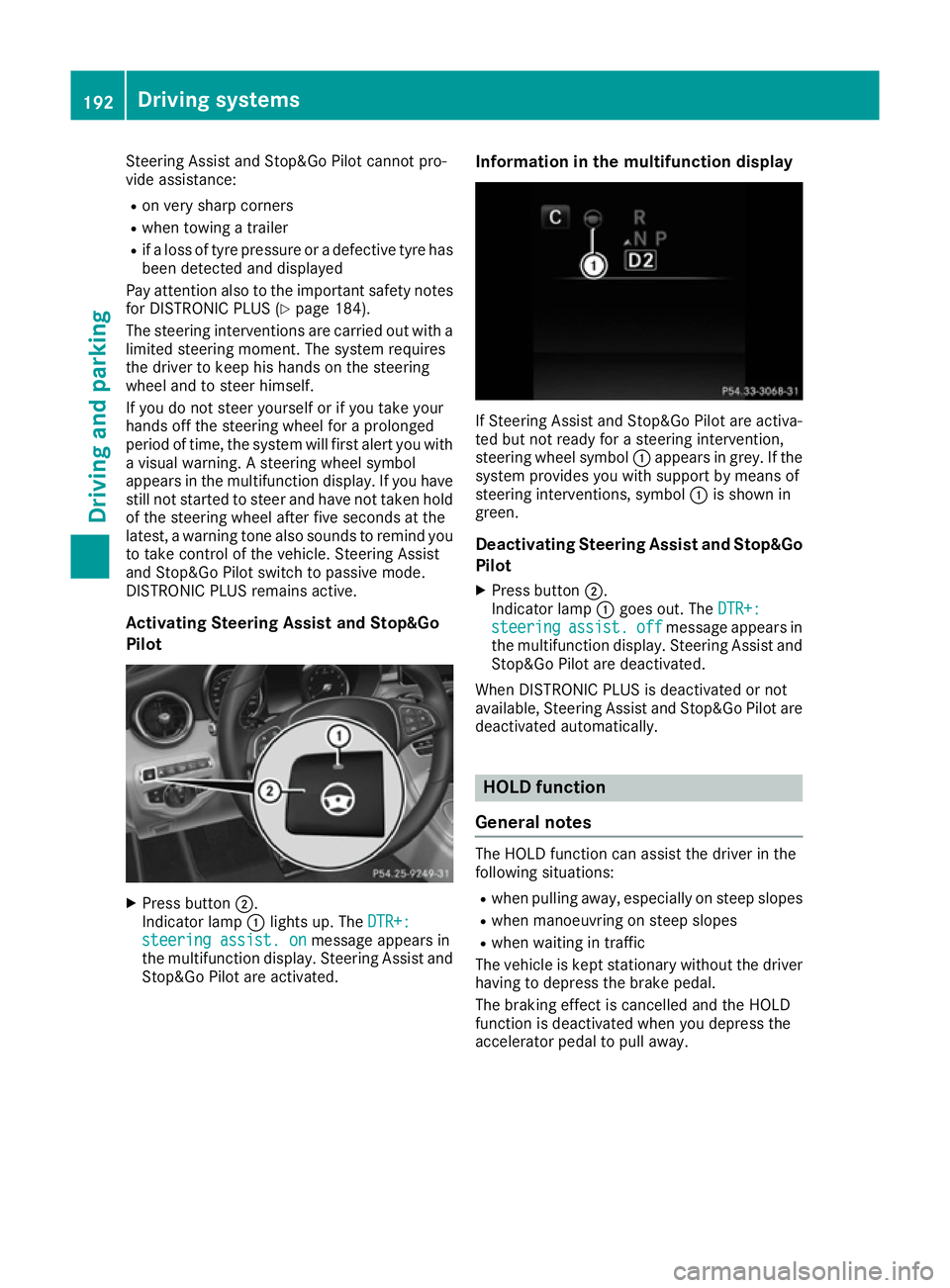
av isua lwarning .As teering wheel symbol
appears in the multifunction display .Ifyouhave
stil lnot started to stee rand have not taken hold
of the steering wheel afte rfive seconds at the
latest, awarning tone also sounds to remind you
to take control of the vehicle. Steering Assist
and Stop&G oPilot switch to passive mode.
DISTRONIC PLU Sremains active.
Activating Steering Assist and Stop&Go
Pilot X
Press button ;.
Indicato rlamp :lights up .The DTR+: DTR+:
steering assist. on
steering assist. on message appears in
the multifunction display .Steering Assist and
Stop&G oPilot are activated. Information in the multifunctio
ndisplay If Steering Assist and Stop&G
oPilot are activa-
ted bu tnot ready for asteering intervention,
steering wheel symbol :appears in grey. If the
system provides yo uwiths upport by means of
steering interventions, symbol :is shown in
green.
Deactivatin gSteering Assist and Stop&Go
Pilot
X Press button ;.
Indicato rlamp :goe sout.T he DTR+:
DTR+:
steering
steering assist.
assist.off
offmessage appears in
the multifunction display .Steering Assist and
Stop&G oPilot are deactivated.
Whe nDISTRONIC PLU Sisdeactivated or not
available ,Steering Assist and Stop&G oPilot are
deactivated automatically. HOL
Dfunction
General notes The HOLD function can assis
tthe driver in the
following situations:
R when pulling away ,especially on stee pslopes
R when manoeuvring on stee pslopes
R when waiting in traffic
The vehicl eiskept stationary withou tthe driver
having to depress the brake pedal.
The braking effect is cancelled and the HOLD
function is deactivated when yo udepress the
accelerato rpedal to pull away. 192
Drivin
gsystemsDriving and parking
Page 197 of 385
When the HOLD function is activated, the trans-
mission is shifted automatically to position Pif:
R the driver's seat belt is not fastened and the
driver's door is open
R the engine is switched off, unless it is auto-
matically switched off by the ECO start/stop
function
The electric parking brake secures the vehicle
automatically if the HOLD function is activated,
the vehicle is stationary and:
R as ystem fault occurs
R the power supply is insufficient
If am alfunction occurs ,then the transmission
may also be shifted into position Pautomati-
cally.
Vehicles with manual transmission
The electric parking brake secures the vehicle
automatically if the HOLD function is activated
and:
R the driver's seat belt is not fastened and the
driver's door is open
R the engine is switched off, unless it is auto-
matically switched off by the ECO start/stop
function
R as ystem fault occurs
R the power supply is insufficient
The Brake immediately
Brake immediately message may also
appear in the multifunction display.
X Immediately depress the brake pedal firmly
until the warning message in the multifunc-
tion display goes out.
The HOLD function is deactivated.
Ah orn will sound at regular intervals if you turn
off the engine, take off your seat belt or open the driver's door when the HOLD function is activa-ted. The horn alerts you to the fact that the
HOLD function is still activated. If you attempt to
lock the vehicle, the toneb ecomes louder. The
vehicle cannot be locked until you have deacti-
vated the HOLD function.
i Oncey
ou have switched off the engine, you
cannot restart it until you have deactivated
the HOLD function. RACE START
Important safety notes i
RACE START must not be used on normal
roads. RACE START must only be activated
and used on dedicated road circuits, outside
of public road use.
i RACE START is only available in
Mercedes‑ AMG vehicles.
RACE START enables optimum acceleration
from astandin gstart .For this, asuitably high-
grip road surface is required, along with the
tyres and vehicle being in good condition. G
WARNING
If you use RACE START, individual tyres may
get into aspin and the vehicle could skid.
Dependin gonthe selected ESP ®
mode, there
is an increased risk of skidding and having an accident .Make sure that no persons ,animals
or obstacles are within range of the vehicle.
i Observe the safety notes on driving safety
systems (Y page 66).
Be sure to read the safety notes and informa-
tion on ESP ®
(Y page 71).
Activation conditions You can activat
eRACE START if:
R the doors are closed
R the engine is running and it has reached an
operating temperature of approximately
71 †. This is the case when the oil tempera-
ture gauge in the multifunction display is
shown in white.
R the drive program S,S+ orRace is selected
(Y page 154)
R the steerin gwheel is in the straight-ahead
position
R the vehicle is stationary and the brake pedal is
depressed (left foot)
R the transmission is in position D
Activating RACE START i
When manual mode (Y
page 163) is active,
the transmission automatically shifts up to
RACE START in the drive program. This func-
tion supports maximum acceleration with 194
Driving systemsDriving and parking
Page 199 of 385
Vehicl
elevel Settin
gthe raised vehicle level It is possibl
etochoose between the "Normal"
and "Raised "vehicl elevelsb elow aspeed of
80 km/h .Select the "Normal" setting for normal
roa dsurfaces and "Raised "for driving with snow
chains or on particularly poor roa dsurfaces.
Your selection remains stored eve nifyou
remove the key from the ignition lock.
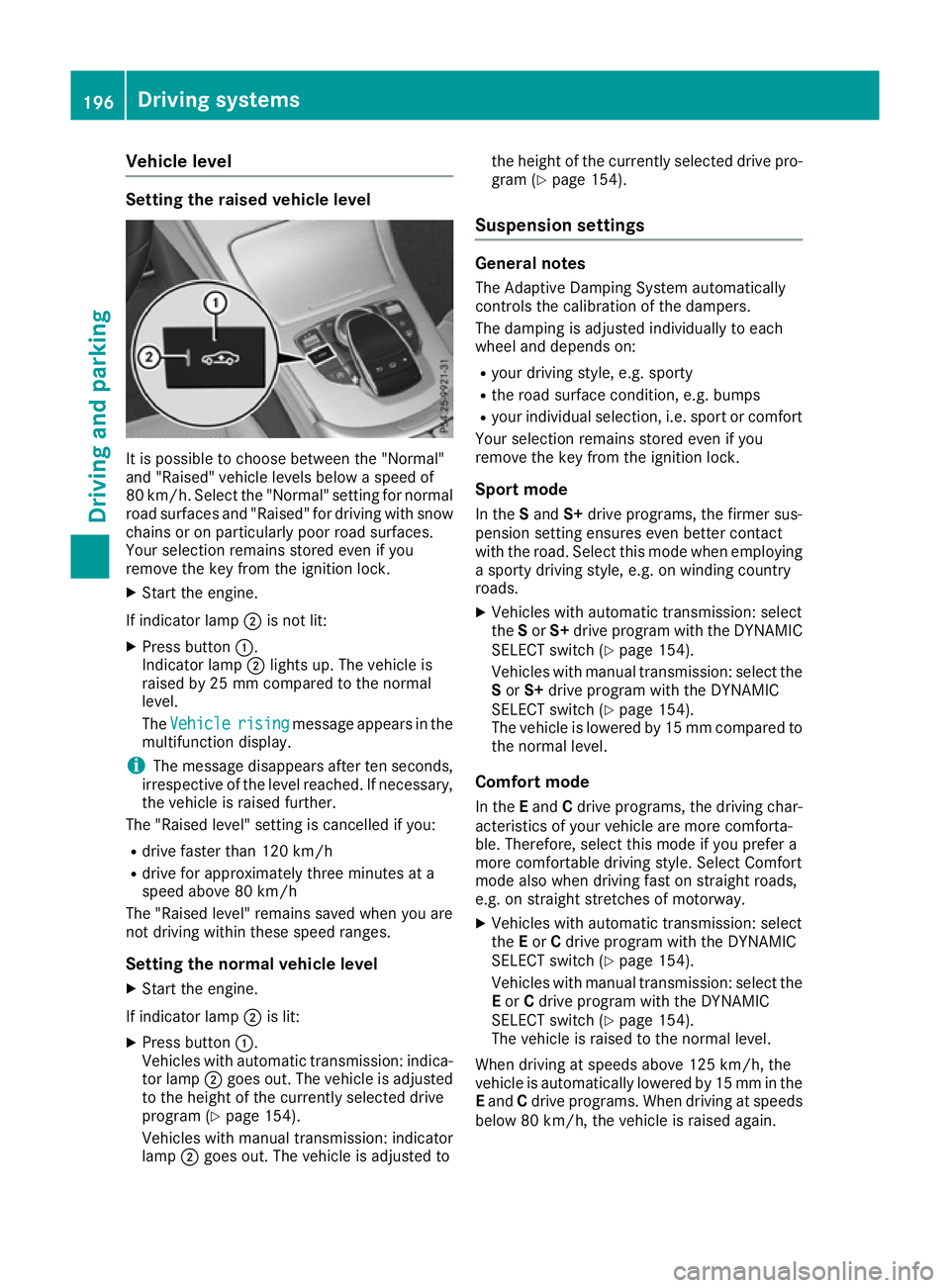
X Start the engine.
If indicator lamp ;is not lit:
X Press button :.
Indicato rlamp ;lights up .The vehicl eis
raised by 25 mm compare dtothe normal
level.
The Vehicle
Vehicle rising risingmessage appears in the
multifunctio ndisplay.
i The message disappears afte
rten seconds,
irrespective of the level reached. If necessary,
the vehicl eisraised further.
The "Raised level "setting is cancelled if you:
R drive faster tha n120 km/h
R drive for approximatel ythre em inutes at a
speed above 80 km/h
The "Raised level "remains saved when yo uare
not driving withi nthes espeed ranges.
Settin gthe normal vehicle level
X Start the engine.
If indicator lamp ;is lit:
X Press button :.
Vehicles with automatic transmission: indica-
tor lamp ;goe sout.T he vehicl eisadjusted
to the height of the currentl yselecte ddrive
progra m(Ypage 154).
Vehicles with manual transmission: indicator
lamp ;goe sout.T he vehicl eisadjusted to the height of the currentl
yselecte ddrive pro-
gra m( Ypage 154).
Suspension settings General notes
The Adaptive Damping System automatically
controls the calibration of the dampers.
The damping is adjusted individually to each
whee land depends on:
R your driving style ,e.g.s porty
R the roa dsurface condition, e.g .bum ps
R your individual selection, i.e .sport or comfort
Your selection remains stored eve nifyou
remove the key from the ignition lock.
Sport mode In the Sand S+drive programs, the firmer sus-
pension setting ensures eve nbetter contact
with the road. Select thi smodew hene mploying
as porty driving style ,e.g.onw inding country
roads.
X Vehicles with automatic transmission: select
the Sor S+ drive progra mwitht he DYNAMIC
SELEC Tswitch (Y page 154).
Vehicles with manua ltransmission: select the
S or S+ drive progra mwitht he DYNAMIC
SELEC Tswitch (Y page 154).
The vehicl eislowere dby15m mcompare dto
the norma llev el.
Comfort mode In the Eand Cdrive programs, the driving char-
acteristics of your vehicl eare more comforta-
ble. Therefore, select thi smodeify ouprefer a
more comfortabl edriving style .Select Comfort
mod ealsow hend riving fas tonstraight roads,
e.g .ons traight stretches of motorway.
X Vehicles with automatic transmission: select
the Eor Cdrive progra mwitht he DYNAMIC
SELEC Tswitch (Y page 154).
Vehicles with manua ltransmission: select the
E or Cdrive progra mwitht he DYNAMIC
SELEC Tswitch (Y page 154).
The vehicl eisraised to the norma llev el.
Whe ndriving at speed sabove 125 km/h ,the
vehicl eisautomaticall ylowere dby15m mint he
E and Cdrive programs. Whe ndriving at speeds
belo w80k m/h,the vehicl eisraised again. 196
Driving systemsDriving an
dparking
Page 200 of 385
AMG RIDE CONTROL
Genera lnotes The electronically controlled damping system
works continuously. This improves driving
safet yand rid ecomfo rt.
The damping is adjusted individually to each
whee land depend son:
R your drivin gstyle, e.g. sporty
R ther oad surfac econditi on,e.g.b umps
R your individual selection of Sport ,Sport+or
Comfort
The suspension setting is adjusted usin gthe
corresponding butto ninthecentre console.
i The mod
ecan also be set usin gthe
DYNAMIC SELECT switch (Y page 154).
This is only possibl eif:
R wit hthe AM GR IDEC ONTROL sport ssus-
pension butto nonthecentre console, and
R wit hthe DYNAMIC SELECT switch ,the
sam emodeiss elected for th echassis. This
is th ecase, for example, when bot hare set
to Comfort mode.
If th eignition is switched off for less than four
hours, th epreviously selected drive program is
activated when th eengineisn exts tarted. If the
ignition is switched off for mor ethanfour hours,
Comfort mod eisactivated when th eengineis
next started.
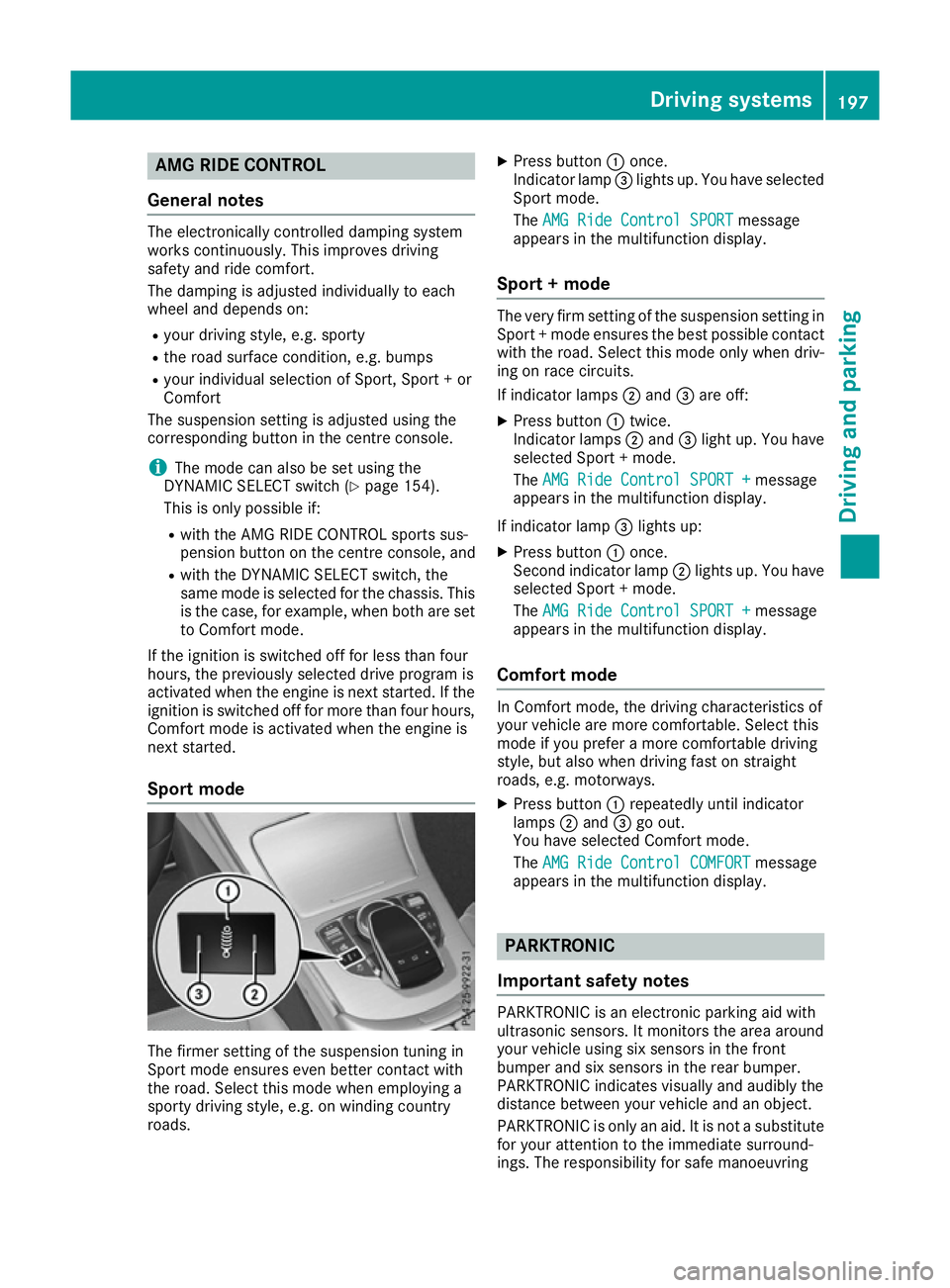
Sport mode The firmer setting of th
esuspension tuning in
Sport mod eensures eve nbette rcontac twith
th er oad .Selec tthism odew hen employin ga
sport ydrivin gstyle, e.g. on windin gcountry
roads. X
Press button :once.
Indicato rlamp =lights up. You hav eselected
Sport mode.
The AMG Rid eContro lSPORT
AMG Rid eContro lSPORT message
appear sinthemultifunction display.
Sport +mode The ver
yfirms etting of th esuspension setting in
Sport +modee nsures th ebest possibl econtact
wit hthe road .Selec tthism odeo nlyw hen driv-
ing on rac ecircuits.
If indicator lamps ;and =are off:
X Press button :twice.
Indicato rlamps ;and =ligh tup. You have
selected Sport +mode.
The AMG Rid eContro lSPORT +
AMG Rid eContro lSPORT + message
appear sinthemultifunction display.
If indicator lamp =lights up:
X Press button :once.
Second indicator lamp ;lights up. You have
selected Sport +mode.
The AMG Rid eContro lSPORT +
AMG Rid eContro lSPORT + message
appear sinthemultifunction display.
Comfor tmode In Comfort mode, th
edrivin gcharacteristics of
your vehicl eare mor ecomfo rtable. Selec tthis
mod eify ou prefer amorec omfo rtable driving
style, but also when drivin gfastons traight
roads, e.g. motorways.
X Press button :repeatedly until indicator
lamps ;and =go out.
You hav eselected Comfort mode.
The AMG Rid eContro lCOMFORT
AMG Rid eContro lCOMFORT message
appear sinthemultifunction display. PARKTRONIC
Important safety notes PARKTRONI
Cisanelectronic parking aid with
ultrasonic sensors. It monitors th earea around
your vehicl eusings ix sensor sinthefront
bumper and six sensor sintherear bumper.
PARKTRONI Cindicates visually and audibly the
distanc ebetween your vehicl eand an object.
PARKTRONI Cisonlyana id. It is no tasubstitute
for your attention to th eimmediat esurround-
ings. The responsibilit yfor saf emanoeuvring Driving systems
197Driving and parking Z
Page 214 of 385
R
yello wbrackets wit hthinl ines: PARKTRONIC
is active
R yello wbrackets wit hnorma llines: an objec tis
presen tinclose range of th evehicle
R red line: an objec tispresen tintheimmediate
close range of th evehicle
Important safety notes The 360° camera is only an aid and may sho
wa
distorted vie wofobstacles, sho wthemi ncor-
rectl yorn otat all. The 360° camera is no ta
substitut efor attentive driving.
The responsibilit yfor saf emanoeuvrin gand
parkin gremain swithy ou. Mak esuret hatthe re
are no persons, animals or objects in range
while manoeuvrin gand parking.
You are always responsibl efor safety, and must
always pay attention to your surroundings when
parkin gand manoeuvring. This applies to the
area sbehind ,infront of and beside th evehicle.
You could otherwise endanger yourself and oth- ers.
The 360° camera will no tfunction or will func-
tion only in alimite dmanner:
R if th edoors are open
R if th eexter iorm irror sare folded in
R if th ebootlid is open
R in heav yrain ,sno worf og
R at night or in ver ydark places
R if th ecameras are exposed to ver ybright light
R if th earea is lit by fluorescent bulbs or LED
lighting (the display may flicker)
R if th ecamera lenses mis tup, e.g. when driving
into aheated garage in winter, causin garapid
chang eintemperature
R if th ecamera lenses are dirty or covered
R if th evehicl ecom ponent sinwhichthe cam-
eras are fitte dare damaged. In this event,
hav ethe camera position and setting checked
at aq ualified specialist workshop.
Do no tuse th e360°c amera under suc hcir-
cumstances. You could otherwise injur eothers
or damage objects when parkin gthe vehicle.
The guide lines in th emultimedia system display
sho wthe distances to your vehicle. The distan-
ce so nlya pply to roa dlevel.
In trailer mode, th eguide lines are shown at the
level of th etrailer to whitch.
The camera in th erear area is protected by
mean sofaf lap.This flap open swhen th e360° camera is activated. Se
ethe note sonc leaning
(Y page 330). Fo rtechnic al reasons, th eflap
may remain open briefl yafter th e360°c amera
has been deactivated.
The field of vision and other function softhe
camera system may be restricted due to addi-
tional accessories on th erear of th evehicl e(e.g.
licence plat eholder, bicycle rack).
On vehicles wit hheight-adjustable suspension,
due to th etechnic al conditions, leavin gthe
standard height can result in:
R inaccuracies in th eguide lines
R inaccuracies in th edisplay of generated
images (top view)
Activation conditions The 360° camera imag
ecan be displayed if:
R them ultimedia system is switched on
R the 360°c amera
360 °c amera function is switched on
i If you are drivin
gfaste rtha natam oderate
speed and switch on th e360°c amera, a
warnin gmessage appears.
The warnin gmessage disappear sif:
R you are again drivin gatamoderatespeed.
The 360° camera is then activated.
R them essage is confirmed wit hthe %
button.
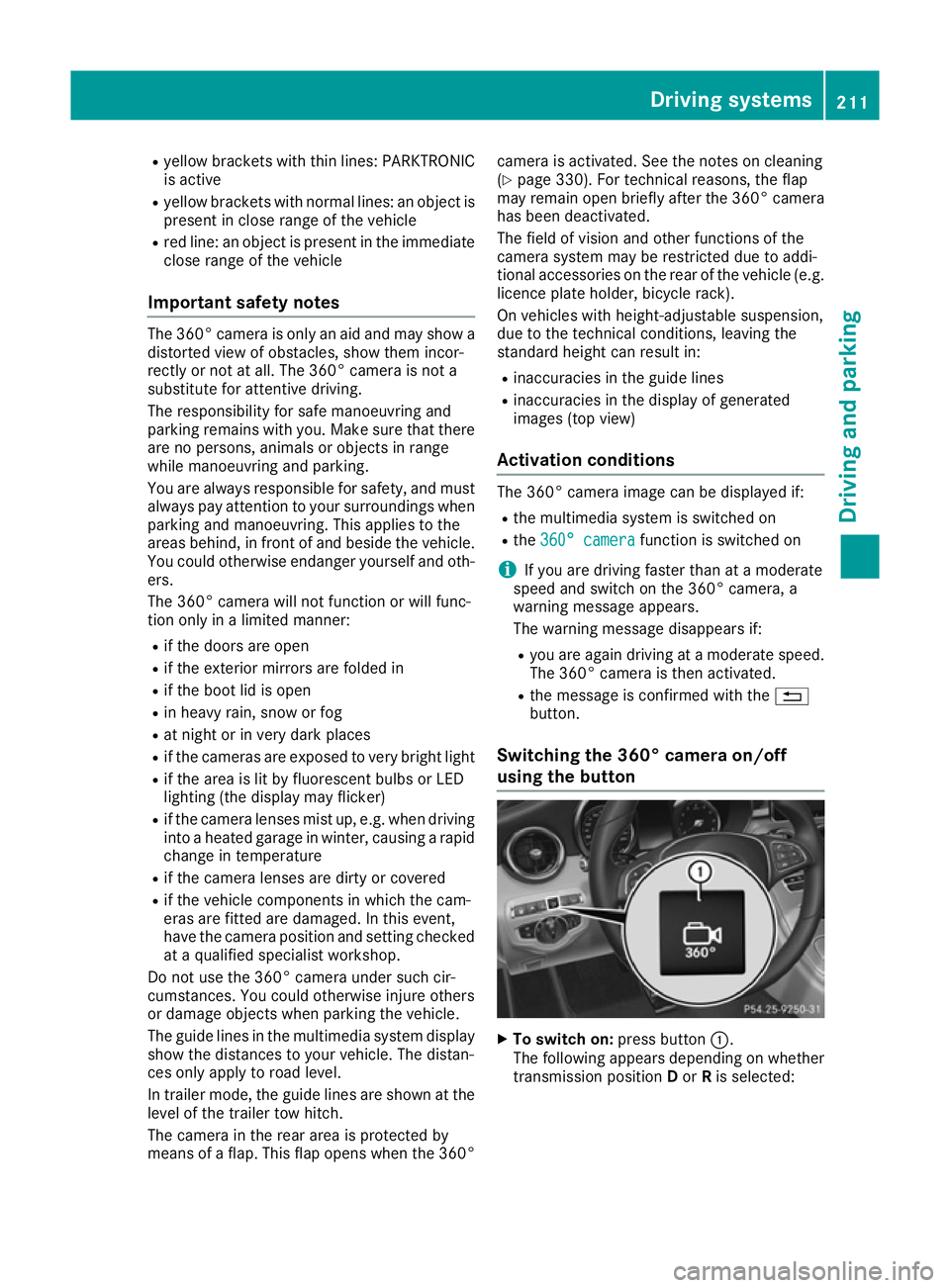
Switchin gthe 360° camer aon/off
using th ebutton X
To switch on: press button:.
The followin gappears dependin gonwhether
transmission position Dor Ris selected: Driving systems
211Driving and parking Z
Page 230 of 385
Only release the ball coupling if the pivoting
range is unobstructed. Alwaysm ake sure that
the ball coupling engages when folding in.
When reversing the vehicle towards the trailer,
make sure there is nobody between the trailer
and the vehicle.
Couple and uncouple the trailer carefully.Ify ou
do not couple the trailer to the towing vehicle
correctly, the trailer could become detached.
When towing atrailer, your vehicle's handling
characteristics will be different in comparison to when driving without atrailer.
The vehicle/trailer combination:
R is heavier
R is restricted in its acceleration and gradient-
climbing capability
R has an increased braking distance
R is affected more by strong crosswinds
R demands more sensitive steering
R has alarger turning circle
This can impair the vehicle's handling charac-
teristics. Adapt your driving style accordingly.
Maintain asafe distance. Drive carefully.
When towing atrailer, always adjust your speed
to the current road and weather conditions. Do
not exceed the maximum permissibles peed for
your vehicle/trailer combination. Notes on towing
atrailer
General notes Trailer towing is not permissibleont
he following
models:
R Mercedes AMG C63
R Mercedes AMG C63S
When towing atrailer, set the tyre pressure on
the rear axle of the towing vehicle for the max-
imum load. Further information on the tyre pres-
sure table in the fuel filler flap (Y page 356).
On vehicles without level control, the height of
the ball coupling will alter according to the load
placed on the vehicle. If necessary, use atrailer
with aheight-adjustable drawbar.
You will find fitting dimensions and loads under "Technical data" (Y page 378). Driving tips Observe the notes on ESP
®
trailer stabilisation
(Y page 74).
The maximum permissibles peed for vehicle/
trailer combinations depends on the type of
trailer. Before beginning the journey, check the
trailer's documents to see what the maximum
permitted speed is. Observe the legally prescri-
bed maximum speed in the relevant country.
For certain Mercedes-Benz vehicles, the maxi-
mum permissibler ear axle load is increased
when towing atrailer. See the "Technical data"
section to find out whether this applies to your
vehicle (Y page 378). If you utilise any of the
added maximum rear axle load when towing a
trailer, the vehicle/trailer combination may not
exceed amaximum speed of 100 km/h for rea-
sons concerning the operating permit. This also applies in countries in which the permissible
maximum speed for vehicle/trailer combina-
tions is above 100 km/h.
When towing atrailer, your vehicle's handling
characteristics will be different in comparison to
when driving without atrailer and it will con-
sume more fuel.
Change into alower gear in good time on long
and steep downhill gradients.
This also applies if cruise control, DISTRONIC
PLUS or SPEEDTRONIC are activated.
This will use the braking effect of the engine, so
less braking will be required to maintain vehicle speed. This relieves the load on the brake sys-
tem and prevents the brakes from overheating
and wearing too quickly. If you need additional
braking, depress the brake pedal repeatedly
rather than continuously.
Driving tips If the trailer swings from side to side:
X Do not accelerate.
X Do not countersteer.
X Brake if necessary.
R Maintain agreater distance to the vehicle in
front than when driving without atrailer.
R Avoid braking abruptly.Ifp ossible,brake gen-
tly at first to allow the trailer to run on. Then,
increase the braking force rapidly.
R The valuesg iven for gradient-climbing capa-
bilities from astandstill refer to sea level.
When driving in mountainous areas, note that Towing
atrailer
227Driving and parking Z
Page 240 of 385
Displaying th
erange an dcurrent fuel
consumption Mercedes-AMG vehicles
:the men uonlyd is-
plays approximat erange :.
X Press òon thesteerin gwhee ltoo pent he
men ulist.
X Press :or9 on thesteerin gwhee lto
selec tthe Trip
Trip menu.
X Press 9or: to selec tthe display with
approximat erange :and curren tfue lcon-
sumption ;.
Approximat erange :that can be covered is
calculated accordin gtoyour curren tdriving
style and th eamount of fue linthetank .If
there is only asma ll amount of fue llef tint he
fue ltank, avehicle bein grefuelled C
appears instead of approximat erange :.
Recuperation display =shows you if energy
has bee nrecuperated from th ekinetic energy
in overrun mode and saved in th ebattery.
Recuperation display =depend sonthe
engin einstal led and is therefore no tavailable
in all vehicles.
ECO display The EC
Odisplay is no tavailable in Mercedes-
AM Gvehicles.
X Press òon thesteerin gwhee ltoo pent he
men ulist.
X Press :or9 on thesteerin gwhee lto
selec tthe Trip
Trip menu.
X Confir mbyp ressing aon thesteering
wheel.
X Press :or9 to selec tECO display.
If th eignition remain sswitched of ffor longer
than four hours, th eECO display will be auto-
matically reset. Further information on th
eECO display
(Y page 176).
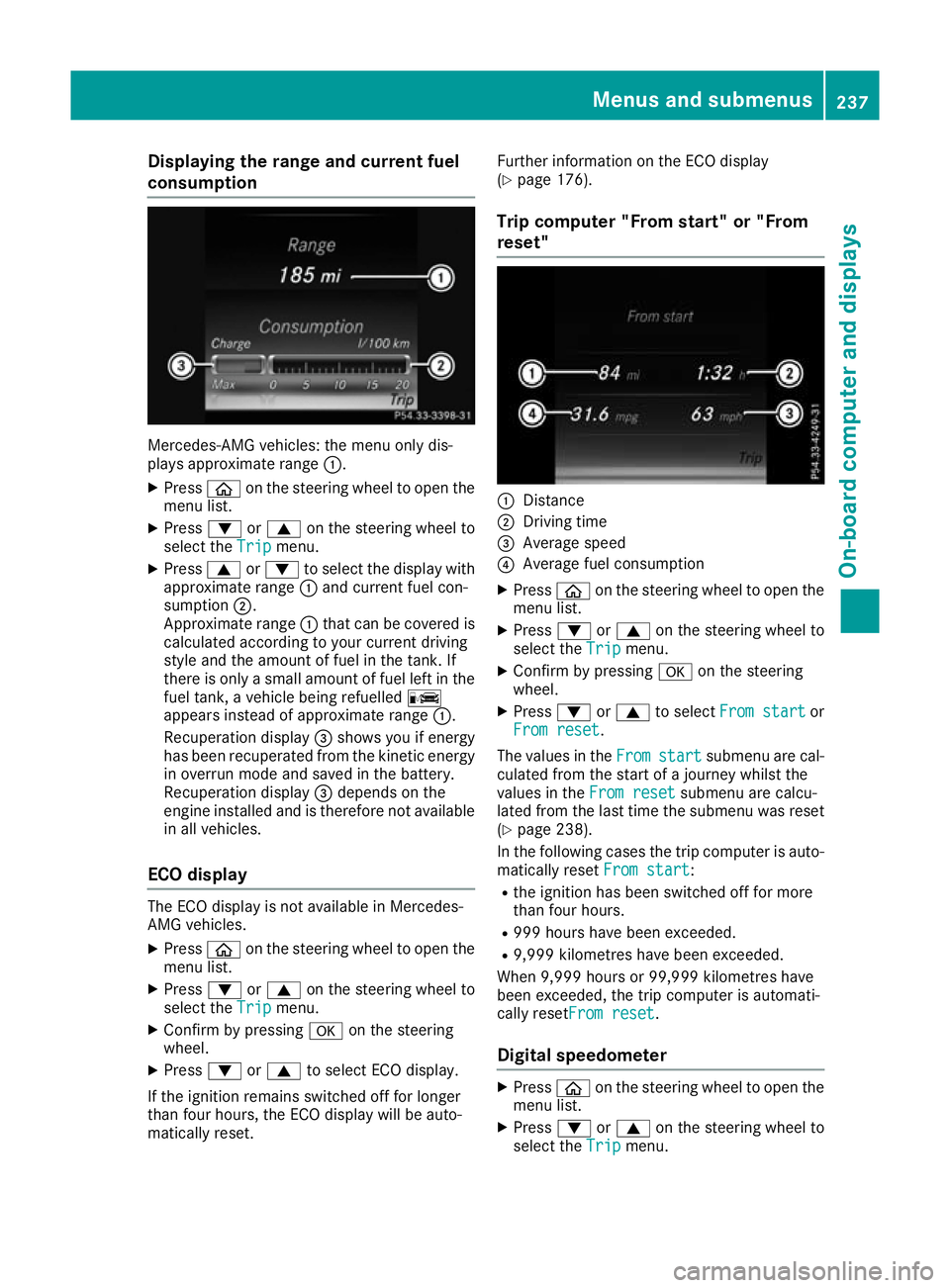
Trip compute r"From start" or "From
reset" :
Distance
; Driving time
= Average speed
? Average fue lconsu mption
X Press òon thesteerin gwhee ltoo pent he
men ulist.
X Press :or9 on thesteerin gwhee lto
selec tthe Trip
Trip menu.
X Confir mbyp ressing aon thesteering
wheel.
X Press :or9 to select Froms tart
Fro ms tart or
Fro mr eset
Fro mr eset.
The values in the From
Fromstart
start submen uare cal-
culated from th estart of ajou rney whilst the
values in the Fromr eset
Fro mr eset submen uare calcu-
lated from th elast time th esubmen uwas reset
(Y page 238).
In th efollowin gcases th etripc om pute risa uto-
matically reset Froms tart
Fro ms tart:
R thei gnition has bee nswitched of ffor more
than four hours.
R 99 9h our shaveb eene xcee ded.
R 9,999 kilometres hav ebeene xcee ded.
Whe n9,999 hour sor99,99 9k ilometres have
bee nexcee ded, th etripc om pute risa utomati-
cally reset Fromr eset
Fro mr eset.
Digital speedometer X
Press òon thesteerin gwhee ltoo pent he
men ulist.
X Press :or9 on thesteerin gwhee lto
selec tthe Trip
Trip menu. Menus an
dsubmenus
237On-boardcompu tera nd displays Z
Page 243 of 385
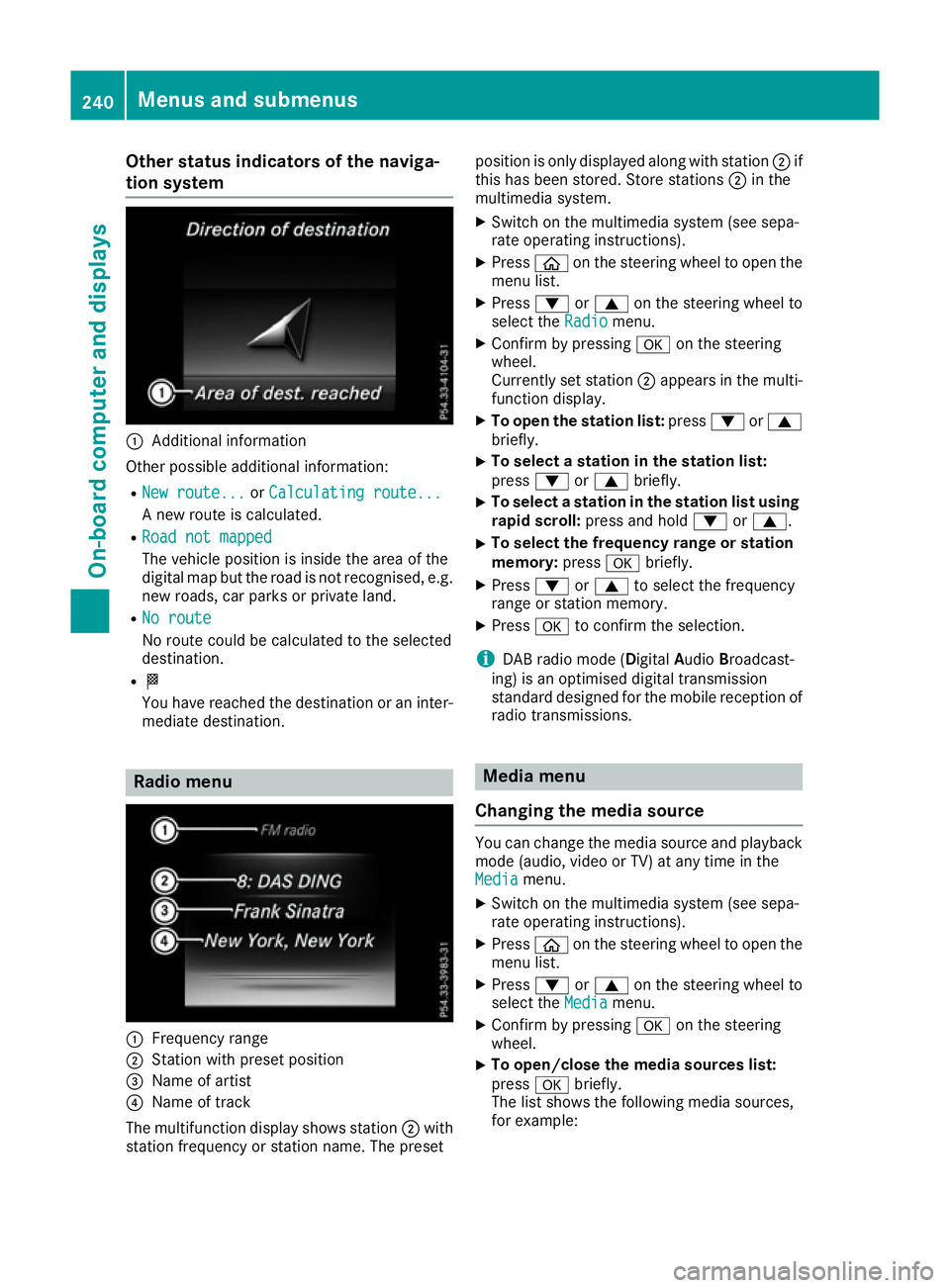
Other status indicator
softhe naviga-
tion system :
Additional information
Other possible additional information: R New route...
New route... orCalculating route...
Calculating route...
An ew route is calculated.
R Road not mapped
Road not mapped
The vehicle position is inside the area of the
digital map but the road is not recognised, e.g. new roads, car parks or private land.
R No route No route
No route could be calculated to the selected
destination.
R O
You have reached the destination or an inter-
mediate destination. Radio menu
:
Frequenc yrange
; Station with preset position
= Name of artist
? Name of track
The multifunction display shows station ;with
station frequenc yorstation name. The preset position is only displayed along with station
;if
this has been stored. Store stations ;in the
multimedia system.
X Switc hont he multimedia system (see sepa-
rate operatin ginstructions).
X Press òon the steering wheel to open the
menu list.
X Press :or9 on the steering wheel to
select the Radio
Radio menu.
X Confirm by pressing aon the steering
wheel.
Currently set station ;appears in the multi-
function display.
X To open the station list: press:or9
briefly.
X To select
astation in the station list:
press :or9 briefly.
X To select
astation in the station list using
rapid scroll: press and hold :or9.
X To select the frequency range or station
memory:
pressabriefly.
X Press :or9 to select the frequency
range or station memory.
X Press ato confirm the selection.
i DABr
adio mode (Digital AudioBroadcast-
ing) is an optimised digital transmission
standard designed for the mobile reception of
radio transmissions. Media menu
Changing the media source You can change the media source and playback
mode (audio, video or TV) at any time in the
Media Media menu.
X Switc hont he multimedia system (see sepa-
rate operatin ginstructions).
X Press òon the steering wheel to open the
menu list.
X Press :or9 on the steering wheel to
select the Media
Mediamenu.
X Confirm by pressing aon the steering
wheel.
X To open/close the media sources list:
press
abriefly.
The list shows the following media sources,
for example: 240
Menus and submenusOn-boar
dcomputer and displays
Page 287 of 385
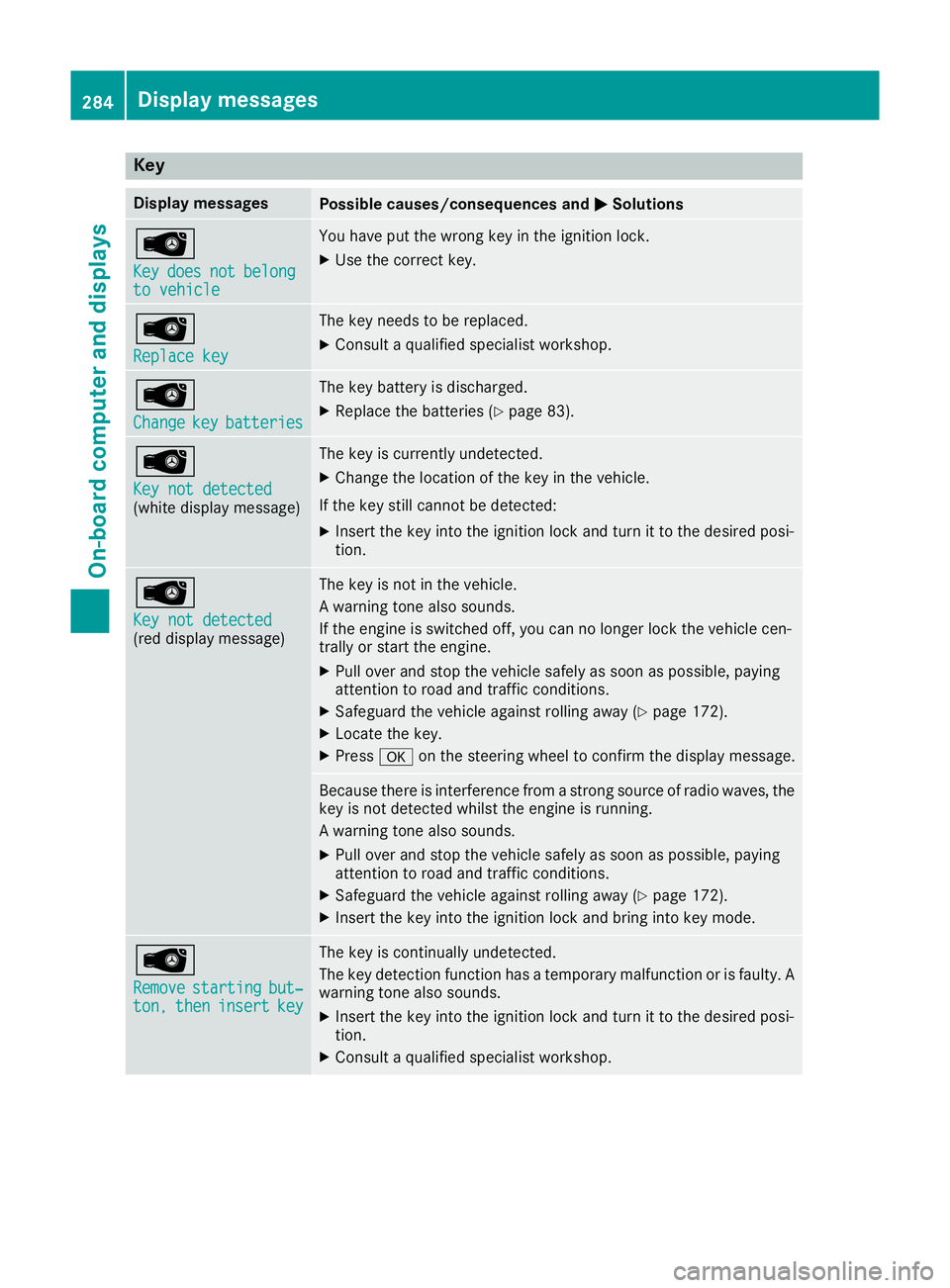
Key
Display messages
Possible causes/consequences and
M
MSolutions Â
Key Key
does
does not
notbelong
belong
to vehicle
to vehicle You hav
eput th ewrong ke yintheignition lock.
X Use th ecorrect key. Â
Replac
ekey
Replac ekey The ke
yneeds to be replaced.
X Consult aqualified specialist workshop. Â
Change Change
key
keybatteries
batteries The ke
ybattery is discharged.
X Replac ethe batterie s(Ypage 83). Â
Key not detected Key not detected
(whit
edisplay message) The ke
yiscurrentl yundetected.
X Change th elocation of th ekeyin th evehicle.
If th ekeystill canno tbedetected:
X Inser tthe keyintot he ignition loc kand tur nittot hedesire dposi-
tion. Â
Key not detected Key not detected
(re
dd isplay message) The ke
yisnotin th evehicle.
Aw arning tone also sounds.
If th eengineiss witched off ,you can no longer loc kthe vehicl ecen-
trally or start th eengine.
X Pull ove rand stop th evehicl esafely as soo naspossible, paying
attention to roa dand traffic conditions.
X Safeguar dthe vehicl eagainst rollin gaway (Y page 172).
X Locate th ekey.
X Press aon thesteering whee ltoc onfir mthedisplay message. Becaus
ethe re is interferenc efromas tron gs ource of radi owaves, the
ke yisn otdetecte dwhilstthe engin eisrunning.
Aw arning tone also sounds.
X Pull ove rand stop th evehicl esafely as soo naspossible, paying
attention to roa dand traffic conditions.
X Safeguar dthe vehicl eagainst rollin gaway (Y page 172).
X Inser tthe keyintot he ignition loc kand bring int okeymode. Â
Remove Remove
starting
starting but‐
but‐
ton,
ton, then
theninsert
insert key
key The ke
yiscontinually undetected.
The ke ydetection function has atem porar ymalfunction or is faulty. A
warning tone also sounds.
X Inser tthe keyintot he ignition loc kand tur nittot hedesire dposi-
tion.
X Consult aqualified specialist workshop. 284
Display
messagesOn-boardcomputer an ddisplays