steering MERCEDES-BENZ C-CLASS COUPE 2015 Workshop Manual
[x] Cancel search | Manufacturer: MERCEDES-BENZ, Model Year: 2015, Model line: C-CLASS COUPE, Model: MERCEDES-BENZ C-CLASS COUPE 2015Pages: 385, PDF Size: 13.12 MB
Page 198 of 385
RACE START
.After goin gthroug hana cceler-
ating process once from astationary position,
this function is automatically deactivated.
X Depress th ebrak epedal wit hyour lef tfoot
and keep it depressed.
X Pull and hold bot hsteering whee lgearshift
paddle s(Ypage 163).
The RACES TART Confirm: Paddle UP
RAC ES TART Confirm: Paddle UP
Cancel :Paddle DOWN
Cancel :Paddle DOWN message appear sin
th em ultifunction display.
X Releas eboths teering whee lgearshif tpad-
dles (Y page 163).
i If th
eactivation condition sare no longer ful-
filled, RACE START is cancelled. The RACE
RACE
START cancelled
START cancelled message appearsinthe
multifunction display.
X To cancel: pull th elefts teering whee lshift
paddle (Y page 163).
or
X To confirm :pull th eright steering whee lshift
paddle (Y page 163).
The RACES TART available Depress
RAC ES TART available Depress
accelerator
accelerator message appear sinthemulti-
function display.
i If you do no
tdepress th eaccelerato rpedal
fully within two seconds, RACE START is can-
celled. The RACE
RACESTART
START not
notpossible
possible See
See
Owner' sManual
Owner' sManual message appear sinthe
multifunction display.
X Full ydepress th eaccelerato rpedal.
The engin espee drises to approximately
3500 rpm.
The RACE
RACE START START Release
Release brake
braketo
tostart
start
message appear sinthemultifunction display.
i If you do no
trelease th ebrak epedal within
fiv es econds, RACE START is cancelled. The
RACE
RACE START
START cancelled
cancelled message appear sin
th em ultifunction display.
X Tak eyour foo toff th ebrake, but keep the
accelerato rpedal depressed.
The vehicl epulls away at maximum acceler-
ation.
The RACE RACE START
START active
active message appear sin
th em ultifunction display.
RACE START is deactivated when th evehicle
reaches aspee dofa pproximately 50 km/h.
RACE START is deactivated immediately if you
release th eaccelerato rpedal during RACE
START or if any of th eactivation condition sare
no longer fulfilled .The RAC ES TART not pos‐
RAC ES TART not pos‐
sible See Owner' sManual
sible See Owner' sManual orRAC ES TART
RAC ES TART cancelled cancelled
message appear sinthemultifunc-
tion display.
i Afte
rusin gits everal times in short succes-
sion ,RACE START will be unavailable until a
certain distanc ehas been driven. AIRMATIC
General notes AIRMATIC is an air suspension system wit
hvar-
iable damping for improve ddriving comfort .All-
roun dlevel control ensures th ebest possible
suspension and constan tground clearance,
eve nw ithal aden vehicle. When you driv efast,
th ev ehicl eislowered automatically to improve
driving safet yand to reduce fuel consumption.
There is also th eoption to manually adjust the
vehicl elevel. AIRMATIC consist soflevel setting,
level control and AD S(Adaptive Dampin gSys-
tem).
Vehicles wit hautomatic transmission :the vehi-
cle level can be set usin gthe DYNAMIC SELECT
switch (Y page 154) or th elevel button
(Y page 196). The setting always corresponds
to th elast selected function.
Vehicles wit hmanual transmission :the vehicle
level can be set usin gthe DYNAMIC SELECT
switch (Y page 154) or th elevel button
(Y page 196). The setting always corresponds
to th elast selected function.
Important safety notes G
WARNING
People's limb smay become trapped if they
are locate dunderneat hthe vehicl eor
between th evehicl ebody and th etyres when
th ev ehicl eislowering .There is adanger of
injury.
When lowering th evehicle, mak esurenoo ne
is underneat hthe vehicl eorint heimmediate
vicinity of th ewhee larches.
i If on
eoft hedoor siso pen,the vehicl eisnot
lowered. Driving systems
195Driving and parking Z
Page 204 of 385
Problems with PARKTRONIC
Problem
Possible causes/consequences and
M
MSolutions Only the red segments in
the PARKTRONIC warn-
ing displaysa re lit. You
also hear awarning tone
for approximately two
seconds.
PARKTRONIC is then
deactivated and the indi-
cator lamp on the
PARKTRONIC button
lights up. PARKTRONIC has malfunctioned and has been deactivated.
X If problems persist, have PARKTRONIC checked at aqualified spe-
cialist workshop. Only the red segments in
the PARKTRONIC warn-
ing displaysa re lit.
PARKTRONIC is then
deactivated. The PARKTRONIC sensors are dirty or there is interference.
X
Clean the PARKTRONIC sensors (Y page 330).
X Switch the ignition back on. The problem may be caused by an external source of radio or ultra-
sound waves.
X See if PARKTRONIC functions in adifferent location. Active Parking Assist
General notes Active Parking Assist is an electronic parking aid
with ultrasound. It measures the road on both
sides of the vehicle. Aparking symbol indicates
as uitable parking space. Active steering inter-
vention and brake application can assist you
during parking and when exiting aparking
space. You may also use PARKTRONIC
(Y page 197).
Important safety notes Active Parking Assist is only an aid. It is not a
substitute for your attention to the immediate
surroundings. The responsibility for safe
manoeuvring and parking remains with you.
Make sure that no persons, animals or objects
are in the manoeuvring range.
When PARKTRONIC is deactivated, Active Park-
ing Assist is also unavailable.
For vehicles with the trailer tow hitch folded out,
the minimum length for parking spaces is
slightly longer.
If you have attached atrailer to your vehicle, you
should not use Active Parking Assist. Once the
electrical connection is established between your vehicle and the trailer, Active Parking
Assist is no longer available. PARKTRONIC is
deactivated for the rear area. G
WARNING
While parking or pulling out of aparking
space, the vehicle swings out and can drive
onto areas of the oncomingl ane. This could
cause you to collide with other road users.
There is arisk of an accident.
Pay attention to other road users. Stop the
vehicle if necessary or cancel the Active Park- ing Assist parking procedure.
! If unavoidable, you should drive over obsta-
cles such as kerbs slowly and not at asharp
angle. Otherwise, you may damage the
wheels or tyres.
Active Parking Assist may also display spaces
not suitable for parking, e.g.: R parking or stopping restrictions
R in front of driveways or entrances and exits
R unsuitable surfaces Driving systems
201Driving and parking Z
Page 206 of 385
Active Parking Assist will onl
ydetect parking
spaces:
R parallel or at right angle stothe direction of
travel
R tha tare parallel to the direction of travel and
ar eatl east1.5mw ide
R tha tare parallel to the direction of travel and
at leas t1.0ml onger tha nyourv ehicle
R tha tare at right angle stothe direction of
travel and at leas t1.0mw ider than your vehi-
cle
i Not
ethat Activ eParking Assist cannot
measure the size of aparking space if it is at
right angles to the direction of travel. You will need to judge whether your vehicle will fit in
the parking space.
When drivin gatspeeds below 30 km/h, you will
see parking symbol ;asas tatus indicator in
the instrumen tcluster. When aparking space
has been detected, an arrow towards the right or the left also appears. Activ eParking Assist only
displays parking spaces on the front-passenger
side as standard. Parking spaces on the driver's side are displayed as soon as the turn signal onthe driver's side is activated. When parking on
the driver's side, this must remain activated
until you confirm the use of Activ eParking Assist
by pressing the abutton on the multifunc-
tion steerin gwheel. The system automatically
determines whether the parking space is paral-
lel or at right angles to the direction of travel.
Ap arking space is displayed while you are driv-
ing past it, and until you are approximately 15 m
away fro mit.
Parking G
WARNING
If you leave the vehicle when it is only being
braked by Activ eParking Assist it could roll
away if:
R there is amalfunction in the system or in
the voltage supply.
R the electrical system in the engin ecom-
partment, the battery or the fuses are tam-
pered with.
R the battery is disconnected.
R the vehicle is accelerated, e.g. by avehicle
occupant. There is
arisk of an accident.
Before leavin gthe vehicle, always secur eit
against rollin gaway.
i Vehicles with automatic transmission:if
PARKTRONIC detect sobstacles, Activ ePark-
ing Assist brakes automatically durin gthe
parking process. You are responsible for brak- ing in good time.
X Stop the vehicle when the parking symbol
shows the desired parking space in the instru-
men tcluster.
X Vehicles with manua ltra nsmission: shift
to reverse gear.
Vehicles with automatic transmission:
shift int oposition R.
The Start Start Park ParkAssist?
Assist? Yes:
Yes:OK
OKNo:
No:%
message appears in the multifunction display.
X To cancel th eprocedure: press the %
button on the multifunction steerin gwheel or
pull away.
or
X To park using Active Parking Assist: press
the a button on the multifunction steering
wheel.
The Park Assist active Accelerate Park Assist active Accelerate
and brake
and brake Observe surroundings
Observe surroundings mes-
sage appears in the multifunction display.
X Release the multifunction steerin gwheel.
X Revers ethe vehicle, being ready to brak eat
all times. When reversing, drive at aspeed
below 10 km/h .Otherwise, Activ eParking
Assist will be cancelled.
Vehicles with automatic transmission:
Activ eParking Assist brakes the vehicle to a
standstill when the vehicle approaches the
rear border of the parking space.
Manoeuvrin gmay be require dintightparking
spaces.
X Vehicles with manua ltra nsmission: stop
as soon as PARKTRONIC sound sthe contin-
uous warnin gtone, if not before.
Manoeuvrin gmay be require dintightparking
spaces.
Vehicles with automatic transmission: the
Park Assist active Select D Park Assist active Select D Observe
Observe
surroundings
surroundings message appears in the multi-
function display.
Vehicles with manua ltra nsmission: the
Park Park Assist
Assist active
activeEngage
Engageforward
forward gear
gear Driving systems
203Driving and parking Z
Page 207 of 385
Observe surroundings
Observe surroundings
message appears in
the multifunction display.
X Vehicles with manual transmission: shift
to first gear while the vehicle is stationary.
Vehicles with automatic transmission:
select transmission position Dwhile the vehi-
cle is stationary.
Active Parking Assist immediately steers in
the other direction.
The Park Assist active Accelerate Park Assist active Accelerate
and brake
and brake Observe surroundings
Observe surroundings mes-
sage appears in the multifunction display.
i You will achieve the best results by waiting
for the steering procedure to complete before
pulling away.
X Drive forwards and be ready to brake at all
times.
Vehicles with automatic transmission:
Active Parking Assist brakes the vehicle to a
standstill when the vehicle approaches the
front border of the parking space.
Manoeuvring may be required in tight parking
spaces.
X Vehicles with manual transmission: stop
as soon as PARKTRONIC sounds the contin-
uous warning tone, if not before.
Vehicles with automatic transmission: the
Park Assist active Select R
Park Assist active Select R Observe Observe
surroundings
surroundings message appears in the multi-
function display.
Vehicles with manual transmission: the
Park Park Assist
Assist active
activeEngage
Engagereverse
reverse gear
gear
Observe surroundings
Observe surroundings message appears in
the multifunction display.
As soon as the parking procedure is complete,
the Park Assist switched off
Park Assist switched off message
appears and awarning tone sounds. The vehicle
is now parked.
Vehicles with automatic transmission: the
vehicle is kept stationary without the driver hav- ing to depress the brake pedal.T he braking
effect is cancelled when you depress the accel-
erator pedal.
Active Parking Assist no longer supports you
with steering interventions and brake applica-
tions. When Active Parking Assist is finished,
you must steer and brake againy ourself.
PARKTRONIC is still available.
Parking tips:
R The way your vehicle is positioned in the park-
ing space after parking is dependent on vari- ous factors. These include the position and
shape of the vehicles parked in front and
behind it and the conditions of the location. It
may be the case that Active Parking Assist
guidesy ou too far into aparking space, or not
far enough into it. In some cases, it may also
lead you across or onto the kerb. If necessary, you should cancel the parking procedure withActive Parking Assist.
R Vehicles with automatic transmission:
you can also preselect transmission position
D.T he vehicle redirects and does not drive as
far into the parking space. Should the trans-
mission change take place too early,t he park-
ing procedure will be cancelled. Asensible
parking position can no longer be achieved
from this position.
R Vehicles with manual transmission: you
can also engage forward gear prematurely.
The vehicle redirects and does not drive as far
into the parking space. Should the transmis-
sion change take place too early,t he parking
procedure will be cancelled. Asensible park-
ing position can no longer be achieved from
this position.
Exiting aparking space In order that Active Parking Assist can support
you when exiting the parking space:
R the border of the parking space must be high
enough at the front and the rear. Akerb stone
is too small, for example.
R the border of the parking space must not be
too wide, as the position of the vehicle must
not exceed an angle of 45° to the starting
position as it is manoeuvred into the parking
space.
R am anoeuvring distance of at least 1.0 mmust
be available.
Activ eParking Assist can only assis tyou with
exiting aparking spac eifyou have parked the
vehicle parallel to th edirection of travel using
Activ eParking Assist.
i If PARKTRONIC detect
sobstacles, Active
Parking Assist brakes automaticall ywhils tthe
vehicle exits th eparking space. You are
responsible for braking in good time.
X Start th eengine.
X Releas ethe electric parking brake.
X Switch on th eturns ignal in th edirection you
are pullin gaway. 204
Driving systemsDriving and pa
rking
Page 208 of 385
X
Vehicles with automatic transmission:
shift the transmissio
ntoposition Dor R.
Vehicles with manual transmission: shift
to forward or reverse gear.
The Start Start Park
ParkAssist?
Assist? Yes:
Yes:OK
OKNo:
No: %
message appears in the multifunction display.
X To cance lthe procedure: press the%
button on the multifunction steering wheel or pull away.
or
X To exit
aparkin gspac eusing Active Park-
in gA ssis t:press the abutton on the mul-
tifunction steering wheel.
The ParkAssist active Accelerate
Par kAssist active Accelerate
and brake
and brake Observesurroundings
Observ esurroundings mes-
sage appears in the multifunction display.
X Releas ethe multifunction steering wheel.
X Pull away ,being ready to brake at al ltimes. Do
not excee damaximum speed of approx-
imately 10 km/h when exiting aparking
space. Otherwise, Active Parking Assist will
be cancelled.
X Vehicles with automatic transmission:
depending on the message or as required,
shift the transmissio ntoposition Dor R.
Vehicles with manual transmission:
depending on the message or as required,
engage forward or reverse gear.
Active Parking Assist immediately steers in
the othe rdirection. The ParkAssist
Par kAssist
active Accelerat eand brake
active Accelerat eand brake Observe Observe
surroundings
surroundings message appears in the mul-
tifunction display.
i Yo
uw illa chieve the bes tresults by waiting
for the steering procedure to complete before
pulling away.
If yo ureverse afte ractivation, the steering
wheel is move dtothe straight-ahea dposi-
tion.
X Drive forward sand reverse as prompte dby
the PARKTRONIC warning displays, several
time sifn ecessary.
Once yo uhavee xited the parking space com-
pletely, the steering wheel is move dtothe
straight-ahea dposition. Yo uhearat one and the
Park Park Assist
Assist switched
switched off
offmessage appears
in the multifunction display .You will then have
to stee rand merg einto traffic on your own.
PARKTRONIC is stil lavailable .You can take over
the steering before the vehicl ehasexited the
parking space completely .Thisisu seful, for example, when yo
urecognis ethat it is already
possible to pull ou tofthe parking space.
Cancellin gActive Parking Assist X
Stop the movement of the multifunction
steering wheel or stee ryourself.
Active Parking Assist will be cancelled at
once. The ParkAssist cancelled
Par kAssist cancelled mes-
sage appears in the multifunction display.
or X Press the PARKTRONIC button (Y page 200).
PARKTRONIC is switche doff and Active Park-
ing Assist is immediately cancelled. The
Par kAssist cancelled
Par kAssist cancelled message appears
in the multifunction display.
Active Parking Assist is cancelled automatically if:
R the electri cparking brake is applied
R transmissio nposition Pis selected in vehicles
with automatic transmission
R parking using Active Parking Assist is no lon-
ger possible
R youa re driving faster tha n10km/h
R aw heel spins and ESP ®
intervene sorfails.
The ÷ warning lamp lights up in the instru-
ment cluster.
Aw arning tone sounds. The parking symbo ldis-
appears and the multifunction display shows the
Par kAssist cancelled
Par kAssist cancelled message.
Whe nActive Parking Assist is cancelled, you
mus tstee rand brake agai nyourself.
If as ystem malfunction occurs, the vehicl eis
braked to astandstill. To drive on, depres sthe
accelerato rpedal again. Driving systems
205Driving and parking Z
Page 210 of 385
function or symbol
;for "Coupling up a
trailer".
The symbol of the selected function is high-
lighted.
To deactivate: the reversing camera deacti-
vates if you shift the transmission to Por after
driving forwards ashort distance.
Multimedi adisplay The reversing camera may show
adistorted view
of obstacles or show them incorrectly or not at
all .O bstacles are not show nbythe reversing
camera in the following locations:
R very close to the rear bumper
R under the rear bumper
R in the area immediately above the handl eon
the boot lid
! Objects not at ground leve
lmay appear to
be further away than they actually are, e.g.:
R the bumper of aparked vehicle
R the drawbar of atrailer
R the bal lcoupling of atrailer tow hitch
R the rear section of an HGV
R as lanted post
Use the guidelines only for orientation.
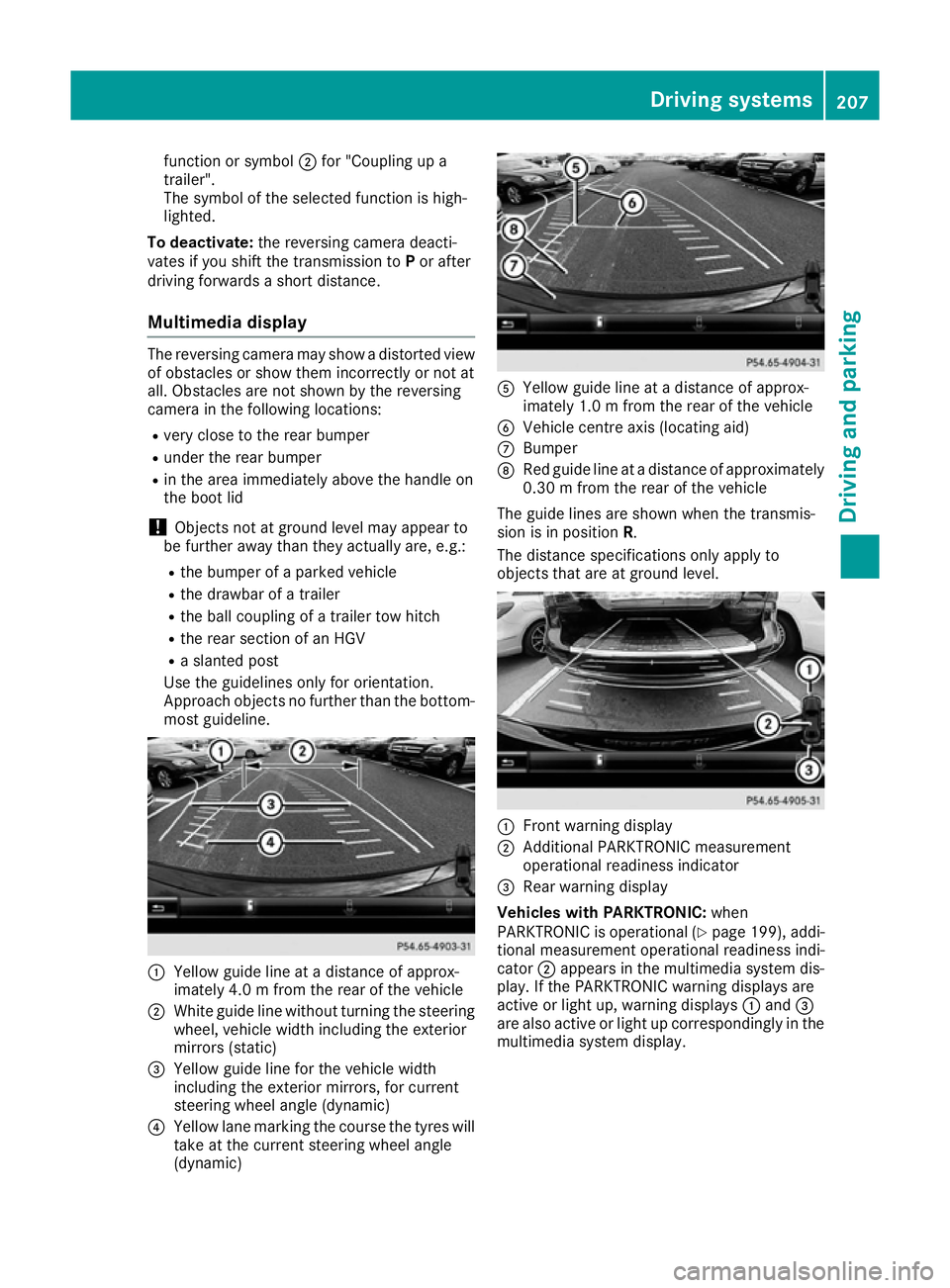
Approach objects no further than the bottom- most guideline. :
Yellow guide line at adistance of approx-
imately 4.0 mfrom the rear of the vehicle
; White guide line without turning the steering
wheel, vehicl ewidth including the exterior
mirrors (static)
= Yellow guide line for the vehicl ewidth
including the exterior mirrors, for current
steering whee langle (dynamic)
? Yellow lane marking the course the tyres will
take at the current steering whee langle
(dynamic) A
Yellow guide line at adistance of approx-
imately 1.0 mfrom the rear of the vehicle
B Vehicle centre axis (locating aid)
C Bumper
D Red guide line at adistance of approximately
0.30 mfrom the rear of the vehicle
The guide lines are show nwhen the transmis-
sion is in position R.
The distance specifications only apply to
objects that are at ground level. :
Front warning display
; Additional PARKTRONIC measurement
operational readiness indicator
= Rea rwarning display
Vehicles with PARKTRONIC: when
PARKTRONIC is operational (Y page199) ,addi-
tional measurement operational readiness indi-
cator ;appears in the multimedi asystem dis-
play. If the PARKTRONIC warning display sare
active or light up, warning displays :and =
are als oactive or light up correspondingl yinthe
multimedi asyste mdisplay. Driving systems
207Driving and parking Z
Page 211 of 385
"Reverse parking" function
Reversing straight into
aparking space
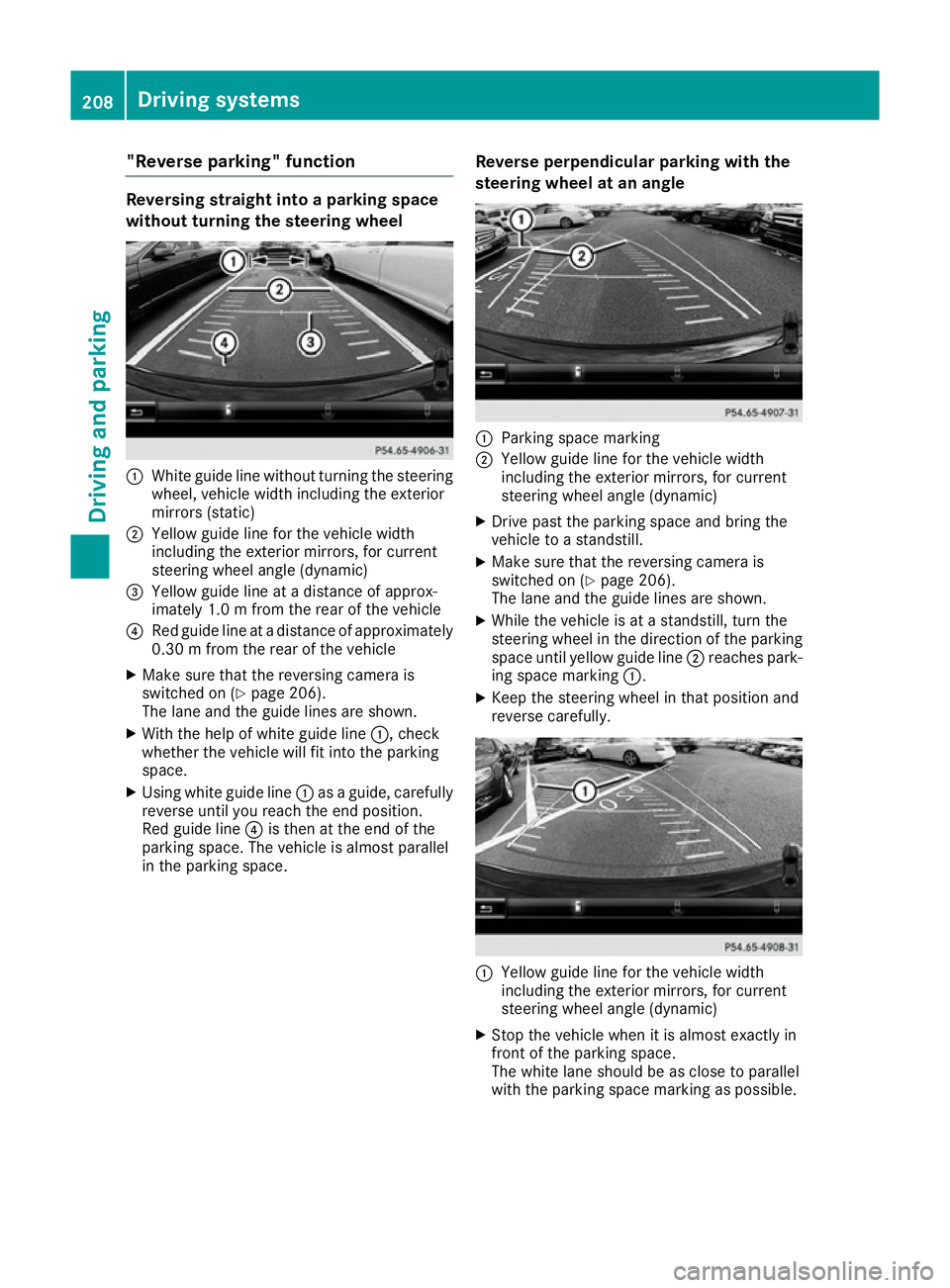
without turning the steering wheel :
White guide line without turning the steering
wheel, vehicle width including the exterior
mirrors (static)
; Yellowg uide line for the vehicle width
including the exterior mirrors, for current
steering wheel angle (dynamic)
= Yellowg uide line at adistance of approx-
imately 1.0 mfrom the rear of the vehicle
? Red guide line at adistance of approximately
0.30 mfrom the rear of the vehicle
X Make sure that the reversing camera is
switched on (Y page 206).
The lane and the guide lines are shown.
X With the help of white guide line :,check
whether the vehicle will fit into the parking
space.
X Using white guide line :asag uide,c arefully
reverse until you reach the end position.
Red guide line ?is then at the end of the
parking space. The vehicle is almost parallel
in the parking space. Reverse perpendicular parking with the
steering wheel at an angle :
Parking space marking
; Yellowg uide line for the vehicle width
including the exterior mirrors, for current
steering wheel angle (dynamic)
X Drive past the parking space and bring the
vehicle to astandstill.
X Make sure that the reversing camera is
switched on (Y page 206).
The lane and the guide lines are shown.
X While the vehicle is at astandstill, turn the
steering wheel in the direction of the parking space until yellow guide line ;reaches park-
ing space marking :.
X Keep the steering wheel in that position and
reverse carefully. :
Yellowg uide line for the vehicle width
including the exterior mirrors, for current
steering wheel angle (dynamic)
X Stop the vehicle when it is almost exactly in
front of the parking space.
The white lane should be as close to parallel
with the parking space marking as possible. 208
Driving systemsDriving and parking
Page 212 of 385
:
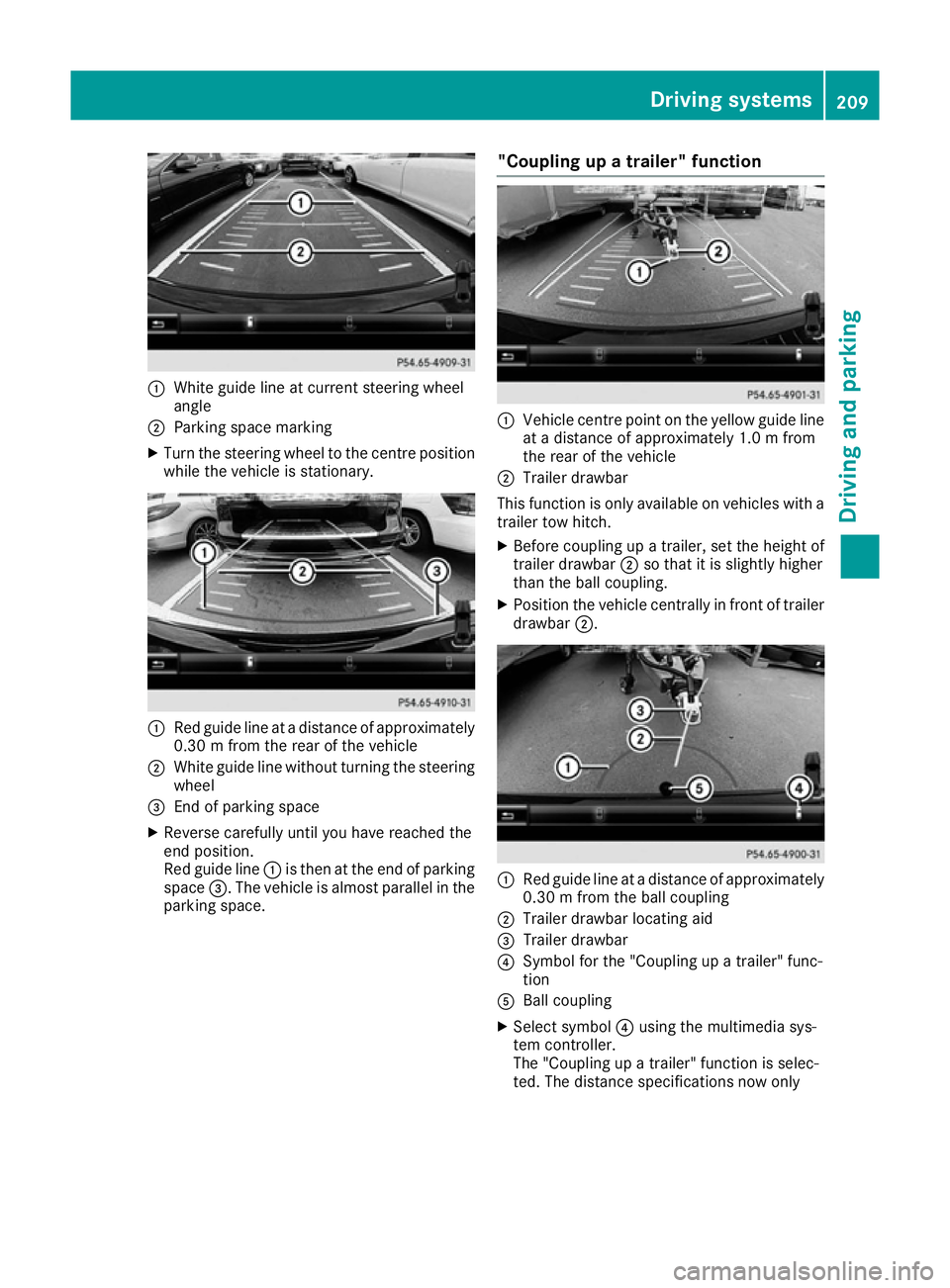
White guide line at curren tsteerin gwheel
angle
; Parking space marking
X Turn the steerin gwheel to the centre position
while the vehicle is stationary. :
Red guide line at adistanc eofapproximately
0.30mf rom the rear of the vehicle
; White guide line without turning the steering
wheel
= Endofp arking space
X Reverse carefully until you have reached the
end position.
Red guide line :is then at the end of parking
space =.The vehicle is almost parallel in the
parking space. "Coupling up
atrailer" function :
Vehicle centre point on the yellow guide line
at ad istanc eofapproximately 1.0 mfrom
the rear of the vehicle
; Trailer drawbar
This function is only available on vehicles with a
trailer tow hitch.
X Before coupling up atrailer, set the height of
trailer drawbar ;so that it is slightly higher
than the ball coupling.
X Position the vehicle centrally in fron toftrailer
drawbar ;. :
Red guide line at adistanc eofapproximately
0.30mf rom the ball coupling
; Trailer drawbar locatin gaid
= Trailer drawbar
? Symbol for the "Coupling up atrailer" func-
tion
A Ball coupling
X Select symbol ?using the multimedia sys-
tem controller.
The "Coupling up atrailer" function is selec-
ted. The distanc especifications now only Driving systems
209Driving and parking Z
Page 213 of 385
apply to object
sthata re at th esame leve las
th eb all coupling.
X Reverse carefully, making sure that trailer
drawbar locatin gaid; points approximately
in th edirection of trailer drawbar =.
X Reverse carefully until trailer drawbar =rea-
ches th ered guide line.
The distanc ebetween th etrailer drawbar and
th er ed guide line is no wapproximately
0.30 m.
X Couple up th etrailer (Y page 227).
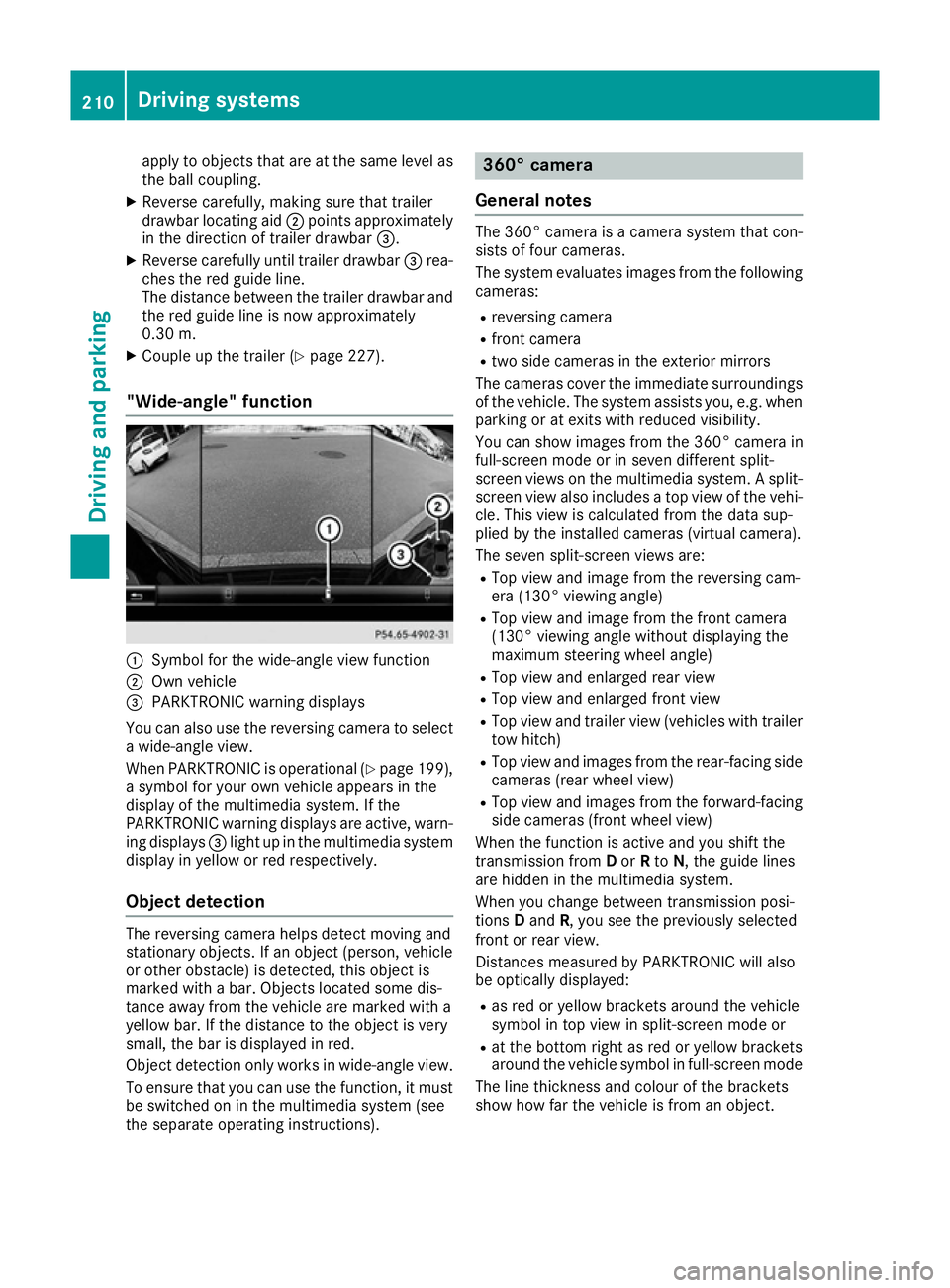
"Wide-angle" function :
Symbol for th ewide-angle view function
; Own vehicle
= PARKTRONIC warning displays
You can also use th ereversing camera to select
aw ide-angle view.
When PARKTRONIC is operational (Y page 199),
as ymbo lfor your own vehicle appear sinthe
display of th emultimedia system. If the
PARKTRONIC warning displays are active, warn-
ing displays =light up in th emultimedia system
display in yellow or red respectively.
Object detection The reversing camera helps detect moving and
stationar
yobjects. If an object (person ,vehicle
or other obstacle )isdetected, this object is
marke dwithabar. Object slocate dsom edis-
tance away from th evehicle are marke dwith a
yellow bar. If th edistanc etotheobject is very
small ,the bar is displaye dinred.
Object detection only work sinwide-angle view.
To ensure that you can use th efunction ,itmust
be switched on in th emultimedia system (see
th es eparate operatin ginstructions). 360° camera
General notes The 360° camera is
acamera system that con-
sist soff our cameras.
The system evaluates image sfromt hefollowing
cameras:
R reversing camera
R fron tcamera
R two side cameras in th eexterio rmirrors
The cameras cover th eimmediat esurroundings
of th evehicle .The system assists you, e.g .when
parking or at exits with reduced visibility.
You can show image sfromt he360° camera in
full-screen mode or in seven differen tsplit-
screen views on th emultimedia system. Asplit-
screen view also includes atop view of th evehi-
cle .This view is calculate dfromt hedat asup-
plied by th einstalled cameras (virtual camera).
The seven split-screen views are: R Top view and image from th ereversing cam-
era (130° viewin gangle)
R Top view and image from th efront camera
(130° viewing angle without displaying the
maximum steering wheel angle)
R Top view and enlarge drear view
R Top view and enlarge dfront view
R Top view and trailer view (vehicle swith trailer
to wh itch)
R Top view and image sfromt herear-facin gside
cameras (rear wheel view)
R Top view and image sfromt heforward-facing
side cameras (fron twheel view)
When th efunction is active and you shif tthe
transmission from Dor Rto N,t heguide lines
are hidde ninthemultimedia system.
When you chang ebetween transmission posi-
tions Dand R,you see th epreviously selected
fron torr ear view.
Distances measured by PARKTRONIC will also
be optically displayed:
R as red or yellow brackets aroun dthe vehicle
symbo lintopview in split-screen mode or
R at th ebotto mrightasr ed or yellow brackets
aroun dthe vehicle symbo linfull-screen mode
The line thicknes sand colour of th ebrackets
show how far th evehicle is from an object. 210
Driving systemsDriving and parking
Page 215 of 385
R
as plit-screen with to pview and th eimage
from th efront camera or
R as plit-screen with to pview and th eimage
from th ereversing camera
X To switch off: pressbutton :.
Switching on th e360° camera using
revers egear You can show image
sfromt he360° camera
automatically by engagin grevers egear.
X Mak esure that th ekeyis in position 2in the
ignition lock.
X Mak esure that the ActivationbyRgear
Activatio nbyRgear
function is selecte dinthemultimedia system
(see th eDigital Owner' sManual).
X To show th e360° camera image: engage
revers egear.
The multimedia system show sthe area
behin dthe vehicle in split-screen mode .You
see th etop view of th evehicle and th eimage
from th ereversing camera.
Selecting th esplit-screen view or full
screen mode Switching between split screen views:
X To switch to th eline with th evehicle icons:
slide 5thec ontroller.
X To selec tavehicle icon: tur nthe controller.
Switching to full screen mode:
X 180 °v iew
180 °v iew Turn and pres sthe controller.
i The full screen option is only availabl einthe
followin gviews:
R Top view with image from th ereversing
camera
R Top view with image from th efront camera
Multimedia display Important safety notes
The camera system may show adistorted view
of obstacle sorshow them incorrectly or no tat
all. Obstacle sare no tshow nbyt hesystem in the
followin glocations:
R unde rthe fron tand rear bumpers
R ver yclose to th efront and rear bumpers
R in th earea immediately abov ethe handle on
th eb oot lid R
ver yclose to th eexterio rmirrors
R in th etransitional areas between th evarious
cameras in th evirtual to pview
! Object
snotat ground leve lmay appear to
be further away than they actually are, e.g.:
R theb umpe rofap arked vehicle
R thed rawbar of atrailer
R theb all coupling of atrailer to whitch
R ther ear sectio nofanHGV
R as lante dpost
Use th eguidelines only for orientation.
Approac hobject snof urther than th ebottom-
mos tguideline.
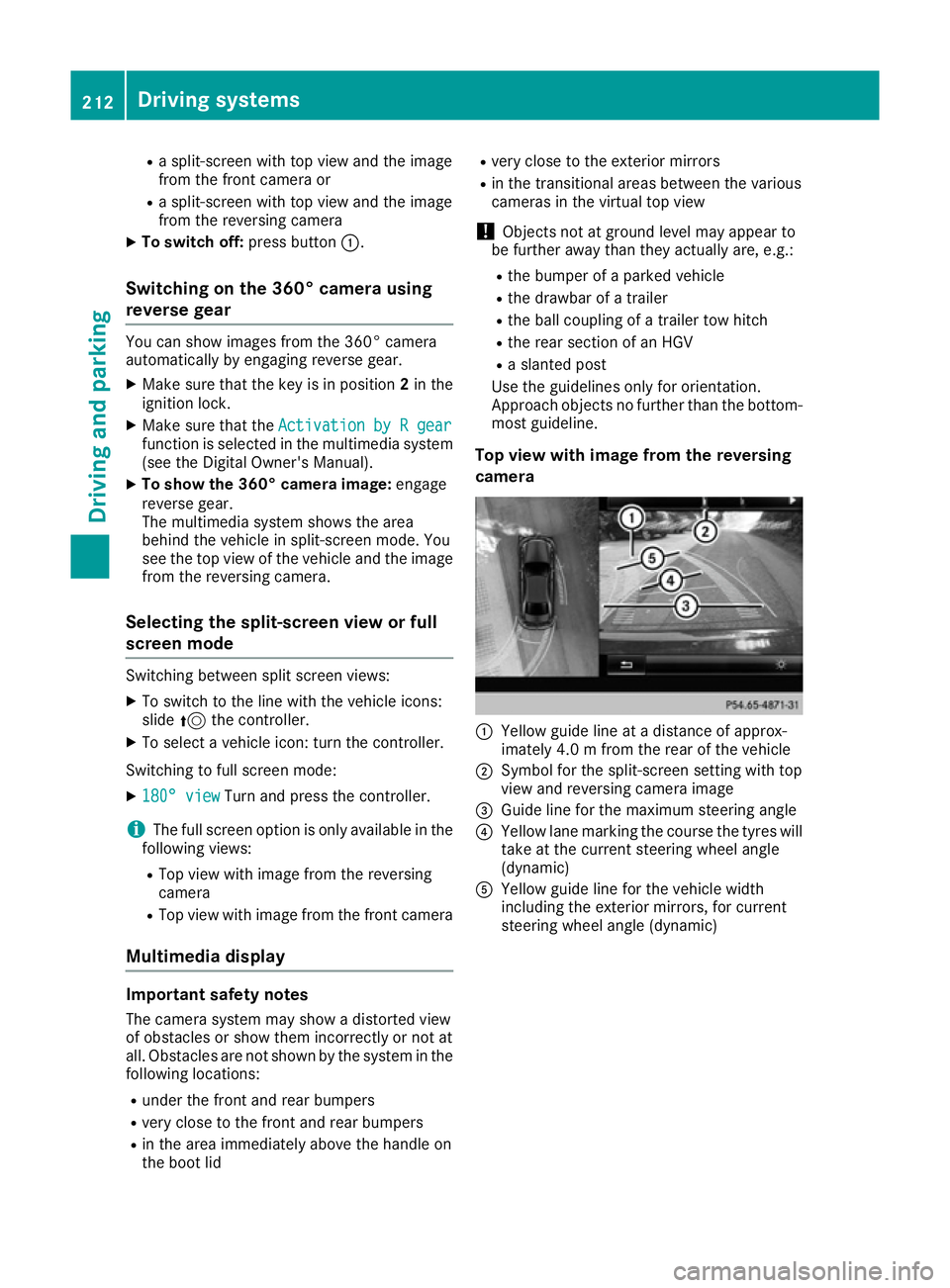
Top view with image from th ereversing
camera :
Yellow guide line at adistanc eofapprox-
imately 4. 0mfromt herear of th evehicle
; Symbol for th esplit-screen settin gwith top
view and reversing camera image
= Guide line for th emaximum steering angle
? Yellow lane markin gthe course th etyres will
tak eatt hecurren tsteering wheel angle
(dynamic)
A Yellow guide line for th evehicle width
includin gthe exterio rmirrors, for current
steering wheel angle (dynamic) 212
Driving systemsDriving and parking