steering MERCEDES-BENZ C-CLASS COUPE 2015 Repair Manual
[x] Cancel search | Manufacturer: MERCEDES-BENZ, Model Year: 2015, Model line: C-CLASS COUPE, Model: MERCEDES-BENZ C-CLASS COUPE 2015Pages: 385, PDF Size: 13.12 MB
Page 216 of 385
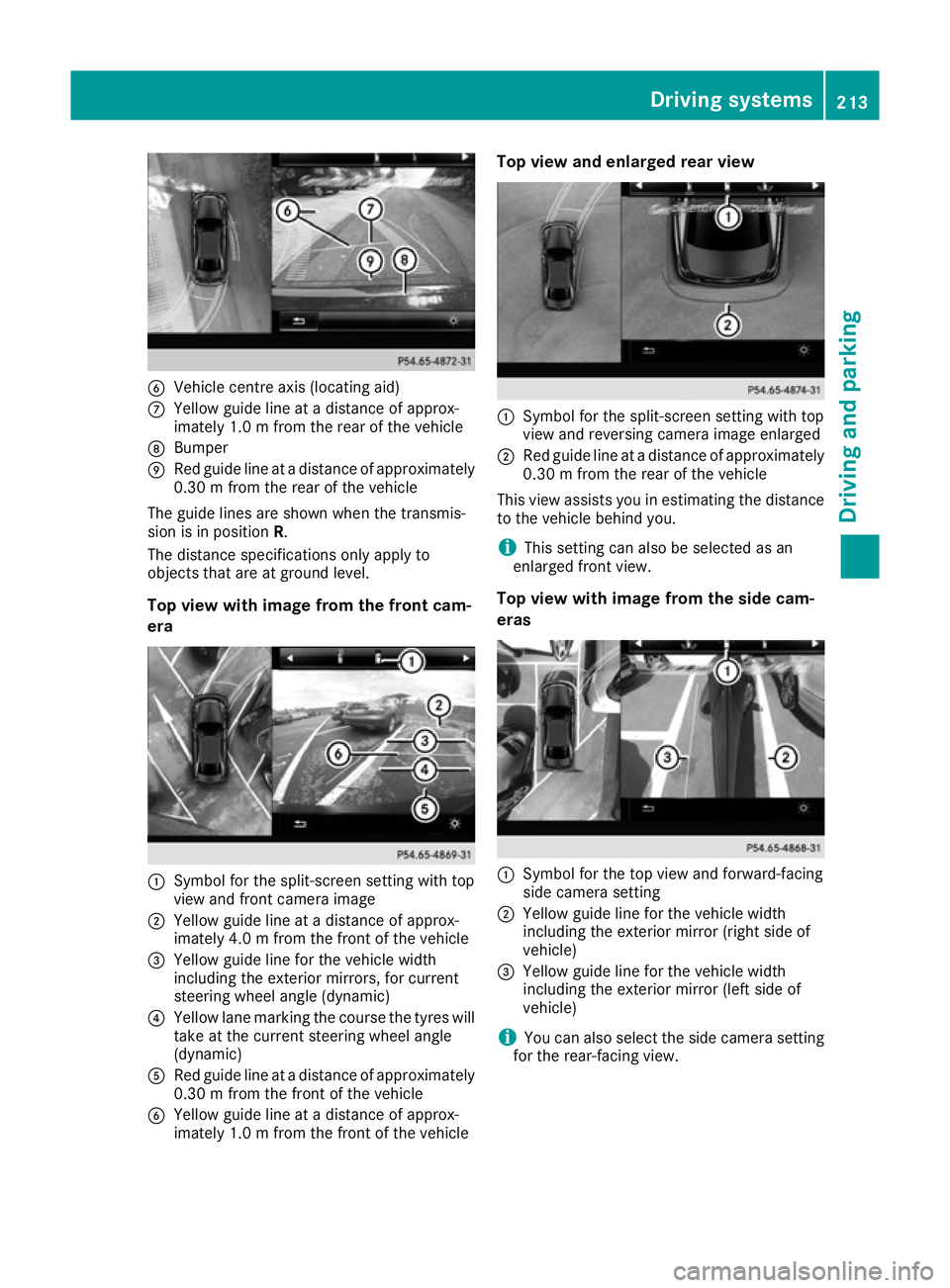
B
Vehicle centre axis (locating aid)
C Yellow guidel ine atadistance of approx-
imately 1.0 mfrom the rear of the vehicle
D Bumper
E Red guidel ine atadistance of approximately
0.30 mfrom the rear of the vehicle
The guidel ines are shown when the transmis-
sion is in position R.
The distance specifications only applyto
objects that are at ground level.
Top view with image from the front cam-
era :
Symbol for the split-screen setting with top
view and front camera image
; Yellow guidel ine atadistance of approx-
imately 4.0 mfrom the front of the vehicle
= Yellow guidel ine for the vehicle width
including the exterior mirrors, for current
steering wheel angle (dynamic)
? Yellow lane marking the course the tyres will
take at the current steering wheel angle
(dynamic)
A Red guidel ine atadistance of approximately
0.30 mfrom the front of the vehicle
B Yellow guide line at adistance of approx-
imately 1.0 mfrom the front of the vehicle Top vie
wand enlarged rear view :
Symbo lfor the split-screen setting with top
view and reversing camera image enlarged
; Red guide line at adistance of approximately
0.30 mfrom the rear of the vehicle
This view assists you in estimating the distance to the vehicl ebehind you.
i This setting can als
obeselected as an
enlarged front view.
Top vie wwithi mage from the side cam-
eras :
Symbo lfor the top view and forward-facing
side camera setting
; Yellow guide line for the vehicl ewidth
including the exterior mirror (right side of
vehicle)
= Yellow guide line for the vehicl ewidth
including the exterior mirror (left side of
vehicle)
i You can als
oselect the side camera setting
for the rear-facing view. Driving systems
213Driving and parking Z
Page 219 of 385
corresponds to the last selectio
nactivated
(standard/sensitive).
Warning in the multifunctio ndisplay If fatigu
eorincreasing lapse sinconcentration
are detected, awarning appears in the multi-
function display: ATTENTIONASSIST
ATTENTIO NASSIST Take a
Take a
break!
break!.
In addition to the messag eshown in the multi-
function display ,you will then hea rawarning
tone.
X If necessary, take abreak.
X Confirm the messag ebypressing the a
button on the steering wheel.
On long journeys, take regula rbreaks in good
time that allow for adequate recuperation. If you do not take abreak and ATTENTION ASSIST still
detects increasing lapse sinconcentration, you
will be warned agai nafter1 5m inutes at the
earliest. Thi swillo nly happe nifATTEN-
TION ASSIST stil ldetects typica lindicator sof
fatigu eorincreasing lapse sinconcentration.
Vehicles with COMAND Online: ifaw arning is
outpu tinthe multifunction display ,aservice
station search is performe dinCOMAND Online.
You can select aservice station and navigation
to this service station will then begin. Thi sfunc-
tion can be activate dand deactivated in
COMAND Online (se ethe separate operating
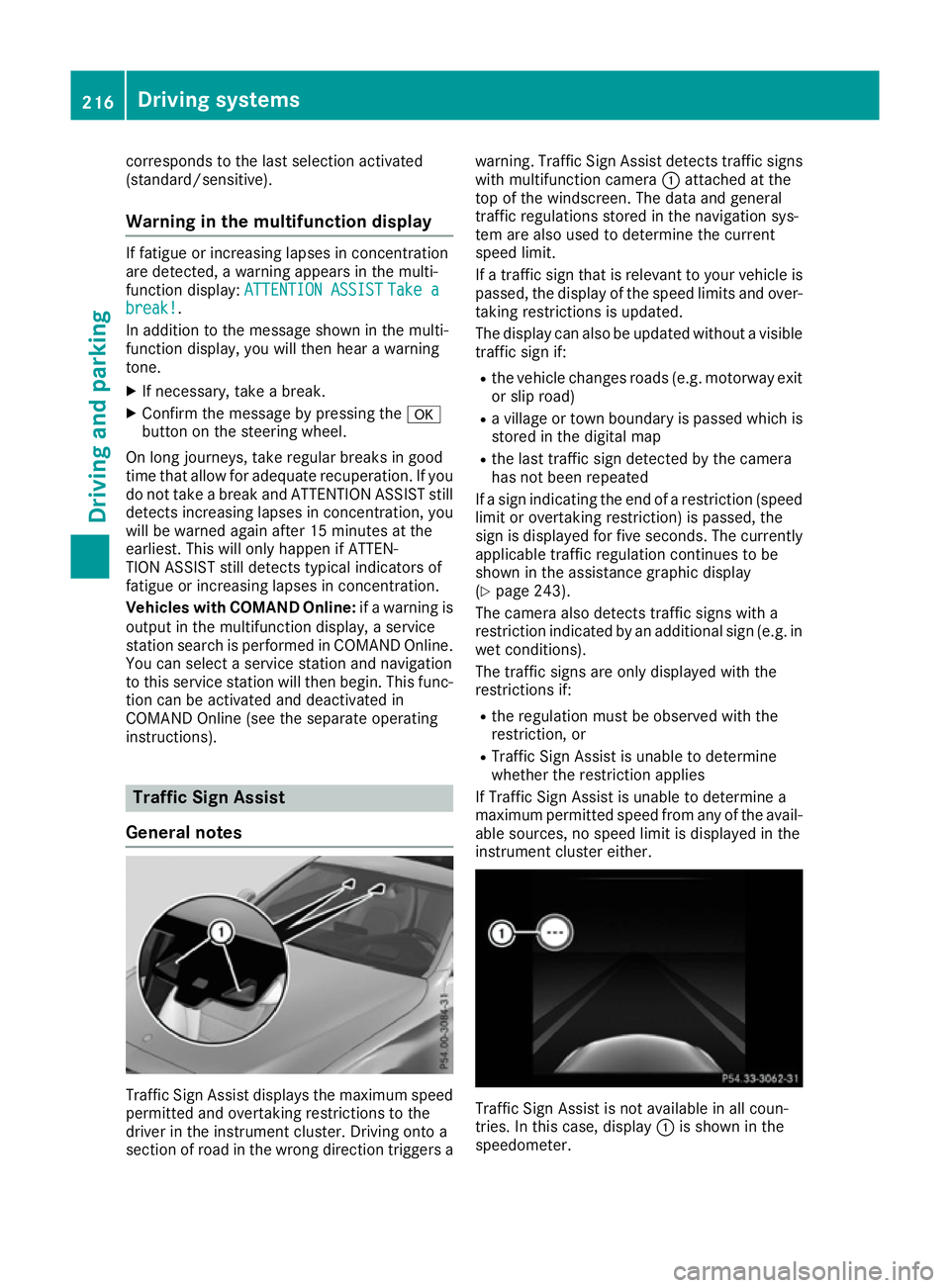
instructions). Traffic Sig
nAssist
General notes Traffic Sign Assist display
sthe maximum speed
permitted and overtaking restrictions to the
driver in the instrument cluster. Driving onto a
section of roa dinthe wrong direction triggers a warning. Traffic Sign Assist detects traffi
csigns
with multifunction camera :attached at the
top of the windscreen. The data and general
traffi cregulations store dinthe navigation sys-
tem are also used to determine the current
speed limit.
If at raffi csignt hat is relevant to your vehicle is
passed, the display of the speed limits and over-
taking restrictions is updated.
The display can also be updated withou tavisible
traffi csigni f:
R the vehicle changes roads (e.g .motorway exit
or sli proad)
R av illage or town boundary is passe dwhich is
store dinthe digita lmap
R the last traffi csignd etected by the camera
ha sn ot bee nrepeated
If as igni ndicating the end of arestriction (speed
limit or overtaking restriction) is passed, the
sig nisd isplayed for five seconds. The currently
applicabl etraffi cregulation continues to be
shown in the assistance graphi cdisplay
(Y page 243).
The camera also detects traffi csigns with a
restriction indicated by an additiona lsign( e.g .in
we tconditions).
The traffi csigns are only displayed with the
restrictions if:
R the regulation mus tbeo bserve dwitht he
restriction, or
R Traffic Sign Assist is unabl etodetermine
whether the restriction applies
If Traffic Sign Assist is unabl etodetermine a
maximum permitted speed from any of the avail- able sources, no speed limit is displayed in the
instrument cluster either. Traffic Sign Assist is not available in al
lcoun-
tries. In this case ,display :is shown in the
speedometer. 216
Drivin
gsystemsDrivin gand parking
Page 223 of 385
This function is availabl
einaspeed range
between 60 km/ha nd 200 km/h.
Aw arning may be given if afront wheel passes
over alane marking .Itwill warn you by means of
intermittent vibration through the steering
wheel for up to 1.5 seconds.
Important safety notes G
WARNING
Lane Keeping Assist cannot alway sclearly
identify lane markings.
In these cases, Lane Keeping Assist may:
R give an unnecessary warning
R not give awarning
There is arisk of an accident.
Always pay particular attention to the traffic
situation and keep in lane, especially if Lane
Keeping Assist alerts you. G
WARNING
The Lane Keeping Assist warning does not
return the vehicle to the original lane. There is ar isk of an accident.
Always steer, apply the brakes or accelerate
the vehicle yourself, especially if Lane Keep-
ing Assist alerts you.
If you fail to adapt your driving style, Lane Keep-
ing Assist can neither reduce the risk of an acci-
dent nor override the laws of physics. Lane
Keeping Assist cannot take into account road,
weather or traffic conditions. Lane Keeping
Assist is only an aid. You are responsible for the distance to the vehicle in front ,for vehicle
speed, for braking in good time and for staying in
lane.
Lane Keeping Assist does not keep your vehicle
in its lane.
The system may be impaired or may not function if:
R there is poor visibility, e.g. due to insufficient
illumination of the road, or due to snow, rain,fog or spray
R there is glare, e.g. from oncoming traffic, the
sun or reflection from other vehicles (e.g. if
the road surface is wet)
R the windscreen is dirty, misted up, damaged
or covered, for instance by asticker, in the
vicinit yofthe camera R
no or several, unclear lane markings are pres-
ent for one lane, e.g. in aconstruction area
R the lane markings are worn away,d ark or cov-
ered up, e.g. by dirt or snow
R the distance to the vehicle in front is too small
and the lane markings thus cannot be detec-
ted
R the lane markings change quickly, e.g. lanes
branch off, cross one another or merge
R the road is narrow and winding
R there are highly variable shade conditions on
the road
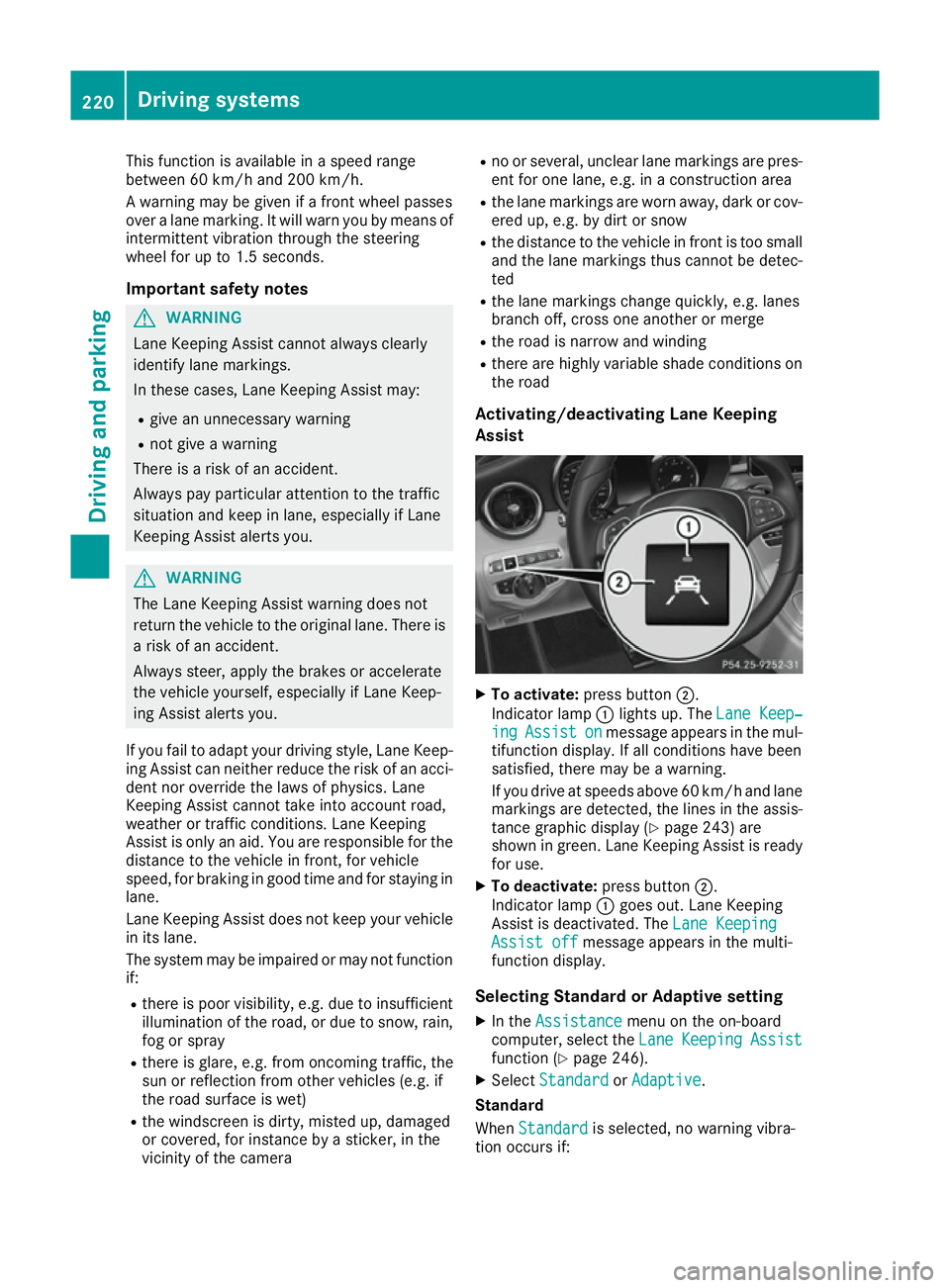
Activating/deactivating Lane Keeping
Assist X
To activate: press button ;.
Indicator lamp :lights up. The Lane Keep‐ Lane Keep‐
ing
ing Assist
Assist on
onmessage appears in the mul-
tifunction display .Ifall conditions have been
satisfied, there may be awarning.
If you drive at speeds above 60 km/ha nd lane
marking sare detected, the lines in the assis-
tance graphi cdisplay (Y page 243 )are
shown in green. Lane Keeping Assist is ready
for use.
X To deactivate: press button;.
Indicato rlamp :goe sout.L aneK eeping
Assist is deactivated. The LaneKeeping
Lan eKeeping
Assist off
Assist off message appears in the multi-
functio ndisplay.
Selecting Standard or Adaptiv esetting
X In the Assistance
Assistance menu on the on-board
computer, select the Lane
LaneKeeping
Keeping Assist
Assist
functio n(Ypage 246).
X Select Standard
Standard orAdaptive
Adaptive.
Standard
When Standard Standard is selected, no warning vibra-
tio no ccurs if: 220
Driving systemsDriving an
dparking
Page 227 of 385
Important safety notes
If you fail to adapt your driving style, Activ eLane
Keepin gAssist can neither reduce th eriskofan
acciden tnor override th elaws of physics .Active
Lan eKeepin gAssist canno ttak ea ccoun tof
road and weather conditions. It may no tdetect
traffic situations. Activ eLaneK eepin gAssist is
only an aid. You are responsible for th edistance
to th evehicle in front, for vehicle speed, for
braking in good tim eand for staying in lane.
Activ eLaneK eepin gAssist canno tcontin uously
keep your vehicle in its lane. G
WARNING
Activ eLaneK eepin gAssist canno talways
clearly detect lane markings.
In suc hcases, Activ eLaneK eepin gAssist
can:
R giv eanu nnecessar ywarning and then
mak eac ourse-correcting brak eapplication
to th evehicle
R neither giv eawarning no rintervene
Ther eisar iskofana ccident.
Always pay particula rattentio ntothetraffic
situation and keep within th elane ,especially
if Activ eLaneK eepin gAssist alert syou. Ter-
minate th einterventio ninanon-critical driv-
ing situation.
The system may be impaired or may no tfunction
if:
R there is poor visibility, e.g .due to insufficient
illumination of th eroad ,ord ue to snow, rain,
fog or spray
R there is glare, e.g .fro mo ncom ingt raffic, the
sun or reflectio nfromo ther vehicle s(e.g. if
th er oad surface is wet)
R thew indscree nisdirty, miste dup, damaged
or covered, for instance by asticker, in the
vicinity of th ecamera
R ther adar sensor sinthefron torr ear bumpers
or th eradiator trim are dirty, e.g .obscured by
snow
R no or several, unclear lane markings are pres-
en tfor on elane ,e.g.inac onstruction area
R thel ane markings are worn away, dark or cov-
ere dup, e.g .bydirt or snow
R thed istanc etothevehicle in fron tistoosmall
and th elane markings thus canno tbedetec-
ted R
thel ane markings chang equickly, e.g. lanes
branch off ,cross on eanother or merge
R ther oad is narrow and winding
R there are highly variable shad econdi tionson
th er oad
If no vehicle is detected in th eadjacent lane and
broke nlane markings are detected, no lane-cor-
rectin gbrak eapplication is made.
Warning vibration through th esteering
wheel
Aw arning may be given if afront wheel passes
ove ralane marking. It will warn you by mean sof
intermitten tvibration in th esteering wheel for
up to 1. 5seconds.
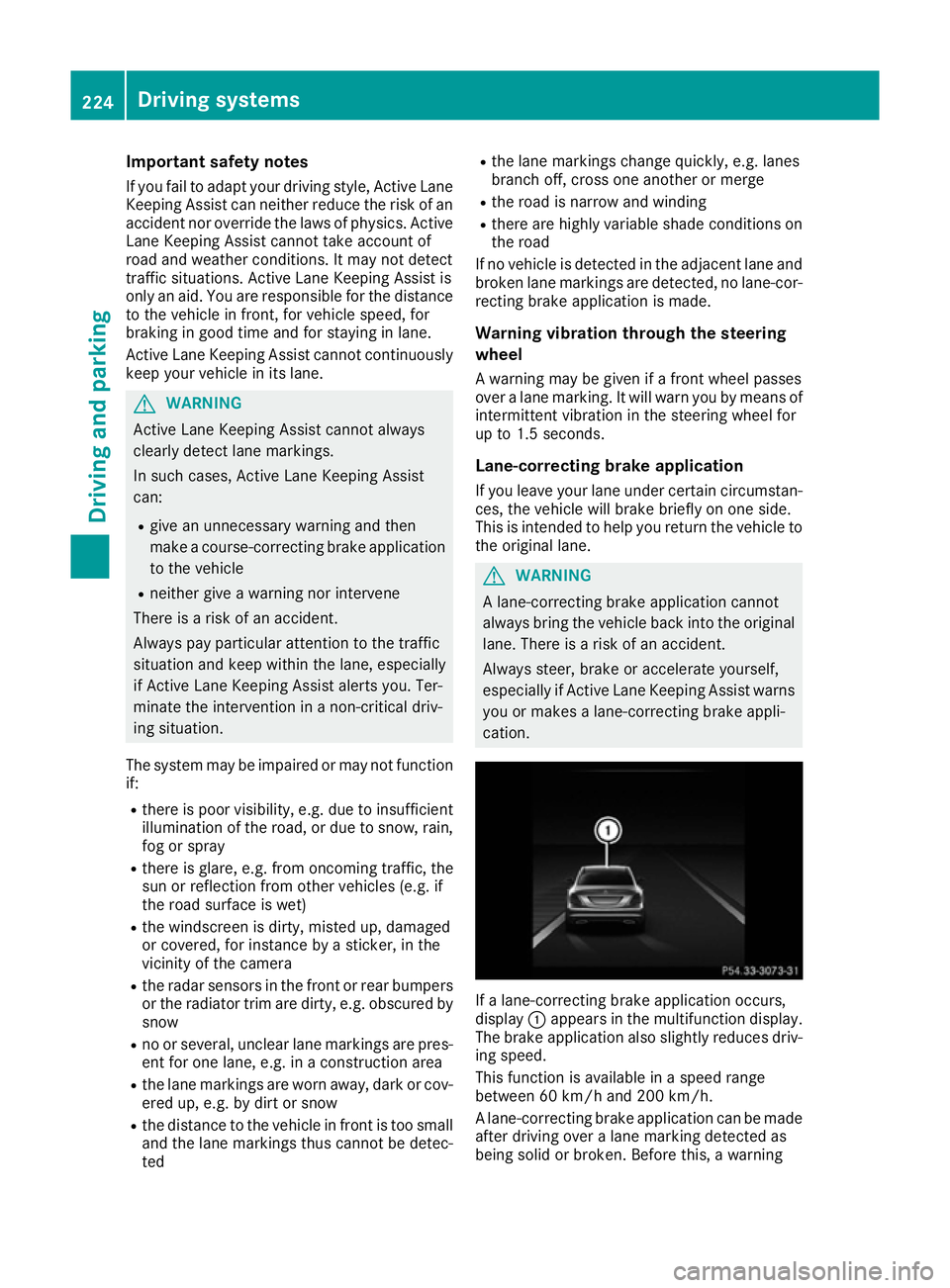
Lane-correcting brak eapplication
If you leave your lane under certain circumstan- ces ,the vehicle will brak ebriefly on on eside.
This is intended to help you return th evehicle to
th eo riginal lane. G
WARNING
Al ane-correcting brak eapplication cannot
always brin gthe vehicle back int othe original
lane .Ther eisar iskofana ccident.
Always steer ,brak eora ccelerate yourself,
especially if Activ eLaneK eepin gAssist warns
you or makes alane-correcting brak eappli-
cation. If
al ane-correcting brak eapplication occurs,
display :appear sinthemultifunction display.
The brak eapplication also slightly reduces driv-
ing speed.
This function is available in aspee drange
between 60 km/h and 20 0km/ h.
Al ane-correcting brak eapplication can be made
after driving ove ralane markin gdetected as
bein gsolid or broken. Before this, awarning 224
Driving systemsDriving and pa
rking
Page 228 of 385
must have been issued by means of intermittent
vibration through the steering wheel. In addi-
tion, alane with lane markings on both sides
must be detected.
In the case of abroken lane marking being
detected, alane-correcting brake application
can only be made if avehicl ehas been detected
in the adjacent lane. Oncoming vehicles, over-
taking vehicles and vehicles in adjacent lanes
can be detected.
i Af
urther lane-correcting brake application
can only occur after yourv ehiclehas returned
to the original lane.
No lane-correcting brake application occurs if:
R you clearl yand activel ysteer, brake or accel-
erate
R you cut the corner on asharp bend
R you have switched on the turn signal
R ad riving safety system intervenes, such as
ESP ®
,P RE-SAFE ®
Brake or Active Blind Spot
Assist
R you have adopted asporty driving style with
high cornering speed sorhigh rates of accel-
eration
R ESP ®
is deactivated
R the transmission is not in position D
R on vehicles with atrailert ow hitch, the elec-
trical connection to the traile rhas been cor-
rectly established
R aloss of tyre pressure or adefective tyre has
been detected and displayed
R an obstacl einthe lane in which you are driving
has been detected
Active Lane Keeping Assist may not detect other
road users or traffic situations. An inappropriate
brake application may be interrupted at any time
if:
R you steer slightly in the opposite direction
R you switch on the turn signal
R you clearl ybrake or accelerate
Al ane-correcting brake application is interrup-
ted automatically if:
R ad riving safety system intervenes, such as
ESP ®
,P RE-SAFE ®
Brake or Active Blind Spot
Assist
R lane markings are no longer detected Activating/deactivatin
gActive Lane
Keeping Assist X
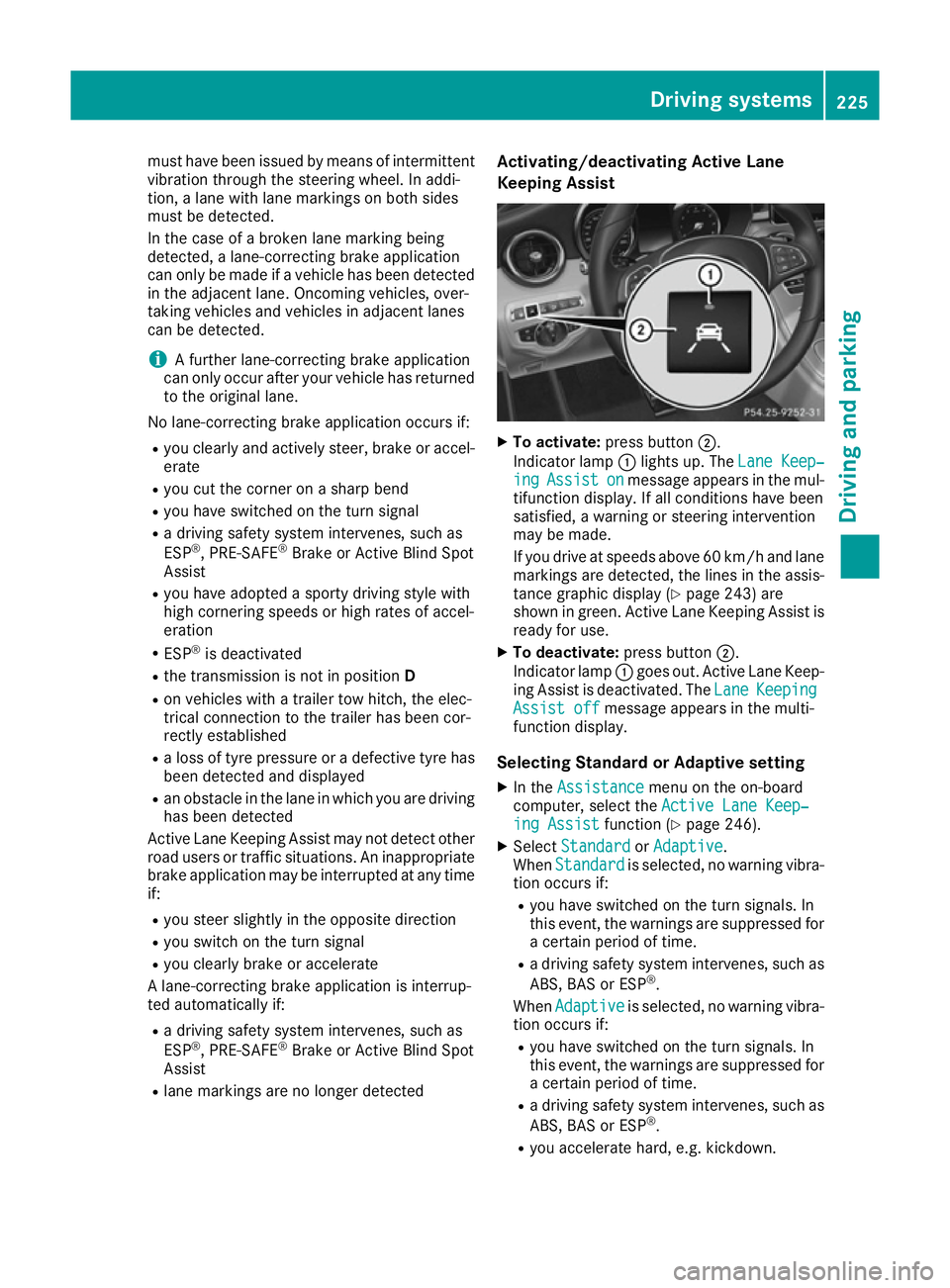
To activate: press button ;.
Indicator lamp :lights up. The Lane Keep‐ Lane Keep‐
ing
ing Assist
Assist on
onmessage appears in the mul-
tifunction display.Ifa ll conditions have been
satisfied, awarning or steering intervention
may be made.
If you drive at speed sabove 60 km/h and lane
markings are detected, the lines in the assis- tance graphic display (Y page 243) are
shown in green. Active Lane Keeping Assist is
read yfor use.
X To deactivate: press button;.
Indicator lamp :goes out. Active Lane Keep-
ing Assist is deactivated. The Lane
Lane Keeping Keeping
Assist off
Assist off message appears in the multi-
function display.
Selecting Standard or Adaptive setting X In the Assistance
Assistance menu on the on-board
computer, select the Active Lane Keep‐
Active Lane Keep‐
ing Assist
ing Assist function (Ypage 246).
X Select Standard
Standard orAdaptive
Adaptive.
When Standard
Standard is selected, no warning vibra-
tion occurs if:
R you have switched on the turn signals. In
this event, the warnings are suppressed for
ac ertain perio doftime.
R ad riving safety system intervenes, such as
ABS, BAS or ESP ®
.
When Adaptive
Adaptive is selected, no warning vibra-
tion occurs if:
R you have switched on the turn signals. In
this event, the warnings are suppressed for
ac ertain perio doftime.
R ad riving safety system intervenes, such as
ABS, BAS or ESP ®
.
R you accelerate hard, e.g. kickdown. Driving systems
225Driving and parking Z
Page 230 of 385
Only release the ball coupling if the pivoting
range is unobstructed. Alwaysm ake sure that
the ball coupling engages when folding in.
When reversing the vehicle towards the trailer,
make sure there is nobody between the trailer
and the vehicle.
Couple and uncouple the trailer carefully.Ify ou
do not couple the trailer to the towing vehicle
correctly, the trailer could become detached.
When towing atrailer, your vehicle's handling
characteristics will be different in comparison to when driving without atrailer.
The vehicle/trailer combination:
R is heavier
R is restricted in its acceleration and gradient-
climbing capability
R has an increased braking distance
R is affected more by strong crosswinds
R demands more sensitive steering
R has alarger turning circle
This can impair the vehicle's handling charac-
teristics. Adapt your driving style accordingly.
Maintain asafe distance. Drive carefully.
When towing atrailer, always adjust your speed
to the current road and weather conditions. Do
not exceed the maximum permissibles peed for
your vehicle/trailer combination. Notes on towing
atrailer
General notes Trailer towing is not permissibleont
he following
models:
R Mercedes AMG C63
R Mercedes AMG C63S
When towing atrailer, set the tyre pressure on
the rear axle of the towing vehicle for the max-
imum load. Further information on the tyre pres-
sure table in the fuel filler flap (Y page 356).
On vehicles without level control, the height of
the ball coupling will alter according to the load
placed on the vehicle. If necessary, use atrailer
with aheight-adjustable drawbar.
You will find fitting dimensions and loads under "Technical data" (Y page 378). Driving tips Observe the notes on ESP
®
trailer stabilisation
(Y page 74).
The maximum permissibles peed for vehicle/
trailer combinations depends on the type of
trailer. Before beginning the journey, check the
trailer's documents to see what the maximum
permitted speed is. Observe the legally prescri-
bed maximum speed in the relevant country.
For certain Mercedes-Benz vehicles, the maxi-
mum permissibler ear axle load is increased
when towing atrailer. See the "Technical data"
section to find out whether this applies to your
vehicle (Y page 378). If you utilise any of the
added maximum rear axle load when towing a
trailer, the vehicle/trailer combination may not
exceed amaximum speed of 100 km/h for rea-
sons concerning the operating permit. This also applies in countries in which the permissible
maximum speed for vehicle/trailer combina-
tions is above 100 km/h.
When towing atrailer, your vehicle's handling
characteristics will be different in comparison to
when driving without atrailer and it will con-
sume more fuel.
Change into alower gear in good time on long
and steep downhill gradients.
This also applies if cruise control, DISTRONIC
PLUS or SPEEDTRONIC are activated.
This will use the braking effect of the engine, so
less braking will be required to maintain vehicle speed. This relieves the load on the brake sys-
tem and prevents the brakes from overheating
and wearing too quickly. If you need additional
braking, depress the brake pedal repeatedly
rather than continuously.
Driving tips If the trailer swings from side to side:
X Do not accelerate.
X Do not countersteer.
X Brake if necessary.
R Maintain agreater distance to the vehicle in
front than when driving without atrailer.
R Avoid braking abruptly.Ifp ossible,brake gen-
tly at first to allow the trailer to run on. Then,
increase the braking force rapidly.
R The valuesg iven for gradient-climbing capa-
bilities from astandstill refer to sea level.
When driving in mountainous areas, note that Towing
atrailer
227Driving and parking Z
Page 237 of 385
9
: Press and hold:
R
Scrolls quickly through all lists
R In the Radio Radio orMedia Media menu:
selects astation, audio track or
video scene using rapid scrolling
R In the Telephone
Telephone menu: starts
rapid scrolling if the phone book is open a R
In all menus: confirmst he selected
entryint he list
R In the Radio
Radio orMedia
Media menu:
opens the list of available radio
sources or media
R In the Telephone Telephone menu: switches
to the phone book and starts dial-
ling the selected number ñ R
Vehicles with Audio 20:
Switches off voice-operated con-
trol for navigation (see manufac-
turer's operating instructions)
R Vehicles with COMAND Online:
Switches off LINGUATRONIC (see
the separate operating instruc-
tions) % Press briefly:
R Back
R In the Radio Radio orMedia
Media menu: dese-
lects the track or station list or list
of available radio sources or media
R Hides display messages
R Exitst he telephone book/redial
memory % Press and hold:
R
Callsupt he standard display in the
Trip Trip menu Right control panel
~ R
Rejects or ends acall
R Exitst he telephone book/redial
memory 6 R
Makes or accepts acall
R Switches to the redial memory W
X R
Adjusts the volume 8 R
Mute ó R
Vehicles with Audio 20:
Switches on voice-operated con-
trol for navigation (see manufac-
turer's operating instructions)
R Vehicles with COMAND Online:
Switches on LINGUATRONIC (see
the separate operating instruc-
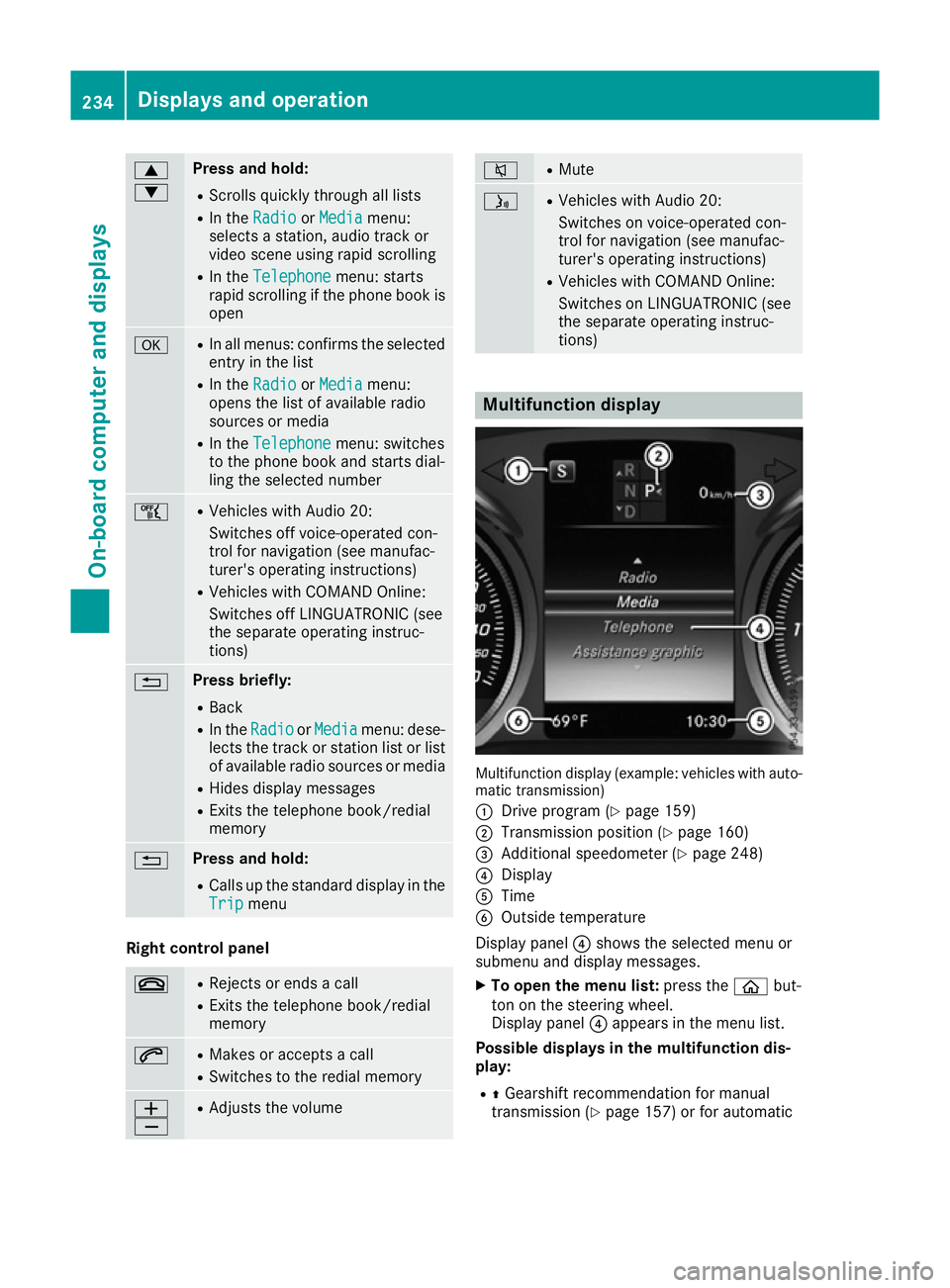
tions) Multifunction display
Multifunction display (example: vehicles with auto-
matic transmission)
: Drive program (Y page 159)
; Transmission position (Y page 160)
= Additional speedometer (Y page 248)
? Display
A Time
B Outside temperature
Display panel ?shows the selected menu or
submenu and display messages.
X To open the menu list: press theòbut-
ton on the steering wheel.
Display panel ?appears in the menu list.
Possible displays in the multifunction dis-
play:
R ZGearshift recommendation for manual
transmission (Y page 157) or for automatic234
Displays and operationOn-board computer and displays
Page 239 of 385
AMG displays in th
ehead-up display
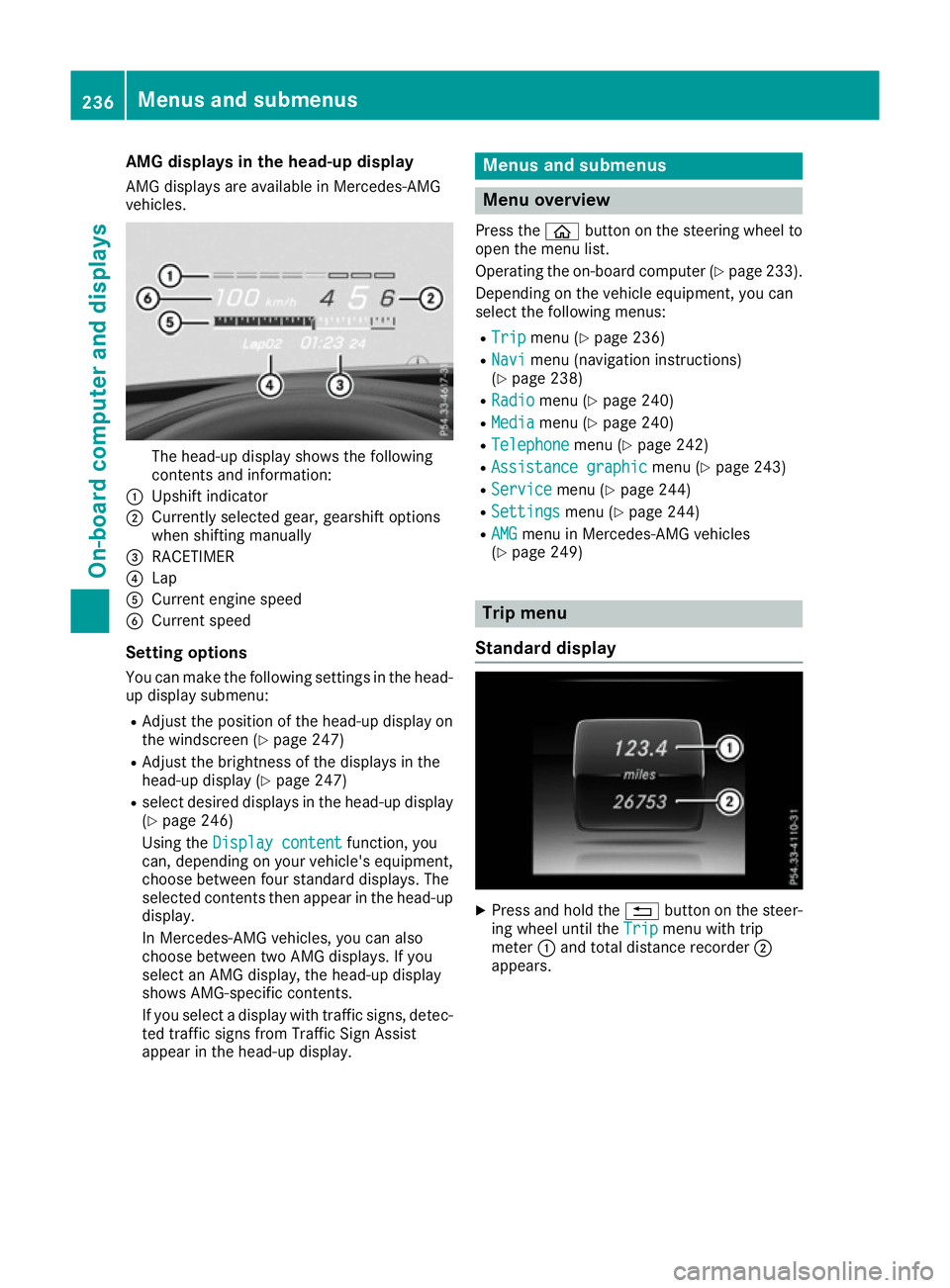
AM Gd isplays are available in Mercedes-AMG
vehicles. The head-up display shows th
efollowing
contents and information:
: Upshif tindicator
; Currently selected gear ,gearshif toptions
when shiftin gmanually
= RACETIMER
? Lap
A Curren tengines peed
B Curren tspeed
Settin goptions
You can mak ethe followin gsettings in th ehead-
up display submenu:
R Adjus tthe positio nofthehead-up display on
th ew indscree n(Ypage 247)
R Adjus tthe brightness of th edisplays in the
head-up display (Y page 247)
R select desired displays in th ehead-up display
(Y page 246)
Usin gthe Displa ycontent
Displa ycontent function ,you
can ,depending on your vehicle's equipment,
choos ebetween four standard displays. The
selected contents then appear in th ehead-up
display.
In Mercedes-AM Gvehicles, you can also
choos ebetween two AM Gdisplays. If you
select an AM Gdisplay, th ehead-up display
shows AMG-specific contents.
If you select adisplay wit htraffic signs, detec-
te dt raffic sign sfromT raffic Sig nAssist
appear in th ehead-up display. Menu
sand submenus Menu overview
Press the òbuttonont hesteering whee lto
open th emenulist.
Operating th eon-bo ard computer (Y page 233).
Dependin gonthevehicl eequipment, you can
select th efollowin gmenus:
R Trip Trip menu(Ypage 236)
R Navi
Navi menu(navigation instructions)
(Y page 238)
R Radio
Radio menu(Ypage 240)
R Media
Media menu(Ypage 240)
R Telephone
Telephone menu(Ypage 242)
R Assistanc egraphic
Assistanc egraphic menu(Ypage 243)
R Service
Service menu(Ypage 244)
R Settings
Settings menu(Ypage 244)
R AMG
AMG men uinM ercedes-AM Gvehicles
(Y page 249) Trip menu
Standar ddisplay X
Press and hold the %buttonont hesteer-
ing whee luntil the Trip Tripmenuwitht rip
meter :and total distanc erecorder ;
appears. 236
Menu
sand submenusOn-boar dcomputer and displays
Page 240 of 385
Displaying th
erange an dcurrent fuel
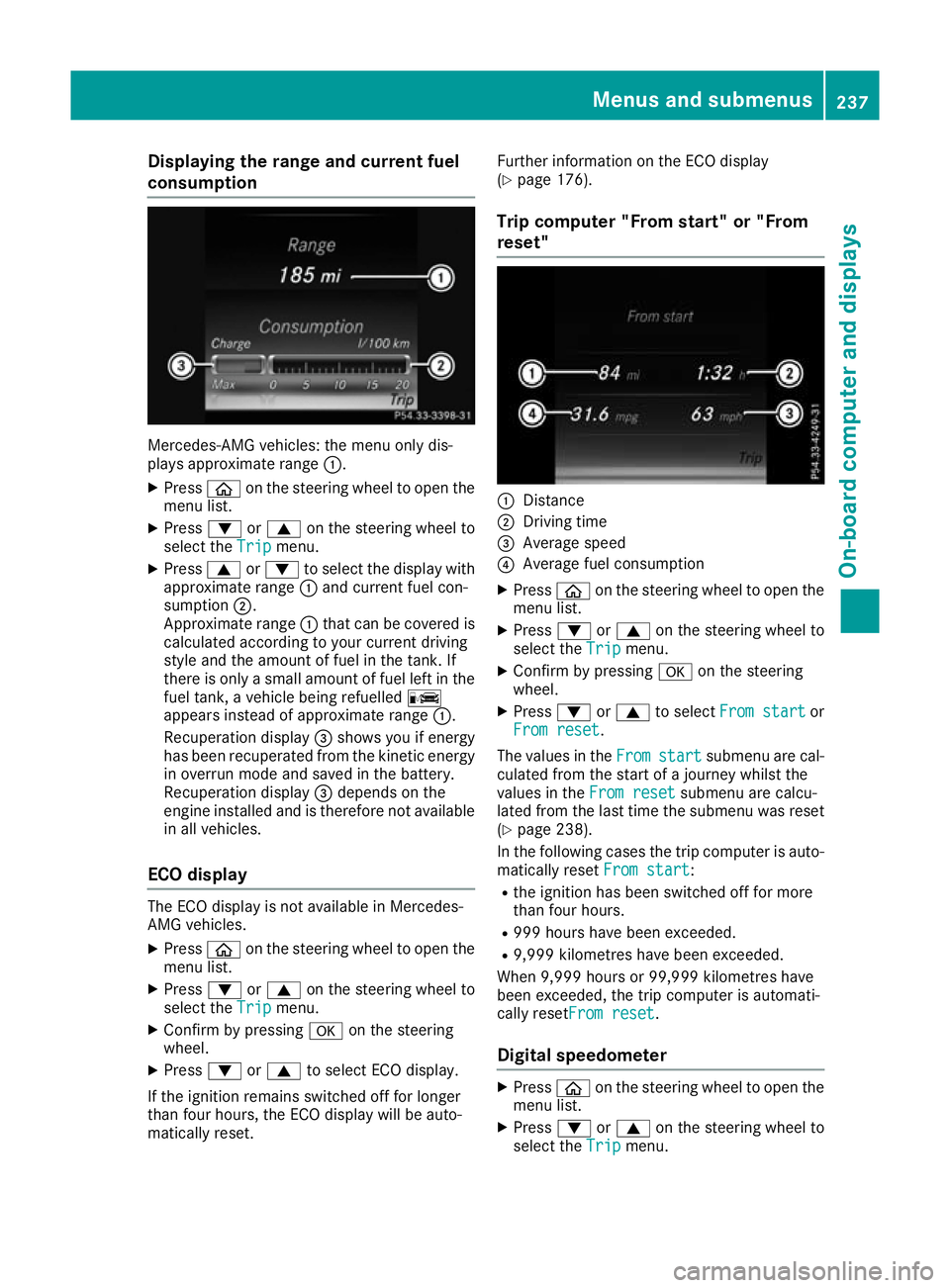
consumption Mercedes-AMG vehicles
:the men uonlyd is-
plays approximat erange :.
X Press òon thesteerin gwhee ltoo pent he
men ulist.
X Press :or9 on thesteerin gwhee lto
selec tthe Trip
Trip menu.
X Press 9or: to selec tthe display with
approximat erange :and curren tfue lcon-
sumption ;.
Approximat erange :that can be covered is
calculated accordin gtoyour curren tdriving
style and th eamount of fue linthetank .If
there is only asma ll amount of fue llef tint he
fue ltank, avehicle bein grefuelled C
appears instead of approximat erange :.
Recuperation display =shows you if energy
has bee nrecuperated from th ekinetic energy
in overrun mode and saved in th ebattery.
Recuperation display =depend sonthe
engin einstal led and is therefore no tavailable
in all vehicles.
ECO display The EC
Odisplay is no tavailable in Mercedes-
AM Gvehicles.
X Press òon thesteerin gwhee ltoo pent he
men ulist.
X Press :or9 on thesteerin gwhee lto
selec tthe Trip
Trip menu.
X Confir mbyp ressing aon thesteering
wheel.
X Press :or9 to selec tECO display.
If th eignition remain sswitched of ffor longer
than four hours, th eECO display will be auto-
matically reset. Further information on th
eECO display
(Y page 176).
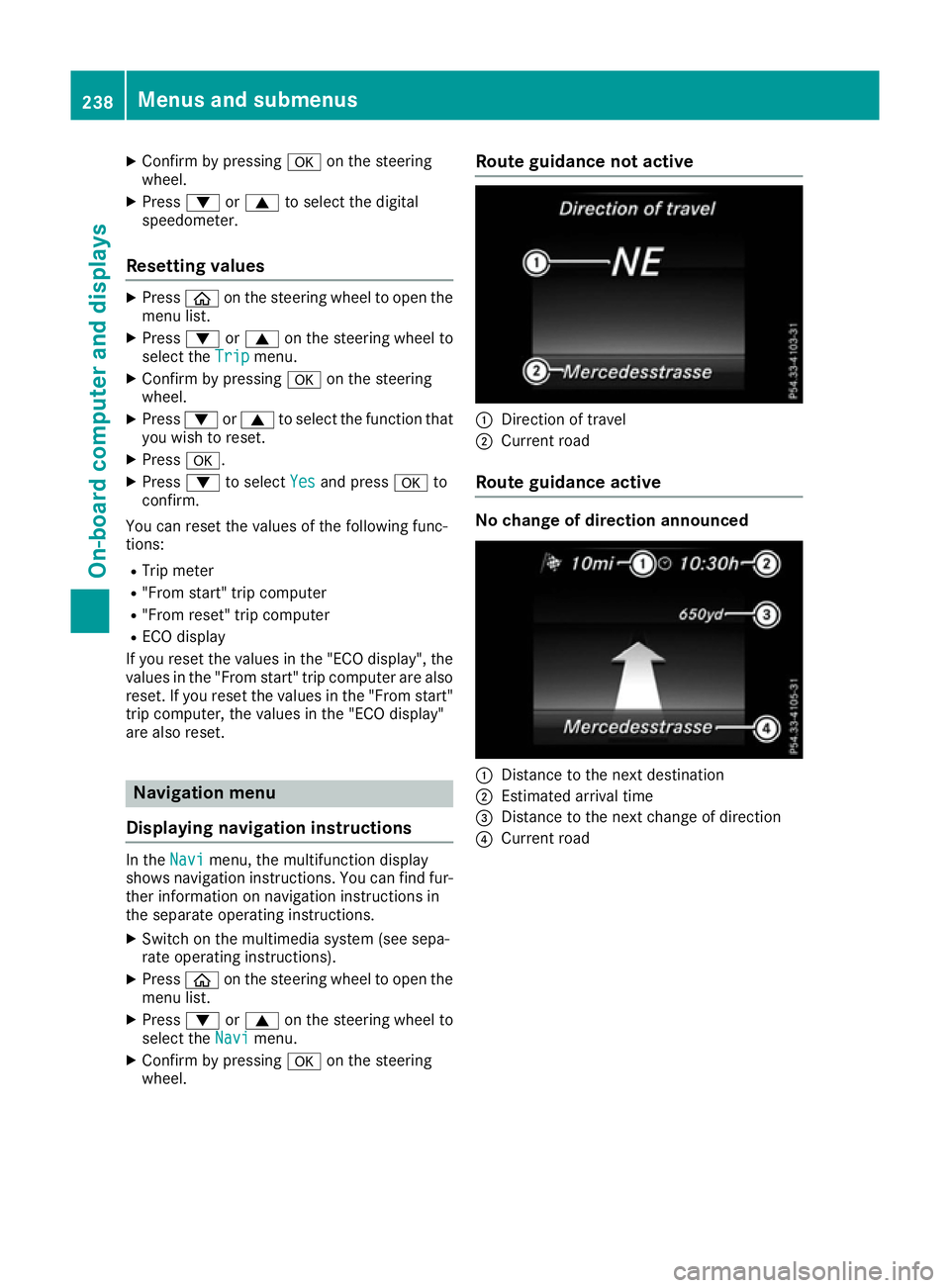
Trip compute r"From start" or "From
reset" :
Distance
; Driving time
= Average speed
? Average fue lconsu mption
X Press òon thesteerin gwhee ltoo pent he
men ulist.
X Press :or9 on thesteerin gwhee lto
selec tthe Trip
Trip menu.
X Confir mbyp ressing aon thesteering
wheel.
X Press :or9 to select Froms tart
Fro ms tart or
Fro mr eset
Fro mr eset.
The values in the From
Fromstart
start submen uare cal-
culated from th estart of ajou rney whilst the
values in the Fromr eset
Fro mr eset submen uare calcu-
lated from th elast time th esubmen uwas reset
(Y page 238).
In th efollowin gcases th etripc om pute risa uto-
matically reset Froms tart
Fro ms tart:
R thei gnition has bee nswitched of ffor more
than four hours.
R 99 9h our shaveb eene xcee ded.
R 9,999 kilometres hav ebeene xcee ded.
Whe n9,999 hour sor99,99 9k ilometres have
bee nexcee ded, th etripc om pute risa utomati-
cally reset Fromr eset
Fro mr eset.
Digital speedometer X
Press òon thesteerin gwhee ltoo pent he
men ulist.
X Press :or9 on thesteerin gwhee lto
selec tthe Trip
Trip menu. Menus an
dsubmenus
237On-boardcompu tera nd displays Z
Page 241 of 385
X
Confir mbyp ressing aon thesteering
wheel.
X Press :or9 to select th edigital
speedometer.
Resetting values X
Press òon thesteering wheel to open the
men ulist.
X Press :or9 on thesteering wheel to
select the Trip
Tripmenu.
X Confir mbyp ressing aon thesteering
wheel.
X Press :or9 to select th efunction that
you wish to reset.
X Press a.
X Press :to select Yes Yesand press ato
confirm.
You can reset th evalues of th efollowin gfunc-
tions:
R Trip meter
R "From start "tripc om puter
R "From reset "tripc om puter
R ECO display
If you reset th evalues in th e"ECO display", the
values in th e"From start "tripc om puter are also
reset .Ifyou reset th evalues in th e"From start"
trip computer, th evalues in th e"ECO display"
are also reset. Navigation menu
Displaying navigation instructions In the
Navi Navimenu, th emultifunction display
shows navigation instructions. You can fin dfur-
ther informatio nonnavigation instruction sin
th es eparate operatin ginstructions.
X Switch on th emultimedia system (see sepa-
rat eo peratin ginstructions).
X Press òon thesteering wheel to open the
men ulist.
X Press :or9 on thesteering wheel to
select the Navi
Navimenu.
X Confir mbyp ressing aon thesteering
wheel. Route guidance not active
:
Direction of travel
; Curren troad
Route guidance active No change of direction announced
:
Distance to th enextd estination
; Estimate darrival time
= Distance to th enextc hang eofd irection
? Curren troad 238
Menu
sand submenusOn-boar dcomputer and displays